


Google announces the second class of Launchpad Accelerator startups
Google has announced the companies that will be a part of the second class of startups in its Launchpad Accelerator program. The 24 startups are based out of Brazil, India, Indonesia, and Mexico, and as part of the program each company will receive mentorship and resources to help successfully scale the mobile apps that they’re working on.

From the Google Developer blog:
Class 2 kicks off June 13. The startups will descend on Google HQ for an intensive 2 week bootcamp. Under the tutelage of Google product teams and mentors from the global Launchpad network, they will receive intensive, targeted mentoring, equity-free funding, and more benefits during the 6-month program.
These are the companies included in the second Launchpad Accelerator class:
- BankFacil
- Emprego Ligado
- AppProva
- GetNinjas
- Edools
- Love Mondays
- HijUp
- Talenta
- Jarvis Store
- Ruangguru
- IDNtimes
- Codapay
- Taskbob
- Programming Hub
- ShareChat
- RedCarpet
- PlaySimple Games
- MagicPin
- Aliada
- SaferTaxi
- Conekta
- Konfio
- Kichink
- Miroculus
The Launchpad Accelerator program, unlike other accelerators, is focused on providing mentoring to startups in developing countries, giving them the skills and seed funding necessary to finish building out their apps.
AT&T HTC One M8 and One M9 Marshmallow updates will begin rolling out on May 12

AT&T is finally going to begin pushing Marshmallow to both the HTC One M8 and HTC One M9 on May 12. This comes after some long delays in getting the update finalized, but either way it is great to see it will be hitting phones shortly. Mo Versi, the VP of Product Management at HTC, made the announcement on Twitter.
HTC One (M8 & M9) AT&T owners! Thank you for your patience. Marshmallow OS is approved, OTA to start tomorrow!!
— Mo Versi (@moversi) May 11, 2016
If you own either of these phones on AT&T, be sure to keep an eye out tomorrow for the update. Odds are it won’t hit every single phone tomorrow, so you may need to wait an extra day or two before you see the update on your phone. Be sure to let us know once you start receiving the notifications to update!
HTC One M9 Central
HTC One M9 Essentials
- Beginner’s guide to the M9
- Read our full review
- HTC One M9 specs
- HTC One series specs
- Get the latest M9 News
- Join the M9 discussion
- Shop for accessories
AT&T
HTC
Sprint
Verizon
YouTube’s new messaging feature will make sharing videos a breeze

The process of sharing your favorite YouTube with friends will soon take place entirely inside of the YouTube app. That’s thanks to a new messaging feature the video giant is currently testing, through which users can share videos and chat about them without ever leaving the YouTube app.
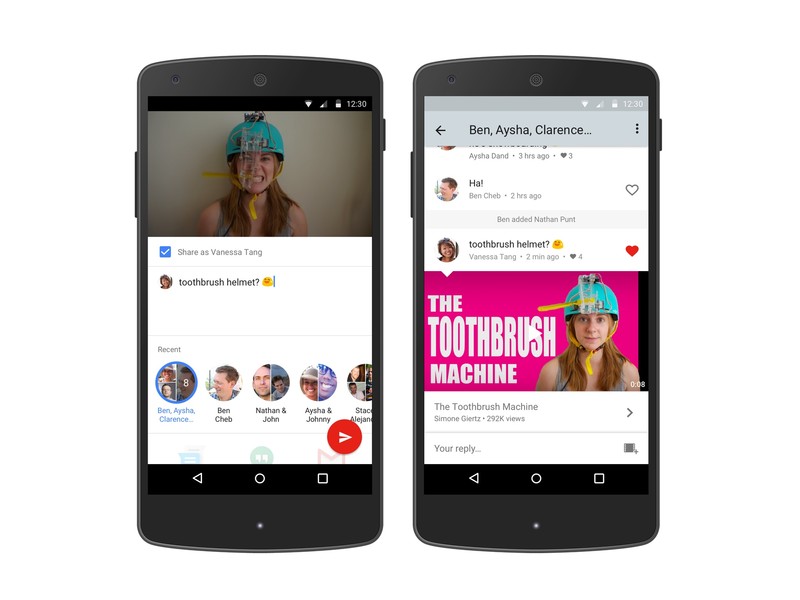
From Wired:
Starting today, so-called native sharing will go live for a small percentage of YouTube users. They can then spread the feature to their friends by inviting them into conversation threads. Friends can chat about the shared video right inside YouTube’s mobile app. They can also reply with another video. The message threads reside within a new tab on YouTube’s mobile app so groups can dip in and out of conversations and catch up on what they missed or add new videos of their own.
While messaging may seem like an odd fit at first, it makes a lot of sense for YouTube. Dedicated chat threads within YouTube will eliminate the need to fiddle with copying links over to other apps. And, of course, there’s also the added benefit that users will spend much more time inside of the YouTube app itself.
The HTC 10 monthly security patch isn’t missing — it’s just hidden
Here’s how to find out whether your HTC 10 has the most up-to-date security patch.
One of the more welcome features of Android 6.0 Marshmallow was the transparency of the new monthly security patches. Starting with the Nexus 5X and Nexus 6P and rolling out with updates to other phones, the “About” section in the settings menu tells the date of the most recently received security patch. It’s sort of a badge of honor, really — and an important piece of transparency in the fight to keep our smartphones safe and secure.
HTC has been one of the better manufacturers when it comes to keeping its phones updated — especially when it comes to its carrier-free models. Computerworld’s JR Raphael ranked HTC No. 2 (behind Google) in his latest “Android update report card,” and while it focuses on major platform updates and not monthly security updates, the point stands — HTC has done pretty when when it comes to keeping current software on its phones.
That’s why it’s troubling, then, that HTC is hiding the monthly security patch level on the HTC 10. Especially when it’s so easy to glean. Here’s how you can do it.

When your phone shows the date of its most recent security patch in the settings menu, it’s pulling that data from the “build.prop.” It’s a file full of little text strings that tell the phone about itself. Model name, software versions, things like that. And in there is where you’ll find the security patch information.
 If you know how to pull files off a phone using a command line, it’s easy. Just pull build.prop and open it in a text editor. My HTC 10 was just updated, and it’s on the May security patch. So the line in the build.prop shows:
ro.build.version.security_patch=2016-05-01
If you don’t want to do that sort of spelunking, a simple system info app can track it down for you. It does the same thing — reads the build.prop — but puts it into something a little easier on the eyes. There are myriad system info apps out there. We’ve been using AIDA64 lately, and it clearly shows the security patch from May 1, 2016.
Why did HTC choose to not display the date of the most recent system patch? It doesn’t really matter. The data is there — you just need to know where to look. And that almost makes it worse. Transparency is important when it comes to this sort of thing. Google’s doing an excellent job of keeping us informed, every month, about what’s being fixed. Other manufacturers are doing the right thing and letting us know how recently they patched their phones.
HTC half-heartedly hiding that information is unnecessary and disappointing.
HTC 10
- HTC 10 review
- HTC 10 specs
- These are the HTC 10 colors
- Our first photo and video samples
- Meet the Ice View case
- Join our HTC 10 forums
HTC
Verizon
Best heavy duty cases for the Galaxy S7

Treat your phone a little less than kind? Get a heavy duty case!
Let’s face it, sometimes keeping your phone protected is the most important thing. After all, you carry it around everywhere so it’s bound to be put into some dangerous situations. If you are prone to dropping your phone on the ground, down the stairs, or even in the water, you may want to think about a heavy duty case.
Heavy duty cases are not typically meant as fashion statements. Their big, bulky, and sturdy design is made for one purpose and one purpose only. Keeping your phone as safe as possible.
- i-Blason Armorbox
- Obliq Naked Shield Series
- Otterbox Defender series
- Spigen slim armor
- Supcase Beetle Pro series
i-Blason Armorbox

This two-piece case will do its part to keep your phone as safe as possible.
The frame the phone sits in is made of hard polycarbonate — to protect it from scratches and bumps — and flexible TPU plastic which will protect your phone in case it falls on the ground. Plus, the headphone jack and charging port have plastic flaps that cover them up to prevent dust from getting in when they are not in use.
The great thing about the Armorbox is it has a separate screen protector that you can either use or not. It’s easy to take on or off whenever you want so you can use the screen protector only when you think you will need it.
See at Amazon
Obliq Naked Shield Series

While clear cases aren’t usually the first to come to mind when you think heavy duty, this offering from Obliq certainly changes that perception.
A crystal clear see-through one-piece shell — with both the shock absorbing power of TPU and the durability of hard polycarbonate — fits snugly on your phone without impeding any of the phone’s functionality. The edges of the case raise above the screen to offer protection when your phone is lying on a flat surface.
An added bonus of this case is the metal kickstand. Watching videos on landscape mode has never been so easy since the kickstand gives you the ability to still use both your hands.
If you want something that protects your phone really well and shows off the craftsmanship of the Galaxy S7, this could be a great case for you.
See at Amazon
Otterbox Defender series

Otterbox is known for making some of the most rugged cases around and their Defender series is the toughest of the bunch.
The Defender series is made up of four layers to offer your S7 the most protection: It has a screen protector to prevent your screen from being scratched up, a foam buffer to ensure your screen protector isn’t rubbing against the screen, an inner shell that protects the rest of the phone from damage, and a hard outer slipcover that seals up the ports to prevent dust and particulates from getting in. Plus, Otterbox puts all of their cases through rigorous testing, such as drop tests and tumble tests, to ensure their product is as rugged as possible.
Due to its design, expect the Defender series case to add a significant amount of weight and bulk to your S7.
See at Amazon
Spigen slim armor

Spigen’s slim armor case may not have a part that covers the front of the screen, but with the edges of the case protruding at least 2mm it doesn’t really need it. On top of that, the camera also has lots of protection from table scratches by the high edges of the case as well.
Spigen’s slim armor is drop-tested military grade. Now we know that sounds like some random label that a company would stick on it’s packaging just to sell phones, but in this case it actually means a lot. It literally means that it was tested by a third party and is approved for use in the military. This is the kind of case Rambo would have had if he had a cell phone.
The added feature of a metal kickstand is just icing on top of this delicious heavy duty cake.
See at Amazon
Supcase Unicorn Beetle

Supcase sounds like two frat boys started a phone case company, but we promise it’s no joke of a product.
The Beetle Pro series has everything you need in a heavy duty case. A hard, polycarbonate shell protects all sides and edges of the phone. There is a screen protector built into the case and dust covers protect your charging port and headphone jack.
The one difference from the other cases we have featured in this roundup is the removable clip that attaches to the back of the phone. Now wearing your phone on your waist isn’t everyone’s cup of tea; however, if you need to have easy access to your phone it’s a super useful feature.
It comes in a few different colors but, if you get the blue one, you can say you have the power of Blue Beetle so why get any other color?
See at Amazon
The end of the road
Heavy duty cases are a great way to protect your phone. Their thickness, weight, and sturdiness make them super secure in your hand and make you worry much less when you have those little accidents. If you think a heavy duty case is way over kill and want some different options don’t forget to check out our round up of the best clear cases for the Galaxy S7
Samsung Galaxy S7 and S7 edge
- Galaxy S7 review
- Galaxy S7 edge review
- Here are all four Galaxy S7 colors
- Should you upgrade to the Galaxy S7?
- Learn about the Galaxy S7’s SD card slot
- Join our Galaxy S7 forums
AT&T
Sprint
T-Mobile
Verizon
Verizon will let you try out the LG 360 CAM with an in-store demo
If you’re interested in the many possibilities opened up by 360-degree photography with the LG 360 CAM, but want to try it out in person before dropping a load of cash, Verizon has your back. The carrier has announced that customers can now head down to their nearest Verizon store to get a hands-on demonstration with LG’s nifty camera, which also just happens to be available to buy for a cool $200.

Of course, if you want to get a head start on things, you should also be sure to check out our review for an in-depth look at how the camera performs, along with some fantastic sample footage. On the other hand, if you’d rather skip all of that and just get your hands on one now, you can pick up the LG 360 CAM from Verizon’s online store at the link below.
See at Verizon
Amazon Echo can finally track your Amazon packages
Alexa, the digital assistant that powers the Amazon Echo, Dot and Tap, has finally gained the ability to track your Amazon orders. It’s been an odd omission considering the great many things that Alexa can already do, but it’s better late than never.

As reported by ReadWrite, you can now simply query Alexa with phrases like “where’s my package” or “where’s my stuff,” and the digital assistant will provide you with an update.
It’s important to note, however, that the skill is limited to orders directly from Amazon. Sadly, if you purchased something from a third-party seller, Alexa won’t offer up any details on its whereabouts.
Have you given the Alexa’s new skills a shot yet? If so, let us know what you think in the comments below!
Amazon Echo
- Read our updated review
- Get the latest news
- Join the discussion
- Download the Echo app
Amazon
An ode to the HTC 10’s SIM card tray

I love the SIM card tray on the HTC 10. Enough that I wrote a Haiku about it.
My SIM card is old
It falls out of most trays
Thank you HTC
A lot of words have been written about the way the HTC 10 is built and designed. Most of them are very positive words. It’s not the right phone for everyone, and there are some things I wish were different, but the SIM card tray is not one of those things.
I change phones a lot, and my poor T-Mobile SIM has seen better days. The corners are worn and it is just not the same size it was when I first got it. That happens when you take a tiny piece of plastic and push it in and out of metal things too often. I need to get a new one, but that means going to a T-Mobile store or calling them to get things switched over, and ain’t nobody got time for that. At least I ain’t got time for that.
Because the card is worn and misshapen, it hates to stay put in one of those SIM card trays that is only an oddly shaped little frame. I see your little cut off corner, trying to make me think that you will hold my card in place just the right way, then silently mocking my failure. Since most phones don’t have a back cover that comes off, those wonky little trays are the norm. Some of them are even plastic and get wiggly. When I put in my SIM, I need to get things just right, then try to defy gravity and slide the little tray in without the card falling through, or use a bit of tape on the back and pray it doesn’t come off and get stuck in the slot. Anything to not have to visit or call T-Mobile, because I’m stupid or lazy. Or both. The struggle is real.
This is one of those little things you don’t think about — until you have to.
That’s why when I first cracked open the HTC 10, I got all excited over the SIM card tray. Sure, my coworkers made fun of me and didn’t really expect me to care this much or (especially) to write about it, yet here we are. This isn’t the first time they have all ganged up on me with taunts and sneers, and it won’t be the last. It’s not my fault that they can’t appreciate the finer things in life.
The HTC 10’s SIM card tray is not a hollow metal frame — it has a real tray with a back and everything! All I had to do was put it in right side up and slide it home. I want to imagine that a design team spent hours and hours making sure the SIM tray was elegant and made from exotic materials by old world craftsmen. Since nobody from HTC claims they didn’t, that’s what I’m going with. As long as I don’t ask, I can live out my SIM card tray fantasy and nobody can take that away from me. In the words of the immortal bard, Can one desire too much of a good thing?

Anyway, someone had to mention the fine craftsmanship and fatherly love the HTC design team put into the SIM card tray. It lets me know that they pay attention to detail, unlike the iPhone and its horrid little backless SIM tray. If a company can’t pay attention to how the SIM tray is built, where else have they made bad decisions and used shortcuts? Should I trust them with my fingerprint or my credit card?
I think not.
HTC 10
- HTC 10 review
- HTC 10 specs
- These are the HTC 10 colors
- Our first photo and video samples
- Meet the Ice View case
- Join our HTC 10 forums
HTC
Verizon
Samsung Galaxy Note 6 may be due for a mid-August release in the U.S.
If you opted to skip the launch of the Samsung Galaxy S7 and S7 edge in favor of the next entry in the Note line, it sounds like you may get your chance in mid-August. That’s according to noted leaker Evan Blass, who says the Galaxy Note 6 is due for a U.S. release the week of August 15.

Samsung Galaxy Note 6 US release scheduled for week of August 15th.
— Evan Blass (@evleaks) May 11, 2016
Unfortunately, we haven’t yet seen any notable leaks concerning specs to expect from the Galaxy Note 6. As far as features are concerned, however, a recent rumor claims that we may see a BlackBerry Hub-like experience called Samsung Focus debut on the Galaxy Note 6. While there’s little else to go off of right now, rumors will likely start heating up as we edge closer to August.
Instagram doesn’t look the same anymore – see the new design now
Out with the old and in with the new.
Instagram and its sibling apps have received new app icons. The photo-sharing app’s brown, dated square now appears flat and colourful. And Hyperlapse, Boomberang, and Layout have been given similar-looking icons too, linking all four apps together. But there’s more: both the Instagram mobile app and web app are sporting new interface changes, including a white top bar and black buttons instead of blue ones.
In a blog post, the Instagram team said the new app icon represents “a simpler camera and the rainbow lives on in gradient form,” while the updated look reflects “how vibrant and diverse” users’ storytelling has become. The team also believes the new black-and-white design in Instagram is simpler and puts more focus on photos and videos without changing how users navigate.
Instagram is now 5 years old, and this icon redesign is the first it’s ever had since launch. The new colour scheme inside the app however is just the latest update in a series of interface tweaks in recent years. For instance, last summer, Instagram retooled Search and Explore, and it subtly adjusted the size and shape of photos as well as how they appear throughout the app.
Check out the video below to learn more about Instagram’s new look.

