


Samsung Galaxy Note 7 shown off in triad of colors in leaked renders
It wasn’t that long ago that we got our first peek at the rumored specs of the upcoming Samsung Galaxy Note 7, and now we’ve got a look at some leaked renders that show what is likely to be the plus-sized phone’s design. The renders were shown off by avid leaker Evan Blass on Twitter, and include the Note 7 in three colors: onyx, silver titanium, and blue coral.

As we previously reported, the Galaxy Note 7 is expected to pack a 5.7-inch QHD Super AMOLED display, 64GB of expandable (via microSD) storage, and a 12MP camera around back with a 5MP shooter up front. The handset will also pack an iris scanner as a secondary layer of security, according to Blass. It’s also expected to feature IP68 resistance to dust and water, much like its sibling, the Galaxy S7.
What do you think of the leaked renders? Be sure to let us know in the comments and on our forums!
Samsung Galaxy Note 7

- The latest Galaxy Note 7 rumors!
- Galaxy Note 7: Imagining the next Note
- Expected Note 7 colors surface
- Join the Note 7 discussion in the forums!
BMW partners with Intel to get autonomous cars on the road by 2021
BMW has already said it wants to get autonomous cars on the road by 2021, but the automaker doesn’t have all the technological know-how to make that a reality. To get there, BMW today announced a partnership with Intel and computer vision / sensing company Mobileye to build a platform that’ll help the company meet its goals. But what the three companies are working on won’t just benefit BWM — it sounds like the idea is to make an open industry platform that other car makers can use in an effort to make autonomous vehicles more widely available.
From a technology perspective, Intel and Mobileye are both bringing experience in machine learning and computer technology; Intel’s been working on autonomous driving tech for several years now. Ultimately, the companies all want to push driverless cars forward to the point where they reach the “eyes off” and “mind off” stage of the game, where passengers aren’t required to keep their hands on the wheel, eyes on the road or any of the other things we take as part of the current driving experience.
All three companies have agreed to “deliverables and milestones” to reach that 2021 goal, but they aren’t talking much about what those are just yet. In the short term, the partners will show off an autonomous test drive featuring a “highly automated driving” prototype. What exactly that means remains unclear, but it seems like we should see things come out of those partnership before too long — by 2017, BWM, Intel and Mobileye want to have full fleets of vehicles performing “extended” autonomous test drives.
Source: BMW (BusinessWire)
Police confirm DVD player found in Tesla Autopilot wreck
A day after we learned that the National Highway Traffic Safety Administration (NHTSA) is investigating a fatal crash involving Tesla’s Autopilot feature, more details have emerged. The Florida Highway Patrol confirmed to Reuters that a portable DVD player was found in the wreckage. The driver of the truck that was crossing the highway when it was struck by the Model S told the Associated Press that the driver was playing a Harry Potter movie at the time. He said he could he could hear it playing after the car hit a telephone pole further down the road.
BREAKING: After truck driver suspected Tesla driver in fatal crash was watching a video, police say DVD player found pic.twitter.com/qoZjd6jt62
— CNBC Now (@CNBCnow) July 1, 2016
When engaged, the Autopilot feature reminds drivers to keep their hands on the wheel and remain attentive, however many posted videos show that not everyone actually does that. From what we know about this particular crash, there are a number of elements at play. Slashgear points out that while Florida laws ban forbid TV screens visible to the driver while a car is in motion, the driver, identified as Joshua Brown, was from Ohio, which does not have a specific law against that.
Mobileye, the company behind some of the sensor tech involved in the Tesla, said in a statement to Electrek that “today’s collision avoidance technology, or Automatic Emergency Braking (AEB) is defined as rear-end collision avoidance, and is designed specifically for that. This incident involved a laterally crossing vehicle, which current-generation AEB systems are not designed to actuate upon.” It’s planning to add detection for that type of incident beginning in 2018, while Tesla again pointed out that the combination of the box truck’s design and color resulted in the automatic braking not firing.
Source: Reuters, Electrek, Slashgear, CNBC (AP)
ESPN2 will televise the ‘Street Fighter V’ finals from Evo 2016
Professional gaming continues its slow creep into the mainstream, landing airtime for another tournament on a prominent sports channel. ESPN2 will air the world championship matches for Street Fighter V live from the Mandalay Bay events center on July 17th at 10pm ET, but they’ll also broadcast it on WatchESPN for you cord-cutters.
The elite Street Fighter tournament is just one of several in the weekend-long Evolution Championship Series (Evo), which hosts top-level fighting game competitions. Eight other titles will be played including Mortal Kombat X, Ultimate Marvel vs. Capcom 3, Tekken 7 and Pokken Tournament. While it’s a little late to register yourself, you can still buy tickets here.
ESPN is really beefing up its esports coverage. They’ve aired events like BlizzCon and The International Dota2 Championships on ESPN3 and the Heroes of the Dorm final on ESPN2 for a couple years now, dragging pro-gaming off the internet and in front of cable subscribers. After launching a dedicated esports vertical in January broadcasting the Madden NFL 16 championships back in June, ESPN seems more and more invested in catering to the digital athletics crowd.
Source: ESPN2
LG G5 Review: modular marvel or bold blunder?
2016 has so far been a year of impressive flagship phones with perhaps the most unique of the bunch being the LG G5. LG was coming off a year of success with two wonderful flagships (the G4 and V10) receiving rave reviews. Many speculated that the G5 would be a fusion of the two devices – stealing the most innovative features of the V10 but in a smaller, easier to handle body.
What we got was something completely different. As early as January, we brought you news that the G5 was going to have a metal unibody that pulled apart at the bottom and featured a removable battery. No one has ever tried this combination before and our interest was piqued. More news leaked about a “magic slot” that would allow users to expand the phone’s functionality with modules. This was truly something new and unique to the market. We’ve seen some of this functionality in beta devices from Project Ara (now named just Ara), but never in a consumer device.
What we got was controversial. Is it metal unibody? Sure is, but it doesn’t remotely feel like it. Does it have a “magic slot”? Yep, but how much it expands the functionality of the phone is debatable.
The G5 matches up in terms of specs with every other flagship on the market, but phones are more than a sum of its parts. What matters is how those chips and that silicon perform and how engaging and easy to understand the software is. LG has had issues with these areas in the past, and they’ve held LG back from challenging Samsung for supremacy in the Android market in the United States. Can the fifth iteration of the G series finally make the leap from also-ran to front-runner?
Software
LG has always deployed one of the heaviest skins of any of the Android OEM’s currently producing flagship phones. This hasn’t changed for the LG G5. Actually, not much has changed from the LG G4’s software, to be honest. This year’s model does ship with the most recent version of Android 6.0.1 Marshmallow, but unless you were looking in the settings, you could be forgiven for not knowing that. There are little enhancements that Marshmallow brings present in the G5, but you’re going to get almost the exact same experience on last year’s G4.

The most notable change in LG’s software is removing the Application Drawer on the default launcher. I did receive an update during the review process that enabled a Home + App Drawer launcher, but for the first week or so, I was stuck without it since I wasn’t using a third-party home replacement like Nova Launcher.
Removing the Application Drawer is a bold move, and I honestly hated it. I have no idea what the purpose of such a move would be other than to be more like Apple. Throwing over 100 applications into folders and hoping I remember where I put them is not a fun experience. It doesn’t lend to finding an app quickly, which is very frustrating when you’re pressed for time.
I hope LG got this out of its system and never tries it again. If I wanted to put every application on my home screen, I could already do that. Forcing me to goes against what Android is all about: choice.
I miss the app drawer
1 of 3
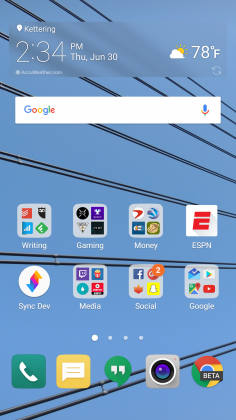

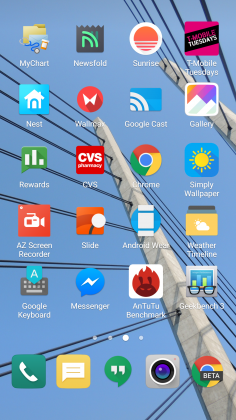
Luckily when I was living an App Drawer-less life, there wasn’t too much bloat to worry about. I am using an unlocked, unbranded version so there are no carrier-installed applications on the phone, but the suite of apps from LG wasn’t excessive. I had no use for apps like LG Friends manager, LG Health, Music, Quick Help, QuickMemo+, QuickRemote, SmartWorld, Tasks, but they were quickly hidden in a folder that I could forget about on a distant home screen.
Kudos to LG for not loading down the device with uninstallable crap from third parties. Android OEMs like to sign commercial deals where they add apps like Yellow Pages or Facebook to the phone to drive up profits, and I like that LG hasn’t sunk to that level.
Another huge win for LG is the quality of life improvements they made to the software. The ability to customize the navigation bar at the bottom of the phone is just smart. Not only can you choose on which side of the home button you want the back and recent apps buttons to be located, but you can add buttons for the QuickMemo+ app and one to drop the notification shade so you don’t have to reach the top of the phone. This is one of my favorite little features on any Android phone out there. LG has been including these options in its phones for a while now, and I hope it continues until Android makes them irrelevant.
You can see Marshmallow poking its head through occasionally. LG decided to keep the stock recent apps screen basically completely stock – clear apps button included. There’s also an always-on display that LG talked about a lot at its Mobile World Congress press conference that shows the time and some notifications. It’s a nice feature that I appreciate, but it’s nothing I think should influence your buying decision. This feature is becoming standard on most phones these days – the Samsung Galaxy S7, Moto X, OnePlus 3, and Nexus 6P all have various forms of this – and the inclusion of an LCD screen means that the G5 has to keep the entire screen on for this always-on display. It’s not ideal in its implementation, and I honestly don’t miss it when I’m not using the G5.
The puzzling choices LG made continue past using an LCD panel for an always-on display. The Settings app is a complete mess. The tabbed layout is confusing and frustrating. There is a reason that most phones use a longer list layout, and LG needs to get the memo that it’s a superior option. In fact, if it could use the stock Android settings menu and just add in the options it needs, do that. Google has made it pretty easy on OEM’s by including a great Settings app in AOSP, and yet, they keep screwing it up somehow.
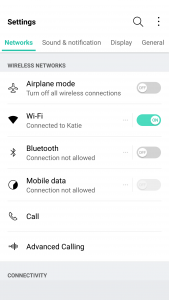
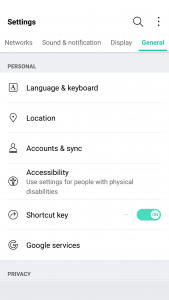
LG seems to put a lot of effort into its software to make it a true selling point. There are some great little features that no-one knows about like the phone composing a ringtone based on the number calling you. That’s not a feature that is going to make your life easier on a day-to-day basis, but it’s something innovative that people will love. It’s cute. I wish LG would focus on features like this instead of theming every inch of the OS with its own brand of color vomit. Stop messing with things that already work just to make them different.
Performance
The LG G5 has a Snapdragon 820 processor clocked at 2.15GHz with 4GB of RAM and an Adreno 530 GPU. This is the standard loadout for a flagship phone released in the first half of 2016, which includes the Samsung Galaxy S7, HTC 10, and LG G5.
As much as I complained about the software in the previous section, this set of hardware is easily able to power through it. LG had been notoriously bad about its home screens redrawing every time you hit the home button on the G4, but luckily I’ve never seen that happen in the several weeks I’ve spent with the G5.
There are no lags in long menus or the recent apps window and zero stutters when swiping through home screen pages. App loading times are on par with the Samsung Galaxy S7 Edge, with maybe the slightest advantage going to LG, but it’s nothing that you’ll notice unless you have the two phones sitting right next to each other.
Consecutive AnTuTu Benchmark runs
1 of 4
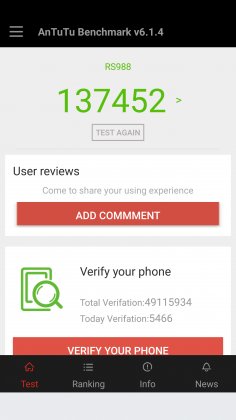

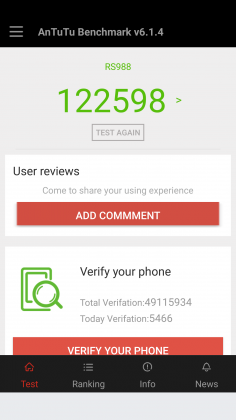

Since the G5 has a top of the line processor in it, expect it to power through extremely difficult tasks like 3D games and video editing. We’re living in 2016, and phones have gotten to the point where there is almost nothing you can throw at a flagship device that it can’t handle.
Benchmarks are always being blown up by the next generation of devices because of the giant leaps being made by companies like Qualcomm, and the G5 is no different. You can put it up against any device from last year and it’ll crush it. Will you see that performance gain in day-to-day use? The all depends on how you use your phone, but you shouldn’t be scared off from the G5 because you think something else can power through difficult tasks better. Everything is amazing these days.
Where you may run into some issues is with connecting to calls. I consistently had issues with phone calls taking forever to connect once I hit send. I am using T-Mobile in an excellent coverage area so there should be no issue. Tested next to other flagship devices, the LG G5 had significantly longer lag times between hitting the dial button and the phone beginning to ring. I don’t know where the issue is coming from. I think I can rule out T-Mobile because I tested it against other unlocked devices, but this just seems like a weird bug. Calls sound wonderful on both my end and the recipient once it actually connects, but I hope that LG is working on a fix for this because it was one of the most annoying issues that popped up while testing the G5.
The G5 does have one thing that most phones of today don’t, a removable battery. I consistently applaud OEM’s for including removable batteries in their devices due to the demands consumers are putting on their phones. The 2800mAh battery is smaller than last year’s flagship and it shows in the life, unfortunately.
Time and again I had trouble passing three hours of Screen on Time. I’m not one who pushes my devices to the limit so those three hours were filled mostly with listening to music with Google Play Music, reading Reddit, and the occasional glimpse at Facebook along with the normal calling and texting. To say I was disappointed would be a bit of an understatement.
To engineer a device as forward thinking as the modular G5 to have it only have it held back by terrible battery life is frustrating. I used to have to charge my phone multiple times a day in 2014, I don’t expect to do so in 2016. At least I can trade out the battery or use quick charging around lunch to get through the rest of the day.
Screen on Time
1 of 4

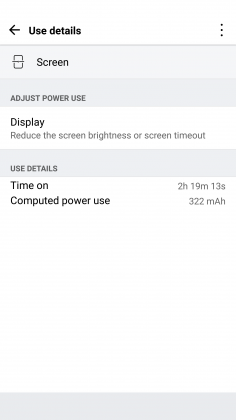


Quick Charging really does save this phone. The G5 actually has the latest in Quick Charge 3.0 which will let you charge up your device about 60% in 30 minutes. If you get an hour for lunch and keep your phone on the charger while eating, you should be good to go for the rest of the day. It’s just disappointing how much I had to utilize this feature. You’ll notice the battery drop especially quick during intensive tasks like heavy games. During setup (installing all my applications and setting them up the way I want) the battery dropped from 78% to 16%. That is a pretty ridiculous drop for the little over an hour it took to get the phone up and running.
Screen
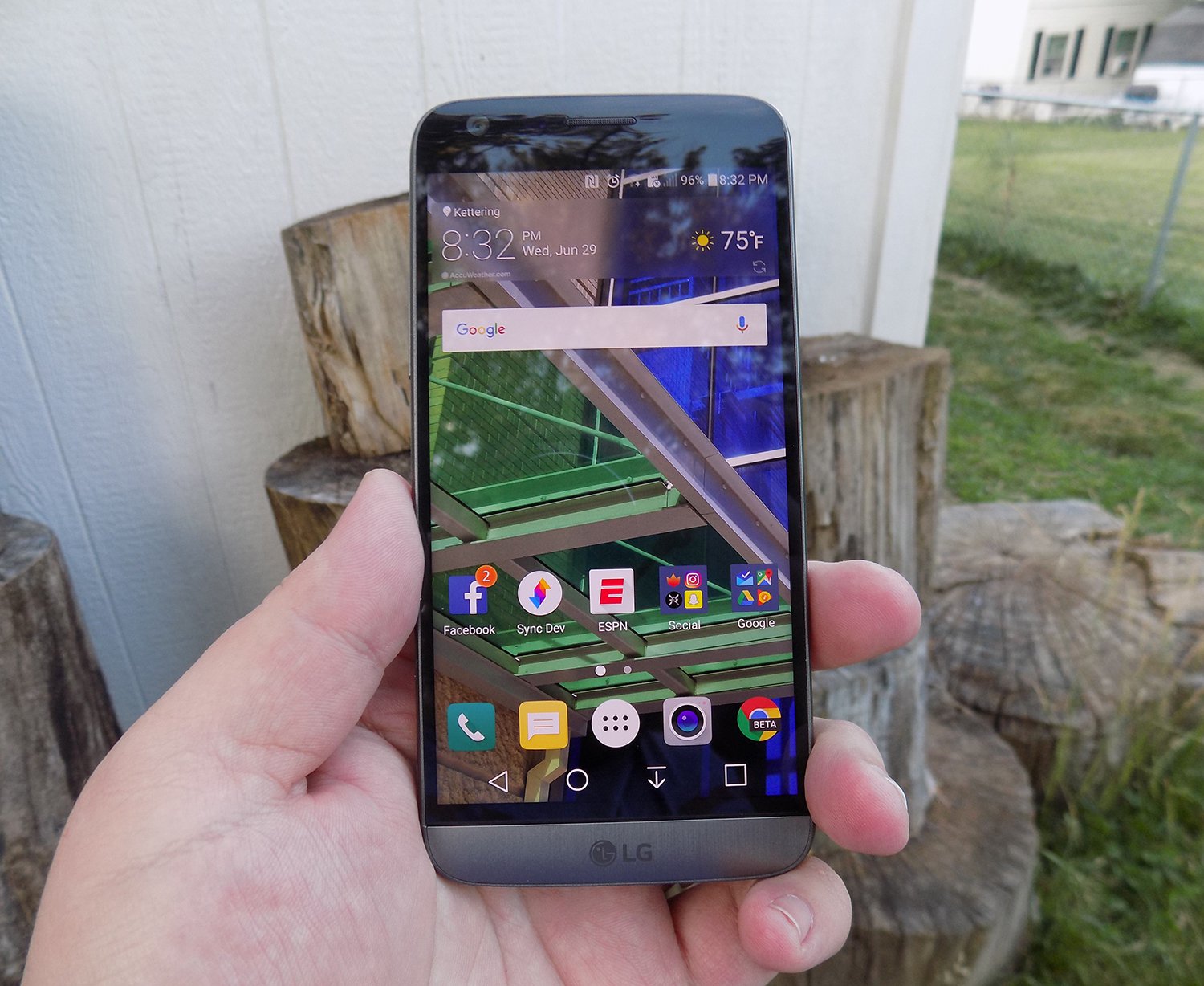
LG brings back another 2560 x 1440p display for the G5, which is now the standard for flagship phones in 2016. Whether you need all of those pixels is still being debated on message boards and in comments sections of reviews like this, but the truth of the matter is that we’re never going to go backward on resolution. It’s a selling point and people want the biggest and best, and higher numbers rule the day.
The fact of the matter is that the display on the G5 is nothing wonderful. Sure, it has a ton of pixels, but it does tend to skew blue and colors simply don’t pop like on Samsung devices. Samsung tends to over-saturate colors and has a superior contrast ratio due to using AMOLED displays, giving it a huge advantage.
The inclusion of an LCD display of the G5 is disappointing if I’m being honest. The always-on display begs for the battery friendly AMOLED display if nothing else. I think LG also overdid it with the auto-brightness again; this is an issue I’ve had with the G3, G4, and now the G5. It doesn’t matter how good the display looks if it’s never lit up high enough to actually see it clearly. Even at max brightness, the G5 cannot compete with other phones on the market.
While the display does have good viewing angles, we would like to see the ability to adjust the display levels and white balance through software. Unfortunately, it’s simply lacking from the phone. There’s also an issue of backlight bleed when the screen is dark that won’t bother you much, if at all, but is present.
Camera
The camera is much like the display, there are a lot of big numbers and plenty of fancy marketing lingo, but it doesn’t blow away its competitors like LG might have hoped. This year we got dual cameras: a wide-angle camera set to capture more of the world around you and a regular field-of-view camera meant to capture more true to life pictures.
The regular camera can shoot up to 16 MP, which is about standard for 2016, while the wide-angle camera sacrifices some megapixels (it tops out at 8MP) to gain the desired effect.

Both cameras are really good. They take comparable pictures to others on the market, but we’re getting to the point in mobile photography where almost everything is fine for what we end up using the pictures for, social media and sending picture messages. Is this my first choice for a camera on a phone? Nope, but it got the job done just fine.
1 of 2

Default Camera

Wide Angle Camera
The camera does tend to bring in lots of light. This is great for those low-light situations that tend to make up many pictures, but can have an adverse effect in well-lit pictures. Luckily, there is a robust manual mode that will let you decide exactly how bright you want the picture to be before you ever snap it.

Pictures provided by our own Josh Noriega. Check out his Flagship Phone Camera Shootout to see how the G5’s camera stacks up against the Samsung Galaxy S7 and HTC 10.
Hardware
The body of the G5 is made out of metal. It doesn’t look like it, and it certainly doesn’t feel like it. There was a controversy when the phone first came out that most reviewers were calling out LG for not actually producing a metal phone.
It was eventually confirmed that LG has covered the body of the phone with a coating to hide the antennas and thus giving a false impression of the phone being made out of plastic. Whatever the reason for, it still doesn’t change the fact that it just doesn’t feel great in the hand. The size is good, but it doesn’t feel like metal, which is really what you want if you’re buying a metal phone.

We’re seeing a bit of a resurgence of phones that feature the microSD card. Both the HTC 10 and the Samsung Galaxy S7 feature the card slot, and LG follows suit with an expandable storage slot of its own. You can expand your storage up to 256GB, and even though adoptable storage isn’t enabled out of the box, it’s only an easy command prompt away.
Part of the advantage of being a modular phone is the removable battery that LG placed in the G5. The 2800mAh battery is smaller than competitors and previous LG flagships, and it shows. As I discussed previously, battery life isn’t great, but you can buy an extra battery to easily swap out when you get low.
Also, since the G5 features Quick Charge 3.0, you can get back about 60% of your battery in a half hour if you happen to be close to a wall outlet and have your charger on you. It’s not a perfect solution to sub-par battery life, but if I believe most people will get through the day on a single charge and a top-off before bed.
Audio output is a bit of a mixed bag. The bottom firing speaker isn’t great. It doesn’t get the loudest and can distort at higher volumes. If you’re often listening to YouTube videos or music in crowded places, you’re probably annoying other people anyway. If you’re using it for speaker phone, it should get you by.
The audio output from the 3.5mm jack is another story. It easily stacks up with the Samsung Galaxy S7 for best output on the market. It’s loud and puts out a quality sound. Props to LG here.

The last thing I want to touch on here is LG’s removable bottom and “Friends”. Having the ability to add in functionality is a great idea. I’ve never been so excited after a product press conference as I was after watching LG’s show at Mobile World Congress 2016. But I’m extremely disappointed in the practical usage of the phone.
The bottom of the phone slides slot, but there’s still a gap at the bottom. Not only that but on my unit, it doesn’t even line up correctly. There is a sharp edge where the phone should be flush, not to mention that the sides where the metal band meets the body is decently sharp too. It won’t hurt, but it is annoying.

I don’t believe LG’s Friends initiative provide enough functionality to justify the design choices it had to make. Right now, it’s a closed system with no real third party modules you can buy and everything that you can buy can easily be duplicated on other phones with different accessories. There’s nothing exclusive about the LG G5, and that’s a shame.
Conclusion
I’ve brought up a lot of negatives about the LG G5 in this review. Maybe I tend to skew toward the negatives because every phone is amazing these days. What really sets them apart is what they can’t do.
The LG G5 can do pretty much what every other phone on the market can do right now. It’s extremely fast and fluid, it takes fine pictures, you can expand the storage with low-cost storage, and charge up the battery incredibly quick.
Where I think LG took a huge misstep were the compromises they had to make for their modular body. Due to this design, it can’t be water resistant like the Samsung Galaxy S7, it doesn’t feel excellent like the hand like the HTC 10 and it isn’t cost efficient (likely to R&D costs) like the OnePlus 3. The functionality it adds is little more than a gimmick, and it gave up major selling points to do it.
Our thanks to B&H Photo for making this review possible!
Verizon will reward customers for referring new subscribers
Need a little extra pocket money? Is Verizon your cell phone carrier? You might be able to hit the company up for a little boost in your cash flow then, provided you bring a few new customers along with you.
Starting today, Verizon will begin rewarding its current customers for utilizing posts on social media networks like Facebook or Twitter to refer family and friends. You can earn up to $100 in Visa rewards cards this way, with $25 for 1 referral, $50 for two and $100 for three or more. Unfortunately it doesn’t keep stacking, but the new customers will also receive a $50 Visa rewards card after signing up as well.
If you’re interested in signing up for the program, you’ll need to head to the special Verizon page set up for referrals here and follow the prompts on the page to ensure you both get your moola. There’s one catch, though: The rewards cards won’t be sent to either party until the new account has been active for 45 days.
Source: Verizon
Google Fit makes it easier to see your daily stats with new design

Google Fit, the company’s fitness tracking app, has recently received a pretty sizable update. Included in the update is a new look that helps show all your daily stats at once, an easier way to see how your weight is trending and more.
You’ll be able to see how you compare to other users in your area and even set more detailed goals. A full list of changes in this release include:
- More goal options and support for multiple goals. Set daily, weekly and monthly goals and goals for specific activities like “run three times a week”.
- A new look that shows all of your daily stats at once.
- See how your weight is trending after logging a new measurement.
- See how your activity compares against other Fit users in your area.
- Bug fixes
If you are not already using Google Fit, you can download it now from Google Play for free.
5 great silicone bands for the ZenWatch 2

What are some great silicone bands for the ZenWatch 2?
While the ZenWatch 2 comes in two different sizes – 18mm and 22mm – any watch band with an extra set of pins, regardless of its size, should work with the ZenWatch 2.
While there are plenty of customizable, fun options for the watch face itself, what about picking out a band that works seamlessly for you and the watch? Here are a five great silicone bands and straps for the ZenWatch 2 that are worth checking out!
- Barton watch band
- Benchmark band with stitching
- TRUMiRR silicone buckle band
- Purple silicone watch band
- MODE b&nd by Hadley Roma
Barton watch band

Bright, durable, and modern, Barton’s watchbands are made from a high-quality silicone rubber that work flawlessly with your ZenWatch 2 in either size. You have the option to pick from 18mm or 22mm bands on the Amazon page.
This waterproof watchband is perfect for people who like to wear their watch as they’re doing some physical activity, and if your Barton band gets dirty at all, it’s designed to be super simple to clean.
The watchband comes with two stainless steel bars to secure your watch to the band, and is eight inches long; there’s quite a bit of room to adjust no matter the size of your wrist. The watchband comes in five vibrant colors, including orange, white, bright blue, green, and black, so there are plenty of colorful options to pick from!
See at Amazon
Benchmark band with stitching

A classic approach to the traditional watchband, Benchmark’s navy silicone rubber strap with sharp, white stitching is not only stylish and nice to look at, it’s practical, waterproof, and a great accessory for the ZenWatch 2.
Made with a soft silicone rubber and a stainless steel buckle, the Benchmark strap comes with a spring bar tool that lets you change and customize your watch bands day-to-day, so if you get sick of one style, you can easily switch to another.
The watch strap is eight inches long, but works for people with smaller wrists as it can be adjusted accordingly. The classic white stitching along the band makes this strap a beautiful accessory to pair with almost any outfit or sense of style.
See at Amazon
TRUMiRR silicone buckle band

Though not as flashy and eye-catching as some of the other bands on our list, the TRUMiRR silicone buckle band is a distinct minimalist accessory for your ZenWatch 2. Sometimes, less is more!
This watchband comes in two different styles: a jet black, more patterned, raised silicone that imitates the style of traditional stainless steel watchbands and a smoother, more modern looking black band with horizontal lines running its entirety. You can pick from either option in the link below.
The TRUMiRR is made from a flexible, comfortable, water-resistant silicone rubber and can be easily adjusted with the stainless steel buckle to fit all wrist types.
See at Amazon
Clockwork Synergy silicone watchband

Made from a high quality, thick, and durable silicone with removable pins for quick-change, customizable access, Clockwork Synergy’s purple silicone watchband is a comfortable and slick looking accessory to pair with your ZenWatch 2.
This watch band is very simple and minimalist, so you won’t have to worry about extra patterns or logos junking up your wrist. The same watchband also comes in a few different colors, including black, grey, brown, royal blue, and hunter green. You can even choose the buckle color and pick from stainless steel, brushed steel, yellow gold, rose gold, or PVD black.
The Clockwork Synergy strap is easily adjustable with eight sizes, so whether you have a tiny or enormous wrist there’s bound to be a comfortable option for you.
See at Amazon
MODE b&nd by Hadley Roma

Bright, bold, and beautiful: MODE’s b&nd by Hadley Roma in seafoam green is bound to make a statement once it’s paired with your ZenWatch 2!
The MODE band is easy to clean and is moisture-resistant, so you don’t have to worry about dirtying it up if you’re doing some physical activity. The entire band is also 100% hypo-allergenic, so if you have severe skin sensitivity issues, it may be a good option to look at.
While most smartwatches are changed with pins, the MODE band comes with a slide button that easily attaches the strap directly to your ZenWatch 2 without any additional tools or fiddling. All you have to do to change to the MODE is snap your band into place using only your hands and you’re good to go!
See at Amazon
What’s your favorite?
Is there a silicone watchband that you just can’t get enough of? Let us know which ones are your favorites to wear with the ZenWatch and why in the comments below!
You’ve got questions, Michael Fisher’s got videos (and the fastest growing new tech channel on YouTube!)
Over 30,000 youtube subscribers in less than a week… and MrMobile is just getting started!
It’s been a whirlwind 10 days in MrMobile’s Boston studios, where we’ve been focused on crafting the biggest YouTube debut party the mobile tech space has ever seen. In less than two weeks, I’ve published an introduction video, two smartphone reviews, a preview of the hottest electric car ever to hit the road, a look at a “work phone” that’s also a pretty sweet vacation device, and a mobile accessory I’ve wanted since before Bluetooth was invented.
The response thus far has been overwhelmingly positive, and I’d like to thank everyone who helped push the MrMobile YouTube Channel to over 30,000 subscribers basically overnight. Don’t despair if you missed the initial launch celebration, though! To help you get up to speed, we’ve embedded every single MrMobile video in this post. Click around to see what catches your eye, and when you’re done catching up, hop on over to the MrMobile Channel page and hit that Subscribe button; we still need your help to hit 50K, 100K, and all the milestones that lay beyond!
Warning: You may get addicted watching these MrMobile videos!
This Rugged Work Phone is Perfect for Vacation Too
The Best Android Phone You Can Buy [Summer 2016]
Tesla Model 3: The Model S/X Test Drive That Sold Me On The Hype
Bluetooth Star Trek Communicator Review: A Trekkie’s Dream Come True
OnePlus 3 Review: Killer Flagship
Follow MrMobile Everywhere
- YouTube
- Web
- Snapchat
Android Central 295: Nougat Unlocked
There’s no such thing as a slow week in the Android world. And in the span of a single morning we’ve gotten both the nickname for Android N — Nougat — and a long-overdue unlocked version of the Samsung Galaxy S7 in the United States.
Plus we weigh in on some recent stories that probably have been blown way out of proportion, and we answer some excellent questions via email.
Thanks to this week’s sponsors:
<
ul>
Harry: Use promo code AC to save $5 off your first purchase — start shaving smarter.
Casper: A shockingly affordable — and excellent — mattress. Try it for free for 100 days. Use code AC to save $50.
BarkBox: High-quality treats for your dog, delivered monthly.
Podcast MP3 URL: http://traffic.libsyn.com/androidcentral/androidcentral295.mp3

