


Rare US N64 disk-drive retail prototype found in Seattle
If you subscribed to Nintendo Power in the 90’s, you probably remember reading about the Nintendo 64DD, a console disk-drive add-on design to bring higher storage capacity, a real-time clock and internet connectivity to the Nintendo 64. You may also remember that it flopped in Japan, badly. The N64DD never made it to the US market — but it may have come closer to hitting store shelves than we previously thought. A collector in Seattle has stumbled upon a working US Nintendo 64DD prototype.
At glance, the unit looks almost identical to the Nintendo 64DD that hit Japan in 1999 — so much so that when Jason “MetalJesusRocks” Lindsey found it, he assumed it was merely a US developer kit. Turns out, it’s even more rare: the unit boots up without the aid of the “partner cartridge,” developers needed to get devkits running. It also features an english-language menu screen, something not present in official development units or the original Japanese retail model. The unit is even region-locked to the US, and won’t play japanese N64DD games. Lindsey (and Ars Technica) reached out to Mark DeLoura, a former Lead Engineer at Nintendo that worked on the n64DD, to figure out what was going on. The answer? This is most likely an unreleased retail unit, or at least a retail prototype.
That alone makes it a rare collectors item, but there’s one more mystery surrounding this retail prototype: it came with a unreadable, blue game disk. The development cartridge is unlabeled, and Lindsey has been unable to get it to boot so far — but DeLoura says the disk could contain a US retail-ready N64DD game or some of the demos he used to show the device to developers when he still worked for Nintendo. Lindsey says he’s working with the gaming community to find a way to read the disk. With any luck, we’ll have one more piece of Nintendo history to admire sometime in the near future. Until then? Check out Lindsey’s YouTube channel for a full rundown of the rare, retail hardware.
Source: NintendoLife, YouTube
Space X delays its Hyperloop competition until next year
Contestants in Space X’s upcoming hyperloop pod competition now have some extra time to prepare their entries. The Elon Musk-owned company announced on Friday that the design contest will be moved back to late January, 2017. This decision comes in response to requests from multiple independent and student-led teams asking for additional time to better refine their submissions. 22 groups in all are competing in this second round, down from 115 initial applicants. The competition will be held along a one-mile test track set up in Hawthorne, CA, come January. Should the technology come to fruition, travellers may one day be able to get from Europe to China in a fraction of the time and cost of conventional high-speed rail.
Via: Re/Code
Source: Hyperloop
Trademark Filings Seemingly Confirm Apple’s Work on Upcoming ‘AirPods’
With it looking more and more like Apple is going to remove the headphone jack on the iPhone 7, we’ve seen considerable speculation and discussion about the transition to either wired Lightning headphones or Bluetooth options. Looking at the wireless possibilities, the first iPhone 7 headphone jack rumors immediately reminded us of an “AirPods” trademark filing we discovered last October that seemed likely to be linked to Apple, although conclusive proof could not be found at the time.
That AirPods trademark application was filed by a previously unknown company by the name of Entertainment in Flight LLC, which carried many of the hallmarks of being a shell company operated by Apple for the purposes of hiding its true identity. Apple has used such companies on many previous occasions, including for “iPad” and “CarPlay” that were ultimately used in product names and others such as “iWatch” that ended up scrapped in favor of other names.
As the AirPods trademark has continued through the U.S. Patent and Trademark Office review process, additional documents have been filed that we believe confirm Apple is behind the filing while providing evidence Apple continues to have interest in protecting the name.
Just this week, the applicant amended its description of the goods to be covered under the AirPods trademark, responding to a January request from the trademark examiner to clarify some of the overly broad terms used in the original description. This week’s filing was signed by Jonathan Brown, a “manager” for Entertainment in Flight, and it’s the first time we’ve seen a name associated with the trademark application other than outside attorneys handling the case.
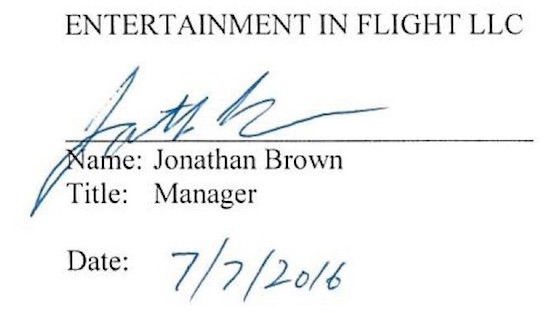 Jonathan Brown’s signature on AirPods trademark case filing
As a matter of fact, Apple employs an attorney by the name of Jonathan Brown in the role of “Senior Standards Counsel.” While Brown describes his role as primarily dealing with technical standards organizations and open source software initiatives, he is involved with intellectual property matters and in prior positions at chipmaker Rambus he handled trademark and patent maintenance and litigation.
Given that Jonathan Brown is a fairly common name, we dug a little further to try to determine whether the manager at Entertainment in Flight and the attorney at Apple and Rambus are indeed the same person, and we came across a court filing from a 2010 civil case involving Rambus that includes a pair of Brown’s signatures. While there is some variation among those two signatures and the one on the AirPods trademark document, they have enough in common that we believe these Jonathan Browns are the same person and thus Apple is behind the AirPods trademark application.
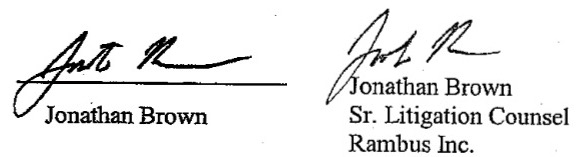 Jonathan Brown’s signatures on 2010 Rambus court filing
This week’s amendment came one day prior to the six-month deadline for responding to the trademark office’s request for clarification, indicating Apple remains interested in protecting the name but suggesting it is interested in stretching out the review process as long as possible with no product yet released.
Trademark protection ultimately requires that a “Statement of Use” be filed to prove the name is actually being used, and lengthening the review process gives the applicant additional time as it continues working on its product. By regulation, a Statement of Use must be filed within six months of the trademark being allowed, although five six-month extensions are permitted.
If Apple is indeed working on an AirPods product, it is likely a set of wireless earphones that would be a natural accessory for the iPhone, Apple Watch, and other devices. Given the cost of wireless earphones, it is likely the iPhone 7 would instead ship with Lightning-enabled wired earphones, with wireless AirPods sold separately. Apple was reportedly looking to launch wireless earphones this fall alongside the iPhone 7, but it’s possible that timeline could be pushed back if the accessory is not ready for market.
Related Roundup: iPhone 7
Tags: trademark, AirPods, Jonathan Brown
Discuss this article in our forums
Yelp Gains New Filter for Listing Venues Near PokéStops
Yelp is getting in on the Pokémon Go action, adding a new filter that will let users discover restaurants and other businesses located near PokéStops to make it easier to find new Pokémon and other bonuses.
Added via an over-the-air update going out today, Yelp’s new Pokémon filter is available at the top of the app when searching for a venue to visit, right alongside other filters like “Good for Lunch,” “Price,” and “Open Now.”
Searching for locations by PokéStop is available on Yelp for the desktop and in Yelp’s mobile apps, including its iOS app. Yelp is also asking customers to help identify businesses that have a PokéStop located nearby by checking in.
In order to leave no PokéStop unturned, we need your help! To identify a business that’s in the vicinity of a PokéStop, check-in to that location on Yelp and answer a quick question to let fellow Yelpers and trainers know that this is the place they want to be. In just the past 24 hours, Yelpers have already identified thousands of PokéStops! With your help, we’ll become Pokémon masters in no time.
Yelp’s new PokéStop feature is available in the United States, Australia, and New Zealand. Yelp can be downloaded from the App Store for free. [Direct Link]
Tag: Yelp
Discuss this article in our forums
MrMobile is a fan of Motorola, and now he has a Moto Z!
It’s no secret that MrMobile has been a fan of Motorola phones for the past few years, enjoying what the Moto X series had to offer. So now that he has a Moto Z in his hands — a clear departure from the X line — how is he finding the differences? That’s what his latest video is all about, and you can see it right above.
When you’re done, be sure to subscribe to MrMobile on YouTube if you enjoyed this video!
Moto Z and Moto Z Force
- Our hands-on preview
- Moto Z specs
- Moto Mods custom backs
- Moto Z and Moto Z Force will be Verizon exclusives until the fall of 2016
- The latest Moto Z news
- Discuss in our Moto Z forums
Motorola
Best Buy
Amazon
How to free up storage space on Android

How do I free up space on my Android phone?
There are a couple of super simple, straightforward ways to instantly give you more room for music, apps, photos, and more.
- Check your storage usage
- Uninstall old or unused apps
- Check and delete your unnecessary downloads
- Clean up your playlist
- Remove large videos
- Use cloud storage for photos
- Investigate adoptable storage options or a microSD card
Check your storage usage
The best way to begin freeing up your storage space on Android is to know what exactly is taking up so much space in the first place. Take some time to do a little investigating before you make any hasty decisions.
Launch the Settings app from your home screen, the Notification Shade, or the app drawer.
Scroll down and tap Storage & USB.
Check the apps and processes listed to see how much storage is being used by each.

Uninstall old or unused apps
There’s a very real possibility that an excess of apps is guilty of taking up tons of storage. We’re all guilty of downloading the fun free stuff that seems like a good idea in the moment, but what happens when we get bored with them or just forget to use them as time goes on? They just sit there and waste space. Such a shame.
Launch the Settings app from your home screen, the Notification Shade, or the app drawer.
Tap Applications or Apps.
Tap the app you wish to uninstall.
Tap Uninstall to remove it.

Check and delete your unnecessary downloads
If everyone you know is in the habit of sending you files to download or if you’ve habitually selected “OK” every time an item wants to be downloaded, chances are you’ve got a boatload of files that you may have only briefly needed or used that can be canned. Keep in mind that not all phones have an app called Downloads; yours might be called My Files or something along those lines. But all phones have a dedicated app where all your downloads are stored.
Tap the app drawer.
Tap Downloads.
Tap the file to highlight it.
Tap the trash can to delete the downloaded file.

Clean up your playlist

Music lovers out there may be guilty of loading up their phones with full albums, which can take up more storage space than you might imagine. Of course, you want to take the soundtrack of your life with you everywhere you go, but you could afford to lose a couple of albums you don’t regularly listen to.
Alternatively, you can opt to use music streaming services; these are much lighter on storage than downloading albums or even singles. Google Play Music, for example, has numerous pre-selected playlists to suit every mood and activity, as well as artist-themed radio stations.
Remove large videos
You don’t have to be an amateur director to have a phone filled to the brim with videos; cute or amazing things happen all the time, and you just happen to be the person with a phone at the ready, recording all of the action. Lengthy videos do require a good amount of storage, though, and the more of them you keep, the more storage space you’re giving up.
You have a few options: you could transfer the videos to your computer if you really want to hang onto them. You could also upload them to YouTube if they’re not private or sensitive, and if they are, you can set up the privacy settings on YouTube so that only selected guests can view it. That way, you can get rid of the hard copy that’s living in your phone’s storage space.
Use cloud storage for photos
Similar to the problem of videos taking up space, your ever-growing photo collections will take up a good deal of storage. Many newer Android phones come with Google Photos ready to use. If you’re not yet using cloud-based storage for your photos, now would be a prime time to start. As long as you’re connected to the storage you choose, you’ll have access to all of your photos at the size and quality you prefer.
You can choose to set up a Dropbox account, or dive in and check out the perks of Google Photos. Both eliminate the need to store your photos locally, freeing up a good amount of space on your phone.
Use a microSD card, potentially with adoptable storage

Keep in mind that, firstly, not all Android phones support adoptable storage, and if it does you’ll need to use a microSD card that will run fast enough to keep up with your phone. Our in-depth look at adoptable storage explains the process in more detail. If your phone offers it, and you’re low on storage, you can consider using the adoptable storage option to expand the storage space available on your phone. When your phone “adopts” the space available on the microSD card it becomes part of the phone’s storage system, rather than just adding a separate pool of available storage.
If your phone doesn’t support adoptable storage, you can still transfer apps, games (sometimes), and other large content onto a microSD card and free up quite a bit more storage space without having that card become part of the phone’s storage system. Move files using a file management app or your computer, set the default storage area for your camera and music apps to the microSD card, and manually move apps to the card from your application settings
Make some room
These basics should help you get a handle on your storage issues. If you have a tip or a trick you’ve found helpful, let us know about it in the comments below.
Earn a six-figure IT security career with the Become an Ethical Hacker bonus bundle (92 per cent off)
It’s a big crime to hack into a company’s network, penetrating their security flaws for any number of nefarious purposes. Ethical hacking, however, is an enormously valuable (and legal) field that enables companies to stay several steps ahead of malicious data thieves.
Professional ethical hackers work to identify and correct structural weaknesses from within networks. And you can get started in this highly valued field with the Become an Ethical Hacker Bonus Bundle, a best-selling collection of courses to get you on track for success as well as an added 5.5 bonus hours of instruction to fortify your developing skills.
For a limited time, you can take advantage of this great offer for only £33.86 ($49) from Pocket-lint Deals.
Ethical hackers are vital security experts in any web-connected industry, and through this 9-course curriculum you’ll master basics of ethical hacking, before exploring more advanced penetration tactics and developing the skills required to earn a six-figure career as a Web Penetration Tester.
Learn to code in C++, and establish the know-how to construct a keylogger from scratch. You’ll also learn to perform automated security analyses of mobile apps, become familiar with important facets of Linux system security, and much more.
Become an Ethical Hacker Bonus Bundle courses:
- Ethical Hacking from Beginner to Advanced Technique
- Ethical Hacking for Beginners
- WebSecNinja: Lesser Known WebAttacks
- Automated Mobile Application Security Assessment with MobSF
- Learn The Basics of Ethical Hacking and Penetration Testing
- Build an Advanced Keylogger Using C++ for Ethical Hacking
- Linux Security and Hardening: The Practical Security Guide
- Cross Site Scripting (XSS) Attacks for Pentesters
- How to Build a $120,000/Year Career as a Web Penetration Tester
Learn at your own pace with 24/7 access to course materials, including lectures and video tutorials. Get started today with the Become an Ethical Hacker Bundle, now 92 per cent off from Pocket-lint Deals.
Magnetic Bluetooth 4.1 Wireless Sport headphones deliver 5 hours of clear music and podcasts (37 per cent off)
The tangle, obstruction and overall nuisance of headphone wires are finally going the way of the dodo, thanks to the advancements of Bluetooth technology.
Taking wearable tech to the next level, Magnetic Bluetooth 4.1 Wireless Sport Headphones deliver comfort, security and strong functionality while providing magnetized support for your active needs. For a limited time, you can pick up a set at 37 per cent off from Pocket-lint Deals.
Say goodbye to the endless hassle of cords getting in the way while you exercise, tearing out of your ears when they catch on any number of items. Your Magnetic Bluetooth 4.1 Wireless Sport Headphones gets rid of the cords once and for all, connecting via Bluetooth from up to 30 feet away from your smartphone or other device.
And since they weigh only 11 grams, you’ll hardly notice they’re in place as you work out, drive, engage in your daily tasks and more.
A stylish storage case allows you to carry your headphones anywhere life may take you, as you enjoy up to 5 full hours of music, audiobooks or podcasts on the power of a single charge. Talk time is even more impressive, with up to 6 hours of conversation available without interruption.
Your Magnetic Bluetooth 4.1 Wireless Sport Headphones are compatible with iPhone and Android, as well as any Bluetooth-capable tablets and even your PS3 game console. They also ship internationally, with free shipping to the continental US. Pick up your own set today for £17.70 ($24.99) from Pocket-lint Deals.
Driving with Nissan ProPILOT: Removing the legwork
Nissan is one of the latest car manufacturers to hop on the autonomous driving bandwagon, having just announced its ProPILOT technology.
The system is heading for the UK version of the Qashqai in 2017 and it aims is to assist drivers on the motorway, taking on some of the controls, while the driver can sit back.
Make no mistake, ProPILOT is not a completely automated self-driving system like some others we have tried. It won’t change lanes for you, it won’t move you over when another car is coming up behind you at over 200kmph, and if you stop for longer than three seconds, you’ll need to reactivate it. But, it offers a glimpse into the future of driving and a future that is accessible.
Nissan ProPILOT: How does it work?
The beauty of Nissan’s ProPILOT system is its simplicity. Like Audi’s piloted driving, the system is activated with a push of a dedicated button on the steering wheel. In Audi’s case, it’s a simultaneous push of two buttons, while with Nissan, it’s a press of the Pilot button, followed by a press of the Set button.
After the Set button has been pushed, it’s then possible for the driver to set the speed up to 62mph, which is shown on the 7-inch dash. When the system is activated, the word Pilot will appear at the top of the dash in blue, along with the car in front and green lines indicating the lane markings.
ProPILOT currently only works in single lane traffic, using a high resolution mono camera situated behind the rear view mirror to recognise vehicles and lane markings in three dimensional depth thanks to Mobileye’s image processing. Rival systems tend to combine cameras with other sensors like radar and ultrasonic and some are also a little more advanced in terms of features. Tesla’s AutoPilot, for example, is capable of dealing with multi-lane highways, which is something Nissan plans to introduce to ProPILOT in 2018, followed by support for urban areas and junctions in 2020.
Pocket-lint
In terms of the current ProPILOT technology however, information obtained by the camera is processed by the Advanced Driver Assistant System (ADAS) ECU microprocessor and the car responds accordingly, whether this be slowing down to keep a safe distance between you and the preceding car, or turning a corner as seamlessly as possible, keeping in the middle of the lane. There is an electric parking brake to ensure the position of the car is held when it comes to a stop, while an Electronic Control Module (ECM) is responsible for throttle control, Electronic Power Steering (EPS) allows for automated steering and Vehicle Dynamics Control (VDC) ensures automated braking.
It’s required by law for your hands to remain on the wheel, even when an autonomous driving system is steering for you. In the case of Nissan’s ProPILOT, this can be just a finger when travelling at slow speeds but the sensor sensitivity increases as speed does, meaning you’ll probably have to place a few more fingers on if travelling at the max 62mph. The steering wheel uses torque sensors rather than touch so it is able to detect the force with which you are holding the wheel and not just whether you are holding it.
When the system is happy with your hand and wheel relationship, a green steering wheel icon appears in the dash. Take your hand off entirely for more than 20 seconds and the system will warn you nicely once, followed by a harsher warning. Ignore the second warning and ProPILOT deactivates. The system will also warn the driver and deactivate if it doubts any elements of its ability, such as if there is too much sunlight affecting the camera’s vision and processing capabilities.
Nissan ProPILOT: What is it like?
Cruising around a Nissan test track with our feet on the floor and our hands only gently touching the wheel was somewhat liberating. There is something amazing about sitting in the driver’s seat, but not actually having to pay much attention to anything, other than the technology we are testing.
The ProPILOT system felt almost natural by the end of our second drive, although we’d be lying if we said it still isn’t a little scary. The autonomous steering part is something we could easily get used to though, despite it feeling a little odd lightly holding the wheel and feeling it pull. The car turned corners smoothly and remained in the middle of the lane. We did experience a couple of drifts to the left after going under a bridge however and while they weren’t substantial enough to have us intervene, they were enough for us to notice.
Pocket-lint
Inclines were also a little less impressive than we expected with the car seeming to lack power. The ProPILOT system delivers a mild acceleration to get you up the hill slowly and we found it a little too slow. Whether our impatience is to blame or the 30mph maximum speed limit, we were tempted to intervene here just to speed things up. That said, general automated acceleration was good.
Unlike autonomous steering, we aren’t sure autonomous braking is something that will ever stop us holding our breath for a brief moment. It worked perfectly though, with the car gradually reducing speed as we approached the car in front. Nissan claims the ProPILOT technology is better than emergency braking systems. As we mentioned previously, stop for longer than three seconds and you have to press the resume button (RES+) or touch the accelerator for ProPILOT to kick in again, much like existing adaptive cruise control systems.
Pocket-lint
The reactivation is quick and easy but three seconds is not long enough, especially in the UK with traffic jams often involving cars stopping for a lot longer. Less than three seconds and the car automatically starts following the preceding car, keeping a safe distance. It’s all very civilised but the three-second rule is certainly something we would like to see increase when the technology launches in Europe, as well as the 62mph speed limit to at least 70mph.
Our test drives with the ProPILOT technology were restricted to a test track, as well as a 30mph speed. It’s worth noting if there is no car in front, the ProPILOT system will not work when travelling at speeds under 30mph. It’s also worth mentioning the test track featured very clear road markings, which won’t always be the case in real life and without the clear markings, the system won’t work.
Nissan ProPILOT: When will it be available and how much will it cost?
Nissan’s ProPILOT technology will be available on the new Serena from August in Japan. Although an exact price wasn’t detailed, Nissan said the technology would be available for under three million Japanese Yen, which is around £21,500.
ProPILOT will be coming to Europe on a face-lifted Qashqai in 2017. No specific date or price has been announced, but the current top-spec Qashqai costs around £27,000, which is quite a bit less than a Tesla featuring the AutoPilot option. The technology will also be coming to the US and China but no timeline was given.
Nissan plans to have 10 core car models featuring ProPILOT within the next four years.
Nissan ProPILOT: First impressions
The Nissan ProPILOT technology is a great step in the right direction when it comes to bringing autonomous driving to the masses. Yes, there are systems more advanced out there already, but these systems are on cars that cost double, if not triple the price.
Nissan plays it safe with the first launch of ProPILOT. It is basically a combination of existing technologies and while the automated steering part is mostly new, the other elements are very much like adaptive cruise control.
We found a couple of little niggles, such as the three-second rule and lack of power on an incline but overall, the ProPILOT system appears to do what it is supposed to. It is is a great starting block to build consumer confidence in autonomous driving technology and it has every potential to make those boring long distance journeys and traffic jams that little bit more bearable by removing some of the legwork … literally.
White House pledges $400 million for 5G research
Following yesterday’s FCC vote to adopt new rules to guide the development of 5G technology, the Obama Administration is pledging support for research. More specifically, the White House announced a $400 million Advanced Wireless Research Initiative that will be led by the National Science Foundation (NSF). The project aims to build four “city-scale testing platforms” over the next 10 years. In the announcement, the administration reiterated that the US is the first to free up spectrum above 24 GHz for the high-speed networks that are said to be 100 times faster than the 4G we use today.
Yesterday morning, the FCC adopted a set of rules that will guide innovation and the development of 5G technology. Those guidelines aim to encourage new technology without letting unnecessary regulation hold up the process. They’re meant to serve as the foundation for companies and wireless carriers building devices and gear to run on the networks and those that will provide the wireless service. Both AT&T and Verizon have already announce testing plans, and there’s sure to be others to follow soon.
The NSF is pledging $50 million over the next 5 years as part of an $85 million total investment by the foundation and private-sector companies to build the testing platforms starting with the 2017 fiscal year. NSF is also committing $350 million over the next seven years that will take research from the concept phase to real-world testing at scale.
The National Science Foundation is working with Intel on a $6 million project to develop super fast wireless edge networks that can handle loads of data in less than a millisecond. NSF will also work with the Academy of Finland on a $4.7 million joint research push for wireless systems and networks, technology that also support the Internet of Things. The list of companies that are lending a hand with the federal 5G effort also includes AT&T, Verizon, Spring, T-Mobile, Samsung, HTC, Nokia and Qualcomm among others. Each will contribute research and testing know-how to the process as the technology is being developed.
Via: TechCrunch
Source: The White House

