


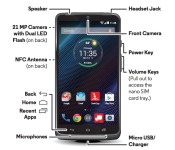
Droid Turbo manual confirms specs, reveals software features

We’ve been hearing things about a Droid Turbo device all the way back in August where some specs were leaked, and then a few weeks ago got another leak that contained photos. Well, if you were looking for some more solid confirmation, we might have it.


DROIDLIFE reported on some leaked manual shots that you can see above, as well as in the title picture. These pictures confirm some of the specs we had reported last time: a 5.2″ screen, dual flash, a long-lasting battery. There doesn’t appear to be a front-facing speaker though, and it turns out the navigation buttons are just like stock android (on-screen rather than physical) instead of something else like we thought. Also, Motorola’s turbo charger will be included, though it will be interesting if it’s the same as the new Moto X, or better (given it has the name “Droid Turbo”). What’s new information is a 21 MP camera on the back, NFC support, Qi wireless charging, and inclusion of many of the Moto X features like Moto Voice and Display.
It seems Verizon is taking a refreshingly different approach to this phone. Stay tuned for more updates as we get them.
via DROIDLIFE
Deals, Discounts, Freebies, and More! Click here to save today! |
The post Droid Turbo manual confirms specs, reveals software features appeared first on AndroidGuys.
.CPlase_panel display:none;
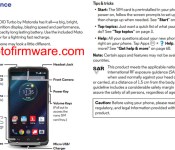
Motorola Droid Turbo (and its 21MP camera) detailed in leaked manual

We caught a brief glimpse of the Droid Turbo late last month, but really: that handful of leaked images didn’t do much to whet our whistles. This time though, something a little more substantive has started making the rounds — the folks over at MotoFirmware obtained the phone’s full Verizon user guide (PDF warning) and have posted it for all to enjoy. The 73-page document confirms among other things that the Droid Turbo packs a 5.2-inch display (though we can’t tell if it’s a Quad HD beast like some rumors have suggested), a 21-megapixel rear camera that shoots 4K video, and the same sort of context-sensitive tricks that the Moto X can pull off. Oh, and that little tease we saw on the official Droid Landing Twitter account? Its not-so-cryptic hints about faster charging have been confirmed too, as the Turbo will come with (what else?) Motorola’s forthcoming Turbo Charger in the box. Not a bad deal, consider everyone else will have to shell out $35 for one.
Filed under: Mobile
Via: AndroidPolice
Source: MotoFirmware (Twitter)
.CPlase_panel display:none;

Six-inch Motorola phone hits the FCC looking like the new Nexus

If you believe all the rumors that’ve been floating around, Motorola’s hard at work on a new Nexus smartphone (codenamed “Shamu”) with a 6-inch screen. Well, guess what just popped in to make an appearance at the FCC? You nailed it: a Motorola smartphone with a 6-inch screen, and with support for AT&T and T-Mobile’s frequency bands to boot. As always, Motorola representatives have petitioned the FCC to keep all the really juicy bits confidential, so it’s far from a definitive nail in the Nexus rumor coffin. Still, it’s yet another piece of evidence that points to Motorola’s role in crafting Google’s latest Nexus smartphone. Why, just the other day it was spotted in Geekbench’s test database putting up some particularly strong numbers. The specifics of the radio should mean the GSM model comes first (which is really nothing new), but Verizon Wireless may be getting in on the fun come launch time, too. Bear in mind, those reports and appearance came to light within the past week — pretty soon (and if we’re lucky) there won’t be anything left to leak.
Source: FCC
.CPlase_panel display:none;

Moto G LTE headed to AT&T October 10th
AT&T has announced a new device, for them, that is headed for their shelves on October 10th. They are officially going to be stocking the Moto G with LTE connectivity this coming Friday.

The Moto G LTE will be offered at just $179.99 outright for those that don’t want a contract or the Next program. Opt for a 1 year contract and get it for $79.99. Roll it on to the Next 12 for $9 a month or $7.50 a month on the Next 18. No matter which way you end up getting the device in your hands, you’ll be gaining a solid product for the price tag. Don’t go getting this one confused with the Moto G 2nd gen that was announced last month. That one doesn’t offer LTE. This is the Moto G LTE which is just a LTE variant of the original Moto G that Motorola put out last year.
The Moto G LTE brings the 4.5-inch 720p LCD screen, Snapdragon 400 processor, and 8GB of storage along with Android 4.4. One could have conceivably purchased it through Amazon for a while now, but at $199.99. So you would save yourself $20 through AT&T so long as you don’t mind being carrier locked. On the Next programs though this is a real win for consumers that can’t or don’t want to, shell out $200 upfront but don’t need an additional $25 a month on their bill.
Any interest?
Source: AT&T
//<![CDATA[
ord = window.ord || Math.floor(Math.random()*1E16);
document.write('‘);
//]]>
The post Moto G LTE headed to AT&T October 10th appeared first on AndroidSPIN.
.CPlase_panel display:none;

AT&T to offer Moto G LTE on October 10

AT&T kicked off the week by announcing that the Moto G LTE will be here on Friday, October 10. Priced $199 with no long-term commitment, the new Motorola handset can be paired with a contract for $79.99. Additionally, it’s possible to spread payments out via a Next plan: $7.50 per month on Next 18 or $9 per month on Next 12. As a reminder, AT&T is offering $100 bill credit for anyone who signs up with a Next plan through the end of October.
Deals, Discounts, Freebies, and More! Click here to save today!
The post AT&T to offer Moto G LTE on October 10 appeared first on AndroidGuys.
.CPlase_panel display:none;

Download the Moto G (2014) wallpapers

If you don’t own a Moto G (the 2014 version) but you still want the wallpapers that come bundled with the device, then here they are for you.
To download an image, simply click on the image in question, right click, and save as. Alternatively, if you want to download all of them, they’re bundled in a convenient .zip file for your enjoyment using this link.


Deals, Discounts, Freebies, and More! Click here to save today!
The post Download the Moto G (2014) wallpapers appeared first on AndroidGuys.
.CPlase_panel display:none;

[Download] The new Moto G 2014 wallpapers are here for the taking
 We’ve seen the wallpapers for the new Moto X already and because it’s a quieter news day, we thought to round up the new Moto G 2014 wallpapers too. Some of these will have been featured on the Moto X 2014 as well, but there are quite a few new ones as well. Check them out below, but be sure to click through to get the full resolution image:


All the wallpapers have a resolution of 1440×1280, courtesy of the Moto G’s 720p resolution. The Moto G 2014 (or 2nd gen, whichever you want to call it) builds on last year’s stand-out release for Motorola. I don’t think many of us predicted that the budget friendly device would become so popular, but after trying it myself, I’m inclined to agree that it is a fantastic phone. This year’s model ups the ante with a 5-inch display, the same Snapdragon 400 1.2GHz processor 1GB RAM and 8GB storage. The neat thing is this time Motorola has included a microSD slot in the Moto G which means you’ll be able to store more things on it (like wallpapers!).
Let us know what you think about the Moto G 2014 wallpapers in the comments below.
Source: XDA
//<![CDATA[
ord = window.ord || Math.floor(Math.random()*1E16);
document.write('‘);
//]]>
The post [Download] The new Moto G 2014 wallpapers are here for the taking appeared first on AndroidSPIN.
.CPlase_panel display:none;

U.S. Cellular to offer Moto X (2014) in late October

U.S. Cellular on Friday announced the upcoming availability of the second-generation Motorola Moto X smartphone. Priced $99 with a two-year service agreement, the 16GB black version of the phone will be offered online and in retail stores. The wood and leather back plate options run $149 with the same stipulation.
Qualified customers can pick up the phone for $0 and spread payments out over an equipment installation plan. When divided over 24 equal payments, the black phone is $20 per month; the black leather and bamboo versions are $21.67 per month.

Deals, Discounts, Freebies, and More! Click here to save today!
The post U.S. Cellular to offer Moto X (2014) in late October appeared first on AndroidGuys.
.CPlase_panel display:none;
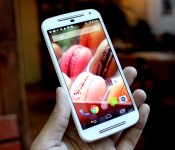
Moto G review (2014): still the best budget smartphone

Last year’s Moto G took us all by surprise. Sure, we knew Motorola wanted to reinvent the cheap smartphone experience, but the very first device in the company’s cost crusade was even better than we expected. Let’s be honest, though: The G’s greatest asset was its small, small price tag. For $180 off-contract, it became awfully easy to forgive the thing for not being the quickest, the prettiest or the smartest. Still, it was one of those gadgets that wound up being more than just “good enough”; between the price and performance, the Moto G was one of the best cheap smartphones you could own, period.
Here we are less than a year later, and we’ve got a sequel to play with (one with the same name, no less). If you took a quick peek at what it brings to the table, you’d be forgiven for thinking that Motorola wanted to play it safe the second time around — the new Moto G isn’t a game changer, and it doesn’t have to be. Does this year’s model clear the “good enough” bar once again? And just how far will $180 take you this year?
Hardware

I don’t mean to sound cynical here, but if you’ve seen one modern Motorola smartphone, you’ve just seen them all. Seriously. Motorola is still enamored with those curved backs, clean faces and dimpled logos. Other details of the design are carryovers too, including the headphone jack centered along the phone’s top edge, and the faintest hints of color circling the 8-megapixel rear camera. All of that taken together means this year’s Moto G looks an awful lot like last year’s batch of Motorola handsets with just a few notable differences.
For one, a more expansive, 5-inch 720p display fills the front — it’s barely bounded by bezels on the left and right, while a shiny pair of front-facing speaker grilles above and below the screen helps the G pull off a convincing Moto E impersonation. You won’t notice the tiny, white notification light next to the pinprick of a front-facing camera until someone shoots you an email or writes on your Facebook wall, though your eye will occasionally dart to the proximity sensor sitting below the topmost speaker (especially if your phone is white, like mine was). That’s about it in terms of visual flair — the G in its default state is as subtle as ever, but you can trick it out with any number of Motorola’s colorful backplates and cases.

As it turns out, that bigger screen winds up being a blessing and a curse. Your apps and emails have more room to stretch out and breathe, but this year’s Moto G is also a little less comfortable to hold because of it. That’s a shame since Motorola did an outstanding job making the new Moto X feel slimmer than it is by tapering the sides. Here, those edges are flat and substantial, and while they don’t make the phone feel small, they do give your hands more surface area to grip — not a bad deal for any butterfingers reading this. You might also notice a hint of slack between the removable back plate and the rest of the phone, but that’s just me being nitpicky.
If you thought the Moto G’s looks were more of the same, just wait until you see what’s lurking inside. This year’s model has the same quad-core 1.2GHz Qualcomm Snapdragon 400 as its predecessor, along with the same 1GB of RAM. That both generations of the G basically share a brain isn’t necessarily a bad thing — we quite enjoyed the horsepower we squeezed out of it last year — but I couldn’t help but hope Motorola would use a more powerful configuration this year.
The similarities don’t end there either: Both versions of the G run with the same non-removable 2,070mAh battery, which, at first blush, seems a silly choice. Why would anyone stick the same ol’ battery in a new device with a bigger screen to light up? It’s another one of those price-performance balancing acts Motorola had to cope with, and since this thing has the same brain and the same lack of LTE support (HSPA all the way) as the original G, I guess popping in a more powerful cell wasn’t deemed crucial. If it makes you feel any better, though, there’s now a microSD card slot behind the back cover to supplement the meager 8GB of storage, and an alternate version of the phone sports two SIM card slots instead of one.
Display and sound

Of all the surprises that first Moto G brought to the table, its 4.5-inch, 720p screen was one of the most pleasant. Impressive clarity? Accurate colors? Solid viewing angles? The original G had them all, and the sequel’s 5-inch display fares almost as well. Yes, almost. There are a few bummers at play here, but the most notable is the slight dip in sharpness since the screen uses the same number of pixels to fill even more space. If you’ve got a spare moment, you can peer very intently and pick out those individual pixels; you’re ultimately left with a screen that looks softer and less crisp than the one that came before it. The bigger question, though, is how much that actually matters. My answer? Hardly at all. It’s not going to be a dealbreaker for anyone but the most persnickety screen hounds.
More importantly, the Gorilla Glass 3-clad display is spacious, bright and plenty vivid, though colors didn’t seem quite as poppy and saturated as they did on the original Moto G. Personally, I prefer it when colors border on lurid (gotta love those AMOLED screens), so the screen feels just a little lifeless to me. Of course, though, your mileage will vary on that one. Alas, things take a turn when you start looking at dark pages or videos: My review unit has some pretty noticeable backlight bleeding at four discrete spots near the center of the screen. Those stray photons shouldn’t be terribly bothersome for most, but my eyes couldn’t help but gravitate toward them while poking through a dark app or sitting in dimly lit rooms.
On the plus side, the silver-trimmed speakers bounding that screen are a damned sight better than the single, wimpy driver that sat low on the original G’s rear end. The difference is dramatic — they get louder than you’d expect without getting too muddy or distorted — but don’t expect any HTC One-style auditory revelations when you crank things up.
Software

Hate bloatware? Love the buttery smoothness of unfettered Android? You’ll find plenty to like here. We can actually keep this bit short and sweet: The Moto G’s build of Android 4.4.4 is just about untouched, a feat that (for better or worse) wasn’t replicated by its big brother. Sadly, this also means that the thoughtful tricks the Moto X could pull off are nowhere to be found. This shouldn’t come as a shock: The G still lacks the additional processing cores that made those tricks possible, but they’re hard to give up if you’ve used them (or have seen them in action) on a Moto X.
With the exception of Motorola’s Migrate, Assist and Alert apps, there’s just about nothing non-Googly in origin here. Thankfully, those apps occasionally come in pretty handy. As the name implies, Motorola Migrate lets you transfer messages, contacts and calendar events (whatever doesn’t come through when you set up the phone with your Google account, really) from another Android phone or straight from Apple’s iCloud. Assist pitches in when it can tell you’re in a meeting or when it’s your bedtime by automatically silencing itself.
Alert, on the other hand, is a sort of a location-based, catchall app where you can broadcast your location to friends (à la Glympse), as well as set up notifications for preset contacts and emergency services if you ever feel you’re in danger. Setting up that list of important contacts doesn’t take more than a few moments, and triggering the emergency mode is just as simple — a single tap of a button initiates a 5-second countdown before your phone starts reaching out to everyone on the list. All told, it’s a largely dummy-proof lifeline should your situation go south in a heartbeat. Here’s hoping you won’t ever need to use it as one.
Camera

None of the smartphones that Motorola pieced together over the last 12 months have had cameras that have blown us away — care to take a guess at how the Moto G fared? Bingo! Welcome back to the middle of the road, at least compared to the current crop of smartphones floating around the market. That might sound like I’m damning the G with faint praise, but believe me: The 8-megapixel sensor Motorola’s got in there is a big, big improvement over the 5-megapixel camera in last year’s model.
As usual, photons are your friends and you’re going to want as many of them around as possible if you want to coax your Moto G into performing its best. Under those conditions, expect to see lively colors and a bountiful amount of detail (the fact that HDR is set to “Auto” by default usually helps with that). It actually does pretty well once the light starts to fade, too — graininess becomes a problem after a while, but the sensor is more than capable of coping when the sun dips behind clouds or starts to inch closer to the horizon.
Up front, the tiny 2-megapixel, front-facing camera performs about as well as you’d expect. It’ll do in a pinch when it’s time for a video Hangout, but I’ve noticed the same sort of ghostly delay when trying to frame up a shot that I did on the Moto X. Strangely, the issue isn’t as prominent here as it was on the higher-end X, so you won’t get too frustrated trying to snap a decent selfie or eight. Meanwhile, flipping into video mode is a quick process but the results definitely won’t wow: video resolution tops out at 720p and footage is all too often soft and unsatisfying.
I’ve praised Motorola’s dead-simple camera interface in the past, and I’ll do it again: The one-touch process of snapping a photo is impossible to screw up, and the settings offer enough depth to enable some handsome shots without overwhelming you with options. That said, it does take some getting used to. Tapping anywhere on the screen to snap a photo seems awfully smart until you realize that lots of other camera apps have you tap on the screen to focus or control exposure; if that sounds like what your current phone does, prepare to fight your muscle memory for a while. The fact that you’ve also got to drag a reticle around to change focus and then tap means it’ll sometimes take longer to capture a scene than Motorola would like you to think.
Performance and battery life

The Moto G’s spec list doesn’t do it many favors. Here’s the thing to remember, though: While it uses a year-old chipset, the 2014 Moto G runs lean. The lack of an obnoxious, overwrought user interface means it can dedicate that available horsepower to more important things, and it shows. I spent my days testing the G as I usually do: sending off messages, jumping into Hangouts, scrolling through long web pages, firing up apps, flipping among those apps as they run and generally being a fidgety brat trying to stymie those long-in-the-tooth internals. The verdict? Once again, the Moto G handled just about everything I threw at it with grace and gusto. Jumping out of Asphalt 8 (which ran more than admirably even at the highest settings) into The Battle Cats for a spot of feline world domination made the phone seize up for a few moments while it tried to cope, but it was almost always snappy and responsive, even while I did my best to break it.
| Moto G (2014) | Moto X (2014) | Moto G | |
|---|---|---|---|
| Quadrant 2.0 | 8,846 | 22,721 | 8,723 |
| Vellamo 3.0 | 1,669 | 2,093 | 1,575 |
| 3DMark IS Unlimited | 4,679 | 19,568 | 4,621 |
| SunSpider 1.0.2 (ms) | 1,534 | 787 | 1,377 |
| GFXBench 3.0 Manhattan Offscreen (fps) | N/A | 11.9 | 1.7 |
| CF-Bench | 14,470 | 39,018 | 15,030 |
| SunSpider: Lower scores are better; results compiled on Chrome. | |||
Meanwhile, the tale of the tape tells a familiar story. The results above are in line with what we squeezed out of the first Moto G, but for some reason, I had a hell of time trying to complete the GFXBench test; it kept returning an “Out Of Memory” error when attempting to render 1080p footage offscreen. Ill omen? Perhaps, but the G didn’t disappoint when it came to running graphically intensive apps (and it isn’t the first Moto handset that balked at that particular test, so I wouldn’t worry about it too much).
And now, we return to the elephant in the room: battery life. Remember, Motorola hasn’t touched the battery, so we’re looking at the same 2,070mAh cell from last year’s model powering a phone with a bigger screen. Sounds like a recipe for disaster, no? Thankfully, the situation isn’t nearly as dire as it could’ve been: In our video-looping test (with screen brightness set to 50 percent) the G stuck it out for seven hours and 38 minutes. For those of you keeping track, that’s only a hair less than the 7:48 the original Moto G was able to manage. Not too shabby, especially when you factor in how it handles when you’re not looping a video for hours on end. The Moto G became my daily driver for a week, and it always managed to keep me texting, tweeting, calling and playing the odd game for full work days (and then some) at a time. For me, that worked out to just shy of 13 hours of active usage, though it goes without saying that your experience will probably differ somewhat from mine.
The competition

There’s no shortage of phones that stack up the Moto G based on pure power, but it’s a whole other ball game when we factor in that cheapo price tag. Consider the HTC One Mini 2 — you’ll get the same quad-core Snapdragon chipset as the Moto G, albeit wrapped in a chic aluminum shell and paired with a (lackluster) 13-megapixel camera. Doesn’t sound like a bad package… until you notice that it’s staggeringly more expensive than Motorola’s latest.
The Desire 510, meanwhile, is a slightly more worthy competitor with its LTE radio and its newer 1.2GHz Snapdragon 410 chip, though its 4.7-inch screen is even less pixel dense than the G. It doesn’t yet have an official release date here in the States (where it’ll be available for free or $149 on Sprint and Cricket, respectively), but in Canada, the 510 will only set you back $200. If good, ol’ fashioned HSPA+ isn’t enough for you, there’s always the LTE-enabled version of the original Moto G to lean on. The camera’s much less impressive, but it’s a bit easier to wrap your hands around and you’re looking at much snappier data speeds if your provider is wired up to offer those sweet, sweet LTE signals. Just be prepared to pony up a little extra come checkout time: The Moto G 4G LTE (who comes up with these names?) costs $219, a full $40 more than the new edition.
Of course, if you’re not married to the prospect of owning an Android phone, there’s the iPhone 5c — these days it’s free with a contract, while going without will cost a cool $450. It’s only wallet-friendly under the right circumstances, though; you’re the only one who can decide if pledging allegiance to Cupertino is worth it.
Wrap-up

This won’t be a phone that you fall hard and fast for. It won’t sweep you off your feet, nor will it dazzle you with a slew of whizbang features. That’s just fine, though. Because none of that changes the fact that the Moto G is still one of the best budget smartphones you can buy today. Using the thing isn’t as revelatory an experience as firing up the new Moto X was, but Motorola’s long list of seemingly modest improvements collectively add up to a device that’s worth your attention — and the $180 asking price.
Filed under: Cellphones, Mobile
.CPlase_panel display:none;
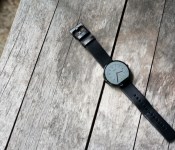
Moto 360 review: The watch you’ve been waiting for

From the time Motorola first announced they were working on a smartwatch, they had everybody watching them. Unlike the LG G Watch or the Samsung Gear Live, the Moto 360 was different, and everyone could see that. It took smartwatch design to a whole new level – not only with the circular screen, but with the great attention to detail.
Since the initial Android Wear announcement, Motorola took a pretty decent amount of time trying to get this thing ready for launch. It’s finally here, and we’ve been using it non-stop for about 3 weeks. So without further adieu, here is our Moto 360 review.
Hardware
To begin with the most obvious differentiator, the Moto 360 offers a round display. It’s what sets it apart from the other Android Wear devices currently on the market, and what makes it look more like a traditional watch than the others.
The casing of the watch is made from stainless steel, and it feels really nice. At 49 grams, it’s not too light and it’s not too heavy. It feels just like a watch should. Around front is a 1.56-inch Corning Gorilla Glass LCD display with a nice chamfered edge around the entire display. It slightly distorts the display on the edge, which takes a little getting used to. However, it does add a slight floating effect to the display, which is quite interesting.

Source: Droid Life
The display comes in at a resolution of 320×290 (205ppi). The ambient light sensor, or the “flat tire”, is the main reason for the out-of-the-ordinary display resolution. It’s the big black bar towards the bottom of the screen, and has been quite the conversation piece throughout the last few weeks.
Some people are really bugged by the ambient light sensor. Others couldn’t care less about it. From personal experience, it all depends on the watch face being used at the time. I’m a big fan of the “Rotate” watch face, mainly because it directs my eyes away from the bar at the bottom. On more circular ones like “Classic”, “Dials”, or “Minimal”, it’s much more easy to spot. If you didn’t want the sensor at the bottom, the other option would be to expand the bezel of the casing, which most would opt against. Moto has commented on their decision to keep the black bar at the bottom, and we’d have to agree with their decision.
Around back is the optical heart rate monitor, used in conjunction with Google Fit. In our experiences, the heart rate monitor works about 70% of the time. It gave skewed results before, during, and after our test workouts. When it does work, though, it’s extremely convenient. We’re unsure whether this is a problem with the hardware, or if it can be fixed with a software update. But I can tell you that we’re sure hoping for the latter.

Buying a Moto 360 today means getting to choose between two options: a light metal case with Stone leather band, or a dark leather case with a Black leather band. More color options will be available in leather and will eventually run you $29.99 a piece. The straps are made of Horween Leather, and are super good quality. The leather is soft, durable, and feels like it will hold up over time. While only having the watch for a few weeks, we don’t know that it will hold up, but it sure feels like it. If you don’t mind waiting a few months, you can grab one of the metal watch straps for $79.99 in black or silver.
While on the subject of watchbands, the Moto 360 fits (almost) all 22mm straps. That means you can probably put your favorite band on your watch, though it may be a bit difficult. There is a slight opening in the watch where the strap connects, to make the illusion that the strap goes all the way through the casing. But remember: it doesn’t. That means it’s going to be much more difficult for your non-Moto strap to replace the stock one. You can always try it, but just take caution!

Battery life
Let’s preface this section with a disclaimer. We’ve used the Moto 360 in everyday life for roughly three weeks. There are some sites out there that posted their thoughts on battery life a mere hours after receiving the device. I’m not naming names, but that isn’t an honest review in the slightest. We’ve tested it in real life situations for weeks, and we didn’t get nearly the same results.
With all of that being said, here’s where the watch gets interesting.

The Moto 360 comes with a 320mAh battery – not the worst, but certainly nowhere near the best. But you can’t judge a device’s battery solely based on capacity alone. Probably the biggest factor in whether the watch will last all day is the “Ambient Screen” mode (not to be confused with the ambient light sensor… more on that later). Ambient Screen mode is “Always On” mode – even when you aren’t looking at the watch, the display remains on, but only in a very dim state. Thinking about it a bit more, this is a great feature to have on your wristwatch. Normal watches are always on, so why not have your smartwatch stay on? The answer is simple:
Don’t turn Ambient Screen on if you want your Moto 360 to last all day.
 Ambient Screen mode is nice, but is a huge battery hog. When you turn the mode on, the watch even warns you that your battery life will suffer dramatically. We had to charge the watch twice in one day with the mode on, and only with light use throughout the day. It really is bad. But there are ways around that. When Ambient Screen mode is turned off, the Moto 360 recognizes when you lift up your wrist to check the time, and immediately turns the screen on. It’s usually pretty good about turning the screen on every time we make this motion, but it would still be nice to have a watch that’s always on.
In the brightness settings on the watch, you can either set it to a certain brightness, or set it to Auto brightness. Auto brightness is possible because of the ambient light sensor (the black bar towards the bottom of the display), and it’s a really nice feature. It gets dim in low light situations, then turns to the brightest setting when you move under a light or go outside. From what we can tell, there isn’t a huge difference in battery life compared to just keeping it at a lower setting. This feature alone is why I’m so willing to put up with the black bar on the display.
As for battery life when Ambient Screen is turned off? It will last you about a day. Personally, I haven’t put it on the charger at night with anything less than about 15% remaining. Sure, that’s cutting it close… but if you can come to terms with the fact that you need to charge it every night, you shouldn’t have any qualms with throwing it on the charger. With the newest Android Wear update (version 4.4w.1), users are seeing much improved battery life on the Moto 360. It’s still a new update, though, so we’ll have to do a bit more testing with this update.
Oh, and Motorola made sure to include Qi wireless charging in the Moto 360, so charging it is as simple as setting it on a dock. When the 360 is charging, it shows a really nice, dimly lit clock, which doubles as a battery percent indicator. We’ve found this is perfect for a small bedside clock or a nice desk clock.
The other nice aspect of the battery is that, while it may be a slight hassle to charge it mid-day, it only takes about 45-50 minutes to charge it from 0-100. That’s pretty impressive, and it definitely helps with the battery situation.
UPDATE: Since the software update rolled out last week we’ve noticed that the battery life is much improved. Bluetooth connection is far more consistent and now we can use Ambient Mode and still end our day with 20% juice. In checking with other members of the team with the Moto 360 we found they, too, were impressed with battery life in wake of the software update.
Performance
Inside the Moto 360 sits a TI OMAP 3 processor. If you’re at all familiar with Motorola’s previous processors, you’ve probably heard the name before. It’s (just about) the same processor, only slightly more optimized for the Moto 360. Unfortunately, the occasional lag is a common theme while swiping away Google Now cards. Android Wear, in its state at the moment, isn’t too graphic-intensive. Sure, it has the occasional animation that requires some processing power, but there is just too much lag while swiping away a simple card.
Of course, the lag isn’t all thanks to the processor, but it’s still unfortunate that it can’t run Android Wear as well as it’s competitors.
Android Wear
The software on the Moto 360 is the same version of Android Wear that we’ve had for awhile now. It’s still based around glance-able information cards that give you info right when you need it. So, it’s basically the same premise of Google Now, if you’re familiar with that. When you leave for work, Android Wear will give you the traffic card for your destination. When a package is shipped from your favorite website, you’ll get a card showing tracking information. You pretty much get the idea… less having to search around for things, more of it just being there when you pick up your watch.
It’s a good thing, too, that Android Wear gives you information when you want it. If you’re in a loud environment and can’t use voice dictation, you’re forced to scroll through a seemingly never-ending list of possible commands. This certainly isn’t the best interface for completing certain tasks, and Google absolutely needs to work on improving on it.

Probably the best feature of the software is Motorola’s custom watch faces. Out of all of them that we’ve seen, the 360′s stock watch faces are by far the best. What’s more, is that you have the ability to customize the colors of the watch faces with Moto’s new Connect app. Once installed on your phone, you can select each individual watch face and begin choosing which color suits you best. This is a feature we hope every OEM will include on their next Wear watch.
Conclusion
If you need to buy an Android Wear device, buy this one. It’s the most stylish. It’s the one that looks the least like a computer on your wrist. It’s the one that doesn’t feel like a first generation product. Whether you’re looking for a genuine premium-feeling leather strap or holding out for the solid metal watch band, you’re not going to feel like you’re carrying around a smart device on your wrist. It feels like a watch should, and looks incredible.
With all of that being said, if you can wait, then wait. Android Wear is a very young product, and the current OEMs in the space need to figure out what’s important in a wearable device. Battery life and non-voice dictated commands need to be fixed in order for Android Wear devices to be taken seriously.
This is the best Android Wear device out there, and it’s priced relatively well. You can pick one up on Motorola.com, Google Play, or BestBuy (online or in-store) for $250. At least at the time we’re reviewing this watch, it is really difficult to find any in stock. All three of the sellers listed above are constantly sold out, though we’re confident inventory will be replenished sometime soon.
The Moto 360 the most fairly priced, well built smart watch you can buy today. Though the battery and processor are the things we’d like to see improved, it’s a solid smartwatch that, in our eyes, is worth the price tag.
Do you have a Moto 360? How do you like it? Let us know if you disagree or agree with our review. We’d love to hear your voice in the comments below!
Deals, Discounts, Freebies, and More! Click here to save today!
The post Moto 360 review: The watch you’ve been waiting for appeared first on AndroidGuys.
.CPlase_panel display:none;
 AIVAnet