



6 reasons your next phone should be from Motorola
Motorola has had quite the career. For a long time they were really the only name in telecommunication devices, from radios to cell phones and so on. However, when smartphones started taking over the market, Motorola suffered greatly. Then Google bought Motorola, and the world waited to see what would come out of the renewed company. In August of 2013, they released the Moto X. The phone proved that a smartphone was not all about specs, but about a good user experience. Then, in November they revealed the Moto G. Another cheap smartphone, but one that worked. From that point forward, Motorola has been playing a whole new ball game.
Being an owner of a Moto phone myself, I’m here to convince you that buying a Moto phone will be the best smartphone decision you’ll ever make. This can be any new Motorola phone (and most of the reasons below apply to them), but I’ll specifically highlight the in-house phones: the Moto X (flagship), the Moto G, and the Moto E. Here are 6 reasons why.

1. Near-stock Android gives a swift user experience
A common misconception among casual smartphone buyers is that the Android UI (user-interface) on Samsung smartphones is the same Android UI as on LG phones or any other Android phone. However, the UI you see on Samsung, LG, HTC, or most other Android phones are customized versions of Android made by the respective companies. Which is the best is up for debate, but what most Android aficionados can agree on is that stock Android is the fastest. Stock Android is the unadulterated version of Android that was made by Google before being changed by manufacturers.
Well, Motorola uses near-stock Android. What is added are features unique to Moto phones, but more on that later. Otherwise, Android on Moto phones is only what Google has made. This allows the phones to work fast, and feel smooth, even on a lower spec phone. The Moto E, while considered a budget phone, works better than most mid-range phones from other companies because the Android version on it is light.
2. Customization beyond compare
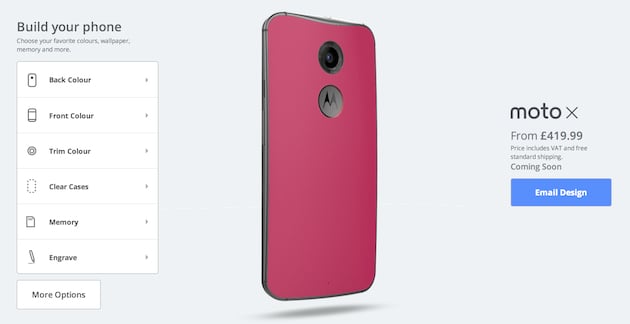
When the first Moto X was announced, one of the most touted features was the ability to customize your phone (almost) completely. This still exists with the new Moto X. You can choose the color of the back, with choices from a normal back, to a wood back, a leather back, and if buying from Verizon, a football back. You can choose the front plate from black or white, and you can choose the accent color of the metal on the power and volume buttons. You can also get something etched on the back, choose the wallpaper that’s set on the phone, and choose a custom phrase that appears when you power on the phone.
Even if you don’t get a Moto X, both the Moto G and Moto E have a plethora of back plates you can choose to change your phone, with the choice of adding a flap that covers the screen as well.
If nothing else, choice is at the forefront of Moto phones. I mean, why shouldn’t you be able to make your phone your own?

3. Added features that are actually useful
Motorola does add things to stock Android to keep it from being completely stock. However, the features that are added actually make the phone better. When you get a Moto phone, there aren’t 20 bloatware apps that take up space that you’ll never use. In fact, the features that are added on the Moto X can all be accessed from one app, aptly named Moto.
Starting with the Moto X, you have Moto Voice which allows you to interact with your phone without ever touching it. Yup, you can activate it and then command it without having to press the power button. This can be useful in a variety of situations, like driving or cooking. Adding on to customization, you can even have a custom launch phrase. Someone on AndroidGuys calls his “chalupa.” So if he wants to know what the weather is going to be during the weekend, but doesn’t feel like picking up his phone, all he has to say is “Hey chalupa, what’s the weather going to be like this weekend?”
Next is Moto Display, which uses the AMOLED screen on the Moto X to only power specific pixels needed to display notifications on the screen without powering it on. With the combination of four IR sensors on the front, all you have to do is wave your hand over the face of the phone and you can see, and then even interact with notifications you’ve received. This helps save battery so that you don’t need to power on the display just to dismiss a notification you don’t need.
Having a Moto X, I can tell you that having those features on my phone has completely changed the way I’ve used it, for the better. I don’t think I can ever get another phone that doesn’t have these features.
“However, the features that are added actually make the phone better.”
The last notable feature is Moto Assist, but this is available on the Moto X, G, and E. Moto Assist allows you to not have to worry about your phone during certain things throughout your day. It’s four modes, Meeting, Driving, Sleeping, and Home, all put your phone into a state that helps you in those situations. Meeting mode uses your calendar to automatically put your phone into a vibrate or silent mode whenever you have an event so that your phone doesn’t accidentally go off in the middle of an important meeting. Driving detects if you’re driving using GPS, and if your phone is connected to an aux jack or Bluetooth car stereo, it will automatically start playing music, and then if you get a text or phone call, the phone will launch into a voice controlled state and read out the message or the name of who’s calling you, and ask if you want to reply or answer the call, or just cancel. Sleeping will automatically set your phone on silent during certain hours you’ve set. Home detects when you’re home using GPS, and puts the phone in a similar state as driving so that you can be un-tethered from your phone while with your family. All of these have options to customize the settings, and if you don’t want a particular mode you can just turn that mode off completely.
 4. Software updates are quicker than any other company
One of the biggest problems that plague the Android OS is getting timely software updates. As mentioned earlier, companies all have their own UI they slap on to Android, so that when a new version of Android comes out they have to completely build their UI onto that new version.
However, one of the many benefits to having a phone with near-stock Android is that process of fixing a new Android version is a lot simpler. So, when KitKat was released to the companies in November 2013, Motorola upgraded their Moto X within two weeks. Some users with a Moto X received their update before Nexus users, which are the phones that usually get new versions of Android first! The new Moto X with Android 5.0 Lollipop was no different, with Motorola releasing the update 9 days after release of the OS to the companies. Up until this point, that was unheard of in the Android domain. The Moto G and E followed quickly with updates as well.

5. Prices that are competitive
When Motorola announced the Moto G in November 2013, the Android community was shocked. Here was a phone that had mid-range level specs, but cost the same as many budget phones at $179 off-contract. Even crazier, when reviewers started releasing their reviews, they had nothing but good things to say. All other phones of this cost gave Android a bad rep (because comparing a $150 Android phone to a $700 iPhone makes total sense), but the Moto G was a great example of Android at its finest in a cheap package.
The Moto G isn’t the only phone that’s worth talking about. Then even cheaper Moto E does something similar: provides a great Android experience for $129 off contract. Even the flagship, the Moto X, is cheaper than other flagships, starting at $500 off-contract. Most other Android flagships run for more like $650 off contract.
To top it all off, Motorola frequently runs discounts. Like right now, you can get a Moto X for $399 off contract until February 14, or $35 off a purchase of $249 or more. This won’t be the only one either. As the year goes by, there will likely be a half a dozen more sales, at least. Not to mention when they’re close to announcing a new flagship, the 2014 Moto X will likely get a deep price cut. Before the Moto X 2014 was announced, the Moto X 2013 was on sale for $349 off contract.
 6. Customer Service is known to be a positive experience

When something happens to a device, it’s hard enough to deal with the stress of having to get it replaced or fixed, let alone the dread of calling customer service to figure out your next steps. What makes it worse is when the customer service is rude or just says there is nothing they can do.
Motorola, however, is known for having good customer service. I often see on social media someone be pleased after interacting with Motorola customer service. They also are more likely to replace a broken device than most might think. I know of one circumstance when a user got their old Moto X replaced with a new Moto X. If having good customer service is important in a company for you, then Motorola has that covered.
Honorable mentions
Active on social media
Motorola is known to be active on social media. This isn’t really a reason to buy a device from them, which is why its an honorable mention, but its worth acknowledging because not only are they “hip” with social media, but they typically respond quickly to those who mention them on social media. If you don’t want to call them or email them, social media is another way to contact them to deal with an issue. Also, if for some reason you do have a bad customer service experience, pointing it out on social media should get you the attention you deserve. Motorola also does some fun giveaways on social media as well.
Based in the U.S.
Now before you get out your torches and pitchforks, hear me out. Motorola being based in the U.S. brings out some positives in a company. The quality of the service you get is more likely to be better. It’s a matter of quality vs quantity. I am aware that Motorola no longer produces devices in the U.S., but their employees are still heavily in the U.S. I know that there are great companies that come from other countries, but you cannot deny that U.S. based companies have a higher service expectation.
Overall, you are likely to get a better user experience from Motorola than any other company. Sure, there are other companies that have their positives, and make great devices. But at the end of the day, I’m arguing for the user experience, and there’s no denying that Motorola provides a great one.
(function() var script = document.createElement(‘script’);script.src = ‘https://stacksocial.com/widget.js?publisher=androidguys&type=editorial_post_widget_preferences’;script.async = true;var entry = document.getElementsByTagName(‘script’)[0];entry.parentNode.insertBefore(script, entry);)();
http://www.androidguys.com/pubgalaxy/728×90.html
The post 6 reasons your next phone should be from Motorola appeared first on AndroidGuys.
2014 Motorola Moto X getting Android 5.0 Lollipop update on US Cellular
Moments ago I shared that Lollipop is rolling out for the LG G3 on AT&T. Following suit today is an update to Android 5.0 Lollipop for the Moto X (2nd Gen, 2014) on US Cellular. The update is reportedly going out now in a staged roll out fashion and not everyone will have it appearing […]
The post 2014 Motorola Moto X getting Android 5.0 Lollipop update on US Cellular appeared first on AndroidSPIN.

5 of the best camera apps for the Nexus 6
Today, many people only own one camera and they always keep it in their pocket. It is their smartphone. This has caused phone manufacturers to constantly improve the cameras and camera software on their phones with each new generation, and developers focus on making camera apps that improve photo quality and add features to make smartphone cameras as useful as possible. Motorola put a great 13 megapixel camera in the Nexus 6, and today we are looking at the 5 best camera apps you can get on the Nexus 6.
A Better Camera

A Better Camera brings several great features to the Nexus 6 that other apps do not. It also takes advantage of Lollipop’s Camera2 API, but you do not have to be running Lollipop to download this app. A Better Camera offers both HDR photos and HDR video; however, the latter is not working on the Nexus 6 but is coming with the next update. Multishot allows you to take a group picture and choose the best face for each person, take a sequence shot, and remove unwanted objects from a picture. Preshot takes pictures before you press the shutter button to ensure you will not miss the shot. Best shot takes several pictures and automatically chooses the best one and deletes the rest. A Better Camera also includes a Burst mode and Night mode plus many other modes and options to fine tune your photo. For more experienced photographers, it also includes exposure bracketing, a live histogram, and the option to shoot in RAW. Of course, A Better Camera is not without its flaws. You cannot shoot video in 4K resolution, the time-lapse feature is not available in the Nexus 6, and the interface is not as appealing as other apps on this list. A Better Camera is free in the Play Store, but there are in app purchases that unlock other feature that some might find useful which can be purchased these individually or buy them all for $7.99.
Camera FV-5

Camera FV-5 is an app that gives you almost full manual control over your phone’s camera, but it also has some other goodies baked in. You have the option to adjust shutter speed, ISO, focus distace, and white balance. For those looking for a more professional experience will be glad to see the inclusion of light metering, exposure bracketing, and a live RGB histogram. One of the coolest features in Camera FV-5 is the ability to assign a camera function to the volume keys. In other apps, you can use the volume keys to take a picture, but in this app you can use them to control different setting in the camera. You can assign you most used setting, such as shutter speed, to the volume keys to that you can raise or lower it by simply pressing the buttons. Another feature that some will find appealing is the option to do a time-lapse. While Camera FV-5 has some great features, it also has its downsides. While there is a video camera icon in the app, video recording is not available. Touching the icon will simlpy give you the option to install a separate video app. Also, the Lite version will only take pictures up to 640×480 resolution. To unlock higher resolutions, you have to buy the Pro version. Camera FV-5 has the ability to shoot in RAW, but the Pro version is also required for that. It is also not the most visually appealing camera app out there. However, if you want a plethora of options and are up for shelling out a few bucks, you can pick up Camera FV-5 Lite free and Camera FV-5 Pro for $3.95 in the Play Store.
Google Camera

Google Camera is the stock camera app that comes preloaded on the Nexus 6, but that does not mean that it is bad. Google Camera has several cool features that you simply will not find on the other apps in our list. One is Lens Blur which allows you to blur the background around an object in the center of the photo. Photo Sphere is another feature that allows you to take a full 360-degree photo in the shape of a sphere. Google Camera also has one of the best panorama modes out there. It gives you the option to shoot video in 4K resolution and take HDR pictures. The shutter is extremely fast with almost no time between touching the shutter button and taking a picture. While Google Camera has several great features, it is also missing many features that other camera apps include such as control over white balance, shutter speed, ISO, burst mode, scene modes, and full camera control. If you are looking for an easy to use, beautiful camera app that just works, you do not need to look further than Google Camera which you can get free in the Play Store.
L Camera

L Camera is different from the other camera apps on this list because it is not available on the Play Store. You have to download the APK from their website and install it from there. Also, L Camera is an experimental app that demonstrates and tests the new features in Lollipop’s Camera 2 API which means you have to be running Lollipop to use it. With L Camera, you are given the option for manual control over focus distance, shutter speed, and ISO. You can take pictures in RAW format and record in 4K which are both useful options. You also have the option to record video at 60fps in 1080p. One of the most appealing features of L Camera is its use of Material Design. The app looks amazing and takes Google’s new design language into account with every detail. Since this app is experimental, there are several functions that are simply not there. You do not have the option to control white balance, there is no photo review, there is no flash control, and no portrait orientation. Since the developers are constantly working to sort out every bug and bring new features to the app, it will definitely be updated to include more options. Unfortunately since it is not on the Play Store, you will have to go check their website periodically to check for new updates. All that being said, L Camera is still a fantastic looking and operating camera app that takes full advantage of the Camera2 API even though it may be lacking some features. You can get L Camera free from their website.
Manual Camera

Manual Camera is currently my favorite camera app out there. This app takes advantage of Android Lollipop’s new Camera2 API which causes photos to look even better. The best part about Manual Camera is that it give you full manual control over your camera’s settings. You can control exposure, shutter speed, ISO, focus distance, and white balance. White balance is not working on the Nexus 6, but that should be fixed in a later update. You are also given the ability to capture pictures in RAW format which many will find extremely useful. On of the best features of this application is the selection wheel. When you choose a setting you want to change such as shutter speed or focus distance, you can change them by rotating a wheel in the bottom right. This is extremely well implemented and makes the app fun and easy to use. Overall, the app looks and functions very well, but there are some downfalls. As I mentioned, white balance is not working yet on the Nexus 6. Also, there is no video mode so you will need a separate video app if you want to record any. The app also requires Lollipop and, according to the description, only the Nexus 5 and Nexus 6 work well with this app. That being said, if you are using the Nexus 6 and want full control over your camera and a great looking camera app, you should pick up Manual Camera for $2.99 in the Play Store.
These 5 camera apps give you the best control of your new Nexus 6’s camera and several take advantage of the new Camera2 API that was introduced with Lollipop. Give one or all of them a try and leave a comment telling us your favorite one. If we missed your favorite camera app, tell us down below in the comments, too!
(function() var script = document.createElement(‘script’);script.src = ‘https://stacksocial.com/widget.js?publisher=androidguys&type=editorial_post_widget_preferences’;script.async = true;var entry = document.getElementsByTagName(‘script’)[0];entry.parentNode.insertBefore(script, entry);)();
http://www.androidguys.com/pubgalaxy/728×90.html
The post 5 of the best camera apps for the Nexus 6 appeared first on AndroidGuys.
Best Buy reveals the next Moto E gets 4G and a price cut

Motorola’s tactic when launching last year’s Moto E was to let it appear on Brazilian retailer FastShop for a few hours, and then whip it away as soon as people began to notice. Looks like it’s another case of history repeating with the refreshed version of the low-end handset, with a listing popping up on Best Buy only to disappear shortly afterward. If the since-pulled listing can be believed, however, then the device is about to get around $30 cheaper and significantly more powerful than the 2014 vintage.
The 4.5-inch 960 x 540 display remains unchanged, but whereas before there was just a 4GB storage and no 4G, you’ll now find 8GB and an LTE modem. Even better is that the price has fallen from $129 down to just $99, at least if you buy the prepaid version on Sprint. When we played with the original, the ridiculously low price was enough to send us googly-eyed with excitement, so if the above is true, it’s hard to see how this new edition will be anything other than a hit.
Filed under: Cellphones, Mobile, Lenovo
Via: PocketNow, Pocket-lint
Source: Best Buy (Pulled), Android Police

Motorola Moto E (2015) for Sprint listed on Best Buy’s site

Pretty soon, we expect Motorola to announce the next version of its affordable Moto E handset. A product page went live earlier today on Best Buy’s site showing that the device would cost $99. This specific listing is for the Sprint variant as a prepaid option. Also, specifications and images of the device were included. The Moto E (2015) does not seem to have changed all that much compared to its predecessor.
Hit the break for specifications and images of the device.
Specifications listed by Best Buy:
- 4.5-inch display (960×540)
- Quad-core processor clocked at 1.2GHz with 1GB of RAM (from Qualcomm)
- 5MP rear camera / VGA front camera
- 8GB internal storage with microSD card slot for an additional 32GB
- Android 5.0 Lollipop


Source: Best Buy
Come comment on this article: Motorola Moto E (2015) for Sprint listed on Best Buy’s site

Best Buy website outs the Moto E (2nd gen)

While the Moto X and Moto G lines were refreshed in late 2014, the Moto E has yet to follow suit with an update, until now. Out of the blue, it seems that Best Buy has now listed up the Moto E 2nd gen, despite the fact that Motorola has yet to announce it.
The model listed on Best Buy’s website is for Sprint Prepaid and appears to be powered by a Qualcomm 1.2GHz processor, likely a Snapdragon 200. There’s also 1GB RAM, 8GB storage with microSD, a 5MP rear shooter, VGA front cam, a 4.5-inch display with 540 x 960 resolution, Android 5.0 Lollipop and allegedly the phone has support for both 3G, 4G and 4G LTE. The Best Buy listing also says the phone is 5.12×2.64x.47-inches and weighs in at 5.04 ounces. The claim of LTE support is pretty interesting, especially considering the Moto G (2nd gen) doesn’t offer LTE, although an optional LTE model did recently surface.
Much like the Moto G’s successor, the next-gen Moto E isn’t a massive update from the original, though it appears to be a more sizable upgrade than the Moto G (2nd gen) was. Some of the notable changes include increasing hte size from 4.3-inches to 4.5, going from 4GB to 8GB storage, and the addition of a VGA front cam. Oh, and LTE — if that part of the spec sheet is accurate.
While the Best Buy listing appears to be live, there’s no shipping options outside of site to store and no stores appear to have it stocked. It’s possible that Motorola’s announcement is just around the corner and Best Buy simply jumped the gun, or perhaps the phone’s launch will simply be a quiet one.

Motorola’s Osterloh thinks Samsung could fade away as leader in smartphone market

The story is not an unfamiliar one – market leader stagnates in the top position while competitors continue to stay sharp and eventually the leader fades away. Two recent examples come to mind – Nokia and Blackberry. Only a decade ago, those two names ruled in the cell phone market, but today the two of them are on life support and on the verge of being consigned to the history bin. Motorola’s president Rick Osterloh thinks Samsung could be in the same position and Motorola is poised to step into the top position.
No doubt Samsung has built a large empire in the smartphone and mobile device market, easily rivaling their closest competitor Apple and blowing away other manufacturers. Despite that success, 2014 was not a good one for Samsung and many are wondering whether the company is on the precipice of a fall.
Meanwhile, after spending some time under Google’s umbrella where their operations were somewhat limited, Motorola is now a part of Lenovo and has big plans to start expanding to new markets starting this year. One of those key markets will be China where buyers expect top-performing smartphones without the premium price.
Osterloh thinks Motorola is positioned to capitalize on a potential changing of the guard:
“Every seven years, the person who’s been on top of the market has gone away. We are going through one of those fascinating shifts where people are starting to realize that you don’t need to pay $600 for a top-tier phone to get a top-tier experience.”
Under Google, Motorola started down a path where they de-emphasized specs in favor of enhancements to the user experience. While top hardware is back in the mix to some extent, as shown by Motorola plans to use a Snapdragon 810 chip in a new flagship device for 2015, the company hopes to take the smartphone to new levels that includes offering better value for buyers without sacrificing performance.
Do you think Motorola will challenge Samsung for the top spot or will that come from other upstarts like Xiaomi?
source: Forbes
Come comment on this article: Motorola’s Osterloh thinks Samsung could fade away as leader in smartphone market
Oh snap: Motorola chief suggests Samsung, like Nokia and Blackberry, will fade away in the future
In case you haven’t heard, Motorola has had a great quarter. While it hasn’t yet translated to profit for its now-parent company Lenovo, it’s innovation and growth is almost back to Motorola’s heyday, and people are starting to take notice. But with the rise of multiple manufacturers, including Motorola, there has to be someone who […]
The post Oh snap: Motorola chief suggests Samsung, like Nokia and Blackberry, will fade away in the future appeared first on AndroidSPIN.
A 2nd gen Moto G with Android 5.1 gets spotted in a dark, dark room
This week has been unusually interesting, and MWC 2015 is still a month away. Yesterday, it was pretty much made official that Android 5.1 is going to be the next update to Android Lollipop after it was seen both on Google’s own Android One website and on actual Android One devices in Indonesia where they […]
The post A 2nd gen Moto G with Android 5.1 gets spotted in a dark, dark room appeared first on AndroidSPIN.

[Deal] Motorola taking $100 off purchases of $499 or more even without coupon code

So you missed out on obtaining a coupon code from Motorola for Valentine’s Day. It’s alright! There is still an opportunity to save money on Motorola products. The company is taking $100 off of purchases totaling $499 or more from now through February 14 and a coupon code is not required. It is not the $140 that the coupon code would save, but $100 is better than nothing. Just make sure your cart is at least $499 before checking out and enjoy putting some money back in your pocket.
Source: Motorola [Moto Maker]
Come comment on this article: [Deal] Motorola taking $100 off purchases of $499 or more even without coupon code
 AIVAnet