


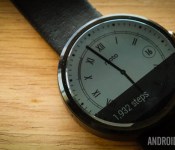
Moto 360 hits Google Play for those in Germany, France, Canada and 4 others

The Moto 360 might not be the only circular Android Wear watch in town these days, but it still remains one of the best AW watches around, despite shortcomings like its flat-tire display and less than perfect battery performance. For those in the US, the Moto 360 has been available both through Google Play, the Motorola webstore and many other retailers for quite a while now. For those outside the US, while there are many channels (including Moto’s store) that offer up the watch, Google Play hasn’t been an option — until today.
Google has now updated its support page to list several new countries where the Moto 360 is hitting Google Play. Specifically we are talking about Canada, France, Germany, Italy, Netherlands, Spain, and the United Kingdom. While the addition of Google Play as a retailer might not make a big difference from some, it’s still nice to see Google offering the watch directly in more markets.
Keep in mind that just because the support page has been updated doesn’t mean all these markets now have the Moto 360 ready for purchase. We are hearing reports that several of the above countries merely have a listing that says “coming soon”, though hopefully it isn’t long before the watch is stocked and ready to go.
22 best Android Wear watch faces
Android Wear is starting to come into its own. The latest round updates added unprecedented smoothness and reliability and the upcoming hardware is both more stable and more stylish. Of course, one of the most important things you’ll need to find is an Android Wear watch face. You’ll look at it more than anything else so you should find one that suits your needs. Here are the best Android Wear watch faces.
To see the best Android Wear apps, click here!
 500px
500px
[Price: Free]
500px is actually a wallpaper application where you can find some of the best photography out there and use it as your background. One of the more recent updates added an Android Wear watch face so you can take the gorgeous photos you find on 500px and put them directly on your smartwatch. The layout is minimal but the photos are gorgeous and it is free without in app purchases so you can enjoy it without spending a dime.


 About Time Watch Face
[Price: $0.99]
About Time Watch Face embraces a minimal design with some smooth animations and a classic set up. It’s an analog style watch face with separate minutes/hours and seconds dials as well as some fun gear animations to give it that expensive watch feeling. It is only for round smartwatches so rectangular watch owners will have to keep looking. It’s designed in a way where the notifications don’t mess with the clock face and that’s important too.
 Battery Watch Face
[Price: $0.99]
Battery Watch Face is a minimal watch face that shows the basics and that includes the time, date, and, of course, the battery level. You can customize the color to suit your tastes and it’s a great option for people who want to keep it simple but informative. If you purchase this watch face, you’ll also get Wear Battery Stats free of charge so you can take advantage of all of the battery monitoring features.

 Chrono Watch Face for Wear
[Price: Free / $1.50]
Chrono Watch Face for Wear was one of the earlier watch faces to come out and it remains one of the more popular options now. It features a simple analog-style interface and you can customize the colors to your taste. You’ll also see the battery stats for both your phone and your watch along with the date. It also features 12/24 hour modes, a seconds hand, Samsung Gear Live monochrome mode, and it’s been specially designed to prevent battery drain and burn in.

 Despicable Watch Face
[Price: $0.99]
Despicable Watch Face is here because really, who doesn’t love minions? It also shows how whimsical and fun a watch face can be which is surprisingly rare. It’s a fairly basic watch face and comes with the time and a picture of a minion. It does have a few issues, including no 24-hour mode and no date options. It partially makes up for these by having some fun and goofy animations.

 Facer Watch Face
[Price: $1.00]
Facer earned early fame in the watch face game by allowing users to customize and create their own watch faces. It’s even better because those designs can be exported, shared, and imported elsewhere. Thus, a small community of watch themers have created a bunch of Facer watch options and there’s even a subreddit. There are some smaller bugs like some information becoming unsynced but it’s a solid option, especially if you like to change things up often.

 Human Time Watch Face
[Price: Free]
Human Time Watch Face is a simple text-based watch face. Instead of having dials or numbers, it simply says what time it is in text. There are 10 fonts and each one can be bolded, italicized, or both. You can also change the position, add a shadow, control capitalization, and you can choose whether or not to show the date. It’s very simple but effective and customizable. It’s also totally free.

 InstaWeather for Android Wear
[Price: Free with in app purchases]
InstaWeather for Android Wear is a set of watch faces that focus on showing you the weather as well as the time, date, and sometimes the battery. There are roughly half a dozen watch faces to choose from that showcase the weather in different ways. The app itself also doubles as a weather app complete with weather radar support. You can also get weather alerts for snow/rain, and there are a number of other small features you can play with. Do beware, the app is confusing when you first use it but it works well once you get the hang of things.

 Krona Sunlight Watchface
[Price: $1.69]
Krona Sunlight Watchface is another watchface that shows you the weather. This one is a little more sleek and minimal than InstaWeather and useful for people who don’t want a gaudy design. It shows things like temperature, cloudiness, precipitation, and the times of the sunrise and sunset. One of its most unique features is the ability to save the weather for 24 hours so even if your phone loses Internet connectivity, you can still get the weather forecast on regular intervals.

 Military Digital Watch Face
[Price: $1.45]
Military Digital Watch Face takes the old school style of military digital watches and puts it on your Android Wear smartwatch. It shows the time, complete date, battery life on both your phone and watch, and finally it shows the step count. On the downside, this is only for circular watch faces so only the Moto 360 and LG G Watch R. It’s a shame it doesn’t support rectangle watches but nevertheless, it’s a great design.
 Muzei Live Wallpaper
[Price: Free]
Muzei Live Wallpaper has garnered a positive reputation for being the best live wallpaper for viewing classic art like The Starry Night or The Mona Lisa. As it turns out, Muzei also comes complete with its own Android Wear watch face that pretty much does the same thing. The layout is basic so don’t expect a lot of features but if you’d like to see various pieces of classic art, there’s no better app available than this one.
 PAC-MAN Watch Face
[Price: $0.99]
Fans of old school gaming can get a bit of nostalgia out of a watch face that features the world’s hungriest hero. The PAC-MAN watch face is simple but features some tasteful PAC-MAN graphics that includes the border that features characters from the game down to the time itself, which is in an 8-bit style font. It’s very basic and doesn’t include things like the date or a battery monitor but if you dig simplicity and the 8-bit days, this is a good way to go.

 Pujie Black, Pujie Blue, Pujie Red Wear Watch Face
[Price: $1.27, $1.00, $1.00 respectively]
The Pujie colleciton of watch faces feature a variety of designs and customization options in three colors. It sucks a little bit that they all come in different apps but if you don’t like two of the colors, then you’ll probably save money buying just one. Each app has a small set of presets to show you to the kind of stuff you can do but you can ultimately customize the watch to your tastes. There are 13 analog and a totally customizable digital clock to start you out and then you can change a bunch of stuff. It’s not quite as deep as Facer but it’s still a good option.
 Ranger Military Watch Face
[Price: $0.99]
Ranger Military Watch Face is another military-style watch face with a simple but beautiful design and some nifty features. You can view weather, the seconds hand, compass, step tracker, battery levels, and date. The compass and weather is a little finicky but otherwise everything works well. There is also a night-mode that illuminates the watch in green. It’s a solid option for fans of analog watch faces.

 Skymaster Pilot Watch Face
[Price: $0.99]
Skymaster Pilot Watch Face is a more sophisticated option for Android Wear owners. Aside from its astounding design, you can see the time, date, battery indicator, and weather which is supplied by OpenWeatherMap. This is a fairly simple watch face so there aren’t many customization options and what you see is pretty much what you get. This isn’t necessarily a bad thing and it is a really good looking watch face.

 Speeds Pro Watch Face
[Price: $0.99]
Speeds Pro Watch Face is another analog style watch face with some unique features. You can see the time, date, the seconds hand, step counter, weather, and battery indicator. There is also a feature that shows you how fast you’re going. It only displays in MPH which will turn off a lot of people and reports are that it does use quite a bit of battery. Aside from those issues, it’s a solid watch face that looks nice.

 StarWatch Watch Face
[Price: $0.99]
StarWatch Watch Face is the watch face to get for fans of space, the cosmos, and the stars. The watch face features a the time and date and you can set it between 24-hour mode and 12-hour mode. The big feature is that the app always shows the stars that are directly above you in a star map format. It looks beautiful and even shows the location of plants and the sun. The image changes based on what time of day it is and what time of year it is.

 Station Watch Face
[Price: $0.99]
Station Watch Face is the initial release of all-star icon themer Tha Phlash. It features a fantastic design that can be customized in red, blue, or green and there are a number of other customization features. It shows the time and date as well as the battery level and you can set it to show other things as well. It’s a solid design with a good layout and it works on both circular and rectangular watch faces.

 Timeless Wear Watchface
[Price: Free]
Timeless Wear Watchface is a simple digital watch face. It shows the time along with the seconds in both 12-hour and 24-hour formats. There is also an option to keep the background black for battery saving purposes or you can have it show a wallpaper for a bit of extra flair. You can also show the date, change where the clock is so it doesn’t interfere with the “Okay, Google” or notification cards, and you can add custom backgrounds if you wish.
 Un Petit Monde Watch Face
[Price: Free]
Un Petit Monde translates to “a small world” and this is one unique watch face. It does the basics like showing the time and date but the background is actually a stop motion video that sort of tells the story of an adventurer named Moses. The animations correlate with the time of day so night time will bring night scenes and day time will bring day scenes. The stop animation videos are a nice touch even if they burn the battery a little bit.

 Watch Face Minimal & Elegant
[Price: $0.99]
Last on our list for now is Minimal & Elegant. It’s a unique spin on the digital watch face where the hours and minutes are in rows instead of the standard style. It is, as the name implies, actually kind of elegant. It also shows the date and the battery levels for your watch  and phone (P). It also comes in 12-hour and 24-hour formats, and you can view the time in text instead of numbers.

 WatchMaker Watch Face
[Price: Free / $0.99]
WatchMaker Watch Face is the biggest competition to Facer that you can find. Much like Facer, you can create and customize your own watch faces to make them look, feel, and act how you want them to. Some of the more unique features include calendar support, weather, GIF support, compass, and plenty of other features you can’t find anywhere else. Also like Facer, you can find watch faces made by others if you don’t feel like making your own. It’s great for tinkerers and for those who want to try to make their Wear experience their own.

Wrap up
If we missed any great Android Wear watch faces (and we likely did), let us know in the comments!
To see our complete list of Android apps and games lists, click here!
Tha Phlash branches out with new STATION watchfaces for Android Wear devices
Tha Phlash is a name that many of you are probably very familiar with. Over the years he has constantly brought us more icon packs than I’d like to count or even think about. His attention to detail and creative mind is insane. While there are many icon designers out there that do some amazing work, […]
The post Tha Phlash branches out with new STATION watchfaces for Android Wear devices appeared first on AndroidSPIN.
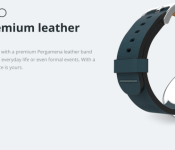
DODO premium leather straps for Motorola Moto 360 now available

A new set of straps are available directly from Motorola for its Moto 360 smartwatch. The premium leather straps come from DODO in four different color options: blue, green, red, and tan. The product listing says that the DODO premium leather straps are suitable for day-to-day use or formal attire. The price is set high at $59, but that is expected for something labeled as premium leather.
Hit the break to see each DODO strap color option.


Source: Motorola
Come comment on this article: DODO premium leather straps for Motorola Moto 360 now available
Motorola now selling four new DODO leather watch bands for Moto 360

Motorola has just added four new leather watchbands to their online store for the Moto 360. The bands are made by popular leather accessory maker, DODOcase. The new band options are available in Blue, Green, Red and Tan, and are being sold for $59.99. This might seem a little pricey, but considering DODOcase products usually have great quality, they’ll likely last for a very long time.
Back when Motorola announced more leather and metal bands, we knew DODOcase was planning some bands for Moto’s watch. We also heard that TYLT was planning to make colorful silicone bands, so we’ll have to wait to see when those arrive.
If you’re interested in grabbing one of these watch bands, head to the Motorola link below.

The Moto 360 is still one of our favorite Android Wear watches to date. Its (mostly) circular design, stainless steel chassis and premium leather and metal band options really make for a sleek watch that doesn’t look like you’ve strapped a computer to your wrist. Want to learn more about the Moto 360? Check out our full review!
TWRP gets updated to version 2.8.4 with Moto 360 and LG G Watch R support
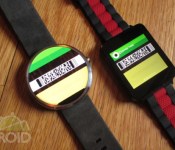
 The Team Win Recovery Project has been updated to version 2.8.4, bringing several new features and enhancements. One of the biggest new things introduced with the update is the support for Motorola’s Moto 360 and LG’s G Watch R.
The update will now let power users flash boot and recovery images directly through TWRP’s GUI, and if you’re using the recovery on a smartwatch, you can use the power button to back up one screen. Other than that, there are lots of bug fixes and small tweaks to improve stability, so even if you aren’t planning on using this on one of your newer smartwatches, it’s still worth it to grab the update.
source: TWRP Moto 360
via: Android Police
Come comment on this article: TWRP gets updated to version 2.8.4 with Moto 360 and LG G Watch R support
The state of smartwatches in 2015: perception vs. reality, and the Apple Watch
CES 2015 has come and gone, and for another show, there was a huge emphasis on the wrist worn wearable, something which we’ve come to colloquially refer to as the “smartwatch“. So what exactly is the state of smartwatches in 2015? Are we at the point where it’s a mainstream consumable and people know what they […]
The post The state of smartwatches in 2015: perception vs. reality, and the Apple Watch appeared first on AndroidSPIN.
Looking forward: What will we see from Android in 2015?
2014 was a great year for Android, so 2015 has a lot to live up to. A lot of great new stuff was released last year – like Android Wear and Android 5.0 – that have set the stage for what should be a very exciting year, and we’ve given our top 3 things that […]
The post Looking forward: What will we see from Android in 2015? appeared first on AndroidSPIN.
The Choose Your Own Android Smartwatch Giveaway: Moto 360, G Watch R and more

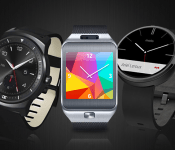
Though Android Wear smartwatches are futuristic and stylish, they’re still a little bit pricey. If you’ve had your eye on one of the first generation Android Wear devices (and we know you have), today might be your lucky day. StackCommerce is giving away an Android smartwatch. The best part? You get to choose which one you win!
To enter, simply head to the giveaway page and enter your email address to win your choice of one of these Android Wear Devices:
- LG G Watch R
- Motorola Moto 360
- Samsung Gear Live
This is a super easy way to win one of the best smartwatches on the market. The contest will be open for the next five days, so be sure not miss out! Head to the giveaway page to enter now.
Editor’s Note: This deal is through StackCommerce, in partnership with AA Deals Store and other StackSocial partners — and not an exclusive Android Authority contest.
Moto 360 Now Available Through T-Mobile Online, Hits Stores November 19th
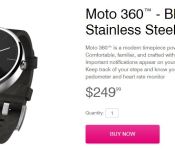
T-Mobile has announced that the Moto 360 can now be picked up beginning today online for the usual $249.99 price tag. As with all thing Uncarrier, you can get it for $0 down and pay $10.41 per month with the final payment being $10.56 of the 24th month.

As you can see in the image above, it is only for the black and stainless steel variant of the device. If ordering online through the carrier isn’t your cup of tea, T-Mobile will also be selling the Moto 360 in select stores on November 19th. It will carry the same price tag and also in the black stainless steel combo.
Bounce on over to T-Mobile.com right now if you want to place an order.
Source: T-Mobile
//<![CDATA[
ord = window.ord || Math.floor(Math.random()*1E16);
document.write('‘);
//]]>
The post Moto 360 Now Available Through T-Mobile Online, Hits Stores November 19th appeared first on AndroidSPIN.
 AIVAnet