


Microsoft caves and gives 15GB back to legacy OneDrive users

Free cloud storage is great. That is until you’ve added it to your workflow and the amount of storage you have is being reduced by Microsoft. That’s what happened to OneDrive users. In November, Microsoft announced that the 15GB of free storage it was offering was being reduced to 5GB. Naturally folks got pissed. One post about the reduction in space generated over 72,000 votes on a OneDrive forum. That got the company to backtrack (sort of) and is offering legacy customers with 15GB the chance to keep all that room in the cloud. But they have to opt-in by January 31.
In a response to the forum post, Douglas Pearce, Microsoft group program manager apologized to OneDrive customers and even announced that those opt-in to keep their free 15GB of storage will also be able to keep their 15GB of camera roll bonus storage. He posted, “we are all genuinely sorry for the frustration this decision has caused and for the way it was communicated. Thank you for sticking with us.”
So be sure to sign up to keep your 15GB of free storage and the additional 15GB of camera roll storage. Or come January 31, it’ll be reduced to a measly 5GB.
[Image credit: Nattapong Kiatmongkollert / Alamy]
Via: Windows Central
Source: OneDrive
Microsoft Band 2 gets new music controls and activity reminders

If you own one of Microsoft’s latest wearable, the Band 2, today is good day. The company has revealed a few fresh features for the device, designed to make it smarter and more functional. For starters, there are new music controls, which will let you play, pause or skip music tracks directly from your wrist.
In addition to that, Microsoft added support for activity reminders, while an improved Exercise Tile makes it easier to track burned calories, heart rate and workout duration. This update should be rolling out already, so be sure to install it on your Band 2 as soon as possible.
Source: Microsoft
The tech industry teams up to take on Donald Trump

Inexplicable presidential candidate Donald Trump has spoken loudly about his distaste for immigration, as well as the mass-deportation he would institute if elected. That puts him squarely at odds with much of the tech industry, which is pushing for immigration reform and a pathway for undocumented immigrants to gain citizenship. Now, lobby group FWD.us has released an emotive video speaking out against Trump’s dystopian vision by showing the human cost of such a policy.
The clip is entitled The Truth of Mass Deportation and features figures like Sophie Cruz, the five-year old who asked the Pope to prevent the deportation of her parents. The video shows how families would be torn apart, especially when immigrant parents with citizen children could be forced to leave the country. The group also wants to make the point that the people targeted often have valuable skills, and FWD.us believes that, if given citizenship, they’d contribute $329 billion to the economy.
The move comes a day after Mark Zuckerberg announced that he’d stand up for the rights of communities like the one Trump seems to enjoy monstering in public. FWD.us is often spoken about in the same breath as the Facebook CEO, but it was co-founded by Bill Gates, Sean Parker and LinkedIn’s Reid Hoffman. The group can also call upon the founders, CEOs and/or major names from a whole host of brand-name tech firms like Google, Qualcomm, YouTube, Instagram, Netflix, Yahoo, AirBnB, Evernote, Jawbone, Zynga and even Aol.’s own Tim Armstrong. Amazon’s Jeff Bezos isn’t a signed member of team FWD, but we can imagine where his sympathies (and rockets) would lie if this went to a fist-fight.
Via: The Hill
Source: FWD.us (YouTube)
Microsoft officially launches Cortana for Android today
(adsbygoogle = window.adsbygoogle || []).push();
Microsoft‘s take on the virtual assistant, Cortana, has spent some time since July in beta on mobile devices, but it appears Microsoft is ready to officially announce its launch. Cortana for Android is officially available from the Play Store today and is compatible with all Android devices with Android 4.1.2 and higher – the only catch is that Microsoft is restricting access to the US and China for now; hopefully a global rollout is on the cards soon.
If you’re wondering why we’re bothering to talk about another virtual assistant at all, Cortana is slightly different in that it’s designed to link your mobile device to your Windows 10 PC – with the help of the Phone Companion app on your PC, you’ll be able to make the most of your phone-PC link like seeing missed calls on your PC. Like Google Now, Cortana also allows for personal tracking of flights and reminders and all that good stuff.
http://playboard.me/widgets/pb-app-box/1/pb_load_app_box.jsMicrosoft also made another interesting announcement which is that in the latest version of Cyanogen OS, users will be able to say “Hey Cortana” and trigger Cortana’s search function, much like saying “OK Google” on an Android device. Apparently this feature is going to be introduced first on the Cyanogen OS-powered OnePlus One sometime in December with the 12.1.1 update.
What do you think about the launch of Cortana for Android? Let us know your thoughts in the comments below.
Source: Windows Blog via engadget
The post Microsoft officially launches Cortana for Android today appeared first on AndroidSPIN.
Uber upgrades Windows app with Cortana, desktop support

You can pick up your phone and call-in a car-on-demand anytime, but what if you’re sitting at a desktop PC? Well, now you can do it there, too. Uber announced today that it used the Universal Windows Platform to port its app to full Windows 10 — making it possible for customers to call cars from their laptops, tablets and desktop computers.
Sadly, the desktop version of the app can’t stand alone: Uber says customers will still need to use their mobile device to complete a trip. At least the phone experience is getting an upgrade, too — the new app adds Cortana voice commands (“Hey Cortana, get me an Uber to Central Park”) and live tile support, letting Windows users see when their car is arriving without actually opening the app. Not good enough? Fine: Uber is giving away a free ride (a credit up to $20) to new users of the Windows app if they use the code MSFTWIN10 under the promotions tab. How’s that for an update?
Source: Microsoft
Microsoft officially launches Cortana on Android

After a few months of beta testing, Microsoft has finally launched its Cortana digital assistant application on Android. Microsoft launched a closed beta test for the app back in July, then opened it up to the public later in August. Now the voice assistant is available for all to download from the Google Play Store.
With Cortana on Android, you’ll be able to set location and time reminders, track packages, and get all kinds of information and answers whenever you need it. And if you own a Windows 10 PC, Cortana will help you out even more. The voice assistant will allow you to send text message replies from your PC, which will definitely come in handy for many users out there. If you’ve been using Cortana beta for the past few months, there aren’t really any notable new features that come along with this stable release.
 See also: “Hey Cortana” may give “OK Google” a run for its money on Android
Additionally, Microsoft has announced that Cortana will be included in the OnePlus One’s upcoming Cyanogen OS 12.1.1 OTA update later in December. This means Cortana on the OnePlus One will be able to toggle network modes, power down your phone, and even turn on Quiet Mode. OnePlus One users will also be able to say “Hey, Cortana” from any screen (even from within another app) and the voice assistant will answer. Other Android users can use this functionality as well, though they need to be in the Cortana app or on their home screens.
Cortana is now available in the Play Store, so hit up the link below if you’re interested! Have you been using Cortana? If so, how are you liking it?
Cortana exits beta, gets built in to Cyanogen OS
Cortana, the virtual assistant from Microsoft has officially left beta and will now be readily available for anyone to use across Windows, iOS and Android.
Microsoft bills Cortana, named after the Halo character, as a personal assistant with personality. Now you’ll be able to use Cortana cross platform to do things like set location based reminders one one device and have it pop up on another, get missed call alerts and respond to text messages on your Windows 10 computer, and track flights and packages.
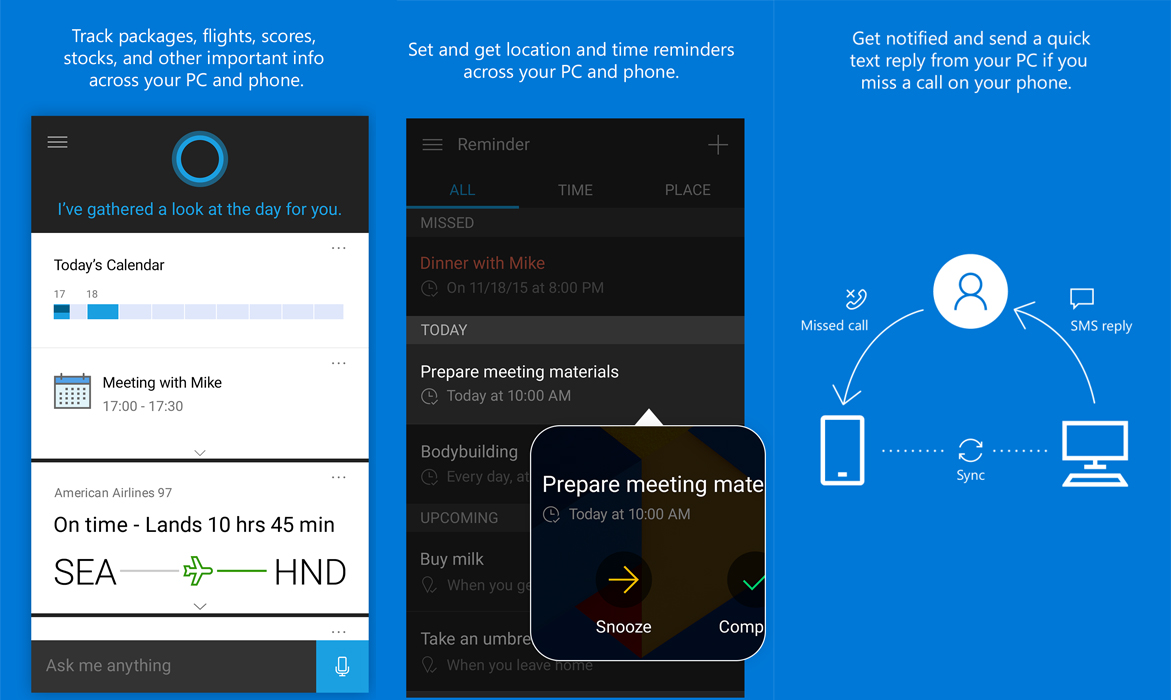
Microsoft says that Cortana will come with the same personality and features on mobile that it does on desktop. One of the main selling points of Cortana is the ability to give contextual suggestions for people, places and things that may interest you. Now the information and searches you use on one device will follow you to other devices so you’ll be able to pick up where you left off.
Even though Cortana will be fully featured on iOS and Android, due to some system limitations, it won’t be able to do some actions like toggling system settings or opening apps.
Another exciting tidbit is that on Cyanogen OS phones will now integrate Cortana much like Android Now is integrated into almost all Android Phones. You’ll now be able to say “Hey Cortana” from any screen and have the personal assistant pop up, ready to serve. With the increased integration comes more options. On Cyanogen OS phones you’ll be able to ask to have your phone powered down, enter Quiet Mode or have it toggle network modes.
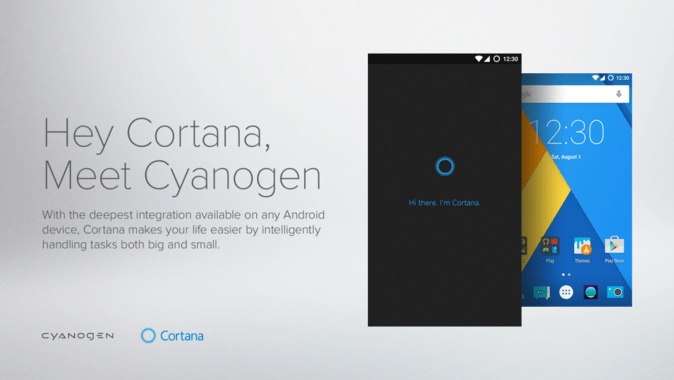
All of this is good news to those that find they like a little bit of personality in their personal assistant, but don’t want to jump over to iOS for the increasingly unreliable Siri.
Source: Microsoft
The post Cortana exits beta, gets built in to Cyanogen OS appeared first on AndroidGuys.
Cortana for Android officially debuts today

Cortana for Android, Microsoft’s own digital assistant, has left its public beta and is now officially available on Android. Cortana for Android will do just about anything Google Now can do, and more if you have a Windows 10-based computer.
Microsoft’s digital personal assistant will allow users to set reminders, appointments, and even dish out suggested interests. The big thing that differentiates it from Google Now is that those with a Windows 10-powered PC can send a text message reply when you miss a phone call on your smartphone.
The goal isn’t to recreate another Google Now, but to truly construct a connected and seamless digital assistant that is available to users wherever they are, whether that be on the PC or various mobile platforms like Windows Phone, Android, and iOS.
Microsoft released the public beta of Cortana for Android back in August and has been hard at work polishing it ever since. Microsoft around the same time began the public beta for iOS as well, which also came out of public beta and became official today.
Cortana for Android and iOS is also debuting in China today, allowing even more users to have a true digital assistant connection between their PC and mobile phones.
“With a Windows 10 PC in the mix we think we can do some pretty powerful things,” Marcus Ash, Microsoft’s Cortana program manager, told The Verge.
Cortana for Android and iOS won’t be everything it can be on these platforms, simply because of the developer restrictions. For instance, users won’t be able to say “Hey Cortana” to activate the digital assistant. That said, Microsoft is partnering with Cyanogen to make that possible on Cyanogen-powered smartphones.
Microsoft and Cyanogen’s partnership will also let Cortana toggle network modes, enable quiet mode, and other system features that aren’t accessible due to those aforementioned developer restrictions.
Aside from the partnership with Cyanogen, Cortana works best on Windows Phone since Microsoft is able to build it into the system on its own mobile operating system. Using Cortana on Windows Phone also opens up a much more seamless experience with Windows 10-based computers.
Despite developer restrictions, Microsoft will continue to update and polish Cortana for Android and iOS to make it the best digital assistant that it can be.


via: The Verge
Come comment on this article: Cortana for Android officially debuts today
Microsoft Launches Official ‘Cortana’ App for iOS and Android Devices
Microsoft today officially launched its virtual assistant Cortana as a downloadable app for iOS and Android platforms (via Business Insider). Similar to Apple’s Siri personal assistant, Cortana allows Windows users to set reminders, preview the weather, and answer basic questions thanks to integrated internet search abilities. Other Cortana for iOS and Android features include the following:
•Set and get location and time reminders across your PC and phone.
•Track packages, flights, scores, stocks, and other important info across your PC and phone.
•Use Cortana’s Notebook to view, edit and manage your interests
•Get information and answers to all kinds of questions. If you’re looking for it, Cortana can help find it.
•Have a little fun in your down time — ask anything, get jokes, and much more.
Microsoft detailed a few features for Cortana at Business Insider‘s Ignition Conference in New York City, including abilities like asking Cortana for help with your voice without having to open up the app. Unfortunately, most of those features won’t be available to iOS users due to certain developer restrictions that fence off Cortana from becoming fully integrated into iOS.

On the other hand, a few Android smartphones will gain a leg up on the iOS version of Cortana thanks to a partnership between Microsoft and start-up company Cyanogen, which runs a custom version of the OS on select Android devices. With Cyanogen software, Android users will have essentially all of the abilities Windows Phone users have over Cortana, including being able to speak to the personal assistant without opening up the separate app.
After some rumors and speculation earlier in the year, in May Microsoft confirmed that Cortana would be heading to non-Windows Phone platforms later this year. In November, the company opened up beta sign-ups for users to test out Cortana for iOS in a pre-release state.
Cortana for iOS is available to download now for free from the App Store [Direct Link].
Discuss this article in our forums
Microsoft officially launches Cortana on iPhone and Android

After several months of beta testing, Microsoft’s virtual assistant Cortana is officially making her debut on competing platforms. You’ll be able to snag the Cortana app for iPhone and Android phones on their respective app stores, or via Microsoft’s Windows 10 companion app, starting today. It’ll also be deeply integrated into the Cyanogen OS-powered OnePlus One come December (with the 12.1.1 Cyanogen update). If you’ve been following along with the Cortana beta releases, there won’t be much new with these finalized apps: At the most basic level, you’ll be able to track reminders and notifications for things like flights and packages across all platforms, as well as manually ask Cortana questions. Beyond that, Cortana’s feature set will be different for each platform.
On Android, you can use the “Hey Cortana” command to shout questions when you’re in the app or on your home screen, and you can even get text notifications sent to your Windows 10 PC. Unfortunately, those are features iPhone users probably won’t see for a while, if ever, since Apple likely won’t open up iOS enough to make them possible.
 As for Cyanogen, Cortana will be pre-installed and you’ll be able to use the “Hey Cortana” command just about anywhere, even if you’re in another app. You’ll also be able to use the virtual assistant to do things like changing network modes, powering down your phone and going into silence mode. It’s not quite as extensive as Cortana’s Windows Phone capabilities, where it has access to a wider variety of settings and can even open and close apps, but it’s close.
“It’s been a fascinating experience to learn how you think about a personal assistant that runs across multiple platforms,” said Marcus Ash, a program manager at Microsoft who’s been heading up the Cortana iPhone and Android effort. Microsoft has been working since March to port Cortana, and while Ash’s team was able to take some notes from other teams that have built cross-platform apps, like the folks behind Office, OneDrive and Skype, this particular project presented entirely new challenges. For example, it’s still unclear how it’ll update the apps going forward, since they do very different things on each platform.
Unfortunately, the Cortana apps will only be available in US and China at launch. As with Cortana on the desktop, it’ll eventually make its way to other territories. You’ll need a device that’s running iOS 8 or Android 4.1.2, at the very least, to run the Cortana apps.
Source: Microsoft
 AIVAnet