


Broods used the Microsoft Band to create music-video magic
Microsoft is no stranger to collaborating with musicians to show off creative uses for its technology. With the Music x Technology project, the company has worked with acts like Big Grams, Neon Indian, KEXP, Phantogram and others to use its Kinect to enhance the musical experience for fans. I got a first-hand look at “Realiti: Inside the Music of Grimes” back at Moogfest in May, an exhibit that let fans remix parts of a song by interacting with a mesh surface. With the help of creative agency Listen, Microsoft teamed up with electropop duo Broods to produce a music video using the Microsoft Band.
In the past, the Music x Technology initiative has done a lot of motion tracking using the Kinect camera’s depth sensors. This time around, Microsoft’s wearable is the key to the project, tracking Georgia Nott’s movements during the video shoot for the song “Heartlines.” In fact, this is the first time the project has used the device while working with an artist. After gathering heart-rate and body-temperature data during the filming process, the team created geometric visuals based on the stats that were overlaid on top of actual footage. Why do this? Hint: It’s about more than just showing off what the Microsoft Band can do.
“The goal is trying to communicate on another emotional level, not just through audio and facial expressions,” Caleb Nott, Georgia’s brother and the other half of Broods, told Engadget. “There are all sorts of ways that emotion can translate into something else. If you can communicate your emotions through your temperature and heartbeat, that’s a more sensual experience.”
With that in mind, Broods wanted a subtler way to capture the heart-rate data, because their previous video had a more industrial feel. Using a device like the Microsoft Band that’s worn on the wrist like a watch did just that. “A piece of medical equipment would have been more invasive, so I think this was a really cool way of doing it,” Nott said. “It’s really awesome to get biodata and visualize it in an interesting way.”

A still from the “Heartlines” video with the Microsoft Band-generated graphics added.
At certain points in the video, you’ll notice the pink-hued geometric shapes that look like they’re pulsing from the torsos of the musicians. Given the title of the song, the choice to track heart rate seems obvious, but the way it’s used in the video isn’t too on the nose. The added graphics aren’t present in every shot in which one of the Broods appears; they show up only to emphasize words and action at specific spots in the video. “I want to feel your heartlines, I want to feel your heart,” the song’s lyrics plead, and the pulsing shapes allow the viewer do just that as the graphics rotate around the performers.
The process of tracking vitals during the video shoot wasn’t without its challenges. Nott said one entertaining part of the process was watching the poor production person who had to stay within range of Georgia’s wrist while also being careful not to step into the frame. “There was a guy running around with a laptop dodging and darting trying to stay out of the shot,” he said. “He was so stressed out, the poor guy.”
Caleb Nott also said this was his first time trying a fitness tracker; prior to the project with Microsoft, he hadn’t worn one. His sentiments about having the Band on his wrist echoed what I’ve heard from wearable owners before: It’s hard getting used to the gadgets for long periods of time if you don’t wear a watch on the regular. “I don’t wear watches or any kind of jewelry, so it was pretty different,” he said.

Explaining how the Microsoft Band is used live during the LA event.
In addition to the video, Broods will use the Microsoft Band to generate visuals during performances on their upcoming tour. Starting next week, the duo’s heart rate and temperature will be tracked and translated into on-stage lighting and visuals in real time. Steve Milton, of creative agency Listen, said what concert-goers can expect to see during the tour will be different from what’s in the new video, but the wearable will still be keeping tabs on Georgia’s stats as she moves around the stage.
“On tour, the band has a really great lighting display, so we’ve worked with the tour production team to use the Microsoft Band to capture Georgia’s biodata during her performance and effect the lighting display on stage,” Milton said. As a preview of how the Microsoft Band will be used live, Broods did a small performance at Capitol Records in Los Angeles this week.
What’s next for the Microsoft Band in terms of the Music x Technology project? Milton says the team of collaborators has yet to find the limits of the wearable device when it comes to more creative uses. “The Microsoft Band can track a number of things: heart rate, calorie burn, sleep quality and exercise,” he explained. “We focused on heart rate given the creative direction of the project, but we have really just started scratching the surface here. We’re excited to see where we can take this and how we can move beyond visuals to music and sound.”
Speaking of controlling music and sound, Caleb Nott already has his eye on using the Band to manipulate a drum machine. In some behind-the-scenes footage detailing the making of the music video, he said that connecting the gadget so that heart rate controls the kick and body temperature can manipulate a snare or hi-hat isn’t beyond the realm of possibility.
“It’s something that I’d like to do, but I think first on the list is integrating it into our live performance,” Nott said. “We have to see where that takes us, because [using the Band to make music] could be quite different depending on how you’re feeling.”
Who knows — maybe on the duo’s next tour the siblings will employ a Microsoft Band to create a new version of a song, live on stage? One thing’s for sure: We haven’t seen the last of the company using its wearable in a musical setting.
All images courtesy of Microsoft Music x Technology. Video shoot photos by Nils Erik Vogth-Eriksen and LA event photo by Mekael Dawson.
Source: Microsoft Music x Technology
Microsoft is laying off 2,850 more workers
Microsoft is cutting an additional 2,850 jobs on top of 1,850 announced in May 2016, meaning it has laid off over 10 percent of its workforce in the last two years. Most are ex-Nokia employees from its mobile hardware division, it said in its annual SEC filing. That means Microsoft has almost nothing left of its $7.2 billion Nokia acquisition, originally intended to make it a smartphone hardware player. The software giant has already notified 900 of the employees and will complete the remaining layoffs by mid-2017.
Microsoft’s mobile phone plans are a big question mark, as sales are in a free fall. The only ray of hope for Windows Phone fans (if there are any left) is that Microsoft hinted last year that it needs to make a mobile device as good as the Surface line. A “Surface Phone,” however, is still nothing more than a rumor and if it does come along, would likely be aimed at Microsoft’s core business market and not consumers. With layoffs now totaling 12,100 in two years, however, Microsoft seems to want nothing to do with building smartphones.
Via: Gizmodo
Source: SEC filing
‘Microsoft Pix’ for iOS Introduces Smart AI to Automatically Adjust Photos
Microsoft today launched a new camera app for iOS devices called Microsoft Pix, which uses an artificial intelligence to adjust settings, choose the best photos, and automatically enhance each picture you take. The app will work on the iPhone 5s or newer, running iOS 9.0 or newer, with the company planning an Android release in the future. It did, however, remain curiously silent on introducing the new app’s features into its own Windows Phone line.
In order to obtain the very best image, Microsoft Pix takes a burst of shots before and after the image capture shutter button is tapped, similar to holding down the button for a burst shot in Apple’s first party camera app. The new app goes one step further, however, and intelligently siphons through each shot to choose the best image, and delete whatever is left over to save memory. This usually ends up with up to three “Best Images” for you to choose from.
Microsoft calls the app “people-centric,” with the AI’s biggest enhancement feature centering around its ability to focus in on faces within a photograph to enhance and adjust the focus, color, and exposure “so people look their best.” The app’s underlying algorithms can even detect whether a person has their eyes open or closed, and use that information as another factor in picking the best photo.
“They are building this for people who aren’t photographers but who like to take pictures — and would like to take better pictures — but don’t want to take the time to learn what goes in to making better pictures,” says Reed Hoffman, a Kansas City-based photography consultant and instructor with the Nikon School of Photography who tested beta versions of Microsoft Pix.
Once a picture has been taken, Microsoft Pix even lets users filter back-and-forth between the “normal” shot without any of the app’s tinkering, and the higher-quality, post-enhancement photo.
When “interesting motion” is detected in a picture, Microsoft’s app functions similarly to Apple’s Live Photo feature in the iPhone 6s and 6s Plus. The app will create a “Live Image” with these motion-based images, that loop an animation repeatedly instead of requiring a user to impress upon them to begin their animation, like in Live Photos. A handful of other features include automatic stabilization, or “Hyperlapse,” syncing with Apple’s Camera Roll, and easy sharing to social networks from directly within the app.
Users can download and try out Microsoft Pix for free on the App Store. [Direct Link]
Tag: Microsoft
Discuss this article in our forums
Microsoft’s Surface Pro 3 battery woes attributed to software
Microsoft’s Surface Pro 3 has had a fairly significant issue that the company had yet to officially comment on, until now. The company has finally come forward with a statement, and it looks like the problem that’s causing some Surface Pro 3 units to suffer from reduced battery life is actually software-based.
According to Greg, a forum moderator on the official Microsoft forums, the team has “isolated” the problem to a limited number of customers. The company has confirmed there are no issues with the batteries themselves and are “working through the details” on how to deliver a software-based fix.
Additional information on how the fix will be shared to Surface Pro 3 users with battery issues will be posted on the forums as it becomes available. This likely comes as a great surprise for buyers who were previously concerned their devices may be permanently damaged, but there’s a light at the end of the tunnel, and hopefully Microsoft is spot on about the issue so it can be resolved in an expedient manner.
Via: The Digital Lifestyle
Microsoft’s new camera app brings AI to your iPhone
Microsoft sure loves it when research projects beget actual products, and it just released another for the masses to play with. Pix is a replacement camera app (what?) available for iPhones and iPads (what?), and in short, it promises better photos of the people around you without any extra work on your part. It’ll run on just about every iOS device from the iPhone 5s newer, too, and an Android release is in the works too. (Microsoft didn’t have a firm answer when I asked if these features would make their way into the Windows 10 Mobile camera.) And you know what? In some ways, I wish this was the camera app that Apple built in the first place.
First, the basics. Here’s the really important thing about Pix: it’s been tuned to make your pictures of people look better.
“There are things the Apple camera does that we don’t do and might not ever do,” Weisberg told Engadget. “The goal was around people photos — can we make better people photos than the stock camera? And we succeeded.”
From the moment you start Pix, it’s capturing what your camera is pointed at – you can never tell when something’s about to happen, after all. Once you press the shutter button, Pix snaps ten frames in an instant and Weisberg says that’s where the magic really kicks in. Algorithms evaluate those ten frames for obvious things like sharpness or exposure, but also underlying characteristics like whether a person in the shot seems happy or sad. When that near-instantaneous process is done, you’ll be given up to three “Best Images” – the image data from the leftover photos is used to enhance those winners before being deleted. All of this happens on the fly and without any extra fiddling, too, so you don’t need to be a photo buff to snap some great shots.
If the app detects multiple similar photos, it’ll stitch them into a Live Image, but only when it thinks what’s going on in the photos is interesting. Oh, and the Hyperlapse feature that Microsoft has been working on for years is here again too. This time, though, you can turn existing photos into time-lapses, or just use it to stabilize video you just shot.
Using Pix is very much a learning process, and I don’t just mean for you, the user. According to Weisberg, the app sends anonymized bits of “telemetry” — settings data and what Best Images people fave’d or deleted — back to the mothership, where human judges will examine them and adjust the image processing algorithms accordingly. Basically, the more you use Pix, the more insight it gains into what makes a photo really good. Most importantly, Weinberg was right – it really is helpful for improving your photos of people. Well, most of the time anyway.
In no time at all, I was snapping photos using Pix that came out punchier and with a greater emphasis on the people in the shot. When the testing period inevitably overlapped with post-work drinks at a local dive, Pix shined even brighter. I mean that literally, too. Smartphone camera sensors often flounder in dim, dank conditions, leaving software to do the heavy lifting required to make a passable photo. Microsoft’s photo processing was both super-fast and mostly great at brightening up pictures of my colleagues and removing grain without making things look unnatural. I was utterly impressed… until I wasn’t.


(Microsoft Pix left, Apple camera app right)
My biggest issue with Pix in its current form is all about consistency. Sometimes the photos it produced were clear improvements over what I squeezed out of Apple’s camera app. Other times, though, the stock camera app had a clear edge. Take landscape photos, for instance – even before Microsoft’s instantaneous image processing did its thing, the app had trouble exposing shots with bright backgrounds. Pix’s outdoor shots tended to be a little blown out, while Apple’s camera software was generally better at balancing exposure levels. And for all the work that went into teaching Pix to enhance photos of people, it can still struggle at times. A “Best Image” it suggested of a colleague in the dimly lit dive mentioned earlier was noticeably less crisp than the image the camera actually captured; in the app’s zeal to brighten up her face, it smoothed out her features a little too much. Long story short, the version of Pix I played with was still more hit-or-miss than I had hoped.


(Microsoft Pix left, Apple camera app right)
But that doesn’t mean you shouldn’t use it. In fact, I’d strongly recommend giving this a download, even if you’re not the sort of person that already juggles multiple camera apps. The benefits of better image processing can be seen from the get-go, but the weightier, far more fascinating goal is to see how much Microsoft’s system can learn about good photographs. In a way, it’s almost as though we’re collectively training it to better understand art. The very nature of Microsoft’s algorithmic processing means these early issues will probably get ironed out over time, and I’m honestly fascinated to see how long it takes before Pix gets to be great in every situation.
Xbox One S ‘Halo’ and ‘Madden 17’ bundles arrive August 23rd
Microsoft dropped the price of the original Xbox One to $249 over the weekend, and now the company is offering more details on the new Xbox One S. The first two bundles that pair games with the smaller 4K-ready console will ship August 23rd, but they’re up for pre-order today. First, a Madden NFL 17 option comes with a One S that offers a download of the game, 1TB of storage, seven Madden Ultimate Team Pro Packs and one month of EA Access for $349. Unfortunately, there’s no 500GB model available with the popular football title and the bundle will only be available in the US and Canada for now.
Not into sports games? There’s a Halo Collection Xbox One S bundle as well. You’ll have the option of 500GB or 1TB of storage alongside five games with Halo 5: Guardians and Halo: The Master Chief Collection. Both models will be available at retailers (including Microsoft Stores) in the US, Canada, Australia and New Zealand for $299 and $349. In the US, Microsoft says the 1TB bundle will only be available in limited quantities online and at the company’s retail stores. If you don’t live in one of those places, don’t fret: Microsoft said more bundle news is on the way as we get closer to the Xbox One S launch.

Office 365 gets smarter with cloud-powered features
In case you couldn’t already tell, Microsoft is all about the cloud these days. Its cloud services were the highlight of its last earnings report, and now it’s bringing even more cloud intelligence to the Office 365 subscription productivity suite. That includes new features for Word, Outlook and PowerPoint that’ll make it easier for you to get work done.
Word
If you find yourself hopping between a web browser and your Word documents a lot, you’ll appreciate Researcher, a new feature that’ll let you dive into reliable sources right from Word. It uses the Bing Knowledge Graph to identify information related to your document (you can also specify what you’re looking for), and with a few clicks you can pull in quotes and other data into your files. Researcher will also properly cite where it’s getting that information from.
Another new feature, Editor, powers up Word 2016’s grammar proofing capabilities with the cloud. Microsoft says it’s using machine learning, natural language processing and its own linguistic expertise to polish you’re documents. Editor can suggest alternative phrasing when your language gets complicated, and it’ll also alert you of possible word confusion (like when you might mean affect instead of effect).
It’ll also get better over time, thanks to the cloud (and you can expect that to be true for all of the features mentioned today). Microsoft says an update this fall will add even more visual indicators to Word’s proofing alerts — grammar notifications will be highlighted with a blue double underline, while writing style alerts will get a gold dotted line.
Outlook

Microsoft is bringing features from the now defunct Accompli mobile email app into Outlook 2016 on the desktop. That includes Focused Inbox, which highlights the most important emails you’re getting, and “@mentions,” which lets you alert specific people that a message is important when they view it in Outlook. Focused Inbox is something that first showed up in the Outlook mobile app, which now includes elements of Accompli and the mobile calendar app Sunrise. The @mentions feature, which first appeared on Outlook on the web, automatically adds people to the “To:” field when you mention them, and you’ll also be able to filter messages that you’re mentioned in.
PowerPoint
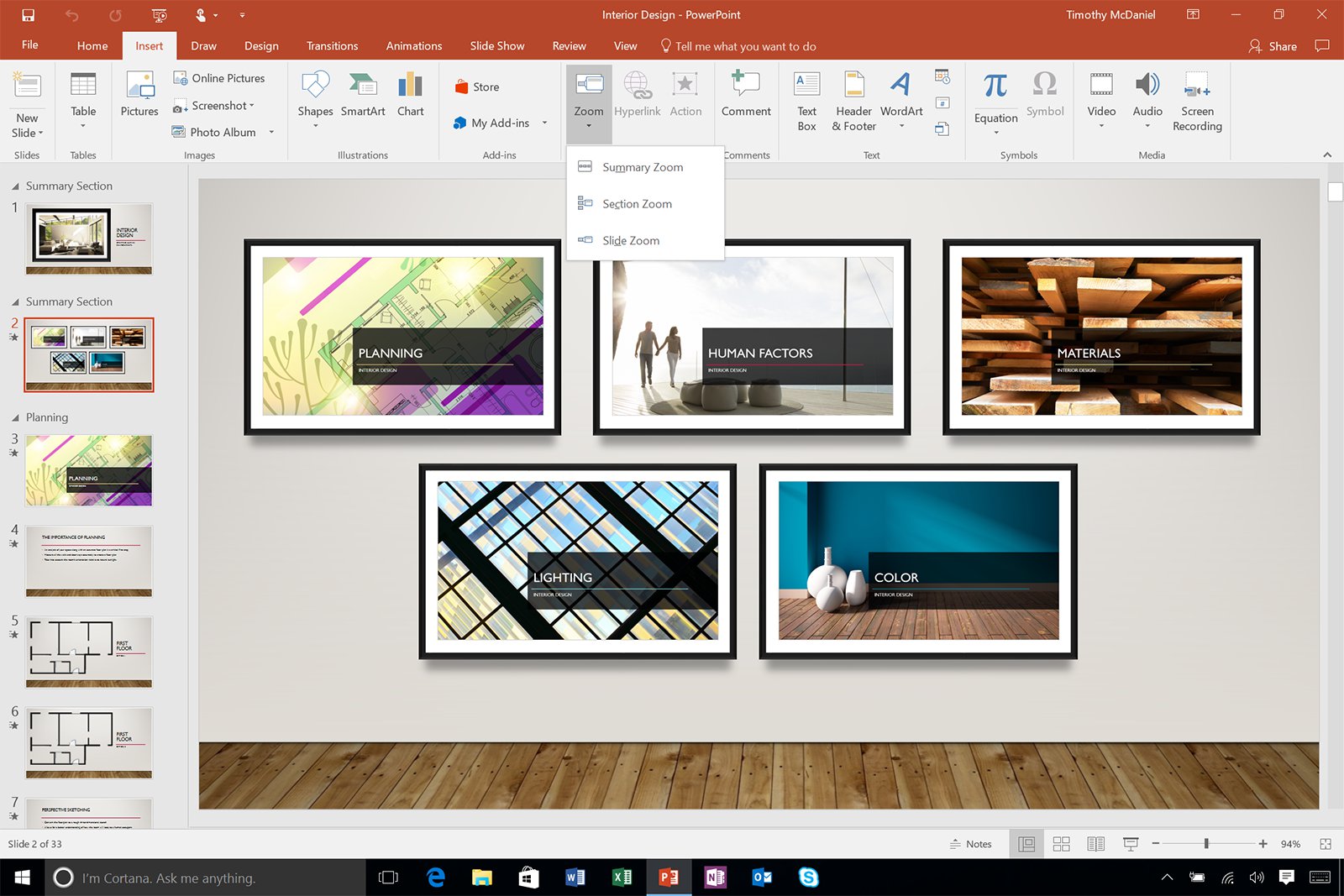
Finally, Microsoft is letting you create more flexible presentations in PowerPoint 2016 with a feature called Zoom. Instead of just stepping through slides in numerical order, Zoom lets you bounce around from a single summary slide, so you can tailor presentations to specific audiences. You can also create Zoom slides to step through sections of your presentation. The feature will be available to Office Insider users on desktops today.
Source: Microsoft
Microsoft Reveals New Authenticator App With Touch ID and Apple Watch Support
Microsoft recently announced an incoming update for its two-factor authenticator apps on iOS and Android, bringing a more robust suite of password authenticator abilities, along with a redesigned user interface, to each app (via The Verge). Set to launch on August 15, the update combines “the best parts” of the company’s previous authenticator apps into one service, letting users save data for both a Microsoft account (targeted at consumers) and an Azure AD account (targeted at enterprise users).
The update is planned to overhaul Microsoft’s existing, two-step verification iOS app, Azure Authenticator, while the Microsoft account app on Android will prompt users with a starting message to download the new app in the Android store. For iOS users, the company promised that any accounts saved in Azure Authenticator will be “automatically upgraded” into the new version of the app. Before the new update, the iOS app solely supported Azure AD accounts.
Also coming to Microsoft Authenticator is a new, “incredibly simple” user experience that the company promises maintains “the highest level of security” for all of the accounts linked to the app. There’s also a streamlined multi-factor authentication in the app’s one-click notifications, where users just click an “approve” button in the notification to finish an account’s login. In addition, fingerprint approval will be coming to the Microsoft Authenticator app for anyone who wants to bypass needing to type in a passcode.
On August 15th, we will start releasing the new “Microsoft Authenticator” apps in all mobile app stores. This new app combines the best parts of our previous authenticator apps into a new app which works with both Microsoft accounts and Azure AD accounts.
We’re just getting started on this new app! Now that we’ve finished consolidating into a single code base, we’re expecting to deliver new improvements at a very rapid pace.
In that same vein, Microsoft is making MFA challenges even easier to approve, thanks to Apple Watch support in the new update. The same “approve” button notification will appear on Apple’s wearable, letting users bypass needing to pick up their iPhone at all to finish up the authentication process. The company said that Samsung Gear devices will also be supported for those on Android.
Users on iOS can get ready for the incoming update by downloading Azure Authenticator for free from the iOS App Store. [Direct Link]
Tag: Microsoft
Discuss this article in our forums
Now Xbox Live Gamertags will expire after five years
It’s always frustrating when you can’t get your preferred nickname for any online service, and after nearly 14 years many of the good ones on Xbox Live are already taken. Worse, they might be tied to accounts that are no longer active, and are just waiting to go back into circulation. Microsoft freed up a cache of 1 million stale Gamertags earlier this year and back in 2011, which could become a regular occurrence. As a part of an update to its Terms of Service, the company is adding a requirement to sign in at least once in a five year period to keep an Xbox Live Gamertag associated with your account.
vii. Software Updates. For any device that can connect to Xbox Services, we may automatically check your version of Xbox console software or the Xbox App software and download Xbox console or Xbox App software updates or configuration changes, including those that prevent you from accessing the Xbox Services, using unauthorized Xbox games or Xbox apps, or using unauthorized hardware peripheral devices with an Xbox console.
viii. Gamertag Expiration. You must sign into Xbox Services at least once in a five-year period, otherwise you may lose access to the gamertag associated with your account and that gamertag may become available for use by others.
The new agreement kicks in September 15th, joined by some tweaks to the privacy agreement plus adjustments to its terms for the Skype and OneDrive services. The full document is available here, plu this FAQ going over just the changes, and you can even read the current TOS. If you’re sick of being HunterFlowerDeath912345 then this is the page to check on your preferred name’s availability, and if you’re a lapsed XBL gamer it may be worth signing in every half-decade or so to keep things fresh.
Via: Eurogamer
Source: Microsoft Services Agreement, Summary of Changes
Windows 10’s Anniversary Update makes a great OS better
“It’s nice, for once, to be able to recommend a new version of Windows without any hesitation.” That’s how I summarized my review of Windows 10 last year, and for the most part, it’s lived up to my expectations. Other than Microsoft’s bafflingly forceful automatic upgrade policy (which has led to lawsuits and plenty of ticked off users), the operating system’s first year on the market has been relatively smooth.
Microsoft says the software is now running on over 350 million devices worldwide, and it’s seeing the highest customer satisfaction ratings ever for a Windows release. So expectations are running pretty high for the Windows 10 Anniversary Update, which arrives August 2nd. But while it definitely delivers some useful upgrades to key features like Cortana and Windows Ink, don’t expect any massive changes to Windows 10 as a whole.
Cortana

Expect to see Microsoft’s virtual assistant just about everywhere in the Anniversary Update. Cortana is accessible through the lock screen, allowing you to ask simple questions or do things like play music, without even having to log in. She’ll also control some apps like iHeartRadio and Pandora, with voice commands. (Unfortunately, there’s no Spotify support yet.)
Perhaps most intriguingly, Cortana will also work across different platforms, with the ability to talk to Windows Phone and Android devices. You’ll be able to see notifications from your phone right on the Windows desktop, as well as alerts like when your phone is running low on battery. While there’s a Cortana app on iOS, this extensive integration won’t be available to iPhone users just yet. Microsoft reps say one reason for that is that it’s simply harder to implement it on Apple’s platform.
Cortana is also getting the smarts to act like a real assistant. Just like before, you can send her reminders and have her recall them at any point. Now, you’ll also be able to add photos to those reminders, as well as create them from Windows apps directly. And yes, those reminders carry over to Cortana’s mobile apps too. They’re particularly useful for things like frequent flyer numbers or complex parking spot locations, where asking your phone to look it up is easier than searching through your notes manually. She can also search within your documents for specific bits of text.
While I still find Google Now to be more accurate at listening to voice commands, Cortana stands out as the only voice-powered digital assistant on a desktop OS. Apple’s Siri will be the highlight of MacOS Sierra this fall when it’s officially released (though you can try it in beta form now), but Cortana still has that beat feature-wise.
Windows Ink

With the Windows 10 Anniversary Update, Ink finally steps out from behind the scenes for stylus users with an interface all its own. Clicking the eraser button on the Surface Pen, for example, brings up a new menu on the right side of the screen. From there, you can create a Sticky Note (basically a digital Post-It), access a blank sketch pad or jot notes down on a screenshot of whatever you’re looking at. Other active stylus models will have access to the feature too, and you’ll even be able to use it with a keyboard and mouse (right-click on the taskbar and choose “Show Windows Ink Workspace” button).
While it’s still fairly rudimentary, the current Ink interface is a lot more useful than what Microsoft offered in the past. Previously, hitting the Surface Pen’s eraser button would simply open up a blank OneNote document. It was great for people who liked to sketch or jot down handwritten notes, but that was about it. I’ve found myself using the stylus even more now with the Surface Pro 4 to create Sticky reminders, or simply caption an image to share with friends.
Just like Cortana, you can also access all of the new Ink features from the lock screen. So if you have to take some emergency notes for class, or simply want to jot down a burst of inspiration, you won’t have to wait to log into Windows to do so.
Windows Hello
Microsoft’s biometric authentication feature is branching out from the lock screen to let you sign into apps like DropBox and iHeartradio. It’ll even log you into some websites when you’re using the Edge browser. Hello was one of the best additions to Windows 10, so it was only a matter of time until its zippy login capabilities spread throughout the OS.
Still, the problem with Windows Hello is actually being able to use it. Fingerprint sensors and depth-sensing cameras (like Intel’s RealSense) still aren’t all that common. You’ll find them on the Surface machines and some high-end notebooks and tablets, but you can forget about them if you’re on a budget. And if you’re using a desktop, you’re even worse off. You can buy a third-party fingerprint sensor, but it won’t be as fast or accurate as the hardware used inside phones. And, for some reason, external depth-sensing cameras are still practically non-existent (unless you pay through the nose for a RealSense developer device).
At this point, Microsoft doesn’t have an answer to the lack of Windows Hello-compatible hardware out there. But company reps say they hope that once Microsoft adds more features to Windows Hello, manufacturers will feel more compelled to add the necessary hardware.
Microsoft Edge

Remember all the promises of browser extension support on Edge? Well, they’re finally here with the Anniversary Update. You’ll be able to choose from a handful of popular options like LastPass, AdBlock, Pocket and Evernote’s Clipper. The selection was pretty limited during my testing, but hopefully developers will adopt Edge’s extensions quickly. Microsoft claims that Edge is more power efficient now (something it already touted over its competitors), and it has even more support for newer web standards.
Start Menu
Rather than just highlighting a few apps in the Start Menu, the Anniversary Update brings all of your installed apps into a single (and very long) drop-down list. It might seem a bit overwhelming to new users, but it saves power users an extra click when they need to peruse their apps. Live Tiles are smarter now as well: If you click on a news app displaying a specific story, you’ll be directed to that story once the app launches. Sure, neither change is as drastic as the return of the Start Menu, but they’re still helpful tweaks.
Wrap-up
If you were expecting a huge change with the Windows 10 Anniversary Update, then you’ll probably be disappointed here. But, in a way, its lack of any major additions says a lot about how much Microsoft got right when it first launched Windows 10. It’s a stable, secure and fast OS. The Anniversary Update simply makes it better, and that’s something I think every PC user will appreciate.
 AIVAnet