



Skype Qik lets you swap short video messages with your friends

Skype may be one of the better-known options for video messaging, but it doesn’t hold a candle to a services like Snapchat if you just want simple, back-and-forth discussions. The Skype team isn’t taking this competition lying down, though — it just rolled out Skype Qik, its own take on rapid-fire video delivery. The mobile-only app is focused solely on swapping short clips (up to 42 seconds; yes, it’s a nod to Hitchhiker’s Guide) as part of conversations with your phone contacts. In theory, it’s just what you need to coordinate a night out or catch up with pals who are rarely available at the same time. All messages vanish after two weeks to help protect your privacy, and you can pre-record “Qik Fliks” to use when you’re either too busy or just want to reply with your favorite internet meme.
The new service is available on Android, iOS and Windows Phone today, and it’s free to use. The feature lists are largely the same, although it will take a few months before you can capture Qik Fliks on Windows devices. Just don’t expect to see desktop versions any time soon; you need a phone number to sign up, so you won’t be joining in from your Surface. The company also tells Engadget that there aren’t any current plans to fold Skype Qik’s features into existing apps, so you’ll need to carry two apps on your device if you want to place old-school video calls. Still, it’s good to see Skype stepping outside of its comfort zone — it risked being left by the wayside as a new wave of messaging apps took over.
Filed under: Cellphones, Internet, Mobile, Microsoft
Source: Skype Blogs
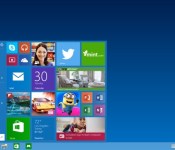
More than a million people have signed up to test Windows 10

Thinking about giving the Windows 10 preview build a shot? You aren’t the only one — according to Microsoft, its Windows Insider Program hit one million registrants over the weekend, giving a lot of potential users access to the latest build of its next-gen operating system. Joining the Windows Insider Program doesn’t necessarily translate to an installed preview, but it is the only way to get access to Windows 10 currently. While it’s not clear how many of those millions have installed the OS, Microsoft says it has received over 200,000 pieces of feedback through Windows’ native feedback application.
Microsoft has reason to believe that most of that feedback is from extensive use, not just folks dipping their toe in the OS: its stats indicate that less than half of all installs are running on virtual machines, meaning most of its users installed Windows 10 natively. It also learned that most users are using more than seven apps a day. The team says that it’s currently trying to categorize and process all of the feature requests and feedback its receiving, and promises to continue to revise and improve the OS before launch.
Source: Windows

Bing’s new election tool helps you make an informed vote

Not sure where your local politicians stand in the upcoming US midterm election? You won’t have to vote blind. Microsoft has followed in Google’s footsteps by launching Bing Elections, its own tool for helping you make informed decisions at the voting booth. The search-based tool lets you know candidates’ positions on the issues, details propositions on the ballot and predicts the outcomes for both congressional and gubernatorial races. It’ll also help you find the nearest polling station if you’re not certain where to go. No, the site won’t let you escape aggressive campaign ads, but it may let you ignore them when it comes time to choose.
[Image credit: Getty Images]
Filed under: Internet, Microsoft
Source: Bing Blogs, Bing Elections
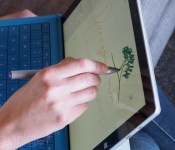
Microsoft app gives you more control over the Surface Pro 3’s pen

The Surface Pro 3’s pen is arguably a defining feature, but you haven’t had official control over it so far. As of now, though, you finally get some say over the stylus’ behavior. Microsoft has posted a Surface Hub app that lets you customize both the pen’s pressure sensitivity and its top button. Right now, the software isn’t likely to please demanding artists and note-takers — you don’t have fine-grained sensitivity tuning, you can’t launch any app you like and the side buttons are strictly off-limits. The crew in Redmond is willing to add features based on feedback, so don’t be afraid to pipe up if you have dreams of launching Photoshop with a single thumb press.
Filed under: Tablets, Software, Microsoft
Via: The Verge, Surface Pro Artist
Source: Windows Store
.CPlase_panel display:none;
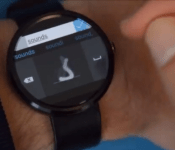
I did not expect that: Microsoft Android Wear keyboard is now in prototype, try it now
 With their own glaring absence of a smartwatch, it appears Microsoft has thought it necessary to develop a keyboard for Android Wear smartwatches. The second most unusual thing about the Microsoft Android Wear keyboard is that it is an analog keyboard – the keyboard provides users with a space to ‘handwrite’ letters and symbols and the smartwatch interprets them as it sees fit. In the short examples shown in Microsoft’s prototype test video, it looks like it works pretty well as designed. Check out the Microsoft Android Wear keyboard in action:
Now you’re probably thinking that this is a bit cumbersome to write long messages, and the reality is that you’re probably right. Then again, there is very limited space afforded to you on a smartwatch’s screen, so perhaps this analog keyboard is a viable option. Apart from English, I can see this methodology being particularly effective for languages like Chinese that use a whole number of strokes and where a traditional keyboard in that language is ineffective on such a small screen. If you’d like to try out the Microsoft Android Wear keyboard prototype, you can download it now from the Microsoft Research site, however you’ll want to make sure to follow the instructions provided.
What do you think about the Microsoft Android Wear keyboard? Is it a keyboard that you’d want to use? Let us know your thoughts in the comments below.
Source: Microsoft Research via The Verge
//<![CDATA[
ord = window.ord || Math.floor(Math.random()*1E16);
document.write('‘);
//]]>
The post I did not expect that: Microsoft Android Wear keyboard is now in prototype, try it now appeared first on AndroidSPIN.
.CPlase_panel display:none;
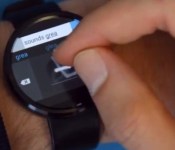
Microsoft’s Android Wear keyboard has you drawing every letter

Microsoft’s support for Android Wear smartwatches isn’t limited to a handy OneNote app. The company’s research wing has slipped out Analog Keyboard, a prototype input app that has you drawing individual characters on your wristwear instead of trying to hit tiny keys. It’s not the fastest solution (and triggers a few flashbacks to old-school PDAs), but it’s very straightforward — you get a relatively big drawing area, and there’s a smart auto-correct system that you turn off just by pausing for a while between letters.
Before you start drafting a magnum opus on your timepiece, be aware that this is definitely rough code. You have to sideload the app, and it saves battery life by dropping support for capital letters. Also, it doesn’t support either lower-resolution watches or future round models; your Gear Live or Moto 360 will work, but forget about trying the current Analog Keyboard on the G Watch or G Watch R. Provided that you’re willing to live with the many quirks, though, it’s worth a look if you’re not fond of voice dictation.
Filed under: Wearables, Mobile, Microsoft
Via: The Verge
Source: Microsoft Research
.CPlase_panel display:none;

Skype tweaks Mac and Windows preview versions to look like its mobile apps

Skype has donned new clothes and gained new features for both Mac and Windows today, though the one for the latter’s just a preview, which means its changes aren’t final. The latest update for both platforms dresses Skype up in a new interface, which now shows thumbnails of your contacts’ photos and features a bubble-style chat. That brings the desktop version closer in design to the mobile apps, but you’ll notice larger spacing in the chat interface for Windows compared to Mac’s. In addition, both apps now come with improved group video chat and display file icons when you share documents with friends. The best new feature for Mac, however, is the app’s ability to let you do video calls and IMs side-by-side with a single click. You can download Skype 7.0 for Mac and the preview version for Windows right now, or look at the images in the gallery first if you need a bit of convincing.
.CPlase_panel display:none;

Playdate: We’re livestreaming ‘Alien: Isolation’ on Xbox One!

Welcome, ladygeeks and gentlenerds, to the new era of gaming. The one where you get to watch, and comment, as other people livestream gameplay from next-gen consoles. Because games! They’re fun!
My first experience with Alien: Isolation was in virtual reality at E3 2014, where I was stabbed in the chest (virtually) by said alien. What I’m playing today is the same game — Alien: Isolation — sans Oculus Rift headset. Bummer? Kind of, but we’re told that the game’s pretty good even without virtual reality integration. Joystiq EIC Ludwig Kietzmann calls it, “a trauma machine masquerading as a video game” in his (positive!) review. So, with all that said, please join me below as I try my best not to get murdered by a Xenomorph in Alien: Isolation.
[For the record, I’m playing Alien: Isolation on an Xbox One, using a retail copy (disc) provided by Sega. I’m streaming the game over wired internet using an Elgato Game Capture HD. All that to say, “This game will likely look prettier and run more smoothly on your home equipment. Streaming conditions vary!”]
And now, the stream:
http://www.twitch.tv/engadget/embed
http://www.twitch.tv/engadget/chat?popout=
Filed under: Gaming, Software, HD, Sony, Microsoft
.CPlase_panel display:none;

Kinect for Windows can track individual finger movements

Microsoft’s new Kinect sensor is a lot of things, but absurdly accurate isn’t one of them. To that end, Redmond’ Research division is showing off some recent advancements its made with Handpose — a way to fully track finger movement with its do-all gizmo in a variety of conditions. The video we’ve embedded below shows off the $150 PC peripheral analyzing and capturing intricate finger and hand movements seemingly pretty easily both from close-range and further back. Changes in lighting don’t affect the fidelity either, as the tracking is all performed by the Kinect’s depth sensor, not its camera. As Kotaku notes, however, this looks very much like something that’ll be used for applications outside of gaming, rather than as a boost for your Dance Central skills. We’d like to imagine that its extra accuracy would probably come in handy in the operating room.
Filed under: Desktops, Cameras, Gaming, Home Entertainment, Peripherals, HD, Microsoft
Via: Kotaku
Source: Microsoft Research (YouTube)
.CPlase_panel display:none;

Microsoft’s Project Spark game creator comes to Xbox One and PC

If you enjoy the creative part of building games but not so much the coding, Microsoft’s Project Spark is now available for Xbox One and PC (Windows 8.1 only). That marks the end of a six month beta period that saw over a million testers create 70,000 game levels, according to Microsoft. As a reminder, Spark lets you build games with relative ease by using onscreen tools to add monsters, geography, game dynamics and logic. You can also use a Kinect HD on either platform to capture your own movements and facial expressions for game characters. Download it now for Windows 8.1 and Xbox One for free, or as Microsoft helpfully suggested, buy a starter disk with content for $39.99. Otherwise, fresh content has to be earned during gameplay or by purchasing tokens.
Filed under: Gaming, Microsoft
Source: Xbox
.CPlase_panel display:none;
 AIVAnet