


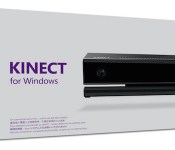
It costs $50 to plug an Xbox One Kinect into your PC

What’s stopping you from creating the first killer Kinect 2.0 hack? Well, now that Microsoft’s released the do-all sensor’s SDK to the public for free you don’t have many more excuses. The software development kit is available without any fees and what’s more, you can now put any finished apps up for sale on the Windows Store as well. Just like that! To help developers along even further, Redmond is releasing an adapter that makes the Xbox One Kinect play nicely with a Windows 8 PC. Meaning, they won’t have to use a hack to create a hack (or buy a redundant Windows Kinect). The $50 USB 3.0 dongle not only brings price parity between the two previously separate cameras, but it’s another instance of Microsoft reversing a previous hardline policy to better suit its customers too. Now, get out there and get cracking — the hardware giant already has a head start on you.
Filed under: Desktops, Gaming, Home Entertainment, Software, HD, Microsoft
Source: Official Microsoft Blog
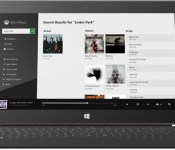
Xbox Music ditches free desktop streaming on December 1st

If you’re hooked on Xbox Music’s free desktop-based listening, you’re going to have make some backup plans very shortly. Microsoft has announced that it’s dropping the no-cost web and Windows streaming option as of December 1st; after that, you’ll have to pay for a Music Pass if you want all-you-can-eat tunes beyond the 30-day trial period. The company claims that it’s refocusing Xbox Music to make it the “ultimate music purchase and subscription service,” although it’s not elaborating on what that entails. Suffice it to say that Microsoft has a lot of competition in the free music space. Its main rival, Spotify, has over 30 million free users worldwide on a wider range of platforms — it wouldn’t be easy for Microsoft to challenge that lead using the free tier you know today.
Filed under: Internet, Software, Microsoft
Source: Xbox Support (sign-in required)
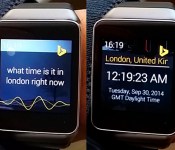
Microsoft Android Wear app lets you search Bing by twisting your wrist

Slightly irked that you have to say “OK Google” whenever you want to use voice search on your Android Wear smartwatch? Microsoft, of all companies, is coming to your rescue. The developer is leading a trio of experimental Android releases with Torque, an app that lets you start a Bing search just by twisting your wrist; you only have to speak when you’re asking your question. You’ll get optimized output for certain kinds of search results, including maps, stocks and weather.
The other apps are meant solely for your phone, but they could be equally handy. Next Lock Screen puts important at the top level of your phone, including missed calls and frequently used apps; you can also change the lock screen’s background depending on your location. Journeys & Notes, meanwhile, lets you write notes to share with anyone else who visits nearby, such as tips about what to eat. All three of Microsoft’s latest Android apps are free, so it probably won’t hurt to give them a try.
Filed under: Cellphones, Wearables, Mobile, Microsoft
Via: Droid-Life, Microsoft
Source: Google Play (Torque), (Next Lock Screen), (Journeys & Notes)

Microsoft Garage brings new Android app alternatives

Microsoft seemingly cannot decide whether it is for Google or against Google. Nevertheless, for those wanting some Microsoft love on their Android devices can get it through Microsoft Garage.
Microsoft Garage is a project by Microsoft looking to bring projects to reality from hackers, interns, employees, etc. Part of what has come to fruition is a trio of new apps available from the Play Store.
First, Torque is an app for Android Wear where you can twist your wrist, prompting a voice search in Bing. Essentially a Google Now replacement for Android Wear.
Next Lock Screen is an app that allows you to access apps and functions directly from the lock screen. If your device isn’t getting Android Lollipop anytime soon, but you like the idea of interactive notifications on your lock screen might look to this as an alternative.
Journeys & Notes is a way to discover things in between two places by looking at notes left by others. You can also leave your own notes about things you know of and find.
If you want to look at the project more, hit the link below. If you want to try any of the apps, click on one of the widgets below.
Do any of these apps interest you?
via Microsoft Garage
 |
The post Microsoft Garage brings new Android app alternatives appeared first on AndroidGuys.
Microsoft Garage launches two Android apps for your lock screen and travels

Today, Microsoft Garage was introduced as an “after-hours idea factory” for company employees to work on their own projects. Microsoft started the day by launching Bing Torque for Android Wear. Now, two apps for phones are available in the Play Store. One is a lock screen replacement and the other is a social app for traveling.
Microsoft wants to be front and center on your Android phone with Next Lock Screen. The app is all about launching apps as quickly as possible. It displays things like your calendar, missed calls, emails, messages, and more. There is a swipe-to-dial feature that allows conference seamlessly. So it seems that people looking for productivity will find Next Lock Screen more useful. A nice touch for Next Lock Screen is that the background is dynamic and changes throughout the day and based on location.
Hit the break for more.
Click here to view the embedded video.


Journeys & Notes, however, leaves behind the seriousness of business and productivity for fun. It is a social app that connects a user with their origin and destination. Microsoft says “The road may be long and lonely, but we help connect you with others along the journey.” Journey & Notes uncovers other users that have taken the same path as you. Notes left by previous travelers can be found and then you can leave some of your own. The design of Journeys & Notes is quite impressive and seems like it is worth giving a try.
Click here to view the embedded video.


Come comment on this article: Microsoft Garage launches two Android apps for your lock screen and travels

Microsoft wants you to use Bing Torque instead of saying “OK Google” on your Android Wear smartwatch

I’m not sure what’s going on at Microsoft these days. First, Microsoft Research released a pretty much useless keyboard for Android Wear smartwatches, and now, Microsoft Garage has just released Bing Torque.
Bing Torque replaces the need to speak “OK Google” each time you want to ask a question. With Bing Torque, you can just twist your wrist and then say your question. If you’re reading between the lines here, it’s not just the “OK Google” command that’s being replaced here. Yup, you guessed it. Next time you want to find out how tall President Obama is, you will be asking Bing. Microsoft is saying that it’s like having Cortana running on your smartwatch. However, it might not work for commands like, “Set a timer” or “Send a text to _____.”
The app works well on the LG G Watch, LG G Watch R, and Samsung Gear Live, but not so well on the Moto 360. If Bing is your thing, then by all means, hit the break and check out the screenshots and download this app today.


Come comment on this article: Microsoft wants you to use Bing Torque instead of saying “OK Google” on your Android Wear smartwatch

Windows 10 brings Windows Phone’s notification center to the desktop

If Windows 10 is going to unify your experiences on devices ranging from smartphones to PCs, it only makes sense that key mobile features would reach the desktop, right? Microsoft certainly thinks so. The team in Redmond has released an updated version of the Windows 10 Technical Preview that brings Windows Phone’s Action Center (that is, a notification area) to PCs. Whether there’s an app update or an important meeting coming up, you can now find about it all in a single place; you won’t have to check Live Tiles or jump into the apps themselves. No, it’s probably not worth installing Microsoft’s pre-pre-pre-release operating system just to try this out, but it’s definitely worth an update if you’re already living on the bleeding edge.
Filed under: Desktops, Laptops, Software, Microsoft
Source: Blogging Windows
Microsoft launches the Xbox One Digital TV Tuner in Europe

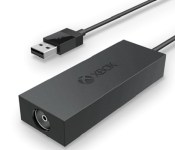
Microsoft pitches the Xbox One not as a run-of-the-mill games console, but as a fully fledged home entertainment hub. For most Americans, making use of the One’s TV integration features is as simple as plugging the HDMI output from their set-top box straight into the console. Europeans don’t have it quite as easy. With old-school coaxial cables still in common use, Microsoft cooked up the Xbox One Digital TV Tuner: a small USB peripheral that turns coaxial outputs into something the console can understand. Today, the TV Tuner has finally gone on sale in the UK for £25, and in France, Germany, Italy and Spain for €30. Once set up, you can start watching TV through your Xbox One, using the console’s OneGuide EPG to browse channel listings with a controller, or with voice commands if you have a Kinect camera. The Xbox also becomes a make-shift DVR, allowing you to pause and rewind live TV. And when you absolutely have to spend time in another room, you can continue to watch live TV on mobile devices by streaming it through the Xbox One SmartGlass app.
Filed under: Gaming, Peripherals, HD, Microsoft
Via: Eurogamer
Source: Microsoft (Xbox Wire)
Xbox One’s next update adds custom backgrounds, Twitter for TV and game clips

Microsoft only just unleashed its October update for the Xbox One, and now it’s talking about what to expect next month. The update will hit consoles for those in the preview test group soon, and adds many features Major Nelson and crew say the community has been asking for, including custom backgrounds (with the PS4 getting themes soon, it’s Blu-ray 3D all over again), and extra details for profiles. The custom backgrounds will launch with a selection of pictures and the ability to post based on achievements, and after a media player update later in the month, gamers will be able to import any image they want. A returning feature from the Xbox 360 will put details like your location and custom bio back on the profile page, plus a self-curated selection of game clips and achievements. Oh, and those game clips? You’ll be able to share them with the masses easily, because the update adds the ability to share any of your favorites directly to Twitter. Check after the break for a video demo and more details on what’s coming.
The Twitter integration won’t stop there either, as the OneGuide adds trending lists for what users are watching on live TV, what people are tweeting about, or what Xbox One owners specifically are watching the most. There is even space to see what people are tweeting about a show in the MiniGuide itself. The integrated Internet Explorer browser can switch from full screen to Snap with a button on the address bar now, and a number icon to let users know when “Featured Sites” have updates. The second screen SmartGlass app has more support to see what’s going on in the Store and what your friends are playing, while the Preview dashboard app for testers has some new gamified features.
Here’s what to expect in Xbox One’s November system update (Spoiler: Customizable Backgrounds) http://t.co/ryXfkGrJWp
– Larry Hryb (@majornelson) October 21, 2014
More fan-requested features coming to Xbox One in November: http://t.co/roFbnnJf8m
– Jeff Rubenstein (@jeffrubenstein) October 21, 2014
Filed under: Gaming, HD, Microsoft
Source: Xbox Wire
Skype for Windows Phone lets you share drawings with friends

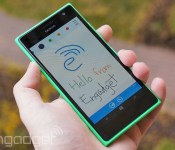
Ever wanted to convey more in a Skype chat than simple text and photos can manage, such as directions to your home? If you’re using Windows Phone, you now have a better way to express yourself. Microsoft has posted a new version of Skype for Windows Phone that, much like Google Hangouts, lets you send simple drawings to friends. You can start with a blank canvas if you’re an artistic type, but you can also doodle on photos and annotate Bing maps. There are a few meaningful under-the-hood upgrades, too, including HD display support and the option to sign in with your phone’s Microsoft account. The Skype team hasn’t said when its Android and iOS apps will get sketching, but it wouldn’t be surprising to see them receive matching updates in the near future.
Filed under: Cellphones, Internet, Mobile, Microsoft
Via: The Verge
Source: Windows Phone Store, Skype Garage
 AIVAnet