



Collusion a defense for Samsung in Microsoft suit over patent payments?

In response to a lawsuit filed by Microsoft against Samsung accusing the Korean electronics giant of delaying patent payments, Samsung indicates in a new filing that possible antitrust issues created by Microsoft’s acquisition of Nokia violate the patent licensing agreement.
The agreement between Samsung and Microsoft was struck in 2011 and called for Samsung to make royalty payments to Microsoft to cover patented technology in Samsung’s Android-powered devices. As part of the agreement the companies also agreed to share confidential business information as part of an effort for Samsung to sell more Windows-powered devices.
Since then, Microsoft acquired Nokia and became a direct competitor to Samsung in the smartphone hardware space. According to Samsung’s filing, the “agreements, now between competitors, invite charges of collusion” from U.S. regulators.
Microsoft thinks their case is strong, probably in part because antitrust regulators around the world approved the Microsoft/Nokia deal. The claim by Samsung that the patent agreement now creates a collusion problem seems like an unusual position that Microsoft may not have anticipated.
source: Reuters
Come comment on this article: Collusion a defense for Samsung in Microsoft suit over patent payments?
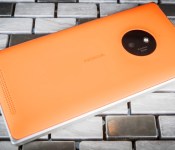
Lumia 830 review: bringing the Icon down to the mid-range

When Nokia released the Lumia Icon earlier this year, it took its polycarbonate design philosophy and went a bit metal — aluminum, specifically. The result was a premium phone with a fancy body to match. But the Icon’s exclusivity on Verizon limited its appeal, and its sibling, the Lumia 930, has yet to make it to US shores. Into that void comes the Lumia 830, from the freshly minted Microsoft Mobile.
With the Lumia 830, priced at around $450, Microsoft looks to bring the metal frame and PureView camera branding of high-end Lumias down to the mid-range smartphone level. Of course, there’s always the risk of making the wrong sacrifices when trying to lower the price, so did Microsoft shave too many corners off of the 830’s aluminum body? I’ve spent the past week with the global version of the phone as my daily driver to find out.
Hardware

While the lower-tier Lumia 735/730 handsets stick to tried-and-true polycarbonate bodies, the Lumia 830 follows in the aluminum-ringed footsteps of the Icon and 930. A solid frame of metal surrounds the 830’s squared-off body, interrupted by two pairs of thin plastic strips on the top and bottom edges (for the radio frequencies to pass through). At 139.4 x 70.7 x 8.5mm, it checks in at 2.4mm taller, 0.3mm narrower and 1.3mm thinner than its higher-end predecessors. Its 150g weight puts it 17 grams lighter as well.
That metal frame is flanked on the front by a sheet of Gorilla Glass 3 that rises slightly above the aluminum body. Thankfully, the display gently tapers at the edges, making for a smooth transition from the glass to the thin metal along the bezels. No sharp, abrupt borders here.
Around back, a removable plastic cover allows access to the swappable battery as well as the nano-SIM and microSD slots. The latter of which supports up to 128GB cards to supplement the 16GB of onboard memory. (Sorry, no 32GB or higher model here.) The backplate puffs out even further from the aluminum frame than the front display, creating a curved rear that makes the phone actually quite comfortable in my palm despite the flat-sided aluminum frame. Its matte finish feels nice to the touch, while also resisting greasy fingerprints. If you’re not a fan of my review unit’s orange hue, there other colors to consider — though the selection in the US may differ from what’s offered elsewhere. Microsoft is also offering various colorful flip cover shells (with wireless charging support) if you’d like some extra protection.

As for ports and buttons, the Lumia 830 mostly sticks to the standard set seen on many a Lumia over the years. On the right edge, you’ll find a volume rocker near the top, a power key in the middle and a dedicated camera key toward the bottom. The headphone jack sits front and center along the top edge. I was somewhat surprised to find the micro-USB port up there as well (it’s been on the bottom on most of my past phones). In regular use, I found that placement a bit tricky when I had the 830 mounted in a cradle in my car — it was a bit odd to see a charging cable sprouting upward out of my phone. That said, there’s always the built-in, Qi-compatible wireless charging if you find the charge port’s location troublesome.
The most notable feature on the rear, of course, is the Lumia 830’s PureView camera module, located in the top-center of the backplate. Here, Microsoft Mobile mimics the look of the Lumia 1020‘s signature camera, with a black, circular panel surrounding the 830’s 10-megapixel camera and LED flash. Of course, this is more “inspiration” than it is direct “imitation.” You won’t find the 1020’s massive, Ritz cracker-size main shooter protruding from the back. No, we’re dealing with more modest equipment here, so the disc on the 830’s rear is much smaller than its ancestor’s. What’s more, the removable cover adds a slight ridge around the rear camera, providing a bit of protection.
Toward the bottom of the back panel is the 830’s main speaker grille. While that location might not be as ideal as, say, the 1020’s bottom-edge speaker, it’s placed where the rear starts to taper, giving it a bit of breathing room when the phone is placed face-up on a table.
While the 830 matches the 5-inch screen size of the Icon/930 line, Microsoft shed some pixels (and helped lower the price) by opting for a 1,280 x 720 display instead of a 1080p panel. We’re also dealing with an IPS LCD here, rather than the AMOLED unit found on its older siblings. Whether that’s a plus or a minus likely depends on how much you enjoy/detest AMOLED’s highly saturated colors. I find the 830’s screen pleasing for the most part, with accurate colors and good viewing angles in most directions. However, I did notice washed-out colors while watching movies at extreme positions, especially toward the lower left and right in landscape mode.
Software

Recent improvements to the Windows Phone OS have more or less put Microsoft’s mobile offering on an even footing (as far as core features) with the likes of Android and iOS. The latest upgrades to WP8.1 include support for folders on the home screen, more options and languages for the Cortana voice assistant and faster browsing through Internet Explorer. In addition, Lumia models will be getting an update called “Denim,” which tacks on camera improvements, more options for the Glance Screen feature and voice activation on certain Lumia models — just say, “Hey, Cortana” to fire up the voice assistant while the phone’s idle. On top of those additions, the OS also boasts a solid notification center, home screen wallpapers and swiping support in the keyboard.
The Lumia’s Glance Screen, which offers the time, date and some notifications when the display is off, makes the 830 a perfect bedside alarm clock since it stays onscreen while the phone is charging. No more groggily trying to find your phone’s power toggle in the middle of the night just to see how much time you got left to sleep.
Out of the box, my unlocked review unit came with the standard Lumia offerings (including Here Drive, Skype and Mix Radio), as well as a smattering of third-party apps like Facebook and Flipboard. Thankfully, if you’re not interested in any of the preloaded options, they’re easy enough to uninstall to reclaim some storage space.

Of course, it’s not all great news. The continued additions to the OS (plus other, Lumia-specific features) have resulted in an unorganized and ungainly settings menu. The latest incarnation of WP’s stock music player has you flicking upward on the album art to change tracks. After years of swiping right to left (since back in the Zune HD days), I’m finding this new gesture annoying and less intuitive. And then there’s the app question. While the situation has greatly improved of late, there’s still a chance your favorite app or game may not yet be offered on the platform.
Beyond that, Google still refuses to offer official options for services like Gmail, Hangouts and YouTube. So if you’re deeply integrated in Google’s ecosystem, but prefer the feel of Windows Phone, you’ll need to resort to third-party options like IM+ for Hangouts or Metrotube for YouTube. Of course, Microsoft offers its own suite of tools, like Office, OneNote and OneDrive, that play quite nicely with Windows Phone 8.1.
You may consider alternative apps even when official support exists. Case in point: While there is a beta-tagged version of Instagram available, it lacks several editing tools seen on Android and iOS. Meanwhile, the third-party app 6tag offers some interesting options, like collages and letterboxing photos with wide aspect ratios to fit them in Instagram’s square format.
Whether that app deficit actually affects you depends, of course, on your specific needs. Can you get by without dedicated Gmail or YouTube apps? Will you be satisfied with an official Instagram app that’s not yet as robust as its Android/iOS counterparts? Comfortable with resorting to third-party alternatives? I can’t answer that for you, unfortunately. So if you are considering Windows Phone, be sure to check the app marketplace to know what you’re getting yourself into.
Camera

With the Lumia 830, Microsoft isn’t bringing just the design language of the Icon and 930 down to a lower price bracket. It’s also placing the “PureView” badge on a more affordable option as well. Sure, the 830 doesn’t boast the resolution of the 20MP Icon or 930, much less the Lumia 1020’s 41 megapixels. Instead, it stakes its claim to the PureView name via optical image stabilization and the promise of improved responsiveness.
Before I dive into the details, though, it’s worth stating that my review unit didn’t arrive with the Lumia Denim update. So, I was unable to test that firmware’s biggest additions, including much-improved overall speed, a Lumia Camera app that replaces Nokia Camera and a capture mode that lets you merge the results of flash and non-flash versions of the same shot, letting you set a balanced look for the final image. I’ll be sure to update my thoughts once I spend some quality time with the new features.
Even without those Denim improvements, I enjoyed my time taking photos with the 830’s 10MP main shooter. On a daytime stroll through downtown Tacoma, Washington, the phone capably handled any shot I attempted. White balance in good light was accurate, though it occasionally took a few seconds to settle on the right color temperature. It did tend toward cooler (bluer) temps in low-light situations, though the Nokia Camera app’s manual options let me fix that quickly.

Interestingly, the 830 also preferred bluish white balance when I tried to take orange-heavy photos of autumn leaves or pumpkin patches. For what it’s worth, images of the same fall leaves taken with an iPhone 6 produced much more accurate colors, but that’s admittedly competing in a completely different price bracket.
Quirky white balance aside, the camera’s optical image stabilization let me take some solid photos in low-light environments, both indoors and out. Close-up shots of sushi in a dark restaurant and portraits of fellow passengers on a bumpy car ride produced relatively clean photos, though if your jitteriness is simply out of control, the 830 won’t produce miracles.
Image quality starts declining when the light gets seriously low. A few interior shots of a dark, empty chapel showed a significant amount of noise, a loss of detail and muted colors, but not quite what I’d label as “unusable.” Of course, what’s unacceptable for a huge wall print isn’t the same as what’s unacceptable for an Instagram post. By that I mean, if you keep your expectations in check (e.g., using a mid-range phone for social network-worthy photos), you should be fine with the results in most settings.
The rear shooter’s stabilization also applies to video recording (up to 1080p/30). Quality in good light is nice and sharp, though it tends to struggle in darker settings. It also takes slightly longer to adjust to different lighting levels than an iPhone 6. On the plus side, that stabilization feature does a respectable job smoothing out video, especially when you’re on the move. We’re not talking pocket Steadicam here, of course, but back-to-back videos of me jogging around with an iPhone 6 and the 830 resulted in steadier footage on the Lumia.

Unlike the selfie-targeting 5MP front shooter on the lower-tier Lumia 735/730, the 0.9MP unit we have here is strictly average. It’s fine for quick snaps and Skype, but not much else. Fortunately, the available Lumia Selfie app lets you use the rear shooter for self-portraits (an audio cue signals when your face is in the frame).
For the most part, the Lumia 830 does the PureView name proud. It doesn’t have the megapixel count of the 1020 or the Icon/930, so you’ll have less leeway when it comes to cropping. But it’s a mid-tier camera I would be happy to use on a daily basis. The auto white balance could be more reliable and the LED flash is simply average, but these are minor flies in a largely effective ointment. If the Denim update only improves things, I’ll have even less to complain about at this price level.
For high-resolution photo samples from the Lumia 830, click here.
Performance and battery life

The quad-core 1.2GHz Snapdragon 400 and 1GB of RAM powering the Lumia 830 may be decidedly mid-range, but its general performance doesn’t leave too much to be desired. Apps launch and close swiftly, and general navigation around the Windows Phone 8.1 UI is fluid and stutter-free. Browsing mobile web pages was a pleasant experience, though there was a good bit of tiling when zooming in and out of desktop sites. If you prefer hard numbers to gut feelings, have a look at the benchmarks below.
| Nokia Lumia 830 | Nokia Lumia Icon | Nokia Lumia 735 | |
|---|---|---|---|
| WPBench | 252 | 471 | 245 |
| SunSpider 1.0.2 (MS)* | 1,235 | 538 | 1,237 |
| AnTuTu | 12,154 | 25,750 | 12,060 |
| “SunSpider: Lower scores are better. | |||
In general, we’re talking about a solid performer here. Push the phone hard enough, though, and you can see the limits of its mid-level hardware. In a fast-moving, 3D game like Asphalt 8, the Lumia 830 turns in merely adequate, and definitely not silky-smooth, frame rates. And if the game’s graphics don’t clue you in, the frequent audio breakup during races should be a clear sign this isn’t going to be a mobile-gaming powerhouse.
Other games can give the 830 a workout as well. While endless runner Temple Run 2 stays smooth most of the time, certain turns, especially during water slide areas, cause things to slow down a bit. It’s not just fast-moving 3D games, either. Strangely, frame rates in the relatively simple Jetpack Joyride dip noticeably whenever you hit a large patch of coins. You’d think that would make the frantic game easier, but it’s really a bit jarring.
On the bright side, the Lumia 830 offers solid battery life with its removable 2,200mAh cell. In our standard video-rundown test, where we loop an HD video while email, Facebook and Twitter run in the background, the 830 managed 10 hours and 39 minutes before calling it quits. That’s actually a bit longer than the 10 hours Microsoft estimates for video playback. In real-world use, the phone regularly saw me through full workdays filled with emails, social networking, lunchtime Instagrams, gaming and even a few actual phone calls.
Speaking of, voice calls featured clear conversations on both ends and the speakerphone performed admirably in my car. Even with the phone face-up on a table, the curved back allows enough clearance for sound to be heard without being muddled. That rear-facing speaker puts out voice and music at a decent level, though don’t expect much, if any, bass to shine through
Overall, if mobile gaming is important to you, it may be worth investing in a phone with a bit more oomph to tackle current and future games. If you’re mainly using your smartphone for more… serious pursuits, the Lumia 830 should handle those needs without breaking much of a sweat.
The competition

Since AT&T hasn’t yet announced a US release date or price for the Lumia 830, it’s a little tricky to size up how it’ll fare against the competition here. That said, it is available elsewhere and in the UK, for example, EE is offering it on pay-as-you-go for £280 (about $450). Meanwhile, Amazon is offering an unlocked international version for around the same price. On EE, that puts it in roughly the same bracket as the 8GB iPhone 5c and the Ascend P7 (both listed at £300). I’d be quick to dismiss the 5c, as it offers less onboard storage (and no microSD slot) and what’s essentially two-year-old hardware. The P7, on the other hand, represents a solid competitor at this price range. You won’t get the Lumia’s full-featured camera app, but it does boast a 1080p display and an 8MP front-facing camera.
If you can do without the 830’s solid, aluminum chassis and stabilized camera, take a look at its lower-priced sibling, the Lumia 735 (around $180). It offers the same Snapdragon 400 heart in a polycarbonate body, with a much better 5MP selfie camera on the front. Although, if you’re looking in that lower price bracket, don’t forget the Moto G ($180), which also features similar quad-core internals, along with official support for Google’s ecosystem.
Wrap-up

In the end, the Lumia 830 is clearly a “bridge” device. It’s got the high-end looks and capable camera of flagship-level phones, along with the performance and display resolution of mid-range and budget models. Whether Microsoft Mobile made the right trade-offs really depends on what you want out of your smartphone. Does having a solid camera (that’s due to get even better) trump average gaming performance? Does using an ever-improving voice assistant mean more to you than having official support for Google’s ecosystem? Personally, I can live with most of the sacrifices that have been made. I don’t think I’m missing much with the 720p screen and merely average front-facing camera. But the spotty performance in games and Microsoft’s continuing struggle to land the latest and best apps give me pause.
If you’re in need of an anecdote, here’s one: After more than a year of happily using the 41MP Lumia 1020 as my daily driver, I made the switch to the iPhone 6. Then, a week or so after that switch, I received the Lumia 830 to review and went about using it as my everyday phone. And guess what? For the most part, I didn’t really miss my shiny, new iPhone. Of course, it’s by no means a complete replacement — there are still games, features and apps on iOS that I can’t get elsewhere (hello, AP Stylebook Mobile). But in general, life was rather pleasant with the 830. It’s an Icon(ic) phone that cuts most of the right corners.
Filed under: Cellphones, Mobile, Microsoft
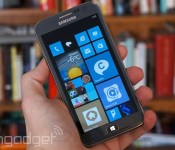
Samsung worries that its Microsoft royalty payments amount to collusion

Samsung was quick to cite the acquisition of Nokia as a reason for holding out on Microsoft’s royalty payments, but there weren’t many details. Just what had it spooked? Thanks to some new court filings, we now have a clearer sense of its motivations. Simply put, the Korean tech giant is worried about “charges of collusion” now that Microsoft is a direct competitor in the smartphone business. The patent deal requires that Samsung not only make Windows Phones, but hand over sensitive business details — both big problems when Microsoft could use them to gain a competitive edge. Samsung already stopped handing over those trade secrets over jitters that American antitrust regulators would step in.
It’s not clear that the court will buy this argument. While there is a real concern about working too closely with a competitor, that doesn’t necessarily give the company an escape from its current agreement — it may still have to pay up, at least in the short term. Whether or not it does, it’s clear that Samsung doesn’t believe the royalty arrangement should continue as-is.
Filed under: Cellphones, Mobile, Samsung, Microsoft
Source: Reuters
Microsoft Shoots for 2nd-half 2015 Office 16
 Microsoft’s next big Office update has been talked about much as we inch closer to the fabled release date, but until now, we’ve known nothing concrete. However, today, Julia White, General Manager of Office Marketing, announced at Tech Ed Barcelona that the next iteration of Office—Office 16—will be released in the second half of 2015. We know nothing else besides Q3 or Q4 of next year, because she didn’t get any more specific than that.
If you’re out of the know, the next few big updates coming around for microsoft before Office 16 are Office for tablets around next month, a new version of Office for Mac in early 2015, and of course, Windows 10 in spring of 2015: most likely May.
Are you looking forward to any of these future developments? Or is Microsoft old news? Leave a comment below and let us know what you think!
Source: ZDNet
Come comment on this article: Microsoft Shoots for 2nd-half 2015 Office 16

Bored with words? Bing now lets you search using emoji

Now that you can communicate solely in emoji and even track your daily activities that way, it stands to reason that you should get to search the web using those tiny pictures, doesn’t it? Microsoft certainly thinks so. Bing’s search engine now understands emoji, saving you the (admittedly pretty minor) trouble of typing out whole words. It’s not just about convenience, though. The search will help you understand emoji you don’t understand, and you can find Easter eggs like the Konami code if you’re imaginative. So long as you’re in an English-speaking country, you can try this icon-driven search today.
Filed under: Internet, Microsoft
Via: Huffington Post
Source: Bing Blogs

Playdate: We’re livestreaming ‘Sunset Overdrive’ on Xbox One!

We’ve been singing Sunset Overdrive‘s praises for awhile now and it’s finally time that the rest of the world gets a chance to play it. The Xbox One exclusive isn’t just a killer game, but it’s one of the stand-out releases in this year’s crowded holiday launch season. What makes it so awesome? Well, for starters it places pure fun over everything else, and coming from the folks responsible for the excellent Ratchet and Clank series for PlayStation hardware it really shouldn’t be a surprise. Sunset City is where you’re free to dress up exactly how you want (my character is rocking an orange-and-blue pompadour and a pair of underwear with a stuffed kangaroo head dangling off the front; seriously) and shoot ridiculous weapons at former humans while grinding around on power-lines and bouncing off of cars. Never before have we seen vinyl records used to mow down cartoonish mutants, but hopefully it happens a lot more in the future.
Want a peek at all this madness? Of course you do, and that’s why you should come back here at 7 p.m. ET / 4 p.m. PT and witness it for yourself as we stream live from the Xbox One. But wait, there’s more! We also have Xbox One download codes to give away for Killer Instinct Season Two: Ultimate Edition, Minecraft, Project Spark and D4: Dark Dreams Don’t Die. All you need to do is tune in. If you like what you see, you could even sign up for our Sunset Overdrive Xbox One giveaway, too!
[For the record, I’m playing Sunset Overdrive on an Xbox One, using a retail copy (download) provided by Microsoft. I’m streaming the game over wired internet using the Xbox One Twitch app. All that to say, “This game will likely look prettier and run more smoothly on your home equipment. Streaming conditions vary!”]
Watch live video from Engadget on www.twitch.tv
Filed under: Gaming, Home Entertainment, HD, Microsoft
Source: Twitch
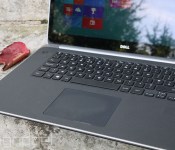
Microsoft will borrow Mac-like trackpad gestures for Windows 10

Those of us who try to bring the handy two- and three-finger trackpad gestures from a MacBook over to a PC laptop are usually treated to digitus interruptus. But during TechEd, Microsoft’s Joe Belfiore said that Windows 10 will have new three finger gestures (not to be confused with salutes) for PC trackpads. Swiping up and down will bring up the “Task View” to minimize and restore active windows, while left and right gestures will switch between apps. Sound vaguely familiar? On a MacBook, three-fingered left and right swipes let you change virtual desktops and apps, while up and down gestures reveal OSX’s Mission Control — a decidedly similar feature to Task View.
The new features reinforce the fact that Microsoft wants to put some emphasis back on the humble trackpad and away from its beloved touchscreens. With Windows 8.1, it made a concerted effort to improve poorly-regarded PC trackpads by working with Intel and Synaptics. While some might decry the new gestures as being a bit more than paying homage to Apple, it will certainly make it easier for users to switch from Macs to PCs. If you’re curious to try the new features, you’ll have to wait — they’ll be available in a future Windows 10 Technical Preview build.
Filed under: Desktops, Laptops, Microsoft
Via: Gizmodo
Source: Channel 9 (Silverlight required)
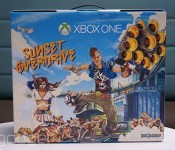
Engadget giveaway: win an Xbox One Sunset Overdrive Bundle courtesy of Microsoft!

If you’ve been waiting for a game that’s equal parts X Games and Tromaville, then you probably know that Sunset Overdrive (exclusively for Xbox One) is rolling out today. If you haven’t already dropped some cash on the pre-order, though, you may want to hold off for another day or two and try your luck on this week’s giveaway. Microsoft has given us an Xbox One Special Edition Sunset Overdrive Bundle and it’s going to find a home with one lucky Engadget reader this week. So, stock up on your energy drink of choice and get ready to experience Sunset City 2027 in all its mutated glory. With this bundle, you’ll get a Cirrus White console and controller, along with the full game download and Day One Edition in-game content giving you a head start in this anything-goes apocalyptic wonderland. All you need to do is head down to the Rafflecopter widget below for up to three chances at winning. Just make sure you don’t slake your thirst with Overcharge Delirium XT or you may experience some side effects…

- Entries are handled through the Rafflecopter widget above. Comments are no longer accepted as valid methods of entry. You may enter without any obligation to social media accounts, though we may offer them as opportunities for extra entries. Your email address is required so we can get in touch with you if you win, but it will not be given to third parties.
- Contest is open to all residents of the 50 States, the District of Columbia, and Canada (excluding Quebec), 18 or older! Sorry, we don’t make this rule (we hate excluding anyone), so direct your anger at our lawyers and contest laws if you have to be mad.
- Winners will be chosen randomly. One (1) winner will receive one (1) Xbox One Special Edition Sunset Overdrive Bundle.
- If you are chosen, you will be notified by email. Winners must respond within three days of being contacted. If you do not respond within that period, another winner will be chosen. Make sure that the account you use to enter the contest includes your real name and a contact email or Facebook login. We do not track any of this information for marketing or third-party purposes.
- This unit is purely for promotional giveaway. Microsoft/Xbox and Engadget / AOL are not held liable to honor warranties, exchanges or customer service.
- The full list of rules, in all its legalese glory, can be found here.
- Entries can be submitted until October 29th at 11:59PM ET. Good luck!
Filed under: Announcements, Microsoft

SmartThings brings its home automation app to Windows Phone

Samsung promised an open platform when it purchased SmartThings, a startup that aims to make every household more intelligent with its products. So, despite the automation service already being present on iOS and Android, the most popular mobile operating systems, SmartThings is opening its doors to a fresh audience: Windows Phone 8. The SmartThings app is great for people looking to upgrade their home but that were, perhaps, hesitant to do so because of the ecosystem’s lack of support for Windows Phone handsets. Most home automations platforms have some sort of integration with iOS or Android from the get-go, leaving Windows Phone users out of options. As such, this is a great move by the Samsung-owned SmartThings. Once you download the app, you’ll be able to control SmartThings devices with ease — and if you haven’t invested yet, maybe now it’s the time to start thinking about creating your own Smart Home.
Filed under: Cellphones, Misc, Peripherals, Internet, Mobile, Samsung, Microsoft
Source: Windows Phone

Tell us how you really feel about the Xbox One and the PlayStation 4

It’s been almost a year since the Xbox One and PlayStation 4 were released in North America, with sales reaching over 15 million units combined worldwide. While we reviewed both consoles, giving the Xbox One an Engadget score of 81 and the PS4 a score of 83, what we reviewed were the systems as they existed at launch, with some great features and a few kinks, but still lots of potential. Since then, plenty has happened for both machines — like Xbox One shedding its mandatory Kinect unit and the release of a few marquee titles like Titanfall and Destiny. To find out where each system stands today, we turn to you, our readers, to let us know about your own experiences with the two consoles. How many games have you bought? Which do you play every day? Do you still make use of options like voice control? Write a detailed review of the Xbox One or PlayStation 4 on their product pages to let us know, and we’ll feature a few of the most insightful comments in our roundup posts next month.
Image credit: Javier Domínguez Ferreiro/Flickr
Filed under: Announcements, Gaming, Sony, Microsoft
 AIVAnet