


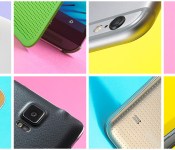
The top 15 smartphones you can buy right now
 It’s possible you already purchased one of the smartphones we listed in our buyer’s guide last July, but things tend to move quickly, and with fresh handsets from names like Apple, Samsung and Motorola, some of you may already be itching for an upgrade. To that end, we’ve made some fresh additions to our list of the latest and greatest smartphones out there today. Sure, our official Holiday Gift Guide is just around the corner, but this update will help you make some quick decisions, or at least get a head start on that holiday wish list.
 Filed under: Cellphones, Apple, Samsung, Sony, Microsoft, HTC, Nokia, Google, LG
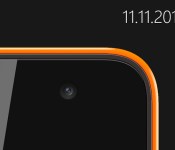
Microsoft will unveil its first Nokia-less Lumia on November 11th

Thanks to Chinese regulators, we’ve already got a pretty good idea of what Microsoft’s first Lumia will look like, but now the company is ready to start showing it off. Microsoft says it will reveal the low-budget handset on November 11th, likely confirming the 5-inch qHD display, 1.2GHz processor, 1GB of RAM, 8GB of storage and 3G-only connectivity we’ve seen approved in Asia. While the handset retains Nokia’s familiar design, it will be the first to sport Microsoft’s logo, which’ll be located beneath the earpiece on the front and in a vertical stripe running down the back.
Filed under: Cellphones, Mobile, Microsoft
Source: Conversations Blog

Microsoft debuts Office for Android with Tablet Preview

Back in March, Microsoft released Office for the iPad, but it required a subscription to Office 365. Unfortunately at the time, there wasn’t a version of Office available for Android tablets, but as of today, that’s no longer the case. Along with releasing iPhone apps for Word, Excel, and PowerPoint, Microsoft has also announced a preview of Office for Android.
The best part about all of this is the fact that you don’t need an Office 365 subscription anymore, meaning that you can use the suite of Office Mobile apps, for free. Now if you want to take advantage of Dropbox integration, then you will still need to subscribe to Office 365, but if you’re okay without it, then feel free to jump on board.
If you want to get the Office for Android tablet preview, then just head over to Microsoft’s form found here, and fill out the necessary information. After completed, you should receive an invite in the next week or two. One thing that Microsoft would like everyone to note, if your device is expected to be updated to Android 5.0 Lollipop, please do not install the Office preview. It’s not known whether the Office preview will work, but if you are going to be using the preview, just keep compatibility in mind.


The post Microsoft debuts Office for Android with Tablet Preview appeared first on AndroidGuys.

The new Office for iPhone is everything it should have been on day one

I remember when Microsoft first came out with Office for iPhone. It was actually kind of exciting. Here was this thing that for years had only existed in the form of rumors and leaked documents. And there it was, at last: the killer iPhone app, ready to download. Or so I thought. Maybe I was expecting too much, but I came away feeling underwhelmed. That first version of Office Mobile was a watered-down gimp of a program, with pitifully few editing tools and an occasionally confusing layout (imagine having no way of knowing what size font you were using). Compared to some apps, like Google Drive, it wasn’t that bad, but it still wasn’t as feature-rich as Apple’s own iWork suite. Worst of all, the software has received few feature updates in the 17 months since it debuted. Is this what we waited so long for?
At last, however, Microsoft seems to have come to its senses. The company is getting rid of Office Mobile and replacing it with three standalone iPhone apps for Word, Excel and PowerPoint, just like on the iPad. In fact, because these apps share code with the iPad version, they arrive with the same robust feature set, along with a couple tricks designed specifically for the iPhone. In short, then, the new apps are everything the original Office for iPhone should have been.
If you’ve spent any time with Office for iPad (or if you read my review), you’ll notice right away that these new iPhone apps have generally the same UI as the tablet version. The icons are the same, as is the layout of the home screen, where you can create new documents, view recently opened files or poke around any storage accounts you may have linked. Speaking of the sort, whereas you once needed a Microsoft OneDrive or SharePoint account to open something stored in the cloud, you now have the option of connecting your Dropbox account as well. It’s a brilliant solution when you think about it: Dropbox doesn’t have built-in office tools like OneDrive or Google Drive, and meanwhile Microsoft has caught flak for not supporting enough storage services. Everybody wins, especially users.
Though the UI is similar in style to the iPad version, Microsoft did have to make a few tweaks to ensure Office ran well on the iPhone’s smaller screen. For instance, while the iPhone apps have the familiar “Ribbon” interface, it now shows up at the bottom of the screen, not the top. Just hit the fourth button from the right in the top pane, and you’ll see a menu pop up at the bottom of the screen, exactly where you’d normally expect to see the onscreen keyboard. Because of that, the Ribbon never feels like it’s in the way: If you’re used to constantly having a soft keyboard taking up the lower half of your phone screen, then Office’s “vertical Ribbon” setup should feel quite natural.
From there, you can tap through all of the usual Ribbon options (“Insert,” “Review,” et cetera). As you’d expect, the menu of options will change depending on the context, but regardless of what you’re doing, the controls are large and easy to hit with your finger. Wanna change the font or color of your text? No problem. Want to program a cell to calculate a formula? Easy peasy. Need to add a transition to your PowerPoint slides? You get where I’m going here. The point is, for an app that offers such a large number of options, it’s impressively well-organized. Best of all, because the main Ribbon menu sits at the bottom of the screen, it should be easy to reach with your thumb, even on the larger iPhone 6 Plus.
Additionally, Microsoft added viewing modes to Excel and Word that make it easier to read documents on the iPhone’s smaller screen. In Excel, there’s a full-screen mode, which is exactly what it sounds like: a view-only mode where you won’t have to worry about hitting any random cells with your finger. In Word, this works a bit differently. There, it’s called “Reflow,” and it’s kind of like the difference between a mobile website and the full desktop version — the high-fidelity original looks better, but Reflow view makes it easier to read on that small screen. With PowerPoint, there’s no special mode, per se, but you will find that it runs mostly in landscape mode.
This would also be a good time to talk about performance. In particular, I like how quickly my iPhone 6 toggles between the standard and Reflow views — in that sense, it’s really not like switching between mobile and desktop websites! In general, too, the three apps feel responsive. Which isn’t surprising, really — Office for iPad runs briskly, as does Office 2013 on the desktop, for that matter. All the Office apps I’ve used recently have been fast.
All told, I’m pretty smitten with the new Office for iPhone apps. Now that they have feature parity with the iPad version, there’s very little I would change. (It is annoying that you still can’t add images to documents unless they come from the Camera Roll — what about OneDrive?) For some people, particularly those who depend heavily on Google Drive, the new Office for iPhone won’t be enough — at least as long as Microsoft continues to not support Google accounts. For everyone else, though, the new Office may have just made every other productivity app obsolete.
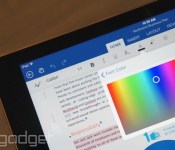
Microsoft makes Office for iPad free to use, starts testing Android tablet version

Considering how popular Office has been on the desktop, you’d assume it’d be the go-to productivity suite on mobile too. In fact, though, the company has made a few missteps: The iPhone app is watered down, and as nice as the iPad version is, you need an Office subscription to do any sort of editing. Fortunately, though, Microsoft is changing course: The company just announced that it will offer basic editing as a standard feature on the iPad, the same way it already does on Android and the iPhone. Keep in mind that you’ll still need an Office 365 subscription to unlock certain advanced editing tools, but most of those are probably better-suited to business users anyway.
Additionally, the company is beginning public beta testing on its first-ever Android tablet app, which will see a wide release early next year. The software, which includes standalone Word, Excel and PowerPoint apps, is still in development, but what we’ve seen so far suggests the apps have feature parity with the iPad suite. Also like the iPad app, it will include basic editing tools for free. You can sign up for the preview today, but it may take a while before you get a turn: Microsoft says it plans to add users gradually, with an eye toward testing a wide variety of devices.
Oh, and lest you think Microsoft forgot about its own Windows OS, a company spokesperson told us the touch-friendly Windows version is still in the works, but that we probably won’t see it until Windows 10 launches next year.
Finally, Office for Mobile for iPhone has gotten a huge redesign — so huge, in fact, that the app as you know it no longer exists. That watered-down application is gone and in its place are three standalone programs for Word, Excel and PowerPoint, each of which has the same robust tool set as the iPad version. Except, you know, some of the features here have been optimized for the iPhone’s smaller screen (think: a “Reflow” mode that makes it easier to view formatted Word docs on a 4.7-inch display). Those are available for free starting today and again, you don’t need a subscription to format text and make other basic edits. Have fun, and be sure to check out our hands-on screenshots.
Filed under: Software, Mobile, Microsoft
Source: Microsoft (1), (2), (3)

‘Halo: The Master Chief Collection’ has a smaller day-one patch than expected

We have some good news and some bad news for your data cap, folks. The Halo: The Master Chief Collection title update that adds multiplayer and a few other things is now available for download. It’s smaller than expected, too! But it’s still pretty sizable; 15GB to be exact. It’s 5GB slimmer than what was initially promised, sure, but depending on your internet speed it could be a time-consuming roadblock standing between you and your first killtrocity on “Sidewinder” — if you’re buying a physical copy, of course. In case you’ve made a digital pre-order, you can grab the patch right now should you have auto-downloads turned on, according to 343 Industries executive producer Dan Ayoub. You have to wait until November 11th to play it, naturally. You still have plenty of Sunset Overdrive on Xbox One to keep you busy until then, right?
Good news gang! Day One TU for MCC is up! If you haven’t enabled auto download, go get it now!! #HaloMCC
– Dan Ayoub (@Danayoub) November 6, 2014
#HaloMCC #DayOne title update is live. Looks like it’s only 15GB instead of the rumored 20GB. Bonus. pic.twitter.com/RtnCwAUiv4
– WorthPlaying (@worthplaying) November 6, 2014
Filed under: Gaming, Home Entertainment, HD, Microsoft

Microsoft’s bone-conducting headset guides the blind with audio cues

While nothing can replace the companionship of a guide dog, technology can help make treks through busy cities a lot less stressful and more enjoyable for the visually impaired. Microsoft, for one, is currently testing a new headset (developed with help from UK charity Guide Dogs) that uses 3D soundscape technology to guide its users with audio cues along the way. That bone-conducting headset can’t work alone, though: it needs to be connected to a smartphone, as well as to receive information from Bluetooth and WiFi beacons placed in intervals throughout the roads users take. For its pilot program, Microsoft attached makeshift beacons on neighborhood objects in a London suburb, where its first testers are giving it a spin. When company news writer Jennifer Warnick tried it out while blindfolded, she found herself so efficient in getting around with only sounds to guide her, that she felt like a “dry-land dolphin.”
According to her detailed report on the experiment, the beacons would constantly send audio cues that sound like the galloping coconut noise from Monty Python to ensure her she’s taking the right way. She also reported hearing other sounds, such as sonar pings to warn her if she’s veering too close to curbs, as well as turn-by-turn voice directions, telling her how far she still has to walk to certain establishments, or if the bus she’s waiting for is approaching. It’ll obviously take a ton of effort bringing the headset to market, seeing as more permanent beacons will need to be installed everywhere. Hopefully, the company finds a way to bring the system to other places, for the sake of all the blind folks who’d love to be more independent.
Filed under: Wearables, Microsoft
Source: Independence Day

New-gen GTA V looks great, and you can play in first-person (video)

The re-release of Grand Theft Auto V on PS4 and Xbox One (PC version delayed until 2015) is just days away now. As a result, Rockstar is cranking up the PR campaign by showing and telling why it should get your hard-earned money (again). Yesterday it delivered confirmation of the leaked first-person mode that brings even deeper immersion to your criminal hijinks — according to a comment on CVG’s podcast, you can even watch the cutscenes in first person — along with a video preview of what it’s like (viewable on YouTube here and in higher quality, higher bitrate video at Gamersyde.) Today it has another highlight reel to present, showing the difference between the PS3 and PS4 version across scenes.
The high-res 1080p / 30fps experience is just the start — you can quickly see more detail in the buildings, environments and cars as a dashboard smear suddenly has working dials, a green blur on the ground becomes fully 3D-rendered foliage and more. The team has also talked specifically on its work for the PS4 version, as IGN says the jump to first person is controlled by the DualShock 4’s touchpad, while police lights cause the lightbar to flash red and blue and radio chatter to come out of the controller’s speaker. Peep the reflections on the helicopter and the realistic looking puddles for more evidence of the team’s attention to detail, although there’s some aliasing and pop-in evident in the videos too. Give them a watch and let us know if you’re convinced it’s time to make a return trip to Los Santos.
Filed under: Gaming, HD, Sony, Microsoft
Source: Rockstar Newswire (1), (2)
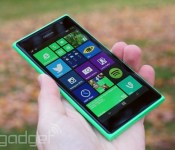
Microsoft’s low-cost Lumia 735 is coming to Verizon, according to the FCC

Windows Phone fans on Verizon haven’t had many cost-conscious options; you’ve usually had to spring for premium devices like the Lumia Icon or One M8 for Windows. Thankfully, that high-priced status quo might not last much longer. A variant of Microsoft’s budget-minded Lumia 735 has passed through the FCC’s regulatory gauntlet carrying Verizon-friendly cellular frequencies (including LTE data), supporting some earlier rumors. There don’t appear to be any special tricks in store, although the smartphone would pack GSM and HSPA+ for your international trips. Don’t hold your breath waiting to get a 735, though. While the filing potentially lets Verizon ship the handset before the end of the year, Windows Central claims that it isn’t on the slate for 2014. You may not see this lower-end Lumia for a few months, if it arrives at all.

Filed under: Cellphones, Mobile, Microsoft, Nokia, Verizon
Source: FCC

Engadget Daily: G Watch R review, life on the International Space Station and more!

We get it: You like the G Watch R’s circular display, but aren’t sure whether it’s the one. We can help. Read on for our G Watch R review, the ins and outs of life on the International Space Station, and the rest of our news highlights from the last 24 hours. Enjoy!
 AIVAnet