


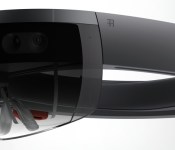
HoloLens is and isn’t Xbox One’s answer to PlayStation 4’s virtual reality headset

Finally, we can stop asking Microsoft’s Xbox lead Phil Spencer about virtual reality headsets. “For us I think this is the area,” Spencer told a group of interviewers at yesterday’s Windows 10 event. He was responding to whether or not there’s also a virtual reality headset in the works at Microsoft, just an hour after the company unveiled HoloLens: a “mixed reality” headset that enables the wearer to see holograms in real life.
For Spencer, HoloLens is both Microsoft’s alternate answer to the recent virtual reality explosion and a potential answer to Sony’s Project Morpheus headset — a VR peripheral that works with the PlayStation 4, where HoloLens could work with the Xbox One. “It’s very cool. To me there’s not a successful consumer electronics device on the planet where gaming is not a primary form of app category on the thing,” Spencer said. There’s even a “Minecraft-inspired” demo — which answers that question — for HoloLens that shows the implications of gaming with holograms. But no demo showed the headset working with the Xbox One in any capacity. Spencer instead talked around that possibility:
“I think gaming will be important. Specific scenarios with the Xbox, we’re thinking hard about. People could ask about streaming solutions. Could I use it as a display for my Xbox? We don’t have answers to any of those things, but know it’s all part of the same organization.”
And that’s why I say HoloLens both is and isn’t an answer to Sony’s Project Morpheus, or the Oculus Rift, or even Samsung’s Gear VR. It’s similarly impressive, and head-mounted, and even delivers some similar experiences, but it’s not virtual reality and it’s not a head-mounted display. It’s…something else.
The fact that HoloLens runs as a standalone device, untethered, is the first major differentiator.
Gaming with HoloLens and Xbox One wouldn’t involve a wire the same way the PlayStation 4 does with Morpheus. Regardless of the fact that it runs standalone, HoloLens could aim to offer a companion experience — a living “second-screen experience,” if you will. Sounds a lot better than connecting our tablets and smartphones!
Or imagine a horror game where HoloLens introduced more and more visual chaos into your life as you lost your mind in-game? That sounds goddamn terrifying!
The other major differentiator right now is that HoloLens has its own processing power on board, capable of running Windows 10. Well, since it runs Windows 10, then you can stream your Xbox One games to it, right? Maybe instead of playing Xbox One games on my TV, I play them on my ceiling while lying on my back, with the game projected directly into my vision so only I can see it. Sounds like a pretty solid solution for playing violent (“adult”) games with kids in the house.
As for whether HoloLens will take advantage of the Xbox One’s horsepower through tethering, that’s “clearly on the roadmap” according to Spencer. But I don’t know, the possible use cases without even heading into tethering are incredibly broad and, bizarrely, maybe even more fascinating.
It’s very early days for HoloLens — so much so that its potential far outclasses its delivery at the moment. What is there is full of promise, and it’s exciting to see a juggernaut like Microsoft pushing innovation in a completely different direction from the competition. What it will become is another question, but so far Microsoft’s made a truly original push into an arena crowded by folks all trying to deliver the same device.
As Spencer put it: “I’ve always applauded Oculus for what they’ve created. I think this is something different.” That, Mr. Spencer, it is.
Filed under: Gaming, Wearables, Science, Software, HD, Microsoft

Tell us how you really feel about the Microsoft Band
 When we published our list of Engadget’s lowest-scored gadgets last month, quite a few readers took issue with the inclusion of the Microsoft Band on that list. In our original review, we dinged it for its poor battery life and for being incredibly uncomfortable, knocking the Band down to a score of 65 and placing it near the bottom of products we evaluated in 2014. But in the end, our review is really just one experience with Microsoft’s new fitness tracker. Now we’d like to hear what you, our readers, thought of the Microsoft Band. Was it comfortable on your wrist? Do you love the plethora of sensors offered in the device? How do you feel about the Microsoft Health service? Leave your thoughts in a review on the product page for the Microsoft Band, and we’ll feature the most interesting and insightful comments in a future post.
Comments have been turned off for this post. Head to our database to write your review! If you don’t have a forum/database account, sign up here!

Dropbox now an alternative to OneDrive on all Windows devices

Filed under: Storage, Internet, Microsoft
Source: Dropbox
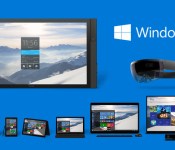
Windows 10 goes mobile, what does it mean for Android?

Microsoft made a few huge announcements yesterday, primary of which was the introduction of Windows 10. One huge feature stood out for us, the fact that Windows 10 will work across all of your available platforms, from the PC to your tablet, and even on your phone.
Microsoft has been struggling a bit in playing catch up with the leading mobile hardware and software vendors around the globe. Windows 8 began down the road to mobile friendly functionality, it was certainly built with touchscreen input in mind, but it somehow felt like an incomplete operating system to many, with a UI that made sense for a tablet experience, but lacked in old school Windows functionality on the desktop.

While Windows 8 is still the prevalent desktop OS, Microsoft has had to rely on a separate OS altogether for mobile. Windows Phone 8.1 is the current iteration, found mostly on the Microsoft owned Nokia devices, plus a small selection of HTC and other handsets.
Windows 10 is a new approach, the same OS is capable of installing on the various devices, where it offers a differing UI for each form factor. From what Microsoft showed off in their announcement, the phone UI brings with it the typical functionality we have all come to expect from our mobile devices. Home screens, settings menus, a phone book, a web browser and more.
What’s new
Windows 10 will rock a new web browser, code named Project Spartan. Cortana is a huge element to the new OS. Universal Apps make for a consistent experience across devices. Action Center eases settings control and syncs data and notifications across devices. Expanded Xbox integration goes beyond sharing game clips, streaming full games to your Windows 10 PC or tablet.

Looking at the new Universal Apps approach, there will be a few limitations as developers work around the x86 vs ARM architectures, but the goal is for one app to work on all of your gear. In addition to the app itself, there has been a focus on services.
Users familiar with the advanced photo functionality of Google+ should be comfortable with most of the Windows 10 Photo capabilities.
Your photos will show together in the Photos app, they will be automatically organized into sections and albums. Small touch-ups will happen automatically as well, such as red eye reduction. Best of all, photos will be a part of the new synchronization technology available on your Windows 10 phone in the Action Center. As is true for Google+ users, you’ll be able to get to your full photo collection regardless the device you are using.

A new messaging app seamlessly jumps between your SMS and IM communications, with Skype integration bringing video to the mix.
There is even a floating on-screen keyboard in Windows 10. Just swipe with your finger to re-locate it wherever you need it.
Should Android and other mobile be worried?
This is a tough one to answer. When it comes to walking into a cell phone store, one usually has to go looking for the Windows Phones hidden on the back shelf. Android and iOS devices have all but monopolized the industry. In these spaces, Microsoft has a long road ahead of them.
When viewing Windows 10 as a service, as many business and educational institutions may do, Windows phones and tablets take on a new appeal. If outfitting a large group of your employees or students with Windows PCs, a matching Windows tablet or phone is an easy sale.

Android, for many, is a powerful OS because it integrates so well with the Google ecosystem of apps and services. Microsoft has a growing user base of OneDrive and Outlook.com users that may become very interested in a phone that directly ties into those services.
As Microsoft expands their services, Windows 10 becomes a larger threat to Android. As a side note, with all of that said, Samsung has worked hard to build their own ecosystem, a roughly mirror image of Google’s own Android apps and mobile related services. Yet, Samsung’s Tizen OS has struggled to take off, so far.
Perhaps one move that Microsoft has done right with Windows 10, is adjust their pricing structure to be more in-line with other Mobile OSs. That’s right, as you have probably already read, for a wide selection of upgrade paths, Windows 10 is free. We are eager to learn what the price will be for those not upgrading. Android remains free, and open, Microsoft will have to keep that in mind as they try to compete.

Final thoughts
If the going success of Windows Phone and the once-great Nokia are to be considered when measuring future threat to Android, we might just say that Android’s market share has nothing to worry about. However, Microsoft has had time to watch and learn, by all accounts, it appears that they are doing things right with Windows 10. We’ll have to wait and see if that translates into smartphone sales.
What do you say, is Windows 10 a viable threat to Android market share, or is this just another Microsoft OS, doomed to be mocked and kept to your PC?

Microsoft will beta test a patch for the still-busted ‘Halo’ collection

343 Industries is beta testing its latest patch for the horribly crippled Halo: The Master Chief Collection. Yes, you read that right: Redmond’s internal Halo studio is asking a portion of MCC‘s players to be canaries in the Covenant coal-mine ahead of the latest (hopefully last?) update that’ll address the myriad issues still surrounding the game’s multiplayer. The test is available to North Americans in the Xbox One Preview Program, and furthermore, if you opt in it’ll limit who you’re playing with to those also in the beta. The test surrounds changes to the game’s matchmaking and party systems according to 343i, with further details coming once the update gets closer to a final release. Sign-ups start this Friday, and only those with the “highest levels of engagement” with the game are going to be selected. Everyone else? You’re just going to have to dream of what a revamped “Relic” will look like.
Filed under: Gaming, Home Entertainment, HD, Microsoft
Source: Halo Waypoint
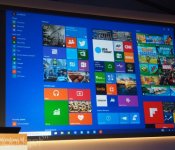
Here’s a closer look at the latest build of Windows 10 (video)

Shortly after Microsoft wrapped its epic Windows 10 keynote today, we had a chance to see the latest version of the next-gen OS running on some honest-to-goodness hardware. Using a Dell Venue Pro 11 tablet on display here at Microsoft’s Redmond headquarters, we got to experience the software in a slightly more final form than when we last saw it. New features include a button for bringing the Start Screen to full-screen, a notification center, revamped Photos and Settings apps and, most importantly, Cortana voice search built right into the desktop. In addition, we got a closer look at the so-called Continuum feature that allows the UI to change depending on what device you’re using (laptop, tablet, et cetera).
#fivemin-widget-blogsmith-image-885142display:none; .cke_show_borders #fivemin-widget-blogsmith-image-885142, #postcontentcontainer #fivemin-widget-blogsmith-image-885142width:570px;display:block;
 trydocument.getElementById(“fivemin-widget-blogsmith-image-885142″).style.display=”none”;catch(e)
Unfortunately, Microsoft’s new Spartan browser wasn’t ready to test, and neither were most of the redesigned core Windows apps. (The reason being: They won’t be included in the next build, which will roll out to testers in the Windows Insider program starting next week.) That said, this remains the most detailed look we’ve had yet of the OS. Have a peek, and stay tuned for more updates, if not today, then sometime soon; Microsoft says it plans to reveal even more about the OS at its Build developer conference in April.
Ben Gilbert and Edgar Alvarez contributed to this report.

When did Apple become the boring one?

In less than a decade, Apple completely changed the world of personal computing, and the music industry in the process. First came the iPod and the iTunes Store; then the iPhone and App Store; and then the iPad. The Apple of the 2000s was an exciting company to follow. It’s just not that company anymore. Instead, it’s spent the past few years slowly improving its admittedly great cash cows, iterating and iterating and iterating. It’s made cheaper iPhones, bigger iPhones and even gave in and made a phablet. It’s made cheaper iPads, smaller iPads and is apparently planning a bigger iPad. It’s made cheaper MacBooks, smaller MacBooks… you get the point. Its latest project, the Apple Watch, sure looks like a smartwatch, and it might be very successful, but is it doing anything totally unique? Is it really exciting? No.
The 2000s Microsoft, on the other hand, spent its years trying to fix Vista, Internet Explorer and Windows Mobile — playing catch-up. Apart from the success of the Xbox 360, it had a pretty torrid time, even if it was never in trouble financially. But let’s briefly summarize what Microsoft, energized by the appointment of Satya Nadella as CEO almost a year ago, just showed us. An operating system that runs universal apps across PC, tablet, phone and Xbox One. Streaming games from your home console to any Windows PC or tablet. A voice assistant for your PC that seems like a prequel to Scarlett Johansson’s AI in Her. HoloLens. I mean, HoloLens! Microsoft is promising to make the distant dream of functional AR a reality very soon. It even held people’s attention while showing off a new enterprise PC.
Google, the final company in the fabled “big three,” has always been the upstart. It’s fresh, exciting and full of ideas. Some of them are good, and completely change their industry; some of them are bad, and fizzle out. But they’re always something. Project Ara”s modular smartphones are truly exciting, and progressing well; Project Loon — the idea of beaming internet down to developing or rural areas from balloons in the stratosphere — is pretty incredible; and sure, Glass might be leaving us temporarily, but with the creator of the Nest onboard and Google’s massive investment in augmented reality company Magic Leap, you can be certain it’ll be back. So what about Apple?
Apple is the mid-2000s Microsoft. Its revenues are as healthy as ever, but it’s become a company that seems to make things just because it has to, that doesn’t take risks, that plays catch-up. The closest it’s come to a really exciting announcement in recent years was the launch of a niche pro desktop PC.
Microsoft just showed the world some crazy exciting stuff. Holographic computing might not be all it’s chalked up to be. HoloLens might never take off. Maybe people don’t want to talk to their computers. We’ll see. But Microsoft is trying to excite, or, to borrow an Apple buzzword, “delight” us all. If you’re a huge tech company, you should be trying to do that every day. Apple might be trying, but it’s not succeeding.
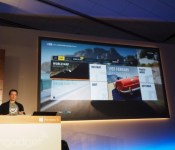
Xbox One games will stream to any Windows 10 PC or tablet

Microsoft’s new “Windows as a service” approach means more than just free Windows 10 upgrades, it’s bringing game streaming from the Xbox One to PCs and tablets.
Developing….
Filed under: Microsoft

Daily Roundup: Windows 10, weak passwords, SpaceX and more!

Microsoft will unveil Windows 10 to the masses tomorrow, giving us a closer look at what the folks in Redmond have been working on. Meanwhile, everyone on the internet is still using weak passwords like “123456” and Google decided to drop some serious money on SpaceX. Get all the details on these stories and more in today’s daily roundup.
What to expect from Microsoft’s next Windows 10 event

Tomorrow, Microsoft will give us a closer look at its latest operating system, Windows 10. What sorts of things do they have in store? Cortana, mobile optimizations and gaming improvements, just to name a few. We take a look at all the things you can expect.
Please don’t use these passwords. Sincerely, the Internet

If one of your passwords is on this list of the most popular passwords of 2014, it’s probably time for you to change things up. The most popular passphrase people used in 2014? “123456.” Well, at least it’s not “password” (that’s the second most used entry).
SpaceX is now a $10 billion company thanks to Google

SpaceX just secured $1billion in funding thanks to investments by Google and Fidelity, who will collectively own 10 percent of Elon Musk’s company. Both Google and Elon Musk are interested in using satellites to make the internet accessible around the world.
YouTube’s first Super Bowl halftime show may beat what’s on your TV

The Super Bowl halftime show is usually the perfect time to restock the fridge, stretch your legs and prepare yourself for two more quarters of exciting football action. This year, there might be a reason to stick around, as YouTube will host its first-ever halftime show.
The NSA knew North Korea hacked Sony because it hacked North Korea first

The US government sounds pretty confident when they say North Korea was responsible for the Sony Pictures hack. How do they know for sure? They inserted backdoor software into North Korea’s computer systems years ago.
Troubled Steve Jobs movie starts filming at last

Aaron Sorkin’s adaptation of Walter Isaacson’s Steve Jobs biography has finally started filming. CNET caught a glimpse of a film crew preparing to shoot in Jobs’ childhood home.
‘Borderlands’ on PS4 and Xbox One comes in a $399 edition with a robot

If you have $399 burning a hole in your pocket, consider this Borderlands: Claptrap-in-a-Box Edition for your Playstation 4 or Xbox One, which includes an actual robot.

What to expect from Microsoft’s next Windows 10 event
After taking big swings with Windows 8 and 8.1 — how big a miss they were is open to interpretation — Microsoft’s trying to redefine how we work with computers once more. We’re going to get a much closer look at Windows 10 at 9AM PT/12PM ET tomorrow (which we’ll be liveblogging, naturally), and all the usual suspects will be on hand to wax poetic about Windows’ next steps: There’s CEO Satya Nadella, of course, along with Windows chief Terry Myerson, mobile impresario Joe Belfiore and Xbox czar Phil Spencer. Let’s take a moment to look at what we know — and what we expect — Microsoft will show off in Redmond very soon.
A rose by any other name
You know where we’re going with this: Microsoft outed the (well-meaning, if misguided) Windows 8 back in 2012, and followed up with a solid 8.1 update about a year later. Now, here we are with Windows 10. Since it officially broke cover last September, we’ve seen a slow, inexorable current of leaks and brief updates outlining Redmond’s modified vision of computing. So, what’s on the docket for tomorrow?
Well, expect a more thorough outline of the consumer-friendly features that’ll pepper the new OS. We’re almost certainly going to get a closer look at the shape-shifting Continuum feature for one, which sadly wasn’t ready in time for the original tech preview release. In case you missed it the first time around, Continuum modifies how Windows 10 looks and feels based on how you’re trying to interact with it. Running Windows 10 on a tablet? You’ll deal mostly with those big, finger-friendly tiles and icons. It’s a totally different beast when a keyboard and mouse are added to the mix, though, as it’s back to the more traditional Windows desktop for you. Then there’s Spartan, Microsoft’s other web browser. The Verge reported earlier this month that the new, more lightweight app would live alongside Internet Explorer — which has finally been relegated to legacy/compatibility status — and features better support for note-taking with a stylus and the ability to play nice with Cortana. Throw in a slew of UI tweaks that range from the substantive (like that new spin on the Start menu) to the seemingly minute, and you’ve got the sort of high-level overview we expect from Microsoft tomorrow.

Now that the world’s techies have had ample time to put that first Windows 10 build through its paces, it’s high time for Microsoft to push out another preview build for us to tinker with (hopefully not long after the event wraps). Some techie prognosticators will also be chomping on their popcorn and waiting for word on what Windows 10 will actually cost, but that seems just a tad premature — as far as we know, Win10 is still slated for a launch later this year, and Microsoft only let official Windows 8 pricing slip a few weeks ahead of its general availability window. Still, we won’t complain if the folks in Redmond want to surprise us with a detailed pricing breakdown toward the tail end of the event. It’s nice to know where our wallets stand, right?
A better, deeper assistant
Apple’s Siri is strictly a mobile entity. Google’s Now voice-recognition and search chops are oozing into Chrome OS proper. And Microsoft? We’ve known for a long time that Cortana — its digital assistant with the familiar name — will make the leap from your Windows Phone to your desktop, and tomorrow’s likely the day we’re going to see how it all works. Of course, that’s not to say we haven’t already gotten a glimpse. Last month, WinBeta posted a video of a very early version of Cortana running on a (naturally) pre-release build of Windows 10 that works about as well as you’d expect: Some of the juiciest bits, like Xbox Music integration and navigation directions, weren’t in working order yet, but she could still take notes and fire up Skype for calls without much verbal prodding.
Still more reports claim that she’ll be baked directly into the Windows search interface, which you’ll recall now occupies its own space in the taskbar — no more jumping between the desktop and Microsoft’s beloved tile-centric UI when you need to scour your hard drive. With a debut expected in Redmond tomorrow, we just might see how much smarter Cortana has gotten since those initial leaked videos first got Her fans worked up. What’s more, ZDNet’s seemingly prescient Mary Jo Foley posited that Cortana could eventually replace the traditional search interface completely. A bold move, if true, and we sort of can’t wait for someone to usher in the age of controlling our computers by barking natural-sounding commands.
The mobile-friendly future

While it’s unclear how much of Windows 10 for mobile we’ll actually get to see tomorrow, some of the biggest changes are happening under the hood anyway. As far as Microsoft is concerned, the future of the desktop is inescapably intertwined with that of the smartphone in your pocket — a vision that’s been talked up in a big way since the introduction of the Universal app concept at the company’s Build developer conference early last year. Microsoft’s end goal? To create a single, unified app store that desktop, mobile and even Xbox users can tap into without forcing developers to craft code for each disparate platform.
And the mobile nitty-gritty? Details are still sparse, but at this point it looks like the really-quite-nice Lumia Camera app will transcend device boundaries and become a stock Windows 10 app for all Redmond-friendly gadgets. That Spartan browser will almost certainly get a shout-out too, though early reports indicate it’s not actually a Universal app — separate versions will apparently be available to desktops and mobile devices. Meanwhile, early appearances by devices like the Lumia 532 suggest that the version of Windows 10 meant for your phone will be called… Windows 10. Anticlimactic, sure, but if true, the name speaks to the sort of unity that Microsoft has been keen to craft among all its devices. After all, if your Windows Phone and your Surface tablet can run the same apps as the tower sitting on the desk in your office, why differentiate between platforms? Like Steve Ballmer famously declared, we’re quickly approaching the age of One Microsoft, not just in corporate structure, but also in a sweeping ecosystem that encompasses most (if not all) of the bits of silicon on you rely on daily.
Make no mistake: Microsoft’s mobile ambitions will definitely get some time in the spotlight tomorrow, but don’t be surprised if the company saves some juicy tidbits for MWC come early March. Don’t fret: You might get a taste of the phone-flavored Windows 10 before yet another trade show rolls around. ZDNet chimed in earlier today with word of a preview program that’s due to kick off (if everything goes according to plan) sometime next month.
Gaming without boundaries

No, you read the list of guest appearances right: Xbox head honcho Spencer will be there, too. Within the past few weeks, Spencer has said that Microsoft is gearing up to show off the “best operating system we’ve ever created for gamers” on Wednesday — the sort of uber-vague corporate bombast that stokes curiosity without actually satiating it.
“This is the beginning of our discussion with our fans about bringing gaming to the Windows 10 operating system,” he noted in a video interview with Microsoft’s Xbox Wire. Very enlightening.
But really, expect him to trumpet the ability for developers to create games that play nice across multiple kinds of devices, accessible from one united store. It’s sort of a dream for certain gamers: You buy a game once and pick up where you left off (hopefully without much of a performance hit) no matter what Windows device happens to be within reach. Our fingers are crossed, but we’re not convinced he’ll get too much more detailed than that. Oh, and a bit of DirectX 12 discourse is par for the course. Given that it’s been designed to help improve gaming performance on Microsoft’s gadgets across the board, not to mention how it’ll supposedly keep your battery from being run into the ground too quickly, we don’t much mind the recap.
And then we’ve got the really pie-in-the-sky stuff. Microsoft’s also working on (or at least, gearing up to work on) a new service code-named “Arcadia” that’s reportedly meant to stream full-blown games and apps to compatible devices, though it’s probably way too early for that to get anything more than a shout-out at tomorrow’s show. There’s also word of a Microsoft “gaming helmet” of sorts referred to internally as Project B that could make an appearance onstage. Researchers at Microsoft have been plugging away at the concept for years now, and perhaps it’s finally the right time to throw down against Oculus, Samsung and Sony. We’ll see.
[Image credit: Michael Kappel/Flickr (Microsoft logo)]
 AIVAnet