



Acer’s new Windows Phone is unlikely to blow you away

For some time now, consumers have pretty much been stuck choosing between Lumias for their Windows Phone fix. Acer is aiming to change that with the launch of its catchily named “Liquid M220″ smartphone. The M220 is a decidedly low-end handset, with a 4-inch WVGA (480 x 800 pixels) display, 1.2GHz dual-core processor, 512MB of RAM, 4GB of storage (upgradable via microSD), 5-megapixel rear camera and 2-megapixel front-facing shooter. It’s clearly aiming to compete with Microsoft’s cheapest Lumias, and, although admittedly this comes down to taste, it’s not exactly a looker compared to its rivals.
Things get worse for Acer when you consider the price. At €79 ($88) it’s up against the Lumia 535, which has double the RAM and internal storage. Interestingly, although the M220 has only 512MB of RAM, Acer is promising it’ll be upgradeable to Windows 10. Microsoft has noted that squeezing all the features of Windows 10 onto such low-end devices may not be possible, so bear in mind when deciding on your next phone that, despite the upgrade promise, not all Windows 10 phones will be equal. The M220 will go on sale in Europe, the Middle East and Africa this April.
Filed under: Cellphones, Mobile, Microsoft, Acer

11 best new Android apps and Android games released in February 2015
We’re nearing the end of February and it’s been quite the month for Android apps and Android games. We saw some flops but we also saw some pretty impressive software. Let’s take a look at the best Android apps and Android games of February 2015.
 Do Button by IFTTT
[Price: Free]
Do Button by IFTTT is a software button that allows you to customize your Android experience. You set up a button with a task to do something and that task gets done when you press the Do Button. Fans of IFTTT should definitely check this out and it’s a pretty nifty tool for just about everyone.

 Draw Slasher
[Price: $2.99]
Draw Slasher is a hack-and-slash game where you use your finger to gesture your attacks. This was once a popular game on the PS Vita and the Android release is a pretty decent recreation. It features a fast pace, plenty of swiping, and ninjas. There are also no in app purchases.
 Heavenstrike Rivals
[Price: Free with in app purchases]
Square Enix has released a new RPG called Heavenstrike Rivals. This is a tactical RPG similar in game play mechanics to Final Fantasy Tactics. The graphics are pretty decent and it is free to play with plenty of stuff to do. Beware, though, as the title is suffering from some launch day issues.
 Limbo
Limbo
[Price: $4.99]
Limbo is a monochrome horror game where you play as a kid who is looking for his lost sister. The game has already received praise for its interesting graphics and creepy, misty atmosphere. At its heart, it’s a 2D side-scrolling platform and puzzle game and it doesn’t have any in app purchases.
 Picturesque
[Price: Free]
Picturesque is a free lock screen app that came out of Microsoft’s Garage project. It grabs beautiful wallpapers from Bing frequently to keep things fresh and also shows things like weather, news, notifications, calendar events, and more. They’re still working out some issues but it’s still pretty solid.
 ScreenPop Lockscreen Messenger
[Price: Free]
ScreenPop Lockscreen Messenger is a picture sharing service similar to Snapchat and others. The catch is that instead of opening an app, ScreenPop puts the photos right on your lock screen so you can view and respond without ever unlocking your phone. The app is going through some release day issues but it can be fun for people who are into that.
 SlingTV
[Price: Free app / $20/month subscription]
SlingTV turned a lot of heads in February by allowing people to get some decent TV channels streamed over the Internet for only $20/month. The app is having a few issues here and there but nothing too serious. It’s a great deal for cord cutters even if the channel lineup is rather limited.
 Smart Weather Wallpaper
[Price: $1.99]
Smart Weather Wallpaper is a live wallpaper that changes based on the weather. So if it’s rainy, you’ll have a rainy wallpaper. It also changes based on seasons and the time of day. Overall, it’s an attractive option even though there are some bugs to work out.
 SoundHUD
[Price: Free with in app purchases]
SoundHUD is a customizable volume panel where you can control things like your system volume, ringtone volume, etc and one of the few that doesn’t require root access. Its claim to fame is the ability to put Lollipop devices into silent mode which is something that is tedious and confusing to do without it. It also has a few other nifty and unique features.
 theScore eSports
[Price: Free]
theScore eSports app is a sports app that covers predominately eSports, such as DOTA 2 and other video games. It represents a monumental shift in mainstream sports coverage because this was the first major sports media company to officially cover eSports. The app itself is actually very good too.
 YouTube Kids
[Price: Free]
YouTube Kids was released late in February and it’s a YouTube experience that caters to young minds. It’s full of playlists that show kids educational and entertaining content that caters specifically to their age range. Every parent should have this app without a shadow of a doubt.
Wrap up
If we missed any awesome Android apps or Android games that were released in February 2015, let us know in the comments! Also, don’t forget to subscribe to the Android Apps Weekly newsletter for more new releases and Android apps news!
Subscribe to our Android Apps Weekly newsletter!
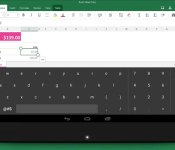
Microsoft made an Android keyboard especially for Excel

Because we do spreadsheets on the move. Because we simply need numpad. Because we didn’t buy a Surface. Microsoft has launched a new keyboard on Android, expressly made for Excel, with the main keyboard being truncated to make space for an unassumingly simple number pad, although there’s no pluses or minuses. Alas, it’s built for tablets, meaning it’s incompatible with ‘mere’ 5-inch Android smartphones — even if those devices, too, are aching to do expenses in transit.
Filed under: Tablets, Software, Microsoft, Google
Via: Android Police

‘Fable’ going free-to-play on Xbox One and Windows 10

Now you can add “price” alongside “gameplay” to the list of aspects that separates Fable Legends from its forebears. That’s because the game’s launching as a free-to-play title on Windows 10 and gratis with an Xbox Live Gold subscription on Xbox One. What’s it all entail? A lot of similar bits if you’ve paid attention to how free-to-play stuff typically works (microtransactions for cosmetic items, for example), but with a few unique wrinkles. The official FAQ stresses that you’ll be able to play the game from beginning to end without spending any real cash, and that all quests and storylines will be free — same goes for “everything that affects gameplay.” There’s a possibility that some customization options won’t be purchasable with the in-game currency you earn, and with its rotating system for playable characters, you have the option to permanently unlock a favorite character with cold hard cash, too.
This isn’t the first time Microsoft’s stepped into the F2P market, but it’s possibly the highest profile example of it to date. Happy Wars and Project Spark didn’t exactly set the world ablaze (neither did F2P elements that invaded the likes of Forza Horizon and its sequel) so it’ll be interesting to see just how well this does. The PlayStation 4 had its own share of F2P games at launch, too, but when the Xbox One will have a title with a DC Universe Online-level of success is anyone’s guess. But, now that the latter’s developer is free to make games for basically anyone, that could happen sooner rather than later.
Filed under: Gaming, Home Entertainment, HD, Microsoft
Source: Fable Legends (1), (2)

Microsoft releases Keyboard for Excel that works across all apps

Tapping out numbers on any tablet keyboard can be tedious. Think about having to work on a spreadsheet with a tablet. Constantly, you will have to go between the letters and the numbers/symbols. Microsoft Garage, which allows for the fostering of new ideas from within the company, has produced Keyboard for Excel. The keyboard layout is optimized for the use of numbers. Keyboard for Excel offers a number bad on the far right just as many full-sized physical keyboards do. Although the keyboard is tailored for Microsoft Excel, it is capable of operating in other apps.
The following are the key features listed by Microsoft:
- Keyboard layout optimized for numbers
- Excel operators prioritized in the keyboard layout
- 10-key number layout for fast number entry
- Tab key for quick navigation across columns
Hit the break for the gallery and download links.


Come comment on this article: Microsoft releases Keyboard for Excel that works across all apps

Search apps, including Siri, Cortana, and Google Now may be saving recordings of your commands

A user on reddit has posted about his experience as a new employee with a company that has access to voice recordings that he claims are commands given to mobile devices. According to this individual, some of the recordings specifically refer to Siri, Apple’s voice-activated search and command app. The reddit poster also implicates Microsoft’s solution, Cortana, and other posters have pointed out that Google is also saving Google Now commands. Although this user has access to the recordings, the employer is none of these major companies.
It is not clear how the recordings ended up with a third party. Access to the recordings is supposedly for the purpose of listening to the sound bites and comparing that with the generated text to help improve the voice to text translation. It may be possible the company has been hired by the major companies to provide this service rather than having this work done in-house.
If you want to get an idea of what information Google is saving, you can login to your Google account and surf over to history.google.com/history/audio. According to that page only you can see the history of recordings and Google does not provide any indication on this page that they share the recordings with others. In all likelihood, the recordings that are being saved are mostly mundane attempts at commands or searches. As the reddit user pointed out though, there are users out there trying some interesting commands that could be embarrassing if they got into the hands of the wrong person.
The problems caused by the way voice activation works are not new. In the past, Facebook has had to deal with claims that their app was always listening to users and more recently Samsung acknowledged private conversations should not be held in front of some of their smart TVs that are listening for commands. Voice activation is a great convenience for users, but as we continue to see, the potential is there for a lot of devices in our world to be turned into monitoring devices and now we see, all that data may be getting saved as well.
Does the potential for others to listen in on what you say, either live or via recording, cause you to adjust your behavior any?
source: reddit
Come comment on this article: Search apps, including Siri, Cortana, and Google Now may be saving recordings of your commands

Daily Roundup: Microsoft predicts (most) Oscar winners, Google Wallet and more!

From Oscar winners to gadget leaks and a robot that feeds you tomatoes while you run, we’ve got plenty of stories to get you talking in today’s Daily Roundup. Won’t you join us past the break?
Microsoft came remarkably close to predicting all 24 Oscar winners

It turns out Cortana isn’t the only fortune teller Microsoft has on hand. Economist David Rothschild works at the company’s New York lab and correctly predicted 20 out of 24 Oscar winners for last night’s Academy Awards.
HTC One M9 store images hint at an evolutionary phone design

MobileGeeks has spotted German store listings that suggest most rumors about the new HTC One M9 are true, with a few bonus features to boot. It looks like the phone will be getting a software upgrade, as well as boost its size to store bigger and better hardware.
The top 11 tablets you can buy today

Want to buy a tablet without breaking your budget? We rounded up 11 of our favorites with wide price ranges for you to browse.
Piggybacking robot feeds you tomatoes while you run

The odd contraption you see above is an actual, functioning robot that feeds you tomatoes, which are apparently chock full of antioxidants, while you run. However, don’t expect to see it on the streets anytime soon — it was created as a promotion for last weekend’s Tokyo Marathon.
Microsoft Band update lets you type replies and track your cycling

Microsoft’s Band just got a lot more useful. With the latest update, you can type replies on the activity tracker using a predictive keyboard, as well as track your bike workouts in the new cycling mode.
Pebble inadvertently teases its first color smartwatch

As Pebble prepares for a big announcement tomorrow, fans of the device think they’ve already discovered a new feature — a color watch face. As to what’s on the inside, 9to5Mac suggests the wearable is getting a new processor, better motion detection and a revamped interface.
Google Wallet to come pre-installed on phones for major carriers

Google is stepping up its mobile payment game — thanks to a new partnership with AT&T, Verizon and T-Mobile, Google Wallet will come pre-installed on their Android phones running KitKat or higher starting later this year.
Microsoft eyeing Dropbox users with 100GB of OneDrive storage offer

Companies with cloud storage services can always provide more space to retain existing users or pry others away from the competition. Right now, current Dropbox users can move over to OneDrive and receive 100GB of storage at no cost for one year. Taking advantage of this offer will require both Dropbox and Microsoft accounts. Once Microsoft verifies everything, a document for new OneDrive users will be added to Dropbox. Then Microsoft will freely add 100GB of storage to OneDrive to confirm completion.
The promotion is designated for people in the United States; however, select international users are seeing identical results.
Source: Microsoft
Via: TechnoBuffalo
Come comment on this article: Microsoft eyeing Dropbox users with 100GB of OneDrive storage offer
Microsoft OneDrive Beta gets Material Design face lift in first release [APK Download]
Another app is picking up a revamped Material Design makeover this week. Microsoft is jumping on board with the guidelines and making it known with the first ever beta release of Microsoft OneDrive. The beta release doesn’t appear to offer anything in the way of feature changes, but it does bring along a snazzy new […]
The post Microsoft OneDrive Beta gets Material Design face lift in first release [APK Download] appeared first on AndroidSPIN.

The Xbox One’s built-in video editor just got a lot more powerful

Microsoft has been touting its Upload Studio since before the Xbox One launched, but until now, the video editing suite only offered a few options for gamers. Now its first major update is bringing a ton of new features — it can splice together recordings to run for up to 30 minutes, drop in text overlays and toss in tons of new effects and transitions including many styled for games like Forza Horizon, Halo and Call of Duty. The biggest change, however, may be the ability for players use the Kinect camera to drop themselves into the video, using green screen effects without the need for an actual green screen backdrop. According to Major Nelson, the system can see your body and pick it out of the background, but we’ve seen enough camera glitches and voice commands missed to be skeptical until more people have tried it out. There’s a demo video laying out the new Upload Studio experience embedded after the break (plus a clip I tossed together with the new tools), and if you have an Xbox One the update should be live right now for you to try out.
In the battle of creature features Sony has significantly stepped up its game since launch with augmented reality sets for the Playroom and an improved video editor of its own, and now Microsoft is responding. I gave it a quick est, and while I wasn’t able to check out the green screen effect yet, the new Upload Studio offers budding video editors a lot more than the old one did. With just a little time and effort it should be easy to put together a highlight reel befitting SportsCenter’s Top 10, and sharing it to SkyDrive was painless. It’s a little annoying to have to jump over to the YouTube app to upload it there, but even that only took a couple more clicks once I’d created the video clip.
Old Upload Studio:

New Upload Studio:

https://www.youtube-nocookie.com/embed/DTVAxFcp-Xg?rel=0https://www.youtube-nocookie.com/embed/Lc-jzQBQPxo?rel=0
Filed under: Gaming, HD, Microsoft
Source: Xbox (YouTube)
 AIVAnet