


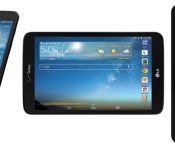
Verizon LG G Pad 8.3 LTE review
When you first pick the device up, before turning it on, you’ll swear it’s no bigger than any 7 inch tablet you’ve used before. Just know that your mind is playing a trick on you, or you’ll be truly surprised when you turn on the tablet and you’re greeted by the gorgeous 8.3 inch, full HD display.
Hardware
A slightly taller slate than the 7 inch tablets to which we’re accustomed, this version has the Verizon badge top center on the front balancing the LG symbol at the bottom. The device has a flap on the top under which you can find the SIM card and insert a 64 GB or lower microSD card.
Aside some the Verizon badges, the hardware is basically identical to that of the original G Pad. The software seems to be the same as well. Although it’s still on Android 4.2.2, the device has a lot to offer. My personal favorite feature from the LG G Flex, knock to wake, is present here as well. Only, on a tablet, when carrying it without a case, the screen will almost always pop on due to contact with my palm or fingers. The software is strikingly similar to that of the G Flex, only bigger. The back of the device is cool metal with a Verizon badge top center, their 4G LTE symbol 2 inches below and the LG symbol toward the bottom. The right hand side about 2 inches from the top and bottom you’ll find the stereo speakers, and one inch in from the left side all the way to the top is the 5 megapixel camera, which performs rather well for a tablet.

Software
Key things to note would be, even though there is a navigation bar, they’ve replaced the multi-tasking button with a menu key (long-pressing home summons the recent apps.) There is a very basic alternative app launcher which you can activate in the notification menu called “QSlide” through which you are able to launch movable window versions of the Calender, Video, Email, Richnote, Voice Mate, File Manager, and Calculator apps. At the top of each, you can control the opacity or elect to maximize the app. The bottom left corner allows you to change the window’s size.
Overall, the software is very well done, if it does feel a bit familiar to Samsung users. I really enjoyed how intuitive it is.
Verizon LTE
Let’s talk about having 4G LTE on your tablet. I admit, up until I reviewed this unit, I was one of those people who preached against tablets with dedicated data lines. “Just use your phone as a hotspot!” I would say. But I have to say, having that data connection all the time has won me over. How best to do this? Numbered list!
Reasons to have a dedicated Verizon data line on your tablet
- No hotspot set-up
- Lower drain on your phone’s data plan (might even be able to save money by switching plans)
- Lower drain on your phone’s battery
- If you don’t have a Verizon phone, your tablet will get data when your phone might not.
- Verizon’s LTE speeds have improved a lot (33 Mbps down 3 Mbps up)
- Only $99 on a 2 year contract ($299 without)
Basically, if you’re a tablet user, and you constantly find yourself switching on your phones hotspot, but don’t use the hotspot for much else, this could be a great alternative for you.
In summary, I would recommend this device to anyone who either knows they want a tablet with its own data plan, or is opened to the idea of switching over. The G Pad 8.3 is a wonderful size, and it my opinion, a size that should have been common before 7 inch displays became popular. The device is plenty quick, with a gorgeous display that makes even complex games look great, and Verizon’s 4G LTE is the icing on the cake. Highly recommend this tablet.
The post Verizon LG G Pad 8.3 LTE review appeared first on AndroidGuys.
LG G Flex receives KitKat update, but only in South Korea for now

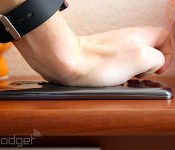
When it rains, it pours. Shortly after the news that AT&T’s Galaxy Note 3 is finally getting a taste of Android 4.4, LG is doing the same with its G Flex back at home, in South Korea. Most notably, this update will bring the company’s Knock Code feature, which debuted on the G Pro 2, to the flexible smartphone — yes, it really does flex. But that’s not it: LG’s KitKat update also brings improved Bluetooth Car-Kit controls and a boost in overall performance, thanks to things like Google’s ART experiment. And don’t worry if you down own a South Korean model of the G Flex, you should take this as being a step closer to arriving on your device.
Filed under: Cellphones, Software, Mobile, Google, LG
Via: UberGizmo
Source: LG (translated)
LG to start shipping the G2 mini in April

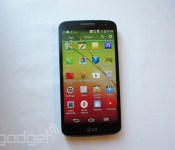
The G2 mini’s far from being a perfect smartphone specimen, but LG’s hoping it has what it takes to compete in developing markets when it comes out in April. That’s right — the 4.7-inch Android KitKat phone’s coming out next month, and it’s making the Russian Commonwealth its first stop, followed by countries in Asia, Africa, Europe, Latin America and the Middle East. The phone’s specs and features haven’t changed since we’ve last seen it at Mobile World Congress, which means it’ll ship with LG’s knock-to-unlock function and, sadly, that disappointing 960 x 540 qHD display. It will, however, come in several versions with slightly different components.
As we’ve mentioned before, the variant heading to Latin America and the Middle East is equipped with an NVIDIA Tegra 4i chip with LTE connection. Thanks to new info from the South Korean company, we now also know that it’s touting a 13-megapixel rear camera and NFC. Folks outside those two markets, on the other hand, can choose between an LTE version equipped with a 1.2GHz Qualcomm MSM8926 chipset and a 3G variant with a Qualcomm MSM8226 chip. Unfortunately, the Qualcomm devices are stuck with an 8-megapixel rear camera, but at least all versions come with a removable 2,440mAh battery. We still can’t say if the phone’s worth the price, because, well, LG kinda forgot to put a price tag on it. Those interested, however, can start thinking of whether they’d get a black, white, red or gold G2 mini while counting their rubles.
Filed under: Cellphones, Mobile, LG
Source: LG
LG’s Knock Code unlock method bumps into G2 and G Flex next month

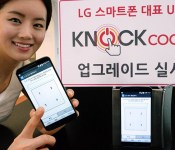
LG’s staying true to its word and updating the basic KnockON feature found on the G2 and the G Flex with its newer, more sophisticated Knock Code technology. The South Korean company launched the feature on the G Pro 2 in February, with a promise that it’ll eventually be available on older models. While the older knock technology only switches a screen on or off when you tap it, Knock Code lets you bypass the lock screen altogether. You merely need to configure a phone’s security setting to recognize a combination of up to eight taps made on four sections of the screen beforehand. The security feature’s slated to arrive on the handsets sometime in April through a firmware update — the bad news is, there’s no clear word on which countries will get it. Obviously, users in LG’s home turf will be some of the first to enjoy the feature, but everyone else will just have to cross their fingers.
Filed under: Cellphones, Mobile, LG
Source: LG
LG introduces Smart Lamp that communicates with your Android
Just like Phillips, LG is also planning to release its first ever smart light bulb as well, and it will be known as LG Smart Lamp; I am sure Edison will be proud of LG right now. LG didn’t tell us when they will start shipping it, but we know that it will retail for $32/35,000 Korean won, which is really affordable compared to Phillips Hue. About the bulb, it is is a low-voltage bulb that is said to be 80% power efficient than typical incandescent bulbs.
Now lets talk about the best thing of the LG Smart Lamp. The bulb is compatible with Android, which means you can control the functions of the lamp with the help of an app on your smartphone. The app works with devices Android 4.3 and above, and it will connect with your device via Bluetooth connection. LG claims that the lamp will work for 10 years based on a usage estimate of five hours per day.
And about some of the functions of the lamp; you can control the brightness of the light with your smartphone, there’s a “security mode” that will let you schedule the smart lights to turn on and off at specific times, plus it will start flashing when you are getting a call on your smartphone.
Are you impressed by LG Smart Lamp? Let us know in the comment box below.
Source: LG
The post LG introduces Smart Lamp that communicates with your Android appeared first on AndroidGuys.
LG G Flex review
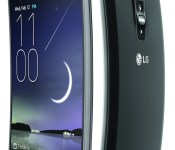
I should preface this review by saying, up until now, the biggest phone I’ve used on a daily basis is a Galaxy S 4 with an Otterbox defender case. But since that didn’t bother me one bit, I didn’t dream something this size would throw me for a loop the way this has. Coming from the Blu Life Pure mini which has a 4.5 inch display, it was an even bigger shock.
First thoughts
*HOLY CRAP that thing is huge* *Wait a minute, why is it curved again?* *How do I turn this thing on?*
The phone is, in my honest opinion, too big to be manageable with one hand. But in LG’s defense, they made the device about as small as they could with a screen that size. The quality of the display is lacking, it has a grainy rainbow quality, the likes of which you might see when oil smears on the display.
Hardware
The front is plain with a singular LG badge at the bottom center. There are no buttons on the sides, top or bottom, but the SIM tray is found on the upper left hand side of the device, the microUSB port in the bottom center and 3.5 mm headphone jack directly to its right. Aside from the curved display, the most interesting thing about this device is on the rear. Top center you’ll find the extremely poor performing 13 megapixel camera stacked above the volume up, power/sleep, and volume down keys. The device’s IR blaster is located to the left of the sensor and the LED flash to the right. All hovering over another LG badge. Lastly, at the bottom center, the T-Mobile symbol to the left of the speaker.
Although the display is large, the curved nature does make one-handed use seem a bit easier than the alternative, as you don’t have to reach your thumb quite as far to the top opposite corner. Also due to the curvature, holding the device to your face isn’t as daunting as you would expect from something so large as it seems to cup your cheek much like the banana “phone” you used to answer when your little niece handed it to you ringing.
There are some definite issues with the build style, though. First, the combination of the slick “self-healing” plastic back and the curve makes it so this device will slide off of any uneven surface, so don’t even think about setting it on your lap while driving.
There’s a certain charm to not having any buttons on the sides on the device, but I just can’t get used the the buttons near the camera, I constantly find myself smudging up the lens while trying to elevate the volume.
The obvious draws about the device are the curve and the large display, but aside from the great size, the display is really nothing to write home about, and when you’re in sunlight, the screen makes an odd silver glare which I can only compare to that of looking at a 3D display from an odd angle. But I think these are issues which will be solved with time.
The size is great for YouTube and Neflix, no problems with volume at all, but it’s nigh impossible to utilize the device one-handed while laying down. I found myself trying to smush it against the couch or bed to keep it propped up, and always had issues with my palm hitting things on the screen when I stretch out my thumb.

For full specs, check this out.
Software
At the time of writing this review the device is still running Android 4.2.2. Let’s start with knock to wake. Simply tap twice on the screen while it’s asleep to turn it on. This being the first device I’ve used which supported this feature, I will really be sad to lose it. The launcher is practically identical to Samsung’s TouchWiz, the “Apps” button is far right, the weather widget is very similar and the Google search widget is the exact same, even in it’s stock arrangement in the middle of the screen beneath the clock/weather widget. The most notable feature of the launcher will appeal to the neat-freak in you, the ability to create folders within the app drawer.
My only complaint to LG about the software is the fact that, even though the device has on-screen buttons like a Nexus, they saw fit to replace the multi-tasking button with a menu key. To access the task switcher, like most devices with hardware keys, you must long-press the home button. To add insult to that injury, there’s a way to change the order of the buttons and add new ones, but still no multi-tasking button, the only new buttons are “Launch quick memo” and “Pull notification panel down”
However there are a plethora of customization options, from per app color for the nav-bar, down to the ability to swipe the buttons to squish them to the left or right to facilitate one-handed operation.
Overall it feels like another solid, smooth Samsung LG device. Although the technology behind the display wasn’t ready for this high a profile release, and, in my opinion the curve doesn’t serve enough of a purpose to be attractive, this device performs admirably and as long as you aren’t off-put by the form-factor, size and display quality, it will serve you well.
The post LG G Flex review appeared first on AndroidGuys.

LG’s first smart light bulb flashes when you get a phone call

LG isn’t about to let household heavyweights like Philips corner the connected lighting space — it just unveiled the Smart Lamp, its first take on the concept. The 10W LED bulb gives Android and iOS users a familiar level of control over their illumination, including a light-based alarm clock and a security mode that pretends you’re at home. There are a couple of noteworthy tricks in this initial offering, however. The light connects through both Bluetooth and WiFi, letting it pull the sync-based stunts we’ve seen in a few other bulbs: it can flash when you get a phone call, or (with Android) pulse to the beat of the music. The Smart Lamp is more expensive than ordinary LEDs at 35,000 won ($32) in LG’s native Korea, but it could be a good deal if you don’t need the many-colored lighting of Hue and similar systems. Unfortunately, there’s no word on whether or not it’s coming to the US.
Via: Android Central
Source: LG (translated)

White House testing LG and Samsung smartphones, considering BlackBerry replacement

It’s been a rough few years for BlackBerry, but America’s highest office remains a dedicated customer — for at least a few more months. According to a Defense Department spokesman quoted in the Wall Street Journal, the White House is currently testing smartphone replacements from other manufacturers. Android appears to be the OS of choice, with the agency’s internal tech team evaluating handsets from LG and Samsung. As for BlackBerry, while the relatively small White House is hardly a significant customer from a financial perspective, the symbolic move would clearly be a significant blow. Though according to the aforementioned spokesperson, any move away from BB is still “months away.”
(Photo credit: Associated Press)
Filed under: Cellphones, Mobile, Blackberry
Source: WSJ

Daily Roundup: Sony’s ‘Project Morpheus,’ the Moto 360 smartwatch and more!

You might say the day is never really done in consumer technology news. Your workday, however, hopefully draws to a close at some point. This is the Daily Roundup on Engadget, a quick peek back at the top headlines for the past 24 hours — all handpicked by the editors here at the site. Click on through the break, and enjoy.

This is Motorola’s new Android Wear smartwatch: Moto 360
Motorola’s new wearable, the Moto 360, takes smartwatch form factor back in time (har), boasting a seriously eye-catching design and circular watchface. Powered by Google’s Android Wear, owners can utilize the power of Now from their wrists. What’s more, this isn’t the Moto 360′s only design. It’ll come in a variety of styles once it launches this summer.

‘Project Morpheus’ is Sony’s virtual reality headset for the PlayStation 4
Sony’s officially jumping into the VR realm with “Project Morpheus.” Now just a prototype, the two-part headset has a 1080p display and packs a 90-degree field of view. And though it’s still unclear how the device will work with consoles, the hardware you see above will double as a developer kit.

Google announces the Android Wear platform
Earlier today, Google unveiled Android Wear: a Nexus-like platform designed to power wearables, featuring contextual updates similar to Now and the same always-listening feature found on the Moto X. This mobile OS will focus on the smartwatch form factor for now, but Google says that’s just the beginning.

Apple’s new 8GB iPhone 5c now available worldwide
It looks like the rumors were true. An 8GB version of Apple’s iPhone 5c is available from several European carriers on multi-year contracts. And though the colorful handset has also arrived for Australia and China via Apple’s online store, we’ve yet to hear word of US availability.
You also might like:
Filed under: Misc
The G-Watch Announced by LG; Their First Android Wear-Powered Device
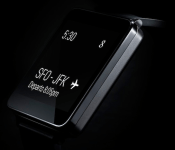
Hot on the heels, maybe even before, Motorola’s announcement of the Moto 360 is LG’s announcement for the G-Watch. Like the Moto 360, the G-Watch will be powered by Android Wear. LG goes to the more tradition smartwatch square/rectangular look vs the round approach Moto took.
 Engadget has it pegged for a Q2 launch, which is right around the corner. LG doesn’t appear to have a landing page up of any sorts though. The LG G-Watch will present a “ low barrier to entry for developers and offer the best Google experience for users.” Sounds like the G-Watch should come with a pretty competitive price point that might be a little more attractive for the masses. I have a feeling the Moto 360 is going to be more inline with the Samsung Gear pricing.
“The opportunity to work with Google on LG G Watch was the perfect chance for LG to really pull out all stops in both design and engineering,” said Dr. Jong-seok Park, president and CEO of LG Electronics Mobile Communications Company. “With the LG G Watch, LG is continuing the milestones we’ve set in wearables following in the footsteps of the world’s first 3G Touch Watch Phone in 2009 and the Prada Link in 2008. We’re confident that a well-designed device has the potential to take the smart wearable market by storm.”
What do you guys think? We still need to see what HTC, Samsung, ASUS and Fossil have up their sleeves. I have a feeling that Android Wear is going to produce quite a variety of styles, designs and price points.
Source: Engadget
 AIVAnet