


Qualcomm Snapdragon 810 in 60+ device design pipelines this year, with LG, OPPO, Sony, Motorola and others on-board
Much of what has been written over the last few weeks in regards to the Qualcomm Snapdragon 810 processor was negative. Not in the grand scheme of things, but due to information that Samsung wouldn’t be using the chip because it over heats. Just last week Qualcomm said it would be not working with one […]
The post Qualcomm Snapdragon 810 in 60+ device design pipelines this year, with LG, OPPO, Sony, Motorola and others on-board appeared first on AndroidSPIN.

Download the LG G Flex 2 wallpapers for your Android
Ready for a new batch of gorgeous, high-resolution images to use for your Android’s wallpaper? Check out these 10 photos that stem from the forthcoming LG G Flex 2; there’s a little something for everybody. We’re really loving the direction LG has taken with its last few smartphones, and the wallpapers are part of that. So, if you can’t afford a new handset just yet, or just like new wallpapers, grab them1


The post Download the LG G Flex 2 wallpapers for your Android appeared first on AndroidGuys.
Download the 1080p LG G Flex 2 wallpapers here
Probably one of the most interesting smartphones to debut at CES 2015 last month was the LG G Flex 2, LG‘s follow-up to its maiden curved display device. Featuring a much more manageable 5.5-inch curved display, the G Flex 2 looks like it could be one of the better phones of the first half of […]
The post Download the 1080p LG G Flex 2 wallpapers here appeared first on AndroidSPIN.
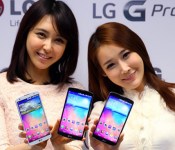
Korean owners of LG G Pro 2 receive Lollipop update

Korean owners of the LG smartphone, the G Pro 2, started receiving the Android 5.0 update a few days ago. The roll-out will be for all three variants of the LG device.
LG gave no indication on what their global release schedule for the G Pro 2 will be.
This is the second LG smartphone to receive the Lollipop update. The first, of course, was LG’s flagship, the G3.
The phablet was released almost a year ago in March 2014. Featuring a full HD display at nearly 6 inches, it was designed as the successor to LG’s popular Optimus G Pro phablet, which had won the Mobile World Congress‘ “Best Smartphone of MWC 2013″ award.
Source: Phone Arena
Come comment on this article: Korean owners of LG G Pro 2 receive Lollipop update
Could the LG G4 sport a 3K display?

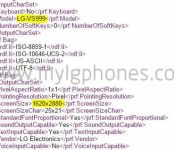
The LG G4 (LG-VS999) was spotted in a leaked document. That in itself is no big deal, but what is interesting is the display resolution, which is 2880 x 1620.
It’s believed that this device is headed to Verizon since the Verizon G3 had a model number of LG-VS985. Now interestingly enough the AT&T version (LG-H810) was spotted in a UA profile a few days ago with an expected resolution of 2560 x 1440.
So one of two things is going on here. Either Verizon is going to get a better version than AT&T or the leaked document is fake.
We probably won’t see the G4 until May, so it’s certainly not out of the question that LG could offer a 3K display, but I need a little more evidence.
source: MyLGPhones
Come comment on this article: Could the LG G4 sport a 3K display?
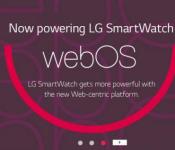
A webOS smartwatch from LG would prove just how right we were!

If you can dream it, you can do it.
Source: The Verge

LG’s Optimus UI vs. Vanilla Android
When I received my first Android smartphone about six years ago, I remember how much I desired stock Android on my HTC Droid Eris. I badly wanted to root my device, but as a young teenager at the time, I thought it would have been better to not risk bricking a phone I wasn’t paying for.
Fast forward to today, and now I’m on my fourth phone, an LG G3. If there is one thing I got the device for, it was the RAM. My last phone, with its 1GB of memory, just got so painfully slow that I couldn’t stand using it after it had been powered on for a few hours. It couldn’t even playback music without it hiccuping constantly.
Of course, this phone could end up the same. I’ve barely owned it for a month, which is not nearly enough time to measure its stamina.
Anyway, I knew right away that I might be dealing with a lackluster skin in the Optimus UI when I bought the G3. I recalled reviews of LG’s previous devices circa 2011 to 2013 where its skin was criticized time after time. Regardless, I just wanted the power the device offered, and at $30 on Verizon at the time, I felt it was calling my name. I’ll just put a launcher on it, I thought.
While it is true that I did put a launcher on it (Google’s Now launcher to be exact, which makes the home screen like the current version of Android), I’d be lying if I said LG’s skin didn’t make improvements on this pseudo-UI of Lollipop and that I didn’t enjoy the interface as a whole.
Before I go on, I should be clear that that my statements of stock Android are based partially on the Google Now Launcher since my phone still has KitKat. Likewise, my descriptions of Optimus UI are based on Android 4.4.
With the Now Launcher, a Google Search widget is located at the top of the screen. For better or worse, it cannot be moved around or removed from the display. I rarely use it, but I do like its minimalist appearance.
Speaking of minimalism, the Now Launcher starts the user off with two home screens, one of which is reserved for Google Now. There’s nothing inherently wrong with this, although I find it surprising that I can’t add a blank home screen manually. In order to add another, there has to be at least one app or widget on it, and if you remove them, the screen deletes itself. I don’t use many displays (Typically, just three), but this seemed a little cramped to me especially with its use of non-re-sizable, large icons.

By the way, LG allows for easy customization of icons by long pressing them until a smaller icon of a paintbrush in the top right appears and tapping them once more in order to enter a menu to resize it or change its appearance. Some will immediately like this idea because while LG’s icons for its apps aren’t ugly in my eyes, the company has used some rather bland colors like for messaging. I can easily see people preferring Material Design’s vivid color palette.

Next, there is the app drawer, which has apps sorted in alphabetical order on an opaque, white background. At first, I found this a bit jarring coming from LG’s UI since that allows the user to group apps into folders and to access widgets. The only way to do that with the Now Launcher (and probably with a stock ROM I’m assuming) is to long press an empty area of the home screen and select the widgets option above the home button. Of course, that becomes more difficult with a screen filled with apps.


Based on what I’ve seen on notifications in Lollipop, I’d say Google’s vision is superior. On the G3’s lock screen, I can see indicators for missed phone calls and text messages but not for emails. In addition, I can’t see a preview of those messages as I could if I was using vanilla Android (Google gives an option to hide those previews as well). Filtering notifications for just the important ones through Priority mode also sounds like a plus to me as is turning off an app’s notifications entirely.

Nonetheless, I still do enjoy LG’s use of the panel. At the top, I can activate toggles for Wi-Fi, Data, Bluetooth, and so on (which can easily be moved around), change the screen brightness (and even turn on or off auto brightness), and control the volume.
I do see how this would be annoying for someone who receives a lot of notifications because almost half of the screen is taken up by these toggles. My Gmail and just one other notification can be seen before I have to start scrolling.

Honestly, I’m not sure about the practicality of the Recents carousel in Lollipop. I think it could be easier to accidentally swipe away or activate apps in this view, but I’m going to reserve judgement until I actually get Lollipop on my G3. Until then, I have no problem using the cards system of the recent apps tray.

LG has added a nice addition of being able to activate dual window mode, which is similar to Samsung’s Multi Window, from this tray. Admittedly, I haven’t used it much, but it was useful for when I wanted to keep listening to a YouTube video while responding to a message.
Both UIs feature battery saving modes. For Lollipop, a device’s battery life can be extended for up to 90 minutes. The estimated time left on the battery can be found in the battery settings, and the OS immediately lets you know when it will be fully charged once it is plugged in.
Optimus UI’s battery saver works starting at 30% of a full charge once it is turned on, but I question why power usage of the phone cannot be scaled back as soon as it comes off the charger. Again, I have not used Lollipop personally yet, but I assume its interface does allow this.
Moving on to security–This might be more of KitKat vs. Lollipop at this point–, Optimus UI gives the options to lock files in Gallery, encrypt the internal storage, encrypt the SD card storage, set up a SIM card lock, install apps from unknown sources, install credential certificates, etc.
I expect Lollipop to also have most of these options especially for encryption, installation, and credential certificates. Additionally, to not be outdone, Google promises that all new devices will be shipped with encryption already turned on. It hopes to increase protection against malware and other vulnerabilities by using SELenforcing for all apps. Lastly, a phone or tablet can be paired to a device the user trusts such as a smartwatch or a car.
Device Sharing is similar as well, except Lollipop can set up multiple users for a single device on top of guest mode.
Android 5.0 supports USB microphones, speakers, amplifiers, mixers, etc., OpenGL ES 3.1 for supposedly desktop- and console-like graphics performance, raw photographic formats like YUV and Bayer RAW, HVEC for UHD 4K video playback, and improved HLS support for streaming.
While KitKat and Optimus UI support 64-bit SoCs and native apps just like Lollipop, Lollipop is built on the ART runtime. This gives the UI four times the performance of stock KitKat and more compact background apps and services, leading to improved memory usage. This is not everything, of course. You can read more these features at the official Android page for Lollipop.
To wrap this up, LG has shown me that with its Optimus UI on the G3 that it has been listening to consumer feedback and has made an interface that is enjoyable for me in many ways. Sure, I may never use the IR remote control or Smart Bulletin, but I just don’t mind because the overall package is that great. Meanwhile, Google has demonstarted that while it has a vision of the OS that it wants the various manufacturers to follow, it has updated it with features that were used in the likes of Samsung and Motorola’s phones.
Ultimately, as someone who has not yet used Lollipop, I can’t make a conclusion about which is better. Although, I will say this. Based on what experiences I’ve had with Android and various UI up until this point, I don’t feel that desire to root and install a ROM of Lollipop. I was quite satisfied that my last device received KitKat a month or two before I retired it and had 4.2 Jelly Bean before that. Perhaps, because KitKat did not do much if anything for my phone that I began to unconsciously think of Android updates as not as significant performance-wise. Hoping for an update for the latest version also has fatigued me for at least five years now.
I’ve been satisfied for well over a year to have a relatively modern version of Android that can fit my needs of occasional browsing and reading, music streaming and native playback, and downloading any app for the Google Play Store. Yes, I’m still excited Lollipop is coming quite soon to my device, but I’ll wait as long as it takes.
FEATURED POSTS


The post LG’s Optimus UI vs. Vanilla Android appeared first on AndroidGuys.
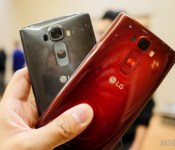
LG reassures that the G Flex 2 and G4 won’t be affected by Snapdragon 810 issue

Yesterday Qualcomm revealed that a “large company” had decided not to use the Snapdragon 810 in an upcoming flagship, with all signs pointing to Samsung. The reason for this change reportedly had to do with Snapdragon 810’s alleged overheating issues, something Samsung encountered in its tests of the chip. So why did Samsung run into problems and not LG? As it turns out, LG had more troubles developing the 810-powered LG G Flex 2 than it originally let on.
Despite denying that overheating was an issue a week earlier, at an LG earnings conference in South Korea LG came clean and admitted that it had ran into some issues with its “initial batch” of chips. However, LG and Qualcom have since dealt with the issues and all is on schedule both for the release of the LG G Flex 2 and the future release of the LG G4.
Despite denying that overheating was an issue a week earlier, at an LG earnings conference in South Korea LG came clean.
Speaking of the G4, LG was also asked if the latest iteration might feature a metallic body when it arrives. As you might expect, LG was pretty vague stating that “these decisions will be based on market demand.” Considering just about every OEM is now shifting to metal for flagships, we’d say the demand is there. Whether or not LG decides to follow suit is a whole other matter.
Back to the subject of overheating, providing that LG is being 100% truthful on the matter, that means other OEMs that are expected to still utilize the Snapdragon 810 (like HTC) shouldn’t experience any delays either. Let’s just hope that everything goes according to plan, both for the sake of OEMs, Qualcomm and for us consumers who want the latest and greatest without having to deal with further delays.
What do you think of the “Snapdragon 810 fiasco”, based on what we know so far? Will this hurt Qualcomm’s reputation in the long term, or will they bounce back as long as they truly have solved any performance issues by the time devices reach customers?
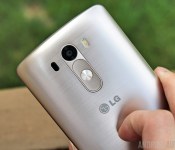
LG talks numbers too, posts strong mobile profits for 2014

LG may have only just missed out on the fifth place for shipments last quarter, but the company has still had a very profitable 2014, led by strong mobile growth. Operating profits for 2014 leapt to KRW 1.83 trillion (USD 1.73 billion) from KRW 1.25 trillion (USD 1.14 billion), an increase of 46 percent.
Fourth quarter revenue reached KRW 15.27 trillion (USD 14.06 billion) resulting in an operating profit of KRW 275.1 billion (USD 253.31 million), which works out to an increase of 28 percent YoY. For the full year, LG brought in revenue worth KRW 59.04 trillion (USD 55.91 billion), mainly thanks to strong growth in mobile shipments, which rose by 24 percent.
Looking a little closer at smartphones, LG shipped 59.1 million devices throughout 2014, which is pretty much what the company and analysts had expected. From this, mobile generated revenues for the year increased by 16 percent to KRW 15.06 trillion (USD 14.26 billion) and the company saw particularly strong growth in North America. Smartphone shipments increased 78 percent in Q4 2014, when compared with Q3 2014, which is one of the highest growth rates in the industry. Coupled with profits from LG Display, the company is holding strong in the increasingly competitive smartphone industry.
LG’s Home Entertainment Company also saw operating profits grow 31 percent year on year to KRW 509 billion (USD 482.01 million). The company’s Energy Solutions and Home Appliance companies also saw profits of KRW 255.1 billion (USD 241.57 million) and KRW 2.88 trillion (USD 2.65 billion) respectively, showing profits all around for the electronics company.
With the LG G Flex 2 and G4 heading our way in the first half of 2015 and a range of products to suit regional demands already on the market, LG looks to be in a strong position going forward into 2015.

LG Display posts impressive Q4 profits while operating costs continue to increase

LG Display has just posted their earning results for Q4 2014. While interest in LG’s display technology has seemingly been growing drastically, the company’s operating costs may be dragging it down.
Overall revenue for Q4 totaled 8,342 billion won, which is a 27% increase from Q3 2014 and an 18% increase from Q4 2013. Operating profits for Q4 2014 totaled 626 billion won, which is a 32% increase from Q3 of 2014 and a year-on-year increase of 144% from 257 billion won in in Q4 2013. LG explains that these increases are largely due to more shipments of larger size panels overall, and an increase in small/medium displays through the peak season through the end of the year. LG also mentions that larger, more inexpensive displays have a lot to do with the profit.
Additionally, LG Display’s net income increased by 10% to 389 billion won in Q4 from Q3. This is also a massive 448% increase from Q4 2013. LG Display’s year-over-year net income has increased 119% from 2013. Annual revenue decreased by 1 trillion won from 2013 to 2014. TFT-LCD panels for TVs accounted for 36% of revenue in Q4 2014, mobile device panels for 23%, tablet panels for 19%, computer monitors for 14% and notebook PCs for 8%.
With more interest in LG’s display technology growing worldwide, operating costs will obviously increase. LG has displayed leadership in the market with P-OLED and OLED panels, and the company is confident that they will continue to see profits throughout 2015 and will work to keep operating costs to a minimum.
Revenue in the fourth quarter of 2014 increased by 27% to KRW 8,342 billion from KRW 6,547 billion in the third quarter of 2014 and increased by 18% from KRW 7,079 billion in the fourth quarter of 2013.
Operating profit in the fourth quarter of 2014 recorded KRW 626 billion, a quarter-on-quarter increase of 32% from an operating profit of KRW 474 billion and a year-on-year increase of 144% from the operating profit of KRW 257 billion in the fourth quarter of 2013.
EBITDA in the fourth quarter of 2014 was KRW 1,532 billion, compared with EBITDA of KRW 1,295 billion in the third quarter of 2014 and with EBITDA of KRW 1,124 billion in the fourth quarter of 2013.
Net income in the fourth quarter of 2014 amounted to KRW 389 billion, a quarter-on-quarter increase of 10% from KRW 354 billion in the third quarter of 2014 and a year-on-year increase of 448% from KRW 71 billion in the fourth quarter of 2013.
LG Display posted its eleventh straight quarterly operating profit at KRW 626 billion and quarterly revenue exceeding KRW 8 trillion resulting from increased shipments reflecting a continual trend towards larger size panels and new product launches in the small and medium display segment through the peak season at the year-end. Favorable pricing condition, particularly in large-sized panels due to the above trend, also contributed to the improved results. LG Display recorded an annual net income of KRW 917 billion in 2014, a year-on-year increase of 119% from the net income of KRW 419 billion in 2013. Annual revenue slightly decreased to KRW 26.456 trillion compared with revenue of KRW 27.033 trillion in 2013. The company expanded its portion of high value-added panels such as those for large-sized, high resolution TVs and mobile devices based on an efficient operational production strategy to proactively meet market demands. Accordingly, despite the decreased annual revenue due to the changes in the business structure towards increased Cell business1 , profitability improved significantly.
In providing a return to the shareholders, LG Display declared a dividend of KRW 500 per common share at the Board of Directors meeting held on the 27th of January. The decision will be finalized after approval at the forthcoming Annual General Meeting of Shareholders.TFT-LCD panels for TVs accounted for 36% of revenue in the fourth quarter of 2014, mobile device panels for 23%, tablet PCs 19%, monitors 14%, and notebook PCs 8%. With 95% in the liability to equity ratio, 122% in the current ratio, and 16% in the net debt to equity ratio as of December 31, 2014, the financial structure of the company remains stable.
Semi-finished panels without backlight module Outlook The following forecast is based on information as of January 28, 2015. The Company does not expect to update its estimates until the next quarter’s earnings announcement. However, the Company reserves the right to update its full business outlook, or any portion thereof, at any time and for any reason. “Shipments in the first quarter are expected to decrease by a mid-single digit percentage, less influenced by seasonality compared with other years, due to steady market demand and the company’s efficient operational production strategy, while overall panel prices are expected to remain stable although they may vary by product segment,” said Don Kim, CFO of LG Display. “LG Display expects a quarter-onquarter decrease in profits given that the first quarter is an off season, but we’re committed to continually enhance our profit competitiveness through technology differentiation and cost reductions.”
 AIVAnet