


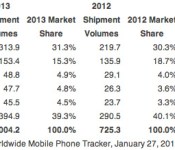
Smartphone sales may have topped 1 billion in 2013, depending on who you ask

You once had to look to the broader cellphone market to see more than a billion phones ship in one year. Well, times have changed… at least, if you ask the right analysts. IDC now estimates that smartphone shipments topped one billion for the first time in 2013. However, Strategy Analytics begs to differ — it reckons that shipments fell just short, at 990 million. Whether or not the industry hit its symbolic milestone, the roughly 40 percent increase over 2012 data shows that the smartphone market had plenty of room to grow last year. Samsung led the pack with 31.3 percent of the the market, while Apple dipped to 15.3 percent as both Samsung and Chinese manufacturers (including Huawei and Lenovo) chipped away at its second-place position.
As for what happened in the fourth quarter? Both analyst groups say that Samsung was once again the top vendor, although they note that the Korean firm’s share was largely flat at 29 percent. Not that Apple fared any better, as its record-setting iPhone shipments weren’t enough to prevent a slide to 18 percent share. Huawei, LG and Lenovo were the real victors — each of them typically gained a point or more of share in the past year. IDC chalks some of this up to the rise of very low-cost smartphones, which are quickly taking over developing markets like China and India. Companies which focus on more expensive handsets, such as Apple and Samsung, have the most to lose in these areas.

Filed under: Cellphones, Mobile, Apple, Samsung, LG, Lenovo
Source: IDC, Strategy Analytics
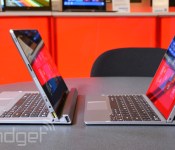
Lenovo’s 10-inch Miix 2 convertible tablet goes on sale early, starting at $699

You won’t have to wait until March to get your hands on Lenovo’s 10-inch Miix 2; much to our surprise, the budget-friendly convertible tablet is already on sale. Just be prepared to pay extra for early access. The company is offering only higher-end versions of the Windows 8.1 slate, which currently starts at $699 for a WiFi model with 128GB of storage. The promised $499 variant isn’t listed on Lenovo’s site as of this writing. While it’s hard to complain too much about the higher price given the unexpectedly quick launch, those who want the cheapest edition of this mid-size Miix 2 will have to be patient.
[Thanks, Augustus]
Filed under: Laptops, Tablets, Lenovo
Source: Lenovo

Daily Roundup: flexible 3D-printed material, Lenovo ThinkPad Yoga review and more!

You might say the day is never really done in consumer technology news. Your workday, however, hopefully draws to a close at some point. This is the Daily Roundup on Engadget, a quick peek back at the top headlines for the past 24 hours — all handpicked by the editors here at the site. Click on through the break, and enjoy.

Lenovo ThinkPad Yoga review
Lenovo’s latest addition to its Yoga line is the ThinkPad Yoga. Starting at $999, this heavyweight convertible packs a Core i3 processor, 4GB of RAM and a 1,366 x 768 display. Click the link for our review.

New 3D printer creates flexible material
Since acquiring MakerBot, 3D-printing company Stratasys has been hard at work. Its new $330,000 Objet500 Connex3 3D printer claims to be the first with the capability to create objects with multi-colored, flexible materials. Follow the link for more information.

SkyDrive gets ‘OneDrive’ name change
Microsoft reluctantly renamed its cloud storage service to “OneDrive” today after losing a trademark dispute with British satellite TV provider BSkyB last July. Click the link for details.

NSA reportedly scouring apps for user data
Yet another leak from Edward Snowden indicates that the NSA can access user data from apps like Angry Birds. The agency may even be able to unearth more information than the apps alone can provide. Click through for the entire story.

Lenovo ThinkPad Yoga review: a good (if slightly heavy) Ultrabook for business users

It’s pretty clear that Lenovo made a mistake with its original Yoga laptop. Don’t get us wrong, we liked — no, loved — it, but we could never get over how awkward it was to use in tablet mode: Every time you folded the screen over, you had your fingers pressed against the loose keys on the back. It was such a glaring oversight that even other companies have taken note: first Sony with its Flip line and now Toshiba with its 5-in-1 convertible that has a reversible keyboard.
Lenovo also seems to have learned its lesson: The new ThinkPad Yoga has a “Lift ‘n’ Lock” keyboard that flattens out as you flip the screen back into tablet mode, making exposed buttons a thing of the past (mostly, anyway). It also allows for pen input — something you still won’t find on the consumer version. Even then, the ThinkPad Yoga introduces some trade-offs of its own: It’s thicker and heavier than the new Yoga 2 Pro, which doesn’t have a self-flattening keyboard, and it makes do with a not-quite-as-sharp screen. Those compromises aside, could this be the Yoga you’ve been waiting for?
Look and feel

It’s exactly what it sounds like, folks: It’s a ThinkPad that looks like a Yoga, and a Yoga that looks like a ThinkPad. Got it? Good. Here’s a quick tour. Unlike ThinkPads of yore, which had a soft, rubbery finish, the ThinkPad Yoga sports a smooth magnesium lid, though certain key details (the red TrackPoint, the glowing ThinkPad logo) have carried over. Also like older ThinkPads, it’s fairly boxy, with blunt edges and straight lines (though Lenovo did sneak in some rounded corners). All told, it’s a blockier shape than you’ll find on Lenovo’s consumer laptops, many of which have been chiseled to resemble a physical book.
We already hinted at this, but the thing that makes the ThinkPad Yoga so special — that Lift ‘n’ Lock keyboard — is also the thing that makes it so heavy. At 3.52 pounds and 0.76 inch thick, it’s noticeably heavier than the new Yoga 2 Pro, which comes in at 3.06 pounds/0.61 inch. It’s even bulkier than the last-gen Yoga 13, which weighed in at 3.3 pounds and measured 0.67 inch thick.
Even without that newfangled keyboard, the Yoga had a sturdy hinge. Which makes sense, given how much bending the thing was supposed to withstand. With the ThinkPad version, that hinge grew even bigger, as it has to support not just the folding screen, but also a series of mechanisms that help lift the platform between the keys, and then lock the buttons in place. Though the impact on the weight and thickness might not be such a good thing, a bigger hinge at least means the machine handles well. As on the other Yogas, the screen here folds back in one fluid motion, without ever feeling too loosey-goosey. Though the hinge never feels rigid, per se, you will encounter what we’d call a speed bump — a little bit of resistance to remind you that you’ve officially entered tablet mode.
And what of that novelty keyboard? As promised, the Lift ‘n’ Lock system clamps the buttons into place, meaning you can’t depress them when the machine is in tablet mode. That’s not to say you can’t still feel the individual buttons: They’re definitely there, and it’s easy to tell one from the other just by running your hands over the back of the tablet. Even so, it’s definitely a less awkward setup than on the original Yoga, where you can feel the loose buttons on the back. But is it a more elegant solution than what Sony is offering with the Flip series? Or what Toshiba has planned for its 5-in-1 convertible? It’s hard to say, particularly with regards to the Toshiba, which isn’t even out yet. But it’s a question worth asking as you consider buying the ThinkPad Yoga, a machine that’s heavier (and no less compromised) than most.

If nothing else, it does seem to us that the self-flattening keyboard would be at home on a smaller, perhaps 11-inch Yoga. Even under the best of circumstances, a nearly 13-inch tablet would be a bit unwieldy, but this one is especially cumbersome, just given how heavy it is. All of which creates something of a catch-22: It’s heavy because of that Lift ‘n’ Lock keyboard, but due to that heft, we’re less likely to use the ThinkPad Yoga as a standalone tablet.
Fortunately, there are other poses for you to choose from, including regular laptop mode, “Stand” mode (screen facing away with the keyboard tucked under) and “Tent” mode, with the laptop standing in an upside-down “V” shape. We’ve always been a fan of Stand mode for watching movies in cramped coach seats, but Tent is well-suited for presentations and videos as well. Interestingly, though Lenovo added a rubber bumper to the Yoga 2 Pro, there’s no such gasketing here. That leaves the ThinkPad Yoga’s edges exposed when you stand it on its head in Tent mode, but so far, at least, we haven’t observed any damage on our review unit.
Finishing up our tour, the ThinkPad Yoga doesn’t bring many surprises in the way of ports. For a power adapter, you’ve got the same OneLink connector found on all new ThinkPads, which has a similar shape to a common USB port. Speaking of the sort, this thing has two USB 3.0 ports — one on each side — along with a mini-HDMI socket, headphone jack, SD reader, lock slot and a volume rocker/screen-orientation button to use in tablet mode. There’s also a slot for the active pen, located on the right side, toward the front where the palm rest is.
Keyboard and trackpad

Lenovo may have messed with the X1 Carbon’s keyboard, adding an adaptive panel with controls that change depending on the app you’re using, but in the case of the ThinkPad Yoga, the company’s design team didn’t take any chances. This is the same spill-resistant, island-style layout we’ve seen on the last few generations of ThinkPads, with six rows of U-shaped “Smile” keys and a large, buttonless trackpad sitting underneath. Lining the top, you’ll see a row of function keys that serve primarily as multimedia controls (read: You’ll need to hold down the Fn button to use it for something else). Throughout, the buttons are generously sized, with only a handful of keys (the arrows, PrtSc) that appear shrunken-down. Like other ThinkPads, too, there’s a good deal of travel here and the buttons are backed up by a sturdy panel that doesn’t bend or flex as you’re pecking away. And we’d expect nothing less, really: Given how thick this machine is, relatively speaking, there’d be no excuse not to have dense, cushy keys.

We’ll admit: We were initially skeptical when Lenovo said it was moving toward buttonless trackpads for its ThinkPad line. After all, there’s something so inherently tactile about the ThinkPad experience: those pillowy keys; the rubber TrackPoint that other companies have tried (and failed) to imitate. Truly, though, the glass touchpad here is easy to use, and Lenovo has refined it so that the learning curve is even smaller than it was last year. When we tested the ThinkPad Helix, for example, we initially encountered a dead zone in the middle of the touchpad — a no man’s land between the regular left/right click buttons and the two buttons up top, which are meant to be used with the TrackPoint. Now, though, Lenovo has painted thin red lines where the two upper touch zones are, so that you don’t even have to feel your way around; you’ll know from the beginning where your finger is supposed to go.
As before, there’s also a row of raised dots right below the TrackPoint, indicating the scroll zone. Beyond that, the touchpad is also easy to press, and it makes a low-pitched sound — not unlike the keyboard itself, which also makes minimal noise. Gestures work well, too, so much so that you can pinch to zoom very slowly, allowing the font to scale up and down in small increments (because nobody likes going straight from 10-point lettering to 72-point).
Display and sound

Unlike the Yoga 2 Pro, which comes standard with a 3,200 x 1,800 screen, the ThinkPad Yoga starts with a 1,366 x 768 Gorilla Glass panel, though you can upgrade to a 1,920 x 1,080 display for an extra 250 bucks. (Our review unit had the 1080p screen.) Setting the resolution aside, what we like most is the matte, anti-glare finish, which makes it easy to view the screen from any angle, whether it be from off to the side, with the lid dipped forward or with the machine lying face-up in tablet mode. As an added bonus, the screen also appears to be coated in some sort of finish that makes it feel slightly less slick, so that there’s just the littlest bit of resistance as you swipe your finger across it (that’s a good thing, in case you couldn’t tell).
That textured finish also seems to assist with pen input, creating a more paper-like canvas on which to take notes and draw mustaches on people. Even without that matte screen, though, pen input would still be quite good, thanks to the Wacom active digitizer inside. As you might expect, pen input is pressure-sensitive, so your markings will run the gamut from fine lines to thick smudges, depending on how hard you press (and what writing implement you choose). That would be the case with any active digitizer, really, though Wacom’s tend to be particularly sensitive to differences in pressure. The one used here also picks up on even the faintest swipes, so we never had to press harder than we would with a normal fountain pen. And, in case you needed a reminder, most competing convertibles don’t support pressure-sensitive pen input at all, so if that’s a key spec for you, well, this is very good news indeed: Your only option happens to be a very good one.
Unfortunately, with as much care as Lenovo put into the display and writing experience, the speaker setup feels like an afterthought. Like, even more so than on other Ultrabooks. The volume is loud, fortunately, but at almost any sound level, the audio is hollow. Distorted. It’ll do in a pinch, but if you’re using this on the road, you’ll be glad to have access to a set of Bluetooth speakers once you get back home (that’s assuming you don’t have room in your road warrior bag for a Mini Jambox or some such).
Performance and battery life
| PCMark7 | 3DMark06 | 3DMark11 | ATTO (top disk speeds) | |
|---|---|---|---|---|
| Lenovo ThinkPad Yoga (1.6GHz Intel Core i5-4200U, Intel HD 4400) | 4,782 | 6,005 |
E1,690 / P910 / X284 |
555 MB/s (reads); 139 MB/s (writes) |
| Lenovo IdeaPad Yoga 2 Pro (1.6GHz Core i5-4200U, Intel HD 4400) | 4,676 | 5,688 |
E1,713 / P914 / X281 |
546 MB/s (reads); 139 MB/s (writes) |
| Samsung ATIV Book 9 Lite (1.4GHz “quad-core” processor, AMD Radeon HD 8250) | 2,060 | 2,814 |
E749 / P530 |
550 MB/s (reads); 139 MB/s (writes) |
| Lenovo IdeaPad U430 Touch (1.6GHz Core i5-4200U, Intel HD 4400) | 3,845 | 4,499 |
E1,448 / P742 |
113 MB/s (reads); 110 MB/s (writes) |
| Samsung ATIV Book 9 Plus (1.6GHz Core i5-4200U, Intel HD 4400) | 4,973 | 5,611 |
E1,675 / P867 / X277 |
547 MB/s (reads); 508 MB/s (writes) |
| Acer Aspire S7-392 (1.6GHz Intel Core i5-4200U, Intel HD 4400) | 5,108 | 5,158 |
E1,724 / P952 / X298 |
975 MB/s (reads); 1.1GB/s (writes) |
| Sony VAIO Pro 13 (1.6GHz Intel Core i5-4200U, Intel HD 4400) | 4,502 | 4,413 |
E1,177 / P636 / X203 |
1.04 GB/s (reads); 479 MB/s (writes) |
| Sony VAIO Duo 13 (1.6GHz Core i5-4200U, Intel HD 4400) | 4,440 | 6,047 |
E1,853 / P975 / X297 |
546 MB/s (reads); 139 MB/s (writes) |
| Sony VAIO Pro 11 (1.8GHz Core i7-4500U, Intel HD 4400) | 4,634 | N/A |
E1,067 / P600 / X183 |
558 MB/s (reads); 255 MB/s (writes) |
The unit we tested has basically the same specs as every other Ultrabook we’ve reviewed recently — namely, a 1.6GHz Intel Core i5-4200U CPU, integrated Intel HD 4400 graphics, 4GB of RAM and a 128GB solid-state drive. Even the SSD appears to be the same Samsung-made one used in other ultraportable laptops, which means that in addition to every other benchmark we ran, the read and write speeds are basically identical. In this case, that means 555 MB/s reads and 139 MB/s writes, both of which are normal for SSDs that don’t use the PCI Express standard.
In real-world use, the only area where the ThinkPad Yoga seems faster than other Haswell machines is in its boot-up time: The machine takes just seven seconds to get to the login screen, which is even quicker than we’re used to. Otherwise, the machine multitasks and launches apps with the best of them, with a strong 802.11ac WiFi connection that performed reliably on various networks (even my home router, which can be sort of poky sometimes). That’s all well and good, but it’s worth noting that the Yoga 2 Pro offers the same specs for a lower starting price of $999 (versus $1,299 for the ThinkPad Yoga with the same processor and upgraded screen). So as you’re shopping around, consider that you can get equal performance at a lower price, even within Lenovo’s own lineup. Just be prepared to give up the pressure-sensitive pen input if you decide to go that route.
|
Battery life |
|
|---|---|
| Lenovo ThinkPad Yoga | 7:32 |
| MacBook Air (13-inch, 2013) | 12:51 |
| MacBook Pro with Retina display (13-inch, 2013) | 11:18 |
| Sony VAIO Duo 13 | 9:40 |
| Samsung ATIV Book 9 Plus | 8:44 |
| Sony VAIO Pro 13 | 8:24 |
| Lenovo IdeaPad U430 Touch | 7:53 |
| Acer Aspire S7-392 | 7:33 |
| Acer Iconia W700 | 7:13 |
| Sony VAIO Pro 11 | 6:41 |
| Lenovo IdeaPad Yoga 2 Pro | 6:32 |
| Microsoft Surface Pro 2 | 6:27 |
| Dell XPS 14 | 6:18 |
| MacBook Pro with Retina display (13-inch, 2012) | 6:07 |
| Lenovo IdeaPad Yoga 13 | 5:32 |
| Dell XPS 12 (2012) | 5:30 |
| Toshiba Kirabook | 5:12 |
| Lenovo ThinkPad Helix | 5:07 (tablet only)/7:24 (with dock) |
| Lenovo ThinkPad X1 Carbon | 5:07 |
| Samsung ATIV Book 7 | 5:02 |
| ASUS Transformer Book | 5:01 (tablet only) |
| Lenovo ThinkPad X1 Carbon Touch | 5:00 |
| MSI Slidebook S20 | 4:34 |
| Samsung ATIV Book 9 Lite | 4:33 |
| Acer Aspire S7-391 | 4:18 |
| ASUS TAICHI 21 | 3:54 |
| Microsoft Surface Pro | 3:46 |
Lenovo claims up to eight hours on the ThinkPad Yoga, which is pretty spot-on: Our review unit lasted through seven hours and 32 minutes of continuous video playback with WiFi on and the screen fixed at 65 percent brightness. Though it pains us to say it, that’s actually fairly short battery life, at least compared to other modern day Ultrabooks. To be fair, it outlasts the skinnier Yoga 2 Pro by about an hour, but even then, its endurance isn’t any better than the Acer Aspire S7′s — and that guy’s thinner than them all. Considering some Haswell laptops are capable of lasting nine or 10 hours, we expected a little more here, especially since the ThinkPad Yoga is heftier than most other machines in its class.
Software and warranty
As always with the ThinkPad line, you’ll find very little third-party software pre-installed, though Lenovo does tend to throw in a bunch of its own programs. These include Live Tiles for Lenovo Settings and Support, as well as one for QuickCast, an app that lets you share files between two ThinkPads. In order for that to work, though, both machines must have the app open, and be connected over the same WiFi connection, so it’s mainly useful in offices where the IT guys have issued ThinkPads all around. Meanwhile, Lenovo Reach is the company’s own cloud service. For that, by the way, you don’t necessarily need a ThinkPad: you can use it on computers, tablets and phones, none of which necessarily has to be made by Lenovo.
As for those third-party apps, the selection is, again, quite small. On board, we have Skitch Touch, Evernote Touch, AccuWeather.com, Kindle, Zinio’s magazine store, eBay and the streaming service rara.com. And that’s it — could be much worse. As for warranty coverage, you’re looking at a one-year plan, extendable to up to five years.
Configuration options and the competition

The ThinkPad Yoga starts at $999 with a Core i3 processor, 4GB of RAM and a 128GB SSD. From there, you can add a Core i5 or i7 processor, up to 256GB of storage ($150) and, of course, that 1080p screen for an extra $250.
As we’ve already hinted, the ThinkPad Yoga has some competition from within Lenovo’s own lineup. On the off-chance you find the whole convertible thing overrated, the newly refreshed X1 Carbon offers a higher-res 2,560 x 1,440 screen option, and weighs much less (around three pounds with a touchscreen). That said, for $1,299 and up, you’re giving up that versatile, shape-shifting design, and won’t get the active digitizer, either.
It’s a similar story with the Yoga 2 Pro, Lenovo’s flagship consumer Ultrabook. It starts at $1,199 (currently on sale for $999) with a 3,200 x 1,800 screen and the same Core i5 processor used in our ThinkPad Yoga test machine. All told, then, it has a sharper screen with a thinner, lighter design and similar performance (minus about an hour of battery life). Still, the lack of pen input is likely to put off some would-be buyers.

Whatever you do, we suggest you stay away from the ThinkPad Helix, if only because it’s still running 2012-era Ivy Bridge processors. It’s a shame, because in every other respect, this is the ThinkPad Yoga’s closest corollary: It has a 12-inch screen that detaches from the keyboard dock, and can be inserted with the screen either facing the keyboard or facing outward. Oh, and it supports pen input too, for a change.
Otherwise, we’re left with a mishmash of laptops that fall into one of two categories: business Ultrabooks that don’t bend and contort the way the Yoga does, and consumer models intended for a totally different audience. On the business side, you might want to check out the Dell Latitude 7000 series, available in 12- and 14-inch screen sizes, whereas HP, meanwhile, just announced the 14-inch EliteBook Folio 1040 G1. That machine doesn’t support pen input. None of these do, actually. In case you were wondering.
As for consumer models, our reigning favorites are the Samsung ATIV 9 Plus, the Acer Aspire S7, the Sony VAIO Pro 13 and the Dell XPS 12. Of the bunch, incidentally, only the XPS 12 has a convertible design (in fairness, it does many of the same things as the Yoga series, just not pen input). Sony also has the convertible Flip series — and believe it or not, these do support pen input — though we’d stick to the smaller sizes, if possible (read: the 11– and 13-inch models).
Wrap-up

More Info
The ThinkPad Yoga’s self-flattening keyboard is a neat idea. We’d just rather see it on a machine that was smaller and lighter. As is, the so-called Lift ‘n’ Lock system comes with a massive catch-22: It makes the entire laptop thicker and heavier, and therefore more cumbersome to use in tablet mode. Which… sort of defeats the purpose of having a laptop that’s more comfortable to hold as a standalone slate.
In the meantime, though, we’re still inclined to recommend the ThinkPad Yoga, if only because this is one of the only Ultrabooks we know of (business or otherwise) that allows for pen input. And what a nice experience it is, too: The Wacom digitizer allows for nuanced pressure sensitivity, while the display’s matte finish makes for some wide viewing angles. The screen is more pleasant to touch as well, thanks to that slightly textured coating.
All told, you can easily find Ultrabooks that offer sharper screens, longer battery life and comparable performance — sometimes for about the same price. If pen input is important, though, the ThinkPad Yoga is by far your best option, and lucky for you, it also happens to be a solid performer in its own right.

Two new Lenovo tablets surface in FCC filings
One of the most popular ways to see up and coming devices is from FCC filings. This time it’s from Lenovo, showing off two new Android tablets.
The A7600 and A5500 made their way through the FCC the other day. With the pictures, came a few details on the A5500. This one sports a 8-inch desplay, with 800×1280 pixels. Also noted are the Dolby Mobile sound, a quad-core 1.3GHz MediaTek processor, and an 8MP rear-facing camera. It’s also rumored to launch with 4.2.2 Jelly Bean.
The tablets have also been approved in China, with 3G connectivity and the ability to make voice calls.
Unfortunately, these are the only details we have on the seemingly mid-range tablets thus far. If you’re interested in keeping up on these devices, check back for more information when it surfaces!

Source: Phone Arena
The post Two new Lenovo tablets surface in FCC filings appeared first on AndroidGuys.
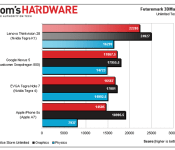
Early benchmarks suggest NVIDIA’s new Tegra chip outperforms Apple and Qualcomm

The graph above comes courtesy of Tom’s Hardware and, whichever way you look it, it suggests NVIDIA is onto a good thing. The company’s recently announced Tegra K1 processor combines a handful of ARM Cortex-A15 CPUs with a GPU based on the same successful Kepler graphics architecture found in desktops and laptops. The result seems to be a minimum 25 percent lead over the current generation of flagship chips, including Qualcomm’s Snapdragon 800 and Apple’s 64-bit A7, as measured with 3DMark. You’ll find a roughly similar pattern in other tests over at the source link, but before you disappear into a new tab here’s a couple of disclaimers: Firstly, these scores are based on a Lenovo Thinkvision 28 Android all-in-one (with a lovely 4K panel), which Tom’s Hardware was led to believe (but not officially told) contains a K1. Secondly, assuming this is a K1, it’s definitely not the 64-bit version; it’s not running at NVIDIA’s claimed max clock speed of 2.3GHz, and it’s almost certainly not using market-ready drivers — all of which suggests that 2014′s crop of Tegra K1-powered tablets could be even more powerful than what we’re seeing right now.
Filed under: Cellphones, Tablets, Mobile, Lenovo, NVIDIA
Source: Tom’s Hardware

Gartner: PC shipments have dropped 6.9 percent in Q4 2014, emerging markets to blame

Those tumbling PC shipments we’ve seen all year? They add up to a 6.9 percent year-over-year drop compared to 2012′s Q4 numbers, according to Gartner. The group’s latest totals puts PC shipments at 82.6 million units for Q4 2013, with the lions share coming from HP and Lenovo – though only the latter managed to grow its business during that period. Dell came in at a distant third, moving 4 million fewer machines than HP while maintaing a 6.2 percent increases in shipments since Q4 2012. The news seems grim for all but a select free companies, but at least it won’t get any worse: Gartner says that most markets have bottomed out, and the losses mostly come from emerging Asia/Pacific markets where consumers first computing devices are typically smartphones and tablets, not traditional PCs. Despite predictions that the US market has reached its lowest point, analysts note that holiday sales were primarily dominated by tablets and mobile devices, though optimistically note that hybrid devices and lower cost notebooks could spur some growth in 2014. Eager to dive into all the nitty gritty numbers? Hit the source link below for Gartner’s full report.
Source: Gartner

Introducing the Best of CES 2014 finalists!

CES 2014 is only just officially beginning, but the show has already been an eventful one for us. To select finalists for the Best of CES Awards, Engadget’s senior editors have been pounding the pavement at the Las Vegas Convention Center to find top contenders for the 13 categories in the running, from best mobile devices to the coolest maker-friendly technology. Now, we’re happy to present our finalists. There’s some great stuff here — just head past the break to dive in. We’ll save our analysis of the biggest CES 2014 trends for another post, but suffice it to say that plenty of innovative tech is in store for us this coming year.
And we want to know your favorite new product, too. That’s why we’re opening up the People’s Choice category to our readers, giving you a chance to select your top choice from our pool of finalists. Head here to our poll; the product that receives the most votes will be honored in our winner’s ceremony tomorrow.
BEST STARTUP
|
An MIT spin-off with 17 employees, FINsix has one of the smallest AC adapters on the market — we’re talking about four times smaller and six times lighter. Its 65W brick comes with a USB port in addition to a laptop plug, and a MacBook-compatible MagSafe version is in the works, too. |
This seven-person startup from Denmark is behind a wireless HDMI dongle that ports your computer screen to your TV, projector or monitor sans cables. Airtame’s raised almost 500 grand on Indiegogo, so they must be doing something right. |


BEST DIGITAL HEALTH & FITNESS PRODUCT
|
We’ve seen plenty of activity trackers, yet LG’s Life Band Touch still manages to stand out for its smartwatch-style features. Its OLED display shows activity info such as calories burned, but it also pairs with your smartphone to notify you of incoming calls and texts. |
Essentially, it’s an activity tracker in bed form, with sensors built in to monitor your heart rate and sleeping habits. Best of all: a Partner Snore feature lets you raise your significant other’s headrest to (hopefully) quiet him or her down. |
|
Like the Life Band Touch, the Nabu combines the features of an activity tracker and a smartwatch. Unlike LG’s device, though, this guy sports two OLED screens: a small one to display notification icons and a larger one to show you texts, emails and other more in-depth personal data. |
Jaybird Reign fitness wristband
Jaybird’s $199 Reign is more than just an activity tracker; it also tells you when it’s time to work out, or when your body could really use a rest. It pairs with an Android or iOS device via Bluetooth, offering up app-based checkups whenever you click. |


BEST AUTOMOTIVE ELECTRONICS PRODUCT
|
Bavarian Motor Works has taken accident-prevention to a new level. If you’re hydroplaning, for example, the system will bring the car back under control by braking individual wheels and adjusting steering — no driver input required. |
Corvette Performance Data Recorder
With Chevy’s system, your route, speed and a slew of other stats are superimposed on a Bing map on the in-dash display. Oh, and audio and video recording let you evaluate your racing chops — or simply make a badass YouTube compilation. |
|
How lucky are we to live in a world where you can jump-start your car with a tiny (think hardcover-sized) power pack? The JumPack has enough power to give your auto a few jumps, and a USB port lets you charge up your gadgets as well. Not a bad value for $130. |
Hyundai’s in-car tech lets you remotely unlock your vehicle, navigate via both specific locations and general search terms and more, with Verizon providing the cell signal. One downside: it’ll cost you $100 per year for navigation services. |


BEST AUDIO PRODUCT
|
Meet the Vertu of PMPs. Sure, it’s pretty much the definition of “aspirational,” but the AK240 is the quintessential media player for the serious (and loaded) audiophile. |
It’s one of the best-looking soundbars we’ve seen to date, and it has a 3D Blu-ray player built in. Need we say more? |
|
It can’t compete with LG’s option on the Blu-ray player front, but Samsung’s HW-H600 is pretty much the sleekest soundbar ever. |
ClearView Clio
ClearView got literal with the Clio, creating a speaker that’s completely see-through. Its near-invisible design is classy, and the speaker’s tech allows sound waves to disperse evenly across a room. |


BEST VIDEO PRODUCT
|
It’s a smart TV app meant to replace your set-top box; provided you buy select LG smart TVs, you’ll be able to watch live TV and DVR content without any extra hardware. |
Sharp Aquos Quattron +
Sharp’s new Aquos Quattron+ line includes sets from 60 to 80 inches, all of which include Active 3D tech and the company’s new Revelation technology for higher picture quality. The biggest draw: It starts at $3,000, much lower than the company’s 4K products. |
|
LG’s 77-inch OLED beauty morphs between flat-screen and curved modes with the press of a button. We don’t want to even guess the price, but a future filled with flexible living-room sets is certainly enticing. |
This 78-inch curved TV packs an impressive feature set: it’s UHD, outfitted with a quad-core core processor to support the hi-def visuals and it supports gesture controls for switching channels and adjusting volume. |


BEST SOFTWARE
|
LG’s ported webOS to the big screen, and what a good idea that was. The UI puts content front and center, with discovery options and Hulu and Roku integration on board. |
Game-streaming services have disappointed in the past, but PlayStation Now looks to be a step in a new direction. Playing The Last of Us on the Vita ran without a hitch, and we can’t wait to try Now out on mobile devices. |


BEST EMERGING TECHNOLOGY
|
Oculus Rift ‘Crystal Cove’ prototype
How’s this for emerging technology? Take an OLED headset, add an external camera and improved depth perception, and you have the most immersive gaming experience to date. Playing EVE Valkyrie, we could lean forward to read text on cockpit controls. VR gaming is suddenly a full-body experience. |
Wearables are here to stay, and Intel has the guts to power them. Edison is a mini-computer with built-in WiFi and its own app store. The company even has a small collection of “Nursery 2.0″ devices on hand at CES to demonstrate the possibilities. |
|
Here’s another take on next-gen headsets: gear that projects images directly onto your retina. It’s less for gamers and more for movie-watching — it even has a fancy pair of headphones built in. |


BEST MOBILE TECHNOLOGY
|
Samsung’s largest Android-powered tablet to date sports productivity features to make the best of the 12.2-inch screen, including a four-window view and remote PC access. We’re also fans of the new Magazine UX, which divides your screen into three customizable panels. |
It’s Lenovo’s second 8-inch Windows tablet, and it’s definitely a winner, thanks to a brilliant display, a well-made aluminum body and a capable quad-core processor. |
|
Unlike most “mini” phones, the Xperia Z1 Compact isn’t a watered-down version of a flagship handset. Like the original Z1, it offers a 20.7-megapixel camera and waterproofing. We hope other phone makers follow suit and stop killing the high-end specs on iterative products. |


BEST GAMING PRODUCT
|
2014 is the year when Steam Machines go viral, at least for PC makers like Gigabyte and Origin PC. It’s a sure sign the gaming machines will take off this year. |
It’s a contender in software, but it’s obviously set to revolutionize gaming as well. PlayStation Now eliminates the need for a dedicated gaming console, bringing the titles you want to almost any device you have. |
|
Oculus Rift ‘Crystal Cove’ prototype
The Oculus Rift is a completely new gaming experience, with a bevy of sensors on board to bring you into the world of the title you’re playing. It’s something you really have to try to understand — and we can’t wait until it hits the market. |
Project Christine even looks like the future; the modular-computing prototype consists of pods that can be used in several setups depending on your gaming needs. It’s customization 3.0. |


BEST OFFBEAT PRODUCT
|
Creepy? Yes. Useful? Yes. The Mother looks like a cross between a Russian doll and a demonic bowling pin, but it’s meant to make your life easier with associated sensors that monitor your home, your child or your pet, for example. |
It can’t fly, but it can jump more than two feet in the air, and that’s an awesome party trick if you ask us. The Sumo is controlled by your smartphone or tablet, though it currently only supports Apple devices. |
|
Most of us can agree that on-screen keyboards will never be as good as the real thing. Dock your phone into the TrewGrip’s curved, grippable body, and you have a set of hardware keys in the familiar QWERTY layout. |


BEST KID-FRIENDLY PRODUCT
|
Fuhu partnered with DreamWorks to make an Android tablet with original art-focused apps. The included stylus works with built-in software to teach kids how to draw Kung Fu Panda and other familiar characters. |
The Kolibree toothbrush lets your little ones know how well they’re cleaning those pearly whites. You’ll even get stats like stroke count — and an evaluation of how well teeth have been cleaned — on your smartphone. |
|
Intel had us at “smart baby onesie.” Intriguing idea aside, the practicality is undeniable. Parents can monitor their babies’ body position, activity level and temperature via a smartphone app. |


BEST MAKER-FRIENDLY TECHNOLOGY
|
It’s the chance to print yourself and the ones you love in edible, sugary form. Enough said! |
The latest version of MakerBot’s desktop 3D printer is faster than ever before, and a new “Smart Extruder” alerts you when you need more material. |
|
The iSense is a 3D scanner that clips onto your iPad — a welcome product for DIY types who couldn’t use the Windows-only Sense. |


BEST PC
|
This modular setup may be a look at the future of gaming, but it’s also a beautiful piece of hardware that could find a place in next-gen customizable computing. |
Samsung updated its already-excellent ATIV Book 9 to include lossless audio and a higher-res screen. For those reasons alone, this Ultrabook is at the top of our list. |
|
Lenovo ThinkPad Carbon X1 (2014)
With an “adaptive” keyboard that includes context-specific controls and up to a 2,560 x 1,400 display, Lenovo’s business Ultrabook is looking better than ever. |
LG brings ChromeOS to the desktop in a sleek, but simple 21.5-inch package. We imagine it finding a comfy place on your kitchen counter, for following along with recipes or streaming some Netflix while you cook. |


Filed under: Announcements, Samsung, Sony, LG, Intel, Lenovo

Live from the Engadget CES Stage: Lenovo VP Dilip Bhatia

What are Lenovo’s big plans for 2014? We’ve got the VP and general manager of the company’s iconic ThinkPad business line onstage to discuss the place of the laptop and tablet in the ever-changing business world.
January 7, 2014 6:30:00 PM EST
Follow all the latest CES 2014 news at our event hub, and check out our full stage schedule here.
Filed under: Cellphones, Laptops, Tablets, Lenovo

Intel unveils RealSense hardware and software line, including 3D camera module

The takeaway at today’s Intel press event? All signs point to the RealSense product line — a number of hardware and software products that “make interaction with technology simple, more natural and immersive,” according to Intel’s own words. The first product bearing the compound name is the RealSense 3D camera. Intel describes the product as “the world’s first integrated 3D depth and 2D camera module that helps devices ‘see’ depth much like the human eye,” suggesting that this isn’t just a substitute for Leap Motion or Kinect.
The camera does full-color 1080p and has an on-board sensor for gesture and face detection. The latter of which apparently helps it “understand emotions.” It also recognizes foregrounds and backgrounds, so you can replace that messy room and make it appear as if you’re Skypeing from the Moon. But, if you’re looking for something more practical, you can also use it to scan objects in 3D using 3D System’s Sense software. The RealSense 3D camera is set to be integrated into a number of diverse devices come the second half of this year, including tablets, Ultrabooks, laptops and all-in-ones, from top companies like Acer, ASUS, Dell, Fujitsu, HP, Lenovo and NEC. Seven such devices are being demonstrated today, and Intel itself has a demo unit.
If you’d rather talk to your computer than wave at it, there’s also a next-generation version of Dragon Assistant from Nuance that will be part of Intel’s RealSense push. Of, course, while all this sounds good on paper, it remains to be seen how much people will actually want to wink, point or shout at their laptop to get it to open Netflix or point Chrome towards Engadget.
Filed under: Cameras, ASUS, Intel, HP, Dell, Acer, Lenovo
Source: Intel
 AIVAnet