


Lenovo ups the game with the Yoga Tablet 10 HD+
Shortly after CES 2014 we offered up a review of the Yoga 8 and Yoga 10 tablets from Lenovo. They met and exceeded many of my expectations especially in the look, the feel and the performance department. They offered the many things that a lot of tablets currently on the market didn’t. One of the big wins in my opinion was the built-in kickstand with the dual front facing speakers. Being able to prop it up at will and watch a movie with ease and without needing a second accessory to tote around is great.
 There was one disappointment in the Yoga 10, the screen resolution. The Yoga 10 offered the same 1280 x 800 resolution as the 8-inch variety. That resolution looks clean and pretty crisp on the Yoga 8, but it is clearly not enough for the Yoga 10. While movie viewing and basic time killing gaming is just fine, those used to high screen resolutions will immediately be irritated.
Lenovo took that to heart and made a number of changes in the new Yoga 10 HD+. Giving the tablet a much needed boost in a few departments that kept this wonder tablet design out of the hands of more people. The Yoga 10 HD+ Kicks up the screen resolution from the fore mentioned 1280 x 800 to 1920 x 1200. That alone makes me smile, but Lenovo kept pushing a little further. They moved the processor from the MediaTek, to the Qualcomm Snapdragon 400 quad-core at 1.6GHz.
Other Specs that are important to know:
- Android 4.3 at launch with Android 4.4 OTA coming
- 1920 x 1200 20/20 Vision display
- 1.6 GHz Qualcomm Snapdragon 400 quad-core
- 2 GB RAM
- 178 Degree Viewing Angle
- 16GB or 32GB internal storage options
- Micro SD card support up to 64GB
- Bluetooth 4.0
- 8MP HD+ rear camera 1.6MP front facing camera
- 9000 mAh Battery up to 18hour rating
- Dual front facing speakers
- 10 point multitouch
- USB port supporting on-the-go technology
- 10.28 x 7.09 x (.12 – .32) inches (261 x 180 x (3.0-8.1) millimeters)
- 615 grams
Lenovo really listened and kicked the Yoga 10 HD+ up a notch. It also has a couple great accessories as well, like a Bluetooth Keyboard cover, various colored sleeves and MiraCast Dongle.
Lenovo has also kicked in some “Doit” apps that they have just released and are pre-loaded.
- SHAREit: Rapidly share photos, apps, contacts, music and more with up to 5 devices with direct P2P transmission. Share files 300MBs+ in size. Is 40X faster than Bluetooth.
- SECUREit: Anti-Spam, Anti-Virus, Anti-Theft and device optimization.
- SYNCit: Backup and restore all contacts, SMS,
- SNAPit: New camera app with various effects, one-touch filters and animated GIF creations.
- SEEit: A new photo album app that is clean, intuitive and offers one touch photo editing. It also has facial recognition.
The new Lenovo Yoga Tablet 10 HD+ will become available for purchase in April with a retail price tag of just $349.
Lenovo Brings out the new S-Series Smartphones at MWC
 Continuing on the coverage from Mobile World Congress, we have a new set of Android powered smartphones from Lenovo. Yesterday they released the news about the new Yoga 10HD tablet, which we haven’t yet talked about, but will. The S series phones have been around for quite some time, and every year the line gets a boost. This year we have the S860, S850 and S660. Each offers something unique and different.
The Lenovo S860
 Classified as the All-Day, Uninterrupted usage device, it really has some stand out details. The exterior is brushed metal and houses a 5.3-inch HD screen. It features a MediaTek Quad-Core processor and 2GB of RAM. The impressive factors come in with 40 days of standby time mixed with 24 hours talk time on 3G. Plus it can charge another device using the included USB cable.
More Detailed Specs:
- 5.3-inch 1280 x 720 IPS display
- Dual-Front facing speakers
- 1.3 GHz MediaTek quad-core processor
- 2GB RAM
- 16GB on board storage
- On the go charging of other devices
- 4000 mAh battery
The Lenovo S850
 The S850 is more so the classy mix of design and function. It comes in white or pink and has an all glass exterior. It sticks with the quad-core MediaTek processor and the screen jumps down to 5-inches. It has a 13MP camera on the back and a 5MP camera on the front.
More Detailed Specs:
- 5-inch 1280 x 720 IPS display
- 1GB RAM
- 1.3GHz MediaTek Quad-Core Processor
- 16GB on board storage
- FM reciever
- 2000 mAh battery
The Lenovo S660
 This one is more aimed at the budget friendly crowd who needs some performance but not all the insanity. The S660 features a 4.7-inch screen, brushed metal design, all-day battery with a 32GB memory card slot.
More Detailed Specs:
- 4.7-inch 960 x 540 IPS display
- 1GB RAM
- 1.3GHz quad-Core MediaTek processor
- 3000 mAh battery (replaceable)
All three will launch with Android 4.2 on board, offer dual-sim capabilities and the wide angle front facing camera lens. Price tags look pretty good too. The S860 will be $349, the S850 will be $269 and the S660 will be $229. Of course they will be available in select markets and via Lenovo.com.


Lenovo delivers three new S-Series smartphones
It may be too soon to be seeing devices coming out of Lenovo’s acquisition of Motorola, but today Lenovo announced three new devices at Mobile World Congress in Barcelona, the S860, S850 and S660 smartphones.
All three of these are said to combine “sleek design elements with quad-core performance” and longer battery life. The S-series devices run quad-core MTK processors and Android 4.2 Jelly Bean, and have dual SIM capability.
As for the individual features of each smartphone, encased in a brushed metal exterior, the S860 sports a 5.3-inch “HD ” display, 2 GB RAM, standby time of up to 40 days and talk time of up to 24 hours on 3G connections, plus the high-capacity battery even allows users to charge their other devices on-the go through an included micro USB cable.
The S850 is “thin and lightweight” and completely encased in glass. This smartphone features a “5-inch screen,” 13 MP rear-facing camera and 5 MP front-facing camera.
Lenovo’s most compact device, and I say that lightly, is the S660. This smartphone, which is encased in brushed metal, features a 4.7-inch display, “long battery life,” a comfortable fingerprint and scratch resistant rear cover and storage expandable up to a 32 GB microSD card.
The S860, S850 and S660 start at $349, $269 and $229, respectively, and will be available in select markets starting in June.
via Business Wire
The post Lenovo delivers three new S-Series smartphones appeared first on AndroidGuys.

Engadget’s smartphone buyer’s guide: winter 2014 edition

You don’t need to cast bones or read entrails to know that smartphones arrive in predictable cycles. February, home of Mobile World Congress, is likely to see the launch of new handsets from heavy hitters like HTC, Samsung and LG. Those new flagships will rule the mobile hill until the fall, when Apple and Google are likely to wheel out next-gen devices of their own. Sony, meanwhile, recently launched its latest handset, the Z1 Compact, which reverses the “bigger is better” trend to great effect.
There may have only been one top-tier phone launching in January, but the phone industry has hardly been hibernating this winter. Two years after Google bought Motorola for $12.5 billion, it sold the rejuvenated handset maker to Lenovo. AT&T, meanwhile, has rejigged its mobile share plans to shrink your monthly data bill; T-Mobile will now pay you to leave your carrier; and we’re inching ever closer to a Sprint/T-Mobile merger, the FCC permitting. If you’re already on the hunt for a new smartphone, or your deal’s only for a few more months left and you like to be prepared, this is your guide to the best handsets on the market.
Android
HTC One

HTC’s 2013-era flagship is due for a revamp, and we’re certain that the gods of irony will ensure that, as soon as we’ve published this guide, the smartphone currently codenamed as “M8″ will officially arrive. In the meantime, however, the HTC One remains a handset that we’re happy to recommend. Combining jaw-dropping unibody aluminum design, powerful BoomSound speakers and an IR blaster, it’s as at home in front of your TV as on the road. The quick performance and general polish of both hardware and software mean that it hasn’t shown its age, and the UltraPixel camera is perfect for low-light shooting. Hopefully the arrival of the One’s replacement will help knock the price down, so we’d suggest keeping your eyes peeled for a bargain in the next few weeks.
Bottom line: Good hardware, good software and some innovative little touches put the HTC One ahead of the Android pack, even though it’s now several months older than many of the other phones on this list.
Key specs: 4.7-inch 1080p (1,920 x 1,080) S-LCD 3 display, 1.7GHz quad-core Snapdragon 600, 4MP rear/2.1MP front cameras, 32GB/64GB non-expandable storage, Android 4.2 (US, to be updated shortly)/Android 4.3 (global edition).
Price: $50 (Verizon), $100 (Sprint) from Amazon and Best Buy or $200 (AT&T)
Motorola Moto X

Since our last guide, the Motorola Moto X went on sale in Europe as an off-the-shelf retail option, and the company went from being Google’s plaything to becoming part of Lenovo. The news of the purchase shouldn’t distract you, however, as the handset is still reasonably new, with much to recommend it. In the US, customization is the name of the game, with the ability to choose colors on the front, back and accent pieces. There’s even an optional wood finish. It may not appeal to those who judge a phone’s performance on its spec sheet, but Motorola (and Google) worked hard to ensure there are some neat tricks under the hood. For example, you just need to say “OK Google” at the device for it to activate and offer up its voice search prowess. Then there’s the Active Display, which will show you your notifications if it feels you holding the handset toward your face.
Bottom line: Rather than cramming in ultra-fast internals, Motorola’s tried to make the phone especially intuitive to use, with Active Display and touchless controls. Oh, and it’s assembled in the USA, which might tug at your patriotic heartstrings.
Key specs: 4.7-inch (1,280 x 720) AMOLED display, 1.7GHz dual-core Qualcomm MSM8960 Pro, 10MP rear/2MP front cameras, 16GB or 32GB non-expandable storage, Android 4.2.2 (upgradeable to 4.4 KitKat).
Price: $50 (AT&T, Verizon) from Amazon and Best Buy, $100 (Sprint) or $330 (unlocked)
Samsung Galaxy Note 3

When Samsung presented the idea of a smartphone with a display larger than five inches, we were more than a little skeptical. The Galaxy Note’s surprise success, however, has forged a trend where colossal devices are now the rule, not the exception. For the Galaxy Note 3, Samsung took everything we loved about its predecessors and turned them up to 11. Instead of mildly useful note-taking, the company has ensured that the S Pen stylus now serves a deeper purpose. It also offers whip-smart performance and a battery that’ll last close to two days with normal usage. The only downside is that you’ll still look a bit silly using one as a phone, but let’s be honest: Who uses their smartphones to make calls anymore, eh?
Bottom line: The third-generation Note is an improvement over its predecessors thanks to a more useful stylus and a longer-lasting battery.
Key specs: 5.7-inch (1,920 x 1,080) Super AMOLED display, 2.3GHz quad-core Snapdragon 800, 13MP rear/2MP front cameras, 16GB/32GB/64GB expandable storage, Android 4.3.
Price: $300 (AT&T, Verizon) from Amazon and Best Buy, $350 (Sprint) or $708 (T-Mobile)
Google Nexus 5

When Google picked LG to produce the Nexus 4, heads and eyebrows were raised, but when it launched, no one could doubt that the duo had pulled off something special. For the Nexus 5, Google raised the price to $349, but for a little extra cash, you’re getting one of the finest flagships for a mid-range price. Since it’s a Nexus device, users are entitled to the latest and greatest version of Android whenever it’s out. And, despite the low price, you’re getting speedy internals and good-quality hardware. Just be prepared for some weak battery life and poor roaming options. Otherwise, we suggest you buy it contract-free, with just a prepaid SIM plan, and don’t look back. Your wallet will thank you for it.
Bottom line: We’re baffled as to why more people don’t just buy Nexus phones over all others. After all, you’re getting a flagship smartphone for $350.
Key specs: 4.95-inch (1,920 x 1,080) IPS LCD display, 2.26GHz quad-core Snapdragon 800, 8MP rear/1.3MP front cameras, 16GB/32GB non-expandable storage, Android 4.4.
Price: $100 (Sprint) from Best Buy, $349 to $399 (unlocked) or $396 (T-Mobile)
Sony Xperia Z1 Compact

We’ve noted that a lot of Android device makers like to release a handset, like the Galaxy S 4, and then release a smaller, more pocket-friendly version shortly afterward. Unfortunately, cramming the same technology down into a tighter package causes a raft of compromises, sending prospective buyers scurrying back to the full-size edition. Sony, however, decided that it would try and produce the Xperia Z1 Compact, a shrunken down, 4.3-inch version of the original Xperia Z1, which has a 5-inch screen. The only differences of note are that the display now has 720p resolution, instead of 1080p, and the battery capacity has dropped by 700mAh due to the hardware’s reduced dimensions. If you’re interested in a top-tier waterproof smartphone, but don’t fancy carrying around a device that can double as a table tennis bat, the Z1 Compact is absolutely worth investigating.
Bottom line: Sony’s struggled to sell its Xperia handsets in the past, but this one deserves to be a hit, thanks to its 20.7-megapixel camera, great build quality and blistering performance. Oh, and it’s waterproof, so if you like dunking your phone in your friend’s drinks, this one’s for you.
Key specs: 4.3-inch (1,280 x 720) Triluminos LCD display, 2.2GHz quad-core Snapdragon 800, 20.7MP rear/2MP front cameras, 16GB expandable storage, Android 4.3.
Price: $625.50 to $689.50 (unlocked, from Negri Electronics)
Motorola Moto G

The partnership between Motorola and Google may have only produced two handsets, but the ones we got were special. Aimed squarely at the lower end of the market, the Moto G is the rare beast that doesn’t feel like it costs just $180. It can beat the HTC One mini and Galaxy S4 Mini in the benchmark stakes; it features a solid camera; and the 4.5-inch display is actually quite fantastic. If you’re not dead-set on LTE or carrying around a big music collection, but want a quick and up-to-date Android smartphone, then this is the device you should be ordering.
Bottom line: If you want a Google handset, but can’t stretch to a Nexus 5, then the Moto G is your next best option. There’s no LTE, no expandable storage and the camera’s just OK, but for this price, who cares?
Key specs: 4.5-inch (1,280 x 720) IPS LCD display, 1.2GHz quad-core Snapdragon 400, 5MP rear/1.3MP front cameras, 8GB/16GB non-expandable storage, Android 4.3 (Android 4.4 KitKat on Google Play edition).
Price: $100 (Verizon), $80 (US Cellular), $130 (Boost) or $179 to $199 (GSM, unlocked) from Amazon
iOS
Apple iPhone 5s

You know the deal by now. Apple’s flagship iPhone 5s is the best iPhone ever made, thanks to improvements both inside and outside. Though it remains dwarfed in size by many rival phones, it benefits from Touch ID, an easy-to-use fingerprint scanner built right into the home button. Then there’s the future-proof A7 chip, which offers fast 64-bit performance. Add in iOS 7, with its stark new design, and you’ve got a seventh-generation iPhone that still manages to look and feel new.
Bottom line: The best iPhone yet, and among the top smartphones, period. However, if you already own an iPhone 5, you’re probably better off waiting for the 6, as nothing here really justifies the early upgrade fee.
Key specs: 4-inch (1,136 x 640) IPS Retina display, Touch ID, A7 chip with M7 motion coprocessor, 8MP rear/1.2MP front cameras, 16GB/32GB/64GB non-expandable storage, iOS 7.
Price: $199 to $399 (AT&T, Verizon, Sprint) from Best Buy or $649 to $848 (T-Mobile)
Apple iPhone 5c

Apple’s middle child is the iPhone 5c, which is basically 2012′s iPhone 5 with a plastic shell. That switch means you’ll now be able to buy the phone in a variety of bright, Lumia-esque colors, but in every other respect, it’s the same phone that came out in 2012. So, you’ll sacrifice the headline-grabbing features you’d otherwise get with the 5s, like the aluminum shell and fingerprint recognition, but if your wallet won’t stretch the extra $100 to get the higher-end model, this is a fine choice.
Bottom line: For $100 less than the iPhone 5s, it’s 2012′s best phone in a choice of fun colors.
Key specs: 4-inch (1,136 x 640) IPS Retina display, 1.3GHz dual-core A6, 8MP rear/1.2MP front cameras, 16GB/32GB non-expandable storage, iOS 7.
Price: $99 to $199 (AT&T, Verizon, Sprint) from Best Buy or $549 to $649 (unlocked or on T-Mobile)
Apple iPhone 4s

It’s a testament to the iPhone 4s that Apple can still sell it as an entry-level device more than two years after it first went on sale. Of course, it’s missing a few key specs that early adopters will be lusting after — namely, it rocks a smaller 3.5-inch display, and makes do with a slower chip and 3G-only data. That said, it still has a fantastic camera and that 3.5-inch display is at least Retina-quality. More importantly, the phone will still run iOS 7, so you won’t feel too behind your friends on more modern hardware. Of course, you’re not eligible for every new iOS feature, and there’s no guarantee your handset will be supported in a year’s time. Still, for a free-on-contract offering, it’s tremendously compelling.
Bottom line: Despite being more than two years old, the iPhone 4s can still hold its own with brand-new budget models from its rivals — and it’s a steal if you can get it for free. Speed freaks and LTE fans won’t be interested, but it’ll beat plenty of other smartphones you can get for nothing.
Key specs: 3.5-inch (960 x 640) IPS Retina display, 1GHz A5, 8MP rear/VGA front cameras, 8GB non-expandable storage, iOS 7.
Price: Free (AT&T, Verizon, Sprint) or $450 (unlocked on T-Mobile)
Windows Phone
Nokia Lumia 1520

A handset that exists in the corridor of uncertainty between a phone and a tablet, Nokia’s Lumia 1520 is the company’s first attempt at a 6-inch device to rival the Galaxy Note. With the first 1080p display on a Windows Phone device, as well as a Snapdragon 800 processor, the 1520 offers plenty to love. Pairing this massive device with a 20-megapixel PureView module puts most other devices to shame, and it’s even reasonably comfortable in a pocket — assuming you’re not wearing skinny jeans, anyway. If you’re a Verizon customer and feel left out, then the Icon, which combines similar internals with a 5-inch display, could be right up your street.
Bottom line: It’s too early to tell if Windows Phone 8 will flourish on a massive device that sits between a fully fledged tablet and a smartphone, but nonetheless, this stands as the best Windows Phone device we’ve ever seen.
Key specs: 6-inch (1,920 x 1,080) IPS LCD display, 2.2GHz Snapdragon 800, 20MP rear/1.2MP front cameras, 16/32GB expandable storage, Windows Phone 8.
Price: $150 (AT&T) from Amazon and Best Buy or $750 (unlocked)
Nokia Lumia 1020

When Nokia announced the “experimental” 808 PureView, it set the hearts of gadget fiends afire. The device came with a 41-megapixel sensor and some clever number-crunching that gave your photos much greater depth and clarity. Best of all, you could even zoom into them to a much greater level, finally bringing a CSI-style “enhance” to your images. The common consensus was that as soon as Nokia could put that 41-megapixel sensor onto a regular Windows Phone device, people would start paying attention to the platform. Well, that phone has arrived: The Lumia 1020 combines staggering imaging technology with Windows Phone’s user-friendly interface. Moreover, now that Microsoft and Nokia are filling the holes in Windows Phone’s app catalog, a flagship like the 1020 is more appealing than ever.
Bottom line: If you want to take amazing images with a smartphone, this is the device you need.
Key specs: 4.5-inch WXGA (1,280 x 768) PureMotion HD+ AMOLED display, 1.5GHz dual-core Snapdragon S4 Plus, 41MP rear/1.2MP front cameras, 32GB non-expandable storage, Windows Phone 8.
Price: $50-$100 (AT&T) from Amazon and Best Buy
Nokia Lumia 1320

When it comes to Windows Phone devices, Nokia’s (and Microsoft’s) strategy has been easy to understand, if a bit scattergun. Produce a high-powered phone, and then whittle out features to produce sequentially cheaper versions from the 925 all the way down to the 520. The company adopted a similar approach to 6-inch units, with the 1520 acting as the “flagship,” and the 1320 being a cheaper, lower-powered version for the masses. It keeps the large display and battery, but ditches the PureView camera, large internal storage and high-power internals. That said, if you’re actively seeking out a phone/tablet hybrid, but aren’t thrilled at spending the thick end of $800, this is probably your first port of call.
Bottom line: Despite its size, this 6-inch device isn’t an all-powerful phablet — it’s more like the Lumia 620 after a bout of elephantiasis. If you want a big phone without a big price tag, however, this is probably where you’ll end up.
Key specs: 6-inch (1,280 x 720) ClearBlack LCD display, 1.7Ghz dual-core Snapdragon 400, 5MP rear/VGA front cameras, 8GB expandable storage, Windows Phone 8.
Price: $390 (unlocked, from Amazon)
Nokia Lumia 520

Nokia’s Lumia 520 (and 521) are the Windows Phone handsets that lurk at the very bottom of the company’s bargain basement. In fact, this handset is so cheap, it’s often handed out as a sweetener when you buy other Microsoft products. The price, combined with the user-friendliness of Windows Phone 8, makes it a pretty easy purchase for smartphone virgins. On the downside, the handset doesn’t have much going for it in the spec department — with a weak display, OK-ish camera and a short battery life. If, however, the purse strings are tight and you’re only browsing Twitter, then this is a reasonably safe bet.
Bottom line: It’s cheap to the point of being free, and while it may not be the greatest phone out there, Nokia has always known how to knock out a solid device for those on a budget. Take advantage of the right deal, and you’ll even be able to grab one of these for free as a party favor.
Key specs: 4-inch (800 x 480) IPS LCD, 1GHz dual-core Snapdragon S4 Plus, 5MP rear camera, 8GB expandable storage, Windows Phone 8.
Price: $29 (521, Metro PCS), $100 (520, AT&T) or $126 (521, T-Mobile) from Amazon
BlackBerry 10
BlackBerry Z30

The Z30 is, in our opinion, the best BlackBerry 10 device on the market. Thanks to the handset’s 5-inch display, BB10 suddenly feels much more comfortable than on the cramped Z10, and while it’s still just a year old, the operating system at least feels mature now. Then there’s the battery, which lasts more than a full day with intermittent usage and nearly 13 hours with nonstop use. Thankfully, the company has now moved to address the weak app selection — BB10 will now install and run plenty of Android apps at the push of a button. If you’re dead set on buying a touchscreen BlackBerry, this is the one that we’d recommend.
Bottom line: We doubt BlackBerry virgins will find anything to convince them to buy this device, but enthusiasts will find plenty to like. The bigger display and better internals make for a more comfortable experience, but beware that the usual BlackBerry issues remain.
Key specs: 5-inch (1,280 x 720) Super AMOLED display, dual-core 1.7 GHz Qualcomm MSM8960T Pro, 8MP rear/2MP front cameras, 16GB expandable storage, BlackBerry OS 10.2.
Price: $100 (Verizon) from Amazon, $520.50 (unlocked, at Negri Electronics)
BlackBerry Q10

Who can count themselves among BlackBerry devotees? Security fans and those for whom only a real QWERTY input will do. The Q10 is the only BlackBerry 10 device with a keyboard that’s worth getting. Combining BlackBerry 10′s beefy operating system with smooth, but imperfect performance, the real star of the show here is that comfortable and easy-to-use QWERTY layout. If you’re eyeing the Q5, we’d suggest saving up a little more cash and going for its bigger brother; you’ll get a significantly better handset for the money.
Bottom line: In a world where the physical keyboard is an endangered species, the Q10 is the only place you can turn to, so be glad that it’s got the best of the old Bolds with a modern spin.
Key specs: 3.1-inch (720 x 720) Super AMOLED display, 1.5GHz dual-core Snapdragon MSM8960, 8MP rear/2MP front cameras, 16GB expandable storage, BlackBerry OS 10.
Price: Free (AT&T) from Amazon, $50 (Verizon), $150 (Sprint) or $500 (unlocked)
Please note, all prices are contract unless otherwise stated. T-Mobile pricing is for full handset cost rather than subsidized.
Filed under: Cellphones, Mobile, Apple, Samsung, Sony, Microsoft, HTC, Nokia, Google, Verizon, Sprint, AT&T, LG, Blackberry, T-Mobile, Lenovo

Which Android phones win at gaming?

A simple kind of happiness reigns in the world of mobile gaming. The app stores are brimming over with four-star ratings; popular titles are making billions of dollars for their creators; and folks on the morning commute seem generally content with what they’re playing — sometimes destroying rows of fruit, sometimes rows of candy. Few of us expect or demand anything deeper on a tablet or smartphone, and surely none of us would be crazy enough to choose our next handset based solely on a criterion as narrow as 3D gaming performance. Right?
Well, yes and no. Things certainly get more complicated when you look at the cutting edge — especially on Android. The industry is pushing the boundaries of what a mobile game can be, what a mobile processor can do and what an Android-based gaming device can look like. And as ambitions escalate, so do the risks. The old nemesis of fragmentation means that certain titles may stutter, or cause excessive battery drain, or fail to run at all, so that those glowing reviews turn into one-star complaints and customers go back to playing it safe.
The industry is pushing the boundaries of what a mobile game can be
That’s why we reckon it’s a good time to take stock — to measure how well some current and older Android devices handle a sample of graphically demanding games. We’ve got cold, hard numbers to show you, which should help to pinpoint the most future-proofed products. We also have a secondary aim, which is to set a benchmark against which we can judge the next wave of hardware, soon to be announced at Mobile World Congress. Indeed, it’s already becoming clear that, from a gaming perspective, smartphones don’t always progress in the manner or at the rate that we might expect.
The Test

This bit could have been arduous, but it turned out to be surprisingly simple. An independent, UK-based company called GameBench has taken up the masochistic challenge of collecting real-world gaming performance data and it has kindly given us early access to its raw info. The numbers are based on a sample of four games (Despicable Me: Minion Rush, Real Racing 3, Dead Trigger and Deer Hunter 2014) played by three different players (one beginner, one intermediate and one advanced), with airplane mode switched on and everything else tuned out. Smoothness is measured in terms of the median frame rate, which is the best proxy for the performance as experienced by the gamer. The other key metric is battery drain, measured as percentage lost per hour, because most people will simply avoid games that kill their phones before they get home.
GameBench’s results are a lot more revealing than so-called synthetic benchmarks
The big downside to our test is that it takes a lot of time. GameBench has its own app for monitoring performance and making testing easier, and it’s working on testing more devices with a bigger sample of 20 games, but it couldn’t provide all that data in time for MWC, so we had to make some tough decisions about what to include. The upside, however, is that even though GameBench’s results aren’t totally comprehensive or perfect, they’re still a lot more revealing than the so-called synthetic benchmarks that we’d normally be forced to rely on — i.e., scores collected by dedicated benchmarking apps that are easy to run and difficult to trust.
The devices

Since the biggest determinant of a device’s performance is its processor, GameBench has tested products that represent the major chips currently on the market: two Samsung Exynos processors housed in Asian versions of the Galaxy Note 3 (N900) and Galaxy S4 (I9500); two Qualcomm Snapdragons inside the Western variants of the Galaxy Note 3 (N900x) and Galaxy S4 (I9505); two Tegras from NVIDIA inside a Shield handheld and an old (2012) Nexus 7; and finally an Intel Clover Trail+ chip inside a Lenovo K900.
Yes, there are a couple of non-smartphones in that list. The Nexus 7 is included for curiosity’s sake — we wanted to see how an older device would fare, and whether the benefit of a tablet-sized 4,325mAh battery might be canceled out by the power draw of the larger display. The NVIDIA Shield, meanwhile, is included as our reference device. It’s by far the most powerful device GameBench has tested so far, achieving the maximum possible frame rate of 60 fps (i.e., the refresh rate of the display) in all the sample games except Minion Rush, which the Play store wouldn’t let us install. The Shield also has great stamina, lasting for four to five hours of solid gameplay on a charge.
We can summarize these two metrics for the Shield through a very crude bit of math: by dividing the average median frame rate (60) by the average battery drain percentage per hour (23), which gives us a result of 2.6 — this certainly isn’t an official GameBench score, or an alternative to looking at the raw data, but it’s a handy little way of combining two averages into a single, vaguely representative figure.
The results

So, we arrive at the rankings. If you’ve just joined us, having skipped all the previous sections, that’s OK — we don’t hold grudges, but we’ll take this opportunity to reiterate an important disclaimer: These results relate solely to a device’s game-playing ability, with everything else deliberately factored out, so they don’t reflect our overall ratings of these devices (you need to check out our product pages to get those).
Tier One – the best in the business
|
Galaxy Note 3 (Snapdragon 800) |
Galaxy Note 3 (Exynos 5420) |
Galaxy S 4 (Exynos 5410) |
|
|---|---|---|---|
| Minion Rush | |||
| – Frame rate (median) | 25 | 27 | 29 |
| – Drain rate (per hour) | 22 | 24 | 32 |
| Real Racing 3 | |||
| – Frame rate | 26 | 30 | 27 |
| – Drain rate | 24 | 21 | 22 |
| Dead Trigger | |||
| – Frame rate | 51 | 54 | 57 |
| – Drain rate | 23 | 23 | 28 |
| Deer Hunter 2014 | |||
| – Frame rate | 51 | 54 | 57 |
| – Drain rate | 26 | 28 | 21 |
| Average | |||
| – Frame rate / Drain rate | 1.61 | 1.71 | 1.65 |
Let’s start with the device that most of us will be familiar with: the American and European LTE version of the Samsung Galaxy Note 3, which runs on a Qualcomm Snapdragon 800. Although the phone came in under the other two devices in this tier, based on our approximate average score, it nevertheless had a solid mix of high performance and good stamina. This tallies with something we’ve been noticing about Snapdragon 800 devices in general: Whether it’s a Note 3, Nexus 5, Sony Xperia Z1 or LG G2, the ratio of performance to battery life is healthy. If you can add a big, phablet-sized battery into the mix, preferably 3,000mAh or higher, you should end up with a pretty game-friendly device.
But the big surprise here is the performance of the two Exynos-powered phones, the Asian Galaxy Note 3 and Galaxy S4. These phones top our chart with frame rates consistently close to or above 30 fps and at least three hours of gaming on a charge. This revelation may not be immediately practical to a phone buyer, since these devices are hard to get hold of and they’re not compatible with Western LTE bands, but it leaves us keen to check out future Exynos-powered devices that are coming to the US and UK — including the new Galaxy Note Pro 12.2, which we’re hoping to review shortly.
Tier Two – adequate gamers
|
Galaxy S4 (Snapdragon 600) |
HTC One (Snapdragon 600) |
Nexus 7 2012 (Tegra 3) |
|
|---|---|---|---|
| Minion Rush | |||
| – Frame rate (median) | 28 | 19 | 29 |
| – Drain rate (per hour) | 32 | 20 | 19 |
| Real Racing 3 | |||
| – Frame rate | 27 | 21 | 37 |
| – Drain rate | 26 | 22 | 20 |
| Dead Trigger | |||
| – Frame rate | 51 | 49 | 33 |
| – Drain rate | 29 | 27 | 39 |
| Deer Hunter 2014 | |||
| – Frame rate | 56 | 46 | 41 |
| – Drain rate | N/A | 21 | 33 |
| Average | |||
| – Frame rate / Drain rate | 1.40 | 1.50 | 1.26 |
Next we come to the “ordinary” flagships: the Snapdragon 600-powered Galaxy S4 and HTC One, which are starting to show their age and are soon to be superseded. The first thing you notice is that they’re forced to make a trade-off between frame rates and battery, instead of delivering on both like our top-tier devices did.
As we’ve reported before, the GS4 goes for performance (partly due to having a higher clock speed), while the HTC One goes for stamina. Ultimately, however, GameBench would describe the GS4 as the better device for gaming, despite what our crude average score shows, and also despite what certain synthetic benchmarks might have shown in the past. This is simply because it plays our sample of games at frame rates much closer to 30 fps — the traditional threshold for smooth-looking 3D graphics — whereas the HTC is left rendering games like Minion Rush or Real Racing 3 at just 20 fps.
The same trade-off is visible with the OG Nexus 7, which has very bad drain rates in a couple of games. Its big battery is of little help against a larger display, aging chip architecture and chunky transistors. That said, bearing its age in mind, the Tegra 3 tablet performs surprisingly well within this table, with strong frame rates throughout. In fact, if you prioritize frame rates over battery drain, then you could easily rank this tablet as top of the tier — even above the GS4. We can speculate that other Tegra 3 devices, like the HTC One X+, should still have some life left in them for most Android games, so long as you don’t stray too far from a power source.
Tier Three – the Intel corner
|
Lenovo K900 (Intel Z2580) |
|
|---|---|
| Minion Rush | |
| – Frame rate (median) | 27 |
| – Drain rate (per hour) | 44 |
| Real Racing 3 | |
| – Frame rate | N/A |
| – Drain rate | N/A |
| Dead Trigger | |
| – Frame rate | 38 |
| – Drain rate | 34 |
| Deer Hunter 2014 | |
| – Frame rate | 51 |
| – Drain rate | 40 |
| Average | |
| – Frame rate / Drain rate | 0.98 |
As you can see, the Intel-powered device in this roundup didn’t fare so well. This is the Lenovo K900 with a dual-core Clover Trail+ Z2580 processor — a chip which, thankfully, is soon to be replaced by a new generation, although we won’t see next-gen Intel Android handsets until later in the year.
Intel’s bad score shouldn’t come as a surprise if you’ve seen synthetic benchmarks for this chip, but it highlights just how much of a disadvantage Intel faces when it comes to gaming: Clover Trail+ couldn’t handle Real Racing 3 at all, and with some titles, the K900 burned its battery at twice the rate of an HTC One. In other words: Even if Intel doubles its Android gaming performance in the next generation of devices, it still won’t be able to match that of ARM-based rivals.
The problem, we suspect, is that most Android games are heavily optimized for ARM chips, and Intel’s chip is forced to work harder to make a game run smoothly — an amazing feat when you consider everything the processor must be doing behind the scenes, but one that leads us to the depressing conclusion that Intel is unlikely to be a force in Android gaming anytime soon.
Wrap-up

More Info
Seven devices, three tiers and one unexpected conclusion. When you compare smartphones across a product range (e.g., Galaxy S4 vs. Galaxy Note 3) or across a processor generation (e.g., Snapdragon 600 vs. Tegra 3), raw performance doesn’t appear to change a great deal. That’s not to say that newer or more expensive chips aren’t more capable, but their extra capability evidently isn’t being turned into wildly better frame rates. Minion Rush and Real Racing 3 ran at 20-30 fps on most of the devices we tested, while Dead Trigger and Deer Hunter 2014 mostly generally ran at 40-60 fps.
Instead, the biggest variation in smartphone hardware lies in the less sexy of our two metrics: battery life. Upgrade your phone and games don’t suddenly look better; they just last longer. The most efficient handsets were those running on the latest Samsung Exynos Octa and Qualcomm Snapdragon 800 chips. In the middle, we find devices based on the Snapdragon 600 and premium chips from the previous generation, such as the Tegra 3. At the bottom end we have Intel, whose architecture apparently has to burn extra milliwatts just to keep up with ARM-based chips.
“Upgrade your phone and games don’t suddenly look better; they just last longer”
The big exception to all of this is the NVIDIA Shield, which would have easily won this ranking if it had been born as a smartphone instead of a hand-held console. It somehow managed very high frame rates with equally good stamina, which makes it all the more ironic (but also perhaps revealing) that the Tegra 4 and the Shield itself are widely considered to be niche products and, frankly, commercial flops.
How to explain all of this? It’s tricky, but the answer almost certainly lies in that simple-but-happy image of Android gaming that we painted at the start of this article. If games continue in the same vein that they have, designed to run reasonably well across a majority of devices rather than pushing high-end processors to their limits, then chips and devices that prioritize 3D gaming performance will continue to be dismissed as overkill.
If, on the other hand, 2014 highlights a different sort of Android developer — one who deliberately caters only to a handful of top-end devices and the latest graphics standards, and whose games are amazing enough to justify that sort of attitude — then a full-blown arms race could well ensue. Software creators and hardware makers would be forced to start working together a little more and, for better or worse, Android’s fragmentation problem would be brought to a head. There’s no guarantee that this will happen, of course. Perhaps mobile games are destined to remain as they are. But still, we have a gut feeling that we can’t keep repetitively flapping around or attacking pigs forever.
Filed under: Cellphones, Cameras, Tablets, Mobile, Samsung, HTC, Google, Intel, Lenovo, NVIDIA
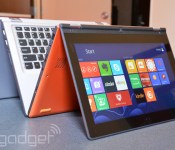
Lenovo Yoga 2 11-inch now available, starting at $519

If you’ve been itching for a new convertible since CES last month, sales pages for Lenovo’s refreshed Yoga line have started popping up online. Best Buy has the 11-inch Bay-Trail-equipped Yoga 2 listed for $519, while you can buy direct from the manufacturer for $799 — a far cry higher than the previously announced $529. With the yellow-tag store’s lower price, however, comes a caveat: the Yoga 2 doesn’t have a release date just yet. It’s totally up to you if ordering (Lenovo’s ship time is “within three weeks”) the touchscreen’s efficient 2.4GHz Pentium, 4GB of RAM and 500GB hard drive right now is worth the premium though. After all, $280 is still a decent amount of cash.
[Thanks, Patrick!]

Engadget laptop buyer’s guide: winter 2014 edition

CES has been over for a month now, which means it’s high time we update all our buyer’s guides with some of the new stuff that was just announced. In the coming weeks, we’ll have fresh tablet and phone picks, but today, we’re all about the laptops. Whether you’re in the market for an Ultrabook, convertible, gaming rig or a Chromebook, we’ve got a suggestion that should fit the bill. Read on to see what made the cut — and what’s been dropped from our guide since last fall.
Convertibles
When Windows 8 first came out, PC makers were experimenting with all sorts of inventive designs in an effort to figure out what consumers actually wanted. In those early months, we saw laptops whose screens could rotate, pop out, detach and fold over. Others had a sliding design, and one even attempted two screens. The results were mixed — so mixed, in fact, that our last two laptop buyer’s guides have had just two recommendations in the convertible category. Now that these companies have had a chance to go back to the drawing board, we’re starting to see more form factors we’d actually want to use.
Dell XPS 12

The Dell XPS 12 has always been on this list, so you can bet we have effusive things to say now that it’s been upgraded with Haswell, NFC and a larger battery (50Wh, up from 47Wh). All told, between the beefier battery and new chipset, Dell is promising this thing will last 9.5 hours on a charge — more than three hours longer than the OG model. Otherwise, it’s the same machine it always was, with a 12.5-inch, 1080p screen that flips around in its hinge so that you can show off presentations and stuff to people sitting opposite you. It might not be quite as versatile as the Yoga, but we love it anyway for its solid build quality, attractive design and unusually cushy keyboard. After all, if you can’t enjoy one of these convertibles in regular notebook mode, why even bother?
The bottom line: Even if you rarely use it in tablet mode, the XPS 12 makes an excellent Ultrabook, especially now that Dell’s refreshed it with Haswell and a bigger battery.
Key specs: Up to a 1.7GHz dual-core Intel Core i7-4650U CPU, 4GB to 8GB of RAM, up to 256GB of internal storage, Intel HD Graphics 5000, 12.5-inch (1,920 x 1,080) display.
Price: $1,000 and up from Dell
Lenovo IdeaPad Yoga 2 Pro

Even back when we included just two convertibles on this list, the Lenovo IdeaPad Yoga 13 was always one of them. Though lots of companies make missteps with their first-gen products, Lenovo won us over right away with the Yoga, whose screen could fold all the way back into tablet mode. Over time, though, as rival companies began upgrading their wares, the original Yoga started to seem stale. Well, just in the nick of time, Lenovo gave it a makeover. The new version, the Yoga 2 Pro, comes standard with a 3,200 x 1,800 screen, making it one of the crispest you’ll find on a 13-inch Ultrabook. It also comes in a thinner, lighter package, and runs on Haswell processors for faster performance and longer battery life. Best of all: The price is low compared to other premium Ultrabooks.
As a side note, Lenovo also has the ThinkPad Yoga, whose keyboard flattens out as you flip the screen over. Even then, we’d only really recommend it if you want pressure-sensitive pen input, as the machine itself is noticeably thicker and heavier than the Yoga 2 Pro (in large part thanks to that newfangled keyboard!).
The bottom line: The most versatile Windows convertible is back with a slimmer, lighter design, sharper screen and longer battery life.
Key specs: Up to a 1.8GHz dual-core Intel Core i7-4500U CPU, 4GB or 8GB of RAM, 128GB to 512GB of internal storage, Intel HD Graphics 4400, 13.3-inch (3,200 x 1,800) display.
Price: $1,049 and up from Lenovo
Sony VAIO Duo 13

Remember we said some companies made missteps their first time out? We give you Sony. The VAIO Duo 11 didn’t make our original list. In fact, no slider Ultrabooks did. The propped-up display eats up too much of the potential keyboard space, we said, leading to a compromised typing experience. The Duo 11, in particular, also suffered from short battery life and an ugly hinge design that left too many of the mechanical bits exposed.
Fortunately, Sony went back to the drawing board and returned with a much-improved follow-up, the VAIO Duo 13. With its “Surf Slider” hinge, the Duo is now much easier to open with one hand, and the back side has been cleaned up as well. Interestingly, though this rocks a larger 13.3-inch screen, the dimensions are about the same, and the weight is only slightly heavier. The secret? Thinner bezels to maximize screen real estate. But wait, we’re not done yet: There’s now a clip to hold the included pressure-sensitive pen. The keyboard, meanwhile, is more comfortable this time around, even if the touchpad is a bit cramped. And the battery life is much longer too, thanks to a fresh Haswell processor.
The bottom line: Sony got the slider design right on its second try, thanks to a completely revamped hinge, a more spacious keyboard and longer battery life.
Key specs: Up to a 1.7GHz dual-core Intel Core i7-4650U CPU, 4GB to 8GB of RAM, 128GB to 512GB of internal storage, up to Intel HD Graphics 5000, 13.3-inch (1,920 x 1,080) display.
Price: $1,400 and up from Sony
High-end notebooks
Just because every PC maker is experimenting with some strange, convertible form factor, doesn’t mean regular, old notebooks are going the way of the dodo. In fact, most of the laptops we’ve seen this season are standard notebooks, many with touchscreens attached (at least in the case of Windows machines). In fact, with the exception of the Lenovo Yoga 2 Pro, Dell XPS 12 and Sony VAIO Duo 13, all of the high-end systems on our list actually do hew to this design. Find our favorites below.
Acer Aspire S7-392

If there’s one theme coursing through this guide, it’s that Intel’s new Haswell processors have transformed laptops with poor battery life, and turned them into lean, mean, all-day machines. That couldn’t be truer of the Acer Aspire S7, which came out in 2012 to mostly rave reviews. Well, raving about everything except the runtime, which topped out at around four hours. Recently, though, Acer refreshed its 13-inch flagship Ultrabook with Intel’s fourth-generation processors, and is now promising up to seven hours of juice (we got seven and a half). Aside from that very important under-the-hood change, Acer didn’t alter the design much; the keyboard layout is similar, as is that white Gorilla Glass lid. Also, until recently, the only display option in the US was a 1080p IPS panel. This month, Acer finally started offering the choice of a 2,560 x 1,440 screen. About time, we say.
The bottom line: The new S7 addresses all the shortcomings of the previous model, and is now one of our favorite Ultrabooks.
Key specs: Up to a 1.8GHz dual-core Core i7-4500U CPU, 8GB of RAM, 128GB to 256GB of internal storage, Intel HD Graphics 4400, 13.3-inch (1,920 x 1,080 or 2,560 x 1,440) display.
Price: $1,350 and up from Acer
Apple MacBook Air

Apple’s current MacBook Airs look just like the ones that came out in 2012, but they still bring some meaningful improvements. In particular, they come complete with Haswell processors and the promise of much longer battery life (up to nine hours on the 11-inch model, and up to 12 on the 13-inch version). And remember, Apple has a tendency to make conservative battery life claims — in fact, we got nearly 13 hours on the 13-inch model when we took it for a spin. Meanwhile, Apple also switched to faster PCIe SSDs, which yield much faster I/O speeds. On top of all that, Apple dropped the starting price of the 13-inch model by $100, making it that much easier for us to recommend. The only thing you might want to keep in mind is that the new Retina display MacBook Pro offers similar battery life and doesn’t weigh that much more, so you might be tempted to get that instead if you want a sharper screen and don’t mind a little extra heft.
The bottom line: No, there’s still no super-sharp Retina display, but the unbelievably long battery life more than makes up for it.
Key specs: 11-inch model: up to a 1.7GHz dual-core Core i7 CPU, 4GB to 8GB of RAM, 128GB to 512GB of internal storage, Intel HD Graphics 5000, 11.6-inch (1,366 x 768) display; 13-inch model: up to a 1.7GHz dual-core Core i7 CPU, 4GB to 8GB of RAM, 128GB to 512GB of internal storage, Intel HD Graphics 5000, 13.3-inch (1,440 x 900) display.
Price: $999 and up (11-inch)/$1,099 and up (13-inch) from Apple
HP Spectre 13 Ultrabook

HP took its time refreshing its line with new designs and fresh processors, but it looks like the delay may have been worth it. HP recently announced the Spectre 13 Ultrabook, and it’s better than its predecessor in almost every way. In addition to running Haswell Core i5 and i7 processors, it’s available with a 2,560 x 1,440 display for an extra $70 — a first for HP. Additionally, it has an extra-wide touchpad with “Control Zones” on the sides that give you tactile feedback as you’re doing things like exposing the Charms Bar or swiping in from the left to cycle through open apps. As for performance, we’ve already begun testing one, and can attest that it delivers both long battery life and brisk SSD speeds.
The bottom line: The Spectre 13 remains one of the few Ultrabooks available in the US with a screen sharper than 1080p.
Key specs: Up to a 1.8GHz dual-core Core i7-4500U CPU, 4GB or 8GB of RAM, up to 256GB of internal storage, Intel HD Graphics 4400, 13.3-inch (1,920 x 1,080 or 2,560 x 1,440) display.
Price: $1,000 and up from HP
Lenovo ThinkPad X1 Carbon

Lenovo’s X1 Carbon hasn’t had a spot in our laptop buyer’s guide since last spring. A curious thing, considering it was once our favorite business Ultrabook — heck, one of our favorite Ultrabooks, period. Eventually, however, even the best products grow stale, and indeed, it took Lenovo a while to deliver a refresh. Finally, though, we have a revamped model with a lighter design, sharper screen and up-to-date processors. Without overwhelming you with speeds and feeds, here’s what you need to know: The new X1 weighs just 2.8 pounds (make that three if you add a touchscreen). Either way, it’s shockingly light for a 14-inch system. Also, in keeping with modern-day specs, the X1 now has a 2,560 x 1,440 screen option and a battery rated for nine hours of runtime. Be warned: Lenovo did tweak the keyboard, adding an “adaptive” panel up top, but fortunately, it doesn’t appear to interfere with the typing experience (or the TrackPoint, for that matter).
The bottom line: The refreshed X1 Carbon returns with a sharper screen, improved battery life and an even lighter design.
Key specs: Up to a 2.1GHz dual-core Core i7-4600U CPU, 4GB or 8GB of RAM, up to 512GB of internal storage, Intel HD Graphics 4400, 14-inch (1,600 x 900 or 2,560 x 1,440) display.
Price: $1,299 and up from Lenovo
Samsung ATIV Book 9 Plus

Samsung went a long time without refreshing its Series 9 Ultrabook, save for adding a 1080p screen option in 2012. Finally, though, the company announced a proper replacement, the ATIV Book 9 Plus. Though it’s similar in design to the aluminum version that came out in 2012, this steps up to a much sharper screen — a 13.3-inch 3,200 x 1,800 panel with enough pixel density to surpass even the 13-inch Retina MacBook Pro. On the inside, it makes use of Haswell processors, solid-state storage and a battery rated for 12 hours of runtime (we managed nearly nine hours in our video rundown test). The only unfortunate thing is that thanks to the added touchscreen, the ATIV Book 9 Plus is heavier than it used to be: 3.06 pounds versus 2.55. Make no mistake: It’s still plenty portable, but there are even lighter touchscreen Ultrabooks out there.
The bottom line: One of our favorite Ultrabooks from 2012 gets refreshed with an eye-melting 3,200 x 1,800 display and a more robust battery.
Key specs: Up to a 1.8GHz dual-core Core i7-4500U CPU, 4GB or 8GB of RAM, up to 256GB of internal storage, Intel HD Graphics 4400, 13.3-inch (3,200 x 1,800) display.
Price: $1,400 and up from Samsung
Sony VAIO Pro 13

Sony broke a lot of hearts when it discontinued its super-thin, super-light Z series. Fortunately for VAIO fans, though, the company last year came out with the Pro 13, a 2.34-pound, carbon fiber machine that’s the spiritual successor to the ol’ Z. Sony says it’s the lightest touchscreen Ultrabook of this size, which sounds about right to us: This thing feels utterly insubstantial in the hand. In addition to that featherweight design, the Pro 13 offers PCIe SSDs, a 1080p display with wide viewing angles, a backlit keyboard and built-in NFC. Battery life is rated at seven hours (thanks, Haswell!), but you can double that with an external sheet battery (another nice carryover from Sony’s older machines). Most importantly, though, Sony slashed the starting price of the 13 to $1,250, down from around two grand. There’s also a less-expensive 11-inch version, the Pro 11, but the keyboard is a tad cramped, and you won’t get those fast PCIe SSDs (just regular solid-state drives).
The bottom line: Sony’s discontinued Z series laptop gets a new life with the Pro lineup, which offers great battery life, crisp displays and a much more reasonable starting price.
Key specs: Up to a 1.8GHz dual-core Core i7-4500U CPU, 4GB to 8GB of RAM, 128GB to 512GB of internal storage, Intel HD Graphics 4400, 13.3-inch (1,920 x 1,080) display.
Price: $1,150 and up from Sony
Budget and mid-range
Acer M5-583P-6423

Acer’s M5 always makes our list for offering good specs at a decent price, and for being surprisingly lightweight, at that. Be warned that Acer had to cut corners in some areas to make that price point; the build quality is fairly mediocre, and you’ll have to make do with a spinning hard drive. That said, we appreciated the narrow bezels on 2012′s M5, and we have a feeling the battery life will be more impressive this time around too. Of note, this model replaces the M5-583P-6428, which held a spot in our laptop buyer’s guide for two straight seasons running. The main difference is that this has 6GB of RAM instead of 8GB, which allowed Acer to push the price down to $630 from $700. Wanna go even cheaper? The Acer V5-473P-6459 goes for $600 with 4GB of RAM and a smaller 14-inch screen.
The bottom line: Acer’s mid-range laptops were already well-priced, but they’ve lately seen price cuts that have made them even more tempting.
Key specs: 1.6GHz dual-core Core i5-4200U CPU, 6GB of RAM, 500GB of internal storage, Intel HD Graphics 4400, 15.6-inch (1,366 x 768) display.
Price: $600 from Best Buy
HP Envy TouchSmart 15t-j100

The Envy TouchSmart 15 (once called the dv6) steps into the modern age with an aluminum chassis, backlit keyboard and a touchscreen with up to 1080p resolution (1,366 x 768 is the standard). Also offered with AMD processors (that’d be the TouchSmart 15-j070us ), it starts at $750 whether you go with a quad-core A10 chip or a dual-core Core i5 processor. As a performance machine, it comes standard with speakers and a subwoofer for your audio needs, and can be configured with up to a 4GB NVIDIA GeForce GT 750M GPU.
The bottom line: A great pick for mid-range budgets, with enough flexibility that you can turn it into a performance powerhouse.
Key specs: Up to a 2.2GHz quad-core Intel Core i7-4702MQ CPU, 6GB to 16GB of RAM, up to 1TB of internal storage with a 24GB SSD, up to a 4GB NVIDIA GeForce GT 750M GPU, 15.6-inch (1,366 x 768 or 1,920 x 1,080) display.
Price: $750 and up from HP
Samsung Chromebook

It’s taken a while, but we think we can finally start recommending Chromebooks to regular consumers. Not the Chromebook Pixel, necessarily — that’s not a practical purchase for anyone — but the cruder, less expensive variety. Specifically, Samsung’s $249 Chromebook, which got a significant price cut after Sammy moved from an Intel Celeron processor to a homegrown Exynos 5 Dual SoC, based on ARM’s Cortex-A15 chip. To be sure, you may suffer a slight performance hit as a result, but this new, lower-powered chip is still hearty enough to support everything Chromebooks were built for: namely email, web surfing and video streaming. Meanwhile, the comfortable keyboard and trackpad make it a pleasure to use — something we can’t even say about some pricier laptops. As a runner-up, the new Toshiba Chromebook is also a good choice. That model brings longer battery life (nine hours versus six and a half) and boasts a more powerful Haswell processor. Just remember that it costs $300 and is noticeably heavier, so it’s not necessarily a slam dunk, either.
The bottom line: With more bang for your buck than any other Chromebook, Samsung’s offering is great if all you want is a cheap secondary laptop and would have spent all your time in the browser anyway.
Key specs: 1.7GHz dual-core Samsung Exynos 5 Dual (5250), 2GB of RAM, 16GB of internal storage, integrated graphics, 11-inch (1,366 x 768) display.
Price: $230 from Amazon
Sony VAIO Fit 14 and 15

Sony turned heads when it announced that all of its laptops — even the low-end ones — would boast some fairly cutting-edge specs. In particular, the company promised that nearly all its new notebooks would rock 1080p touchscreens with NFC, backlit keyboards and webcams making use of Sony’s own Exmor R sensors. It all sounded swell, but there was one problem: Some of these laptops shipped with Ivy Bridge processors, and at a time when Haswell was coming out, no less. Finally, though, Sony’s upgraded its entry-level Fit line with the latest Intel Core chips, which means we can finally recommend them here in our buyer’s guide. Whether you buy the 14- or 15-inch model, both start at $580, with the lowest-end Haswell model starting at $630. Even when we tested the Fit 15 with Ivy Bridge, we enjoyed solid performance and fast-boot up times, and we suspect that with Haswell, you’ll also get longer battery life.
The bottom line: You’ll be hard-pressed to find an entry-level laptop with better specs than Sony’s recently refreshed Fit series.
Key specs: Up to a 1.7GHz dual-core Intel Core i7-4650U CPU, 4GB to 16GB of RAM, up to 1TB of internal storage, up to a 2GB NVIDIA GT 740M GPU, 14- or 15.6-inch (1,920 x 1,080) display.
Price: $580 and up from Sony
Toshiba Satellite P50

All told, Toshiba sells several laptop lines, starting with the “L” and “C” series at the bottom, moving up to the “S” (for “speed”) and the “P” (for “premium”) lines. Because even the P series is fairly affordable, though, there’s no reason not to just focus your search there. In particular, we recommend the 15-inch P50, which offers a nice mix of higher-end design elements and robust performance. With the latest models, Toshiba’s made the aluminum chassis up to 25 percent thinner. It’s also added features like an optional touchscreen and an HDMI 1.4 port for 4K output (should you actually have some compatible content). Rounding out the list, Toshiba included Sleep and Charge/Sleep and Music ports as well as Harman Kardon speakers with DTS sound — pretty much what we’ve already come to expect from Toshiba’s high-end machines.
The bottom line: Toshiba’s P series is as feature-rich as ever, except now it’s significantly thinner.
Key specs: Up to a 2.4GHz quad-core Intel Core i7-4700MQ CPU, 6GB to 12GB of RAM, up to 1TB of internal storage with an 8GB SSD, up to a 2GB NVIDIA GeForce GT 740M GPU, 15.6-inch (1,920 x 1,080) display.
Price: $650 and up from Toshiba
Performance powerhouses
Sometimes an Ultrabook just isn’t good enough. Maybe you want discrete graphics for editing photos or chopping HD video. Maybe you’re looking for a little more processing power, better speakers or — gasp! — an optical drive for burning the occasional Blu-ray. Whatever it is, we’ve got the selection narrowed down to three. (No promises on the BD-RW drive, though.)
Apple MacBook Pro with Retina display

We’ve always liked Apple’s Retina display MacBook Pros, but we could never recommend them without a caveat: They were good (really good), but only if you could afford them. Recently, it’s become a little easier to suggest them — especially the 13-inch model, which has seen a $400 price drop (the 15-incher is cheaper too, but only by $200). The 13-incher in particular is now closer than ever to the 13-inch MacBook Air in both weight and thickness, with just half a pound between them. And thanks to a new Haswell processor too, the battery life is also fairly similar; we got over 11 hours of runtime in our battery rundown test, compared with nearly 13 for the Air. All told, you’ll be faced with a difficult choice: Buy the MacBook Pro for its stronger graphics or get the Air for its lighter weight and slightly longer battery life? It all depends on your priorities.
The bottom line: Apple’s Retina display MacBook Pros are easier to recommend now that the prices have dropped, and now that the battery life has improved.
Key specs: 13-inch: Up to a 2.8GHz dual-core Core i7 processor, 4GB to 16GB of RAM, up to 1TB of internal storage, Intel Iris graphics, 13.3-inch (2,560 x 1,600) display; 15-inch: Up to a 2.6GHz quad-core Core i7 CPU, 8GB to 16GB of RAM, up to 1TB of internal storage, Intel Iris Pro graphics or a 2GB NVIDIA GeForce GT 750M GPU, 15.4-inch (2,880 x 1,800) display.
Price: $1,299 and up (13-inch)/$1,999 and up (15-inch) from Apple
Dell XPS 15

The Dell XPS 15 fell off our shortlist for the summer buyer’s guide just because it was getting long in the tooth and hadn’t yet been updated with Haswell. Since, then, though Dell has come out with a redesigned model, complete with fourth-generation Intel processors and a 3,200 x 1,800 screen option. So with that, it’s returned to our laptop buyer’s guide with a vengeance. If you check out Dell’s site, you’ll see it’s available in two configurations, with the higher-end $1,999 model matching the 15-inch Retina display MacBook Pro spec-for-spec in nearly every case (weight, screen quality, graphics, et cetera).
The bottom line: Windows users who always wanted a machine as light and powerful as the Retina display MacBook Pro with just as sharp a screen now have a solid option in the new Dell XPS 15.
Key specs: Up to a 2.2GHz quad-core Core i7-4702HQ CPU, 8GB or 16GB of RAM, up to 1TB of internal storage with a 32GB SSD, Intel HD Graphics 4400 or a 2GB NVIDIA GeForce GT 750M GPU, 15.6-inch (1,920 x 1,080 or 3,200 x 1,800) display.
Price: $1,500 and up from Dell
Lenovo IdeaPad Y510p

When the IdeaPad Y510p came out, Lenovo was quick to clarify it’s not a gaming laptop, per se. Instead, the company would rather you think of it as more of an all-around multimedia machine, the sort of thing you’d use to edit full HD video or batch-edit lots of photos. And while we would indeed recommend this to anyone planning on doing serious editing, we’d also suggest gamers take a look: The system comes standard with a 2GB NVIDIA GeForce GT 750M GPU, and almost every configuration sold has a 1080p display to match. Even design-wise, it straddles the line: The red backlit keyboard suggests this is a gamer’s machine, regardless of what Lenovo says, but thanks to an otherwise simple chassis, it’s still restrained enough that you can use it in public. Obviously, we still recommend it, even after all this time, but if you can wait until March, Lenovo will be releasing the similar IdeaPad Y50, which will have a 3,840 x 2,160 screen option.
The bottom line: Powerful enough for a gamer, but discreet-looking enough for everybody else.
Key specs: Up to a 2.4GHz quad-core Intel Core i7-4700MQ CPU, 8GB to 16GB of RAM, up to 1TB of internal storage with an optional 24GB SSD, up to a 2GB NVIDIA GeForce GT 755M GPU or 2GB NVIDIA GeForce GT 750M GPU with optional Ultrabay SLI graphics, 15.6-inch (1,366 x 768 or 1,920 x 1,080) display.
Price: $1,169 and up from Lenovo
Gaming systems
We know what you’re going to say, dear readers: Gaming laptops are overpriced, and it’s better to just build your own desktop anyway. We don’t necessarily disagree. If, however, you don’t mind paying a premium, they’re a good way to enjoy still-playable frame rates, even while on the go.
Razer Blade

After wowing us with its 17-inch, absurdly thin Razer Blade laptop, Razer is back with a 14-inch model (yep, also called the Razer Blade). Like its big brother, now called the Razer Blade Pro, it costs a pretty penny, with a starting price of $1,800. As before, then, you’re not getting the best bang for your buck, but if you insist on a lightweight form factor and strong performance and can only really compromise on price, this could be the thing for you. What’s interesting is that Razer got rid of its Switchblade UI — that secondary LCD that doubled as a touchpad — a move that allowed the company to achieve the smaller, thinner laptop we have here. All told, rock-solid build quality, fast performance and surprisingly long battery life make it a good pick for on-the-go gamers, but for the money, we wish it had a higher-res screen.
The bottom line: Razer expanded its gaming lineup to include a smaller, 14-inch model. It’s as thin and powerful as you’d expect, but it’s about as expensive too.
Key specs: 2.2GHz quad-core Intel Core i7-4702HQ CPU, 8GB of RAM, 128GB to 512GB of internal storage, Intel HD Graphics 4600/2GB NVIDIA GeForce GTX 765M GPU, 14-inch (1,600 x 900) display.
Price: $1,800 and up from Razer
Alienware 17

After years of just simple CPU refreshes, Dell finally unveiled an entirely redesigned line of gaming notebooks, with screen sizes ranging from 14 to 18 inches. For the purposes of this guide, we’re focusing on the in-between-sized one, the Alienware 17, but really, we’d recommend any of them, with the caveat that the specs (especially screen quality) improve as you go up in size. Whichever you choose, Dell has retired the old plastic chassis and switched to a metal one, replete with a magnesium lid and aluminum body. These new systems also have even more customizable LED lights than before: Not only are there multiple keyboard zones, but the touchpad also fully lights up, and you can change the color of that glowing alien head on the lid. Rounding out the design changes, Dell gave the keyboard more depth, moved the vents to the back edge where they’re not in the way and introduced Klipsch speakers across the board.
The bottom line: The biggest name in gaming laptops recently came out with a line of brand-new models. If you trust the Alienware brand, this couldn’t be a better time to take a look.
Key specs: Up to a 3GHz quad-core Intel Core i7-4930MX CPU, 8GB to 32GB of RAM, up to 2TB of internal storage with an 80GB SSD, up to a 4GB NVIDIA GeForce GTX 780M GPU, 17.3-inch (1,600 x 900 or 1,920 x 1,080) display.
Price: $1,499 and up from Dell
MSI GT70

The 17-inch MSI GT70 excels where you’d expect it to (graphics performance), and also in some areas you wouldn’t — namely, battery life. Even with 2012′s chips, it lasts nearly three hours on a charge, but with a new Haswell processor, you can expect runtime in the four-and-a-half-hour range. Performance aside, it also has an exceptional keyboard: sturdy, tactile and loaded up with customizable backlights. The one thing you should keep in mind is that the benefit of having a 1,920 x 1,080 display is mitigated somewhat by the fact that the viewing angles are so narrow. Oh, and if you want something smaller, MSI is now selling the 14-inch GE40; it’s reasonably priced, starting at $1,300, but it’s not as configurable as, say, the Alienware 14.
The bottom line: Strong performance, a great keyboard and long battery life (for a gaming machine, anyway) make this worth considering.
Key specs: 2.4GHz quad-core Intel Core i7-4700MQ CPU, 8GB to 32GB of RAM, up to 1TB of internal storage and up to three 128GB SSDs, up to a 4GB NVIDIA GeForce GTX 780M GPU, 17.3-inch (1,920 x 1,080) display.
Price: $1,500 and up from MSI
ASUS G750

If you’re looking for a Haswell-powered gaming notebook, we’d advise you not to count out ASUS and its Republic of Gamers line. Its refreshed 17-inch G750 laptop, available in three configurations, packs a 2.4GHz quad-core processor similar to what you’ll find on competing models, like the MSI GT70 detailed above. For the money, though, it starts with more RAM, and has a lovely design defined by brushed-metal surfaces. Additionally, ASUS has added an amplifier inside the headphone socket, so you should expect better in-game audio with this generation.
The bottom line: ASUS’ 17-inch gaming machine is back with a new processor, fresh graphics and improved audio quality — something the notebook wasn’t known for in previous generations.
Key specs: 2.4GHz quad-core Intel Core i7-4700HQ CPU, 12GB to 32GB of RAM, up to 1TB of internal storage with an optional 256GB SSD, up to a 4GB NVIDIA GTX 780M GPU, 17.3-inch (1,920 x 1,080) display.
Price: $1,283 and up from Amazon
Filed under: Laptops, Apple, Samsung, Sony, ASUS, HP, Dell, Acer, Lenovo
Lenovo CEO: Motorola will be profitable in a “couple of quarters”
Lenovo has been making the headlines with their recent acquisition of Motorola Mobility from Google for $2.91 billion. Needless to say, investors in Lenovo are somewhat concerned given Google’s posted loses with the company since its acquisition, but Lenovo’s Chief Executive Yang Yuanqing and Chief Financial Officer Wong Waiming took part in an interview with the Wall Street Journal.
On the topic of turning around an unprofitable business, Yang said that they have already identified areas where they can cut expenses due to the significant economies of scale that the Motorola acquisition will give Lenovo.
When we complete the acquisition, from day one, we can start working on those cost synergies. Most likely it will take a couple of quarters to turn around the Motorola business. But I definitely believe we can have a profitable business over time.
Yang was also very vocal in stating that they plan to fully utilise the Motorola brand to build more products and take advantage of Lenovo’s vast operational resources.
Lenovo seem very confident that they can turn Motorola’s steep losses around and keep it from hurting the Lenovo brand.
For the short term, it could have a certain negative impact on our performance. But for the long term, I think this acquisition will be good for our shareholders and for the future of Lenovo.
Lenovo seem to know what they’re doing here, and despite investors not being completely comfortable with their vision, the CEO and CFO certainly seem to know how they will utilise Motorola.
Let us know your thoughts in the comments below – is it a good acquisition for Lenovo?
The post Lenovo CEO: Motorola will be profitable in a “couple of quarters” appeared first on AndroidGuys.
Lenovo’s acquisition of Motorola doesn’t bother LG
Following the acquisition of Motorola by Lenovo in an attempt to boost their mobile presence, Kim Jong Hoon – head of LG Mobile – took the chance to state that despite the boost in market share the acquisition gave Lenovo, LG isn’t worried.
“There are many talks over Lenovo and Motorola in the media right now and how it affects LG, but internally, we aren’t discussing much about it.”
LG has firm plans to regain third place in the smartphone market by the end of the year and they don’t see Lenovo as being a threat to that goal. Currently LG is sitting in fourth place with around five percent of the market.
With LG introducing the new LG G Pro 2 it certainly has the hardware to battle for third place. Lenovo will take some time to get their acquisition in order and get a Motorola product to the market, but should LG be worried?
Let us know in the comments below.
The post Lenovo’s acquisition of Motorola doesn’t bother LG appeared first on AndroidGuys.

Motorola CEO Dennis Woodside confirms he’s leaving for Dropbox

Not that we had serious doubts about the Wall Street Journal’s report, but it’s nice to get confirmation of Motorola CEO Dennis Woodside’s departure. Less than two years after taking over the position from Sanjay Jha, who ran the company before the Google acquisition, Woodside is stepping down to become the first COO of Dropbox. The move comes just weeks after the announcement that Lenovo would be taking Moto off of Google’s hands. It also raises questions about the future direction of the brand which shifted its focus towards affordability and customization over the last year, even if Woodside assures that Motorola management “remains focused on our current strategy.” Obviously there is still work to be done during the transition from one owner to another, so Jonathan Rosenberg who has been Senior Vice President of Product will be stepping in as COO of Motorola to work with the rest of the leadership team.
Filed under: Misc, Mobile, Lenovo
Source: Motorola
 AIVAnet