



Engadget Daily: Chromebooks go mainstream, CleverPet trains dogs to solve puzzles, and more!

You might say the day is never really done in consumer technology news. Your workday, however, hopefully draws to a close at some point. This is the Daily Roundup on Engadget, a quick peek back at the top headlines for the past 24 hours — all handpicked by the editors here at the site. Click on through the break, and enjoy.

Google aims for the mainstream with 20 new, more powerful Chromebooks
Today, Intel announced its plans to release as many as 20 (!) new Chromebooks by the second half of this year. Just as important, this new crop will include a few models with Core i3 processors, making them by far the most powerful Chrome OS devices to date.

Razer Blade review (2014): a ‘no-compromise’ premium gaming laptop
In the past, Razer’s gaming laptops have mainly been criticized for two things: short battery life and lackluster displays. This year’s model, the fourth-gen Razer Blade, packs a beautiful 3,200 x 1,800 screen, but its battery life falls two hours short of the last-gen model.

Don’t touch this toilet
Toilets are gross: it’s a fact. But what if you didn’t ever have to touch them? Well, Kohler has an intuitive solution that lets you flush simply by waving your hand.

CleverPet makes every dog Pavlov’s dog
Are you looking for a way to keep your furry friend occupied while you’re out of the house? If so, CleverPet might be for you. The nifty contraption uses classical conditioning to train your dog to solve puzzles, rather than chew your seat cushion.
You also might like:
Filed under: Misc

Google aims for the mainstream with 20 new, more powerful Chromebooks

If you haven’t picked up a Chromebook just yet, you might want to wait a little longer. Intel has just announced that it plans to roll out as many as 20 new Chromebooks by the latter half of this year. This new set will be thinner, lighter, more powerful and generally more diverse in terms of design. It’s clear that Google is making a play for the mainstream.
Most of these will be based on Intel’s more powerful and efficient Bay Trail-M system on a chip.
“Bay Trail is optimized for power, performance and cost,” Intel’s VP and general manager, Navin Shenoy, said. “The first Chromebooks are also now available with over 11 hours of battery life, which is up from about 10 hours on Haswell.”
They’re also the first ever Chrome devices to be fanless, he said, and will be 15% lighter. Also expect a lot more different Chromebook designs and form factors. There’ll be some models with touchscreens, and some, like the Yoga, will have a folding display. In addition to just Chromebooks, Intel also introduced a tiny HP Chromebox that you’ll be able to hook up to any display and announced the availability of LG’s all-in-one Chromebase. Last but not least, Shenoy also announced that all of the Chrome devices released today will be made with the world’s first “conflict-free” microprocessors, that were not mined by slave regimes in the Republic of Congo.
At least a couple of them will be based on the company’s Core i3 processor, including an Acer version that’ll be available for $349 this summer and an updated version of Dell’s 11-inch model that should ship later in 2014. In addition, Intel is partnering with at least four major manufacturers — Acer, ASUS, Lenovo and Toshiba — to produce Bay Trail-powered devices. Lenovo has announced two of these last night: the N20 and N20p. Not to be left out, ASUS also rolled out a couple of new offerings. They include an 11.6-inch C200 and a 13.3-inch C300, both of which will begin shipping this summer.
Caesar Sengupta, VP of product management at Google, took to the stage to say that sales numbers for the Chrome devices have been great. “Chromebox is the number one selling desktop,” he said, “And the top six rated laptops on Amazon are all Chromebooks. They’re both the highest rated and the most affordable.” He also pointed out that eight of the top computer manufacturers offer Chromebooks, and that Chrome devices are available in over 20 countries and nearly 10,000 schools, with more coming in the future. Shenoy also showed off an education Chromebook reference design that he hopes will inform the next generation of Chromebooks for schools. In addition, Sengupta told us that not only are Google Now and voice commands coming to Chromebooks, but also Play movies will be available to view offline as well. “The momentum is solid and gathering pace,” he said.
Filed under: Google
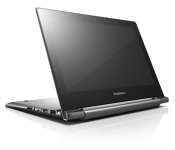
Lenovo Announces new N20 and N20p line of Chromebooks
Lenovo has announced two new Chromebooks today, adding to the current line of more educational geared Chromebooks. The new line consists of the N20 and N20p.

Both Chromebooks offer similar specs:
- 11.6-inch 1366 x 768 display
- 11.6 x 8.34 x 0.70 inches ( 295 x 212 x 17.9 mm)
- Weight – N20: 2.8 pounds (1.3kg) N20p: 3.1 pounds (1.4kg)
- Up to 4G DDR3L RAM
- Up to 16GB eMMC storage
- Intel Celeron processor
- 8 hours battery life
- 2 x USB orts
- 1 x HDMI out
- 2-in1 SD/MMC card reader
The key difference between the Lenovo Chromebook N20 and the N20p is that the N20p offers a 10 point multi-touch display and it also folds around to get the keyboard out of the way entirely. Think more along the lines of the Yoga laptops.
The N20 will set you back $279 and become available in July. Where as the touch screen N20p will be slightly more expensive at $329 and won’t make its debut until August.


//<![CDATA[
ord = window.ord || Math.floor(Math.random()*1E16);
document.write('’);
//]]>

Moto X+1 appears as placeholder on Moto Maker site

A few weeks ago, evleaks, the popular mobile leaker, outed that the successor to the Moto X would be called the Moto X+1. While we’ve also heard that the customization options could perhaps include leather this time around, those are the two main leaks we have on the new phone.

We have to remember, even though evleaks is correct around 99% of the time, things aren’t official until the company announces them. Today, the name ‘Moto X+1′ showed up on the Moto Maker site, pretty much confirming that the name is correct. As you can see from the photos, not much else is visible.
No specs, no images, no nothing, besides big blank white screen where the phone will eventually show up. With the promise of the phone arriving in late summer, we couldn’t be more excited to see what they’ve cooked up.
Via: Phone Arena, Source: Mobiflip.de
The post Moto X+1 appears as placeholder on Moto Maker site appeared first on AndroidGuys.

Tablet demand hits a wall as many are happy with the devices they own

It looks like Apple wasn’t the only tech firm to see its tablet business take a hit this winter; according to IDC, others suffered a similar fate. The analyst group estimates that overall tablet shipments grew just 3.9 percent year-over-year in the first quarter, a sharp contrast with the breakneck pace of the past few years. Amazon took a particularly severe blow, as its shipments dropped almost 50 percent. So what prompted the suddenly chilly market? If you believe researchers, many are happy with the devices they’ve got — they either have a good-enough tablet or a big-screen smartphone that will do in a pinch. Simply put, there was no compelling reason to splurge on something new.
It wasn’t all doom and gloom. Samsung’s shipments grew by a third, in part because it encouraged carriers to bundle cellular tablets with smartphones. Lenovo’s success with slates also continued unabated. While it’s still relatively small in this field compared to Apple or Samsung, its unit numbers more than tripled in the past year thanks to hits like the Yoga Tablet. These are shipments and not sales, so they don’t tell a complete story — Apple claims that pent-up iPad mini demand skewed its figures last year, for instance. Even with that in mind, it’s evident that tablet makers will have to fight harder to capture people’s attention.

Filed under: Tablets, Apple, Samsung, ASUS, Amazon, Lenovo
Source: IDC

Lenovo ThinkPad 8 review: sharp screen, worst-in-class battery life

Not long ago, I vowed to review every 8-inch Windows tablet. That’s partly because they’re popular, sure, but there was another reason, too: Their specs are so similar that you’d have to actually use one to know which is best. In a field full of same-y options, though, the Lenovo ThinkPad 8 would seem to stand out: It’s the only one with a full HD screen, not to mention a 128GB storage option (good news for folks who’d rather not store stuff on a microSD card). Other bonus points include an aluminum casing — a step above other tablet designs — as well as optional 4G. Of course, premium doesn’t come cheap; the ThinkPad 8 starts at $429, whereas competing models can be had for around $300. The question, then, is: Could it still be worth it?
Hardware
Chalk it up to the fact that I’ve spent a lot of time with this tablet, or maybe just blame the subjective nature of reviews. However you want to explain it, I’m less enamored with the ThinkPad 8 than my colleagues Mat Smith and Richard Lai were when they handled it back at CES. My theory: I’ve had more time to break it. OK, not break it, exactly; just scuff it up. After shoving the skinny tablet in my bag one too many times, I’ve managed to scratch both the aluminum back, as well as the Gorilla Glass screen, which should, in theory, be impervious to a simple set of house keys.
And that’s a shame: If it weren’t for those durability issues, this would otherwise be a well-designed tablet. That metal casing makes it feel more premium than other 8-inch tablets, as does its especially slim shape. Indeed, at 0.35 inch thick and 0.89 pound, it’s thinner and lighter than both the Toshiba Encore and Acer Iconia W4. In terms of portability, the closest contender is the Dell Venue 8 Pro, which is just as thin, but weighs two-hundredths of a pound less (not that you’ll notice). The downside to having such a skinny frame? Worst-in-class battery life. But hey now, let’s not get ahead of ourselves here. More on that in a bit.

For now, let’s finish our tour of the device. Like pretty much every other 8-inch Windows tablet, the ThinkPad 8 was designed to be used in portrait mode. The giveaway: its button layout. Both the power button and volume rocker sit on the upper right-hand side, making them easy to reach when you’re holding the thing vertically. Nearby, you’ll also see a proprietary charging port, which works with a surprisingly big, chunky connector — not the sort of thing you’d expect on a mobile device. The headphone jack, meanwhile, sits on the lower portrait edge, just where you’d expect to find it. As for everything else — the micro-HDMI socket, the covered microSD port and SIM slot — all that’s tucked out of sight on the left side.
Over on the front, there’s a 2-megapixel webcam up top, with the standard Start key tucked into the lower bezel. Speaking of bezels, they’re remarkably narrow, at least on the portrait ends, though they’re still wide enough that my thumbs weren’t covering the 8.3-inch screen (I have small hands, mind you — those of you with hammier hands might have less luck). Around back, meanwhile, you’ll find an 8-megapixel camera and accompanying LED flash, along with Lenovo’s signature ThinkPad logo, with the “i” that glows red. There are also two small speaker grilles on the bottom of the back lid; they’re so tiny, in fact, that I actually missed them on first glance. As small as they are, though, they deliver decent audio. Pharrell’s “Happy,” for instance, sounded quite pleasant, even if the volume didn’t get very high.
Display

It’s one of the main reasons to buy this, really: The ThinkPad 8 is the only 8-inch Windows tablet with a full HD, 1,920 x 1,200 display. And yes, the difference over regular 1,280 x 800 screens is actually pretty obvious. Even in modern Windows apps, where everything is bigger and more finger-friendly, on-screen objects look noticeably crisper. The same is even truer on the desktop, though that’s perhaps not such a great thing. Items are harder than ever to hit with your finger, even the Windows Store icon that now comes pinned to the Taskbar in Windows 8.1. Obviously, if you’re using any Windows tablet in desktop mode, you’ll probably want a mouse anyway, but that’s a little more of a hassle here, since there isn’t an in-box dock or keyboard accessory.
The occasional un-optimized app aside, it’s a pretty good display. Even more than the crispness, I’ve enjoyed the viewing angles — I only lose a little bit of color accuracy when I place the tablet face-up on a table to watch a movie. Also, thanks to the use of a direct-bonding manufacturing technique, the Gorilla Glass panel reflects relatively little light, so that even when I’m looking at the display from an off-angle, with harsh office lights overhead, I can still make out what’s on the screen. As a trade-off, though, the display is on the dim side, so there’s that to consider, especially if you think you might be using this outdoors.
The only other potential caveat? It doesn’t support pen input. For that, you’ll have to look at Lenovo’s bigger ThinkPad Tablet 2 (or the rumored ThinkPad 10). Otherwise, you might want to consider Dell’s Venue 8 Pro, one of the only 8-inch Windows tablets with an active pen digitizer. Even then, though, it’s not our favorite tablet, for reasons I’ll come back to a little later on.
Software
You’ve gotta hand it to Lenovo: The company mostly kept it clean here. All we have in the way of bloatware are Skitch Touch, Evernote Touch, Kindle, AccuWeather.com, Hightail (formerly YouSendIt), Zinio and the music-streaming service rara.com — none of which are even that bad. Also on board: a trial of Norton Internet Security and a full version of Microsoft Office, which you’ll find on every Windows tablet this size. Otherwise, there’s not much say — you can download the Windows 8.1 update, of course, but even that’s geared mainly toward mouse-and-keyboard machines.
Performance and battery life
| Tablet | PCMark7 | 3DMark06 | 3DMark11 | ATTO (top disk speeds) |
|---|---|---|---|---|
| Lenovo ThinkPad 8 (1.46GHz Intel Atom Z3770, Intel HD graphics) | 2,567 | 1,598 | E312 / P198 | 128 MB/s (reads); 57 MB/s (writes) |
| Toshiba Encore (1.33GHz Intel Atom Z3740, Intel HD graphics) | 2,479 | 2,068 | E339 / P210 | 178 MB/s (reads); 68 MB/s (writes) |
| Acer Iconia W4 (1.33GHz Intel Atom Z3740, Intel HD graphics) | 2,538 | 2,089 | E340 / P211 | 173 MB/s (reads); 48 MB/s (writes) |
| ASUS Transformer Book T100 (1.33GHz Intel Atom Z3740, Intel HD graphics) | 2,461 | 2,113 |
E338 / P209 |
123 MB/s (reads); 58 MB/s (writes) |
| Dell Venue 8 Pro (1.33GHz Intel Atom Z3740D, Intel HD graphics) | 2,343 | 1,986 |
E299 / P164 |
86 MB/s (reads); 45 MB/s (writes) |
For the most part, the ThinkPad 8 sticks to the script in terms of specs you’d expect to find on an 8-inch Windows tablet. That means: an Intel Atom processor, 2GB of RAM and flash storage (either 64GB or 128GB in this case). The main difference? The Z3770 chip here has a slightly higher clock speed: 1.46GHz, compared with the usual 1.33GHz. Indeed, that translates to the highest PCMark 7 score we’ve seen yet in a tablet this size. And for basic tablet tasks — email, web surfing, Evernote — that’s just fine.
As you probably know by now, though, specs don’t tell the whole story and indeed, the faster clock speed doesn’t yield any improvements in other tasks, like graphics benchmarks or gaming. In fact, though the ThinkPad 8 rules the PCMark test, it also turned in the slowest boot-up time: 14 seconds, compared with eight for the Acer Iconia W4 and nine for the Toshiba Encore. Also, though Intel hasn’t published a TDP figure for this processor, I have to say: it gets quite hot during gaming (I mean, ouch).
| Tablet | Battery Life |
|---|---|
| Lenovo ThinkPad 8 | 6:11 |
| Microsoft Surface 2 | 14:22 |
| iPad Air | 13:45 (LTE) |
| Apple iPad mini | 12:43 (WiFi) |
| Apple iPad mini with Retina display | 11:55 (LTE) |
| Apple iPad (late 2012) | 11:08 (WiFi) |
| Apple iPad 2 | 10:26 |
| Samsung Galaxy Note Pro 12.2 | 10:04 |
| Apple iPad (2012) | 9:52 (HSPA) / 9:37 (LTE) |
| Acer Iconia W4 | 9:50 |
| Nexus 7 (2012) | 9:49 |
| Microsoft Surface RT | 9:36 |
| Toshiba Encore | 8:45 |
| Sony Xperia Tablet Z | 8:40 |
| Sony Xperia Z2 Tablet | 7:57 |
| Nexus 10 | 7:26 |
| Dell Venue 8 Pro | 7:19 |
| Samsung Galaxy Note 8.0 | 7:18 |
| Nexus 7 (2013) | 7:15 |
| Samsung Galaxy Tab Pro 8.4 | 7:13 |
| Samsung Galaxy Tab 3 10.1 | 6:55 |
And then there’s this: The battery life is short, even for a smaller tablet. At its best, the tablet can last up to eight hours — that’s according to Lenovo’s official marketing materials, anyway. In practice, though, we only got six hours and change after looping a video at half-brightness. Meanwhile, the Dell Venue 8 Pro lasted seven hours and 19 minutes in the same test, while the Acer Iconia W4 managed nearly 10. If longevity is a priority (and why wouldn’t it be?), you might want to look elsewhere.
Configuration options and the competition
The ThinkPad 8 comes in two different flavors: 64GB and 128GB (good luck finding 128GB on any other 8-inch Windows tablet). Prices start at $429, and go up to $569 on the beefier model. Adding 4G will, of course, boost the price even higher. If we haven’t sold you regardless, there’s thankfully a multitude of alternatives, including a bunch with equally compact, 8-inch screens. At the moment, our favorite is the Acer Iconia W4 ($300-plus), which we gave a pretty good score of 83 thanks to its long battery life, solid performance and much-improved display. It’s not perfect, but if you’re set on an 8-inch Windows tablet, this is by far your best bet.
After that, the scores fall way down into the low 70s, which means we’re recommending these other products, but with faint praise. The Dell Venue 8 Pro ($250-plus), for instance, has an awkwardly placed physical Start button, instead of a touch-sensitive key somewhere on the bezel. On the plus side, it’s one of the only 8-inch Windows tablets we know of to support pen input (there’s also the ASUS VivoTab Note 8, which we haven’t reviewed). But, on the downside, the pen digitizer on the Venue 8 Pro was unreliable when we tested it. (Note: This may be less of an issue now, thanks to subsequent firmware updates, but buyer beware nonetheless.) Meanwhile, the Toshiba Encore ($300-plus) offers only one real advantage over the competition, which is that it has a micro-HDMI port for outputting video. Even then, the ThinkPad 8 happens to have that too. Overall, then, it’s an okay tablet; there’s just little reason to choose it over the others.
Wrap-up

The ThinkPad 8 is indeed a stand-out tablet, but not necessarily for the reasons you think. It has the winningest specs, and yet it should also be the first one you cross off your shopping list. On the one hand, it has a sharp 1,920 x 1,200 screen and up to 128 gigs of storage, but it’s also more expensive than any other 8-inch Windows slate, with worst-in-class battery life to match. For the money, it doesn’t bring extra features, either — no pen input, no fingerprint reader, no state-of-the-art camera. Realistically, I’d probably be more charitable if it was priced in line with other 8-inch tablets, but even then, it wouldn’t be a slam dunk — not with that tiny battery, anyway. Truth be told, none of the small-screened Windows tabs we’ve reviewed are perfect, but they all manage to offer a little more value.

Motorola’s first post-Google phone is coming on May 13th

Motorola will soon fall into Lenovo’s clutches, but it’s still got some shiny new hardware to show off in the meantime. According to an invite that just hit our inboxes, the company’s planning to show off a brand new smartphone in London on May 13th. In fairness, the timing of the launch means that Motorola was almost certainly working on… whatever it is… while still part of Google, but this is Motorola’s first big product launch since the news of its sale broke last January. And hey, if we’re exceedingly lucky, we may just catch a glimpse of how (if at all) things have changed for Motorola now that’s preparing to report to some new corporate masters.
If the persistent hum of the rumor mill is worth anything, it seems like the wallet-friendly Moto E will wind up taking the stage. Firm details are still hard to come by (aren’t they always?), but early reports claim that Motorola may have traded pure horsepower and battery life for a super-thin body. Here’s the thing, though: Motorola has already proven that it knows how to make a cheap smartphone worth buying, and it’s definitely running with a similar price formula again. Now the question is whether they can capture that low-cost lightning in a bottle yet again.
Filed under: Mobile

Microsoft donates $1 billion to help US schools buy PCs

Microsoft isn’t just supporting White House’s ConnectED education program by lowering the cost of Windows — it’s also giving schools the cash they’ll need to buy Windows PCs. The company is donating $1 billion to make sure that students have the tech they’ll need for both getting online and learning technology skills. The funding comes alongside a new device pricing program that should make the PCs more affordable — to start with, it’s offering sub-$300 systems from Acer, ASUS, Dell, Fujitsu, HP, Lenovo, Panasonic and Toshiba.
The company isn’t shy about having a commercial incentive behind its generosity; its Education CTO, Cameron Evans, tells CNET that there’s a hope that kids will become loyal Windows fans down the road. However, he adds that any eventual sales are secondary to the more immediate focus on improving education. The influx of cash should reduce the technology gap for less fortunate students, many of whom could miss out on digital learning without a little help.
[Image credit: Getty Images]
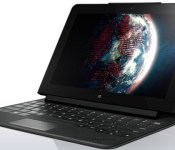
Lenovo teases a new 10-inch ThinkPad tablet in Australia

Online stores have been hinting that Lenovo was working on a 10-inch counterpart to its ThinkPad 8 tablet, and now there’s no doubt: the company’s Australian branch has listed a ThinkPad 10 ahead of an official announcement. While a full-fledged product page was only briefly available, it was enough to show that the new Windows slate shares much in common with its smaller sibling. You’ll find a slightly faster 1.6GHz quad-core Atom processor and up to 4GB of RAM, but there’s still a 1,920 x 1,200 screen, up to 128GB of storage, an 8-megapixel rear camera and a 2-megapixel front shooter. Not that we’re griping about the similarity between models, since this ThinkPad 10 should still be leaps and bounds more powerful than the aging ThinkPad Tablet 2.
The ThinkPad 10′s big advantages over its 8-inch cousin are likely to revolve around its optional gear. As with the Tablet 2, there are promises of versions with LTE data and pen input. You’ll also have the choices of a basic dock, a keyboard dock and a keyboard case if you need your tablet doubling as a workstation. Lenovo didn’t give out any release details as part of its teaser, but an official listing suggests that a launch is just around the corner. We’d also expect a price premium over the $399 ThinkPad 8 — that extra display area and processing power won’t be cheap.
Via: TabTech (translated)
Source: Lenovo
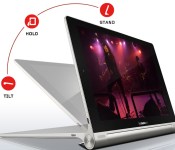
Lenovo Yoga 10 Review

Lenovo‘s Yoga series has made a name for themselves in the industry pushing the boundaries of shape, form factor and all around physical features in mobile computing. The Lenovo Yoga tablet stays true to its name in pioneering something completely new in an Android tablet.
Hardware
Probably the most notable hardware of any Android powered tablet I’ve seen to date, when held in portrait mode one side on the device is slim as a razor, and the other side has a 3/4 inch thick round “handle” of sorts the length of the device. This serves the multiple purposes of giving you something substantial to grasp while using the tablet one-handed, and housing the tablet’s kick-stand.
At the top of the thick edge is a large, circular power button, balancing the 3.5 mm headphone jack on the bottom. The kickstand takes up almost the entire edge starting an inch from the top and bottom. To extend the kickstand you must grasp the edge tightly and begin to twist toward the screen. Beneath the kickstand on the back is the micro SD slot toward the bottom and the factory information sticker at the top.
The front of the device is a black slate aside from the rounded silver handle at the top and bottom of which the Dolby speakers are located. The MicroUSB charging port is at the top to the right of the power/sleep button opposite of the volume rocker which resides beside the headphone jack.
Software
The device’s launcher does not have an app-drawer, which can become an issue if you install upwards of 100 apps as it can start to look rather messy. But that’s what launcher replacements are for. Lenovo has implemented a “smart side bar” which offers quick access to apps like books, gallery and some of the recently used applications, however it is only accessible from the home-screen, so if you utilize the device’s stock launcher, all of those things would be immediately available anyway.


The performance is sub-par, but if you’re interested in purchasing one to use as an ebook reader, I would encourage that. The screen has good brightness and visibility even in direct light, and the software offers several options to accommodate using the device in “tilt, stand, and hold” modes. However any usage much more taxing on the processor than that would be out of the question. Even playing Words With Friends at times proved to be too much for this little guy.
Probably the best feature of this tablet is the bragged 18 hour battery life. With somewhat light use, I pushed the battery over 2 weeks without charging it. If battery life is more important to you than hardcore performance or high-end specs, at an MSRP of $299, this tablet is definitely worth considering.
The post Lenovo Yoga 10 Review appeared first on AndroidGuys.
 AIVAnet