


PC shipments appear to flatten out after two years of steep decline

Both Gartner and IDC appear to have some good news for the PC industry — the seemingly never-ending death spiral may have come to an end. While the two research groups don’t agree completely on the numbers, it does appear that after two years of stead and sizable declines, the PC industry is seeing shipments flatten out. In total, according to Gartner, 75.8 million computers were shipped in the second quarter of 2014, a negligible 0.1 percent drop from the same quarter a year ago. While IDC saw a much more sizable 1.7 percent fall in PC shipments, that’s still a far cry from the 7.1 percent decline it anticipated and the smallest it’s measured in two years.
Two years ago the netbook market imploded and tablets started eating into laptop sales. Since then shipments of traditional computers have been falling at an alarming rate. IDC doesn’t necessarily expect this to indicate a longer term trend towards flat PC sales. Basically, the worst may not be over yet. Despite impressive growth from major players like Dell, HP and Lenovo smaller companies are still seeing tremendous drop off. And the declines are particularly steep in markets like India where the most potential for growth is. Instead the improvements during the quarter were carried primarily by the US and Western Europe, which might not be able to keep the industry from declining further in the long run.
Filed under: Desktops, Laptops, Apple, ASUS, HP, Dell, Acer, Lenovo

Lenovo Passes Apple in U.S. PC Shipments As Worldwide Market Flatlines
Apple saw its U.S. PC marketshare decline to 10.6 percent in the second quarter of 2014, down from 11.5 percent in the year-ago quarter, according to new data released from Gartner. With 1.6 million shipments, it trailed behind HP, Dell, and Lenovo, ranking fourth for the first time in several years.
Lenovo saw the most significant growth at 20.3 percent, while HP and Dell also saw high growth rates of 15.5 percent and 12.3 percent, respectively. Toshiba, with just over a million shipments, also saw growth of 18.5 percent.
 Gartner’s Preliminary U.S. PC Vendor Unit Shipment Estimates for 2Q14 (In Thousands)
“The consumer PC market also started picking up in the U.S. The availability of affordable, thin and light notebooks have drawn consumers’ attention,” Ms. Kitagawa said. “Touch enable devices are also widely available with decreasing price premiums compared to a year ago. The price premium is low enough for mainstream consumers to spend the extra money for the additional functionalities,
such as touch.”Four of the top five vendors in the U.S. market experienced double-digit growth. HP was the market leader, accounting for 27.7 percent of PC shipments.
Overall, U.S. PC shipments totaled 15.9 million, up 7.4 percent year over year, while worldwide PC shipments saw flat growth compared to the year-ago quarter. Shipments totaled 75.8 million units, a 0.1 increase. Though worldwide PC shipments have ceased to decline in 2Q14, interest in low-cost tablets continues to eat into the traditional PC market.
 Apple’s U.S. Market Share Trend: 1Q06-2Q14 (Gartner)
IDC has also released its own estimates of PC shipments for the second quarter of 2014, painting a similar picture. IDC puts Apple’s shipments at 1.6 million and its market share at 10 percent, down from 10.9 percent, a 1.7 percent decline. IDC’s numbers also rank HP, Dell, and Lenovo as the top three vendors in the United States, with all three seeing growth of 15.6, 12.9, and 24.7 percent, respectively.
Unlike Gartner, IDC suggests worldwide PC sales totaled just 74.4 million, a year-over-year decline of 1.7 percent, with U.S. sales up 6.9 percent.
IDC and Gartner did not list Apple’s worldwide market share for the quarter, as usual, because the company does not rank among the top five vendors on a worldwide basis. Apple’s U.S. decline comes even as the company dropped the prices on two of its flagship products in 2014 — both the MacBook Air and the iMac saw price drops, with the former gaining a small spec boost and the latter seeing the introduction of a new low-cost version.
The evolution of the PC: A decade of design

Computers have gone through nothing short of a renaissance in the decade since Engadget was born. When we started in 2004, desktops still ruled the roost; laptops were frequently clunky; and tablets were niche devices for doctors.
That state of affairs didn’t last for long, though. Netbooks briefly took over the world, bringing tiny laptops to the masses. Ultrabooks proved that slim machines could still be powerful. And just about the entire PC market has had to confront the rise and domination of touchscreen-enabled mobile devices like smartphones and tablets. In short, it’s pretty remarkable how much of a difference 10 years can make in tech.
2004: Sony VAIO X505

Notable specs: 1.1GHz Pentium M processor, 20GB hard drive, 1.73-pound weight, 10.4-inch (1,024 x 768) display.
Sony didn’t realize it at the time, but it was laying the groundwork for the next decade of laptops with the VAIO X505. The 10-inch system was so featherlight and slender that it was easy to take anywhere, much like a netbook or Ultrabook. If it weren’t for the astronomical $2,999 price tag, it’s possible it could have started a mobile-computing revolution.
2005: IBM ThinkPad T43

Notable specs: 1.6GHz to 2.13GHz Pentium M processors, 30GB or larger hard drive, 6-pound weight, DVD drive, 14.1-inch (1,024 x 768 or 1,400 x 1,050) display.
The ThinkPad T43 was the swan song for an era of computing when laptops were mostly for globe-trotting professionals. One of the last PCs to bear the IBM name before Lenovo closed its acquisition of IBM’s PC business, it represented everything good about the ThinkPad badge: It was fast, well-built and relatively easy to carry in a briefcase.
2006: Dell XPS 700

Notable specs: Core 2 Duo or Core 2 Extreme processors, dual 320GB hard drives, dual DVD drives, dual GeForce 7900 GTX graphics.
Dell had built up a reputation for high-performance PCs well before 2006, but the XPS 700 was the system to own that year if you wanted a gaming desktop from a major brand. Its aggressive design still holds up today, and it was often as powerful as custom-built rigs. It was a dream machine at a time when you still needed a giant tower for serious online gaming.
2007: ASUS Eee PC 701

Notable specs: 800MHz or 900MHz Celeron M processors, 2GB to 8GB solid-state drives, 2-pound weight, 7-inch (800 x 480) display.
The Eee PC 701 marked the official start of the netbook craze, which lasted until the iPad’s arrival in 2010. Its screen, speed and storage were very modest even when new, but it showed that you didn’t need a big, expensive portable just to check your email at the coffee shop.
2008: Apple MacBook Air

Notable specs: 1.6GHz or 1.8GHz Core 2 Duo processors, 80GB hard drive or 64GB solid-state drive, 3-pound weight, 13.3-inch (1,280 x 800) display.
The archetypal Ultrabook. While it wasn’t without its quirks, the MacBook Air successfully bridged the gap between ultraportables and full laptops. It was fast enough for most tasks, yet light enough that you’d hardly notice it in your bag.
2009: HP Firebird

Notable specs: 2.66GHz or 2.83GHz Core 2 Quad processors, dual 250GB or 320GB hard drives, DVD or Blu-ray drives, dual GeForce 9800S graphics.
While HP’s Firebird line wasn’t perfect by any stretch, it showed how efficient desktops had become. You could get a reasonably quick, ready-made gaming PC that both looked good and didn’t swallow up too much surface area. It’s arguably the prototype for the small-yet-strong Steam Machines that would follow five years later.
2010: Lenovo IdeaCentre A300

Notable specs: 2.2GHz Core 2 Duo processor, 500GB hard drive, 21.5-inch (1,920 x 1,080) display.
Although the iMac is virtually synonymous with all-in-one computers, Lenovo’s sleekly designed IdeaCentre A300 was proof that Apple didn’t have a complete lock on the category. Rather than glom the computer on to the A300′s back, Lenovo tucked it away in the base. The result was a relatively subtle, stylish desktop that looked right at home in just about any environment.
2011: Samsung Chromebook Series 5

Notable specs: 1.66GHz Atom processor, 16GB solid-state drive, 3.3-pound weight, 12.1-inch (1,280 x 800) display.
Unlike the other PCs here, the Chromebook Series 5′s real revolution was its software — with Chrome OS, both Google and Samsung were betting that you only needed a web browser for most of your day-to-day computing. That was optimistic on a slow, Atom-based machine circa 2011, but the Series 5 helped launch a wave of stripped-down, affordable laptops that could do a lot without relying on conventional apps.
2012: Apple MacBook Pro with Retina display

Notable specs: 2.3GHz or 2.6GHz Core i7 processors, 256GB to 768GB solid-state drives, 4.5-pound weight, 15.4-inch (2,880 x 1,800) display.
Apple’s 2012 MacBook Pro redesign was just an iterative upgrade in some ways, but it was also a bellwether for where laptop design would go. It wasn’t just that extra-sharp Retina display that turned heads; this was also one of the first high-end, full-size laptops to ditch optical discs and hard drives in the name of both an easier-to-carry body and faster, flash-based storage.
2013: Acer Aspire R7

Notable specs: 1.8GHz Core i5 processor, 500GB hybrid hard drive, 15.6-inch (1,920 x 1,080) adjustable display.
Windows 8′s touch-friendly interface prompted a flood of PCs that tried to be everything to everyone, and that’s epitomized in Acer’s one-of-a-kind Aspire R7. Depending on how you adjusted its multi-hinged display, the R7 could serve as a desktop, laptop or tablet. It wasn’t especially good at any of these, but it revealed how eager PC makers were to keep you from buying mobile tablets.
2014: Microsoft Surface Pro 3

Notable specs: Core i3, i5 or i7 processor, 64GB to 512GB solid-state drive, 12-inch (2,160 x 1,440) display.
If you want a system emblematic of the changes to PCs in the past 10 years, you only need to look at Microsoft’s latest flagship device, the Surface Pro 3. So long as you get its (practically mandatory) keyboard cover, it blurs the lines between tablet and laptop — it’s as useful for watching movies on the couch as it is for serious media editing at your desk.
Jon Turi contributed to this post.
Filed under: Desktops, Laptops, Tablets, Apple, Samsung, Microsoft, HP, Dell, Acer, Lenovo
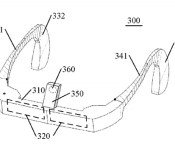
Lenovo’s Google Glass-like wearable concept keeps your voice chats private

Even Lenovo isn’t immune from the temptation to produce a Google Glass-like wearable display, it seems. The Chinese tech giant has applied for a US patent on a headset design with dual screens, touch-based navigation and an unusually strong emphasis on voice quality. Rather than use conventional noise-canceling microphones, like Google, Lenovo would use a bone-conducting microphone just above your nose bridge. The approach would make it easier to catch your voice, since you wouldn’t have to compete with outside sounds for attention; it could also offer an extra level of privacy for internet calls, since you could speak quietly and still get your message across.
There’s no telling whether Lenovo will get its patent, let alone use it in a wearable display. Like many companies, it may simply be hedging its bets in case the category takes off. With that in mind, the firm is both flush with cash and expanding rapidly into the mobile world — don’t be surprised if you’re donning Lenovo-badged eyewear in the future.
Filed under: Displays, Wearables
Via: TechCrunch
Source: USPTO
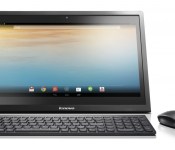
Lenovo N308 Android Powered AIO Table Top PC Review, is it Worth the Money?
I have always had a bit of a love for Lenovo. They successful turned their purchase of IBM into a profitable PC market. Heck, they over took Apple in PC sales in the last few months. On the mobile front they dominate in overseas markets while they still have a struggling point here in the states. That is going to be changing once the Motorola purchase finalizes and they can start moving into the US market a bit easier. Their tablet line is something to keep an eye. I have used the Yoga 8 and Yoga 10 for the last few months and their unique design, exceptional battery and overall performance for the money keeps them in my recommended tablet purchase slot. Lenovo is constantly doing different things with their products and are always bringing new things out that deserve a look. In this review/look, I will be going over the Lenovo N308 AIO (all-in-one) Android based PC.

Whats in the box
- A Lenovo AIO
- A power cable
- A keyboard and mouse
External overview:
Sure, there are instruction manuals all that jazz too, but the hardware is the focus. The N308 is an interesting contraption. The screen comes in at 19.5-inches with a resolution of 1600 x 900. Don’t let the physical numbers throw you off, that is still higher than 720p but just lower than 1080p. The screen is bright at 250-nit and is also multitouch (2 finger only). You don’t have any physical buttons on the front of the N308, rather you have the on screen keys that many current tablet and phone owners are used to using. You will also find a 720p wabcam/front facing camera, a mic and an ambient light sensor.


On the top rear of the device you will find a single power button to turn the screen on or off, as well as long pressing to power the N308 on or off. Just to the left of the power button is where you will find the physical volume up and down key as well.

On the left hand side tucked away in a small cut out you find a series of ports for you added convenience. You will find 3 USB ports, 1 headphone jack, 1 full size SD card slot, a Ethernet port and your power port.
On the rear of the N308 is where you find the stand. Much like the Yoga tablets, but much more heavy duty, the stand rotates down. The N308 can be angled any way you want between 15 to 65 degrees or flat. Of course you can also lay it flat. If you have other plans for the device, you can remove the stand entirely and wall mount it with the Vesa mount holes too.


Internal hardware overview:
Inside the N308 there a view very interesting things. The N308 is powered by a quad-core NVIDIA Tegra 4 processor at 1.8GHz. Not exactly the slouch in the processing department you might have thought. It also offers 2GB of RAM. Here is where it gets a bit interesting though, the AIO has a 320GB 5400 RPM HDD and 8GB eMMC storage. You can where this would be a pretty powerful media device. To make things a little more mobile, mainly suited more for traveling around your house, it houses an internal battery that can give you up to 3 hours of unplugged usage.


The N308 also offers Bluetooth 4.0 connectivity and dual-band Wi-Fi 802.11 b/g/n.
The keyboard and mouse:
To continue along with the interesting aspects of the N308, it comes prepackaged with a Lenovo wireless AccuType keyboard and mouse. Both take batteries, but are included. They connect to the N308 via a USB dongle that you plug into one of the 3 USB ports. You don’t need any special software or installs, simply plug in the dongle and you can start using them immediately. The keyboard keys have, what I will call, a shirt pocket design. Where they are flat on the top and sides with slightly rounded bottoms. They are also slight concave for you fingers to rest comfortably in. The keyboard even has a variety of short cut keys to access the camera, head to the home screen, open up the multitasking window, control the brightness, music playback and more. It is kind of nice to have all that control without having to touch the screen at all.

On the mouse side of things you get a laser mouse that works on plenty of surfaces. The sides are contoured for your thumb and pinky to sit comfortably. The it has the typical left and right clicks along with a center scroll wheel. Of course Android has no use for a left and right click. Either works the same just like a finger touch. One click to open things and hold thee click like you would long press with your finger.

The good:
- The 320GB hard drive offers plenty of storage for movies and photos.
- While one USB port is occupied by the dongle for the Keyboard and Mouse, you still have two additional ports for external thumb drives or hard drives.
- It comes preloaded with all the Google apps and the Play Store, so it is Google certified.
- NVIDIA Tegra 4 processor
- 2GB RAM
- Keyboard and Mouse
- Functional Keyboard shortcuts
- Ethernet port for hardlined internet
The bad:
- 8GB eMMC, limits the number of apps that can be installed and can’t move apps to SD or to the internal HDD
- Certain apps, like G+, can’t be scrolled through with the mouse scroll wheel or arrow keys on the keyboard. (Most likely the apps fault, not Lenovos)
- It is heavy, it weighs just over 10 pounds. Unlike some of their Windows AIO’s, Lenovo didn’t put any sort of handle cut out on the back. It makes carrying it a bit more awkward.
- The BEZEL! It basically has two bezels. The main outer bezel which is where the infrared beams come from to recognize your finger inputs. Then there is the actual bezel on the glass.
- No HDMI or Video out ability
- Android 4.2.2 and no updates as of yet.
- The 2watt speakers are in the rear so having a wall behind it makes it louder. In a quiet environment they are ample to watch a movie and have video calls. Your experience will be better with headphones, a Bluetooth speaker or even a set of good PC speakers thanks to the headphone jack.
How do I actually feel about the AIO?
There are a lot of things to consider on the AIO. For starters does the price tag match the device. If the AIO is priced to high and fails to deliver then we have a monumental problem. The N308 was listed at $350, but is currently out of stock through Lenovos website. Considering the specs above and the goo vs bad, $350 is a pretty good price point, but it is easily targeted to specific sets of users. I found myself using it mostly for streaming movies from Plex at my bedside, idle web browsing and some commander mode on Battlefield 4. Commander mode is pretty slick on a 19.5-inch screen with a mouse on your stomach while the wife is sleeping. My son loved playing Angry birds and other games on the large screen in the living room with it placed on the coffee table. It is so big and heavy that he wouldn’t dare try an pick it up.
I found it particularly useful at my sister in laws wedding. I was able to combine every ones photos from their camera on the spot and put together a slideshow of the event for the reception.

It drew quite the crowd.
I applaud Lenovo for bringing something to market with an affordable price tag that does offer quite a lot of functionality. Had this same AIO had a price tag of $500+ there is no way it would sell. Not unless the Android version was updates, the screen res was pushed up, the eMMC started at 16 or 32GB and it ditched the infrared. All those things would easily put it over the $500 marker. For exactly what it is and exactly what I used it for, it was very useful to have.
I am not sure when they will be coming back in stock, but if you are interested in keeping track of it head over to Lenovo.com.
Gallery


//<![CDATA[
ord = window.ord || Math.floor(Math.random()*1E16);
document.write('’);
//]]>

Motorola confirms Moto Maker isn’t dying, despite US factory closure

Today’s revelation that Motorola is shutting down its sole American plant is an indication that its latest flagship didn’t do as well as expected in the US and the costs of operating the Texas factory were simply too high to continue operations. Since the facility focused heavily on shipping Moto Maker products to US consumers, speculation arose that the feature — which gives you the ability to customize the color and trim of your Moto X — would die along with it. Upon reaching out to Motorola, a spokesperson confirmed to us that Moto Maker is not going away as a result of the factory’s closure.
There are still plenty of questions about Motorola’s future, most significantly how its product strategy will change under Lenovo’s leadership. Unfortunately, we won’t hear more details on Lenovo’s plans until the acquisition (barring rumors, of course), so exactly how the Moto X and Moto Maker will change is up in the air for now.
But just because the Texas factory is shutting its assembly lines doesn’t necessarily spell the end for Motorola’s latest flagship or its customization options. Let’s look at the bigger picture: The company has plants in other countries around the world, and the US plant merely assembled parts that were already made in China, so Motorola may not even experience much of a squeeze on production. Additionally, Motorola confirmed in February that Moto Maker should come to Europe and Mexico this quarter; there’s no word on if or how the closure will affect expansion.
The primary concern to US folks is that even though Moto Maker isn’t technically dying, the company’s withdrawal from the country is likely to strongly impact shipping time, which may adversely affect sales even more. Thanks to the Texas factory, Motorola was able to send out custom orders to consumers within two to three days, but international shipping from one of the company’s other factories will undoubtedly take more time. Motorola’s rumored to be preparing a follow-up to the X known as the “X+1,” however, so we’re curious to see if it will offer custom options with longer wait times or just limit the feature to a handful of other markets or regions.
Filed under: Cellphones, Wireless, Mobile, Google, Lenovo

Motorola to close its Moto X plant in Texas by the end of the year

Motorola became part of a growing trend when it opened a plant in Texas to build its flagship Moto X, but just a year on, its now decided to shut down its US manufacturing operations. According to The Wall Street Journal, employee numbers have plummeted from nearly 4,000 when it was in full swing to only 700, and the plan is to close the factory by the end of the year. Motorola’s intention was to offset the inherently higher cost of manufacturing in the US, compared with places like China, by being able to get handsets to customers quicker, and manage the Moto Maker customization process on home turf. But, despite churning out 100,000 Moto Xs a week at one point and progressively making the handset cheaper, the ‘born in the USA’ vision hasn’t paid dividends.
Motorola’s in ownership limbo at the moment, as Google has essentially sold the smartphone-maker to Chinese company Lenovo, but the deal is yet to be fully executed. Motorola President Rick Osterloh told the WSJ “the decision to close the plant was independent of the planned sale,” which isn’t hard to believe given Lenovo is one of the champions of stateside manufacturing. It has a PC plant in North Carolina, and like Motorola, believes there’s a competitive edge in being close to your customers and able to customize and ship computers quicker. Perhaps, then, there’s scope for Motorola to return to the US under Lenovo’s leadership. The Moto X will continue to be made elsewhere, and with Moto Maker being one of the main attractions of the handset, we imagine this’ll still be available on the next edition of the X due this summer, even if it takes much longer to ship.
Beyond what it means for Motorola as a company, the fact it’s had to pull the plug on its US plant after such a short time raises much bigger questions about the viability of manufacturing electronics in the US. Last year, the company convinced us it was going to make it work, so how long before others begin changing their tune as well?
Filed under: Cellphones, Mobile, Google, Lenovo
Source: The Wall Street Journal

Lenovo’s next flagship phone is all about metal, a quad HD screen and a big battery

Lenovo’s current flagship phone, the Vibe Z (K910), opted for plastic instead of metal like its predecessor, so it’s nice to see metal making a comeback on the next model, dubbed the Vibe Z2 Pro. This is according to several photos that have been making the rounds on Sina Weibo, and our sources have since confirmed that these were taken at an internal event, so someone’s been a bit naughty. The specs are top notch: 6-inch quad HD display, 16-megapixel OIS camera (with dual LED flash), massive 4,000mAh battery and 2.5GHz quad-core Snapdragon 801 chip. These are all wrapped inside a 7.7mm-thick metallic body that also supports NFC.

Like the Vivo Xplay 3S which packs the same display, the Vibe Z2 Pro appears to feature a very high screen-to-bezel ratio, which is always welcomed as long as the touchscreen’s edges aren’t too sensitive. You can also see that this is a dual-SIM device with LTE support, though the international variants may differ. Oddly enough, the usual “Lenovo” logo spot on the back has been taken up by “Vibe,” thus suggesting that for some reason, the Chinese company is making a bigger push for its mobile sub-brand.
Given the fact that this was from an internal event, we should be hearing an official announcement very soon. With ex-Nokia vet Colin Giles recently quitting Huawei to run Lenovo’s global mobile division, here’s hoping he’ll do something about that ugly UI before bringing it to our side of the world.
Filed under: Cellphones, Mobile, Lenovo
Source: Sina Weibo (1), (2)

Engadget Daily: Ads on your thermostat, eBay’s password breach and more!

You might say the day is never really done in consumer technology news. Your workday, however, hopefully draws to a close at some point. This is the Daily Roundup on Engadget, a quick peek back at the top headlines for the past 24 hours – all handpicked by the editors here at the site. Click on through the break, and enjoy.

Google ads could be coming to thermostats, refrigerators and car dashboards
A Google filing with the SEC hinted that it’s considered displaying ads on a variety of devices that include “refrigerators, car dashboards, thermostats, glasses, and watches.” The company has since commented on the issue, saying that, “Nest, which we acquired after this filing was made, does not have an ads-based model and has never had any such plans.”

eBay asks all users to change their passwords following cyberattack
eBay looks like it’s the latest company to suffer a security breach after it alerted users that an attack had “compromised a database containing encrypted passwords and other non-financial data.” Change those passwords, stat!

Oculus VR and Palmer Luckey being sued by CTO’s former employer
Zenimax Media, owner of id Software, is suing Oculus VR co-founder Palmer Luckey, alleging that Luckey and Oculus VR stole and misappropriated trade secrets related to virtual reality technology. Oculus VR responded and said this lawsuit has no merit.

Old console, new tricks: Getting the most out of your Xbox 360
If you’re still holding on to your Xbox 360 but feel like it’s getting a bit long in the tooth, don’t fear! Engadget’s own Richard Lawler has a few tips that will ensure you’re getting the most out of your favorite game console.
You also might like:
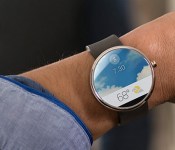
Motorola contest pegs the price of a Moto 360 smartwatch at $249

If you’ve been at all interested in Motorola’s Moto 360, the biggest question has likely been the price: how much will that swanky circular smartwatch set you back? Not that much, if you believe the company’s rules for a watch face design contest. The legal details set the average retail value of a Moto 360 at $249; that’s as much as a relatively posh smartwatch like the Pebble Steel, but less than the $300 you’d pay for tech-laden wristwear like the Gear 2. Before you start budgeting for a timepiece, though, remember that this still isn’t official. While Motorola’s figure gives at least some idea of what to expect, we wouldn’t rule out a higher price tag when the Moto 360 reaches store shelves.
Filed under: Wearables, Google, Lenovo
Via: Droid-Life
Source: Motorola (Google Drive)
 AIVAnet