


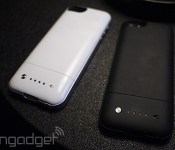
Mophie’s Space Pack boosts both battery life and storage, requires a special iOS app (hands-on)

As a smartphone power-user, one of the devices that intrigued this editor the most at CES was not a huge TV or a sleek sportscar, but actually the Mophie Space Pack. It’s an iPhone case that marries both a backup battery and additional storage — a first of its kind, according to Mophie. The concept strikes us as an attractive one, especially to iPhone owners who are stuck with both a sealed-in battery and without the benefit of external memory. As it comes in both 16GB and 32GB versions, the Space Pack could also potentially double or triple your existing capacity. During a brief hands-on with the case, we can say that it looks very similar to the current Juice Pack Air — indeed, it’s almost indiscernible as far as look and feel goes. The only difference seems to be a silver brushed button on the back instead of a simple plastic one.
If you’re expecting the Space Pack to merge seamlessly with your existing iPhone storage to become one giant hard drive, you’re sadly mistaken. The Space Pack really acts more like an external USB stick that you offload your iPhone’s storage. This is why Mophie requires you to use a special iOS app called Space, not only to manage that additional storage but to access it at all. Unfortunately, this means that iPhone apps like the Camera Roll and iTunes are not integrated with that extra capacity — after you transfer over those files, they’re only accessible through the Space app. As such, Mophie has recommended that most first-time users simply dump their entire Camera Roll or iTunes library into their Space Pack so that they can empty out their iPhone’s capacity and start “fresh.”
The Space app does have its own built-in camera function that captures photos directly to the Space Pack, and there’s a built-in media player as well for playing videos and audio stored on it. In our demonstration, the video played seamlessly without any hiccups, and taking pictures seemed as easy as with the default camera. However, you won’t be able to edit those photos as it lacks an editing function, at least for now. Also, these sub-apps require some effort to use and we’d rather we could just add this storage on to our existing apps, or at least have an easier way to synchronize them.
Despite these issues, however, we still think this is the best bet most iPhone users have if they’re short on storage space and battery life and need an easy way to deal with both. The lightweight design of the Space Pack is a nice, and the base model only costs about $50 more than the Juice Pack Air. Either that, or you could just practice some judicious file collecting and rely more on the cloud for your storage woes. As a reminder, you can pre-order the Space Pack starting today from Mophie’s website. It comes in black and white. The 16GB is $149.99 while the 32GB is $199.99, and both are expected to ship by March 14th.
Source: Mophie

Spotify for iOS gets its promised free, shuffle-based music streaming

Spotify delivered free mobile music streaming to Android users a while back, and it’s following up today with a corresponding update to its iOS app. iPhone listeners can now listen to artists or playlists in shuffle mode without spending cash on a Premium subscription; iPad listeners can play any song they like at any time. As long as you live in one of Spotify’s supported countries, you’ll want to swing by the App Store to grab the big update.
Filed under: Cellphones, Tablets, Mobile
Source: App Store
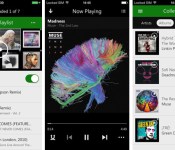
Xbox Music for iOS now plays music offline

Xbox Music landed on iOS with a big splash, but the absence of offline playback hurt its appeal for frequent flyers and anyone else whose internet access isn’t guaranteed. That won’t be a problem now that Microsoft has updated the app with offline support. Tunesters just have to flick a virtual switch to cache playlists for listening in any situation. The move won’t lure subscribers away from rival services that have had offline playback for a while, but it’s hard to object to a little more convenience for Xbox Music loyalists.
Filed under: Cellphones, Internet, Software, Mobile, Microsoft
Via: The Verge
Source: App Store
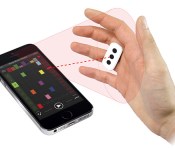
iRing adds gesture control capability to iOS music apps (video)

This year’s CES has introduced us to a number of devices that cater to specific people. That includes IK Multimedia’s iRing accessory, designed for aspiring DJs who’d like to control their iOS music apps with gestures…and a dash of showmanship. So long as a user’s wearing the iRing, the iDevice’s front camera picks the gesture controls up, and the peripheral’s accompanying app translates them to commands music software can understand. According to the company (the same one responsible for a few other music accessories for iOS), the iRing’s capable of controlling not only basic music apps, but also advanced ones designed for those who mix their own tunes. It also comes with a couple of its own music editing apps that one can use to add effects and create non-stop loops. Those who prefer waving their hands in the air over poking at on-screen controls can get the iRing in various music and electronic retailers worldwide for $25.
Filed under: Peripherals, Mobile
Source: IK Multimedia

Typo case marries an iPhone 5s and a BlackBerry Q10, with Ryan Seacrest officiating (hands-on)

Why Typo, of all the names for a smartphone keyboard? The company answers the obvious question with a Wikipedia quote.
A typographical error (often shortened to typo) is a mistake made in the typing process … The term includes errors due to mechanical failure or slips of the hand or finger.
Well, yeah, sure, but that doesn’t really answer the question we — oh, wait, there’s more: “For many of us at Typo, typing on our iPhones is a slow, tedious one- or two-finger affair. Our desire is to avoid making Typos by using the Typo Keyboard.” Ah, so you named it “Typo” because you want people to use it to not make typos — sort of a reverse Orwellian doublethink approach to product naming. You know, like the MacBook Backpain. The Typo harnesses Ryan Seacrest’s deep pockets to the tune of $1 million, in order to address an issue that hardly anyone seems to talk (read: complain) about anymore: the death of the smartphone keyboard.

For the American Idol host, it’s a problem big enough so as to require a low seven-figure investment. And while we could certainly spend the day pondering precisely how much it might have cost for the television personality to purchase a controlling share in troubled QWERTY enthusiasts BlackBerry, we’ll instead focus on where the money ended up. Simply put, the Typo is a case that snaps onto your iPhone 5 or 5s, adding a full QWERTY keyboard to the bottom. It’s not the first keyboard case we’ve seen for the iPhone, though past models have largely stuck to a slider form factor, letting you type in landscape mode and stash the thing out of view when you’re not using it.
The Typo, on the other hand, adds the keyboard to the bottom of the device, a decision that drew immediate comparisons to BlackBerry handsets the moment it was unveiled (not to mention a recent lawsuit). And the similarities aren’t fleeting. The pad looks remarkably like the one you find on the Q10, right down to the thick white lines separating the rows and the beveled keys for speedy touch-typing. There are some issues with the placement — for starters, there’s the fact that it completely covers the iPhone’s large home button, though Typo’s fixed this with the addition of a small button with a square icon in the bottom right-hand corner, so you don’t have to pull the case off every time you need to exit out of a program.

What the company can’t really fix, however, is the nearly one inch it adds to the iPhone’s already long, skinny body. In fact, the press material notes that the final version of the hardware will actually be 1.7 millimeters taller than the beta version we tried out. The other big issue is also pretty clear after analyzing the Typo for a second: The phone is really, really top heavy. Look at how Dana’s holding it in that lead image. That’s no coincidence. She’s propping up the back, due to the really weird center of gravity the case creates. And because it’s not a slider, you’ll have to deal with that keyboard sticking out any time you want to, say, play a game in landscape mode. The upside, as Typo notes, however, is that the removal of the virtual keyboard means you’ve got a lot more screen real estate for typing.
The case’s build quality is actually pretty nice, overall. It has a matte black, soft-touch back, akin to a Mophie, that feels fairly good and offers some tracking for your fingers during that inevitable cradling. The Bluetooth pairing process is pretty straightforward as well. We managed to accomplish that in less than a minute, with the space bar showcasing a nice glowing blue light to let you know when things are ready. The keys are pretty decent — not quite BlackBerry-level, but a lot nicer than other keyboards we’ve tried, and while there’s a bit of a learning curve, that’s to be expected for any new device keyboard.

There’s also a button for backlighting. That’ll likely have an effect on battery life, though with the week of active use you’re supposed to get on a single charge, you’ll probably be all right. And when the battery is about ready to go, you’ll see yet another light warning you that it’s time for a charge. There are holes for access to the necessary buttons and ports, with a micro-USB socket on the left side to charge the keyboard.
All of that will run you $99 when the Typo goes live on the 13th. The case does what it claims, but like the Q10 itself, this feels like an instance of too little too late, as so many of those BlackBerry loyalists who were eagerly awaiting a new device with a decent keyboard eventually jumped ship out of frustration, only to realize that a virtual keyboard wasn’t quite so bad as they’d imagined. If you continue to die a little every time you type on your iPhone’s screen, perhaps this thing is worth a look.
Filed under: Cellphones, Mobile, Apple

Weekly Roundup: 2013 in review, NSA iPhone hack, live at CES 2014 and more!

You might say the day is never really done in consumer technology news. Your workday, however, hopefully draws to a close at some point. This is the Daily Roundup on Engadget, a quick peek back at the top headlines for the past 24 hours — all handpicked by the editors here at the site. Click on through the break, and enjoy.

The year in reviews
We reviewed more than 170 products in 2013, but rather than leave you to sift through them yourself, we’ve compiled our most memorable reviews into one simple package. Click on through for more details.

We’re live at CES 2014!
While you’ve been enjoying a restful weekend, folks at Engadget have been hard at work, prepping for the insanity to come. Click the link for a sneak peek of CES 2014.

2013 in review
Engadget takes a closer look at the biggest triumphs, breakthroughs and failures of the year gone by. From the Netflix explosion to the rise of wearables, we’ve got you covered. Click through to take a look.

Mac Pro teardown
Apple products aren’t exactly known for their serviceability, but according to iFixit’s latest teardown, repairing the new Mac Pro is a surprisingly straightforward affair. Click through for details on the repairability score.

Apple buys SnappyLabs to improve your high-speed iPhone photography

The iPhone 5s can already capture photos at a brisk 10 frames per second, but that apparently isn’t fast enough for Apple. The company has confirmed to Recode that it has acquired SnappyLabs, a one-man outfit best known for its popular (and now withdrawn) iOS camera app SnappyCam. Cupertino isn’t outlining its plans following the buyout, but the software’s party trick is its extremely high-speed photography; it takes full-resolution shots at up to 30fps, and scales up to 60fps. You don’t need an oracle-like insight to predict that future Apple devices could snap pictures at a rate that puts many professional cameras to shame.
Filed under: Cellphones, Mobile, Apple
Source: TechCrunch, Recode
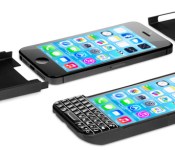
BlackBerry sues Typo over its familiar-looking iPhone keyboard

If you thought Typo’s iPhone keyboard looked an awful lot like the keyboard from a BlackBerry Q10, you’re not alone. BlackBerry has just sued Typo in a Northern California court for alleged patent infringement. The slide-on peripheral is a “blatant” copy of BlackBerry’s signature feature, according to the company. We’ve reached out to Typo for commentary, but it may not have many options — the crew in Waterloo has patented a lot of keyboards, and it’s hard to deny the strong resemblance.
Filed under: Cellphones, Peripherals, Mobile, Blackberry
Via: CrackBerry
Source: Marketwired

iPhone and iPad Dominate Mobile Web Share Throughout Holidays
Apple’s iPhone was the only smartphone to gain mobile web traffic share in North America during the holidays, according to a new report from analytics firm Chitika, suggesting that the iPhone 5s and the iPhone 5c were popular with consumers over the holiday season.
The iPhone saw a 1.8 percent jump in web traffic from the period between December 20 and December 29, while other smartphone manufacturers experienced no gains or a slight loss in traffic share. Overall, the iPhone has a 54.3 percent share of total mobile web traffic, far above its closest competitor Samsung, which has a 23.7 percent share.

Despite its minor share loss, the iPad remains the most popular tablet, comprising 76.1 percent of all mobile web traffic in North America. Apple’s closest competitor, Amazon, has a 9.4 percent share, while Microsoft and Samsung come in at 2.3 and 5.9 percent.

Mobile web traffic usage numbers have changed little over the course of the last year, with iOS devices continuing to dominate Android devices. In a report from late 2012, Chitika noted that iOS had an overall usage share of 67 percent, while Android had a 33 percent share.
Apple’s mobile web traffic dominance was also confirmed by a recent report from IBM, indicating the majority of online shopping from mobile devices during the Christmas holiday was done by iOS users rather than Android users. 23 percent of total online sales on Christmas in the U.S. were made from iOS devices, while just 4.6 percent were made from Android devices.
To gather its data, Chitika used its Chitika network ad impressions, analyzing data from millions of smartphone and tablet users in both the United States and Canada. An ad impression was measured each time an individual user loaded a page containing Chitika ad code, giving an impression of overall web usage rather than a measurement of unique users.
     |

Apple may let you describe iPhone photos with your voice

Tagging greatly simplifies photo searches, but it can be a cumbersome process — just ask anyone who has typed in keywords for dozens of vacation shots. It may be more intuitive if Apple implements the voice tagging from a newly published patent application, though. The technique would let mobile-device users describe images using natural-language voice commands, with social networks and other info filling in the gaps. Say “this is us at the beach” and the software would tag not only you and the location, but also anyone else who was scheduled to come along on the trip. It could even auto-tag photos once it recognizes people and scenes. There’s no certainty that iOS will get any of the new voice features, but don’t be surprised if you can eventually ask Siri to sort out your iPhone photo gallery.
Filed under: Cellphones, Software, Mobile, Apple
Via: AppleInsider
Source: USPTO
 AIVAnet