


Opera’s Coast iPhone browser is a speed dial for your favorite sites

Last year Opera introduced Coast, a simple mobile browser designed specifically for the iPad, and today it brought the same unique experience to the iPhone. Coast is a little different than Chrome or Safari, and streamlines browsing by organizing shortcuts to sites on menu pages like they’re apps. Think of it like your phone’s home screen, except exclusively for the internet. It’s intentionally pretty barebones, and doesn’t have much besides those site icons — so no address bar or back button. While the stripped down browser may sound a bit restricting at first, we’ve been testing the iPhone app for a few days and have found it makes getting to your favorite sites a lot easier.
The app comes preloaded with shortcuts to a few popular sites like Gmail and YouTube, but gets much more useful once you start adding your own must-view pages (we hear Engadget is pretty awesome). Instead of using a traditional address bar, swiping down from the top of your home screen launches a blank page where you can type a topic. As you input letters, Coast starts to suggest sites you might want to check out using colorful tiles. Our search for “phones” for instance, quickly brought up several popular mobile pubs. The app tries to steer you towards sites, but you can perform an old-fashioned search result page as well. If you see a page you like, you can tap on the icon to launch it, or press and hold to pin it to one of three menu pages. It’s a simple process that makes it easy to create the ultimate collection of news sites or cat grooming blogs. Everything can be synced using iCloud, so you’ll have the same bookmarks on your iPad as well.
While the experience is pretty limited, Coast does have a few tricks up its sleeve. Inside launched pages you can press and hold to share a story with a friend or take a screenshot. If you’re feeling really adventurous, you can save a photo from the web to use as a background image throughout the app. Open tabs are also handled a little differently than you might be used to. Pages you’ve previously visited are displayed in a format reminiscent of Apple’s multitasking feature rather than a list, with full screens you can swipe to. We found seeing the whole site made navigating back in time a lot easier. When you’re done with something for good, it can be closed just like an iOS app, by swiping it off the top of the page. Everything is super fast and responsive, probably thanks to the browser’s stripped down nature.
If you’re used to something like Safari and typing in URLs everyday, Coast’s simple interface and shortcuts can be a bit jarring at first. After using the app for a while, however, we noticed how few mobile sites we actually go to on regular basis. Once you’ve come to terms with that fact, a speed dial for your faves makes a ton of sense. Overall, we found the app makes it easier to get to the places you love faster — earning Coast a permanent place on our home screen. Curious to give it a try for yourself? You can snag the app for iPhone and iPad now from the App Store.
Filed under: Cellphones, Wireless, Mobile, Apple
Source: iTunes
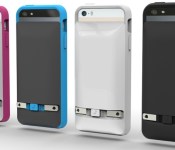
Prong Debuts iPhone ‘PWR Case’ With Built-In Plug and Backup Battery [iOS Blog]
Prong, the company behind the iPhone case with a built-in plug for easy charging, today announced an expansion to its product line up, debuting the Prong PWR case.
Like its existing PocketPlug combo cases, the PWR case includes an integrated plug for charging the iPhone, but it also comes equipped with a 1500 mAh detachable backup battery that can be used to charge the iPhone when it is away from a power source. The backup battery itself can also be detached and recharged via its built-in plug.

The Prong PWR Case includes a detachable backup battery and integrated plugs for charging in any outlet, along with a Micro USB port and cable. The backup battery is easily detachable and can be recharged without any additional accessories while the smartphone remains with the user, safe in the inner-protective bumper.
No matter how much someone uses their phone, they can have power all day with the Prong PWR case and their phone never has to leave their side. The battery can be detached and plugged into any outlet to be recharged whenever needed. Once the back-up battery is charged, it quickly reconnects to the back of the case and the phone can then be recharged while on the go.
The case itself comes in multiple colors (black, white, blue-gray, and white-pink) and can be used with or without the battery pack attached, protecting the iPhone from scratches and drops. Designed for the iPhone 5 and 5s, the case also has a retractable A/C plug that folds down flat when it is not in use, and the battery pack utilizes “Quick Charge Technology” to deliver fast charging.

The Prong PWR Case can be preordered from the Prong website for $65, but will retail for $80. It will ship during the summer of 2014.

Viber’s first major redesign makes it look right at home on the iPhone

Internet calling and messaging service Viber does a solid job of constantly bringing new features to its apps, regardless of the platform. Now, some seven months after iOS 7 was released, Viber is finally changing the looks of its iPhone app to match that flat, minimalist appearance of Apple’s OS. Aside from overhauling the UI, the Viber application now also lets you create a list of numbers you’d like to block and send longer video messages to people. The company’s CEO, Talmon Marco, tells us this update isn’t just about iOS 7, however. “This is the first time we are introducing a new look and feel for Viber. Our goal was to create a simple and friendly interface but at the same time establish a solid foundation for future updates,” Marco stated. In other words, don’t be surprised when you see some of these design cues make their way to other Viber apps, like those on Windows Phone 8 and Android.
Filed under: Cellphones, Internet, Software, Mobile, Apple
Source: App Store

Google Glass now displays your iPhone’s text messages

On the heels of last week’s KitKat update, Google Glass nabbed up two more notable improvements today. First, iOS users can now have their text messages displayed on Glass, after a quick toggle of the Bluetooth settings. Here’s the catch: “due to some limitations with iOS,” you wont be able to reply to those messages directly from the headset. There’s also a new Calendar Glassware that situates an agenda to the left of the home screen. Tapping a card in that timeline will allow you edit title, time, location and even RSVP. If you’d rather just skip those festivities altogether, you can delete events or hide them from view. Both of the new features are said to be rolling out to early adopters “in the next few days,” so keep your eyes peeled.
Filed under: Wearables, Software, Mobile, Google
Source: Google Glass (G+)

Rufus Cuff wants to dominate the wearable market and your forearm

We told you to put on your disappointment pants for the Galaxy Gear 2, but for the Rufus Cuff we suggest rolling up your absurdity sleeves. Seriously, given its three-inch screen you might just have to. This wearable boasts a built-in mic, a camera, a speaker, web browser, voice control, GPS and full access to the Google Play store — if the Cuff sounds like a smartphone that straps to your wrist, well, that’s basically what it is. It connects to your Android or iPhone via Bluetooth for mobile data, making calls and sending texts, but it’s running a full version of Google’s mobile OS and can hook on to WiFi if you’re in a cellular dead-zone or if your phone’s battery runs out.
While the gizmo doesn’t exactly look practical (we’re pretty sure that it won’t play nice with the cuffs of a slim-cut oxford), as of this writing it’s has raised over $150,000 of its $200,000 IndieGoGo goal, with a handful of days to go. If you dig the idea of strapping one of these monstrosities on your wrist, all it takes is a $249 pledge.
Filed under: Wearables, Mobile
Source: IndieGoGo

Skitch makes sharing annotated pics easier for iPhone and iPad

Skitch’s share screen for iOS just got a makeover, making it easier to send out and save your annotated, doodle-filled masterpieces. The latest iOS update now shows a preview of your image on the Share screen, where you can type in and attach a caption to the bottom of the photo, as well. On the same screen, simply swipe left to send a pic to friends or co-workers attending a meeting you’ve listed, or swipe right to save modified images. Once you’re done uploading, the updated app will now show a confirmation screen, which comes with options to edit and share the same image again or annotate a brand new pic. As a nice plus, a “Frequents” section will appear to speed things up once you’ve performed the same action several times.
Other than the shared screen overhaul, the updated app now also forms paragraphs when you resize the text box and comes with the option to buy PDF Annotation even if you’re not a premium user. You can get these and a few more changes by updating the Skitch app for iPhone and iPad, or by downloading it from iTunes.
Source: Evernote

Hail Britannia: One third of trade-ins for the Samsung Galaxy S5 in Britain have been iPhone owners, report Says
 I can’t say I’m surprised, but it’s always nice to see it in action. A report from The Telegraph in the motherland (Britain) has said that one third of trade-ins for the Samsung Galaxy S5 seen by website CompareMyMobile have been lodged by iPhone users. The most traded-in device in this period has been the iPhone 4S, followed by the Sasmsung Galaxy S3 in second place, and perhaps most surprisingly in third place is the iPhone 5S.
While you might be thinking that this is completely down to iPhone users just jumping ship to the Galaxy S5, that’s actually not the whole truth. Though the report stops short of saying it directly while talking about depreciating trade-in values, these trade-ins may have more to do with the fact that the iPhone does not depreciate in value as quickly as the Samsung Galaxy phones do. That said, whatever the actual reasons for people trading in for the Galaxy S5, people being converted to Android can probably be counted as a win regardless.
What do you think about this report? Do you think the Galaxy S5 should be as wildly popular as it is turning out to be? Let us know what you think in the comments.
Source: The Telegraph via Phone Arena
//<![CDATA[
ord = window.ord || Math.floor(Math.random()*1E16);
document.write('’);
//]]>

Another Alleged iPhone 6 Case Surfaces with Cutouts for Moved Power Button, New Volume Controls
New photos showing what appears to be another case for Apple’s larger-screen iPhone 6 have been posted by Nowhereelse.fr [Google Translate]. While details about the case’s exact length are unknown, the images are said to have come from a Chinese accessory maker and show a case designed for the next-generation iPhone, similar to cases pictured last week and those on display at the Hong Kong Electronics Fair yesterday.

The case feature slightly rounded edges, similar to the design of the iPhone 5c and consistent with design drawings said to be for the iPhone 6. Like other cases and in line with a claim from KGI Securities analyst Ming-Chi Kuo, the case also includes a hole for a button along the upper right side of the device, which may be the new location of the power button. Rectangular volume control buttons similar to the fifth-generation iPod Touch are also notably present.

Rectangular volume (1) and right side power (2) cutouts (Annotated by Nowhereelse.fr)
Apple’s iPhone 6 is expected to launch in two sizes of 4.7 and 5.5 inches. The majority of leaks so far have depicted the 4.7-inch version, as it is reportedly on track for a release this fall. Apple is said to have been running into production issues with the 5.5-inch version, with that model likely seeing a release later this year or early next year.
Along with a larger screen, Apple’s next-generation iPhone is expected to include a thinner profile, upgraded A8 processor, Touch ID fingerprint sensor, and an improved camera featuring optical image stabilization. A report earlier this week from Jefferies analyst Peter Misek also claimed that Apple is negotiating with carriers to increase the price of the iPhone 6 by $100.

Google’s Helpouts service now offers expertise on your iPhone

Need to brush up on your cooking skills, but only have your iPhone close at hand? Don’t panic: Google has quietly brought its Helpouts service to iOS. Much like the existing Android software, the iPhone-sized app (sorry, no iPad version) lets you schedule video chats with experts on topics ranging from baking to bike repair. Just be prepared to limit yourself to free advice — Google isn’t offering paid Helpouts in the iOS app. You’ll also need to go to the web if you want to create listings for your own instructional sessions. If neither of those limitations is a deal-breaker, though, you can start taking lessons today.
Filed under: Cellphones, Internet, Mobile, Google
Via: 9to5 Mac
Source: App Store
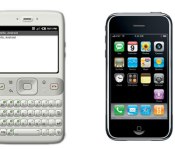
Before the iPhone was announced, Android didn’t support touchscreen input

Ahead of Apple revealing its first smartphone, Google’s plans for Android back in 2006 involved physical keys for control and no touchscreen input support. Revealed in court documents from the ensuing Apple-Samsung legal fray, the early specification says that “the product [Android] was designed with the presence of discrete physical buttons as an assumption. However, there is nothing fundamental in the product’s architecture that prevents the support of touchscreen in the future.” (The above render is from Google’s initial SDK, but by then, touchscreen integration was now part of the official spec.)
In this 2006 documentation, many of the Android staples (both in software and hardware) get a mention, including removable storage, third-party application support, widgets, notifications and all those Google services. Between the announcement of the iPhone and finalizing Android’s software requirements, touchscreen input was not only supported — multi-input touch was required, and our phones were never the same again.
Filed under: Cellphones, Mobile, Apple, Google
Via: Recode
 AIVAnet