



Razer’s Junglecat looks like an Xperia Play gamepad for the iPhone

Apple’s iOS gamepad protocols have spawned some solid mobile button solutions, but they all have the same fundamental problem: portability. The appeal of mobile games is mobility — it’s not fun to lug around a spare controller on the off chance you might pick up a quick game on your phone. Razer’s first mobile game controller embraces this problem by aping one of the strangest smartphones of the last decade: the Xperia Play.
Like the Xperia Play, the Razer Junglecat gamepad hides underneath your smartphone, sliding in and out like a QWERTY keyboard. Unfortunately, it’s not quite as robust — the Play’s touch-sensitive dual thumb pads aren’t represented here, just the standard four-way d-pad, two bumpers and A, X, B and Y buttons. At least it features Razer’s flair for customization: a companion app will allow users to fully remap all of the controller’s functions, and also serves as a portal for compatible games. It’s also an iPhone exclusive controller. Interested in trading 20mm of pocket space and $99 for a portable gamepad? Check out the source link below.

AirPlay on iOS 8 doesn’t need a network to stream your media

Right now, Apple’s AirPlay media streaming requires an established WiFi network to fly. That’s fine when you’re at home, but do you really want to ask for a friend’s hotspot password just to show vacation photos on their Apple TV? Mercifully, iOS 8 will let you skip that hassle. One of the many under the radar upgrades to the software is peer-to-peer AirPlay support — you can now share content to an AirPlay-capable device as long as you can make a direct connection.
The basic concept is old hat, as you might suspect. DLNA has done this for a while, and third-party apps on various platforms can pull this off. All the same, the improved AirPlay technology should be handy both for media-savvy socialites as well as presenters who aren’t always guaranteed network access in the meeting room.
Filed under: Cellphones, Home Entertainment, Tablets, HD, Mobile, Apple
Via: AppleInsider, Gizmodo
Source: Apple

[OP-ED] Why I think iOS 8 is good for Android

A banner spotted at WWDC 2014 prior to Apple’s keynote – courtesy of The Verge
Today’s tech news has been dominated by the announcements made by Apple at WWDC 2014 happening now in San Francisco. As many expected, Apple is making their yearly iteration to their mobile OS platform, iOS, bringing it to iOS 8 sometime in Fall this year. And as usual, some of the improvements that Apple is making in iOS 8 bear some eerie resemblance to features already featured on Android; some commenters have already said that this seems more like Google I/O 2011 rather than WWDC 2014, but we’ll leave that argument there. The last few iterations Apple has made to iOS have been huge in bringing the platform back into contention with Android on a functionality level which some have suggested should worry Android and Google. However, I think it’s actually the opposite: I think that iOS 8 is good for Android, and here’s why.

Image courtesy of The Verge
The upgrades to iOS are extensive, and a full list of those can be found pretty much anywhere you look on the internet today. Widgets, predictive text, third-party keyboards, or automatic photo backup are all nice, but we’ve seen it all before, some of which Android has had for many years. The improvement that caught my eye, however, is the actionable notifications. This currently only has a very basic implementation on Android right now, suffice to issue basic button commands, but Apple’s implementation will allow you to complete entire actions, like reply to a message, all from the notification. While it remains to be seen how useful this actually is in reality, it’s made more interesting by the fact that this isn’t available on Android yet. And this is where this becomes useful to Android.

Image courtesy of The Verge
Depending on how these features are accepted by its users, Android may choose to do something similar in the next major iteration of Android. If you’re an Apple fan and you somehow feel incensed or smug about the suggestion that Android should copy Apple, just remember that Apple has been catching up to and copying Android for years; notification bars in iOS 7 and now widgets and third-party keyboards in iOS 8 should be evidence enough.
 And really, the argument shouldn’t be who’s copying who, or even who is better than the other. Sure, fans on either side of the fence are going to fight to the death about who copied who and who’s done what functionality better. But at the end of the day, the people who benefit most from these two gargantuan mobile platforms doing battle is us, the consumers. While it’s arguable which platform is making better progress lately, it’s kind of a false dichotomy as the competition between the two drives them to improve things for the common good.
So the next time someone tells you that iOS has something that Android doesn’t have, remember that the competition is a good thing and that you can be sure that Android and Google will have something in store to one-up Apple in the future, and inevitably, vice versa somewhere along the track.
What do you think about Apple announcing iOS 8? Do you think the competition between Apple and Google is a good thing for mobile platforms? Let us know your thoughts below.
Sources: The Verge, Android Police
//<![CDATA[
ord = window.ord || Math.floor(Math.random()*1E16);
document.write('’);
//]]>
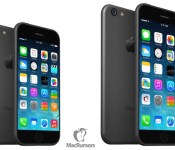
Apple Solves Battery Issues with 5.5-Inch iPhone 6, Looks to Ship 20 Million Units in 2014
Recent rumors surrounding Apple’s upcoming iPhone 6 have pointed to two models for the device: a 4.7-inch version set to launch later this year and a larger 5.5-inch version for late 2014 or early 2015. While Apple previously released the iPhone 5s and iPhone 5c at the same time last year, reports have indicated that issues with the 5.5-inch iPhone 6 battery life and display technology will force the company to launch both phones at separate times later this year.

Now, a new report from Chinese site Laoyaoba (Google Translate, via GforGames) claims that Apple has solved its battery issues with the 5.5-inch iPhone 6, as the company will partner with Chinese manufacturing company Sunwoda Electronics to manufacture 20 million batteries for the device. Apple’s main battery supplier Dynapack will also help with production, however the Taiwanese-based company has reportedly struggled to keep up with demand.
The report also notes that Apple is aiming to build 20 million 5.5-inch iPhone 6 units by the end of this year, which follows a rumor last month that stated the company’s desire to build a total of 80 million iPhone 6 units in 2014. If true, this would mean that the majority of iPhone 6 units would be of the smaller 4.7-inch version, perhaps indicating that the larger version will be hard to find until supplies improve later next year.
In addition to a larger screen, Apple’s iPhone 6 is expected to include a thinner profile, a faster A8 processor, and an improved camera in the form of optical or electronic image stabilization. Apple has also included an option for developers to size apps for devices referred to as “Resizable iPhones” in its release of Xcode 6 earlier today, which likely further indicates that iPhones with larger displays are coming.

iOS 8 lets your iPhone make WiFi calls on T-Mobile

[Image credit: John Moore/Getty Images]
Filed under: Cellphones, Wireless, Mobile, Apple, T-Mobile
Source: T-Mobile

SwiftKey, Swype and Fleksy are already making iOS 8 keyboards

When Apple revealed that iOS 8 would allow third-party keyboards, one big question came to many people’s minds: would some of the better-known Android keyboards make the leap? In short, yes. SwiftKey says it has “already started” porting its heavily customizable software to iOS; Swype tells Engadget that it “can’t wait” to support Apple’s platform. Fleksy, meanwhile, is going so far as to take sign-ups for a beta program and vows to be “one of the first” with a solution. The odds aren’t high that you’ll get something like Google Keyboard on your iPhone (we’ve asked to be sure), but you won’t be hurting for input methods when iOS 8 is ready this fall.
Filed under: Cellphones, Tablets, Mobile, Apple

Siri in iOS 8 will let you identify songs and buy from iTunes

Siri is going to learn a few new tricks in iOS 8. As rumored, the voice assistant will now identify songs using Shazam; if you want to find out the name of a catchy track, you don’t have to fire up a separate app. You’ll also have the option of buying iTunes content. The speech recognition system is smarter, to boot — it now shows what you’re saying in real time, and you can start commands by speaking “hey, Siri” (much like Android KitKat’s “OK Google”) instead of holding down the home button. There’s no mention of integration with third-party apps so far, but this is still a big step forward for iOS users who prefer voice dictation for all their tasks.
Filed under: Cellphones, Tablets, Mobile, Apple
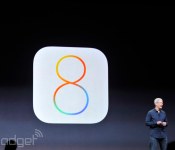
Apple reveals iOS 8 at WWDC 2014

We all knew it was coming, and now it’s here. Apple CEO Tim Cook just put months of breathless speculation to rest by pulling back the curtain on iOS 8 during the company’s WWDC 2014 keynote address in San Francisco. It doesn’t look like the sort of quantum leap that iOS 7 was, but Apple’s head honcho assures us that it interacts in some fantastic ways with the new version of OS X and that it pairs great end user features with great developer features. Well, we’ll be the judges of that. The big keynote is still underway, but here’s what we know so far.
Interactive Notifications

We’ve all been there — you get a message while you’re doing something else, and you just can’t be bothered to switch apps. With iOS 8, you can pull down from that notification shade and respond from right there. It’s not limited to messages, either — you’ll be able to like/comment on Facebook messages or handle your calendar events.
Improved Mail

Apple has introduced Mailbox-style actions to its stock Mail application, too. You can easily tag or dismiss certain missives without even having to open them up, and all it takes is a quick swipe on the contents of your inbox.
Spotlight
The company made a big to-do about how much better Spotlight is in OS X Yosemite, so it’s only natural the iOS version gets an upgrade as well. Among other things, it’ll let you search for apps you haven’t even installed yet, songs in the iTunes store, movie times and locations and more. Media isn’t the only focus here, though. It’ll also show directions to locations you type in to even news.
QuickType

At long last, iOS is getting an improved on-screen keyboard. In short, we’re looking at an improved recognition service that can more accurately predict what it is you’re trying to say. Hopefully this means an end to all the “ducking” typos going on out there.
iMessage takes on Whatsapp

Facebook just bought Whatsapp for an obscene amount of money, but that hasn’t stopped the folks in Cupertino from replicating some of the app’s most-used features. Among other things, you can send audio and video messages from within the app — in the old days, you’d have to pop out into the camera or Voice Memos to create your content and then send it over. Even better: you can respond to one of those audio messages right from the lock screen if you just raise your iPhone to your face.
Continuity
We’ve touched on this elsewhere, but the newly announced Continuity between iOS and OS X is a very, very welcome shift for Apple. You’ll be able to pick up and initiate phone from within OS X, even when your iPhone is across the house. Is someone calling you? You’ll get a caller ID notification, and a quick touch lets you use your Mac as a speakerphone. And if one of your non-Apple pals shoots you a plain ol’ text message, your iPhone will relay it to all your other iDevices.
HealthKit and the Health app

Think of HealthKit as a one-stop shop for all the health data that gets collected from all the tracking apps on your phone. Apple’s teaming up with a few key partners to use that data — Nike can provide access to your fitness and activity data, and the Mayo Clinic hopes to get actual, real-time health information from patients through HealthKit. And for you, the end user? You’ll be able to keep tabs on the measurements that matter most to you by way of a (startlingly pretty) new Health app.
Family Sharing
Apple is being embraced by businesses all over the place, but that’s not the only organization the company is concerned with winning over. With its new Family Sharing push, those even smaller groups (up to 6 people, if you were curious) can share a single calendar and app and content purchases. If you’re a parent and your lil’ whippersnapper has an affinity for buying things from iTunes with your credit, well, never fear. Once connected, those young ones will be told to seek your permission and you’ll get a notification on your phone to that effect.
A Slightly Smarter Siri
Craig Federighi just glossed through a spate of Siri modifications, none of which were as interesting as what we were hoping for. She’s still in solid shape, though: You can invoke her presence in the car by saying “Hey, Siri,” and the virtual assistant can listen to music and identify it (thanks to a little help from Shazam). In case you happen upon something you like, you’ll be able to download that track right from Siri’s results page.
This is a developing story, please refresh for updates (or check our liveblog!)
Filed under: Mobile

OS X Yosemite will let you answer calls to your iPhone from your Mac

As part of OS X Yosemite’s focus on creating a more seamless experience between your Mac and iOS devices, Apple’s updating iMessage to keep conversations going. Now it’s not just instant messages from other Apple devices that show up on the desktop app, but texts and multimedia that’ve been sent from other platforms, too (texts from your friends’ Android devices, for example). Oh, and you can now make and take regular phone calls from your Mac when your iPhone is in range. Part of the new “hand-off feature” that means your computer and iDevice know exactly what the other is doing, if someone calls your phone, you’ll see a pop-up asking if you want to answer right from your computer. It works the other way, as well, so you can make calls without touching your phone. And, what better way to show off the new feature than to call Dre live on stage. Show-offs.
Messaging has received some TLC in the upcoming iOS 8 update, too. Word predictions across iMessage, Mail, etc. will take the person you’re talking to into account — expecting your vocabulary will be more formal with your boss than with your buddies. All the data that goes along with smart predictions will be stored locally, by the way. Group threads are a bit more malleable, allowing you to add or remove people from the conversation, yourself included. You can also share your current location to a message group. A spirited back and forth annoying you while you’re trying to work? Well, turning Do Not Disturb on for that individual thread means you can stop notifications from that conversation, but allow everything else to get through.
Probably the most important new feature is the addition of voice and video messaging. And, to respond to a voice message with one of your own, you simply raise the iPhone to your ear and start talking. To stop threads full of audio and video hogging all your internal memory, these kind of messages will self-destruct, Snapchat-style. Unless you specifically choose to save them, that is.
Filed under: Cellphones, Desktops, Laptops, Mobile, Apple

Apple may enter the smart home business

Forget those rumors of an Apple smartwatch for now — home automation may be where it’s at. The Financial Times hears from sources that the crew in Cupertino is going to unveil a smart home platform at its Worldwide Developer Conference kicking off next week. While there aren’t many details, proximity will reportedly play a big role; your house lights would switch on as soon as you come home with your iPhone in your pocket. Apple would also have a Made For iPhone-style program to guarantee that devices work with its system, and it would put a strong emphasis on privacy to counter fears about both its ad-driven competition and government surveillance.
The FT is quick to note that Apple is known for scrapping announcements at the last minute, so don’t be shocked if the tech giant is mum on the subject at WWDC’s June 2nd keynote. However, a smart home strategy would make sense. Apple may want a platform of its own now that Google owns Nest, and it already sells home automation tech like Philips’ Hue lighting at its retail stores. Assuming the claims are true in the first place, we’ll get the full scoop next week.
Filed under: Household, Mobile, Apple
Source: Financial Times
 AIVAnet