



Moment begins Kickstarter campaign for clip-on smartphone camera lenses

If you’re fed up with the camera on your phone, there’s no shortage of clip-on lenses to enhance the experience: Just take a look at Sony, Olloclip and Photojojo for great examples of this. This doesn’t mean there isn’t room for a new contender, however. Moment, a startup founded by the creator of Contour, has just launched a Kickstarter project for a pair of lenses that clip on to your iPhone, iPad or Samsung Galaxy S 2, 3 or 4. The new products, which consist of your choice of wide-angle or telephoto, can be mounted onto the phones with a thin piece of metal. Each one features a four- or five-element lens, almost no geometric distortion or chromatic aberration, the same professional-quality cinema glass that Moment claims is used for HD film and slightly larger diameters designed to keep image quality the same around the edges as it is in the center. If you choose to back the project, you’ll be able to buy one lens for $50 or two for $100, though there are a couple more expensive options should you be interested in getting something a little more exclusive.
Filed under: Cellphones, Wireless, Mobile, Apple, Samsung
Via: Recode
Source: Kickstarter

Just Mobile unveils its fine-point capacitive stylus, expands dock and battery lineup

Just Mobile was back at CES to sprinkle some magic dust on its new accessories, and this time it involves a mixture of batteries, Lightning docks, cables and styli. We’re most excited by the company’s AluPen Digital, a fine-point capacitive stylus that works on any modern mobile device, without the need of Bluetooth or any additional sensor. We also got an exclusive look at the upcoming AluBolt Pro Lightning dock for the iPad, along with the Launch Pro and Launch Ice iPhone docks, the AluCable Flat and the aluminum refresh of the Gum++ battery. Read on to check them out.
AluPen Digital

As mentioned earlier, the AluPen Digital shifts away from the conventional blunt stylus to deliver something closer to a real pen. The only thing needed here is an AAAA battery (yes, such a thing exists!) that keeps the narrow tip going for about six to eight weeks. When you’re done with doodling, you can also retract the tip by twisting the small cap. The best part of all is the price: just $49.95. Expect this to be made available in Q1 this year.
AluBolt Pro

Just Mobile launched the AluBolt Lightning dock for the iPhone in late November, and given the funky design, it’s no surprise to see a larger version made for the iPad — and we were apparently the first people outside the company to see it. The only downside is that both stands are set at a fixed angle due to their Lightning plugs, but if you don’t mind the missing Lightning plug, then you may consider the similar-looking Encore that lets you adjust your tablet’s angle. The AluBolt Pro will arrive in early April for $59.95 — the same price as the Encore, which is already available.
Gum++ aluminum edition and AluCable Flat

The original Gum++ launched last year with a Rimowa-inspired design, but apparently there’s a demand for a smooth aluminum version, hence this refresh. All five colors are pictured above: black, space gray, silver, red and gold. The specs are the same as before: 6,000mAh capacity and a generous 2.5A output. You can grab one at the end of this month for $79.95.
If you’re looking for a Lightning cable as well, Just Mobile’s also offering the self-explanatory AluCable Flat, available in black with silver caps, black with blue caps or white with gold caps. You can grab one by the end of March, with the long version for $24,95 and the short version (pictured above) for $19.95.
Launch Pro

This minimalistic iPhone dock has a couple of not-so-obvious features. For one, there’s a retractable support stand behind the phone (but the Lightning plug alone also does the job), and there’s also a hole underneath the iPhone’s speaker, which amplifies the sound through a front-facing slot at the bottom of the dock. This will be available toward the end of March for $34.95 — it’s cheaper than the AluBolt Pro because it uses your own Lightning cable.
Launch Ice

Last but not least, we have the Launch Ice, which is clearly designed with the iPhone 5c in mind. It’s named as such because when plugged in, it’s as if you’re looking at a popsicle. Aww. The wooden plug isn’t just for show, though, as it actually houses your Lightning cable’s plug. This is also launching around end of March, and it’ll cost $29.95.
Filed under: Peripherals, Mobile

Social calendar app Sunrise finally comes to iPad

Launching on iPhone in February 2013, Sunrise changed our perception of calendar apps with its ability to provide more context to daily events. By connecting to Google, iCloud, Facebook, LinkedIn and Foursquare accounts, Sunrise can intelligently integrate appointments, birthdays and even checkins into its slick calendar UI, giving users a complete picture of what they’ve done in the past and the things they need to do in the future.
Despite its iPhone-only availability, the free app has grown to become one of the most popular third-party iOS calendar apps, consistently ranking in the App Store’s top 100 productivity apps in the final quarter of last year. Almost a year on, Sunrise developers Pierre Valade and Jeremy Le Van have decided it’s finally time to bring the stylish calendar app to iPad, complete with visualization and synchronization improvements.
Like its iPhone counterpart, the Sunrise iPad app will immediately request that you connect your cloud accounts when you open it for the first time, helping to feed it with information it’ll need to remind you about later. Valade says the team has worked hard to bring the best Sunrise experience to the iPad, and so it’s created two new weekly and monthly views that “make it easier to plan from your iPad and navigate in time quickly.”

If you’ve used Google Calendar or Apple’s Mac Calendar.app, you’ll be familiar with Sunrise’s time-based views, although Sunrise will deliver more information at-a-glance. If you see that you have a particularly busy day coming up, the week view will let you dive deeper and see how much free time you have outside of those events. The new week view has also been ported to the iPhone app and can be selected by tapping the week icon next to the new event button.

Tapping on a day will generate a new pop-up tab that displays all of your appointments and reminders. Drawing from the original iPhone UI, Sunrise for iPad not only chronologically lists events, it also categorizes them by assigning them a small icon related to the activity you have planned (or the service they are connected to). As you can see from the screenshot above, if you’ve planned a movie night, the app will assign a little movie ticket icon to the entry. If there’s a location attached to an appointment, Sunrise will provide directions, although Apple Maps, Google Maps or Waze will do the heavy lifting. It’s little things like this that make this that make Sunrise really stand out from other calendar apps.
In the past, if you wanted to ensure Sunrise had an up-to-date list of your upcoming appointments, you’d have to open the app and have it download them, which is especially annoying if you add events from different devices. Sunrise version 2.1 eliminates that frustration by integrating background updates that will synchronize all of your connected cloud accounts every hour by default, or at 30 or 15 minute intervals (if you need tasks to show up a little quicker).
While there’s no shortage of productivity apps on the App Store, Sunrise’s slick user interface and iterative features consistently continue to push the bar for iOS calendar apps. Soon, Apple users won’t be the only ones enjoying the app: desktop and Android versions are expected later this year. Today’s update, however, sees the app go universal while remaining free to download — hit the source link below to try it for your yourself.
Filed under: Tablets, Internet, Software, Mobile, Apple, Google
Via: Sunrise Blog
Source: Sunrise Calendar (App Store)

Spotify for iOS gets its promised free, shuffle-based music streaming

Spotify delivered free mobile music streaming to Android users a while back, and it’s following up today with a corresponding update to its iOS app. iPhone listeners can now listen to artists or playlists in shuffle mode without spending cash on a Premium subscription; iPad listeners can play any song they like at any time. As long as you live in one of Spotify’s supported countries, you’ll want to swing by the App Store to grab the big update.
Filed under: Cellphones, Tablets, Mobile
Source: App Store
iRing adds gesture control capability to iOS music apps (video)

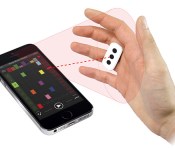
This year’s CES has introduced us to a number of devices that cater to specific people. That includes IK Multimedia’s iRing accessory, designed for aspiring DJs who’d like to control their iOS music apps with gestures…and a dash of showmanship. So long as a user’s wearing the iRing, the iDevice’s front camera picks the gesture controls up, and the peripheral’s accompanying app translates them to commands music software can understand. According to the company (the same one responsible for a few other music accessories for iOS), the iRing’s capable of controlling not only basic music apps, but also advanced ones designed for those who mix their own tunes. It also comes with a couple of its own music editing apps that one can use to add effects and create non-stop loops. Those who prefer waving their hands in the air over poking at on-screen controls can get the iRing in various music and electronic retailers worldwide for $25.
Filed under: Peripherals, Mobile
Source: IK Multimedia

Here’s that $500 3D scanner for the iPad

That new consumer 3D scanner we told you about a little while ago? Here it is. Well, sort of. This iSense is actually a prototype, as you can probably tell from the 3D printed mold behind the camera. We asked CEO Avi Reichental if there was any possibility that the company might 3D print the casing at some point, to help future-proof the peripheral, and he certainly seemed open to the idea, though don’t expect that in the version of the product shipping in Q2. At a cursory glance, the camera and the sensor appear similar — if not exactly the same — as the ones found on the sense. Around this, you’ll find a brushed metal housing that helps the camera blend in a bit more with the iPad’s backing.
As for why this unit is $100 more than the Sense, we suspect it has something to do with the much smaller form factor, which helps make this a truly portable scanner, with a Lightning cable that plugs directly into the tablet. We couldn’t take a shot of the software, as that’s also still firmly in the beta stage, though you can expect it to be pretty similar to what you get with the Sense.

Kindle for iOS updated with flashcards, notebook filters and better search

Thinking about replacing your textbooks with an iPad Air? Amazon’s trying to make the transition a little better for you. The latest update to Kindle iOS app adds flashcards and improved in-book search for print replica textbooks, giving students a better way to find the topics they need for class, as well as a convenient way to catalog and study them. The update packs in a handful of items for non-students too, including page footers that display page numbers and time left (for audiobooks), a redesigned dictionary for iOS 7, an updated X-Ray experience and a new set of Notebook filters for sorting through annotations. It’s not quite as hefty as the app’s recent redesign, but if you’re looking for some new features for the semester, you can get them at the app store.
Filed under: Tablets, Mobile, Apple, Amazon
Via: TheNextWeb
Source: iTunes

Apple buys SnappyLabs to improve your high-speed iPhone photography

The iPhone 5s can already capture photos at a brisk 10 frames per second, but that apparently isn’t fast enough for Apple. The company has confirmed to Recode that it has acquired SnappyLabs, a one-man outfit best known for its popular (and now withdrawn) iOS camera app SnappyCam. Cupertino isn’t outlining its plans following the buyout, but the software’s party trick is its extremely high-speed photography; it takes full-resolution shots at up to 30fps, and scales up to 60fps. You don’t need an oracle-like insight to predict that future Apple devices could snap pictures at a rate that puts many professional cameras to shame.
Filed under: Cellphones, Mobile, Apple
Source: TechCrunch, Recode

iPhone and iPad Dominate Mobile Web Share Throughout Holidays
Apple’s iPhone was the only smartphone to gain mobile web traffic share in North America during the holidays, according to a new report from analytics firm Chitika, suggesting that the iPhone 5s and the iPhone 5c were popular with consumers over the holiday season.
The iPhone saw a 1.8 percent jump in web traffic from the period between December 20 and December 29, while other smartphone manufacturers experienced no gains or a slight loss in traffic share. Overall, the iPhone has a 54.3 percent share of total mobile web traffic, far above its closest competitor Samsung, which has a 23.7 percent share.

Despite its minor share loss, the iPad remains the most popular tablet, comprising 76.1 percent of all mobile web traffic in North America. Apple’s closest competitor, Amazon, has a 9.4 percent share, while Microsoft and Samsung come in at 2.3 and 5.9 percent.

Mobile web traffic usage numbers have changed little over the course of the last year, with iOS devices continuing to dominate Android devices. In a report from late 2012, Chitika noted that iOS had an overall usage share of 67 percent, while Android had a 33 percent share.
Apple’s mobile web traffic dominance was also confirmed by a recent report from IBM, indicating the majority of online shopping from mobile devices during the Christmas holiday was done by iOS users rather than Android users. 23 percent of total online sales on Christmas in the U.S. were made from iOS devices, while just 4.6 percent were made from Android devices.
To gather its data, Chitika used its Chitika network ad impressions, analyzing data from millions of smartphone and tablet users in both the United States and Canada. An ad impression was measured each time an individual user loaded a page containing Chitika ad code, giving an impression of overall web usage rather than a measurement of unique users.
     |
Chromebooks overtake Android tablets and Macs in US business sales

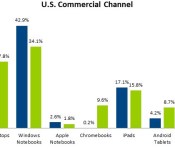
Chrome OS is at last gaining some momentum — among US businesses and schools, anyway. The NPD Group reports that Chromebooks represented 9.6 percent of all computing devices sold through American commercial channels in 2013, or enough to surpass the market share of Android tablets, Windows tablets and MacBooks. Google’s rise put the squeeze on traditional computers, which dropped from 77.8 percent of the commercial space to 63.7 percent this year. NPD researchers don’t believe that the PC is going away, but they note that the most successful companies diversified their gadget lineups. Samsung’s combo of Android and Chromebooks helped it jump to 10 percent share of commercial sales in 2013, while PC-focused builders like HP took a bruising; it’s clear that one-trick ponies won’t thrive in the workplace for much longer.

Filed under: Laptops, Tablets, Mobile, Apple, Samsung, Microsoft, Google
Via: Electronista
Source: NPD Group
 AIVAnet