



Brush up on American history with this elegant Ken Burns iPad app

When it comes to apps, Apple’s iOS platform offers access to an incredible amount of them. That being said, there are always some which stand out from the rest, one of these being Ken Burns’ new, beautifully designed iPad application. But there’s more behind its stunning visuals: The Ken Burns app is also, most importantly, loaded with a ton of content related to American history. Once installed, you can view scenes from different Burns’ films (like Baseball or The War), as well as select a theme that you’re most interested in — Art, Innovation, Politics, War, to mention a few. It’s available now as a free download, but be prepared to shell out $10 in order to unlock the app’s full potential on your iPad.
Filed under: Tablets, Software, Apple
Via: The Verge
Source: App Store

Padcaster’s tablet movie rig comes to the iPad Mini

The big iPad’s large, high-res screen is a plus for shooting video, but wielding it can make one look like, shall we say, a dork. One way to overcome that stigma is by shooting with the original Padcaster (pictured above), a metal frame that lets you mount your tablet on a tripod and attach lenses and other accessories. The company has now launched a version for the iPad Mini on Kickstarter, which you may prefer for its less bulky size but equally capable 1080p camera and (optional) retina screen. Like the last model, the Padcaster Mini consists of a frame with threaded holes for video accessories, a bracket for 72mm and 58mm lens adapters and a DSLR attachment if better video is needed. That’ll let journalists and bloggers broadcast live straight from an iPad, or even use it as a makeshift teleprompter or support to watch TV in bed, for instance. It’s now about halfway to its goal, so if you’re looking to cast in style from your own Mini, you can pledge at the source starting at $99.
Source: Kickstarter

Apple and carriers will donate free devices and broadband to US schools

The White House won’t be going it alone as it brings US classrooms into the internet era through its ConnectED initiative — it just revealed that a host of technology firms will also lend a hand. Apple plans to donate $100 million in iPads, MacBooks and software to underprivileged schools, while Autodesk and O’Reilly Media will give away free software and content. Microsoft, in turn, will heavily discount Windows to lower educational PC prices. Carriers are getting in on the action, too. AT&T and Sprint have both pledged to offer free wireless broadband to schools for multiple years; Verizon isn’t giving away service, but it will donate up to $100 million in cash and other commitments. The combined efforts aren’t going to fix the American education system by themselves, but they could create a level playing field for schools across the country.
[Image credit: Johan Larsson, Flickr]
Filed under: Wireless, Networking, Internet, Apple, Microsoft, Verizon, Sprint, AT&T
Source: The White House Blog, AT&T, Sprint

Pacemaker DJ app for iPad swaps your record bag for your Spotify password

Third time lucky? The team behind Pacemaker clearly thinks so. What was originally ambitious hardware, had to reinvent itself as an app after a complex business arrangement meant things didn’t work out. Sadly, the app chose a platform that limited its scope, when it launched as a BlackBerry-only offering. Today, Pacemaker is back, and perhaps where it most logically belongs — as an iPad app. The totally reinvented interface is much cleaner than before, and operates on a freemium model (unlock extra features like effects at a small cost). Most notable though, is the partnership with Spotify, giving you instant access to the streaming service’s entire library. You’ll need a premium account, but there’s a free trial included in the app. This is something that was attempted before, albeit in breach of Spotify’s terms and conditions. Perhaps the most pleasing part of the story though — at least for owners of the original hardware — is that Pacemaker the device hasn’t been forgotten. Today, it receives a new firmware update which brings new features and improvements to the now, cult gadget. So whether you’re hardware or software, it’s time to dig out those headphones.
Filed under: Tablets
Source: Pacemaker device, iTunes

Make Evernote your own with its latest iOS update

Just look at those three totally different — well, kinda different — versions of Evernote for iOS above. That’s Evernote illustrating just how distinct you can make the latest version of its popular productivity app, from color themes to sections to where it syncs. Oh, and if it weren’t already apparent, the latest update brings an even more distinctly iOS 7 look to Evernote; that’s an intentional evolution, as today’s update is emblematic of changes that users requested “ever since we launched our iOS 7 redesign,” the team says. Not convinced it’s worth your precious MBs? Head below for a video tour of all the changes.
Filed under: Cellphones, Handhelds, Tablets, Software, Mobile, Apple
Source: Evernote

Korg Gadget packs 15 synthesizers and drum machines into an iPad app

Fancy feeding your music production hobby with a slate rather than a collection of pricey gadgets? If so, Korg has added to its iPad-based offerings with the Gadget app. The software for Apple tablets bakes in 15 different sythesizers and drum machines (called Gadgets) that can be combined any way you’d like to construct those beats. Ranging from the Kiev digital synth to the Chicago tube bass machine, the app’s instrument arsenal (which can be previewed here) covers quite the sonic spectrum with drum and synth sounds a plenty. Keeping the orientation vertical, the UI is divided into two sections that allow for dual control at all times. This is aimed at making both track and instrument adjustments quick and easy. If you’re concerned about your lack of musical skill, there’s a scale function helps you avoid hitting a wrong note whilst getting your feet wet.
Already splurged for the latest iPad? Korg says you’ll be able to run more than 20 of the instruments at the same time, thanks to its beefed up chipset. Once those audio files have been tinkered with enough, options for sharing to Facebook, SoundCloud and Twitter or beaming them to Dropbox for safe keeping are all built in. There’s also access to GadgetCloud for showing off projects with fellow users of the software — complete with its own ranking system. The app is a bit pricey at $38.99, but if you commit before February 23rd, you can snag a $10 discount at that second source link below.

Filed under: Software

IRL: the iPad Air

By now, we’ve written nearly everything there is to say about the iPad Air, but that doesn’t mean we can’t revisit it here in “IRL.” In particular, our own Jon Fingas bought one to see if it was lighter and faster than his third-gen model. Surprise: it is.
 I like big-screen tablets, but I’m not a fan of the bulk that comes with them — a 1.5-pound slab isn’t especially comfortable to hold during an hour-long reading session. That’s why I leaped on the iPad Air when it launched this fall. In theory, it’s a large tablet that’s as nice to hold as more compact devices, including the iPad mini. But does it really defy the laws of physics?
Almost. The Air isn’t quite weightless, but it’s still wonderfully compact and light. I have no problems holding the tablet while I’m reading a couple of book chapters or playing an involving game. I can even thumb type with it, which wasn’t realistically possible with previous full-size iPads. It’s hard to imagine going back to any heavier slate after this; I’d rather carry an Ultrabook instead, since the added weight at least comes with more functionality.
The Air is also one of the quickest mobile OS tablets I’ve used. Web browsing is about as fast as you’d expect from a desktop, and most current apps don’t seem to faze it. I just wish developers would make better use of the A7 chip; right now, the best showcases for its processing power are media editing tools and intensive games like Infinity Blade III. iOS 7 runs smoothly and is certainly easy to use, although I’ve very occasionally seen the iPad crash without warning. It’s clear the software is still rough around the edges.
If there’s any major concern, it’s simply that the iPad Air won’t sway those who want a more PC-like experience. If you want to view more than one app at a time, you’ll have to get a suitably equipped Android or Windows tablet. There also aren’t any widgets, live tiles or other elements that would make better use of the screen real estate. While the iPad is excellent at most everything it does, there’s room for it to do more.
– Jon Fingas

Skype update for iOS brings two-way HD video chat to newer Apple devices

Did you get a new iPad or iPhone this holiday? If so, Skype has a treat in store for you — it just updated its iPad and iPhone apps to support two-way HD video chat on all A7-equipped devices. Not that Skype is leaving older hardware without an upgrade, mind you. The same update lets the software receive chat messages in the background, and those messages will sync faster across every gadget you own. Whether or not you live on the cutting edge, you’ll definitely want to visit the App Store for the update.
Filed under: Cellphones, Tablets, Mobile, Microsoft
Via: iDownloadBlog
Source: App Store (iPad), (iPhone)

‘Baldur’s Gate II: Enhanced Edition’ Now Available for iPad [iOS Blog]
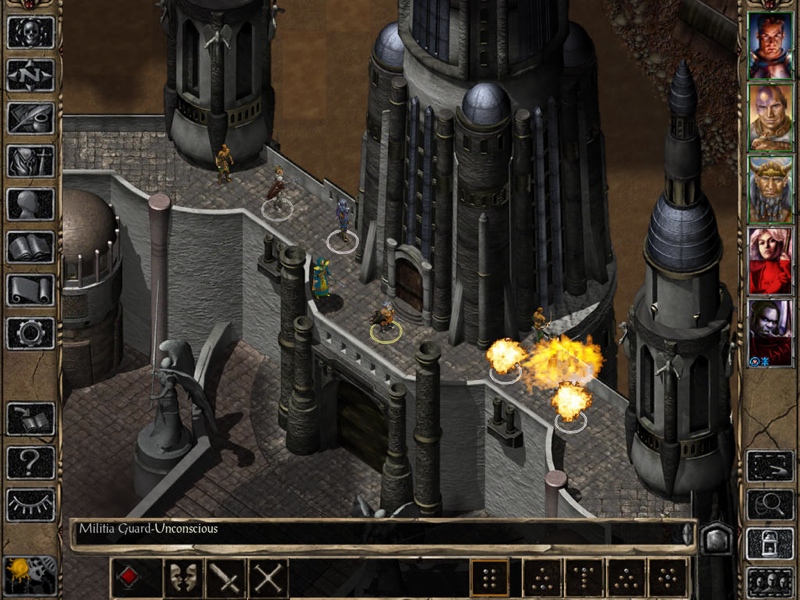
Baldur’s Gate II: Enhanced Edition, the sequel to the original Baldur’s Gate: Enhanced Edition for iOS released in late 2012, can now be downloaded from the App Store.
The game, which has been made available thanks to a collaboration between Beamdog, and Atari, is a remake of Baldur’s Gate II: Shadows of Amn and the following expansion packs: Throne of Bhaal, Fist of the Fallen, Unbound, A Shadow’s Life, In Defense of the Wild, The Black Pits II: Gladiators of Thay, and Gallery of Heroes II.
“He who fights with monsters should look to it that he himself does not become a monster… When you gaze long into the abyss, the abyss also gazes into you…”
Kidnapped. Imprisoned. Tortured. The wizard Irenicus holds you captive in his stronghold, attempting to strip you of the powers that are your birthright.
Can you resist the evil within you, forge a legend of heroic proportions, and ultimately destroy the dark essence that haunts your dreams? Or will you embrace your monstrous nature, carve a swath of destruction across the realms, and ascend to godhood as the new Lord of Murder?
As with the original Baldur’s Gate for iOS, Baldur’s Gate II includes multiplayer functionality, remastered artwork, and interface improvements. Baldur’s Gate II has also been available from the Mac App Store since November.
Baldur’s Gate II can be downloaded from the App Store for $14.99. [Direct Link]
     |
Box redesigns its iOS app for simplicity, speed and real-time search (video)

Box is finally countering Dropbox’s revamped iOS app with a redesign of its own. Its updated cloud storage software centers around a fresh, iOS 7-native interface that’s both simpler and faster at drawing content. The app takes advantage of that newfound speed, too — it now previews over 100 file types with accurate rendering, and grid views make it easier to find photos and presentations. Box has also slipped in real-time searching, a comments sidebar and the option to copy, delete or move multiple files at once. Even if these features don’t justify an upgrade by themselves, the company is sweetening the pot by offering 50GB of free, lifetime space to anyone who downloads the new app within the first 30 days. If you’re at all interested, we’d suggest hurrying to the App Store.
Filed under: Cellphones, Tablets, Storage, Mobile
Source: App Store
 AIVAnet