


Apple may improve your iPhone’s battery life by understanding your habits

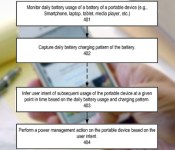
Battery-saving software on a phone tends to have all the subtlety of a sledgehammer — it either waits until you’re low on power to do anything, or limits functionality at all times. Apple may eventually take a smarter approach, if a newly published patent application is any indication. The technique would optimize your mobile device’s power consumption based on both your daily activities and charging patterns. If your iPhone doesn’t get much use during working hours, for instance, it could automatically throttle down for that period. The technology also adjusts power for specific events; check into a long flight and your phone will conserve battery while you’re in the air. We don’t know if Apple will ever use this energy-saving technology, but the patent is grounded more firmly in reality than others we’ve seen.
Filed under: Cellphones, Laptops, Tablets, Mobile, Apple
Via: BGR
Source: USPTO

Apple kills iPad 2 in favor of 4th-gen Retina display model

When Apple launched the iPad Air, it swiftly kicked the fourth-generation iPad to the curb, but kept the iPad 2 around as an “entry level” option. At the same time as the company has tweaked the iPhone lineup, it’s also pulling a switcheroo in the tablet space — dumping the iPad 2 and replacing it with the Retina-and-Lightning model. The unit is back on the Apple store for the same price as the Retina iPad Mini, so now it’s just a decision as to what size slab your hands can carry.
Source: Apple Store
Feedback Loop: Old gadgets, Android tablets, photo management and more!
Welcome to Feedback Loop, a weekly roundup of the most interesting discussions happening within the Engadget community. There’s so much technology to talk about and so little time to enjoy it, but you have a lot of great ideas and opinions that need to be shared! Join us every Saturday as we highlight some of the most interesting discussions that happened during the past week.

This week, Engadget turned 10 years old! So, we discussed what we were using way back in 2004. Also, we talked about ditching iPhoto, Android tablets and good game controllers for the iPad. Head on past the break and join the conversation.
What gadgets were you using 10 years ago?
It’s crazy to think that Engadget turned 10 years old this week! Frank, one of our product database editors, took to the forums to find out what gadgets you were using 10 years ago. Brace yourselves, there’s a whole lot of flip phones, antiquated game consoles, and devices that use something called physical media. Gross! If you can handle it, take a gander at the thread and share which pieces of technology you used a decade ago.
Ditching iPhoto for OneDrive
Managing our extensive digital photo libraries is a topic that we’ve frequently discussed in the forums. This week, TgD shares his own experience with ditching iPhoto and he’s never felt better. His solution for managing those invaluable digital memories may surprise you. Head over to the forums and tell us how you manage your photo library.
Comparing Android tablets
There’s no denying that the popularity of Android tablets is on the rise and it seems like we see interesting new tablets released every week. Will5204 is in the market for the latest and greatest Android tablet. Between the Sony Xperia Z2, Galaxy Note 10.1 and Galaxy Tab Pro 10.1, which would you choose? Let him know! Besides, it’s fun to spend other people’s money.
Game controllers for an iPad
Gaming on the go is becoming a bigger and bigger part of our lives. But sometimes, our grubby fingers get in the way of what we’re trying to do. Dogetag is looking for some advice on iOS gaming controllers that would be perfect for an iPad. Got some ideas that will help him out?
That’s all this week! Do you want to talk about your favorite gadget or have a burning question about technology? Register for an Engadget account today, visit the Engadget forums and start a new discussion!

Instapaper update for iOS lets you send media to your Kindle and TV

Instapaper’s already broad device support has just grown a little bit broader. The service’s updated iOS app lets you send articles to Kindle for reading on one of Amazon’s devices, and you can push videos to your big-screen TV through AirPlay. Even if you’re happy with catching up from your iPad or iPhone, you may also like a new option to auto-renew your Instapaper subscription. It’s not the most life-changing Instapaper update we’ve seen. Stay tuned, though — the developers promise that their next release will be the biggest since Betaworks acquired the app last year.
Filed under: Cellphones, Tablets, Mobile
Via: The Next Web
Source: App Store, Instapaper Blog

Dish Explorer for iPad can now recommend shows and turn on your TV

If you own one of Dish’s Hopper DVRs and have ever been stumped as to what to watch next, you’ll want to grab the latest version of Dish Explorer for the iPad. The new app now recommends shows based on your viewing habits; watch a lot of crime dramas and Dish may suggest the others you’ve missed. The update also introduces direct control over the TV’s power and volume, so you won’t have to go hunting for that lost remote. Head to the App Store for an upgrade if either new Explorer feature sounds appealing.
Filed under: Home Entertainment, Tablets, HD
Via: Dish
Source: App Store
Apple brings two-step verification for Apple ID to more countries

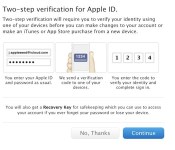
After discovering a huge security hole last year, Apple added an extra layer of protection for Apple ID and iCloud users in the form of two-step verification. Today it’s making the important security feature available in more countries: Canada, France, Germany, Japan, Italy and Spain. With two-step verification, Apple sends a special code to a trusted device like your iPhone whenever someone attempts to make changes to your account or log in for the first time on a new device. Similar to what Google does with Gmail, the extra step prevents malicious changes happening without your knowledge. It’s a simple thing to set up, and something that can save you from a whirlwind of pain should your Apple ID ever fall into the wrong hands. Those in the mentioned countries can register now on Apple’s website.
Filed under: Cellphones, Wireless
Via: 9to5Mac

Engadget’s tablet buyer’s guide: winter 2014 edition

The tablet landscape is changing rapidly. It’s now relatively trivial to find a cheap, full-featured Windows slate, and we’ve seen a number of smaller models that still manage to pack plenty of power. In light of those shifts, our tablet buyer’s guide looks very different this winter. Dell and Nokia are on the list for the first time, and Windows tablets sit shoulder-to-shoulder with their mobile OS rivals. We’ve even brought back an older Nook that’s received a new lease on life thanks to updated software and a significant price cut. Whether you’re looking for a productivity machine or just something to watch movies on, we’ve got a tablet that should fit the bill.
10-inch tablets
Apple iPad Air

After a couple years of playing it safe with iPad designs, Apple pulled out all the stops with the iPad Air. It’s one of the lightest full-size tablets on the market, weighing in at just one pound. It’s one of the fastest, too: Its dual-core A7 processor frequently outperforms the better quad-core chips inside its rivals. You also get to download a free, fairly powerful suite of productivity apps. Buyers may not like the proprietary Lightning connector, and they could miss both the memory card slot and multi-window app support offered on other devices. Still, the new iPad is ideal for gamers and anyone else who wants a big, fast mobile OS tablet without the usual bulk.
The bottom line: A large tablet that doesn’t sacrifice performance or portability.
Key specs: Dual-core A7 processor, 1GB of RAM, 16GB to 128GB of storage, 1.2-megapixel front and 5-megapixel rear cameras, 9.7-inch (2,048 x 1,536) display.
Price: $499 and up
Sony Xperia Tablet Z

The Xperia Tablet Z is an old hand in this group; its Snapdragon S4 Pro is no longer cutting edge, and there are higher-resolution tablets available at slightly higher prices. However, it still has one of the more appealing designs on the market. With its lightweight body, water resistance and infrared blaster, Sony’s design simply has more party tricks than many of its rivals. If your tablet has to double as a TV remote, poolside computer or kitchen assistant, this may be your best choice. Be sure to watch out for its impending sequel, though.
The bottom line: Still one of the best-designed Android tablets, although it’s not the fastest.
Key specs: 1.5GHz quad-core Snapdragon S4 Pro processor, 2GB of RAM, 16GB or 32GB of storage, 2.2-megapixel front and 8.1-megapixel rear cameras, 10.1-inch (1,920 x 1,200) display.
Price: $450 and up
ASUS Transformer Book T100

The Transformer Book T100 is a value champ among larger Windows tablets. For under $400, you’re getting a quad-core slate that runs desktop Windows apps, lasts for up to 11 hours on a charge and comes with its own keyboard dock. The T100 doesn’t have the performance or storage needed for more demanding apps, but it could still be ideal for anyone who wants a tablet that can double as a basic laptop.
The bottom line: One of the cheapest Windows tablets, offering tremendous bang for your buck.
Key specs: 1.33GHz quad-core Atom processor, 2GB of RAM, 32GB or 64GB of storage, 1.2-megapixel front camera, 10.1-inch (1,366 x 768) display.
Price: $393 and up (at Amazon)
Microsoft Surface Pro 2

Microsoft’s Surface Pro 2 is billed as a tablet, but it’s really an Ultrabook without a built-in keyboard — and that makes it one of the most powerful slates on the market. The Core i5 chip inside is quick enough to do some heavy lifting, whether it’s 6K video editing or large Photoshop projects. It also fixes many of the qualms we had with the original Pro. The battery lasts longer; there are more memory options; and the kickstand is more comfortable on your lap. The Pro 2 is far from the most portable tablet in this roundup, so consider the Surface 2 if you want something lighter and thinner. Just be aware that it doesn’t support traditional Windows apps.
The bottom line: The Windows 8.1 tablet for power users.
Key specs: 1.9GHz dual-core Intel Core i5 processor, 4GB or 8GB of RAM, 64GB to 512GB of storage, 720p front and rear cameras, 10.6-inch (1,920 x 1,080) display.
Price: $899 and up
7- and 8-inch tablets
Google Nexus 7 (2013)

The Nexus 7 is no longer the most powerful small tablet on the block, but it still boasts exceptional bang for the buck. It’s fast, and it carries both a very sharp display as well as wireless charging. More importantly: It’s the standard-bearer for stock Android. The Nexus 7 is the only small tablet running Android 4.4 as of this writing, and it should get future updates quickly. While it’s more expensive than 2012′s model, it’s an even better bargain.
The bottom line: Exceptional value for the money, and the definitive Android tablet.
Key specs: 1.5GHz quad-core Snapdragon S4 Pro processor, 2GB of RAM, 16GB or 32GB of storage, 1.2-megapixel front and 5-megapixel rear cameras, 7-inch (1,920 x 1,200) display.
Price: $229 and up
Apple iPad mini with Retina display

While the original iPad mini trailed some competitors in performance, the iPad mini with Retina display comes out ahead — sometimes by a significant margin. It has the highest-resolution display of any tablet with a screen measuring eight inches or smaller, and the A7 processor helps it outperform many larger rivals. It even has a 128GB storage option that’s still extremely rare for tablets this size. Just be prepared to pay a premium: The new mini is one of the most expensive devices in its class, and it doesn’t include extras like a keyboard dock or stylus.
The bottom line: One of the priciest small tablets, but also one of the best.
Key specs: Dual-core A7 processor, 1GB of RAM, 16GB to 128GB of storage, 1.2-megapixel front and 5-megapixel rear cameras, 7.9-inch (2,048 x 1,536) display.
Price: $399 and up
Amazon Kindle Fire HDX (7-inch)

If you value a tablet’s price-to-performance ratio above all else, you can’t ignore the 7-inch Kindle Fire HDX. For $229, you’re getting a small tablet with performance that humbles the Nexus 7 — and, for that matter, many larger competitors. Features like Mayday live support and Second Screen media streaming are nice to have, too. The only catch, as is usually the case with Kindle Fire tablets, is the heavy emphasis on Amazon’s content ecosystem. If you regularly use competing services (including Google Play), you’re better off getting a tablet running regular Android. Consider the 8.9-inch model if you need more screen real estate.
The bottom line: In terms of sheer value for the money, the best tablet here; just make sure you really like Amazon’s media services.
Key specs: 2.2GHz quad-core Snapdragon 800 processor, 2GB of RAM, 16GB to 64GB of storage, HD front camera, 7-inch (1,920 x 1,200) display.
Price: $229 and up
Dell Venue 8 Pro

The Venue 8 Pro is the small tablet for people who want a tiny PC more than anything else. You can run legacy Windows apps, add microSD storage and draw with an optional pen. However, you won’t have to pay a premium for the added sophistication; the Venue costs as much as some of its mobile OS counterparts. It doesn’t have HDMI video output and has suffered from some glitches, but it remains one of the best ways to get the full Windows experience without buying a full-sized device.
The bottom line: A capable, affordable Windows PC in concentrated form.
Key specs: 1.33GHz dual-core Atom processor, 2GB of RAM, 32GB to 64GB of storage, 1.2-megapixel front and 5-megapixel rear cameras, 8-inch (1,280 x 800) display.
Price: $300 and up
Galaxy Tab Pro 8.4

While Samsung launched four new Android tablets at the start of 2014, the tiniest of them — the Galaxy Tab Pro 8.4 — may be the most interesting of the bunch. It has the highest-resolution display of any small slate, and it’s about as fast as its bigger brethren. You may also find its magazine-like interface a refreshing break from the usual grid of app icons. The Galaxy Tab Pro 8.4 is as expensive as the new iPad mini, but it promises a similar level of value for the money.
The bottom line: A very powerful Android tablet in a compact form factor.
Key specs: 2.3GHz Snapdragon 800 processor, 2GB of RAM, 16GB to 32GB of storage, 2-megapixel front and 8-megapixel rear cameras, 8.4-inch (2,560 x 1,600) display.
Price: $400 (16GB; 32GB not available in the US)
3G/4G tablets
Not everyone has the luxury of using their tablet on WiFi; whether you’re on a business trip or a vacation, you may need a cellular-equipped slate to stay connected. Thankfully, there’s an abundance of 4G models to choose from. While there’s often some premium to be paid for either the data plan or the hardware, it may be worth the expense to avoid packing a big, bulky laptop.
Apple iPad Air (WiFi + Cellular)

You know by now that the iPad Air is much faster and lighter than its ancestors. However, its WiFi + Cellular variant provides a few additional improvements for frequent travelers. The new model supports a whopping 14 LTE frequencies; odds are you’ll get full-speed data wherever you go. The tablet also supports T-Mobile USA for the first time, and the carrier’s customers can use up to 200MB of data per month for free. Limited expansion remains a concern, but there are few other big tablets that are so well-suited to life on the road.
The bottom line: Everything we love about the iPad Air, with LTE on top.
Key specs: Dual-core A7 processor, 1GB of RAM, 16GB to 128GB of storage, 1.2-megapixel front and 5-megapixel rear cameras, 9.7-inch (2,048 x 1,536) display, unlocked LTE/EV-DO/HSPA+ data.
Price: $629 and up
Apple iPad mini (WiFi + Cellular)

If you want a small, travel-ready tablet with relatively few sacrifices, the cellular edition of the iPad mini with Retina display is your best bet. It’s just as fast as the iPad Air, and it offers the same broad LTE support. The mini is undoubtedly expensive, but you’re getting a lot for your money.
The bottom line: One of the most popular LTE tablets, in bite-sized form.
Key specs: Dual-core A7 processor, 1GB of RAM, 16GB to 128GB of storage, 1.2-megapixel front and 5-megapixel rear cameras, 7.9-inch (2,048 x 1,536) display, unlocked LTE/EV-DO/HSPA+ data.
Price: $529 and up
Google Nexus 7 (2013, LTE)

The Nexus 7 is already quite capable in WiFi-only form. However, its cellular variant is truly something special. In the US, the tablet offers LTE for AT&T, T-Mobile and (technically) Verizon through one model; American travelers won’t have to sacrifice 4G speeds or carrier support as they have in the past. Combine that with global HSPA+ support, and you have a tablet that will rarely let you down when abroad. The $350 price just makes it that much sweeter.
The bottom line: One of the most flexible cellular tablets on the market, at a price that’s hard to match.
Key specs: 1.5GHz quad-core Snapdragon S4 Pro processor, 2GB of RAM, 32GB of storage, 1.2-megapixel front and 5-megapixel rear cameras, 7-inch (1,920 x 1,200) display, unlocked HSPA+ and LTE data.
Price: $349
Lumia 2520

There isn’t a huge selection of LTE Windows tablets, but Nokia’s Lumia 2520 deserves to be at the top of that list. It has an outdoor-friendly display, brisk performance and epic-length battery life. An optional, battery-equipped keyboard can turn it into a productivity powerhouse. Windows RT will prevent you from running conventional desktop apps, but it’s hard to beat the price — at $500 off-contract, the 2520 is decidedly more affordable than many big LTE tablets, no matter what platform they’re running.
The bottom line: The de facto choice for travel-ready Windows tablets.
Key specs: 2.2GHz quad-core Snapdragon 800 processor, 2GB of RAM, 32GB of storage, 1.2-megapixel front and 6.7-megapixel rear cameras, 10.1-inch (1,920 x 1,080) display, LTE and HSPA+ data for AT&T and Verizon.
Price: $500 at AT&T and Verizon
Budget
ASUS MeMO Pad HD 7

The definition of value for money. The ASUS MeMO Pad HD 7 is no threat to the Nexus 7 or other mid-tier tablets, but it costs much less while preserving some useful features from its higher-end counterparts — namely, a color-rich IPS LCD, dual cameras and a quad-core processor. There’s even a microSD slot, which the Nexus 7 lacks. Never mind the software upgrade challenges that often come with custom Android interfaces; at this price, they’re easy to live with.
Key specs: Quad-core 1.2GHz ARM Cortex-A7 processor, 1GB of RAM, 16GB of storage, 1.2-megapixel front and 5-megapixel rear cameras, 7-inch (1,280 x 800) display.
Price: $149
Amazon Kindle Fire HD (2013)

We liked the original Kindle Fire HD from 2012, so last year’s refresh is virtually a shoo-in for the budget category. Apart from the exterior, you’re not getting anything new. At a lower $139, however, it’s quite the steal; you’re getting a slate with solid performance, a pleasing display and healthy battery life. The 8GB model will do the job if you want a basic device for Amazon Instant Video streaming or Kindle books, and a $169 16GB variant is available if you have a small personal media collection. Just be aware that there are no cameras, and you’re (officially) stuck grabbing software from the Amazon Appstore.
The bottom line: The Kindle Fire HD takes on new life as a budget tablet.
Key specs: 1.5GHz dual-core OMAP 4460 processor, 1GB of RAM, 8GB or 16GB of storage, 7-inch (1,280 x 800) display.
Price: $139 and up
Nook HD

You might wonder why Barnes & Noble’s Nook HD has returned to our list after a long hiatus. Simply put, it’s a good value these days. It’s affordable and boasts a sharper display than most devices in its class. And unlike the Kindle Fire HD, you’re not locked into the manufacturer’s ecosystem — you can download any app you like from Google Play. The base 8GB Nook HD doesn’t afford much space for offline media, but you can spring for the 16GB model (or a Nook HD+) if you need more.
The bottom line: One of the few high-resolution tablets in this price range, and more flexible than some of its peers.
Key specs: 1.3GHz dual-core OMAP 4470 processor, 1GB of RAM, 8GB or 16GB of storage, 7-inch (1,440 x 900) display.
Price: $129 and up
Filed under: Tablets, Apple, Samsung, Sony, Microsoft, Nokia, ASUS, Google, Amazon, Dell

Microsoft reportedly prepping Office for iPad to release in the first half of 2014

While Microsoft Office Mobile for iPhone released last summer and we’ve yet to see software release for Apple tablets. Not only is the slate-focused productivity suite alive and well, it’s apparently going to launch before July. ZDNet reports that development of Office for iPad (codenamed Miramar) could allow for its debut ahead of the touch-friendly Windows 8 version. This means that the previously reported fall 2014 timeline has been accelerated, and Microsoft may release the iPad version as soon as it’s ready — rather than keeping it under wraps until Q3. As Mary Jo Foley notes, the iOS package will likely require an Office 365 subscription and tap into OneDrive as its main storage repository. For now, we’ll just have to wait and see — but that wait could be shorter than initially expected.
Filed under: Tablets, Software
Via: The Verge
Source: ZDNet

Microsoft Office for iPad Coming ‘Sooner Than Most Think’
Microsoft has been rumored for a number of years to be bringing its Office productivity suite to the iPad, and according to a new report from ZDNet, it is coming “sooner than most think.” Sources have indicated to ZDNet‘s Mary Jo Foley that Office for iPad may even arrive before the “touch first” Windows version that had been reported to be leading the way.
But I hear Ballmer and the senior leaders of the company may have had a change of heart towards the end of last year. According to one of my contacts, Ballmer OK’d the suggestion by the Office team that they’d bring Office for iPad to market as soon as it was ready, even though that would likely mean before the Windows 8 version. I’m hearing that new date for Office for iPad is some time in the first half of calendar 2014. (My sources last summer were hearing Office for iPad wouldn’t debut until Fall 2014.)

Foley notes that it is still unclear in exactly what form Office for iPad will arrive, but it will presumably involve Microsoft’s Office 365 subscription service and potentially integrate with the company’s OneDrive cloud storage. The company currently offers an iPhone app that offers viewing and limited editing capabilities, with the available free of charge but requiring an Office 365 subscription.
     |
500px iOS app finally lets photographers upload their work on the go

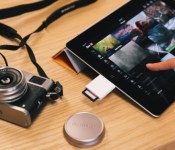
If you’re on the go and would rather post your pictures to 500px without running them through Light Room first, the photo-sharing app’s latest iOS update addresses just that. You can now upload iPhone shots directly from the application, and all you need to share DSLR pictures without a PC are an iPad and its SD-card reader. There’s a step-by-step guide on the developer’s website should you need it, but the entire process is pretty straightforward. No, it isn’t revolutionary, but the new functionality essentially puts the application on par with Instagram. There is a key difference between the two photo apps though — one could earn a (marginal) profit by uploading to 500px.
Filed under: Cameras, Tablets, Mobile, Apple
Via: 500px
Source: iTunes
 AIVAnet