


iOS 8 Beta 2 Tidbits: Permanent Podcasts App, QuickType Keyboard for iPad, and More
Apple today released the second beta of iOS 8, which brings a number of improvements, changes, and bug fixes to the beta software that was introduced on June 2.
iOS 8 beta 2 also includes several minor interface tweaks and modifications that make the beta feel both faster and more polished. We’ve gathered a list of the enhancements that have been bundled into the release below.
Podcasts: Following iOS 8 beta 2, the Podcasts app is a default iOS app that comes pre-installed on iOS devices. This means it can no longer be deleted.

Safari: According to the release notes, Safari will now block ads from automatically redirecting to the App Store without user interaction. Safari also includes a new pinch to tab view.
App Store Purchases: Apps in the App Store’s purchased tab are once again sorted by purchase date. In iOS 8 beta 1, they were sorted alphabetically. It’s also possible to leave reviews in the App Store again, a feature unavailable in beta 1 due to a bug, and the App Store now displays Family Purchases.

QuickType Keyboard: Apple’s QuickType keyboard is now available on the iPad as well as the iPhone, but does not appear to be available on the iPad 2.
Brightness: In beta 1, the Brightness toggle in the Settings menu under Wallpaper and Brightness was broken. It is now functional again.
Messages: Icons for the camera and the microphone in Messages are now gray rather than blue and there’s a new setting to mark all messages read.

Settings: There’s a new “Raise to Listen” setting for Messages.
Privacy: There’s a new Home Data section within the Privacy menu of the Settings app.

iCloud Photos: When entering the Photos app, there’s a new “iCloud Photos” popup that activates Apple’s new iCloud Photos feature, replacing a user’s existing Photo Stream settings.

Additional features in iOS 8 beta 2 will be added here as they are discovered. Apple is likely to continue pushing regular updates to iOS 8, bringing minor performance boosts and changes ahead of the operating system’s public release, which is expected to come in the fall. For more information on iOS 8′s features, big and small, make sure to check out our roundups.

Parallels’ new remote desktop apps let you control your PC like a phone

Remote desktop apps have an easier time working on tablets, where you have a lot of display area to work with, but they’re frequently awkward on smartphones. Wouldn’t it be nice if you could control a PC at home like it was just another phone app? Parallels is tackling that challenge head-on with smartphone-friendly versions of its Access app for both Android and the iPhone. Much like the earlier iPad release, the new titles give you a remote view of your Mac or Windows PC that’s optimized for your mobile platform of choice. You can launch programs, select text and type almost as if the computer’s software were built for a small screen. On the Android client (which also handles tablets), Parallels will even let you create shortcuts to jump directly into favorite desktop apps.
The wider support comes alongside a bundle of fairly hefty upgrades. It’s now possible to wake up your computer in some circumstances, so you won’t have to always leave it running for Access to work. You can also choose from extra screen resolutions if you need to see more of your desktop at a glance, and apps can borrow your device microphone for speech recognition or a quick voice chat. Those on iOS have the added perk of a file browser that makes it easier to track down that all-important presentation.
For some, the biggest change may be the cost of entry. Parallels has cut its personal subscription price from $80 to $20 for one year, and $35 for two years ($30 if you sign up by the end of June). That’s obviously a much better value, particularly if you only occasionally need to reach your PC. There’s also a new business tier that lets companies hook up five people for $50 per year. All the new apps are free to try for a couple of weeks, so it won’t hurt to give them a shakedown. Who knows — they might save your bacon the next time you leave your laptop at home.
Filed under: Cellphones, Tablets, Software, Mobile
Source: Parallels
Facebook for iPad’s new sidebar wants you to play more games

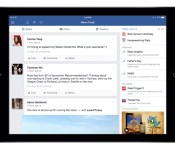
Love Facebook, but hate your friends’ endless invitations to play Farmville? You might not like the social network’s latest iPad update. According to the Facebook developer blog, the company is testing out a new sidebar that offers users in landscape mode a sampling of trending topics, videos and other content. Most of this data is fairly personalized — consisting of upcoming birthdays, events, holidays and recently played games, but there’s also a special section reserved for advertising “popular” Facebook games. Fortunately, you aren’t guaranteed to see the latter element right away: the column’s layout is out based on individual use. If you don’t play Facebook games, you might not see advertisements for them.
According to a Facebook spokesperson, the app will always keep items like birthdays or events up top, but everything else in the column moves around based on how you use the social network. If you watch a lot of video, for instance, you’ll see a lot of trending videos on the top of the sidebar; if you’re addicted to Facebook games the column will be flush with recently played titles and recommendations. Content irrelevant to your interests might stick around though — Facebook says non-gamers can expect the “featured games” panel to live off-screen, available to users who scroll down to the bottom of the panel’s display. The update is currently only available to a small percentage of test users, but Facebook plans for the sidebar to become a permeant facet of its iPad experience.
Filed under: Internet, Facebook
Source: Facebook

Printeer is the 3D printer your kids can use

There’s no denying that 3D printers are cool. However, they’re not exactly easy to use for kids — not unless Junior has a knack for modelling software, anyway. If Mission Street Manufacturing’s Printeer hits its crowdfunding goal, though, children will have a 3D printer they can truly call their own. All you need to create a plastic masterpiece with Printeer is an iPad and a basic ability to draw. There’s no scary-looking CAD programs or other intermediary tools. The machinery itself is also friendly to young creators, with both an easily removable build platform and a transparent shell that shows how all the parts work together. The company hopes that schools will use it to teach the basics of design and engineering to kids who might otherwise wait years to get started.
You’ll have to act quickly if you want to get a Printeer as soon as possible. Right now, Mission Street is offering a limited batch of early units to those who pledge at least $549; if you’re one of those precious few, you’ll have a printer in your hands around October. After that, you’ll likely have to sit tight until sometime after November, when production kicks into high gear. With that said, your patience may pay off if Printeer lives up to its billing — it promises to make 3D printing appealing to a much wider (and much younger) audience.
Filed under: Peripherals
Source: Kickstarter

Split-screen multitasking on an iPad could work like this

In the run-up to the reveal of iOS 8, there was a frission of eager rumors that Apple could add split-screen multitasking to the iPad, but then… nothing. Well, the good news is that code referring to it has been found nestled inside Apple’s incoming mobile OS upgrade, although we can’t regard this as confirmation that it’ll ever launch on iOS 8. More hopefully, however, Steve Troughton-Smith has gone as far as to tinker with the iOS 8 iPad Simulator to enable (at least partially) said split-screen skills, with a two-finger swipe to the side. The Safari web browser, at least in this test, can be swiped to take up specific quadrants of the screen, down to 75 and 50 percent, while at 25-percent size the browser looks awfully similar to the iPhone iteration — which, well, makes a lot of sense.
We’re yet to see the simulator run two apps (more?) concurrently, and given that Apple didn’t announce this Surface-baiting feature at WWDC a few weeks ago, could it simply be a curio that will never surface, or perhaps something that the company aims to fold into iOS 8.1? (Spoilers: there will probably be an iOS 8.1.)
Filed under: Tablets, Software, Apple
Source: @stroughtonsmith (Twitter)

Outlook Web App finally debuts on Android, but only for ‘small’ devices

Been looking forward to a native Outlook Web App for your Android device? You just might have to wait a little longer: the freshly launched OWA Android app is only available on ‘select devices.’ Microsoft says this pre-release version can do everything its iOS counterpart can and automatically update its address book whenever the user makes a chance to their device contacts, but it’s not ready for a full roll-out. Still, if you’re sporting a device with Android 4.4 KitKat and Google’s OS standards categorize your phone as “small” or “normal,” the app’s inaugural releases is yours for the taking. Have something else? Check out OWA’s support page: Microsoft is taking suggestions on what devices to support next.
Filed under: Cellphones, Mobile, Microsoft
Source: Google Play, Office 365

Engadget UK giveaway: win an iPad Air courtesy of Misco

You lucky devils, you. Last week you were in with a chance of winning a free Galaxy S5, and today we’ve only gone and got ourselves an iPad Air to send someone’s way. It wouldn’t be possible without the generosity of our pals over at Misco, an IT service provider and online retailer of all things computing. They’ve supplied us with a “Space Grey,” 16GB WiFi version of Apple’s latest full-fat tablet, meaning you can potentially save yourself £400 with a couple of clicks. Anyone can submit up to three entries via the Rafflecopter widget below, and we’d recommend you give the rules a quick scan while you’re down there. Godspeed.
- Entries are handled through the Rafflecopter widget above. Comments are no longer accepted as valid methods of entry. You may enter without any obligation to social media accounts, though we may offer them as opportunities for extra entries. Your email address is required so we can get in touch with you if you win, but it will not be given to third parties.
- Contest is open to all residents of the UK, 18 or older! Sorry, we don’t make this rule (we hate excluding anyone), so direct your anger at our lawyers and contest laws if you have to be mad.
- Winners will be chosen randomly. One (1) winner will receive one (1) iPad Air.
- If you are chosen, you will be notified by email. Winners must respond within three days of being contacted. If you do not respond within that period, another winner will be chosen. Make sure that the account you use to enter the contest includes your real name and a contact email or Facebook login. We do not track any of this information for marketing or third-party purposes.
- This unit is purely for promotional giveaway. Apple, Misco and Engadget / AOL are not held liable to honor warranties, exchanges or customer service.
- The full list of rules, in all its legalese glory, can be found here.
- Entries can be submitted until June 9th at 11:59PM BST. Good luck!
Source: Misco
Apple’s new Lightning spec allows for smarter, better-sounding headphones

When Apple first unveiled its Lightning connector, there was a debate about whether or not it was needed at all: what can this proprietary tech do that standard micro-USB can’t? Well, it looks like we’re going to find out soon. Sources for 9to5 Mac understand that Apple has published a new specification that lets headphone makers use an iOS device’s Lightning port for audio instead of the normal 3.5mm jack. On a basic level, this allows headsets to launch apps and carry more than just the usual playback controls. However, there’s reportedly an advanced spec that permits a lot more — headphones could include digital-to-analog converters and other processing that overrides what’s in the device. If you’re not happy with the fidelity of the built-in hardware, a new pair of cans could provide an upgrade.
Since Lightning can also supply power in both directions, either new spec could eliminate a number of electricity-related problems. External audio processing wouldn’t always need a separate energy source; you could do active noise cancellation that draws only on the host device for power. You could alternately charge an Apple gadget through batteries that are built into the headphones or attached with a pass-through cable.
Whether or not manufacturers take up the spec is another matter. To support Lightning without abandoning listeners on other platforms, companies would have to either bundle extra cabling or else sell multiple versions of the same gear. Those feats are easy for higher-end brands, but may be tougher for newer or more budget-conscious outfits. Even if others are skittish, though, the tech could come in handy now that Apple owns Beats — future official headphones could both sound better and integrate well with your iPhone.
Filed under: Cellphones, Home Entertainment, Peripherals, HD, Mobile, Apple
Source: 9to5 Mac

AirPlay on iOS 8 doesn’t need a network to stream your media

Right now, Apple’s AirPlay media streaming requires an established WiFi network to fly. That’s fine when you’re at home, but do you really want to ask for a friend’s hotspot password just to show vacation photos on their Apple TV? Mercifully, iOS 8 will let you skip that hassle. One of the many under the radar upgrades to the software is peer-to-peer AirPlay support — you can now share content to an AirPlay-capable device as long as you can make a direct connection.
The basic concept is old hat, as you might suspect. DLNA has done this for a while, and third-party apps on various platforms can pull this off. All the same, the improved AirPlay technology should be handy both for media-savvy socialites as well as presenters who aren’t always guaranteed network access in the meeting room.
Filed under: Cellphones, Home Entertainment, Tablets, HD, Mobile, Apple
Via: AppleInsider, Gizmodo
Source: Apple

SwiftKey, Swype and Fleksy are already making iOS 8 keyboards

When Apple revealed that iOS 8 would allow third-party keyboards, one big question came to many people’s minds: would some of the better-known Android keyboards make the leap? In short, yes. SwiftKey says it has “already started” porting its heavily customizable software to iOS; Swype tells Engadget that it “can’t wait” to support Apple’s platform. Fleksy, meanwhile, is going so far as to take sign-ups for a beta program and vows to be “one of the first” with a solution. The odds aren’t high that you’ll get something like Google Keyboard on your iPhone (we’ve asked to be sure), but you won’t be hurting for input methods when iOS 8 is ready this fall.
Filed under: Cellphones, Tablets, Mobile, Apple
 AIVAnet