


iPad Mini 4 Again Rumored to Be Smaller Version of iPad Air 2 in New Design Renders
The upcoming iPad mini 4 will be the smallest the line-up has seen, equivalent to a miniaturized version of the iPad Air 2, according to a new design render video shared by uSwitch and Nowhereelse.fr‘s OnLeaks channel. The render gives the iPad mini 4 a thickness of 6.1mm, the same as the iPad Air 2, and less than the current 7.5mm thickness of the iPad mini 3.

The design render video backs up a part of a previous rumor that claimed the next iPad mini would adopt the slimmer form factor of the current line-up of iPad Air models, alongside the Air’s 8-megapixel rear-facing iSight camera and a fully laminated display with anti-reflective coating. Today’s report gives no news on the iPad mini 4’s internal upgrades, nor its camera or display changes, but Apple will undoubtedly aim to make the new generation of mini a bit more substantial than the simple addition of Touch ID that was introduced with last year’s model.
Apple is expected to reveal the new line-up of iPads at the next major company keynote, rumored as of now to be taking place on September 9. Alongside the iPad mini and iPad Air, the company is likely to showcase the so-called “iPhone 6s” and “iPhone 6s Plus” at the event, and possibly even finally reveal the next-generation Apple TV set-top box.


The iPad Air 2 and iPad mini 3 review

It’s a conflicting time for Apple. On one hand, it’s a joyous occasion for the company because its latest iPhones, which come in larger screen sizes than the last, set new sales records worldwide; but on the other hand, its lineup of iPads just experienced its third straight quarterly decline. Coincidentally, this comes just a week after Apple announced its annual tablet refresh, which includes a thinner and more powerful version of the iPad Air along with a Touch ID-enabled mini with Retina display.
Just because it’s down doesn’t mean it’s out. Giving up on a product category isn’t really Apple’s style, and last week, it offered up the Air 2 as exhibit A. The company made it clear that making a solid top-of-the-line tablet is on the top of its to-do list, so naturally the new 10-inch device got plenty of upgrades in nearly every aspect of its design. Curiously, it didn’t give the mini lineup the same kind of treatment: The mini 3 got so little love this time around that the best news about it is the fact that last year’s version is now $100 cheaper. Should the new iPads still get a place in the consumer’s backpack? Read on to find out.
Hardware
iPad Air 2
Thinner, lighter, more powerful. It sounds a lot like last year’s iPad Air, which was reduced to the thickness of a pencil, but in fact, I’m talking about the sequel. At 6.1mm thick, an 18 percent decrease from the original Air’s 7.5mm, you’ll be hard-pressed to find a thinner tablet; Samsung’s Tab S comes close at 6.6mm. It’s not easy to build such a thin device that feels just as sturdy as its thicker brethren, but Apple nailed it with the Air 2. The new slate has lost weight, too, but not as much as the last one did: While the first Air managed to lose nearly half a pound over the iPad 4, the next version only trims off 0.04 pound (32g) for a total of 0.96 pound (the LTE-enabled version is a few grams heavier). So, it’s lighter, but the change isn’t anywhere near as noticeable this time around.
The design language hasn’t changed: The Air still features an aluminum build, chamfered edges and the same footprint as before. But Apple insists that it rebuilt the new tablet from the ground up. After all, cramming better specs into a thinner package requires some creative thinking. The good news is that it looks and feels fantastic, and it comes with a no-gap display, better camera, more powerful chipset, Touch ID and stronger wireless connections. The bad news is that some compromises were made — specifically in the area of battery size, which has plummeted from 32.4Whr to 27.3 (more on this later).

Aside from being thinner, there are a couple other ways you can tell a new Air from an old one. The first is the inclusion of Touch ID, Apple’s fingerprint sensor that was introduced last year in the iPhone 5s. It’s certainly a welcome feature, and one I’ve been hoping to see on an iPad ever since the iPhone 5s debuted; I can’t count how many times I tried unlocking my iPad this way before remembering it doesn’t have this feature. What’s more, Touch ID is even more useful now than it was before; iOS 8 enabled third-party developer support for the fingerprint sensor, so you can use it to access sensitive account information or passwords. It also facilitates online payments through Apple Pay, but since no new iPad comes with NFC, you won’t be able to use your huge tablet at a tap-to-pay station.
The Air 2 also doesn’t have a mute switch, which I didn’t think would be a huge loss until I actually found myself trying to use it and becoming frustrated more frequently than I expected. Your new options are to press and hold the volume down button or go into the Control Center and press the mute key; if you used the switch to lock screen orientation, you’ll need to do that in the Control Center as well. A microphone now sits where the mute switch once was; there’s another one right next to the camera. This means the antenna on the top of the WiFi+Cellular model is no longer interrupted by mic holes.

Inside, the Air 2 comes with a new A8X chipset, which I’ll discuss later on. In short, Apple has added another CPU core, boosted graphics performance and doubled the RAM. But it’s also followed the iPhone 6 by adding the M8 motion coprocessor, which includes a barometer so you can track flights climbed. Other additions include 802.11ac WIFi, which can get you faster connections (provided you have a compatible router); 20 LTE bands, which should be more than enough for most international travelers; and up to 150 Mbps cellular download speeds if your carrier offers it.
iPad mini 3

Apple’s message for the iPad mini changed dramatically in the past year. When it debuted last fall, the iPad mini with Retina display was given feature parity with the Air. The two devices were nearly twins, with the exception of size and a difference in color accuracy (which we’ll get into soon). In the end, iPad buyers found that the toughest decision was which size to pick. Fast-forward a year, and the mini 3 has been largely forgotten. Even the fourth-gen iPad, which was released only eight months after the previous version with a performance boost and Lightning port, looks like a bigger upgrade.
Indeed, there’s only one major feature change on the mini 3: Touch ID. Yep, that’s all, unless you count a gold color option as an actual feature (I don’t). Otherwise, the hardware is completely identical to last year’s mini. All of the stuff you just read (and will continue to read) about getting improved on the Air 2? Nowhere to be found. The dimensions and design style all remain the same as the last mini. Whereas Apple says it built the Air 2 from the ground up, the mini 3 just seems like an afterthought to make it look like the mini line hasn’t been forgotten. Well, it hasn’t been, but it does look strange that the larger tablet is once again considered the premier option with the best specs. The sudden change in product strategy doesn’t add up.
Apple SIM

This may be the very first time a SIM card has earned its own section in an Engadget review. But a new type of nano-SIM card preinstalled in the Air 2 and mini 3 is worth a mention. Buried in the last few lines of a press release is Apple’s first mention of a new “Apple SIM,” a first-of-its-kind card that lets you change your cellular carrier without also changing the SIM card. This convenience is limited to just a few countries and carriers at launch — Sprint, T-Mobile and AT&T in the US and EE in the UK — but over time, the selection of willing operators may improve. It’s still very much in the early stages right now, but the idea is a natural fit for an iPad, which doesn’t come with a carrier lock or a contract; people will want to switch among carriers depending on what kind of coverage they need and what types of data plans become available.
My review units came with carrier-branded SIMs, but the Apple-specific chips should come preinstalled when they’re shipped. (If you prefer a non-supported carrier, such as Verizon, a new chip will be provided for you.) There’s still no way of knowing whether this is a proprietary technology or if Apple is licensing it; if it’s the latter, it’s possible that the option will eventually be available for non-Apple devices as well.
Display

The Air 2 has the same 2,048 x 1,536 resolution as all the Retina iPads that have come before it; Retina HD does not exist in the tablet lineup. But as I mentioned earlier, Apple was able to trim down the iPad by using a laminated, optically bonded, no-gap display similar to the ones used on the iPhone and even the Microsoft Surface tablets. Not only does the new panel save vertical space by eliminating any gaps of air between the display layers, but it also makes the screen significantly less reflective. This is meant to reduce the amount of glare hitting the screen, whether you’re reading in direct sunlight or watching movies under harsh fluorescent lights. I’m happy to report that it works as advertised; I was able to read text and look at photos much better on the Air 2 than the previous version. Tapping on the screen also doesn’t feel as hollow on the new tablet as it did on last year’s. Still, Apple seems to have achieved this at the expense of white balance, which seems slightly colder than on the first Air.
For the iPad mini, I have a confession to make. As I reviewed last year’s model, I praised the display for its high pixel density and good looks — and in many ways this still rings true a full year later — but I didn’t catch a glaring difference between it and the original iPad Air’s display: The colors on the mini with Retina display have a narrower gamut than the Air, so the hues are flatter; they simply don’t provide the same kind of punch that the Air does. That was something I didn’t want to miss again, so I took a closer look to see if Apple had corrected anything on the mini 3, or if the color gamut would remain consistent among all three devices in the series. If you didn’t like it before, expect to see more of the same; any changes in color accuracy are extremely minor, as the Air lineup continues to offer a better experience here than the mini. The below image shows the difference between the Air 2 and the mini 3 displays.

iOS 8.1
iOS 8.1 is the third update to Apple’s new mobile OS in just over a month, after a bug fix that was immediately followed by another fix to correct the problems introduced in that initial update. The refresh was made available to every compatible iPhone and iPad yesterday, and the new iPads will come with it preinstalled, bypassing the lengthy download and install process.
Because the Air 2 and mini 3 both use Touch ID, they can take advantage of the biggest new feature in the update: Apple Pay. But since they don’t have Near-Field Communication (NFC) chips installed, you can’t do tap to pay; you can only use the service for online payments. This isn’t a huge issue, since most people will prefer using their phones (or Apple Watch) to buy stuff in retail outlets; it’d be much easier to whip out my wallet and swipe my card than take an iPad out of my bag to use tap-to-pay.
Apple Pay isn’t the only benefit you get in 8.1. In the initial iOS 8 release, the company oddly left out the Camera Roll. You could still see all of the images you took on your phone or tablet, but if you were using iCloud and had multiple devices, there was no way to tell which photo or video was taken on which product. This week, it’s back in the Albums tab.
With 8.1, you’ll also get to beta test the iCloud Photo Library, which uploads and stores your collection o’ memories so that you can edit and share them from any of your Apple devices. If you have less than 5GB in your album and don’t want to pay anything, it’s definitely worth doing. If you’ve got more than that, you’ll need to pony up some cash in order to store it all: 20GB costs a dollar per month in the US; 200GB is $4; 500GB is $10; and 1TB is $20.
Finally, 8.1 enables some of the Handoff and Continuity features I discussed in the iOS 8 review, such as sending and receiving text messages on your Mac, and Instant Hotspot, which makes it possible to automatically tether your computer to your mobile device. These features were announced as part of iOS 8 in June, but needed Apple’s new desktop operating system, OS X Yosemite, to work properly.
Camera
I’ll be the first to admit that I’m not the target demographic for a tablet camera. I used to make fun of the whole idea of taking pictures with a 10-inch gadget, but clearly it’s a trend that’s not going away, as a brief visit to any theme park, tourist attraction, concert or Vegas sidewalk will prove. So, I can’t blame Apple for catering to this growing group of people who prefer a large viewfinder. The iPad Air 2 is a prime example of this. While the mini 3 doesn’t gain improved imaging capabilities, the Air 2 steps up to 8MP resolution (versus 5MP in the Air) and has a new Image Signal Processor (ISP) as part of the new A8X chipset. On the software side, the new camera comes with Burst Mode, as well as slow-motion video capture in 720p at 120fps. There’s still no LED flash on front or back this time around, however.
Overall, the improvement in detail is obvious, and imaging is noticeably better in a few other areas as well. The white balance is slightly improved; colors are a little more accurate; and harshly backlit images aren’t as blown out as they were on the previous Air. And although the f/2.4 aperture is the same on both cameras, the new ISP manages to filter out more noise in low-light situations; it still won’t catch as much errant light as the iPhone, however. Apple also says the 1.2MP FaceTime camera should do a better job of reducing noise, but I couldn’t see any real difference in side-by-side comparisons.
(You can see full-res images taken by the Air 2 camera here, and samples from the original Air can be found here.)
Performance and battery life
| iPad Air 2 | iPad Air | iPad mini 3 | NVIDIA Shield Tablet | |
|---|---|---|---|---|
| Geekbench 3.0 | 4,510 | 2,646 | 2,470 | 3,423 |
| Basemark X | 29,518 | 15,231 | 14,839 | TBD |
| 3DMark IS Unlimited | 21,659 | 15,536 | 14,595 | 30,970 |
| SunSpider 1.0 (ms) | 303 | 404 | 439 | 463 |
| GFXBench 3.0 Manhattan Off/onscreen (fps) | 32.4/24.6 | 13.0/8.8 | 13.0/8.8 | 31.0/29.7 |
| SunSpider: Lower scores are better. | ||||
Strap on your seat belts, kids — the iPad Air 2 is speedy. The irony is not lost on me as I say it, given that we seem to say the same thing with every new iPad. Indeed, the Air 2 fits that bill perfectly: It’s predictably more powerful than its predecessor, thanks to the A8X chipset inside, but there’s a bit more to the tablet’s oomph this time around. Apple’s making a jump from a dual-core processor to one with three cores; the CPU is clocked at 1.5GHz, a 100MHz bump from the original Air; the L2 cache doubled from 1MB to 2MB; and it also comes with 2GB of RAM, twice as much as the last few iPads. It’s no surprise, then, why the company is boasting a 40 percent boost in CPU performance and an increase in graphics prowess by a factor of 2.5.
So yes, the iPad was powerful before, and it’s even more so now. Apple says the new chip is optimized for apps and games that use Metal, a framework that gets rid of a lot of the overhead that gets between a developer and the GPU. It also takes advantage of 3D graphics processing and other advanced computing capabilities. The A8X will increase the performance of every app regardless of whether or not they use Metal, but I focused more heavily on apps and games that do.
One such app was Replay, a video highlight tool featured in last week’s keynote. The app takes images you’ve curated from your photo library and puts them into a cool montage-like video; you can add music, text and other effects to give some extra pizzazz to your Facebook slideshow of the family trip to Disneyland. The A8X showed its chops when it was time to save and render the video; I did the same exact video on both iPad Airs (iPads Air?), and the original wasn’t even halfway through the job when the Air 2 completed the task.
It’s clear that the A8X can make a huge difference over the A7 in many areas, but I didn’t see as drastic a performance improvement with existing games that use Metal. I tried several, such as Asphalt 8, Beach Buggy Racing, Modern Combat 5 and Epic Zen Garden. As expected, I experienced fewer frame skips, smoother play and faster load times, all of which are nearly givens anytime there’s a boost in graphics capacity. And the Air 2 is a winner for this alone. The only downside was that I saw the same number of fine details in the A8X during gameplay as I saw in the A7. When comparing the two Airs side by side, I saw the same reflections in puddles, blazing fires, other characters, falling buildings, exploding helicopters and other elements. Still good, but not a night-and-day difference. The improvements in this area were not as noticeable as I’d anticipated, but hopefully A8X-optimized games will come out soon that push the chip’s graphics capabilities to the limit.
The benchmarks sided with Replay in terms of performance. I saw massive bumps in test scores on Geekbench 3 and Basemark X (nearly double that of the Air), as well as a 6,000-point increase on 3DMark. I also notched a 25 percent decrease in SunSpider, which was the lowest score I’ve ever seen on any mobile device (SunSpider scores are like golf — the lower the better); finally, I was also impressed by the onscreen and offscreen GFXBench results. However, while the iPad is still among the most powerful tablets on the market, it’s got some serious competition; the NVIDIA Tegra K1-powered Shield Tablet crunches some numbers that surpass the Air 2’s scores, with others getting incredibly close.
| Tablet | Battery Life |
|---|---|
| iPad Air 2 | 11:15 |
| iPad mini 3 | 13:45 |
| Microsoft Surface 2 | 14:22 |
| iPad Air | 13:45 (LTE) |
| Apple iPad mini | 12:43 (WiFi) |
| Samsung Galaxy Tab S (10-inch) | 12:30 |
| Apple iPad mini with Retina display | 11:55 (LTE) |
| Apple iPad (late 2012) | 11:08 (WiFi) |
| Apple iPad 2 | 10:26 |
| Samsung Galaxy Note Pro 12.2 | 10:04 |
| Apple iPad (2012) | 9:52 (HSPA) / 9:37 (LTE) |
| Acer Iconia W4 | 9:50 |
| Nexus 7 (2012) | 9:49 |
| Microsoft Surface RT | 9:36 |
| Toshiba Encore | 8:45 |
| Sony Xperia Tablet Z | 8:40 |
| Sony Xperia Z2 Tablet | 7:57 |
| Nexus 10 | 7:26 |
| Dell Venue 8 Pro | 7:19 |
| Samsung Galaxy Note 8.0 | 7:18 |
| Nexus 7 (2013) | 7:15 |
| Samsung Galaxy Tab Pro 8.4 | 7:13 |
| Samsung Galaxy Tab 3 10.1 | 6:55 |
A thinner profile comes at the expense of battery size. The new Air’s is 5.1Whr smaller than the old one, but Apple still promises that you’ll get the same 10-hour battery life because the A8X is more power-efficient. Real-life use shows that the original Air still rules the roost; after a day of heavy use, I typically went to bed with around 20 percent left in the tank. If you’re only using it moderately — say, for casual content creation or consumption — you should get a little over two days. In our video test, in which an HD movie plays through the life of the battery, the Air 2 squeezed out 11 hours and 15 minutes, significantly lower than last year’s Air and about an hour short of the Samsung Tab S. That said, I’m using the WiFi+Cellular version, so keep in mind that the WiFi-only option should get longer results. On the flip side, the mini 3 actually improved in battery life over the last model, getting nearly 14 hours of video before dying.
On the plus side, the loudspeakers have improved. In side-by-side tests with the original Air, the sequel’s speakers produced even louder and fuller sound than its predecessor, which came in handy while listening to podcasts and streaming music around the house.
The competition

As usual, the new iPads come in WiFi-only and WiFi+Cellular options, with the WiFi-only models beginning at $499 for the Air 2 and $399 for the mini 3. In both cases, the base models have 16GB of storage. Meanwhile, the cellular options start at $629 for the Air 2 and $529 for the mini 3. If you need more storage — and given how much available space is required just to update your devices these days, I strongly recommend it — you’ll need to add an extra $100 to get 64GB of storage and $200 for 128GB. As with the new iPhones, the iPads are no longer offered with 32GB.
The new iPads aren’t the only show in town. Google’s Nexus 9, which comes out in two weeks, will likely be a strong performer thanks to its NVIDIA K1 chip, a 2.3GHz dual-core processor with 64-bit support. (This is the same silicon inside the Shield Tablet, so the Nexus 9 should keep up with the Air 2.) Apple got a nice head start on 64-bit support when it released the A7 chip last year, so it’ll take some time for developers to take full advantage of their newfound abilities. The baseline, WiFi-only Nexus 9, which includes 16GB of internal storage, will go for $399; this puts it as solid competition against the mini 3, although its screen size is right in between the mini and Air. There’s also the Sony Xperia Z2 Tablet, which is now going for around $460 and packs plenty of punch, and the Samsung Tab S, which comes with an octa-core chip and 3GB of RAM for the same price as the Air 2.
The mini 3 will also soon have to compete against Sony’s Z3 Tablet Compact, an 8-inch waterproof slate that is now available for pre-order. It’s 6.4mm thin and comes with a 2.5GHz quad-core Snapdragon processor with 3GB of RAM, but you’re also paying for the extra features: it’s priced starting at $499, which is a fair amount higher than Apple’s already high-priced option.
If you like the smaller form factor, but don’t love the price, there’s also the Shield Tablet, which comes with the aforementioned K1 chip and is available starting at $299; it’s more gaming-minded than your usual Android tablet, but it’s a fantastic performer that soundly beats out the mini 3. There’s also the Google Nexus 7, which was discontinued, but still available on Amazon and other retailers for around $200. And finally, last year’s iPad mini with Retina display is now $100 cheaper at $299, while the original mini is $249. However, that $50 difference also means you lose the Retina display; it’s definitely worth the money to go with the higher resolution. Likewise, the original Air is now $399, $100 cheaper than its successor.
Wrap-up

In the wake of dire sales, the Air 2 is exactly what Apple needed to keep the lineup fresh. It may not be a brand-new design, per se, but its thin frame helps keep the marquee tablet looking sleek and exciting, and the extra burst of performance ensures that it stays among the most powerful tablets on the market for the next year. It could use a little help with battery life compared to the Air, but it’s still an improvement over the iPad fourth-gen and older. Most importantly, the Air 2 feels like Apple hasn’t given up on the tablet form factor, even if it’s experiencing a dip in sales.
That said, I’m not sure where the mini 3 fits into Apple’s strategy. Since the only hardware improvement to the new slate is Touch ID, the mini lineup is no longer on par with the Airs; it’s now a second-class tablet citizen. I love Touch ID, and I favor the screen size of the mini, but it’s not worth paying an extra $100 for Apple’s fingerprint sensor unless you use a ton of passwords or want to make a lot of online Apple Pay purchases. It’s still a great performer, but I can’t help but wonder if the mini lineup can remain relevant at its price point — especially now that 5.5-inch iPhones are even more portable and still offer a large screen.
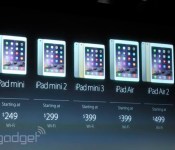
Apple drops iPad Air, iPad mini and iPad mini 2 prices by $100

Now that Apple has introduced the iPad Air 2 and iPad Mini 3, it’s time for some of the older models to get a price cut. After announcing the new tablets, the on-stage Phil Schiller, Apple’s senior VP of worldwide marketing, also revealed that the original iPad Air, iPad mini and iPad mini with Retina Display, will be sticking around once the newer versions start to ship at “the end of next week.” As a result, the iPad mini, iPad mini 2 and iPad Air now start off at $249, $299 and $399, respectively, for the 16GB, WiFi versions. On the other hand, the newly unveiled iPad mini 3 will cost $399, while the iPad Air 2 is going to be $499 — both with 16GB of storage and WiFi-only. Like always, if you want to add a 4G/LTE to that, you’ll have to shell out $130 extra per iPad.
You’ve got $2,500. Tax aside, what do you buy?
Filed under: Apple

Apple leaks iPad Air 2, iPad mini 3 ahead of official announce

Well, this is a bit unlike Apple — the company appears to have accidentally spilled the beans about the iPad Air 2 and iPad mini 3, which are expected to be announced tomorrow. Representations of both devices showed up in a screenshot of the iPad User Guide for iOS 8.1, which we’re also expecting new details about tomorrow. We can’t tell much from the image, but it does confirm that Cupertino’s tablets will be getting Touch ID. A later screenshot also details burst shooting mode, which will be coming to the iPad Air 2, but not the mini 3, according to the document. However, downloading the book didn’t reveal any additional info. In fact, there’s no trace of the content leaked via the preview screenshots at all.
While the leak may seem like a careless mistake, the more cynical out there will note that this happened just moments after Google announced its latest Nexus devices. It might be a coincidence, or the notoriously media savvy company might be trying to push the competition out of the news cycle as fast as possible.
[Image via 9to5Mac]
Filed under: Tablets, Mobile, Apple
Via: 9to5Mac
Source: iTunes

How a keyboard case can turn your 8-inch tablet into a productivity machine

What’s up with 8-inch tablets? Microsoft reportedly canceled the Surface Mini at the last minute. Samsung’s Galaxy Note 8.0 is long overdue for a refresh. Even the current class leader, the iPad mini, only came about after years of procrastination at Apple. Perhaps it’s just a little harder to convince people of the merits of this category of device, compared to the greater pocketability of a phablet, the affordability of a 7-inch Android slate or the extra productivity offered by a full-sized tablet, hybrid or laptop. However, I’m happy to report that with a bit of smart accessorizing — namely, the addition of a high-quality keyboard case that allows for proper touch-typing — an 8-inch tablet has plenty of scope to operate as a serious productivity tool, if not an outright laptop replacement.

Due to the sheer size of Apple’s following, the iPad mini offers the greatest choice of tailored keyboard cases of any 8-inch tablet. Demand for iPad mini keyboards has evidently persisted since launch, because new products from reputable companies have continued to hit the market in the past six months. This includes a miniature version of the ClamCase Pro, which was the winner of my full-size iPad keyboard roundup last year and which can bend backwards to work as a stand. There’s also now an intriguing rugged keyboard from ZAGG, which has a magnetic hinge allowing you to quickly detach the tablet section from the keyboard. I’ve spent a few weeks with both of these, as well as with a more lightweight ZAGG keyboard for the Samsung Galaxy Note 8.0, in an effort to acclimatize to what are inevitably more-cramped conditions.
These accessories may be small, but none of them are half-hearted add-ons — something that is reflected in both their designs and their price tags. Crucially, all three keyboards have backlit, chiclet-style keys, and they also have proper hinges to replicate a laptop-style experience. In other words, if fast, comfortable typing is ever going to be possible on this sort of accessory, these examples probably stand the best chance of making it happen. What’s more, with all these cases, the combined size, weight and cost of the tablet-plus-keyboard combo is significantly less than a MacBook Air or Microsoft Surface Pro 3 — which is a key reason to be interested in this sort of solution in the first place.
(Incidentally, I haven’t been able to find any similar hinged cases for 8-inch Windows 8 tablets like the Lenovo ThinkPad 8 or Dell Venue 8 Pro. For now, it seems, those tablets are stuck with more casual folding cases that prop the tablet up at an angle.)
| Price | Weight (with tablet) | Thickness | |
|---|---|---|---|
| ClamCase Pro for Apple iPad mini | $100 | 391g (699g) | 17.5mm (0.69 inch) |
| ZAGG Rugged Folio for Apple iPad mini | $140 | 529g (837g) |
24mm (0.94 inch) |
| ZAGG Folio for Samsung Galaxy Note 8 | $100 | 367g (707g) | 18mm (0.71 inch) |
Typing speed

Let’s start with the most important statistic: words per minute. I define “touch-typing” as typing without looking at the keyboard, rather than following any sort of specific method taught at a secretarial school (do those things even exist anymore?). So all the numbers in the table below reflect typing while mostly staring at the screen, and with all errors corrected on the fly in order to produce a clean passage of relatively complicated text (which included some large numbers, special characters and people’s names, so that autocorrect couldn’t fix everything).
|
Words per minute |
|
|---|---|
| 15-inch MacBook Pro (benchmark) | 69 |
| iPad mini Retina onscreen keyboard | 31 |
| ZAGG Rugged Folio for iPad mini | 56 |
| ClamCase Pro for iPad mini | 53 |
| ZAGG Folio for Galaxy Note 8 | 45 |
As you can see, I wasn’t able to match my natural typing speed (69 wpm, as achieved on a 15-inch MacBook Pro) on any of the 8-inch accessories. The closest I came was with the ZAGG Rugged Folio, which yielded 56 words per minute, with the ClamCase Pro not far behind at 53 wpm. These latter two products honestly felt about equal to me in terms of typing comfort, and their sensible layouts actually allowed me to type just as fast as on a 10-inch iPad keyboard case — in other words, trading down from a full-size iPad to a mini didn’t seem to come with a huge sacrifice in potential typing speed. That was quite a revelation.
Bear in mind, many of the simpler errors I made during these tests were fixed by iOS’ autocorrect before they had a chance to slow me down. This actually explains why the ZAGG for Galaxy Note 8.0 got such a low score — it wasn’t the keyboard’s fault so much as Samsung’s, because the autocorrect function in TouchWiz let many more errors slip through, forcing me to go back and fix them manually. For some reason, in order to use a Bluetooth keyboard with the Note 8.0, you have to use Samsung’s default keyboard, which means the user can’t benefit from the superior autocorrect offered by SwiftKey or Google Keyboard. That’s a major nuisance.
Design and usability

There’s more bad news for ZAGG on the Galaxy Note 8.0: The Bluetooth connection sometimes took a while and often failed unless I messed around in the settings menu, which seems like another TouchWiz issue. I also encountered repeat presses, where I’d hit a key once and see the letter repeated five times in succession on the screen. Worryingly, this was even worse with the Backspace key — I’d try to delete a word and it’d go haywire and delete a whole sentence or paragraph. This ZAGG also doesn’t allow any of the flipping or detaching contortions that are possible with the two iPad mini models — it’s stuck in a traditional laptop mode. Suffice to say, my Galaxy Note 8.0 has come out of the case and gone back to dressing in its birthday suit.
By contrast, the iPad mini’s Bluetooth connection and processing was absolutely flawless, and both the ZAGG Rugged and ClamCase Pro were effortless to use. It was easy to turn the keyboards off to break the wireless connection and re-enable the onscreen keyboard. And it was just as easy to turn them back on to re-establish the connection and start typing again. During the course of testing the accessories, I made two big trips without my MBP, just relying on the keyboard-equipped iPad mini as my primary work laptop, plus a Wacom stylus for note-taking. Overall, I think I could cope with this as a permanent laptop replacement, if it wasn’t for an occasional need to batch-process images and cut video.
Wrap-up

Overall, it’s safe to conclude that touch-typing is possible on an 8-inch tablet keyboard, so long as you make an effort to get used to it, and so long as your particular keyboard is nicely designed. I’d forget about the ZAGG keyboard for the Galaxy Note 8.0, mostly due to the software issues, but both the iPad accessories covered here are solid purchases. If I had to choose one, it’d probably be the ZAGG Rugged — not because of its slight advantage in typing speed, but because of its Toughbook-style tactility and the ease with which it lets you pull the iPad section away from the keyboard section. Both of these features came in handy on cramped flights, or when passing the iPad to someone across a desk during a meeting. Of course, many people will be put off by the ZAGG’s extra bulk, in which case they can default to the ClamCase Pro instead. But ultimately, I’ve arrived at the same conclusion that I did in my last roundup a year ago: I think a great keyboard accessory is one that is bold enough to totally transform a device’s function for as long as it is attached, rather than just trying to be as small and inconspicuous as possible.
Filed under: Peripherals, Tablets, Mobile, Apple, Samsung
.CPlase_panel display:none;

Apple’s new iPads will come with anti-glare displays, says Bloomberg

Apple is set to launch not only new iPhones and a possible wearable soon, but also a new line of iPads, according to Bloomberg. Its sources told it that a full-sized, 9.7-inch iPad is now being mass-produced for a launch near the end of the quarter, and that a 7.9-inch iPad mini will arrive a few months later. If the rumor pans out, it wouldn’t be too mind-blowing: after all, the iPhone 5s was launched last year on September 10th, with the iPad Air and mini coming a bit more than a month later. However, one interesting new tidbit did emerge: the new iPads will have an anti-reflection screen, a big change from past models. That would make sense if Apple used either anti-glare Sapphire displays or Gorilla Glass — as Corning is working on less reflective (and anti-bacterial) displays too.
The rumor mill has pegged the launch of the iPhone 6 for September 9th, almost exactly a year after the last model. That event could be chockablock, given that both a 4.7- and 5.5-inch model are expected, so a separate iPad launch event would make sense. A smartwatch is also rumored to be coming in October, possibly at the same time as one or both iPads. That would mean a pretty busy couple of months for Apple, but keep in mind that it’s all still utter speculation at this point.
Source: Bloomberg
.CPlase_panel display:none;
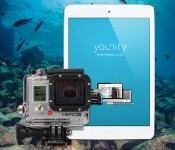
Engadget giveaway: win an iPad mini and GoPro Hero3+ Black Edition courtesy of younity!

Summer has long been the season of vacations, beach outings and BBQs, and that means documenting every possible moment on camera. It helps to have your tunes close at hand, too, in case the party’s about to jump off. The task of copying over playlists and organizing photos in the aftermath can be a pain, but younity’s personal cloud service could help simplify the task. Instead of syncing and storing data on the cloud, it turns all your devices into dedicated media streamers. That means you have centralized access to all of your files, regardless of which gadget they’re on — they just need to be connected to the internet. Younity also added GoPro integration, letting you discover, catalog and instantly share camera content right from your iPhone or iPad. That’s why this week, one lucky Engadget reader will be winning a GoPro Hero3+ Black Edition camera and an iPad mini. All you need to do is head down to the Rafflecopter widget below for up to three chances at winning this adventurous combo courtesy of the folks at younity.
- Entries are handled through the Rafflecopter widget above. Comments are no longer accepted as valid methods of entry. You may enter without any obligation to social media accounts, though we may offer them as opportunities for extra entries. Your email address is required so we can get in touch with you if you win, but it will not be given to third parties.
- Contest is open to all residents of the 50 States, the District of Columbia, and Canada (excluding Quebec), 18 or older! Sorry, we don’t make this rule (we hate excluding anyone), so direct your anger at our lawyers and contest laws if you have to be mad.
- Winners will be chosen randomly. One (1) winner will receive one (1) iPad mini (MF432LL/A 16GB WiFi), one (1) Tavik Drone case for iPad mini and one (1) GoPro Hero3+ Black Edition (CHDHX-302).
- If you are chosen, you will be notified by email. Winners must respond within three days of being contacted. If you do not respond within that period, another winner will be chosen. Make sure that the account you use to enter the contest includes your real name and a contact email or Facebook login. We do not track any of this information for marketing or third-party purposes.
- This unit is purely for promotional giveaway. Younity, GoPro, Apple and Engadget / AOL are not held liable to honor warranties, exchanges or customer service.
- The full list of rules, in all its legalese glory, can be found here.
- Entries can be submitted until July 30th at 11:59PM ET. Good luck!
Filed under: Announcements
.CPlase_panel display:none;
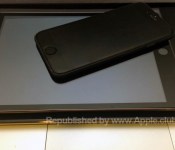
Questionable Claim of 30% Slimmer ‘iPad Mini Air’ Launching in Late 2014
According to a new report from Taiwan’s Economic Daily News, Apple’s third-generation iPad mini will be an “Air”-like model, featuring a design that shaves 30 percent off the thickness of the device. This thinness along with a powerful new A8 processor will be among the main selling points for the next generation iPad mini, claims the Asian sources (via GforGames).

While the sources of the rumor are given only as from the supply chain, the claim of a 30 percent thinner iPad mini seems to be an overly optimistic one. The original iPad mini measured 7.2 mm thick, and the device saw a slight increase to 7.5 mm with the move to a Retina display last year. The larger iPad Air moved in the opposite direction last year, slimming down from 9.4 mm in the fourth-generation iPad to match the Retina iPad mini at 7.5 mm.
A 30 percent reduction in thickness for the iPad mini would put it in the range of 5.25 mm, and how Apple would achieve such a reduction is unclear, especially given the increase in horsepower seen with the move to a Retina display last year. That move made the iPad Air and Retina iPad mini essentially identical with the exception of display size.
Apple is expected to release the updated iPad mini in the third quarter of 2014, likely following the iPhone 6 launch in September. Besides a possible thinner form factor and A8 processor, the next generation iPad mini also is expected to include a more durable Touch ID fingerprint sensor containing tin. Similar to the iPhone, the next generation iPad is expected to support iOS 8′s new SDK that allows third-party developers to access the fingerprint scanner for verification purposes.
Besides the iPad Air and iPad mini, Apple is rumored to be expanding its iPad lineup with a larger 12.9-inch iPad. Dubbed the “iPad Pro,” the larger model may not be released until 2015, claims DisplaySearch analyst David Hsieh. This prediction echoes a earlier report from KGI Securities Ming-Chi Kuo who also predicted a 2015 launch date for the oversized tablet device.
Retina iPad Mini as Low as $300 With Best Buy EDU Discounts [iOS Blog]
Best Buy is currently offering a $50 discount Apple’s Retina iPad mini as part of a Grad sale, dropping the price of the entry-level tablet to $349. Combined with a student deal that offers an additional $50 off, it’s possible to get a Retina iPad mini for as little as $300.

The combined $100 discount is good on any Retina iPad mini, cellular and WiFi and with all storage capacities. To take advantage of the full deal, a valid .EDU email address is required, but prospective buyers without an .EDU email address can still get a $50 discount on any Retina iPad mini.
The $50 grad sale will last from June 19 to June 21, while the $50 student discount will last until July 12.
Best Buy’s deep student discounts on 2014 MacBook Air models are still ongoing as well, dropping the price of the entry-level MacBook Air down to $649 with an .EDU email address. Students can also get $150 off any Mac by taking advantage of Best Buy’s student deals.
MacRumors is an affiliate partner of Best Buy.
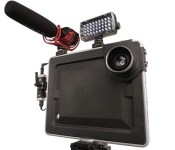
Padcaster’s tablet movie rig comes to the iPad Mini

The big iPad’s large, high-res screen is a plus for shooting video, but wielding it can make one look like, shall we say, a dork. One way to overcome that stigma is by shooting with the original Padcaster (pictured above), a metal frame that lets you mount your tablet on a tripod and attach lenses and other accessories. The company has now launched a version for the iPad Mini on Kickstarter, which you may prefer for its less bulky size but equally capable 1080p camera and (optional) retina screen. Like the last model, the Padcaster Mini consists of a frame with threaded holes for video accessories, a bracket for 72mm and 58mm lens adapters and a DSLR attachment if better video is needed. That’ll let journalists and bloggers broadcast live straight from an iPad, or even use it as a makeshift teleprompter or support to watch TV in bed, for instance. It’s now about halfway to its goal, so if you’re looking to cast in style from your own Mini, you can pledge at the source starting at $99.
Source: Kickstarter
 AIVAnet