


Apple Releases iOS 7.1 With CarPlay, Touch ID Improvements, Visual Tweaks
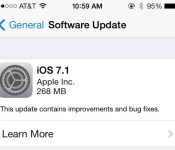
Following a lengthy beta testing period, Apple today released iOS 7.1 to the public, marking the first major update to iOS 7 since its September release. The update includes much-needed improvements to the Touch ID fingerprint recognition system built-in to the iPhone 5s, an update for a home screen crashing issue, and it brings CarPlay support, which was first unveiled by Apple last week.
Apple has launched a new website page that shows off some of the additions to iOS 7.1.
The update also includes multiple visual tweaks, such as revamped shift and caps locks keys on the keyboard, refined icons for the Phone, FaceTime, and Messages apps, and a redesign for several aspects of the Phone dialer and shutdown screen.

Accessibility has been improved with a new “Button Shapes” option that indicates where tappable areas are located, a “Darken Colors” option, and an enhancement to Contrast allowing users to reduce iOS 7’s white point.
A multitude of minor improvements to enhance the performance of the operating system have also been bundled into the update, such as new bounce animations in Control Center, more prominent buttons in the Music app, and a new event list view within the Calendar app. Full release notes are as follows:
CarPlay
– iOS experience designed for the car
– Simply connect your iPhone to a CarPlay enabled vehicle
– Supports Phone, Music, Maps, Messages, and 3rd-party audio apps
– Control with Siri and the car’s touchscreen, knobs, and buttonsSiri
– Manually control when Siri listens by holding down the home button while you speak and releasing it when you’re done as an alternative to letting Siri automatically notice when you stop talking
– New, more natural sounding male and female voices for Mandarin Chinese, UK English, Australian English, and JapaneseiTunes Radio
– Search field above Featured Stations to easily create stations based on your favorite artist or song
– Buy albums with the tap of a button from Now Playing
– Subscribe to iTunes Match on your iPhone, iPad, or iPod touch to enjoy iTunes Radio ad-freeCalendar
– Option to display events in month view
– Country specific holidays automatically added for many countriesAccessibility
– Bold font option now includes the keyboard, calculator, and many icon glyphs
– Reduce Motion option now includes Weather, Messages, and multitasking UI animations
– New options to display button shapes, darken app colors, and reduce white pointOther
– New Camera setting to automatically enable HDR for iPhone 5s
– iCloud Keychain support in additional countries
– FaceTime call notifications are automatically cleared when you answer a call on another device
– Fixes a bug that could occasionally cause a home screen crash
– Improves Touch ID fingerprint recognition
– Improved performance for iPhone 4
– Fixes display of Mail unread badge for numbers greater than 10,000
– Continued user interface refinements
The update officially disables the evasi0n iOS 7 jailbreak, patching key kernel exploits.
iOS 7.1 was first seeded to developers back in mid-November, following the launch of iOS 7.0.4. iOS 7.1 saw five developer betas, with the last beta coming on February 4.
iOS 7.1 can be downloaded via the software update tool in the settings menu on iOS devices. Users on devices upgrading from iOS 7.0.6 are seeing file sizes of approximately 268 MB, while those upgrading from a beta are seeing larger downloads of 1.3-1.4 GB.
Apple has also launched a new update for the Apple TV.
     |

Apple Releases Revamped iTunes Festival App Ahead of SXSW, iOS 7.1 Not Required
Apple today updated its iTunes Festival app to version 5.0, ahead of next week’s SXSW iTunes Festival, which kicks off on Tuesday, March 11. The iTunes Festival app [App Store Link] shows up in the iTunes Store with a revamped icon and is listed as having a “refreshed design” and support for SXSW, but the app isn’t available for download in the U.S. just yet.

Clicking on the download link results in an error message that asks users to try again later, but it will presumably be downloadable shortly. Users in other countries have been able to download the app with iOS 7.0.6, suggesting SXSW streaming does not require iOS 7.1 as was reported earlier this week.
Apple’s SXSW iTunes Festival is the first it has hosted in the United States, with previous iTunes Festivals occurring annually in London. The festival will offer five free nights of music, beginning on March 11 at Austin City Limits Live at the Moody Theater in Austin, Texas. Featured artists include Coldplay, Imagine Dragons, Kendrick Lamar, Soundgarden, Pitbull, Keith Urban, and more.
All of Apple’s iTunes Festival concerts are presented for free, with tickets available via a lottery system. Live and on-demand streams of the shows will be available through the revamped iTunes Festival app and via the Apple TV.
| |

MLB At Bat Updated for 2014 Baseball Season With Full iOS 7 Redesign [iOS Blog]
In what has become a yearly tradition for late February, Major League Baseball today updated its MLB At Bat app for the 2014 baseball season. The app, perennially one of the most popular — and highest grossing — on the App Store, received a top-to-bottom redesign to match iOS 7 and to improve the user experience.
Photos and video are more prevalent in At Bat, running edge-to-edge and inline with other content. For example, video embedded in a news article displays within the article itself, with users able to tap a full-screen button if they wish. The redesign emphasizes MLB’s aim to improve the fan experience and help technology augment the game and otherwise get out of the way.
Showing how the design team has embraced subtlety, text and selection highlights in the app change depending on which team a user selects as their “favorite”. For example, a Red Sox fan will see red highlights throughout the app, while a Yankees fan would see navy blue. A MLB spokesperson told MacRumors that the app is the mobile focus point for millions of baseball fans and the design teams strive to make the app seem like home, no matter which team they’re a fan of.

Long hailed as the standard bearer for introducing features that matter to fans, At Bat this year will report for live Spring Training games with a full app re-design for iOS 7 on iPhone and iPad, among other new enhancements. Fans again will have access to the core functionality At Bat has pioneered over its first five years, including: personalized team experiences to deliver a linear feed of content for a designated favorite team; searchable libraries of tens of thousands of video-on-demand highlight clips; and customizable original news reporting and fantasy baseball analysis from MLB.com club beat reporters and national columnists.
Like last year, there are two main subscription packages for the iPhone and iPad — a $130/season MLB.tv Premium offering that includes live home-and-away television broadcasts for out-of-market games, as well as live home-and-away radio broadcasts. It also includes the ability to watch on any device regardless of how the viewer purchases the package — users can buy MLB.tv Premium via a $130 in-app purchase can watch live games within the app, as well as on the Apple TV, Xbox, PlayStation or any number of other connected devices.
The cheaper At Bat 2014 product, available as a $20/season in-app purchase, offers home-and-away radio broadcasts with no blackout restrictions. Both the Premium and At Bat services are also available as month-to-month subscriptions, though the whole-season package is quite a bit cheaper than buying month-to-month.

MLB Advanced Media told MacRumors that the company is aware that customers would very much like to stream local games without blackout restrictions, but that the content deals to allow that are extremely complex and difficult to negotiate. It also is well into its iBeacon rollout and expects to have twenty ballparks outfitted with the devices by Opening Day. The At The Ballpark app will see an update before then to support the new iBeacons.
MLB At Bat is a free download from the App Store for iPhone and iPad. [Direct Link]
| |

Mad Catz C.T.R.L.i is an iOS 7 controller with Xbox heritage (hands-on)

Best known for its range of console and PC gaming accessories, Mad Catz has made huge strides over the past year to cater for mobile gamers. After it launched its M.O.J.O. Android gaming console in June, the peripheral maker has emerged at Mobile World Congress with C.T.R.L.i, its first controller to feature native support for iOS 7. While it’s still in the prototype stage (so new, we’re amongst the first to see it), the C.T.R.L.i is was fully playable when we discussed specifics with Mad Catz’s representative, allowing us to experience an almost final version of the gamepad before it launches publicly in April.
If the C.T.R.L.i looks familiar, that’s because it’s basically the same as the accessory maker’s award-winning MLG Pro Circuit controller for Xbox 360. Swapping consoles for handhelds, Mad Catz has introduced a spring-loaded mount to cater for Apple’s current iPhone range and any larger devices it may or may not decide to launch in the near future (cough, 5-inch iPhone, cough). The clip is fixed with a tiny screw, allowing iPad gamers to play wirelessly fear of a giant clip obstructing their view. In the past, iOS 7 controllers have been called out for their high price and low build quality, but in our short time with the C.T.R.L.i prototype, we were impressed with how stable the controller remained while we played, and our iPhone looked to be in no danger of falling out. When Mad Catz finally makes the Bluetooth gamepad available in early Spring, it’ll be available in black, white, blue, red, orange and will carry an $80 price-tag. That’s cheaper than the most MFi devices already on the market, but we’re still looking for that golden sticker price to make it a real impulse buy.
Steve Dent and Chris Velazco contributed to this report.

iOS 7.1 Still Slated for March, Could Include Mobile Device Management Improvements [iOS Blog]
 Previous rumors have indicated the first major update to iOS 7, iOS 7.1, will be released to the public in March after a testing period that initially began in November. AppleInsider today echoed those rumors with a report suggesting the release could come towards the middle of the month.
Citing an “unverified source,” the site specifically points to a March 15 release date, which is highly unlikely as it falls on a Saturday. A mid-March release date that falls near the 15th of the month is in line with previous March rumors, however.
AppleInsider‘s source suggests the release of iOS 7.1 is tied to the completion of new Mobile Device Management options designed to allow corporate and educational organizations to manage large numbers of devices.
The source stated Apple’s iOS 7.1 would include “over-the-air supervision, allowing iOS administrators to fully manage devices without the need for the much maligned Apple Configurator,” allowing organizations to instead deploy iOS devices via an MDM server.
Improvements to MDM options are said to include methods to prevent students from bypassing restrictions installed on school issued devices, a problem that surfaced after students in the L.A. school district were able to delete management profiles from their iPads back in September.
Apple has thus far provided five iOS 7.1 betas to developers, with the most recent beta released on February 4. Along with the rumored improvements to Mobile Device Management options, iOS 7.1 also offers a number of visual tweaks including revamped shift and caps locks keys on the keyboard, refined icons for the Phone, FaceTime, and Messages apps, and a new look for several aspects of the Phone dialer.
Details on features in past beta releases can be found in our previous beta posts: Beta 1, Beta 2, Beta 3, Beta 4 and Beta 5.
| |

‘MOGA Ace Power’ iOS 7 Game Controller Sees 20% Price Drop [iOS Blog]
MOGA has dropped the price of its Ace Power iOS 7 gaming controller to $80, down from $100. The controller was released back in November, the first of a number of iPhone-compatible game controllers that hit the market following the launch of iOS 7.
The MOGA controller includes a battery component that charges the iPhone to extend gameplay. There are a number of other similar controller devices on the market as well.

We wanted to let you know that as of this morning, the price of MOGA ACE POWER has been lowered to $79.99 MSRP in Apple Stores and most other retailers. These past few months have seen a huge influx of great controller-enabled iOS games onto the App Store, and to-date, MOGAAnywhere.com has curated a list of more than 120 of these games that now work with the MOGA ACE POWER controller.
The MOGA Ace Power is available from MOGA’s online store for $80. The Apple Online Store also has the controller available, but for the old $100 price.
| |
SwiftKey’s new iOS note-taking app syncs with Evernote

Will Apple ever open up its mobile platform to allow the use of third-party keyboards? Y’know, customizable boards that have features like clever word prediction algorithms and finger-swiping gestures? Despite CEO Tim Cook’s suggestion last May that we might see iOS open up more in the future, we’ve seen no strong indication that alternative keyboards are even on the drawing board at present time. Fortunately, some developers are finding small workarounds to this dilemma: even though they aren’t allowed to change the keyboard on the platform level, it’s possible to do so within third-party applications. Fleksy is a prime example of a company that’s thinking outside the box, opening up a developer kit allowing third parties to incorporate the Fleksy keyboard into their own app.
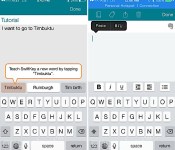
SwiftKey is also making the jump to iOS, but it’s taking a different approach: the keyboard maker just announced SwiftKey Note, a note-taking app that’s integrated with your Evernote account. This is great news for current Evernote users, and it may even be enough of an incentive for newbies to try it out. Using the new Note app, you’ll be able to create notes that sync up with the account on your desktop or other mobile app. But what’s more important is that you’ll have the help of SwiftKey’s trusty and faithful word prediction engine combined with the look of the default iOS 7 keyboard. We’ve got a gallery, video and additional impressions after the break.
However, this version of SwiftKey is much more minimal than what you can currently get on Android — essentially, you’re looking at an iOS 7 keyboard with an extra bar on top for word predictions and a few formatting options (if you swipe to the left on that bar, you’ll find a set of buttons for bold, underline, italics, indent and bullet points). We found that we could type faster on this keyboard than the standard iOS version, so it’s off to a decent start, but long-time fans of the Android version may be frustrated by the limited number of features. No swipe gestures, customizable themes, adjustable sizes or anything of the sort, at least not yet; this is the first version, after all, so we’re hopeful that SwiftKey will continue pouring more features into the project.
Still, for all that it’s missing, some of the key ingredients of a good note-taking keyboard are there. Not only do you get to enjoy the same word prediction engine found on the Android platform, the keyboard also gets smarter as you type; the more you do it, the more it’ll be able to figure out your patterns. (Again, this has been done on Android for a long time, but it’s refreshing to see on a platform like iOS.) To take it a step further, it also looks at your Evernote archive to get an idea of your personal writing style, and even keeps track of stats like how many keystrokes you’ve saved and how efficient SwiftKey makes you. Five languages are also currently supported: English, French, Spanish, German and Italian. The app is free and available on the App Store starting today on iPhones and iPads. It’ll work on devices running iOS 6 or higher, but the formatting options are only available for iOS 7. And who knows — perhaps the app will be enough to grab Sir Jony Ive’s attention.
Filed under: Cellphones, Wireless, Mobile, Apple

Apple Updates iWork for iCloud Apps With Flat iOS 7 Design, New Features
Apple today updated its iWork for iCloud web apps (via 9to5Mac), introducing an iOS 7-style “flat” redesign that includes a revamped look for the document library and template selection screen in Pages, Keynote, and Numbers. In addition to a new look, all three apps have also gained several new features, including the ability to add a password and share password protected documents with other users.

Continuing its efforts to add collaborative features to iWork for iCloud, Apple has also added new options to view files shared by other users within each app.
Each app has also received upgrades to bring the software more in line with Apple’s iWork Mac apps. Pages now supports floating tables, page numbers, page counts, and footnotes, along with keyboard shortcuts for resizing, rotating, and repositioning objects. Keynote offers the same keyboard shortcuts and support for floating tables, and all three apps have gained rich formatting of text in table cells and bug fixes and stability improvements.
Apple likely has plans to introduce additional updates to iWork for iCloud in the near future, bringing the iOS 7-style design to all elements of the apps. iWork for iCloud continues to lack some notable collaborative features, including the ability to track changes and comment on content.
The iWork for iCloud software is available to all users for free and it can be accessed through Apple’s iCloud.com website.
| |

SteelSeries launches the Stratus, the first wireless iOS 7 gamepad

With its new gaming protocols in iOS 7, Apple opened the door for gamepads that make use of the iPhone’s Lightning connector to bring assortment of inputs to iOS titles. Recognizing that not all iOS gamers own an iPhone, accessory maker SteelSeries has unveiled its new Stratus controller, becoming the first wireless gamepad to support Apple’s latest iOS platform in the process. Unlike Logitech’s PowerShell and PowerA’s MOGA Ace Power, the Stratus connects to an iPad, iPhone and the iPod touch via Bluetooth 2.1, putting four pressure sensitive face buttons, four shoulder buttons, dual analog sticks and a 4-way D-pad in a design that reminds us a little of Sega’s Genesis/Mega Drive gamepad, at least in black. While you won’t be able to attach your iOS device to the Stratus and play on the move, it does mean you can set it aside and play against up to three other players on the big screen via AirPlay. Without that additional clutter, the Stratus comes in significantly lighter than rival controllers, giving you around 10 hours playtime on a full (USB) charge. SteelSeries has already made the Stratus available for pre-order on its website for $99.99 / €99.99, you can find the link in the source below.
Filed under: Gaming, Handhelds, Mobile
Via: SteelSeries Press
Source: SteelSeries Status

Nokia pulls Here Maps from the App Store, blames iOS 7

In the wake of Maps-gate, Nokia was one of several outfits that rushed to Apple’s aid with a navigation app of its very own. A year later, however, and that same offering has been yanked from the App Store before it could send a note to its neighbors. When we asked, Nokia responded with the below quote, saying that iOS 7 harms the user experience of HERE, but users can still access the mobile edition of the service. Which is all well and good, unless you were a big fan of the app’s ability to cache offline data.
“We have made the decision to remove our HERE Maps app from the Apple App Store because recent changes to iOS 7 harm the user experience. iPhone users can continue to use the mobile web version of HERE Maps under m.here.com, offering them location needs, such as search, routing, orientation, transit information and more, all completely free of charge.”
Filed under: Cellphones, GPS, Mobile, Apple, Nokia
Via: Nokia Power User
Source: Indian Express, iTunes (Broken link)
 AIVAnet