



You can buy a Nexus 9 for half price, but only if you’re quick

HTC has decided that it doesn’t want to follow the herd when it comes to slashing prices just before the gadget-buying apocalypse that is Black Friday. That’s why, instead, the company will ape an Amazon-style flash sale by offering a single, cut-price device every Tuesday for the next nine weeks. First up, we’ve got the brand new Nexus 9, which is available for $199, 50 percent off the regular $399 price. Unfortunately, HTC will only sell you a limited quantity of the Lollipop-running tablet at such a deep discount, so Johnny latecomer will have to settle for just $50 knocked-off the 16GB or 32GB edition of the slate. The deal is open from now until midnight ET / 9PM PT, so you’d best get a move on if you want to save your cash.
Photo by Will Lipman
Filed under: Tablets, Mobile, HTC, Google
Source: HTC Hot Deals
HTC kicks off Hot Deals program with half price Nexus 9 (16GB for $199) [Update: Andddd they’re gone]

UPDATE: HTC says they’re completely out and will have something else to share with you all.
Looking to scoop up a Nexus 9 tablet for yourself? Why not buy it directly from HTC who just happens to have the tablet at $199 for the 16GB model. As part of the hardware maker’s new Hot Deals program, the Android 5.0 tablet is half its normal price. As you can imagine, this is a limited time deal and subject to quantities on hand. But, if there are enough of these tablets to go around, you can get in on this by 9PM PST.
Should you miss out on the deal you can still take advantage of a good, but not as great offer, of $50 off the Nexus 9. HTC will discount both 16 GB or 32 GB for everyone who purchases by 9 p.m. PT/midnight ET on Tuesday.
The post HTC kicks off Hot Deals program with half price Nexus 9 (16GB for $199) [Update: Andddd they’re gone] appeared first on AndroidGuys.
Nexus 9 teardown reveals that it won’t be easy to repair

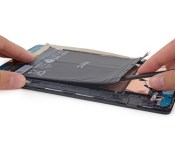
The folks at iFixit took apart the Nexus 9, which of course revealed a lot of super cool hardware like the 64-bit Tegra K1. However, the teardown also revealed that if you’re looking to fix it on your own, it won’t be so easy. On a scale of 1 to 10 with 10 being super easy, the Nexus 9 scored a 3.
Removing the rear case is easy enough, but once you get inside the “interior is a maze of tape and thin, delicate cables,” making your job very tedious. Even replacing the display proved to be difficult as it’s “insanely very solidly glued to the midframe.”

Now that’s out of the way, does this information impact your decision to buy the Nexus 9? I don’t plan on ever repairing any tablet so it doesn’t make as much of difference to me as the 4:3 ratio.
source: iFixit
Come comment on this article: Nexus 9 teardown reveals that it won’t be easy to repair

[Smoking Hot Deal] HTC kicks of 9 weeks of Hot Deals with the Nexus 9 (16 GB) for only $199

HTC is going to host a Hot Deal each week for the next 9 weeks, and the first one is a doozy. Starting right now (12:00 PM EST / 9:00 AM PST), you can grab the 16 GB version of the Nexus 9 from their site for only $199. That’s a whopping 50% discount off of the normal $399 price.
This hot deal is 12 hours long, but supplies are very limited and unlikely to last the entire time. Once supplies for the Hot Deal are depleted, you can still save $50 off of either the 16 GB or 32 GB version provided you enter your order in by 12:00 am EST / 9:00 pm PST. That would put you at $349 for the 16 GB version or $429 for the 32 GB version.
HTC is going to run a new Hot Deal each week for the next 9 weeks so look for a post from us or check their Facebook and Twitter feeds (#HTCHotDeals) every Tuesday at 12:00 pm EST / 9:00 am PST. If this deal is any indication of things to come, you won’t want to miss out.
source: HTC Hot Deals
Come comment on this article: [Smoking Hot Deal] HTC kicks of 9 weeks of Hot Deals with the Nexus 9 (16 GB) for only $199

HTC Desire 820s is now official

For whatever reason HTC decided to offer a new variant of the Desire 820, dubbed the Desire 820s. From what we can tell, the only difference is the processor. It’s still 64-bit and octa-core, but instead of the Qualcomm Snapdragon 615, you get a MediaTek MT6752. Both use Cortex-A53 cores, but the MediaTek clocks all the cores at 1.7 GHz, while the Snapdragon clocks half of the cores at 1.5 GHz and the other half at 1 GHz.
They are also paired with different GPUs. The MediaTek gets the Mali-T760, while the Snapdragon has the Adreno 405.
The rest of the specs appear to be identical, which include 2 GB of RAM, 16 GB of internal storage, 13 MP main camera, 8 MP front-facing camera,and BoomSound speakers.
No pricing or availability was announced.
sources: Weibo (1) (2)
via: G4Games
Come comment on this article: HTC Desire 820s is now official

AT&T to carry HTC Desire Eye, Re Camera on November 7

AT&T announced yesterday that it will soon offer the selfie-centered HTC Desire Eye starting later this week. Arriving on November 7, the Coral Reef (white) colored Android handset features a pair of 13-megapixel rear cameras, a 5.2-inch display, and a host of upper-end hardware. Internally you’ll find a 2.3GHz quad-core processor, 16GB storage (microSD expansion up to 128GB), and a 2400mAh battery.
The Desire Eye will sell for $149.99 with a two-year service agreement or $549.99 outright. Qualified customers can purchase the device on an AT&T Next plan. Two options include $0 down $22.92/month on Next 18 or $27.50/month on Next 12.
Also joining the carrier’s lineup that day is HTC’s standalone, waterproof camera. The Re Camera will retail for $199 by itself however AT&T is offering a discount if purchased with the Desire Eye. Purchase the smartphone on a Next plan or two-year contract and you can save $50 on the handheld camera.
The post AT&T to carry HTC Desire Eye, Re Camera on November 7 appeared first on AndroidGuys.

Let the countdown begin for Lollipop on the HTC One (M8) and (M7)

Last summer when HTC announced the new HTC One (M8) smartphone, part of their big news was a commitment to rolling out updates to Android on the device in a more timely fashion. This was obviously in response to criticism from the market that HTC lagged, if they even got around it, at updating their devices. Thus the HTC Advantage program was born to not only get updates out more quickly, but to keep devices current for at least a couple years.
Trying to live up to their commitment, HTC’s Mo Versi announced via a tweet today that they had received the final Android Lollipop code from Google. Earlier this year HTC indicated that they would have the new version of Android ready for both the HTC One (M8) and the HTC One (M7) within 90 days of receiving the code, so the countdown has started.
Just because HTC thinks they can get Lollipop ready for their flagship devices by February 1st does not mean users will have it then. International customers could see an update hit their devices within that 90 day window. U.S. customers will probably see an additional delay while carriers work to certify the update for devices on their networks.
The major smartphone manufacturers seem to have figured out that there is a large contingent of customers that want Android updates for their devices in short order after release. Samsung is working on Lollipop for the Galaxy S 5 to be released by December and LG is doing the same for the LG G3. The pressure will increasingly be on carriers to accelerate their verification efforts.

source: @moversi
Come comment on this article: Let the countdown begin for Lollipop on the HTC One (M8) and (M7)

HTC publishes companion app for its RE Camera

The RE Camera is coming as soon as November 15, and there is still some software preparation to be done. To control the RE Camera with your device, HTC has released a companion app. The RE app pairs devices to sync it with photos and videos without the need for a wired connection. It also allows users to view live what the RE Camera sees. The app works with Android 4.3 and above.
Hit the break for the video, gallery, and download links.
Click here to view the embedded video.


Come comment on this article: HTC publishes companion app for its RE Camera

AT&T launches new HTC phones, Lumia 830 and G Watch R on November 7th

When it rains, it pours — on top of its Galaxy Note Edge announcement, AT&T has unveiled launch plans for no less than six smart devices that should reach stores by November 7th. It’ll be a particularly big day for HTC fans, who’ll get the Desire Eye ($150 on contract, $550 off), One (M8) for Windows ($200/$670) and RE camera ($199 contract-free). And that’s just the start. The previously promised Lumia 830 will arrive at the same time, costing $100 on contract and $450 up front; you’ll get a free Fitbit Flex activity tracker with the Windows Phone if you act quickly. Meanwhile, smartwatch lovers will like that both LG’s G Watch R and Motorola’s Moto 360 will go on sale for respective prices of $299 and $249. That’s a lot of release info to digest, but it’s hard to complain too much about getting so many gadgets in one day.
Filed under: Cellphones, Wearables, Mobile, Microsoft, HTC, Nokia, AT&T, LG, Lenovo

Google Nexus 9 review: The first taste of Lollipop is a sweet one

It’s been nearly five years since Google released its very first Nexus device, and by now we all basically get what the Nexus name stands for. It’s all about building devices to show off the bleeding-edge version of Android, to give us a better sense of Google’s vision of our collective mobile future. That future isn’t just phones, either: It’s about screens of all sizes, and that’s why Google and HTC teamed up to build the new Nexus 9. Now that ancestors like the Nexus 7 and 10 have been forcibly shuffled off this mortal coil, the 9 stands alone as the sole tablet in Google’s Nexus hardware lineup. So, does it live up to the standard geeks expect from the Nexus name? And more importantly, is it actually worth the asking price?
Hardware
Forget rewriting the rule book: When it comes to design, Google and HTC wanted to keep the Nexus 9 looking as subtle — and as familiar — as possible. Don’t believe me? A quick look at its backside should prove my point. Putting that sturdy aluminum frame aside, you’d think someone threw a shrink ray in reverse and aimed it at last year’s Nexus 5. That broad, gently curving expanse of matte black plastic is punctuated by a big Nexus logo in the center, while a familiar-looking 8-megapixel camera and LED flash sit prominently in the top-left corner. Those telltale angled edges are back too, housing the power button and volume rocker and sloping to meet the Nexus 9’s understated face. A pair of hefty horizontal bezels frames the top and bottom of that 8.9-inch display (they’re thankfully not as heinous as the ones on the Nexus 7), which happens to be where HTC’s pair of BoomSound speakers live. Throw in a 1.6-megapixel camera just north of the screen and you’ve got the Nexus 9’s appearance in a nutshell.
There’s a certain thrill in seeing how hardware design shifts year after year, but neither HTC nor Google was trying to break new ground this time around. And that was entirely by design, of course. After all, the star of the show is Android 5.0 Lollipop (much more on that later), and the design buffs working on the 9 were seemingly more than happy to let the tablet’s looks fade into the background. If anything, it’s what’s inside that makes the biggest difference. The quad-core Qualcomm silicon that powered the 2013 Nexus 7 has been dumped in favor of NVIDIA’s new 64-bit, dual-core Tegra K1 chipset with 2GB of RAM. That step back to a 2.3GHz dual-core processor might sound like a downgrade at first blush, but you can rest easy knowing that’s not the case (especially when it comes to graphics performance, but more on that in a moment). The Nexus 9 I tested is a little pricier than the most basic version because it comes loaded with 32GB of internal storage — no expandable memory here — though it doesn’t have a 3G/LTE radio like the top-tier model.

Let’s put those technicalities aside for a bit, though. How does this thing feel? If I’m honest, a 9-inch tablet (especially one that weighs in at 15 ounces) can feel awkward to use at times, even though the package itself is undeniably sturdy and well-constructed. That probably sounds a little odd considering it’s just about the same thickness as a Retina display iPad mini, but we’ve got the Nexus 9’s weightier plastic-and-aluminum hybrid build to thank for that. Even though it only tips the scales at 15 ounces (0.94 pound), it’s still noticeably heavier in my hands than the 8.4-inch Samsung Galaxy Tab S and Amazon’s Kindle Fire HDX 8.9. In fact, it’s just a teensy bit lighter than the new iPad Air 2, despite Apple’s tablet having a thinner frame, plus a bigger screen and battery.
Yes, yes, it’s been made clear that the Nexus 9 isn’t meant to be an iPad killer, but I still can’t help but wish Google and HTC pushed the envelope a bit more here. Your mileage might vary, but over the days I’ve been testing it, the 9 feels just a little too dense, too large to grasp with a single hand for long periods of time, while full-on two-hand typing on that screen can be a little precarious. HTC’s put together a little something just for that scenario — a surprisingly handsome physical keyboard case — but I didn’t have the chance to try one out. Long story short: The Nexus 9 lives in the upper strata of the no-man’s-land between more popular 7- and 10-inch tablets, and it would’ve been nice to see Google and HTC pay a little more attention to the minute details that make big tablets feel handier.
Display and sound

Don’t take this the wrong way, but after five days of testing the Nexus 9, I stopped paying the screen any mind. Sounds weird, I know, but it’s not because it’s lacking. The Nexus 9’s namesake 9-inch display, with its bright colors and respectable viewing angles, is more pleasant than it is jaw-dropping. Consider it another example of HTC and Google not worrying about pushing an envelope.
Alright, let’s dig into things a little further. This time around, HTC went with a screen that runs at 2,048 x 1,536, which means it squeezes 281 pixels into each linear inch. In case you’re keeping tabs, that isn’t quite as densely crisp as the panels in Samsung’s 8.4-inch Galaxy Tab S (359 ppi) or the Kindle Fire HDX 8.9 (339 ppi), but you’re still not going to pick out individual pixels without a magnifying glass and a persnickety personality. By nature, the Nexus 9’s IPS LCD also isn’t as sumptuous (or as easy on the battery) as the typically gorgeous AMOLED screens that grace some of its competitors, but that’s no dealbreaker. All told, the Nexus 9’s LCD is really a good screen, just not an outstanding one. Google sure knows it, too — the search giant carefully avoids crowing about the display quality on the Nexus 9’s product page, noting only that its size makes it both portable and immersive. You won’t hear any arguments against that logic.

I’ve loved HTC’s BoomSound speakers since they first graced the One M7, so it’s no surprise that I had high hopes for the Nexus 9. Alas, thanks to the lack of HTC’s audio-enhancing software and the seemingly smaller drivers moving that air around, these speakers don’t live up to the bar set by the ones on the One M8. Tight, energetic rock? Mellow jazz, laden with husky vocals? Soaring orchestral suites? I tried them all, and the results were the same each time: They all sounded more subdued and muddled than I’d hoped. Now, lest you think I’m being harsh, the speakers aren’t bad by any stretch. They get plenty loud (though not as loud as the M8) and still have enough nuance to draw you into whatever video you happen to be watching. It’s just that the crisp channel separation you’d get out of the M8’s BoomSound speakers is missing here, and so is the bright, vibrant sound that’s been a hallmark of HTC’s high-end phones. Bummer.
Software
Now we’re getting to the good stuff. Like all Nexus devices, the 9 isn’t just meant to be a solid tablet. No, no: It’s meant to be the standard-bearer of Google’s Android tablet vision, a device that highlights the best that Android is capable of. That’s basically just a long-winded way of me saying the Nexus 9 comes loaded with a shiny new build of Android 5.0 Lollipop. We’ve got a full initial preview for you right here, but read on for my distinctly tablet-y impressions. Still with me? Good. Brevity is apparently the soul of wit, so I can sum up what it’s like to use Lollipop in just a few words: It’s stunningly smooth.
Part of that’s because of the NVIDIA chipset thrumming away inside the 9’s metal-and-plastic frame, but really, the Android team deserves a lot of credit for crafting an experience that feels damned near seamless. You’ll probably notice that bump in speed and responsiveness most when you’re swiping through multiple home screens and sifting through all your open apps; the latter feels outrageously quick, without a hint of lag on my test unit. Even better, app previews show up nearly instantaneously once the simulated inertia starts to slow down those app cards in motion. Speaking of apps, they launch quickly and run with fewer hiccups than on other similarly specced devices, though those rocket starts tend to slow down a touch when you’ve got loads of apps going at the same time. C’est la vie.

We’ve got Google’s newish Android Runtime (better known as ART) to thank for that. With Android 5.0, Google’s team officially ditched its old-school Dalvik runtime in favor of ART, which it promised would offer some noticeable app performance gains. Why? It’s because certain key bits of code are converted into native machine code the device can interpret when the app is installed, instead of every time the app is launched. You probably didn’t need to know that, but hey — it’s what we’re here for. In the end, just about every interaction I had with the Nexus 9 felt snappier than I expected, especially since I avoided the Android L Developer Preview. (What can I say? I like surprises.) Nicely done, Mountain View.
And there are the unsung heroes, the features that make Lollipop just that much more pleasurable to use. A quick double-tap on the screen will rouse the 9 from its slumber, for instance — no more fumbling for that hard-to-reach power button when the tablet’s resting on your desk. Priority notifications, which can be toggled from the notification shade, ensure that you can get your productivity on without the risk of getting distracted by the din of Facebook updates and chirping Hangouts messages. The ability to add new users and restricted profiles is back too (you can have up to eight total), but it’s also joined by the option to “pin” certain apps into place so unwitting guests can’t pop out of them and root through your stuff. With a little bit of coaxing (by which I mean a quick jaunt into the separate Google Settings app), you can teach your Nexus 9 to listen for that trademark “OK Google” command even when the screen is off, too. The reality isn’t quite as good as the promise, though: While Google Now can pick up questions and commands issued in hushed tones, I had to raise my voice a few decibels each time I wanted to wake up the tablet with a question.

Of course, not all of Lollipop’s big changes take place behind the scenes: Android as we know it has gotten a hefty face-lift thanks to Matias Duarte and the rest of Google’s mobile design team. Just about every trace of the cold, digital Holo aesthetic has been excised, replaced by something vibrant, warmer and a little more physical. It’s Material Design, and it’s here to stay.
In its simplest form, the story of Material Design is one centered on a new approach to colors, layers and motion. The first bit is easy enough to explain. Material Design plays host to lots of vivid colors, from the red and deep salmon of the excellent new dual-paned Gmail app (a tablet exclusive) to the greenish teal and light blue that give the stock Calculator app a new dose of personality. Meanwhile, some of Google’s stock apps aren’t flat any more. Elements are layered like sheets of paper stacked atop each other, with subtle drop shadows to keep everything distinct.
And that focus on motion? It’s meant to help keep things feeling consistently physical. Remember the inertia I mentioned when it came time to swiping through app cards? That’s part of it. So is the app launcher button’s explosion and expansion into the app tray itself — Google wants us to feel like the bits and bobs that spring to life on the Nexus 9’s screen stem directly from where we touch. Here’s the big thing to remember, though: Duarte says that Material Design is going to be a focal point of sorts for all of Google’s properties going forward. Web apps? Chrome OS? It’ll all get the same kind of visual revamp down the road, though I’d advise against holding your breath until all that happens. These things take time.
Camera

Let’s face it: Tablet cameras are rarely ever anything to write home about, and the pair of shooters shoehorned into the Nexus 9 don’t do anything to buck that trend. The pair in question consists of an 8-megapixel main camera around back and the selfie-friendly 1.6-megapixel front-facer located right above the screen. There’s still a weird stigma attached to using a tablet camera for on-the-go photography, but if you do that, expect the results out of that rear camera to be mostly crisp and well-saturated. As always, quality starts to take a dive when the photons start getting scarce, and it isn’t long before you start seeing grain infiltrating your photos. Meanwhile, the front camera (low-resolution as it is) yields photos that are mostly smudgy and unsatisfying. It’ll do in a pinch for a video Hangout, but you’d best turn to your phone when it comes time to snap a selfie or six. Video quality lies in the middle of the road too: The Nexus 9 can shoot 1080p footage and it’s usually quite nice until the ambient sound levels pick up and you’re left with some messy audio.
All of the above is driven by Google’ stock Camera app, and guess what: It’s about as straightforward an experience as you’ll find. Wanna snap a photo? Nudge that gigantic, rectangular shutter button. Swiping from left to right lets you jump among shooting standard photos, Photo Spheres (remember those?), panoramas and videos. A deeper dive into the settings lets you decide whether you want location data to be saved with each shot, and if you want manual exposure controls for even more granular shot-taking. Feel free to leave that particular option unchecked though; most of my best shots came about through careless pointing and shooting.
Performance
| Google Nexus 9 |
Samsung Galaxy Tab S**
|
NVIDIA Shield tablet | iPad Air 2 | |
|---|---|---|---|---|
| Quadrant 2.0 | 13,737 | 18,597 | 20,556 | N/A |
| Vellamo 2.0 | 2,653 | 1,672 | 3,055 | N/A |
| SunSpider 1.0.2* (ms) | 948.3 | 1,109 | 463 | 303 |
| 3DMark IS Unlimited | 24,256 | 12,431 | 30,970 | 21,659 |
| GFXBench 3.0 Manhattan Offscreen (fps) | 31 | 5.5 | 31 | 32.4 |
| CF-Bench | 18,495 | 31,695 | 43,033 | N/A |
|
*SunSpider: Lower scores are better. **Average scores for the 8.4- and 10.5-inch models. |
||||
This might go without saying, but I can’t help but feel the Nexus 9 really got short-changed when it came to our usual slew of benchmarks, thanks at least in part to the architecture of NVIDIA’s 64-bit Tegra K1 chipset. You see, this version of the K1 has a dual-core processor configuration rather than the quartet of cores the 32-bit edition spotted in the NVIDIA Shield tablet, and that made for some rather interesting dips in the 9’s Quadrant and CF-Bench scores. That said, the Nexus 9 put up some stronger numbers when it came to tests that relied on more visual pizzazz, like GFXBench’s offscreen Manhattan rendering and 3DMark’s Ice Storm. Curious, I pitted the K1-toting Nexus 9 and Shield tablet against each other in a few more tests — the 9 boasted a stronger single-core score than the Shield in Geekbench 3 (1,643 vs. 1,074), but the multi-core score definitely skewed in the Shield’s favor.

The thing about these synthetic benchmarks is that they can’t tell the true story of a gadget all on their lonesome. Going off the numbers you see above would lead you to believe that the Nexus 9 is some sort of mediocre also-ran. If you glean one thing from this section, make sure it’s the knowledge that despite some seemingly off-kilter numbers, the Nexus 9 can and will handle just about anything you throw at it. As I made abundantly clear in the software section, the Nexus 9 runs incredibly smoothly while you poke around the OS and launch apps. That sort of computational oomph carries over into graphically intense situations like games, too — just what you’d expect from a chipset with the K1’s pedigree. You might remember that the quad-core, 32-bit version was featured in NVIDIA’s own Shield tablet not long ago, where it helped the thing push pixels with plenty of grace and fluidity.
The 64-bit variant (and its similar assortment of 192 Kepler GPU cores) inside the Nexus 9 is meant to step things up even further, and it shows. Watching the events of République unfold was as fluid and as engrossing an experience as I’ve seen on a tablet, and taking hard corners in Asphalt 8 looked as gorgeous as ever, even with its graphics settings cranked up. There’s just one concerning bit to note: The top-right corner of the tablet (presumably where its brains are located) can get very warm once you starting pushing it around. In my case, it was most apparent while swatting at pumpkin-headed zombies in Dead Trigger 2 — I haven’t noticed the thing getting alarmingly hot, but I did occasionally wonder whether I was gripping a tablet or a warm cup of tea.
Google claims that the Nexus 9’s battery will hang in there for about 9.5 hours on a charge if you’re surfing the web or watching videos, and my initial spin with the slate fell just short of that mark. It was nothing if not an able companion as I plowed through my daily routine, sticking with me through about 12 hours of mixed usage (you know, web browsing, shooting off emails, the odd gaming break in the bathroom, with plenty of standby time mixed in between). The first few times through our standard video rundown test (with an HD video set to loop indefinitely while screen brightness is locked at 50 percent), the Nexus 9 usually managed to hang in there for about 9 hours and 10 minutes before giving up the ghost. Here’s the thing, though: Google dropped one last big software update on us yesterday — it’s the version that’s shipping on the Nexus 9s you’ll get — and right now I’m retesting the battery to see if we can squeeze even more out of it.
Configuration options and the competition

After slogging through those thousands of words, you’ve probably got a good sense of what the Nexus 9 brings to the table. Right now you can claim either a WiFi-only Lunar White or Indigo Black model with 16GB of internal storage for $399 (there’s a handsome Sand model that isn’t ready just yet). Since you don’t have the option of sticking a memory card in there, you’ll probably want to shell out the extra $80 to double your storage capacity too. Oh, what’s that? You’re a big spender? As the most premium member of the family, the 32GB LTE/HSPA+/EV-DO/GSM model will be right up your alley — it’s not quite ready for public consumption yet, but it’ll cost $599 when it ships. Now the question is, well, what other tablets out there are worth your cash and consideration?
As I noted before, the Nexus 9’s screen — while totally adequate — is unlikely to knock your socks off. If that’s the sort of experience you’re after, consider Samsung’s Galaxy Tab S family, a pair of ultra-slim slates that pack some of the prettiest Super AMOLED screens we’ve ever seen. The most basic model runs at $400, and has a slightly smaller 8.4-inch display running at a mind-boggling 2,560 x 1,600 (that’s the most pixel-dense AMOLED you can find on a tablet). That’s not to say there aren’t trade-offs, though. The combination of Samsung’s bloatware fetish and the tablet’s 1.9GHz Exynos 5 Octa 5420 processor means you’re prone to hit more hiccups than on the Nexus 9.
Meanwhile, if you’re a media buff who digs the idea of a nearly 9-inch screen, you’ll want to consider Amazon’s Kindle Fire HDX 8.9. Its screen measures the same diagonally as the Nexus 9, but it squeezes even more pixels into all that space, and the aspect ratio is stretched out to a more video-friendly 16:10 so you can plow through all those Amazon Prime movies with fewer black bars in sight. The plus side: Amazon didn’t pussyfoot around with design, so it’s noticeably slimmer and lighter than the Nexus 9 to boot. It’s just a touch cheaper than the Nexus 9, too: The basic 16GB WiFi model will only set you back $379.
Of course, all of the above assumes you’re already dead-set on an Android slate. If that’s not the case, you’ll want to consider Apple’s iPad Air 2: It’s thinner and roughly the same weight as the Nexus 9 despite its bigger screen, and it starts at $499 if you think 16GB of storage will suffice. And in the event you’re looking for a taste of untainted Lollipop, let me offer a more unorthodox choice: How about the Nexus 6? Its 6-inch screen means it’s close enough to tablet territory for some people, and for now, the Android 5.0 pickings are pretty slim. Of course, you’ll want to wait until we publish our full Nexus 6 review before deciding one way or the other, but it’s at least worth keeping in the back of your head.
Wrap-up

I didn’t expect to feel so torn about the Nexus 9. On the one hand, Android 5.0 Lollipop is refreshing, what with its snappiness and welcoming redesign. On the other, I can’t help but feel a little frustrated that Google and HTC compromised on the Nexus 9’s screen, speakers and design. I get the rationale. The software’s the real highlight here, so they didn’t feel the need to go bonkers with the hardware niceties (and the costs that come with them). What that all boils down to is a tablet that’s stunning in some ways and seemingly average in others. Long story short: If you want to live on Android’s bleeding edge, buy a Nexus 9. Buy it because of Lollipop. Those few shortcomings won’t overshadow all the good that Google and HTC have done here. But if that’s not you — if you don’t demand the latest software that springs forth from Mountain View’s depths as soon as it’s ready — there are plenty of attractive options that might fit your life a little better.
Photos by Will Lipman. Sean Buckley contributed to this story.

