



HTC Dot View app gets third-party notifications, music controls, and holiday surprises

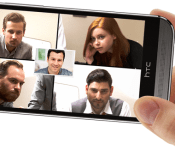
Today, HTC brings some of the most-requested features to its companion application for the Dot View case. The Dot View case will now show third-party notifications from any app. Previously, developers had to take advantage of the technology and do it themselves. In addition to having a third-party app icon appear on the display with the case closed, a user can swipe up for quick launch. Then the app will appear when opening the case. HTC also brought music controls so you do not have to open the case and hop around just to pause or skip a song.
In the changelog for the app, HTC says that it has included “new secret features.” It seems that the company is going to celebrate some holidays starting with Halloween. The app’s Google Play page shows a screenshot of a carved pumpkin. We expect that more holidays and seasons will be included over time.
Hit the break for the gallery and download links.


Come comment on this article: HTC Dot View app gets third-party notifications, music controls, and holiday surprises
HTC pushing Eye Experience update with Android 4.4.4 to unlocked One (M8) on Tuesday

The Eye Experience is coming to the HTC One (M8). On Tuesday, HTC will be rolling out a software update to the unlocked version of the One (M8) that includes Android 4.4.4 alongside the Eye Experience. The company’s vice president of Product Management, Mo Versi, tweeted the news on Monday night.
Other owners of the One (M8) should expect an identical update in early November.
Click here to view the embedded video.
Source: @moversi (Twitter)
Come comment on this article: HTC pushing Eye Experience update with Android 4.4.4 to unlocked One (M8) on Tuesday
Engadget giveaway: win a One (M8) Phunk Studio Edition courtesy of HTC!

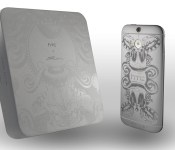
Back in August, we mentioned that HTC would be sending a customized HTC One M8 Phunk Studio Edition handset our way to mark the start of the design collective’s Wonderment exhibition. Well, your patience has finally been rewarded: We have one in a limited edition of 64 handsets ready to deliver to a lucky Engadget reader this week. Not only will you get one of the top smartphones out on the market, but you’ll have a work of art and guaranteed conversation starter as well. It’s up to you whether you display it on a shelf or drop it in your pocket on a daily basis, but you probably won’t want to cover up the metal unibody’s laser-etched artwork with a case. You will need to head to the Rafflecopter widget below, though, if you want up to three chances at winning the latest in a growing line of special editions from HTC.
- Entries are handled through the Rafflecopter widget above. Comments are no longer accepted as valid methods of entry. You may enter without any obligation to social media accounts, though we may offer them as opportunities for extra entries. Your email address is required so we can get in touch with you if you win, but it will not be given to third parties.
- Contest is open to all residents of the 50 States, the District of Columbia, and Canada (excluding Quebec), 18 or older! Sorry, we don’t make this rule (we hate excluding anyone), so direct your anger at our lawyers and contest laws if you have to be mad.
- Winners will be chosen randomly. One (1) winner will receive one (1) HTC One (M8) PHUNK Studio limited edition smartphone with custom etching.
- If you are chosen, you will be notified by email. Winners must respond within three days of being contacted. If you do not respond within that period, another winner will be chosen. Make sure that the account you use to enter the contest includes your real name and a contact email or Facebook login. We do not track any of this information for marketing or third-party purposes.
- This unit is purely for promotional giveaway. HTC and Engadget / AOL are not held liable to honor warranties, exchanges or customer service.
- The full list of rules, in all its legalese glory, can be found here.
- Entries can be submitted until October 8th at 11:59PM ET. Good luck!
Filed under: Announcements, HTC
.CPlase_panel display:none;
Meet Engadget’s new buyer’s guide picks: The iPhone 6, Moto X and more!

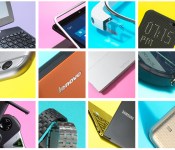
Here at Engadget, we make good on our promises. So when we say we’re going to be updating our buyer’s guide more frequently, well, gosh darn, we mean it. Roughly two months after we re-launched the guide, we’re adding a bunch of new gadgets, including the iPhone 6 and 6 Plus, the new Moto X, HTC One M8 for Windows, the Acer C720 Chromebook, the NVIDIA Shield gaming tablet and the Moto 360 smartwatch. Of course, we also had to remove some of our original picks to make room for the new ones: The new, 5.2-inch Moto X takes the place of the old 4.7-inch one, while the Moto 360 overtakes the Samsung Gear Live — formerly our favorite Android Wear device. We’re also getting rid of all the BlackBerrys for now. That’s not to say BBM hold-outs should switch operating systems, but until we get to try the new BlackBerry Passport, we’re going to refrain from including those older models. Check out our guide right here, and stay tuned for more updates next month — who knows what we’ll be adding then!
Filed under: Announcements, Apple, HTC, NVIDIA
.CPlase_panel display:none;
Accessory of the Day: HTC One M8 hybrid case $17.98

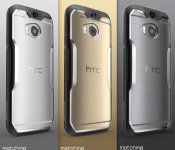
I can’t tell you how many times I’ve dropped my device outside, or on my balcony, this Summer only to kick myself for not having put a case on sooner. One of the nicer offerings I’ve come across in some time is this thermoplastic polyurethane and hard polycarbonate hybrid protective case (say that 5 times, fast) for the HTC One M8. Offered in seven color variations, it’s sure to match your device or stylistic preference. With incredible customer feedback ratings and priced under $20 (shipped), you’ll be hard pressed to find a reason to pass on this deal.
We're Hiring! Click here to learn more!
The post Accessory of the Day: HTC One M8 hybrid case $17.98 appeared first on AndroidGuys.
.CPlase_panel display:none;

Engadget giveaway: win an HTC One M8 courtesy of MapHook!

Albums worth of photos and scattered receipts may serve as breadcrumbs when you’re trying to revisit your travels, but they’re far from an ideal solution. MapHook has an alternative, though, with its free Android and iOS app that lets you tag your stops on a map, add photos, video and notes about what you saw and even share the trip with close friends or the general public. Not only can you get insights from other travelers, but MapHook is also powered by sources like Yelp, Foursquare, Wikipedia, Groupon and more. You’ll have tips, deals and details on local hot spots and points of interest to enhance your adventure. To help one lucky Engadget reader get started, MapHook has even provided a new HTC One M8. All you need to do is head down to the Rafflecopter widget below for up to three chances at winning. It’ll go a long way towards helping you remember that place you went that one time.
a Rafflecopter giveaway
- Entries are handled through the Rafflecopter widget above. Comments are no longer accepted as valid methods of entry. You may enter without any obligation to social media accounts, though we may offer them as opportunities for extra entries. Your email address is required so we can get in touch with you if you win, but it will not be given to third parties.
- Contest is open to all residents of the 50 States, the District of Columbia, and Canada (excluding Quebec), 18 or older! Sorry, we don’t make this rule (we hate excluding anyone), so direct your anger at our lawyers and contest laws if you have to be mad.
- Winners will be chosen randomly. One (1) winners will receive one (1) HTC One M8 (Grey, 32GB, unlocked).
- If you are chosen, you will be notified by email. Winners must respond within three days of being contacted. If you do not respond within that period, another winner will be chosen. Make sure that the account you use to enter the contest includes your real name and a contact email or Facebook login. We do not track any of this information for marketing or third-party purposes.
- This unit is purely for promotional giveaway. MapHook, HTC and Engadget / AOL are not held liable to honor warranties, exchanges or customer service.
- The full list of rules, in all its legalese glory, can be found here.
- Entries can be submitted until September 3rd at 11:59PM ET. Good luck!
Filed under: Announcements, HTC
.CPlase_panel display:none;

AT&T Users Using an HTC One M8 and Galaxy S5 Receive Updates – Device Updates

Happy Labor Day my friends, or at least to the friends living in the States. Others, it is just another Monday, so let’s talk some device updates. Looks like the only ones we have are for users on AT&T rocking either an HTC One M8 or a Galaxy S5. M8 users are getting some Android 4.4.3 while Galaxy S5 users are just getting a a fix update. Hopefully those updates have hit your phone already.
Device Updates
AT&T galaxy S5 OTA update
Android 4.4.3 HTC the AT&T HTC One M8
//<![CDATA[
ord = window.ord || Math.floor(Math.random()*1E16);
document.write('‘);
//]]>
The post AT&T Users Using an HTC One M8 and Galaxy S5 Receive Updates – Device Updates appeared first on AndroidSPIN.
.CPlase_panel display:none;

Android 4.4.3 update rolling out for AT&T HTC One M8 owners
 Looks like there is an update headed to your HTC One M8 if you are using a AT&T branded version of the device. The firmware version coming down the pipeline is reportedly 2.23.502.3. It brings a long a number of security fixes and optimizations for your beloved M8. While you won’t find some fancy new visuals, it is still worth getting on the latest available update.
Like most OTA updates though, if you have root you might want to hold off for a bit. It is entirely possible that it will kill that for you. If you are just your average stock user though, have at that update button in your settings menu. Be sure you have over 50% battery life and some time to hover on a Wi-Fi connection as the update file size is said to come in at about 660MBs. I am sure it will be rolling out in stages too, so if you don’t see it right away keep an eye out for it.
T-Mobiles similar update started just last week and word on the street is that Verizon should be following suit sometime in mid-September.
Source: XDA via AndroidPolice
//<![CDATA[
ord = window.ord || Math.floor(Math.random()*1E16);
document.write('‘);
//]]>
The post Android 4.4.3 update rolling out for AT&T HTC One M8 owners appeared first on AndroidSPIN.
.CPlase_panel display:none;
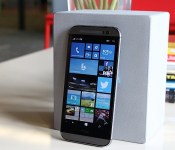
HTC One (M8) for Windows review: Same muscle, different soul

Since Windows Phone’s humble beginnings, Microsoft has been the underdog in the wireless industry. Four years later, nothing’s changed — except, perhaps, a few more percentage points of market share. Even then, it’s got a long way to go before catching up to Android and iOS. Let’s give the company credit for pushing forward, improving its platform and not giving up, though: When I reviewed the last major OS update, I said I could finally use Windows Phone as my daily driver. The one element that Microsoft continued to lack, however, was buy-in from large phone makers. They put more focus on Android products, which meant anyone interested in Windows Phone had a small selection of devices to choose from.
For Microsoft, it’s time to experiment with a new, simpler approach. The software giant has buddied up with HTC to convert the One M8, its Android flagship, into a Windows Phone. That’s all there is to it. There’s absolutely no change to the hardware — and it’s a fantastic idea. If it fails, neither company loses much from the deal; since they’re using an existing phone, the cost of design and engineering is far lower than it would be on a standalone device. If it’s successful, it may inspire other manufacturers to follow suit, resulting in a market with a wide variety of Windows Phones to choose from. If you can’t beat ‘em, join ‘em, right?
Hardware

The hardware section is typically one of the longest in a phone review, but this time, the opposite is true. That’s because the HTC One M8 for Windows, as awkward as the name is, is exactly that: an HTC One M8 that happens to run Windows Phone instead of Android. (Why the name omits “Phone” is beyond me, however.) The aluminum unibody chassis, 1080p display, Snapdragon 801 processor, BoomSound speakers, 2,600mAh battery, even the UltraPixel Duo Camera setup — it’s all there. It comes with the infrared blaster embedded into the power button as before, and all of the buttons, LED flashes and card slots are all precisely in the same place. In fact, if it weren’t for the Windows Phone logo on the back, the hardware would be virtually indistinguishable. Of course, that also means that it’s still just as slippery and just as tall as the Android version, so if you didn’t like it before, nothing about this phone will change your mind.
The version I’m reviewing is the Verizon-exclusive model, which only comes in a gunmetal gray color with 32GB of internal storage (and a microSD slot that handles cards up to 128GB). If Verizon isn’t your thing, AT&T announced that it plans to release the device after the exclusivity period is over. HTC’s been tight-lipped about whether the phone will eventually head to other markets or carriers.
The Verizon version of the M8 for Windows comes with quad-band LTE, which covers both of Verizon’s high-speed frequencies and a couple of bands (3 and 7) friendly to many countries in Europe, Africa and Asia. In case the LTE doesn’t work when you’re traveling abroad, it also comes with quad-band HSPA+ (up to 14.4 Mbps) and quad-band GSM/EDGE. Regardless of where you travel, you’re bound to have some sort of connection, even if it isn’t incredibly fast.
Software

It’s only when you turn the two devices on that you’ll really notice the difference. For the first time since the Palm Treo days, you can choose between two different operating systems running on the same hardware. I want to see more companies try this, but most manufacturers seem wary of dedicating resources to make Windows Phone available on existing Android devices. Of course, this wasn’t even an option until Microsoft introduced Windows Phone 8.1 earlier this year, when it announced that manufacturers could take any Android phone they wanted and just slap on the third-place mobile OS instead. (Sadly, Microsoft and Google aren’t so keen on letting anyone use both at the same time.)
What matters is that it’s here now, and Windows Phone flagships are no longer limited to Nokia’s Lumia series; it introduces more options for fans of the OS, and it gives the platform more visibility for everyone else.
If you’ve used a Windows Phone before, the user experience will be familiar. HTC tweaks aside (I’ll tackle those shortly), the M8 is a Windows Phone 8.1.1 device without a custom user interface. Which makes sense: Microsoft doesn’t allow skins. As you’d expect, then, the phone features Cortana, Live Tiles, quick controls, notifications, folders and the new lock screens, among other things. If you’ve seen one Windows Phone, you’ve seen them all.
The biggest early question about the M8 for Windows was how (or if) it would utilize HTC’s homemade software features from its Android skin, such as Zoe, BlinkFeed, Duo Camera capability, Sense TV and Video Highlights. Fortunately, all but Zoe made it into the phone, although there are slightly different implementations for each feature. BlinkFeed on Windows is its own separate app and Live Tile as opposed to a full home screen panel on Android. Ditto for Video Highlights, which takes the form of a standalone app. The camera UI is the same, but only some Duo Camera editing features made the OS jump. Finally, the HTC Dot View case is supported.

BlinkFeed feels more at home on Windows Phone than it does on Android, primarily because its interface is tile-based. Its functionality is similar on both platforms: You have access to your social network feeds (yes, including Google+) and a wide variety of highlighted feeds (like Engadget!). At present time, the Windows Phone version doesn’t come with a search option or custom feeds, so you’ll just have to stick with what HTC offers. It also comes with an active Live Tile that shows the most recent news updates.
Video Highlights has been around since the HTC One M7 came out in early 2013. It compiles your photos and videos and combines them into a 30-second highlight reel; you can choose from several different themes (akin to Instagram filters) as well as music, including pre-loaded tracks and selections from your own library. Once the clip is created, you can share it however you want. On Android, the video highlight-creation tool is a part of the Sense gallery app, but here it’s a standalone app. The basic setup is the same on both platforms, but their designs match their respective OSes. All told, too, the functionality is the same, though the WP option doesn’t appear to have the ability to choose which images or clips to start and end with.
The on-screen navigation bar is a recent addition to Windows Phone, and a very welcome one, at that (Android has had this functionality for a while). The bar consists of the usual WP buttons like back, home and search. You can choose to have the bar be dark, match the background of the app you’re in (which doesn’t seem to change too often) or match your accent color instead. It’s also possible to hide the bar, in case you’re watching a 1080p video or using another app that wants to take advantage of the full screen rather than getting cut off at the bottom. By default, you can press a small arrow on the left side to tuck it away and swipe up from the bottom bezel to bring it back; however, you can choose to disable the button and swipe up for both actions instead.
The Dot View case is an optional accessory introduced on the One M8 for Android, but HTC’s made it compatible with the Windows Phone version as well. You’ll still get the time on top and a symbol for notifications on the bottom, but there’s a new feature: Swiping down from the top will activate Cortana, who will begin listening to you without any further action.
Unfortunately, this swipe-down functionality isn’t available without the case. In fact, the One M8 motion gestures are limited to a simple double-tap-to-wake option; you can’t swipe your finger in any direction to take it directly into specific apps. Even worse, the only way to activate the camera is to manually unlock the screen and tap on the Live Tile or go through the Action Center. I’d prefer to have a faster shortcut to the camera for quick access.
Camera

The M8 for Windows sticks with the same love-or-hate UltraPixel Duo Camera setup as its Android brother, and it even offers a nearly identical user interface. (The only differences are in the settings, which must adhere to Windows Phone UI elements.) In general, HTC’s UltraPixel option takes decent pictures and fares well in low-light settings, though shots tend to be less detailed than on other flagship devices.
But while the camera modules are exactly the same, a quick image comparison between the Windows Phone and Android versions reveals a few minor disparities. The M8 for Windows seems to do better at capturing dynamic range, and the photos are more saturated in color. The default white balance is also marginally colder. The gap between camera performance widens further in low-light situations, in favor of the Android version. The M8 for Windows produced images that were fuzzier and less detailed than those taken on its counterpart. This may be in part due to the length of time HTC’s worked on optimizing its UltraPixel tech on Android versus Windows Phone, and I’m hopeful this can be fixed in a future update.
For now, one version isn’t better than the other in every department; you’ll have to pick and choose the factors that are most beneficial to you. If you want the full gamut of imaging options, however, stick with the Android model for now. HTC’s signature Zoe feature, which takes a few seconds of video and burst-mode shots and converts it into a Harry Potter-esque moving picture, isn’t available; the Zoe app, which is a social network that lets you show off your Video Highlights to friends and family, is also restricted to Android 4.4. Lastly, the Windows edition lacks a few of the M8′s Duo Camera editing tools. It comes with UFocus (which lets you change the area of focus), Foregrounder (adds funky visual effects to objects in the background), Dimension Plus (gives the picture a faux-3D feel), rotate/crop tools, most filters and a few frames. Copy/paste, stickers, draw/flip/straighten tools and seasons (a pointless feature that shows leaves, snowflakes, etc. falling down in front of your picture) didn’t make the cut, but I rarely use those features on the Android version anyway.
Performance and battery life

In its early days, Windows Phone earned a reputation for robust performance that has continued to the present. Until recently, the gap in performance between flagships and entry-level devices had been relatively small because Microsoft imposed restrictions on which processors and other specs could be used on the platform; phones like the Nokia Lumia 520 are cheap, but perform well given their limited processing power and RAM. As Microsoft has slowly lifted those restrictions, flagships have now become even more powerful, possessing the same specs as many top-of-the-line Android devices.
With the One M8 for Windows, you’re going to enjoy all of the same performance benefits as the Android version — on paper, at least. It has a quad-core 2.3GHz Snapdragon 801 chipset with 2GB of RAM, so it’s no slouch. The M8 for Windows runs WP 8.1 Update 1, which is still only available as a Developer Preview on other devices; this is the first time it’s been included on a new device out of the box.
The M8 for Windows runs well most of the time. To nitpick (’tis my burden and duty), the Android version is a little faster when loading apps and multitasking, primarily due to the time-wasting animations scattered throughout the Windows Phone OS. It’s a difference of a couple seconds each time, which likely won’t matter at all to most users. Games run smoothly with few to no frame skips, but the same titles on Android were consistently more fluid. Occasionally, the processor on the Windows version would slow down, making games extremely choppy for around 15 seconds, after which it’d smooth out for two or three seconds before returning to its frozen state. A reboot usually cleared up the problem, but I’ve never run into similar issues on the M8 for Android.
I’ve also noticed that the two 1080p displays aren’t calibrated identically; it appears that both devices use different temperatures (the original M8 is a tad warmer), though the brightness and viewing angles are both good. Images and graphics on the Windows Phone model appear to be fuzzier and have less clarity when looking at the two devices side by side, as if they’re displayed at a lower resolution somehow, but at least text and games look great.

Running benchmarks can be a little tricky when doing cross-platform comparisons, since most Android tests aren’t available on Windows Phone. Microsoft’s OS was slightly better on internet-based tests like SunSpider (609ms vs. 649ms, where a lower time is better) and Google Octane (2,801 vs. 2,666), while the Android version did better on GFXBench 2.7 (28 fps vs. 19 fps). The latter score is the most concerning, as it’s a much larger difference than I’d expect to see on two devices with identical hardware. Compared to the Icon, the M8 does better on Octane and GFXBench but worse on SunSpider and WPBench. So, just like it was on the camera, there’s no clear-cut answer to which phone is the better choice. Since the differences are minor, only a few power users may be dissuaded by the results.
Battery life is a mixed bag. The benefit in testing identical hardware on competing operating systems is that you can compare the two much more easily and closely study the effect each platform has on power efficiency. In my testing so far, it appears that the WP option is better than the Android version in some ways and worse in others. (My tests are ongoing and I’ll continue to add more results as they come.)
First, the good news: You can still get through an entire day of normal usage with a little left to spare when you hit the sack. When using the device for email, taking a few photos, browsing the web and running an occasional app, I was able to get slightly more battery life than on my Android M8. When streaming movies through Netflix, the Windows Phone M8 soundly defeats its Android counterpart. Additionally, it lasted for 12 hours and 10 minutes in our standard video rundown test, an increase of 40 minutes over the Sense-clad version.
I wouldn’t recommend playing games without having a charger nearby, however; titles like Asphalt 8 and Frozen Free Fall (my kids’ favorite) drain up to 30 battery percentage points per hour, as compared to around 15 percentage points on the Android M8. (As an aside, both versions of the M8 get hot when playing graphics-intensive games for more than 10 minutes, the point where it becomes uncomfortable to hold.) Finally, the M8 for Windows lasted two hours and 35 minutes in the standard WPBench CPU stress test, in which it forces the processor to work at high intensity. That’s pretty typical: The Lumia Icon delivered nearly identical runtime of 2:36. (It scored 2:42 on our initial review, which was on older firmware.)
The competition

Now that a flagship phone is available on more than one major mobile platform, it’s tougher to clearly define its competition; whether you’re a fan of Windows Phone, Verizon or nothing more than good phone design, there are plenty of factors to consider. The M8 for Windows is available for $100 on-contract, which is half of what the Android edition cost when it first came out. It may have limited appeal at first because of its exclusivity, but Windows Phone users on Verizon will appreciate it because they can now choose among this and two other flagship devices: the Lumia Icon, which is renowned for its 20-megapixel camera, and the Samsung ATIV SE, which is somewhere between a GS4 and GS5 in terms of specs. The Icon is definitely a well-built phone, but the M8 has more curb appeal thanks to its robust aluminum frame and arched back.
Let’s go more into specifics on how it compares with the Lumia Icon, its direct Windows Phone competitor. If you’re looking for a superior imaging experience, go with the Icon; the M8 is in no way a horrible picture-taking device, but Nokia’s had a lot more time and experience to get things right on Windows Phone than HTC has. (And since the Icon still does quite well in low-light situations, the UltraPixel tech isn’t quite as persuasive in this case as it may be on Android.) The screen size is only 0.1 inch smaller on the Icon, but the chassis is significantly shorter and much less slippery. HTC offers a great audio experience with BoomSound; the Icon has a hardware shutter button for faster access to the camera; and you’ll also need to decide between capacitive buttons and virtual ones.
In a way, the M8 for Windows is competing against its Android brother as well, but HTC’s goal isn’t to cannibalize sales. By adding a second platform, it’s allowing HTC to reach a new set of smartphone users without the high cost of designing, developing and producing a brand-new device. I also doubt many people have held off on buying the M8 because it wasn’t on Windows Phone, as fans of the platform will have already looked at other options already available to them.
Wrap-up

This is the first time in years that a user can select a device’s hardware and software at the same time; you usually have to choose one and then live with the other. People who already use and love Windows Phone now have a flagship option that isn’t the latest Lumia device. This phone won’t end the platform wars by showing undeniable proof that Windows Phone trumps Android or vice versa; both devices clearly have pros and cons in different areas, and it ultimately comes down to your personal preference.
If your go-to OS is Windows Phone, the M8 is one of the best options, thanks to great design and solid performance. The Lumia Icon still has a bit of an edge, but you’ll be happy with either device. If given the choice between M8s, I’d go with the Android version for now because HTC’s had much more time, experience and flexibility to get things right on that platform. The performance is a bit more optimized in most cases, and it comes with more of the HTC-branded functionality that makes the One M8 unique. But isn’t it nice to finally have a choice?
Filed under: Cellphones, Mobile, HTC, Verizon
.CPlase_panel display:none;

LG G3 vs. HTC One M8 vs. Samsung Galaxy S5
 Today, LG debuted it’s newest newest global flagship phone, the G3. The Android smartphone is a followup to the LG G2 from 2013, which had an unique design which moved the power/lock button and volume controls from the sides of the phone to the back of the device, below the camera lens. The G3 sports that same design, but with a more polished look, complete with a brushed metallic body (available in five colors) and a more mature-looking Android operating system.
The G3 packs the high-end specs we’ve come to expect in premium phones, and it’s perfectly poised to go up against it’s top Android competitors, the HTC One M8 and the Samsung Galaxy S5.
With similar eye-popping screens, powerful processors, and capable camera lenses available on all three devices, deciding on which one is best for you really comes down to the extra features, design, and personal brand preference. The LG G3 is no slouch when it comes to extras, with the Knock Code security feature, a front-facing camera designed specifically for selfies, and a high-capacity battery.
Check out the chart below to see how the phone’s specs stacks up against its competition, and let us know in the comments below which phone comes out on top for you.
LG G3
HTC One M8
Samsung Galaxy S5
Size
5.7 x 2.9 x 0.3 inches; 5 oz.
5.8 x 2.8 x 0.4 inches; 5.6 oz.
5.5 x 2.9 x 0.3 inches; 5 oz.
Screen
5.5 inches; 2,560×1,440 pixels; 538ppi
5 inches; 1,920×1,080; 441ppi
5.1 inches; 1,920×1,080 pixels; 431ppi
Operating system
Android 4.4
Android 4.4
Android 4.4
4G LTE
Yes
Yes
Yes
WiFi
Wi-Fi 802.11 a/b/g/n/ac
802.11 a/b/g/n/ac
802.11 a/b/g/n/ac
NFC
Yes
Yes
Yes
Bluetooth
4.0 Low energy
4.0 Low energy
4.0 Low energy
RAM
3GB
2GB
2GB
IR Blaster
Yes
Yes
Yes
Fingerprint scanner
No
No
Yes
Rear camera and recording
13-megapixel; 4K HD video
4-’Ultrapixel’; 1080p HD video
16-megapixel; 4K HD (1080p HD default)
Front-facing camera
2.1-megapixel; 1080p HD video
5-megapixel; 1080p HD video
2-megapixel; 1080p HD video
Processor
2.5GHz quad-core; Snapdragon 801
2.3GHz quad-core; Snapdragon 801
2.5GHz quad-core; Snapdragon 801
Battery
3,000mAh, removable
2,600mAh; embedded
2,800mAh, removable
Capacity
32GB
16GB, 32GB
16GB, 32GB
Expandable storage
Yes
Yes
Yes
Notable extras
One-watt speaker with amp
BlinkFeed, BoomSound
Fingerprint scanner, heart rate monitor
US Carriers
T-Mobile, Sprint, AT&T, Verizon
AT&T, Sprint, T-Mobile, Verizon
AT&T, Sprint, T-Mobile, Verizon
Color options
Metallic white, black, gold, red, and violet
Gray, silver, rose gold
Black, white, blue, and copper
.CPlase_panel display:none;
 AIVAnet