


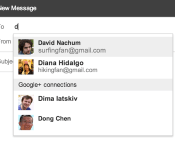
Gmail now lets you email Google+ users directly, still keep your email address private if you choose to

Even though the rest of the tech world is preoccupied with a little trade show in Vegas, the folks in Mountain View are still working hard. Today, Google has rolled out a nifty new feature for Gmail and Google+ users: letting them email each other whether or not they’ve actually exchanged email addresses. That’s right folks, now, when you are typing in email recipients, Gmail will make suggestions to add from your Gmail and G+ contacts, too. Naturally, users can decide which of their circles get access to their inbox, or whether to accept emails from social networkers at all. In practice, should a Google+ contact in one of your circles send you a message, it’ll pop up in the Primary category of your inbox, while all others coming from G+ will wind up under the Social tab. Sound good? The feature will be rolling out worldwide soon, so look for an email from Big G telling you how to set it up in the next few days.
Filed under: Google
Source: Official Gmail blog

Social calendar app Sunrise finally comes to iPad

Launching on iPhone in February 2013, Sunrise changed our perception of calendar apps with its ability to provide more context to daily events. By connecting to Google, iCloud, Facebook, LinkedIn and Foursquare accounts, Sunrise can intelligently integrate appointments, birthdays and even checkins into its slick calendar UI, giving users a complete picture of what they’ve done in the past and the things they need to do in the future.
Despite its iPhone-only availability, the free app has grown to become one of the most popular third-party iOS calendar apps, consistently ranking in the App Store’s top 100 productivity apps in the final quarter of last year. Almost a year on, Sunrise developers Pierre Valade and Jeremy Le Van have decided it’s finally time to bring the stylish calendar app to iPad, complete with visualization and synchronization improvements.
Like its iPhone counterpart, the Sunrise iPad app will immediately request that you connect your cloud accounts when you open it for the first time, helping to feed it with information it’ll need to remind you about later. Valade says the team has worked hard to bring the best Sunrise experience to the iPad, and so it’s created two new weekly and monthly views that “make it easier to plan from your iPad and navigate in time quickly.”

If you’ve used Google Calendar or Apple’s Mac Calendar.app, you’ll be familiar with Sunrise’s time-based views, although Sunrise will deliver more information at-a-glance. If you see that you have a particularly busy day coming up, the week view will let you dive deeper and see how much free time you have outside of those events. The new week view has also been ported to the iPhone app and can be selected by tapping the week icon next to the new event button.

Tapping on a day will generate a new pop-up tab that displays all of your appointments and reminders. Drawing from the original iPhone UI, Sunrise for iPad not only chronologically lists events, it also categorizes them by assigning them a small icon related to the activity you have planned (or the service they are connected to). As you can see from the screenshot above, if you’ve planned a movie night, the app will assign a little movie ticket icon to the entry. If there’s a location attached to an appointment, Sunrise will provide directions, although Apple Maps, Google Maps or Waze will do the heavy lifting. It’s little things like this that make this that make Sunrise really stand out from other calendar apps.
In the past, if you wanted to ensure Sunrise had an up-to-date list of your upcoming appointments, you’d have to open the app and have it download them, which is especially annoying if you add events from different devices. Sunrise version 2.1 eliminates that frustration by integrating background updates that will synchronize all of your connected cloud accounts every hour by default, or at 30 or 15 minute intervals (if you need tasks to show up a little quicker).
While there’s no shortage of productivity apps on the App Store, Sunrise’s slick user interface and iterative features consistently continue to push the bar for iOS calendar apps. Soon, Apple users won’t be the only ones enjoying the app: desktop and Android versions are expected later this year. Today’s update, however, sees the app go universal while remaining free to download — hit the source link below to try it for your yourself.
Filed under: Tablets, Internet, Software, Mobile, Apple, Google
Via: Sunrise Blog
Source: Sunrise Calendar (App Store)

France slaps Google with $204,000 fine for violating privacy laws

Google’s run in with France’s privacy regulator has come to a rather undignified end. After months of deliberation, the National Commission on Computing and Freedom (CNIL) today hit the search giant with a €150,000 ($204,000) fine for breaking the law with its unified privacy policy. It’s significantly less than the €300,000 fine CNIL threatened in September, but the regulator will compound Google’s misery by requesting it to display a notice on its Google.fr homepage for two days explaining the decision. It’s the latest in a long line of privacy-related investigations against Google: six European countries have launched probes into its privacy policies, with Spain fining the company €900,000 ($1.2 million) just last month. Google has maintained its innocence throughout, but with penalties coming in thick and fast, it could be forced to amend its policies once more.
[Image Credit: cplapied, Flickr]
Via: GigaOm
Source: CNIL
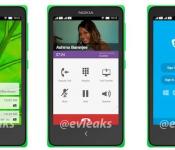
Leak reportedly shows Nokia Normandy’s Android interface

We’ve heard a number of rumors recently about Nokia’s Normandy phone, which will supposedly ship with an Android-based operating system. Shots of the handset, with its lack of a hardware shutter trigger, capacitive buttons and LED flash, appeared back in December, and now mobile tipster @Evleaks has posted what could be the first shots of Nokia’s alternative take on Google’s open-source platform. Three leaked renders of the device shows support for dual SIMs, homescreen notifications, a dialer screen and what appears to be a custom version of Skype’s mobile app.
Nokia’s Normandy project is said to be a low-end Asha equivalent that runs a forked version of Android, meaning it won’t be associated with Google’s apps and services, similar to Amazon’s Kindle Fire tablets. As we know, Nokia’s mobile business is currently awaiting the all-clear for an acquisition by Microsoft, meaning the project might never see the light of day. The leaked shots suggest Nokia has made significant progress with Normandy, but we’ll have to wait and see if the project forms part of its new owner’s future plans.
Filed under: Cellphones, Software, Mobile, Nokia
Source: Evleaks (Twitter)

Motorola announces January 14th event in UK, hints at Moto X in the invite

UK residents that liked the Moto G, but wanted the Moto X might not have to wait long. In middle of untold CES-based emails, rants and schedule updates, Motorola tells us that it’ll be holding a London event for a “new addition” to the Motorola family. Oh look, there’s a Moto X right in the photo. You can join the dots, right?
Filed under: Cellphones, Mobile, Google
Philips launching Android Smart TVs in 2014
Philips has announced that its new lineup of Ambilight TVs will be powered by Android with a release date scheduled for June 2014.
The TVs will also have access to Google Play and Philips Smart TV apps, which in turn would give access to Google applications such as Play Music, Youtube, and possibly Google Now. This is another move from Google to get into your living room and I think it opens up many possibilities for the future of TVs powered by Android.
The TVs are also packing a “powerful quad-core chip” which Philips suggest that it will be able to handle even the most graphic intense Android games.
There are no official models, specs, or pricing, however we hope to hear more soon!
Source: T3
The post Philips launching Android Smart TVs in 2014 appeared first on AndroidGuys.
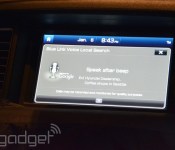
Hyundai’s second generation Blue Link tech runs custom Android, keeps you connected with Verizon

When Hyundai’s latest Genesis sedan launches later this Spring, it’ll have the latest version of Hyundai’s Blue Link tech: voice navigation, media management and remote tech. That means unlocking your car remotely, navigating to both specific locations and general search terms (think: flowers, sushi, etc.), and a whole mess of other “smart” functionality. Unlike the first-gen Blue Link currently available, all of that functionality is being brought to your new Genesis with a cell signal provided by Verizon.
Hyundai was part of the big Google news earlier today, and Blue Link’s second-gen is another piece in that puzzle. Consider it the latest in a series of cross-company explorations into how best to implement Android in cars — a Hyundai rep told us it’s also exploring iOS for cars, but won’t have more to share until some point “later this year.”
In the brief time we spent with Blue Link 2, we were impressed! It picked up on voice commands without a hitch, and was able to wirelessly connect to Google Places from within the confines of a Las Vegas hotel conference room. Sadly, navigation costs $100 annually, and it’s another $100 annually for remote services. Head past the break for a look at Blue Link 2 in action, and find out if it’s the Android you’re looking for.
Filed under: Misc, Transportation

LG Chromebase: Handling Chrome OS on an all-in-one (video)

LG’s first foray into Chrome OS is also a first for the Google operating system, debuting in an all-in-one. Not a Chromebox then, nor a Chromebook, but a Chromebase, consisting of a 21.5-inch screen connected to a curved hinge. The 1080p IPS LCD was more than adequate for a session of browsing, typing within Google Docs and, er, taking another look at the new House of Cards trailer on YouTube. The screen is good, but we’re keeping our judgment tempered until we hear a specific price.
With three USB ports to connect to companion keyboards and mice (and something else), using the Chromebase was like using any typical all-in-one. Interestingly, because both are relegated to peripherals here (like a Chromebox) you’ll be able to connect your favorite mechanical keyboard and laser-precision mouse, negating the Chromebook series’ occasional trackpad-keyboard woes. That said, LG’s ‘board and mouse worked fine, with both coated in the same matte finish of the AIO unit. There’s also the two color options planned, with a fetching matte black finish launching alongside the white model sometime in this half of 2014. We’ve got a closer look, on video, right after the break.

Sony Xperia Z1S: a waterproof flagship exclusive to T-Mobile (hands-on)

For the past two years, Sony Mobile could be counted on to introduce new Xperia smartphone lines at CES — the S and Z, specifically. Not so this year, as the company’s instead offering twists on previously announced hardware, which, for the US market, results in the Xperia Z1S for T-Mobile. If you followed our IFA coverage from last summer, you’ll be familiar with what Sony and exclusive US partner T-Mobile have to offer. The Xperia Z1S, set for release January 22nd at $528 outright or $22/mo, retains much of its Z1 counterpart’s spec load — 5-inch, 1080p Triluminos display, Snapdragon 800, 3,000mAh battery and 20.7-megapixel camera — albeit with some notable upgrades.
Despite maintaining the same 5-inch screen size as its Z brethren, the Z1S is significantly taller, owing to the larger 3,000mAh battery inside and packs 32GB of storage. Though its lack of an IPS display means viewing angles won’t be as generous, the Z1S does feature X-Reality Engine (disabled by default) for improved contrast in stills and video.
The device’s now also rated for IP58 certification, making it waterproof, not just splash-resistant, at a depth of up to four and a half feet for about 30 minutes. As for its build, the Z1S still features the “omnibalance” design (that all-around flat-sided look) Sony ushered in with the Z, but here the edges have been gently rounded with a plastic trim, making for a much more comfortable in-hand feel. It’s a change we wish had been present from the very start of this Xperia Z line.

Much like its predecessors, the Xperia Z1S’ ports are all tucked away behind flaps, with one exception: the headphone jack. At the behest of T-Mobile, that jack, newly centered on the top of the device, has now been made fully accessible when submerged, so users can laze about the pool and not worry about water damage. That’s not the only functional change Sony’s made to the cosmetics; it’s also added in a dual-detent camera key that should make taking shots when submerged in water far easier to do.
With a 20.7-megapixel, f/2.0 camera module on deck and associated software suite, it’s clear Sony’s placing heavy emphasis on the Xperia Z1S’ imaging capabilities. Like its Z1 mate, this US iteration will ship with a specially designed, larger Exmor RS sensor that Sony claims is on par with that of its compact camera line. That’s in addition to the G Lens (Sony’s in-house solution) and BIONZ for mobile image processing which, together, should translate into faster autofocus, better white balance and images with less blur and discernible noise.
Sony’s loading up the Xperia Z1S with the PlayStation App (a first for the Xperia line) and a suite of camera apps to complement that imaging prowess; the same camera apps we saw on the Z1. Of the bunch (i.e., InfoEye, AR Effects, Social Live and TimeShift Burst), only Background Defocus, an app that creates artificial bokeh or background blur, is new and exclusive to the Z1S. Users can also augment this app suite with a selection of third-party add-ons, searchable from within the camera app.

The Xperia Z1S is set for an official nationwide launch on January 22nd, but die-hard Sony fans will have a chance to snag it even sooner than that. An online pre-sale will go live on January 13th, although sadly there is no special purple version on offer. The Z1S comes in black and only black — for now, anyway.
Filed under: Cellphones, Wireless, Mobile, Sony, Google
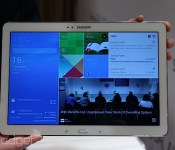
Samsung’s Galaxy Note Pro 12.2 is a gigantic tablet that promises extensive productivity (hands-on)

In much the same way that smartphones are trending towards larger screens, it appears that manufacturers like Samsung are experimenting with the same concept in the tablet realm. The company has just introduced its latest (and largest) Android-running Galaxy Note device called the Note Pro 12.2. Announced alongside the Tab Pro 12.2 at CES, the Note Pro offers the same S Pen functionality we’ve enjoyed on previous devices like the Note 3 and Note 10.1 2014 edition, and as usual, you’re going to see some refinements in Samsung’s firmware and user experience as well. The device will be available in LTE, 3G and WiFi flavors and is expected to launch sometime this quarter in various parts of the world.
As soon as we tried out the new Note Pro, we immediately noticed the size and weight difference compared to Samsung’s 10.1-inch offerings. Regardless of how much you trim its bezel, a 12.2-inch tablet simply isn’t designed for optimal portability, which means we’re more likely to use it as a coffee table device, special projects or conferences in the office. It’s just a little too awkward to hold for long periods of time. Aside from that and a glaring weight difference — 753g (1.66 lbs) on the 12.2, versus 547g (1.21 lbs) on the 10.1 — we were hard-pressed to find any variation between the 12.2-incher and the Note 10.1 2014 edition; it features the same design, button layout, “leather-like” back and display resolution (2560×1600, for a pixel density of 247 ppi). Other than that, what stands out on the 12.2, which runs Android 4.4 KitKat, is a few key new firmware features like Remote PC and Magazine UX. Continue reading below the gallery and our hands-on video to get more of our impressions.
First, let’s discuss the key specs. With a larger Note comes an even larger 9,500mAh battery, an 8MP rear camera paired with a 2MP front camera, “super clear” WQXGA LCD panel, IR support, dual-band WiFi 802.11 a/b/g/n/ac MIMO, USB 3.0 and Bluetooth 4.0. The LTE model promises support for 800/900/1800/2100/2600+850, while you’ll get quad-band HSPA+ (with a max of 21Mbps).
The Note Pro 12.2 runs Android 4.4 KitKat, but the user experience is drastically different than any Note we’ve played with before. Instead of being graced with a standard Android/TouchWiz home screen panel when pressing the home hardware button, you get whisked away to a new interface lovingly called Magazine UX. This experience consists of three separate customizeable screen panels: one for your office/workspace, another for personal use and a last one that handles your social networks and media. It’s much like My Magazine on the Note 10.1 2014 edition, but Samsung has streamlined the number of screens and assigned one of them as the default screen that pops up when you press the home button. So far, we haven’t found a way to opt out of that default, and Samsung confirmed to us that it is, in fact, stuck. You can still access the notification menu and status bar on the top, as well as the app tray in the lower right corner, but if you want the standard home screen, you’ll need to swipe to the right to bring it up.

The Multi-Window feature is also here, and Samsung is making good use of the extra screen space. Instead of two windows to manage simultaneous tasks, you can have up to four — and that’s not counting the ability to add pop-up windows on top of that. There are now two ways to access the menu, too: there’s the standard method of long-pressing the back button, but you can also swipe in from the right bezel to pull up the list of compatible apps. Tapping on those apps will make them float above the screen as a pop-up window, and minimalizing each one turns them into small circular icons a la Facebook’s Chat Heads. If you want the four-screen setup, you’ll need to drag-and-drop the app into its rightful place.
The last major firmware enhancement Samsung boasts is its Remote PC setup. We weren’t able to demo these features in our hands-on, but they certainly sound promising enough. Granted, the idea of accessing your PC or Mac remotely isn’t anything new by a long shot, but we can’t complain about having the feature baked into the device without needing third-party assistance. In fact, Samsung has built in a UI that allows you to drag and drop files between your PC and Note Pro, which would be a huge asset to our productivity when we’re away from our computer. The ability to edit and save files is also included, as well as support for Cisco WebEx Meetings.

In terms of performance, we didn’t see much of a difference between this and the Note 10.1 2014, which is likely because Samsung opted to use the same silicon inside: the LTE version of the Note Pro comes with a 2.3GHz quad-core Snapdragon 800, while the 3G and WiFi-only options are fitted with the same Exynos octa-core processor as the Note 10.1 unit we reviewed a few months ago; each version comes with 3GB RAM. As luck would have it, the models on-hand were Exynos-powered, and unfortunately we saw all-too-familiar signs of stutter and lag in even the most basic of tasks. Since we didn’t get a chance to see final production firmware or hardware (although we suspect it’s pretty close to final at this point), we don’t want to come to final conclusions on the tablet’s performance until we get a chance to put it through the paces in our full review when it officially launches.
And for those of you wondering: no, we didn’t try to put it up to our ears like a phone.
Ben Harrison and Mat Smith contributed to this behemoth post.

