


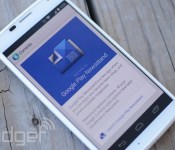
Currents officially transitions to Google Play Newsstand with latest update

When Google Play Newsstand made its debut back in November, the folks in Mountain View let us know that Currents would be merged with the new app. Well, the day has come when Currents officially bites the dust. With a recent update, users are prompted to click through to Newsstand when trying to access the shuttered software and all current subscriptions are ported over automatically. After you swipe over the first time, Currents will be disabled and its icon disappears from the Apps menu. Of course, iOS users are still waiting for Google’s Newsstand to hit their mobile devices, which is expected to happen soon.
Filed under: Internet, Software
Via: Android Police
Google I/O Conference Gets its Dates on the Calendar

Google I/O has finally been scheduled this year, and the dates you should mark on your calendar are June 25th and the 26th. Many of us were wondering when Google was going to plan their developer conference, and it was Sundar Pichai to the rescue.
Apparently there will be a sort of different registration process to get into the event, which Google will announce next month. They don’t plan on doing a first come, first serve registration, but rather have people apply then they will get back to those certain applicants. Probably because they don’t want a bunch of random tech enthusiasts and they want more developers to attend. Let us know if you plan on going.
Source: Android Police
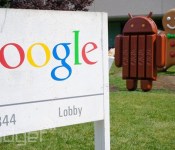
Google to hold its I/O 2014 conference on June 25th and 26th

Mark your calendars, everyone: Sundar Pichai has just announced that Google I/O 2014 will be held between June 25th and 26th at the Moscone Center in San Francisco. Registration info and other details are coming next month. It’s too soon for any big clues as to what will be unveiled this year, although Google used its 2013 I/O presentations to announce All Access music streaming, its first Google Play Edition phone and the Glass Developer Kit. We’d expect similarly grandiose things this time around, especially when the search giant wants to sell Glass to the general public before the year is out.
Filed under: Cellphones, Wearables, Internet, Mobile, Google
Source: Sundar Pichai (Google+)

Google’s Russian rival offers free alternative apps and services on Android

Android is famed for being an open-source operating system. Well, kind of. Anyone can cruise and caress Android’s code thanks to the AOSP, but if you want a package complete with Google’s services — like the Play store, Mail, Maps and better-than-basic apps for messaging, imaging, etc. — then you have to pay the piper. Yandex is to Russia as Google is to most other places, in that it’s the country’s most popular search engine, has its own browser and provides email and cloud storage services, among others. And now, with the launch of Yandex.Kit, it also has an alternative to the bits of Android only a licence’ll get you.
Available to those making devices for the Russian market, Yandex.Kit comprises 15 apps from browser, mapping, store and email clients to a launcher and dialer. (There’s a slimmed-down version of the firmware for outside Russia, too). Most importantly, it’s totally free, and has already attracted the likes of Huawei and local manufacturer Explay. Chinese firm Xiaomi forgoes Google’s wares in its Android-based MIUI OS due to censorship issues. Here, however, Yandex is intentionally wedging itself between Android and Google to erode any reliance on the latter’s ecosystem in Russia. The fact it allies you to Yandex instead being pure coincidence, of course.
Filed under: Cellphones, Software, Mobile, Google
Via: TechCrunch
Source: Yandex

Google Fiber explores bringing gigabit internet to 34 new cities

Google has only made plans to roll out gigabit internet access in three US cities so far, but it’s not content with stopping there. The company is now exploring the feasibility of deploying Google Fiber in 34 cities located around the major urban hubs of Atlanta, Charlotte, Nashville, Phoenix, Portland (Oregon), Raleigh-Durham, Salt Lake City, San Antonio and San Jose. In each case, Google will work with local officials to both map out its potential network and create a checklist of requirements. The search giant would like to bring Fiber to every one of the cities if possible. Be careful not to get your hopes up, though — Google warns that it might not be practical to offer service in every territory. Even so, the potential for expansion should prove comforting to Americans worried that they’re running out of choices for broadband providers.
Filed under: Networking, Internet, HD, Google
Source: Google Official Blog

Google Looks at 9 Other US Cities for Google Fiber Deployment

Google Fiber is one of those services that us nerd boys crave. The speed in which we can download and stream our illegally downloaded movies is quite staggering, but only 3 cities are lucky enough to be able to get the service. Kansas City (in both Kansas and Missouri) and Provo, Utah, are the lucky cites to have download speeds that can reach a gig. Now it seems that Google is seeking out 9 other cities to enjoy this lovely service. Fingers-crossed that you live in one of these cities.
- Phoenix, Arizona
- San Jose, California
- Atlanta, Georgia
- Charlotte, North Carolina
- Raleigh-Durham, North Carolina
- Portland, Oregon
- San Antonio, Texas
- Nashville, Tennessee
- Salt Lake City, Utah
Some pretty big cities on that list. Sadly, I am nowhere near any one of them. There is mention on Google Blogs that surrounding areas of these cities will be getting Google Fiber too, so if you live pretty close to one of these, odds are you might be able to get it. Let us know if your city made the list.
Source: Android Central

New Google Maps is now rolling out to everyone’s desktops

Google has been testing its major redesign of Google Maps’ web interface for the better part of a year, and it’s at last ready to bring the new look to everyone. The search giant has started rolling out the updated layout to all desktop users; only some will see it today, but it should reach all visitors in the weeks ahead. As a refresh, the new Maps gets rid of the old sidebar in favor of putting search results directly on the map. It also brings real-time traffic data and a Street View carousel to help virtual tourists. The mandatory transition is unlikely to please holdouts who see the redesign as a step backward, but Google has been filling in at least some of the gaps.
Source: Google Maps Blog

Google teaches Glass owners how to mind their manners

Google wants society to welcome Glass with open arms, but that hasn’t proven to be easy when some early owners have run into trouble — there’s a real chance that one bad user could ruin the eyewear’s reputation. To get on the public’s good side, the company has published an etiquette guide that teaches Glass wearers how to be on their best behavior. Many of the tips reflect common sense, but bear repeating: ask before you record anything, avoid wearing the device in risky situations and pay attention to the world around you. However, the guide is also a reminder that you’re effectively Google’s ambassador when you use Glass. The company wants you to politely answer questions from curious onlookers, and it prefers that you take off the eyepiece when asked instead of creating a fuss. The advice is strictly optional, but we’d suggest taking it seriously. It may be the key to social acceptance if Glass ever goes on sale to the general public.
Filed under: Wearables, Google
Source: Google, Google Glass (Google+)
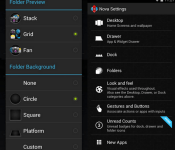
Get Started with Nova Launcher for Android
With all the launchers that are available in the Google Play Store, it can often be a daunting task trying to decipher the differences between them all, when really all you want to do is cover up that ugly TouchWiz skin. Here we take a look at one of the offerings called Nova Launcher and how to get it, install it, and configure it to get you up and running.
Install Nova Launcher
Obviously, the first thing we want to do is to install Nova Launcher, which is a free download from the Google Play Store.
Upon opening the app you’ll notice Nova Launcher looks a lot like stock Android – and you’d be right! No more TouchWiz for you. Bundled with the Launcher is a whole load of settings that can customize your Nova Launcher experience to exactly how you like it.
From the settings menu, you can customise the number of home screens that are available, the number of columns and rows that are contained within each homescreen (so you can fit more/less on the screen), as well as the dock and folder appearance.

Some of the settings are protected and are only available in Nova Launcher Prime, which is the paid version of the Launcher. However, most functionality is available from the free version.
In addition, you can download icon packs that have been designed to work with Nova Launcher to give a different system-wide look to your device. Just head over to our icon download section to check out some of the best ones.
Nova Launcher is a fantastic way of bringing the stock look of Android back to your device without having to worry about rooting or flashing custom roms.
Some of the features include:
- Features include:
- Colour Themes
- Icon Themes
- Customisable App Drawer
- Folder icon backgrounds
- Widgets in Dock
- App Drawer Groups
- Hide Apps
- Scrollable Dock
Nova Launcher is available for free for your phone and tablet in the Google Play Store.
UP NEXT
Look for a follow-up post in the coming days! We’ll dive a bit deeper into the Nova Launcher settings and customize the experience.
The post Get Started with Nova Launcher for Android appeared first on AndroidGuys.
Google Play edition devices might not be a big seller [Guest Blog]
The smartphone market has completely revolutionized the mobile phone phenomena. These days it is understood that throughout the year we are going to have regular updates, new models, new technology – the cycle goes on and on.
Android has been at the forefront of the drastic hyper activity that has engulfed the smartphone market. Whilst Android has been a treat for tech enthusiasts, there are some unmistakable drawbacks that Google needs to fix straightaway.
At a recent meeting with some industry experts, here’s what Richard Querrey from contractphoneswithfreegifts.com had to say:
I think Google Play Edition phones are a great idea, but the strategy to sell them is flawed, not enough people know these devices are available as you can only buy them in the Play Store. I’d hazard a guess that the average Joe on the street would never look there to buy a phone. The second issue is that they are all sold off contract, most customers here in the UK won’t want to part with such large sums of cash up front and they want a pay monthly plan. If they are going to make a go of it then they need to re-evaluate. But then again maybe they don’t care, the GPe editions are there just for the sake of it rather than to skyrocket.
A Common Problem
Many Android users say that they would love to have a phone that can swiftly switch from the stock Android to the manufacturer’s software. Although there are ways to do that, but we are yet to see a simple, fast and easy way. One requires technical know-how and has to deal with all the rooting hassle to achieve this.

Google Play Edition Devices
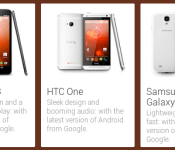
Apparently, Google well aware of this demand released a “solution” at the start of 2013 – or so they thought. They released two extended devices HTC One GPe and Samsung Galaxy S4 Gpe in a category called “Google Play Editions Devices”. The hidden concept behind these phones was that they could boot into skinned or stocked software – Not the best solution in the world, but at least we finally had something.
Why Google Play Edition Devices may not sell
Here are some problems due to which Google Play Edition Devices might fall short of their expectations. Firstly, the Play Edition Devices are not selling that much from the Playstore. Google want all their sales to be unified and integrated from one system. But the problem is that practically speaking many uses don’t even know that Google Play web store sells these devices directly. So Google will have to take extra burden of typical “retail sales”. So in a nutshell, getting these devices from the shelf isn’t as cost effective as Google might’ve initially thought.
The other problem is the pricing. All the Google Play Edition Devices don’t have a sales contract. This means that they are sold at their full value. And as we all know that majority of consumers particularly in US and European region like to buy devices by signing contracts of discounts and partial payments. Full price upfront is definitely going to be a problem.
Maybe a revised policy can solve these issues. Let’s hope for the best.
Author bio: Nuur Hasan is a Project Development team leader at Gloria9 Technologies. He is an Android phone geek. His other interests include sports, politics and blogging.
The post Google Play edition devices might not be a big seller [Guest Blog] appeared first on AndroidGuys.

