



Google Trends is now, finally, a screen saver

The flying toasters and infinite space your sleeping computer’s been living with are being retired. No, After Dark isn’t being resurrected and, well, does Windows even come with a screen saver built-in anymore? It’s Google, and specifically the Trends section of Google, that’s leading the bleeding edge of screen saver tech: Mac users can now download a Trends-driven screen saver that…yep, it culls trending Google topics and pushes them to your screensaver. It’s quite pretty! Head over here to grab it for yourself.
Filed under: Misc, Internet, Software, Google
Source: Google Trends Screen Saver, Google

Chrome’s hands-free voice search is coming to everyone, no add-on required

If you’ve wanted hands-free Google voice search (à la Android’s Now Launcher) on the desktop, you’ve so far had to install a Chrome extension. No more — the company has released a Chrome beta that builds the feature into the browser. Any time you visit the Google homepage or open a new tab, you can say “OK Google” to ask a question or perform a command, such as scheduling a reminder. Testers running Chrome in US English should see the feature go live sometime within the next few days, and a matching Chrome OS update is coming soon. Don’t worry if you’d rather not be an early adopter. Google typically releases finished versions of the software several weeks after the beta, so touchless voice search should be available to every Chrome user before long.
Filed under: Internet, Software, Google
Via: TechCrunch
Source: Google Chrome Blog
Google VP chats Galaxy S6, Nexus 6, Whatsapp, and more
Google Senior Vice President Sundar Pichai recently sat down with French website Frandroid where he discussed a number of Android-related topics. Among other things, Pichai touched on the relationship between Samsung and the Android team, Whatsapp, and, of course, future smartphones.
On Samsung‘s decision to employ Tizen for the Gear 2 smartwatch, Pichai indicates he would have liked to see them use Android. Then again, it’s just one of hundreds of devices.
Looking ahead to the next-generation of Galaxy S smartphones (presumed Galaxy S6), Sundar says that Samsung will again use Android for the flagship brand. Yeah, we know it’s entirely too early to start looking at something that’s likely a year off but, hey, whatever.
As for the overall relationship between Samsung and the Google (Android) team, we’re told that it’s more boring than the press would have us believe.
In terms of the next-generation Nexus smartphone, Pichai advises that we won’t see it in the first half of the year. Makes sense, really, as the last few Nexus handsets made their debuts in the fall. It’s unclear if this will be known as the Nexus 6.
Contradicting recent reports, Sundar Pichai says that Google did not make a play for WhatsApp. Purchased by Facebook for $16-$19 billion earlier this month, WhatsApp did, however, meet with Google.
It is worth pointing out that the original article is in French and that some of what we’re passing along can be a little lost or garbled in translation. The whole article is worth a quick read as it also touches on the Nokia X and general security issues for Android.
The post Google VP chats Galaxy S6, Nexus 6, Whatsapp, and more appeared first on AndroidGuys.
The next mobile imaging war won’t be waged over megapixels

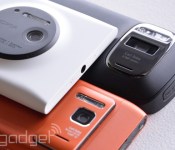
For the past several years, improvements in smartphone cameras have followed the “more megapixels” mantra. Samsung’s Galaxy S5 is up from 13 to 16 megapixels; Sony’s new Xperia Z2 packs a 20.7-megapixel Exmor model; and Nokia’s Lumia 1020 with PureView is a 41-megapixel monster. However, Google’s recent sensor-laden smartphone prototype, Project Tango, could herald a new direction.
Though Mountain View is focused on 3D mapping, so-called depth camera tech could dramatically improve all the pictures you take with your smartphone. By using two lenses with different focal lengths, for example, you could zoom in on subjects with quality that rivals bulky optical zooms. It could also eliminate a number of other shortcomings without adding an awkward hump like the one seen on the Lumia 1020. You could soon have much better light sensitivity, less noise and depth of field control that rivals a DSLR. The benefits are clear, but Google is not alone in its pursuit. The battle for a better smartphone camera is on, and you could be the one to reap the rewards.
Project Tango: 3D Mapping First

Though Google’s Project Tango has shone a bright light on multi-sensor technology, the hardware on its prototype handset (shown above) was actually developed by a company called Movidius. Like a mobile Kinect, it consists of a high-res camera, a low-res tracking sensor, an infrared depth scanner and a CPU. The Myriad 1 brain processes all the inputs at teraflop speeds using several hundred milliwatts of power. In a demo video from last year, Movidius showed off various applications like VR motion tracking, post-capture refocusing (à la Lytro), computational zoom and mobile 3D scanning.
For its purposes, Google has keyed in on depth scanning with Project Tango. That would enable anyone with a smartphone or wearable like Google Glass to map their indoor environment using only a smartphone. Obviously, the search giant has a strong commercial interest in that function, given how tight the Maps app has become with its search business. As such, its Advanced Technology and Projects (ATAP) group (the part of Motorola it didn’t sell to Lenovo) created a prototype phone equipped with Movidius’ hardware and an SDK for developers. It’s hoping developers will come up with innovative mapping and location functions that could one day become Android apps.

However, one overlooked aspect in the Project Tango coverage has been the technology’s potential to vastly improve smartphone photography. Thanks to onboard sensors and enormous, imaging-specific horsepower, Movidius’ tech could sort out some of the annoying limitations of taking snaps with your phone. One demo in its technology display, for instance, shows how you could zoom into a scene without the considerable pixelation normally seen on a smartphone. In another example, selective Lytro-like focusing was used on a photo after it was taken, but with more precision thanks to depth sensors. Presumably, developers could tap into those features as well as the 3D mapping to create apps with an immediate, tangible benefit to consumers. Whether Google’s SDK will permit such development or not remains to be seen.
Pelican imaging: 16 lenses, one camera

Qualcomm-backed Pelican Imaging takes a completely different approach to depth sensing. It’s developed an array of 16 lenses in a 4 x 4 grid, each of which captures only red, green or blue colors to produce 8-megapixel images. The process reduces noise by eliminating the cross talk between pixels produced by regular CMOS sensors. Offset lenses allow depth information to be captured passively (unlike the infrared Movidius system), enabling a variety of functions and effects. For example, Pelican can perform the same selective-focus trick as Movidius after a picture is taken. It could also bring clearer images in low light and even 3D image stabilization for smoother video and decreased motion blur. The company has also showed off more dramatic effects, like isolating a subject using depth info and placing it into another shot.
Last year, Pelican told us that its imaging tech would start to appear in smartphones sometime in 2014. It had received a huge vote of confidence (and cash) from Nokia, the smartphone maker leading the charge on camera technology with PureView. However, we met with Pelican here at MWC 2014 and it has now backtracked, saying its sensors won’t be installed in any handsets until at least 2015. It’s holding out for a deal with a major smartphone manufacturer, rather than settling for contracts with smaller OEMs. We can imagine, however, that any large company would be wary of risking a new handset on unproven technology unless it’s clearly an improvement on the status quo. Though Pelican’s sensor is clearly interesting, we’re not sure it can say that yet.
Core Photonics: Replacing the point-and-shoot

Israeli company Corephotonics is another Qualcomm-backed camera sensor player. Unlike Movidius, it’s focused squarely on straight-up camera technology and sees depth sensing as mere window dressing. In fact, during MWC 2014, the company told us that its goal is nothing less than to bring smartphone cameras on par with decent-quality compact zoom models. To do that, it has taken a different tack than Movidius and Pelican by using two high-resolution cameras with different focal lengths. The prototype we saw had a pair of 13-megapixel imagers, one with a standard wide-angle lens and the other with a 3X telephoto. By comparing pixels, its software can enable zooming with optical-like quality for video and stills. The image above, for instance, compares its results with that of a 5x digital zoom. It also brings other advantages of dedicated cameras, like reduced noise, better low-light performance and shallower depth of field.

Though the module looked like it might line up with the two-camera-hole HTC M8 leak, the company denied any connection. A spokesperson did say, however, that its technology is being explored by various smartphone companies and added that there are no downsides compared to current phone cameras. Indeed, as we saw at their Mobile World Congress booth, the sensors delivered not only sharp zoomed still pictures, but smooth zoomed-in video as well, a huge improvement over current shooters. Though you could argue that Samsung’s Galaxy Camera and other optical zoom models are better, the Corephotonics’ module is tiny enough to slip into devices without substantial changes. That would eliminate the dreaded PureView hump and let makers retain the slim profiles consumers have grown accustomed to.
Another factor that Corephotonics feels confident about is power consumption. Its passive tech doesn’t draw much more power than a regular camera, and the company told us that any technology using active depth sensors, like Movidius’ module, is bound to drain a handset quicker. It also felt that its tech had an edge on Pelican’s multi-sensor array, since it supports higher resolutions (Pelican claims its modules produce 8-megapixel images.) Corephotonics also believes that Google’s Project Tango could lead to SDKs that will allow app makers to deal with depth info — something it could capitalize on.
The image is everything
As it dawns on consumers that jamming more pixels onto a small sensor doesn’t necessarily make their pictures better, camera companies are reviewing their options. Depth cameras look mighty tempting, especially with companies like Google, Qualcomm and Nokia behind them. But the biggest potential lies simply in making your pictures better. A lack of zooming capability is a serious shortcoming, as are poor low-light capabilities and grainy images. Adding megapixels or boosting sensors can help a bit, but those tweaks add unwanted bulk and expense to cameras. If those issues are put to bed, people may finally chuck their compact or point-and-shoot cameras once and for all. That’s the kind of revolution that could make or break this technology — any other benefits, like Google’s vaunted 3D mapping, are just icing on the cake.
Filed under: Cellphones, Cameras, Mobile, Google

Google adds the ‘Polar Bear capital of the world’ to Street View

One of the more immediate effects of climate change is that the icy habitats of the Polar Bear are very rapidly evaporating. In an attempt to connect people more directly to the issue, Google and Polar Bears International have teamed up to bring the evidence straight to Street View. Attaching a Trekker Backpack to the charity’s specially adapted vehicle, the pair have mapped the frozen tundra of Churchill, Manitoba, otherwise known as the “Polar Bear capital of the word.” In addition to the harsh landscape, the team have captured a few of the most famous four-legged residents, so if you fancy getting up close and personal with nature, head down to the source link and get looking.
Source: Google Maps, Google Blog
Google+ updated with new photo editing and management features
Google is currently rolling out a major update to its Android Google+ app which brings some nice features to the photo sharing and management. The update also brings the usual bug fixes and speed optimisations, but the big story here is the added functionality users now get to their photos stored on Google+.
The four major changes that the upgrade brings to Google+ are:
- Non-destructive photo editing across devices — Starting today you can start your edits on one device, and continue (or start over) on another. This means you can backup full-resolution photos from your desktop, edit them in seconds on your phone, then add some finishing touches from your tablet. (And you can revert to your originals at any time!) The technical term for this experience is non-destructive editing in the cloud, and we think you’ll really enjoy it.
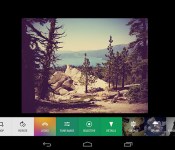
- Brand new filters and creative tools — Now when you edit your photos, you’ll have a powerful set of tools (like crop and rotate), 1-touch filters, and Snapseed-inspired enhancements (like Drama, Retrolux, and HDR Scape). Mix and match to make your photos look their absolute best.
- A single view of all your photos — The new ‘All’ view displays your entire photo library — whether it’s on your current device, or backed up in the cloud. If your library is really large (> 10s of thousands of photos), the app won’t show all your photos initially. But stay tuned, because we’re supporting larger and larger libraries over the next few weeks.
- An easy way to browse your photos by date — In addition to search, there’s now another way to find your photos fast. Just swipe through your photos in the ‘All’ view, and look for the scroll bar on the right. Dragging the scroll bar up or down will quickly move you forwards or backwards in time.
The update should be live now on the Google Play Store, so go ahead and hit update on your Google+ App to get all the new photo goodness.
The post Google+ updated with new photo editing and management features appeared first on AndroidGuys.
Google+ for Android learns even more photo editing tricks from Snapseed

Google+ has been taking cues from Snapseed ever since the company snapped up the app, and this refresh for Android is no different. The update introduces tools like crop, rotate and one-touch filters. It also comes with Snapseed-like enhancements, including HDR Scape, which made its debut on the web interface early this month.
While the update brings these familiar features onboard, you’ll also come across something entirely new: “non-destructive editing in the cloud,” which gives you the power to edit photos on one device and pick up where you left off on another. Finally, you can now see every photo you’ve saved on the device and in the cloud (arranged by date) on the new All tab. Since people upload more than a billion images a week on Google+, this definitely won’t be the last photo editor upgrade you’ll see. We just hope whatever the social network comes up with in the future is a lot better — and a lot less cheesy — than its Valentine’s Day stunt.
Filed under: Cellphones, Misc, Tablets, Mobile, Google
Source: Todd Kennedy (Google+)
Tip: How to hide the notification bar on Nova Launcher
Installing Nova Launcher opens up a whole load of customisation possibilities for your Android device; first we explained how to use Nova Launcher gestures to quickly activate Google Now, and now you’ll see how to hide the notification bar.
Hiding the notification pane on your device can change the look of your home screen entirely, for the better – not only do you get more screen space, but you don’t have a solid black bar spoiling your nice new minimal wallpaper.
The requirement is that you’ll need to be on KitKat 4.4, or any phone that supports transparency in the navigation bar, of which includes:
- Samsung Galaxy S3 (on Android 4.3)
- Samsung Galaxy S4
- Sony Xperia Z
- Motorola Moto X
- HTC One (rooted)
- Any Android 4.4 device ( Nexus 5)
You’ll also need the Beta release of Nova Launcher to get the option to hide the notification bar. To get the Beta, simply join this Google+ community, then head here to opt-in to the beta.
Then to activate the transparent notification bar, head into Settings -> Look and Feel -> Transparent Notification Bar.
And that’s all there is to it. Enjoy.
The post Tip: How to hide the notification bar on Nova Launcher appeared first on AndroidGuys.

Daily Roundup: a Galaxy S5 knock-off, dual-lens mobile imaging and more!

You might say the day is never really done in consumer technology news. Your workday, however, hopefully draws to a close at some point. This is the Daily Roundup on Engadget, a quick peek back at the top headlines for the past 24 hours — all handpicked by the editors here at the site. Click on through the break, and enjoy.

Elife S5.5 hands-on
Gionee’s latest smartphone, the Elife S5.5, features a 1.7GHz octa-core chipset, 2,300mAh battery and a 13-megapixel rear shooter, all in an astoundingly thin 5.5mm aluminum package. Read on for our hands-on impressions and photos.

The Goophone S5
It’s only been two days since Samsung unveiled its Galaxy S5 at MWC, yet Goophone’s already managed to whip up a knock-off. And yes, it’s called the Goophone S5. At $300, this eerily similar look-alike packs 32GB of storage, a 2,800mAh battery and 2GB of RAM.

Corephotonics dual-lens smartphone camera
Aside from obvious 3D implications, what sort of imaging features can dual-lens smartphones bring to the table? We sat down with a startup called Corephotonics to find out.

Google Now launcher hits the Play Store
Google’s popular Now launcher that debuted on the Nexus 5 finally arrived in the Play Store. Though, for now, it’s only available to those with a Nexus or Play Edition handset that runs KitKat.
Filed under: Misc
Google wants its Project Ara modular smartphone to cost $50

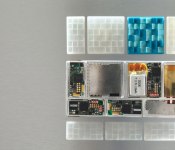
How much will a modular smartphone set you back? If Google gets its way, about $50 — assuming you forgo all of the bells and whistles. The team behind Project Ara wants to launch what it calls a “grayphone,” a barebones customizable exoskeleton that comes with little more than a screen, a frame and a WiFi radio. That wouldn’t be much of a phone, of course, but its only the bait. Google’s Paul Eremenko told Time Techland that users would customize their underpowered husks at special kiosks outfitted with tools to help customers build the device that’s right for them.
Sounds bold? It is, a little; the team admitted to Time that it hasn’t actually reached its price target just yet, and between the FCC and public opinion, it still has more than a few hurdles to leap before its modular cellphone is ready for market. That said, Eremenko says the focus is to make Ara great, not profitable — a statement that adds to the nebulous handset’s allure. Skip down to the attached source for Time’s full rundown of Project ARA, Google’s ATAP group and Eremnko’s thoughts on redesigning the smartphone.
Filed under: Cellphones, Mobile
Source: Time Techland

