



Google wants your help making cheaper, tinier solar power systems

Solar panels have become cheaper and more efficient in recent years, but you can’t say the same for the big, costly inverters turning their energy into usable electricity. Google isn’t happy with this lack of progress, so it’s about to launch the Little Box Challenge, an open competition to build a tiny (and consequently cheaper) solar power inverter. The search giant is promising $1 million to whoever cracks the problem, although it warns that this won’t be easy; don’t expect to reach a breakthrough in your basement. If someone does produce this miniscule power box, though, it could lead to eco-friendly energy in places where it’s currently unaffordable or otherwise impractical — whether it’s a remote village or your own rooftop.
[Image credit: Getty Images]
Filed under: Household, Google
Source: Google+, Little Box Challenge

Oracle gets another shot at making Google pay for using its code in Android

Oh, you thought Oracle and Google’s heated legal battle was over? Not quite: the US Court of Appeals for the Federal Circuit (CAFC) overturned a lower court’s decision that Oracle’s Java APIs weren’t copyrightable. This means that Oracle gets another shot at making Mountain View pay for its alleged transgressions, assuming Google can’t prove that its use of the APIs in Android falls under the fair use doctrine of US copyright law.
To fully understand what’s going on, we need to flash back to 2010. Oracle sued Google for billions because it believed (among other things) that the search giant infringed the “structure, sequence, and organization” of 37 Java application programming interfaces (APIs) while it was first building Android. Two years and lots of legal jostling later, a jury decided that Google did in fact infringe on Oracle’s copyrights (but not its patents). Seems like an open and shut case, no? Judge William Alsup eventually shot down the copyright claims their verdict was based on, though, basically nullifying the jury’s decision.
The court ultimately decided that those APIs aren’t copyrightable, prompting Oracle to accept a whopping $0 in damages from the folks in Mountain View. Today, that’s no longer the case. In short, the appeals court took issue with Alsup’s original conclusion (and some of the intellectual leaps that lead to it) and overturned the ruling. APIs can indeed be copyrighted now, which itself is quite a can of worms to open because of the potential pitfalls for software creators trying to craft apps and services that interact with others. Last time around the jury found itself deadlocked on whether Google’s actions fell under fair use — expect another trial and still more legal intrigue to come.
Via: FOSS Patents
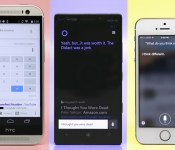
Smartphones for hire: Which personal assistant is right for you?

“Ring-ding-ding-ding-dingeringeding.”
This isn’t a standard job interview answer, but then again, “What does the fox say?” isn’t a typical question, either.
The top three smartphone platforms now feature fully functional personal assistants, and just like real-life assistants, it’s not so easy to pick one at random. Each has its own talents, weaknesses and personality quirks to consider. So, I conducted a series of “interviews” with Siri, Google Now and Cortana to get to know them better — and yes, they all know exactly what the fox says.
Siri

Apple’s Siri is a seasoned assistant with plenty of experience to back up its resumé. Now nearly 3 years old, the once-beta program has had time to squash bugs and add features. And thanks to the iOS platform, it’s integrated with social networks like Twitter and Facebook, as well as services like Yelp, Evernote, Fandango, OpenTable and WolframAlpha.
Siri has a jovial personality. No matter what you ask, just frame your question naturally — for instance, “How should I dress this weekend?” — and nine times out of 10, it’ll not only understand you, but also respond in a similar fashion. If you have follow-up questions or requests, Siri will continue the conversation with you. And if you ask something silly, expect a sassy answer.
Siri is a seasoned assistant with plenty of experience to back up its resumé.
Personality’s a nice touch, but it’s merely a party trick if your assistant lacks functionality. Fortunately, Siri’s not hurting in that area. It can dictate and send texts, emails and social network updates. It can make calls and read messages back to you. It has no problem setting (and canceling) reminders and alarms, and will display your upcoming appointments in a list. How about opening apps and changing settings? Airplane mode, WiFi, Bluetooth, you name it — Siri’s got you covered so you don’t have to dig around countless screens to find stuff.
Siri’s also good with watercooler talk. It told me when the next Giants home game was and how they’re doing this year. When I ask about a movie, the details show up in a card-like view; and I can even buy movie tickets through Fandango. Siri also can pull up music through your library or iTunes, and it’s able to pause, resume and skip songs. However, it doesn’t do a good job of pulling up concert information, opting instead for a web search.
Much like both of its competitors, it can set geofences for reminders. This means you can tell it to remind you to pay the rent as you pass by the landlord’s office, or stop and get a Mother’s Day present when you’re close to your mom’s favorite store (hint, hint). Speaking of location, it can pull up local listings, which you can then filter by distance or Yelp rating; you can also use Siri for all of your navigation needs, as long as you don’t have a strong aversion to Apple Maps. The service also remembers your home and work to help route your morning commute, but unfortunately, it doesn’t do well at determining other places you visit frequently.
Siri’s not all business though. It has a knack for finding your friends, as long as you and your entourage have the iOS app. If Steve’s late getting to your house, you can ask Siri to see where he’s at and it’ll pull up a map with his location. While you wait for him to show up, you might as well use Siri’s OpenTable integration to set up reservations for dinner.
Hire Siri if you’re looking for: Personality, dictation, social networking, music playback, sports, movies, changing settings, reading messages, finding friends.
Google Now

Of the three candidates, Google Now is the blandest. It’s the kind of assistant that takes everything a little too seriously, and on the rare occasion when it tries to be funny, it tries too hard. But it’s also very robust, knowledgeable and takes care of business when called upon — and you can call upon Google without touching the device. It works great on the home screen and in the Now screen, but you can’t activate it when you’re in an app, or even in the app tray. That’s still better than Siri and Cortana, however, which are activated by a long-press of a particular button.
It’s the kind of assistant that takes everything a little too seriously, and on the rare occasion when it tries to be funny, it tries too hard.
Sure, it comes with a few Easter eggs (me: “Make me a sandwich.” Google: “What? Get it yourself!”), but Google prefers function over friendliness. I can respect that — Siri’s and Cortana’s jokes aren’t technically all that useful anyway — but it’s disappointing that an engine like Google can’t understand questions unless they’re framed formulaically, such as “What’s the weather like today?” instead of “What should I wear this weekend?”
It’s not the most intuitive assistant, and it’s a mixed bag for basic daily tasks. Google can look through your email and remind you of upcoming flights and give you other information related to your pending trip. Of course, you can also use it to do the usual voice assistant stuff: Set reminders and alarms, visit specific websites, draft notes and make calls, as well as send texts and emails. For reminders, Google will ask you when and where you want to be pinged. And although it can set up appointments and alarms, it can’t change or cancel them. (If you ask, it doesn’t even understand your request.)
One of Google’s less job-specific strengths is its ability to name a tune. It’ll pull up information about the song you’re listening to and link you to the Google Play Store. It’s a talent Siri simply doesn’t possess, although rumors indicate that Apple’s looking into integrating Shazam. Lastly, if you’re interested in using your assistant to post on social networks, take note: You’re limited to Google+.
Hire Google if you’re looking for: Travel and flights, dictation, music discovery, hands-free voice activation and website shortcuts.
Cortana

Cortana is the only personal assistant in the trio that has a recognizable face, and the only one that has a resumé stretching 500 years into the future. Presently, the service is brand-new and technically in beta, but it’s fully functional. It’ll continue to improve over time as more people use it and Microsoft’s team adds functionality.
Like Siri, Cortana’s got the makings of a fun personality. Jen Taylor, the voice of Cortana in the Halo series, contributes to her Windows Phone namesake by providing a lot of the program’s clever quips, and you’ll hear more of her voice over time. The service doesn’t have quite as many quirky responses as Apple’s counterpart, but wit comes with experience. Currently, Cortana’s sass is limited to telling jokes, poking fun at the competition and responding to random questions about Halo and Microsoft. She’ll also keep conversations going as long as you’re making queries that are relevant to the topic at hand.
She can take care of nearly all of the essential tasks that a virtual assistant should have, many of which I’ve already discussed in earlier sections, but Cortana’s greatest strength comes with her Notebook. After all, your personal assistant would jot down information about you in his or her notebook, right?
Cortana is the only personal assistant in the trio that has a recognizable face, and the only one that has a resumé stretching 500 years into the future.
Do people even use real notebooks anymore? Well, Cortana does. She uses her Notebook to learn more about you. Sure, Siri and Google Now have shown small pieces of this feature: Both services remember your relationships and recognize where you live and work. Siri gets smarter as it gets to know you, and Google displays cards with information about your favorite sports teams, stocks, cable provider, news stories and so on. So far, however, Cortana’s implementation adds a lot more customization. Your list of reminders resides here, as well as your favorite places, music searches and preferred quiet hours.
But the most intriguing part of the Notebook is the section on your interests. This is a customized feed of information that keeps you posted on certain news stories and fills you in on things like your commute time, places to eat, upcoming flights, local weather and your favorite sports teams.
It’s also home to Windows Phone’s Do Not Disturb mode, known as Quiet Hours. A personal assistant would likely know not to bug you about things after a certain time of night, unless it’s incredibly important — but if your mother is trying to get ahold of you at midnight, it’s probably an emergency. Thus, you can set your quiet hours in the Notebook, as well as add a list of people (the Inner Circle) you don’t mind waking you up at the worst possible time in the morning.
You can rely on Cortana when you want to change settings and open apps, and it can even open up specific websites directly as long as you have a shortcut set up as a Live Tile. That’s still not quite as nice as Google, which can open sites without that caveat, but it’s a start. However, just like Google, Cortana can recognize music and offer links to buy the song you’re listening to. She can pull up whatever tunes you want, navigate through your playlist and pause songs currently playing. She’s also skilled at hooking you up with the latest weather conditions in a card-like view (which the others do just fine) and converting temperature between Fahrenheit, Celsius and even Kelvin. Conversely, I asked Siri to convert to Kelvin and it showed me how hot it was in Kelvin, Australia.
Unfortunately, the service’s beta status also means it’s not complete. Cortana doesn’t appear to have any attachments to social networking yet, though I wouldn’t be surprised to see this change down the road. She also doesn’t have hands-free activation, so you have to hold down the search button and then speak your voice commands. Finally, she also has trouble dictating punctuation, so “period” and “question mark” were transcribed as actual words instead of grammatical marks.
Hire Cortana if you’re looking for: Personality, navigation, appointments and reminders, weather, music discovery, changing settings, Do Not Disturb.
Who gets the job?
Don’t you hate it when there isn’t a clear-cut answer? Truth is, all three services do the basics quite well — appointments, reminders, dictation, making calls, sending messages and so on. But each one has its own array of talents to set it apart and its own obstacles to overcome. Between Siri’s experience, Cortana’s Notebook and Google’s hands-free functionality, you could hire any of the three and still be happy.
If you’re not looking for a specific feature or strength, however, you may need to bring them in for a follow-up interview.
Filed under: Cellphones, Software, Mobile, Apple, Microsoft, Google
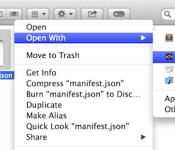
Google now lets you use Chrome apps to open files on your Mac

Although Google has quietly been working to bring Chrome apps to the desktop, you’ve not been able click a file and have it open inside a browser extension. According to Chrome tinkerer François Beaufort, that’s all about to change, after the search giant launched a new beta version of its Mac browser, which just so happens to add this kind of support for various file types. As you can see in the screenshot above, the Chrome extension Text can be assigned to edit (you guessed it) documents. Images are also supported, though it’s not clear what other file types Google may allow extensions to access. Imagine a YouTube app that’ll let you edit videos saved on your Mac while uploading them to the site: not something you can do currently, but Google could help make apps like that a reality.
Filed under: Internet, Software, Google
Source: François Beaufort

Uber and Google are just getting started

This week, Google announced a huge update to its Maps app on Android and iOS, bringing new tools such as lane guidance along with one particularly intriguing feature: Uber integration. If you have the ride-sharing service’s app on your phone, Uber will show up as an option when you search for public-transit directions, and you’ll be able to jump into the Uber app from Maps to order a ride.
Google’s clearly favoring one ride-ordering app over others like Hailo and Lyft. Of course, Uber’s integration with Maps will mean nothing to you if you don’t already have the app on your phone, but for current customers, it’s one more reminder that a ride’s just a few taps away. Looking at the larger picture, though, this move points to Google’s (literal) investment in Uber — and it could be the first step in a wide-reaching partnership between the two companies. Driverless rides to the airport, anyone?
Fast-forward several years from now, and we might be talking about on-demand, driverless cars and unmanned delivery vehicles.
Google Ventures, Mountain View’s tech-investment wing, threw a whopping $258 million behind the transportation company in late 2013, the biggest deal it’s made to date. Ventures, which operates independently of Google as a corporate VC firm, previously invested heavily in another big name, the Nest smart thermostat. Nest Labs, of course, famously ended up a member of the Google family in a $3.2 billion acquisition deal. Given that there’s a precedent for investments turning into acquisitions for Google, Uber seems like an obvious next pick.
Fast-forward several years from now, and we could be talking about on-demand, driverless cars and unmanned delivery vehicles. It’s hardly a new idea to think that Google will utilize Uber to execute its vision for driverless transportation, especially considering reports that it’s been working on autonomous taxis of its own. While plenty of Uber users may wince at the idea of Google cannibalizing an independent service, it’s not like the ride-share app is any stranger to aggressively edging out the competition. And while Google Ventures does back the Uber alternative Sidecar, it wouldn’t be out of character for the company to buy out the competition once it throws its full weight behind Uber.
But driverless cars that you can order from your phone are just one way Uber complements Google’s vision for the future. Considering that Amazon’s becoming a power player with its same-day delivery service, Mountain View could bolster its Shopping Express program by joining forces with Uber. That latter company is currently testing its new UberRUSH courier service in New York City, and a combined Google-Uber effort would help in taking on Jeff Bezos and co. With Google-backed, driverless Ubers delivering you that urgent supply of mouthwash, Amazon’s delivery drones could start to look a tad gimmicky.
So, will Google acquire Uber? It already owns a significant chunk of the company, but buying it outright would give Google freedom to shape the service to serve its own goals, many of which we probably haven’t even seen a glimpse of yet. Should that day come to pass, let’s just hope the ride-sharing app continues to operate under its original name — “Goober” just doesn’t have a nice ring to it.
Filed under: Transportation, Google, Amazon

Google’s camera app once again lets you snap photos while recording video

Google’s redesigned Android camera app wasn’t a full step forward. While you got a much improved interface, you also lost the ability to snap photos while recording video — not so hot if you want more than just movies from a friend’s wedding dance. Well, it’s back. A low-key update to Google Camera once again lets you capture stills in mid-video, making sure that you’ll have album-worthy images alongside your YouTube clips. If you’ve been holding off on upgrading the camera app because of that earlier omission, it’s now safe to jump in.
Filed under: Cellphones, Mobile, Google
Via: Phone Arena
Source: Google Play

Could the Google device codenamed “Flounder” be the Nexus 8?
 There’s a lot you can find out from taking a look at the Chromium issue tracker; sometimes, you might even find a potential entry from an unreleased Google device. According to the above log, a device codenamed “flounder” was spotted; for reference, Google codenames its devices with names of sea animals i.e. Nexus 5 = hammerhead, Nexus 10 = manta. Which begs the question about a rumoured Google device that we haven’t heard from in a while: could the Google device codenamed “flounder” be the Nexus 8?
Rumours about the Nexus 8 have died down mightly since the initial hullabaloo of possibly accidentally leaked pictures, however this information might just pick things up again. We’ve heard rumours that a possible Nexus 8 device could be released in August, which would mean it would almost indefinitely be announced at Google I/O next month if this really is the real deal. As some collateral information, the “flounder” appears to be using a development build from this week, so it looks like development of whatever this device is may be well under way.
Do you think the “flounder” could be the Nexus 8? Can you think of what else the “flounder” could be? Let us know your opinion in the comments below.
Source: myce.com
//<![CDATA[
ord = window.ord || Math.floor(Math.random()*1E16);
document.write('’);
//]]>
Google Maps Updates to Verison 8! Google Camera Adds Much Needed Feature! – App Updates

Happy Hump Day gang, and when it’s Hump Day; Google starts humping away with updates. Quite a few this week. Google Maps probably gets the most significant update, by updating to version 8. The Google Camera gets that taking photos while taking video feature which will please a lot of you All updates are down below, so get them on your devices.
App Updates
Google Maps 8.0.0
Google Play Services 4.4
Google Camera
Google Wallet
All other updates here
//<![CDATA[
ord = window.ord || Math.floor(Math.random()*1E16);
document.write('’);
//]]>

Google Wallet on Android now juggles all your internet accounts

As good as Google Wallet might be for payments, you’ve so far been locked into one Google account; that’s not so hot if family member need to borrow your phone to send some cash. That won’t be an issue after today, since Google has updated Wallet’s Android app with a tweaked interface that lets you use multiple Google accounts. You’ll also get shipment updates for orders from distant retailers.
There’s also an under-the-hood upgrade that should affect other apps you use. A Google Play Services refresh makes it easier for developers to put Google Wallet Instant Buy buttons in their titles; when they do, it’ll be trivial to buy something on a whim. That’s not great news if you’re an impulsive shopper, but we suspect that those with a good handle on their finances will be happy with the improvements.
Filed under: Cellphones, Internet, Mobile, Google
Source: Google Play, Android Developers

Google pads small-business toolbox with purchase of website builder

By nabbing up Appetas, a company that gives restauratuers a way to build a website in minutes, Google appears to be diving deeper into small business. The culinary outfit announced the acquisition on its blog, along with the news that it would be shuttering the service to get to work on its “new endeavors.” Co-founders Curtis Fonger and Keller Smith note that the folks in Mountain View are looking to bring easy-to-use business tools to merchants, but as you might expect, there’s no mention of what that might entail. Appetas not only serves up Squarespace-esque design tools, but it offers GrubHub, OpenTable and social integration for key features — like managing reservations. “We’re very excited to use what we’ve learned with Appetas to create something even better at Google,” they wrote in the blog post. Of course, Google purchased Zagat and its crowd-sourced reviews back in 2011, so we’ll have to wait and see if it and this offering are paired together in future services. And there’s Google+, which could be ripe for a transition to business directory now that its status is in limbo.
Via: TechCrunch
Source: Appetas

