


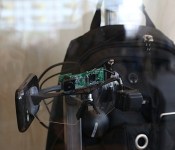
These early Google Glass prototypes looked (even more) awkward

Whether you believe Google Glass looks hideous or fashionable — and hey, we’re not here to judge — the current model looks a heckuva lot better than its first few prototypes. The first models arrived on the scene in 2010, and they looked more like the mess Jason Jones slapped together for the Daily Show than an actual consumer product. Three of the earliest prototypes, spanning two years, were on display at I/O this week.
The very first Glass prototype, which wasn’t shown off, was essentially just a big screen twice as big as a human face; it featured a coat hanger and a pico projector. Not a practical solution, of course, and definitely not a portable one. So the Google X team came up with the Pack (seen above), which only looked slightly less ridiculous. This handy model used a backpack with a laptop, GPS and mobile keyboard, and it came with a webcam, earbuds and Samsung smartphone, which was solely used as an early version of the Glass trackpad. Yes, this meant that testers walked around in 2010 with a phone attached to their cheek and a pack strapped to their back.
Fortunately, most prototypes actually improve as time progresses, and that’s exactly what happened with Glass. The Cat model, which came out the following year, shed the backpack and smartphone. Instead, the 3D-printed frame had Nexus 5 guts grafted onto the right side along with an awkwardly placed battery on the left. Curiously, the optical display sat underneath eye level. Cat was heavy, but it was at least the first truly portable version of the wearable.
Finally, the Emu model came later in 2011. Once again, it was a significant improvement in looks, weight and portability: It was cleaner, the circuitry wasn’t as rudimentary as older models, the optical display was positioned above the eye and it came with a bone conduction speaker that hung out on the back of the head.
I/O didn’t provide us with any new details about the consumer-facing future of Glass, but at least we got to know a bit more about its past.
You can buy an ‘unofficial’ Google Cardboard VR kit for 20 bucks

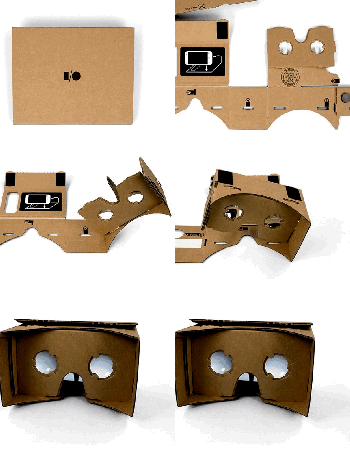
At the end of Google’s keynote yesterday, Sundar Pichai announced that all I/O attendees would receive either an LG or Samsung Android Wear device, along with Moto 360 when it becomes available later this summer. But he also offered up an unexpected gift… the slide read #cardboard (yes, with the hashtag) and Pichai held up a small brown square, barely large enough to accommodate a thin book for shipping purposes — but Google had something else in mind. Once assembled, #cardboard serves as a head-mounted 3D viewer, using your own smartphone and a pair of integrated lenses to create the effect.
Functionally, it’s virtually identical to the PhoneStation we saw earlier this month at Computex, but unlike that yet-unreleased device, Cardboard is available now for I/O attendees. The rest of us can pick up a similar version from San Francisco-based DODOcase, which is making the kit available for $20, or $25 with an optional NFC tag, plus 4 bucks for shipping. The set, which ships within 4-6 weeks, will net you pre-cut cardboard, lenses, a magnet, a rubber band and velcro, which you can assemble together in five minutes. Just add your smartphone.
Filed under: Displays, Home Entertainment, Wearables, Google
Source: DODOcase
Android Wear brings Google to life

How many times have you checked your phone today? If Google’s data is correct, your answer is somewhere between zero and 125. This proclivity to check our phone is the foundation upon which Android Wear, the company’s wearables platform, is built. Wear isn’t about replacing your smartphone though; it’s about extending Android beyond your pocket and into the world around you. Yesterday’s I/O keynote revealed a lot about Google’s vision for the future — and Wear is the thread that could tie it all together.
On stage, Director of Engineering for Android, David Singleton, explained that everything in Android L is contextually aware, and has voice recognition enabled. Wear isn’t a separate entity; it’s an extension of Android L. An interface that bridges your experience of the world to the phone in your pocket (and vice versa). No more unlocking your phone and digging for restaurant recommendations. Wear knows your location and preferences; it’s already giving you step-by-step directions to a ramen joint around the corner. Or so the theory goes.
Wear isn’t a separate entity; it’s an extension of Android L.
Singleton’s demonstration of how Wear dances with, rather than marches beside, your phone was to order a pizza through his watch in under 20 seconds. A party trick to please the mostly developer audience, sure, but that demo showed Wear’s potential in a way that people understand: a useful interaction that solves a (hunger) problem. That’s something you can easily do from your phone, of course; the smartwatch skeptics are going to be harder to impress.

Singleton’s second onstage demo showed Wear working with a tablet, displaying a recipe from Allthecooks. The tablet is the main screen in this scenario, but Wear is listening; it’s a servant to more than one device. The tablet feeds Wear each stage of a recipe one by one. Swipe for the next instruction on the watch, and this is reflected back on the tablet. The same is true for all interactions on all apps across all your Android L devices. No more dismissing notifications twice. This same symbiosis will be present across Android, Wear and Chrome OS — Google’s making the most determined push for unity yet, and Wear is a big part of it.
Great, we can order pizza and make recipes a little less likely to fail. But Google has a much broader ecosystem now. Android will be in cars, TVs and your home. It knows what you like to eat, where you go on weekends and how badly you suck at Tappy Chicken. All of this information is united by your phone, and (the idea being) effortlessly enhanced by Wear. The feel-good promo videos might ham it up a little, but Google Now’s cards are getting smarter, and could find a natural home on your wrist. Having a wearable that controls (and is controlled by) all the technology in your life is, perhaps, the only logical case for a smartwatch — and that’s what Google is going for.
Google wants Wear to be the key that unlocks the Android experiences around you right now.
Earlier on in the I/O keynote, Director of Engineering at Google, Dave Burke, showed off a new feature within Android L — trusted environments. If you have a “Bluetooth watch” (this was before Wear was discussed), your phone knows you’re near, and removes the need for a password to access it. This might work for all Bluetooth devices, but it’s further evidence of the neat shape Google has cut out for Wear in Android’s future. Google wants Wear to be the key that unlocks the Android experiences around you right now.
If you’re thinking Wear is just a fancy example of the internet of things, that’s because it is. This isn’t even the first wrist-worn gadget to be used for controlling other smart devices. Jawbone and SmartThings may spring to mind. The difference here is potential scale. Having a fitness tracker feed into your home automation is great. A platform that can set your thermostat, get driving directions (or score a lift), tell you about your surroundings and quickly reply to a friend’s message is better.
Your phone is still the brain, the identifier, the hardware that knows you. Wear listens, interfaces, serves. Much like Android itself, or Google Now, Wear is a platform that, if grown with care and attention, could usher in the era of the smart-world. A world where technology is used to lower, not create barriers between discovery and social interaction. That’s the marketing dream at least, and surely one we’re all invested in. On a more practical level, if Google is working on a unified ecosystem (as it appears to be), it’s about time for something like Android Wear.
Revamped Google Drive for Android makes it easier to tinker with your files

Google unveiled a lot of things at the start of its I/O conference, but there was also a pair of stealthy updates that could make a big difference for cloud storage lovers. To begin with, there’s a brand new version of Google Drive for Android that makes it much easier to manipulate your files. Instead of sifting through a top menu bar, you just have to tap a button to rename, share or star a document; it’s also a little quicker to print a file or scrap it entirely.
On top of the Drive refresh, presentation gurus will be glad to hear that Google’s promised Slides app has reached Android. There aren’t any big surprises if you’ve worked with such files in Drive before, but this now means that you can edit most common office documents in dedicated Google apps. Whether or not you need to tweak business pitches on the road, you can grab both new Drive-related apps today. Android Police has its own download link for the Drive update if you can’t wait for it to reach you automatically.
Filed under: Cellphones, Internet, Mobile, Google
Via: Android Police (1), (2)
Source: Google Play (Drive), (Slides)
LG partners with Google’s Project Tango to make consumer product next year

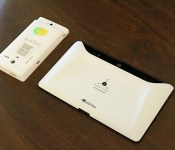
Google’s Advanced Technology and Projects division has been hard at work on its 3D-mapping project, known as Tango, since early 2013. In this time, we’ve seen the team rapidly progress its efforts by introducing a smartphone and tablet specifically for developers to construct their own apps that take advantage of the cameras and sensors inside. That said, we weren’t expecting to hear about a consumer-facing Tango product for quite a while, so it came as a surprise when Google announced that it’s working with LG on a device that will be available to the public sometime next year. There were no details about whether this product will be a smartphone, tablet or neither, but the partnership is likely still in the early stages.
Filed under: Cellphones, Tablets, Mobile, Google, LG
LG’s G Watch: designing a blank canvas for Android Wear

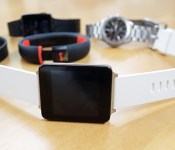
The G Watch is minimal. The shape aims to bring Android Wear front and center. “The content floats.” The lack of toggles, buttons and periphery is all intentional. “A lack of ornamentation,” is how Chul Bae Lee, VP of mobile design puts it. But it didn’t start out that way. Lee gestures at a soft sheet where there are roughly 10 prototypes of varying shapes and profiles. It’s the “What If…” of LG wearable design, but because these designs are still in LG’s collective brain for possible future use, we’re not allowed to take photos, although it doesn’t stop us from using our words.
We pore over the early prototypes, which are built and machine-finished to seem like the real thing. They intentionally have a slight weight to them, even if there are no electronics inside. One has a brushed-steel finish along a thick bottom bezel, while some jarring LG branding in the corner made another look a tiny wrist-mounted version of the company’s TVs. Several prototypes pack landscape screens, while another, with its curved sides and soft vertices, veers close to Samsung’s Gear 2, or Neo… or Live.
The G Watch has two primary features: commands and notifications — and not, Lee specifies, interaction. This, in a way, explains the lack of buttons (or cameras), as well as the inclusion of a touchscreen that, while accessible, certainly does do as much as your smartphone. “Commands” is an interesting way to put it too, because the primary way of getting information from the G Watch is by barking orders at it.
Circles and squares

The biggest difference between the LG G Watch and Motorola’s 360 is their faces. LG’s product goes for the smartwatch staple, a square LCD, in an aim to maximize usable screen space, while Motorola’s chosen to display Google’s latest project on a circular screen. Lee says. “A circular face? Well, we like it, but it’ll lead to a more classical watch experience.” The exec wouldn’t admit that his company would be bringing out a similarly shaped timepiece, but told us that LG is trying a whole load of things — and it probably helps when you have a display-making companion company.
“A circular face? Well, we like it, but it’ll lead to a more classical watch experience.”
While it’s the first effort, the G Watch is still borderline chunky (just like the rest of the Android Wear gang) and it’s due to what Lee calls the smartwatch’s biggest challenge: battery life. As the LG VP tells it: “I prefer to have high picture quality with (LCD or OLED).” He offers two options: a smartwatch with a low-grade display that will last a week on a charge, or one that has a high-quality screen, but lasts around a day. “[The battery life] could have been very different. It’s the mix of design, hardware, chipsets and display. Some people wanted a 15mm-thick watch face. Well, that’s crazy … but it’s all part of the compromise.”
The sales pitch for Android Wear is a notification-heavy one. This editor wants it to do more — what’s a watch doing that my smartphone doesn’t do already? How does it make my life better? “The point of the G Watch isn’t that we are wearing it, but that we are accessing information instantly — especially compared to a phone,” Lee says. “If I get a call or notification there, I have to drag it out of my pocket, check it, unlock it, answer it. Instant accessibility is the core value here.” But is it worth $229?
Does one size fit all?

The G Watch will arrive on July 7th in black and white options, but it’s a uniform, relatively unisex shape and size. LG’s stance is that smartwatches, at least for now, are nascent. Admittedly, there’s something regressive about gender-specific technology, but these watches and wearables will be compared to “dumber” male and female fashion accessories, whether they want to or not.
There’s something regressive about gender-specific technology, but these watches and wearables will be compared to “dumber” male and female fashion accessories
Lee recalls those heady feature phone days, where companies like LG used to market teenage, feminine and even “silver” phones to different customer segments. “As the smartphone era matured, [these segments] disappeared.” (There was the HTC Rhyme: never forget). Lee says it ties into another trade-off: Change the specification, like increasing the screen size, and you’re going to make the entire thing bigger. “The smartwatch has potential … but there’s still room for refinement.”
Watch this walkthrough of Samsung’s Android Wear device

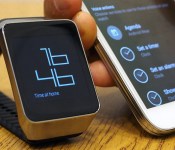
Android Wear, Google’s new platform for wearables, is fascinating stuff. We got to see a lot of it yesterday, but we didn’t get to spend a lot of time with the user interface itself because the watches were on retail mode — a limited version of the firmware. This is no longer a problem, as Samsung demoed its brand new Wear-laden smartwatch, known as the Gear Live, for Engadget. Once you’re done checking out our walkthrough of the UI below, we recommend you also take a closer look at our other coverage of Android Wear devices from yesterday. In the meantime, however, head below for a photo gallery and five-minute tour of Google’s new platform.
Filed under: Cellphones, Wearables, Mobile, Samsung, Google
Google Play for Education comes to student Chromebooks

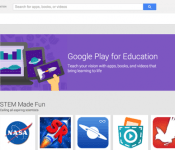
If Google really is on a quest for global domination, as some folks loudly proclaim, then it’s wisely starting its efforts in the classroom. In addition to attracting schools to its Chrome OS platform, via low-cost Chromebooks, it’s now also offering them access to the “Google Play for Education” hub through those devices. This hub contains apps, books and videos that are especially tailored to kids plowing through their primary and secondary education in the US, and it was previously only available to those who had a school-provided Android tablet.
Via: TNW
Source: Google Enterprise Blog
‘OK Google’ voice commands are coming to your Android lockscreen

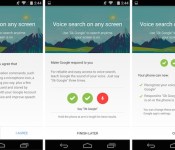
“OK Google.” The phrase is slowly working its way across Google’s mobile and web services, but the touchless control is about to get even better for many Android users. Previously limited to just the homescreen on Android 4.4 KitKat devices and anywhere on the Moto X (thanks to its always-on listening chip), the voice-activated command will soon be enabled on any screen, including the lockscreen, on your smartphone or tablet. That’s not all, either: Google’s also including a new Audio History feature that learns the sound of your voice to increase the accuracy of your searches.
The features come as part of an update to the Google Search app, which is currently rolling out slowly to devices following Google’s I/O keynote. Google is making the feature available on a phone-by-phone basis, meaning that even if you are able to grab the relevant app file, you still might not be able to use it. If you are eligible, however, all you have to do is navigate to your Google Now settings and enable the options inside the “OK Google Detection” menu.
[Image credit: Droid Life]
Filed under: Cellphones, Tablets, Internet, Software, Mobile, Google
Via: Droid Life
Source: Google Search (Play Store)
Android TV announced by Google

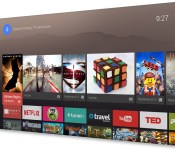
As you no doubt know by now, Google’s developer conference I/O kicked off yesterday with the keynote address. While I was unable to attend the conference in person I did watch the live stream on my computer. And, as many of you understand, one of the numerous announcements that Google made was Android TV – an evolution of the less than popular Google TV. Here is a quick run down of things that you may find important in the next-gen attempt at Google play for TV.
Android TV is in an attempt to unify Smart TVs under one OS and use the same API so that it is easier to get apps onto your TV. Another important point is that there is one SDK to write apps for all Android forms factors. With Android TV, you can search through your TV shows and movies easily using your phone or smart watch. You can also control your TV using a physical controller.
Controlling a smart TV with a smart phone might not be such new news to you; you might be wondering “Is that all they got?” Well no. Google has really worked hard putting together this Android TV experience for you. In addition to standard things that are becoming the standard with smart TVs, Android TV is backed with Google’s own Play Store. With the Play Store, you get the Play Games. In the keynote, they demonstrated how you can also use your Android TV to play games with your friends. They show one guy playing with a controller hooked up to the TV against another guy playing on his tablet.
Another feature of the Android TV is that it comes with Chromecasting built in. This means that you can use your Android TV the same you would use a TV with a Chromecast plugged into it. It also has Screen Mirroring which means that whatever you see on your device screen will display on your TV! You can cast anything and everything with the push of a button.
You can learn more about the Android TV from the keynote video itself here. They start discussion about the Android TV at 1:45:10
The post Android TV announced by Google appeared first on AndroidGuys.

