



Google sets aside $100 million for promising European startups

Genius can flower anywhere, you know, that’s why Google wants to give promising startups outside Silicon Valley a chance to explore their ideas. Mountain Valley’s particularly eyeing up-and-coming companies from Europe at the moment, so it launched a $100 million venture fund in the region. In an official blog post, Google Ventures Managing Partner Bill Maris says the company believes Europe’s startup scene has huge potential. After all, that’s where SoundCloud, Spotify and Supercell came from, and these three are now successful tech properties valuing billions of dollars, according to The New York Times. “Our goal is simple,” the blog post reads, “we want to invest in the best ideas from the best European entrepreneurs, and help them bring those ideas to life. “
$100 million, however, is small in the grand scheme of things, as tech deals reach tens of billions of dollars in total per year. Still, that’s just the initial amount Google plans to spend funding startups in the continent. And, hey, if the company’s establishing an HQ in London, there’s a chance that it won’t be the last hundred million Google’s earmarking for plucky European entrepreneurs.
Via: The New York Times
Source: Google

Engadget Daily: Google’s 3D-mapping tablet, Cuphead’s hand-drawn world and more!

Today, we take an in-depth look at Google’s 3D-mapping tablet, virtually tour Adam Savage’s man cave, explore the hand-drawn world of Cuphead and learn about a potential new purpose for plain copper wire. Read on for Engadget’s news highlights from the last 24 hours.

Two years to Tango: the race to finish Google’s 3D-mapping tablet
Two years. That’s exactly how much time Google’s ATAP division was given to develop Tango, a first-of-its-kind 3D-mapping tablet. Read on as Brad Molen digs into the project’s ambitious start and race toward the finish line.

Cuphead: Bringing 1930s style to 21st century games
Cuphead, you say? At first glance, this upcoming, hand-drawn 2D shooter might appear to be a long-lost game from the 1930s, but it’s only meant to look that way.

Tour Mythbuster Adam Savage’s collection of collections with Street View
Mythbusters fans, it’s your lucky day. Thanks to Google’s indoor Street View, you can virtually tour serial tinkerer Adam Savage’s San Francisco workshop in all its gadget-filled glory.

Researchers get record broadband speeds out of old-school copper wire
You know those old, colorful cables in your telephone line? They might not be so outdated after all. Researchers from Alcatel Lucent’s Bell Labs claim they’ve achieved a world record of 10Gbps through standard copper wire.
You also might like:
Filed under: Misc
Two years to Tango: the race to finish Google’s 3D-mapping tablet

Speck Design’s clientele has ranged from Apple to Samsonite to Fisher-Price in its history, and now it can add Google to the list of high-profile companies. But Google — or its Advanced Technologies and Projects (ATAP) division, to be more specific — is no ordinary client. The group is modeled after DARPA, which divides its agency into teams, with each one given a limited time to solve a pressing issue. Nearly a year and half ago, ATAP reached out to Speck, led by industrial designers Jason Stone and Vincent Pascual, with one such task: Build a tablet like no other.
The project is known as Tango. Its goal is to create technology that lets you use mobile devices to piece together three-dimensional maps, thanks to a clever array of cameras, depth sensors and fancy algorithms. As if that isn’t enough of a challenge, Tango’s team only has two full years to make this tech a reality. Those two years will be up in less than five months.

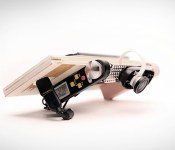
Several early models designed by Speck to get an idea of how the tablet would look and feel.
ATAP focuses on cutting-edge projects that push technology forward at a rapid pace, and Tango is a prime example of this. Through a combination of hardware and software, the project aims to give mobile devices a sense of scale and an understanding of space and motion. You could potentially create a three-dimensional mockup of your office building or home just by walking through every room with a Tango-equipped smartphone or tablet. If the project is successful, it means you may someday use an app to hunt down hard-to-find products at the grocery store, the same way you’d locate a house using GPS. You could play Plants vs. Zombies or Portal with your living room as the backdrop, or envision how that IKEA couch would fit in front of your entertainment center. It opens up a lot of new options that, until now, haven’t been technically feasible.
Two years isn’t much time to develop bleeding-edge tech from the ground up, let alone two pieces of hardware (a smartphone and tablet) and an entire software platform; heck, even the original iPhone took over three years to blossom from a sparkle in Steve Jobs’ eye to a final product release. But what’s more impressive is the fact that Speck cranked out a tablet in 16 months. That’s similar to a standard development cycle for a regular device. But the Tango slate is nowhere near normal, and it’s not just different in its curvaceous appearance. For starters, it’s a high-end Android tablet with 4GB of RAM, 128GB of internal storage and an NVIDIA K1 chip (the first in the US and second in the world) that features desktop GPU architecture. It also has a unique design that consists of an array of cameras and sensors near the top and a couple of subtle grips on the sides. It packs 3D-mapping features previously reserved for professional equipment worth thousands of dollars, and it even looks good enough to pass as a consumer device.
Two years isn’t much time when you’re working on a first-of-its-kind product.
In case it sounds like an easy process, Stone insists it’s the complete opposite. Tango and its partners worked at a breakneck pace. The project vision was evolved daily, and the team worked with several different companies simultaneously on various aspects of the product’s development. Working on multiple things at the same time isn’t uncommon, but the vast number of parties that were involved is; Tango recruited engineers, researchers, universities and manufacturers to help mold what would eventually become the hardware and software we see today.
“It’s like they were starting to form a vision on how this thing should actually work while we were doing the industrial design in parallel,” Stone says.
Speck was hired in March 2013 to come up with a “shotgun blast” of ideas and conceptual designs, but Stone and Pascual soon realized they were in for a far bigger challenge than they’d expected. Oftentimes clients will have specific design languages or standards for their brands, but because ATAP operates as a separate entity from the rest of Google, there were no established guidelines or rules to help Speck narrow down design options.
“They didn’t tell us a lot about what they were doing [with Tango] at first,” Stone says. “They didn’t really explain about the applications or tech at that point.”
Equipped with little more than a high-level understanding of the project, Stone and Pascual crafted dozens of rough, handmade prototypes. “We’d cut out a block and lay some dimensional paper down to make sure it’s the right screen and body size,” Stone says. “We’d make around three before picking one to take to Google.” Some of the more interesting models included a flagpole-shaped option and a tablet with a transparent frame around the edge.

One of Speck’s first handmade design prototypes.
While Speck’s clients are typically armed with a strict budget, Google had no cost restraints. Price simply didn’t factor into Tango early on; to Google’s Johnny Lee and Ryan Hickman, it was essential to use the best components, such as cameras, sensors, chipsets and speakers. That became a huge challenge for the designers because blank checks mean even more options.
“Sometimes those restraints around cost can help you make decisions easier and faster,” Stone says. “You’re like, ‘Well, we can’t do this so we’ll have to do that.’”
Speck wasn’t the only company working with Tango on potential designs at first. ATAP, eager to leverage its connection with Motorola and somehow utilize its supply chain and other resources, asked Moto’s User Experience Design (UXD) group to experiment with some conceptual designs. Tango even reached out to Google’s Nexus team, which wanted to focus on making affordable devices like the Nexus 5 instead.

Speck designed several mockups detailing how Tango could be used.
Soon, Speck received more responsibility. The company was asked to put its Photoshop skills to work by drawing up visualization mockups — screenshots depicting various use cases for Tango. These mockups helped ATAP sell its vision of Tango to potential hardware partners and Google. Thanks to the project’s time constraints, immediate partner buy-in was crucial to its success. Thus, this job was given the same priority as the designer’s other tasks; it had to be done as soon as possible.
Pascual said the team came up with hundreds of use cases. For instance, virtually trying a new carpet in your house; seeing how a new pair of glasses would look before a visit to the optometrist; rendering a 3D map of what’s under your car’s hood; or calculating a route through a crowded museum.
While overwhelming, the exercise gave Speck a greater understanding of Tango’s grand vision for the user experience. Thanks to the designers’ newfound knowledge, they concluded that the slate would be more effective in landscape; users wouldn’t hold the device in portrait mode while mapping out their house or office building.

Determining the tablet’s orientation helped narrow down the design options, but Speck still had to figure out how the baseline — the term for the array of Kinect-like cameras and sensors that measures all three dimensions — would factor in. Should the user hold the device directly in front of their face? Or does it make more sense to hold the screen parallel to the ground, with the cameras pointing forward? Stone and Pascual needed to find the optimal angle, so they began working on user tests.
There was just one major problem with testing a device like this: Neither company had performed these kinds of tests before.
There was just one major problem with testing a device like this: This was new territory and there wasn’t an existing model to replicate. The designers had to formulate the tests themselves, so they worked with ATAP to determine what needed to be tested and how. Since the tablet’s industrial design wasn’t finished at the time, Speck fashioned a special prototype using plywood, a built-in digital protractor (to quickly adjust camera angles between tests) and a sample camera array.
The process of building and conducting the tests, as well as quantifying the results, began in August and lasted roughly a month. Testers numbered fewer than 100 and came from within Motorola and Google. They were given a series of five tasks, each performed at two different camera angles, chosen at random. Tests consisted of simple activities like taking photos of a few objects, snapping an image over a short wall and navigating the office by following arrows that appeared in the viewfinder. After each run, testers would rate their experience on a scale of one to five.
Stone and Pascual discovered the camera angle mattered — a lot. Testers had difficulty holding the device directly in front of their faces while avoiding obstacles. As Pascual points out, “It’s tough to navigate around the house without knocking stuff off the table or couch.” Holding it close to the user’s waist didn’t work either, because testers constantly moved their heads (and eyeballs) up and down. So it had to be somewhere in between. The solution that testers liked best: Tilt the camera so users could hold the tablet at a slight angle while walking.

Speck designers putting the final computerized touches on the Tango tablet.
After some tweaking for economics, Stone and Pascual’s next adventure was a trip to visit Tango’s supplier in Asia to iron out some finite details. They had to make a lot of trade-offs at this stage: making sure the antennas were positioned correctly, getting buttons and components locked down to precise locations, color studies to determine the best shades to use for the final product and a few other details involving fit and finish. Now, Speck’s primary task is to help support ATAP anytime the group needs them to resolve issues.
“It always feels like it’s going to be a clean handoff,” Stone says, “but it’s never as clean as you’d expect.”
With five months remaining before the project ends, Tango is now making the final preparations before shipping the tablet out to a large (though unspecified) number of developers. And although ATAP will move on to other projects, Tango will live on through the technology it created, along with a set of standards that manufacturers can use to offer a consistent experience to users. LG, for instance, has already committed to releasing one such device next year.
If Project Tango was an audition, Speck Design did well enough to make the cut. ATAP has several other unannounced projects in the works, and Stone quietly mentions that his company’s involved in at least one or two of them. “We’re working with Google on another project that’s too early to be discussed publicly,” he says, but given ATAP’s time constraints, we’ll likely hear about it sooner than we expect.
[Image credits: ATAP]

Tour Mythbuster Adam Savage’s collection of collections with Street View

When Adam Savage isn’t busy blowing stuff up while filming Mythbusters, he’s often found tinkering about in his San Francisco workshop. It’s in this “cave” that Savage films his popular YouTube series for Tested, but it’s also home to an incredible number of gadgets and sci-fi memorabilia that his Mythbuster cash has funded over the years. Fortunately, this treasure-filled studio is now open for virtual tours, courtesy of Google’s indoor Street View cameras, letting you go behind-the-scenes and see for yourself where all the magic happens. If you prefer something more personal, Savage has also conducted a video tour of his man-cave, which we’ve included below.
Filed under: Google
Source: Google Maps

Google Play Games 2.0 rolling out now carrying features and improvements [Download]

New update to Google Play Games is rolling out as we speak. It is bringing a number of features and improvements, let’s see what we get in this 2.0 update.
As far as new features go we get level-up notifications and XP ranking, along with that you might notice a few UI tweaks in the app. Inbox, which was up to now reserved for game invitations only, has been tweaked and now includes separate tabs for invitations, quests and gifts. Play Now, Players and My Games screens have also been tweaked. All in all they’ve slightly changed the looks and the functionality of the app itself.
The official version of the update is 2.0.11 and if you don’t want to wait until they push it to your device you can download the .APK here, all you need is an Android 2.3+ device and you’re good to go!
Via: AndroidPolice
The post Google Play Games 2.0 rolling out now carrying features and improvements [Download] appeared first on AndroidGuys.

Gmail for Android adds a faster way to attach Google Drive files

Attaching Drive files on Gmail is easy enough even on Android phones and tablets, but we doubt anybody would complain if Google wants to make it even easier. The new Gmail refresh for Android comes with an “Insert from Drive” option on the right-hand pull-down menu. That’s definitely a lot quicker to access than the traditional Drive icon hidden among the undoubtedly numerous apps in your list, which shows up after clicking “Attach file.” Plus, in case the email’s recipients can’t see the file you’ve chosen (say, if it’s marked private or if it’s only shared to a select group of people), you can access its settings from within the app before you send an email. As a bonus, the updated Gmail app’s To: and CC/BCC: suggestions are now not only more comprehensive, but also show up much faster than before. Just don’t feel hurried to choose recipients because of this change, lest you end up blasting the entire office an embarrassing email.
Filed under: Cellphones, Tablets, Mobile, Google
Source: Gmail (Google+), Google Play

Control Google Glass with your mind… and a second headset

MindRDR shows up as a thin white line on Glass’s screen, which moves upwards the more the user concentrates. Once that line reaches the very top, it snaps a picture of whatever you want — you simply need to repeat the process to upload the image to a social network. In the future, though, its creators believe that the app could be a huge help to people who can’t move on their own. These include quadriplegics, those with multiple sclerosis, and especially those suffering from locked-in syndrome.

How To: Update the Google Play Store on your Android without an APK

It’s usually best to be on the latest version of the Google Play store app on your Android device since from time to time Google releases bug fixes, updates the UI and packs in even more new features.
 Most people either wait until the newest version hits their device or downloads an APK from somewhere on the Internet, but we wanted to tell you there’s a much simpler way and it requires no downloading APKs and sideloading the app. Here is what to do:
- Open the Google Play Store app
- Open the side slide-out menu by clicking the three lines at the top left
- Select “Settings”
- Scroll down until you see “Build version”
- Click on “Build version”
If a new build of the Play Store is available, you will be prompted to download and install it. If it’s already the latest, you will get a message that reads, “Google Play Store is up to date,” as you can see in the photo above.
The post How To: Update the Google Play Store on your Android without an APK appeared first on AndroidGuys.

Nexus 8 (Nexus 9/Flounder/Volantis) gets leaked on a shipping manifest

Last time we spotted a leak of a new Nexus tablet we were quite shocked, considering it said that the tablet will sport 5GB of RAM along with some other pretty nice specs. Even the source of that leak is usually spot on. This device keeps on leaking.
This time it leaked on a shipping database in India (image down below). It showed a listing for two “NEXUS8 PROTOTYPE TABLET SIMILAR TO NEXUS(7)” which landed in India about a week ago via Bangalore Air Cargo. The value listed for each of those was INR$16,484, which is approximately $275. This is probably not the retail price though, but we’re not sure. This might be the best evidence this thing exists thus far.

This time around we don’t get any specifications or anything of the sort. As far as we know @evleaks’ information might be spot on.
Source: GSM Insider
Via: TechnoBuffalo
The post Nexus 8 (Nexus 9/Flounder/Volantis) gets leaked on a shipping manifest appeared first on AndroidGuys.

Google, Dropbox, Canon and others team up to disarm future patent trolls

Patent litigation from non-participating entities (casually known as “patent trolls”) is the bane of a technology firm’s legal department. Fighting patent lawsuits from firms that subsist completely on licensing and legal action is a frustrating waste of resources, and one that often stifles innovation indirectly. Now, a new partnership between Canon, Dropbox, Google, Asana, SAP and Newegg hopes to cut off would-be patent trolls at the knees. It’s called the License on Transfer Network (LOT), and it’s a patent-licensing agreement that neuters a patent’s potential for litigation before prospective trolls can exploit it.
The companies’ plan hinges on how patent sales are handled. Companies within the LOT network can sell each other patents under normal terms — but if a participating firm sells their patents to an entity outside of the group, all other LOT members will be granted a royalty-free license to the technology. This means that if a patent is sold to a non-participating entity, LOT members will be protected from frivolous litigation. If a company never sells their patents, it is of course still free to protect it via litigation, but the group hopes the network will disarm trolls ahead of time. “As long as a company owns their patent, they retain all their rights to it,” explained SAP’s Anthony DiBartolomeo in the group’s announcement. “The LOT Network helps protect innovative patent owners from unwarranted litigation without stifling valid, beneficial uses of patents, such as cross-licensing.”
[Image credit: Brian Turner/Flickr]
Via: Re/Code
Source: DropBox, LOT Network

