


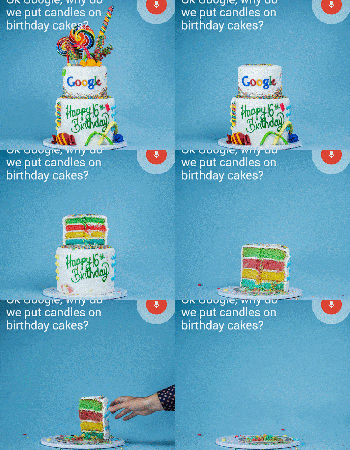
Interesting theory: Did Google out the name of its next build, Android Lollipop, in its birthday celebration?
 Fun fact: Google turned 16 years old yesterday. Other fun fact: A gif that Google posted on social media shows lollipops as the decoration on a birthday cake. Now, this next bit is going to be a bit of a stretch, but this is by no means beyond the subtle marketing of Google – could the lollipops on the top of the cake signify the name of the next build of Android, Android Lollipop? This was one of our earliest guesses for the name of Android L, even before we knew it as Android L, and it is at the very least plausible. Of course, it could equally be called layer cake, but we’d like to think there’s going to be a lollipop themed Android figurine on Google’s lawn in a month’s time. And yes, we know that’s a pretty indefensible reason.
As with every build of Android before it, everybody has been trying to guess the name of the next build of Android for the longest time, the most compelling theories of which have recently been Lemon Meringue Pie and Lion, the last courtesy of Google’s previous relationship with Nestle. Really, it’s anybody’s guess, so unless you’re into the whole business of speculation, you can probably afford to wait until an official announcement is made – Google is expected to announce a new tablet, the Nexus 9, and also a new phablet, the Nexus 6, come mid-October.
What do you think about this latest theory? Is it reading too deep into it, or is this totally something Google would do? Let us know your opinion.
Source: Phandroid
//<![CDATA[
ord = window.ord || Math.floor(Math.random()*1E16);
document.write('‘);
//]]>
The post Interesting theory: Did Google out the name of its next build, Android Lollipop, in its birthday celebration? appeared first on AndroidSPIN.
.CPlase_panel display:none;

Google changes Google Search app name in Google Play Store

Google have finally updated the Play Store listing for the Google Search app to match the app drawer labelling and new launcher icon.
The Play Store listing now lists the app as just ‘Google’ along with the refreshed icon. Order is restored in the unity of the Android operating system.
Small change, but notable nonetheless.
Deals, Discounts, Freebies, and More! Click here to save today!
The post Google changes Google Search app name in Google Play Store appeared first on AndroidGuys.
.CPlase_panel display:none;

Google wants its presence felt even more on smartphones

It seems that Google is realizing more that Android is big, and that their apps are therefore big. With this in mind, they have updated their MADA (Mobile Application Distribution Agreement) for 2014, the agreement that manufacturers such as Samsung or Motorola sign in order to add Google’s suite of apps to their phones.
New requirements include things such as having 20 pre-installed Google apps in a folder on the home screen labeled “Google”, a Google search bar at the top of the home screen, making “OK Google” a hotword to wake the device for interaction (assuming the phone has this capability), making Google Search accessible by swiping up from the home button, and during boot-up the screen should display either a Google trademark or mention that the phone runs Android.
This may seem extreme, particularly considering Android is supposed to be “open”. There’s a distinction that needs to be made though: getting Android on a phone, and getting Android on a phone with Google’s suite of apps. Manufacturers could still place Android on their phones if they desired, just without Google Play or other Google apps (similarly to how Amazon uses Android).
What do you think? Should Google rein it in? Or do they have the right to ask as much from manufacturers, considering the above requirements arguable provide a better Android experience?
via Droid-Life
Deals, Discounts, Freebies, and More! Click here to save today!
The post Google wants its presence felt even more on smartphones appeared first on AndroidGuys.
.CPlase_panel display:none;

For Your Consideration: mobile accessories to check out this weekend (Sept. 27)

Hey, Happy Saturday! Welcome to the first of an ongoing series of accessories round ups. The plan is to highlight at least five accessories to check out, but we’ll play loose with the number, especially if it pertains to different smartphones or tablets. Let’s jump right in!
The Glif

The Glif is perfect for you if you have ever wanted to use your phone with a tripod. It has 2 purposes: it is a universal tripod mount, and you can use it as a kickstand. Its small and can be adjusted to fit any phone, even if the phone is in a case. It’s extremely portable, it comes with a keychain adapter so you can take it with you anywhere with your keys. The company, Studio Neat is from Austin,TX and the Glif is made in America. It can be found here on Amazon – The Glif.
Chargecard for Android

If you have ever been stuck somewhere and needed a micro-usb cable for your phone, this one is for you. The Chargecard is shaped like a card and is made to fit in either a wallet or purse. The name is slightly deceiving, this is not a portable charger as the name implies; this is just a compact USB cable that fits in your wallet for whenever you need it. The reason I included it is because I can’t tell you how many times, I have been stuck and needed a USB cable, this would have helped a lot. It can be found here- Chargecard.
Spiderpodium

I read about the Spiderpodium and thought of 1 thing: a holder for my phone in the car. I have had this problem in my car since I decided to get it back in March; I have nowhere to put it when I am in my car.
This accessory is one of the most versatile stands for a phone that I have ever seen. The stand has 8 flexible legs that can be arranged to grip and support your phone wherever you decide to put it. The are two different versions: one for the phone, and a bigger one for the tablet.
LG Tones

If you are in the market for some stereo bluetooth headphones, you should look at these strongly. I have owned a pair of these for about a year now, and they work unbelievably well. One of my favorite features is that it works with Google search on your phone, if you press one of the buttons on the device, it functions as if you just said “OK, Google” in the search app. They sound great, I haven’t had any issues with music or podcasts. Another of the cooler features is that these vibrate when receiving a call as well. Check them out at Amazon.
Otterbox Symmetry

I love Otterbox cases! I have used an Otterbox case for almost every phone I’ve used for over 2 years. I started with nothing but Commuter cases, which are smaller than the Defender, and have a screen protector included in every package. The new Symmetry case has caught my attention. I love that they are smaller and lighter than the Commuter, and offer a great level of protection.
What I don’t like is that they don’t come with screen protectors. Maybe Otterbox will include them at some point in the future. You can find one of these cases for some of the newer phones. Check out one of these symmetry cases for some of the more popular Android phones: LG G3, HTC One M8, Samsung Galaxy S5.
Well, that’s all for this week! Let us know what you think about the accessories on the list. Also, let us know in the comments which accessories you want to see covered next!
Featured this week
Otterbox Symmetry Series for Samsung Galaxy S5 – Retail Packaging – Black (Black/Black)

Deals, Discounts, Freebies, and More! Click here to save today!
The post For Your Consideration: mobile accessories to check out this weekend (Sept. 27) appeared first on AndroidGuys.
.CPlase_panel display:none;

The extended Nexus family: Google’s golden Android standard

Google’s Nexus line has long stood as the company’s ideal vision of its widely adopted, open-source Android operating system. The devices, be they smartphones, tablets or even one-off media streamers, are built in conjunction with select hardware partners and represent an ideal marriage of tech specs with an unadulterated version of Android. It’s Google’s way of dealing with fragmentation (read: skinned versions) in the mobile OS market it created; a reference mark for manufacturers to aspire to, so to speak.
On the tail of the original Android handset’s sixth anniversary and in the run-up to whatever new Nexuses come next, we take a look back at the hardware path that’s been Google’s gold standard for Android.
Filed under: Cellphones, Tablets, Mobile, Samsung, HTC, Google, LG, T-Mobile
.CPlase_panel display:none;

Google to require more of its apps on Android devices

According to a report by The Information, you may be seeing a few more Google apps preloaded on future Android devices. Confidential paperwork on new contract requirements details raising the amount of pre-installed software. Under the new guidelines, the number is set to total up to 20 apps– more than doubling the current set of 9. What’s more, Google’s wares will also have to be displayed in strategic locations on home screens and in “prominent” folders. This means that Android device makers like Samsung, HTC and others would need to retool where the requisite apps are positioned and factor in the increased volume. As you may recall, Google aims to reign in customization of its software too, and ZTE has already opted for the Google Now launcher by default on its upcoming devices.
Filed under: Software, Mobile, Google
Source: The Information
.CPlase_panel display:none;

Google’s data-transferring tool gets a shiny new interface

Google already makes it very simple for you to pull your data from some of its many services, via the Takeout transfer tool on the web. Up until today, however, Google Takeout wasn’t necessarily pleasing to the eye, despite being extremely useful at letting users extract their archives. As a way to alleviate that, the search giant has quietly given Takeout a design makeover, bringing the user interface more in line with its other products, like Gmail and Google Drive. Still, it’s not all about the visuals here — Google Takeout is now also more thorough, allowing you to pull specific data from each service. For example, with Google Play Books, you can choose to include select files, rather than only having the option to download all at once. Just don’t go too crazy creating archives, since they do take up space from your Drive’s free storage allotment.
Filed under: Storage, Internet, Software, Google
Via: Google Operating System, GHacks
Source: Google
.CPlase_panel display:none;

This little laser could be the key to inexpensive self-driving cars

To listen to the Googles and the Elon Musks of the world is to believe that one day soon, we’ll be tooting down in the highway in cars that control themselves. Those cars will need eyes, though, and that’s where a company called Velodyne Acoustics comes in — it whipped up the Puck, a scaled down version of the laser scanning tech that helps Google’s self-driving cars see (which they also make) that only costs about a tenth of the price. Not up on the market rates for portable LiDAR arrays? Let’s put it in perspective: the units Google use cost around $75,000. This new model? Just a shade under $8,000. That old cliché about getting what you pay for still holds true here, though — this cheapo LiDAR array only has 16 lasers with which it scans the world, down from the 64 seen in higher-end units. As a result we’re looking at a pretty staggering dip in the sheer number of environmental data points, but the unit’s smaller size and price tag just might mean big things for car companies trying to craft the first truly affordable wave of autonomous cars.
Via: Wired
Source: Velodyne
.CPlase_panel display:none;
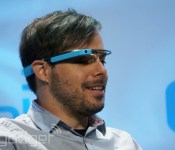
Texting on Google Glass is just as dangerous as on a phone

You’d think hands-free texting on Google Glass while driving would be a lot safer, but apparently, that’s not the case. A team of University of Central Florida researchers got 40 subjects in their 20s to drive a simulator while texting a math problem using voice transcription on Google Glass. In particular, the researchers observed how fast the drivers slammed on their brakes when a car suddenly stops in front of them during the simulation. The result? In the words of team leader Ben Sawyer, they “didn’t find a statistically significant difference between Google Glass and smartphones,” as the testers who wore the eyewear were just as distracted.
The Glass users did recover from the event faster than their smartphone-toting peers, but the testers who used smartphones were a lot more careful after the near-collision, putting more space between their cars and the ones ahead. Sawyer hopes Glass can eventually lead to a technology that can deliver info while you’re on the road without distracting you. For now, it’s all just a matter of ignoring text messages while driving — especially if it’s asking you to solve trig and algebra problems.
Filed under: Wearables, Mobile, Google
Source: Reuters, University of Central Florida
.CPlase_panel display:none;
Europe tells Google what to do to better protect people’s privacy

To say Google’s had problems in Europe would be an understatement. If it’s not been battling fines over its illegal WiFi snooping or trying to handle people’s rights to be forgotten, it’s faced numerous sanctions over its privacy policies. In a bid to ease the pressure on the search giant, privacy regulators from numerous European countries have issued set of guidelines that they believe will help it sidestep any future action. They expect Google to provide clearer reasons why it collects customer data, which include YouTube, Gmail and Google Maps, and let users know if it intends to share that information with third parties. The company came under fire in 2012, after it decided to consolidate more than 60 privacy policies into one and combine the information it collected across its popular services. The company is ready to work with authorities, though, noting that it’s open to feedback and looks forward to discussing the guidelines, suggesting Europeans may soon better understand if Google is being evil (or not).
Source: Reuters
.CPlase_panel display:none;

