


Google adds even more 3D Touch support to its iOS app
The Google app on iOS has supported 3D Touch for awhile, but that’s going, ahem, deeper. Now you can deep press on the big G at the bottom of the screen to start a new search query from anywhere within the app. Doing the same on Search and Maps results will offer previews of web pages and maps, respectively, while an even firmer press will open the links or Map. If you don’t have an iOS device that supports the feature, long pressing will net you the same results. Beyond that, version 18’s patch notes are barren aside from word that there are more Doodles and games coming in the future.
Source: iTunes
Google’s high-speed Fiber internet goes live in Salt Lake City
If Google’s experimental Fiber plans pan out, 24 locations across the US will be able to try it out. You know which place doesn’t have to wait for that to happen, though? Salt Lake City, Utah. The service officially went live in the state capital at 9AM on August 24th. Fiber’s initial rollout covers roughly 112 blocks from 100 South to 800 South between 400 West and 1300 East, according to The Salt Lake Tribune. Google even launched a portal where you can check if your address is within that area. Even if it’s not, you might not have to wait that long anyway — the company said the rest of the city will get access to Fiber within the coming months.
To refresh your memory, Google’s Gigabit internet will set you back $70 a month — $50 if you only want a 100Mbps connection for some reason. A Gigabit connection bundled with a TV service will cost you double at $140 a month. No matter which option you choose, though, you won’t ever have to deal with data caps, and you can add a home phone for an additional $10 a month.
Source: Google Fiber, The Salt Lake Tribune
Report: YouTube will fend off Facebook with social features
If you want to post a video on the web several years ago, YouTube was the go-to spot. Now, Google’s video network is feeling the pinch with strong video features from Facebook, Twitter and others, and has decided to push back, according to Venture Beat. The feature, internally code-named “Backstage,” will reportedly allow users to share photos, short posts, links, polls and videos with subscribers. Much like a Facebook timeline, items will be listed from newest to oldest and posted in subscribers’ feeds.
Backstage, which will appear as a channel tab, gives producers a new way to share content with fans. But it will also allow subscribers to comment with (Backstage-only) video, photos and other “rich replies,” according to VB. That’s along the same lines as Twitter, which supports links, videos and GIFs. It could also open it up to more abuse, though it’s hard to top a YouTube comments section for that.
YouTube is still by far the most popular video site on the net. Facebook recently reported that users watch 100 million hours of video per day, but YouTube reportedly serves up over 500 million hours daily. There’s often not much reason to linger on YouTube (other than watching more videos), though, so the site is likely hoping the social aspect will convince viewers to stick around longer. Backstage is expected to arrive by the end of the year, starting with select, influential YouTube accounts.
Source: Venture Beat
Google links Project Fi-approved WiFi hotspots to Nexus phones
The WiFi Assistant feature from Google’s Project Fi wireless network turned out to be one of Nicole’s favorite parts of the service, and now more people will have access to it. Google announced today that it’s bringing the ability to “automatically and securely connect” to over a million hotspots to Nexus owners in the US, Canada, Mexico and Nordic countries. WiFi Assistant identifies open, unprotected hotspots with good connections, and if you don’t want your network on the list then you may want to take a look at these instructions (or, just make sure it has any password protection at all).
Since it’s operating on open wireless networks by nature, WiFi Assistant uses a Google VPN to try and secure the connection. Ideally, it just makes sure you have an internet connection that you can trust, wherever you are, without the need to do anything manually. The FAQ should do a lot to explain exactly how the feature works and give you some time to get used to it as the feature rolls out “over the next few weeks.”
Source: Nexus (Google+), WiFi Assistant FAQ
YouTube’s app for the big screen is being updated today
YouTube may have originated on the desktop (more than a decade ago!), but now mobile and the living room are two of its most important platforms. The latter is receiving an update today: Game consoles, streaming devices like Roku, smart TVs and of course the Chromecast will all get a small but important change. Now, when you load up YouTube, you’ll be presented with a variety of different content tabs right at the top of the interface. It’s now much easier to flip through topics like sports, news, comedy, music, entertainment and so forth.
Google previously had similar categories hidden in the left-side menu bar, but the company thinks that moving them front and center will help users find content faster and keep them watching longer. The categories themselves have also been refined a bit, with some new additions and subtractions getting to the 14 total you’ll find now. It’s something YouTube has been working on ever since it started designing its own consistent interface across the big screen in 2013. Previously, YouTube had an open API that device makers could tap into and make their apps, but that led to inconsistent experiences and new features being left behind.

Below those high-level categories are a bunch of sub-genres and categorizations to help users drill in to what they may want to watch. Each section typically has a “top stories” area first that surfaces trending and popular videos. YouTube head of living room products Sarah Ali tells Engadget that the company spent a lot of time working to get the algorithms right so that it surfaces not only new videos, but older content that might be relevant to a topic that’s trending.
Beyond the top stories area are sub-categories meant to show off popular topics within a broader group. In gaming, for example, you might see Pokémon Go, Minecraft and Overwatch. Once you scroll through about 10 of these groupings you’ll get to a handful of suggested topics and channels. And once you start watching in any of these groups, the next video in the sequence will play automatically.
YouTube also added a new live streams section. There’s a top “live” area that shows you a variety of streams happening right at the moment you’re looking, and (in some cases) you can find live streams specific to the top-level categories when you start drilling down.
This update is rolling out today to basically every device that displays YouTube on your big TV. The only notable exception to that is the Apple TV, which has its own YouTube app that integrates with Siri and that Google maintains separately. Ali was quick to point out that it is feature complete, so Apple TV users aren’t missing out on anything at the moment. But if you’re watching YouTube on pretty much any other device (provided it was made in the last four years or so), the new interface should show up soon.
However, just note that only users in the US will see this change, at least for now. Ali said all of the recommendations need to be localized to get the right mix of content in that’s relevant to a particular country. It sounds like eventually other regions will get this update, but for the time being it’s restricted to the US.
Google Drive for Android now creates file and folder shortcuts
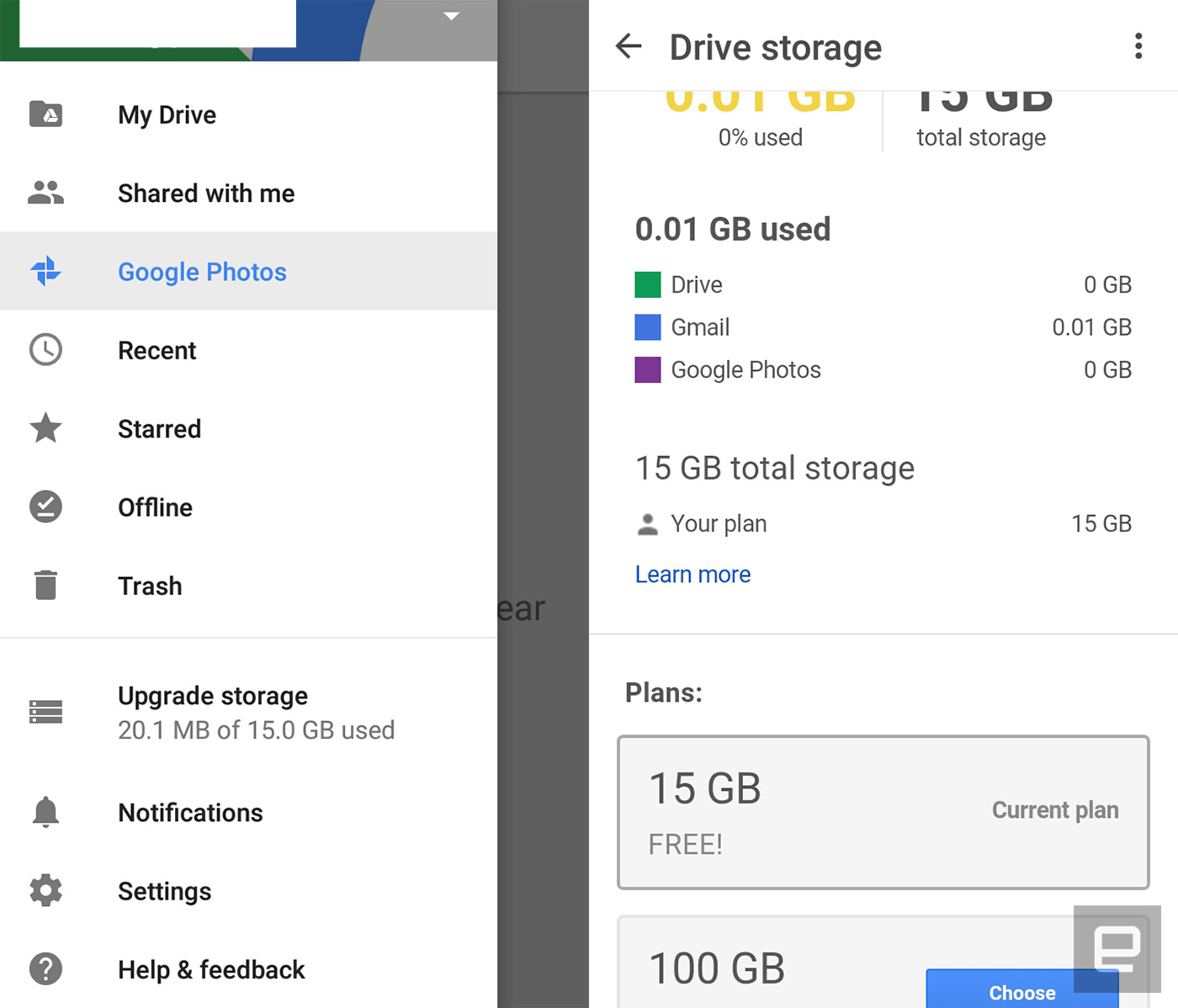
Google’s latest Drive update makes it easy to access your favorite files on Android. It adds the ability to add file and folder shortcuts to your homescreen, so you don’t need to launch the app every time there’s something in there you want to open. You can do that by going to your device’s Shortcuts menu and choosing Drive shortcuts, which could be next to the Drive scan and toolbar options. That might sound minor, but it could help you become more productive if you use the app as your primary cloud storage.
Besides the ability to add shortcuts, the latest version also adds an “Upgrade storage” option in its menu drawer. It shows your current plan and makes it a cinch to upgrade if you need more space. While the update comes a couple of small but useful features, it also serves as the bearer of bad news if you’re stuck on Android Ice Cream Sandwich. This is the last ICS-supported update, which means you won’t be getting any more new features after these.

Via: 9to5google
Source: Google Drive
Google hires satellite exec to head up Project Loon
The Project Loon team has been conducting successful tests in different parts of the globe for quite some time, but they’ve yet to release a commercial product. Google’s new hire could change that. The tech titan has signed up Viasat exec Tom Moore to become the team’s new general manager by mid-September. Moore originally joined the satellite communications provider when it acquired the company he co-founded. Now, his role is to steer the Loon ship into its next phase and make the internet balloons’ commercial deployment a reality.
Astro Teller, head honcho at Google’s secretive research facility X, said in a statement:
“Under Mike’s scrappy, entrepreneurial leadership, Loon moved from science project to viable venture, and Tom’s valuable industry experience will help launch us into the commercial stage of this moonshot.”
Mike Cassidy is Loon’s old chief, and while he’s out of the project, he’ll remain with X to work on other ventures.
This isn’t the first time the big G hired someone with experience running big companies in an effort to turn experimental projects into commercial endeavors. Google also signed up former Ford and Hyundai exec John Krafcik in 2015 to run its self-driving car division. It’s worth noting, though, that the company lost a few of that particular team’s key members, as well. They’re now working for Uber and are developing the ride-sharing giant’s autonomous car project.
Source: Bloomberg, Recode
Google’s Daydream VR could debut in the next few weeks
With the release of Android Nougat this week, Google’s mobile VR platform Daydream couldn’t be far behind. And that indeed seems to be the case, as Bloomberg reports that Daydream will launch in the “coming weeks.” You can also expect some brand new VR media from the likes of Hulu and YouTube stars like Justine Ezarik and the Dolan twins to accompany the platform.
At this point, the search giant is dabbling in different types of VR content to see what sticks, according to Bloomberg. It’s shelling out in the “high six figures” for video game-related VR experiences, and in the “low five figures to low six figures” for projects involving filmmakers. Facebook, in comparison, has poured millions into producing VR media for its Oculus platform. That’s also one of the biggest strengths of Samsung’s Gear VR, which was built in partnership with Oculus.
While Daydream seems like a far more ambitious VR initiative than Google Cardboard, there’s still plenty we don’t know about it. For one, we’ve only seen a sketch of a prototype headset design, which looks very similar to Samsung’s Gear VR. It’s also unclear what, exactly, Google will demand of its hardware partners. All we know is that Daydream compatible phones will require “key components” like “specific sensors and screens.” (Based on conversations with people in the VR industry, I’d bet that OLED displays will play a major role.) The company has at least managed to get Samsung, LG, Xiaomi and HTC onboard with building Daydream-compatible phones.
Source: Bloomberg
Google will downplay mobile websites with intrusive pop-ups
It’s bad enough when you deal with third-party pop-up ads, but it’s that much worse when the site itself shows pop-ups. Do you really want to subscribe to that newsletter before you’ve even read a single word on the page? Google wants to put a stop to this. As of January 10th, 2017, its mobile search results will downplay sites with “intrusive” interstitials and pop-ups. It’ll accept content that asks for necessary info or takes up a “reasonable” amount of space (such as the app install banners in Android or iOS), but “click to continue” pop-ups and first-party sales pitches won’t curry Google’s favor.
Google is quick to note that a high-quality site might still rank well even with those irksome pop-ups, so this isn’t a death knell for the format. However, it might persuade some sites to tone down their in-your-face marketing and focus on the content you came to see. Don’t be surprised if a page that drives you bonkers now is much less annoying in the months ahead.
Via: The Verge
Source: Google Webmaster Central Blog
Google’s using neural networks to make image files smaller
Somewhere at Google, researchers are blurring the line between reality and fiction. Tell me if you’ve heard this one, Silicon Valley fans — a small team builds a neural network for the sole purpose of making media files teeny-tiny. Google’s latest experiment isn’t exactly the HBO hit’s Pied Piper come to life, but it’s a step in that direction: using trained computer intelligence to make images smaller than current JPEG compression allows.
Google’s approach relies on forcing its network to learn compression the hard way. Researchers sampled six million compressed photos from the internet and broke them each 32 x 32 pixel pieces. The neural network was then fed 100 bits from each image that represented the poorest elements of its compression — the idea being that if the network could do a better job compressing the worst of the competition, it should do a better job compressing everything.

The group’s paper breaks the process down further, using math (that admittedly is beyond this writer’s comprehension) to demonstrate how the network broke down images into binary code and reconstructed them piece by piece, outperforming JPEG compression at most bitrates. At least by the numbers — human perception is a bit flighty. Even Google admits that the “human visual system is more sensitive to certain types of distortions than others,” and there isn’t a universally recognized metric for measuring human perception of a compressed image.
Still, the project is a big step forward in making our ever-growing libraries of media just a little smaller. And that’s always a good thing.
Source: Arxiv, Quartz
 AIVAnet