



Google puts ad revenue to good use with R&D growth

Google isn’t a search company or a software developer. Its real business is advertising. Most of the money flowing into Mountain View (and there’s quite a lot of it: $16.5 billion this quarter to be exact) comes from ads. The company could simply build up a war chest or snatch up some more startups, but clearly its eyes are on the future. With Larry Page at the helm Google has branched out beyond browsers and mobile operating systems to delivery drones, internet-delivering balloons and whatever Glass is. A year ago Page told investors he wanted to spend more on “speculative” research and development projects. At the time its R&D budget had just seen a $1 billion growth over the previous year. Since then Google has added nearly another $2 billion. Over the first nine months of 2014 has pumped $7 billion dollars into R&D projected, including $2.7 billion in the last quarter alone. Obviously, not all of that money is being funneled into Google X, but it’s clear that the experimental arm is adding quite a bit to the company’s expenditures. Loon and Calico aren’t just about generating goodwill though. Clearly the more consumers Google can reach and the longer those consumers are alive, the more ads it can serve.
While the projects that grab the most headlines tend to be things like self-driving cars, it’s other efforts that are more important for the future of Google. Its experiments with Project Loon, millimeter wave wireless, and more prosaic programs like Android One are what will allow the company to ensure it can continue to grow by reaching consumers in emerging markets like India and Indonesia. Even something as mundane as app trials that don’t require a full download can have a serious impact in nations where mobile data is slow, expensive or both. While countries like the US and UK are still the biggest markets for Google, the rest of the globe is becoming increasingly important. In fact revenue outside of those two nations grew at a much faster rate — 26 percent year-over-year (versus just 15 percent in the US and 10 percent in the UK). Its content delivery services like Play Music, Movies and Books have also entered a strong era of international expansion.
The R&D spending for the quarter was quite a bit higher than some had expected, but as CFO Patrick Pichette explained during the company’s earnings call, a lot of that had to do with the 3,000 new employees Google added in the last three months. Most of those hires were in the “tech” space according to Pichette, especially in the field of engineering. The significant spending on hiring and R&D may hurt the company’s bottom line in the short term, but we’re sure the Pichette and the rest of the executive team would argue you have to spend money to make money.
Filed under: Misc, Internet, Google
Source: Google
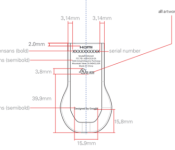
Next version of the Chromecast hits the FCC

If I have a nickel for everytime somebody complained that the Chromecast doesn’t have 5 GHz support. Well a new version of the Chromecast (model A4RH2G2-2A) has passed through the FCC, and it appears to support the 5 GHz band.
It’s not clear if there is anything else that will be upgraded. Hopefully support for DD 5.1 and DTS.
So when will Google announce this device? We have no idea, but let’s hope sooner rather than later since the holidays are approaching.
So what do you guys think? Is 5 GHz support enough to replace your current Chromecast? How else would you like to see the Chromecast upgraded?
source: FCC
via: Android Police
Come comment on this article: Next version of the Chromecast hits the FCC

Nearby Multiplayer comes to Google Play Games

With the latest Google Play Services update, Google has rolled out the ability to find nearby players in multiplayer games. This would work for both real-time multiplayer games as well as turn-based multiplayer games.
Developers are encouraged to hit up the source link below to learn more how multiplayer works.
source: Google Developers / +AndroidDevelopers
Come comment on this article: Nearby Multiplayer comes to Google Play Games

Google’s plan for super-fast internet: tap unused airwaves

One of the problems with a tech company publicly testing anything is that you can start to hope. Hope, almost inevitably, leads to despair, and from despair it’s only a short hop to the dark side, or something. With that in mind, we’d suggest you try not to hope too hard when you hear that Google has applied to the FCC for permission to begin wireless spectrum tests in the San Francisco area. According to Reuters, the company’s looking into a rarely-used millimeter wave frequency that is capable of transmitting large amounts of data, but only if the receiving equipment is in the line-of-sight.
Google does do a lot of research, so this could just be one of its various groups (X, Nest, Boston Dynamics) doing some testing outside of the lab. If so, then this could simply be a piece of procedural box-ticking to avoid getting into any trouble with fussy regulators. Of course, the more hyperventilation-inducing theory is that Google is following through on a promise to bring wireless service to areas where it currently offers fiber optic broadband. That would fall in line with a The Information report from earlier this year, which said that the search engine was trying to buddy up with Verizon on the project.
Reuters’ cabal of experts has also suggested that this project could be used to build out a wireless broadband network that’s much cheaper than fiber. Rather than digging up roads and laying cables to each individual home, transmitters placed on the top of each building in a street could be easier and much more cost effective – enabling Google to bring its home-rolled internet to far more places in a shorter time. This last theory makes a little more sense, considering that the application was signed by Craig Barratt, the executive in charge of Google’s fiber plans. We’re not going to wildly speculate upon this too much, however, because that’s what the comments section is for.
Filed under: Google
Source: Reuters
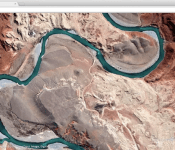
Google’s Earth View extension brings a touch of satellite imagery to Chrome

Great news for all you satellite imagery fanatics out there. Google has today released ‘Earth View,’ a brand new Chrome extension that changes your wallpaper to a “beautiful and unique satellite image from Google Maps each time you open a new tab or window.
So you know exactly where the background image was snapped; Google has listed the location in the bottom right-hand corner adjacent to a globe icon on every photograph. If you want to find out more about the scene in focus, simply click the icon and you’ll be redirected to the respective locale in Google Maps.
The extension is available to download for the latest version of the Chrome Desktop Browser via the Chrome Web Store and works on Windows, Mac, Linux and Chrome OS.
To install ‘Earth View’ — hit the source link below.
Source: Chrome Web Store
Come comment on this article: Google’s Earth View extension brings a touch of satellite imagery to Chrome
Nexus 9 finally shown off in real pictures and videos with keyboard case

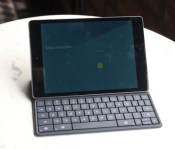
The Nexus 9 is easily the most hotly-anticipated Android tablet of the year and over the past few days has shown its face in teaser videos, renders and cartoons, and while we may have to wait until later this month to get our hands on one, Techrum user tdiddy-2 has uploaded a ton of photos of the upcoming tablet to the Vietnamese forum. Thanks to Italian site Webtrek we also have a couple videos of the tablet in action. The official keyboard case also makes an appearance in the photos. Hit the break for the motherload.


As you can see from the photos, the keyboard case seems to fit quite nicely and allows the front-facing BoomSound speakers to blare media with no issue. The cover is a “smart” cover and also features a mechanical keyboard. Are any of you planning on picking one of these up? Or is that old-school 4:3 screen ratio a dealbreaker? Sound off in the comments and scroll down to see the Nexus 9 in action!
Click here to view the embedded video.
Click here to view the embedded video.
Come comment on this article: Nexus 9 finally shown off in real pictures and videos with keyboard case
Here are the first camera samples from the Nexus 6

Nexus phones traditionally have average to lousy cameras, and I am not expecting anything different with the Nexus 6. Let’s face it, Motorola makes great hardware, but camera quality is something they never figured out.
Google’s Nexus 6 page has the term “More epic shots” with the 13 MP rear camera and f/2.0 lens. I continue to remain skeptical since I have already seen what the Moto X (2014) is capable of doing.
Now with all that said, the first camera samples have surfaced. As one would expect, the outdoor shots look pretty good, but the indoor shots look okay, with many of them showing some blur.
Take a look at them for yourself and let us know what you think.


source: +DuanDao
via: Phone Arena
Come comment on this article: Here are the first camera samples from the Nexus 6

Check out the Nexus 9 hands-on video running Android 5.0 Lollipop

The Nexus 9 may have only been announced yesterday, and doesn’t even go up for pre-order until tomorrow 17th October, but it seems someone has managed to get early access to the device and has posted a lengthy hands-on video.
Courtesy of YouTube channel SChannel, we are able to get an early peek at the Nexus 9, it’s hardware, software, and just how responsive it is. Be sure to turn on the English subtitles, unless you speak Vietnamese of course…
The Nexus 9 goes up for pre-order tomorrow, 17th October, and will be released on 3rd November.
 |
The post Check out the Nexus 9 hands-on video running Android 5.0 Lollipop appeared first on AndroidGuys.
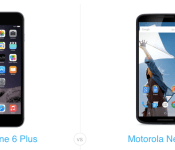
Nexus 6 vs iPhone 6 Plus: The battle of the phablets

So Google have now announced their new flagship device, we can finally see their response to Apple’s iPhone 6 Plus. For most, the decision on which device to get is simple as it is the platform that dictates the buying decision, but for some, platform doesn’t play as an important part in the decision.
We’ve stacked up the Nexus 6 against the iPhone 6 Plus in a pure spec comparison to see how the two compare, since the size profile of the two devices are very similar.
One of the main observations of the Nexus 6 is the sheer size of the screen, but despite it having a larger screen than the iPhone 6 Plus, the height of the two devices is almost identical – to give some perspective on the size of the Nexus 6.
The Nexus 6 wins on pretty much every other front, having more RAM, higher clocked CPU, higher PPI, better rear camera, and bigger battery.
So if you’re in the market for a phablet-sized device and don’t mind about OS, then there’s a clear winner here, and that’s the Nexus 6. But even if you’re set on iOS and you’re just here to check out the competition, with the sheer specs of the Nexus 6, combined with Android Lollipop, the competition is looking far more appealing than it was back in the days of Gingerbread, which is probably the last time iOS users dabbled in Android when it was a new platform.
So avid Android users and curious iOS users, the Nexus 6 is the device to buy if you’re in the market for a plus-sized device and pre-orders go live tomorrow, 17th October.
Let us know in the comments if you’re buying the Nexus 6, and if so what device you’re coming from.
|
The post Nexus 6 vs iPhone 6 Plus: The battle of the phablets appeared first on AndroidGuys.
Now Google’s Translate Chrome extension can zoom in on short bits of text

Say, you’re reading an article written in your third language but can’t properly decipher a sentence or two — you can just highlight those specific lines and let the Google Translate extension for Chrome do the rest. The add-on’s new update makes it simpler to translate small snippets out of websites: highlighting part of the text leads to a pop-up icon you can click to view the translation (or some semblance of it, since we all know the service isn’t always on point) on the same screen. You can also right click and choose Google Translate to view the original sentence and its meaning in a separate tab, though. Of course, if you want to to read the whole page in the language of your choice, you can always click the service’s icon living in the corner of your browser. The extension should update itself if it’s already installed, otherwise, you can download it right now from the Chrome Web Store.
Source: Google Chrome Blog

