


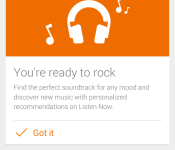
Google Play Music’s Material Design update and Songza integration starts to rollout [APK Download]
I know you have all been eagerly waiting for the new Material Design elements of Google’s redesigns to come through to all of our apps. I know I have been. One app that seems to be the hottest topic and most sought after is the update to Google Play Music. I am happy to report that the update that moves Play Music to v5.7 is now starting to roll out to devices.


 The update ties the app in with the look and feel of the Play Store, Google+ and other apps that already have the changes. You get the slide out navigation with the animated hamburger icon rotating to an arrow. You get a ton of color, bigger images and a lot more. While the new look is a pretty big deal, it is the integration of a new-ish service to Play Music. A while back Google purchased Songza. While the reports said that Sangza would remain its own company, we all knew Google would do a little cross integration to their own services. Today’s update also does just that.

If you are an AllAccess subscriber you will find a new section in the Listen Now area that will constantly change based on the time of day, activity or even for your mood. Offering you music that is curated specifically for Waking Up Happy, Working Out, Driving or many more. The new activity section is available online and should be making its appearance on your device after the update.
I know you all hate waiting about as much as w do., so the APK for the latest update, which carriers version number 5.7.1717Q.1530520, is linked below for you. If you would rather check the Play Store to see if the update is available, that link is below also.
Download – Google Play Music v5.7
//<![CDATA[
ord = window.ord || Math.floor(Math.random()*1E16);
document.write('‘);
//]]>
The post Google Play Music’s Material Design update and Songza integration starts to rollout [APK Download] appeared first on AndroidSPIN.
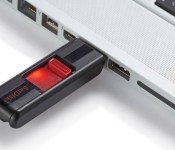
Google now lets you prove your identity with a USB security key

It shouldn’t surprise you that Google’s a big proponent of online security, and that’s why it’s rolling out support for a new way to prove you are you who are: a USB Security Key. Google’s normal approach to two-step authorization involves getting a text on your phone to verify your identity, but that isn’t always ideal. Maybe you suck at keeping your phone charged. Or maybe you’re abroad (your author’s had to deal with that particular headache a few times) and don’t want to get slammed with roaming charges. Having a dedicated secure USB key around means you’ll be able to log into Google’s ecosystem without having to worry about phishing or having your phone handy.
Alas, there are a few caveats: you have to be a Chrome user, for one. You can’t turn any ol’ thumb drive laying around into a security key, either – it’s got to be one that supports the FIDO authentication standard. Still, there’s some more icing on this cake: other sites and services can choose to use FIDO authentication too, and plenty of big name players like Microsoft, Alibaba and PayPal have already pledged their support. Thinking of taking the plunge? You can claim some compatible hardware for just under $20, so there’s no excuse for not locking your digital world down.
Source: Google

Google Play Music gets Material Design, benefits from Songza

Google has released an update to Google Play Music that bring both their new Material Design to the app as well as functions modeled after features found in Songza, in particular the Concierge option. The update to incorporate Material Design is no surprise and we even saw a port of it get out over the weekend. This update starting to rollout today makes the new look official though. Besides the benefits of Material Design, Google is also working on making the service more useful for listeners with the new features that have been added no doubt thanks to their acquisition of Songza.
One of Songza’s claims to fame was their Concierge function. This feature provided users with a list of activities or settings that listeners could select to launch a playlist matching what they were doing. For example, listeners could choose from activities like working out or studying or trying to go to sleep. As Play Music’s product manager Elias Roman indicates, the new options give Play Music “context.”
Google makes this work by collecting data like time of day, location, or the device a user is listening on. However, the final stage is handled by real people who help put together the play lists and determine what will next. The end result for users is that they can access a fairly well put together playlist with only a couple taps.
Google hopes Play Music is a step above what Songza was offering though. To get there, Google is limiting these improvements to All Access subscribers. For those who can access the new lists, which appear on the “Listen Now” page, they will not have to deal with ads. Users also get full control over the playlists, reordering songs or cutting them out completely. Users will also be able to launch a radio station based on a song they hear or add it to their Play Library. Google is also making it possible to download the playlists, up to around 25 songs, for offline listening.
You probably already have Play Music installed on your Android device, but if for some reason you don’t, use one of the links below to grab it from the Play Store. You can also check for the update using the links.


Come comment on this article: Google Play Music gets Material Design, benefits from Songza
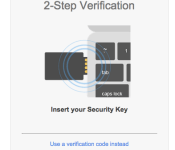
Google adds USB Security Key support to make their 2-Step Verification more robust

Google’s 2-Step Verification is currently the most secure method of signing into your Google account but today the search giant have one-upped their own robust security system by launching Security Key. Security Key is similar to 2-Step Verification except instead of typing in a unique code, you simply insert the USB Security Key. The USB first verifies that the site you’re on is a legitimate Google site and then prompts you to tap the USB key.
The Security Key and Google Chrome use the Universal 2nd Factor (U2F) protocol so this verification process can easily be implemented into other sites and browsers. While Security Key works with Google Accounts for no extra charge, users will have to purchase a U2F-compatible USB device from the vendor of their choice. Hit the source to learn more about Google’s awesome new security measures.
Source: Google
Come comment on this article: Google adds USB Security Key support to make their 2-Step Verification more robust

Google publishes guide for switching from iOS to Android
 With a handful of new devices right around the corner and a major Android update coming up, there are going to be many people that decide to test out Android for the first time and leave iOS. Switching over from a different ecosystem can be a pain when you don’t know how to move contacts, photos, and other information, so Google has posted a very useful guide to help users get started on transferring their stuff over to a brand new Android device.
Most of the guide is common sense for more experienced and tech savvy users, but it still has some helpful info, including showing you how to turn on Google+ auto-backup, how to set up email accounts on an Android device, and there’s even a reminder to turn off iMessage so you don’t get hit with Apple’s infamous iMessage bug.
You can find the guide below. It might not hurt to brush up on a few things if you’re planning on helping a family member make the switch this year.
source: Android
Come comment on this article: Google publishes guide for switching from iOS to Android
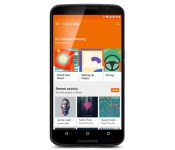
Google’s redesigned Play Music app offers stations that suit your mood

You know how there were hints that Google Play Music was about to get a Material Design makeover? As it turns out, that’s just a small piece of what’s in store. Google has updated its Play Music Android, iOS and web apps with a new Listen Now page that focuses on context-aware music stations from the company’s recent acquisition, Songza. Provided you’re an All Access subscriber, you’ll get to stream curated playlists that fit the time of day and your likely activities — you may get relaxing playlists to take the edge off your commute home, or uptempo tracks for morning exercise. The page also improves discovery with cards that suggest both new releases and stations based on what you like. Google’s redesign should be available today in all 45 Play Music countries, so have at it if you’re an avid listener.

Filed under: Cellphones, Tablets, Internet, Mobile, Google
Source: Official Android Blog, Google Play, App Store
Google wants to help you leave iOS for Android Lollipop

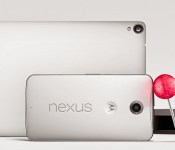
So, you’ve taken a look at the new iPhones and iPads and thought to yourself: “Nah, it’s time to see if the grass really is greener on the other side.” Well, good timing, because Google has published a guide to help you switch from iOS to its newest platform, Android Lollipop. The tech giant has laid it all out for you: its instructions include how to upload photos stored on iPhones and iPads to Google+, transfer music from iTunes to Google Play Music, keep all your contacts and even set up mail and messaging, among others. In short, it’s what you need to read if the only thing keeping you from moving platforms is the process itself. If you’re ready to switch allegiance, keep an eye out for the Nexus 6 smartphone, the Nexus 9 tablet or the Nexus player, as those will be the first devices to come loaded with Lollipop (though some older devices are also getting it through software upgrades). But in case you’re actually having issues switching to iOS instead of from, don’t worry: Apple has also published a guide to help you become a bona fide iOS user.
Filed under: Cellphones, Tablets, Mobile, Google
Via: Droid Life
Source: Android Switch

Google 5.0 for Android will also support Exchange and absorbing stock Email app functions
 Yesterday, we got our first taste of Google 5.0 for Android, featuring the expected Material Design visual makeover and most surprisingly, the knowledge that Google intends to make the new Gmail capable as serving as the inbox for Yahoo and Outlook emails too. As it turns out, it’s much more than even that. According today’s information courtesy of Android Police, the new Gmail won’t stop at just allowing you to manage Yahoo and Outlook accounts, but also Exchange accounts and essentially absorbs all functions of the stock Email app.

 This doesn’t come particularly as a surprise given that Google has made a habit of combining apps with common purposes, a la Hangouts. This latest change puts Gmail in a realm with all the other email curating apps, though we’ll have to wait for the official app to drop before we can see exactly how good this turns out to be.
What do you think about Google combining the stock Email app functions into the new Gmail 5.0 app? Let us know your thoughts in the comments below.
Source: Android Police
//<![CDATA[
ord = window.ord || Math.floor(Math.random()*1E16);
document.write('‘);
//]]>
The post Google 5.0 for Android will also support Exchange and absorbing stock Email app functions appeared first on AndroidSPIN.
Nexus 6 pre-ordering starts October 29 on Google Play

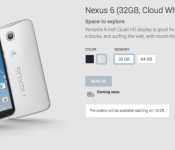
Head over to your calendar and make a note for October 29. While the Nexus 9 is already available in the Play Store, the Nexus 6 and Nexus Player have remained on hold. The Nexus 6, though, will be ready to go in the Play Store next week. The pricing is steep even with the base 32GB storage option at $649. Relying upon Google for excellent pricing is not an option. This year, it seems that going with a carrier to get a Nexus device is the way to go.
Here is a breakdown of the choices:
- Nexus 6 (32GB, Midnight Blue) — $649
- Nexus 6 (32GB, Cloud White) — $649
- Nexus 6 (64GB, Midnight Blue) — $699
- Nexus 6 (64GB, Cloud White) — $699
Come comment on this article: Nexus 6 pre-ordering starts October 29 on Google Play
Google’s Nexus 6 gets compared to Samsung’s Galaxy Note 4

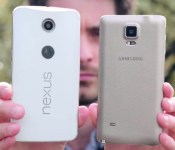
This fall, two massive devices will be on the market and consumers will have a very difficult choice to make. Should they go with Google and the Nexus 6 or Samsung and its Galaxy Note 4? Fortunately, you can take a look at a video comparing the two. Carphone Warehouse has both devices on hand for a really good breakdown. Unsurprisgly, the Nexus 6 is a lot bigger than the Galaxy Note 4. After all, the Google device does have a 5.96-inch display compared to its foe’s 5.7 inches.
There is a common ground for the two. The resolution of the displays both equal 2560×1440 and are AMOLED. Inside, Google and Samsung opted for a Snapdragon 805 processor with 3GB of RAM and 3220mAh batteries. They also have 32GB of internal storage; however, Samsung follows its tradition by including a microSD card slot.
Hit the break for the video.
Click here to view the embedded video.
Source: TechnoBuffalo
Come comment on this article: Google’s Nexus 6 gets compared to Samsung’s Galaxy Note 4

