


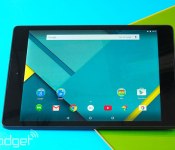
You can buy a Nexus 9 for half price, but only if you’re quick

HTC has decided that it doesn’t want to follow the herd when it comes to slashing prices just before the gadget-buying apocalypse that is Black Friday. That’s why, instead, the company will ape an Amazon-style flash sale by offering a single, cut-price device every Tuesday for the next nine weeks. First up, we’ve got the brand new Nexus 9, which is available for $199, 50 percent off the regular $399 price. Unfortunately, HTC will only sell you a limited quantity of the Lollipop-running tablet at such a deep discount, so Johnny latecomer will have to settle for just $50 knocked-off the 16GB or 32GB edition of the slate. The deal is open from now until midnight ET / 9PM PT, so you’d best get a move on if you want to save your cash.
Photo by Will Lipman
Filed under: Tablets, Mobile, HTC, Google
Source: HTC Hot Deals

Disney Movies Anywhere is your one stop cross-platform shop for Disney, Pixar, and Marvel movies

Disney just set history today by allowing you to purchase Disney, Pixar and Marvel movies from either iTunes or Google Play and use them on either platform. This all done through the Disney Movies Anywhere app, which was already available on iOS. With the launch on Google Play, both platforms work seamlessly.
All you have to do is create an account through the Disney Movies Anywhere app or your desktop browser. Once you link both your iTunes and Google Play accounts, movies that you purchased from either store will be visible and playable to you. This holds for not only the app, but also the Play Movies & TV app as well as iTunes. This means you can also utilize Apple TV and a Chromecast. In fact, you really don’t need the Disney Movies Anywhere app, but you might prefer it for playing your content on your tablet or phone.
This is pretty significant if you think about it since no other app or service has ever provided a link between the native apps for both iOS and Android. If only this could work with every movie purchased, but hey, this is a big start.
Disney is also offering a free movie for those that open a new account. Just signup through the app (download links below) or through their online site.
Features:
- Watch your Disney, Pixar, and Marvel movies anywhere you go, across all your devices!
- Build your digital movie collection with a library of hundreds of movies to choose from.
- Access exclusive Disney content for free, including original programming, never-before-seen videos, and much more.
- Watch movies while connected or download movies to your device for offline viewing.
- Earn Disney Movie Rewards points for every digital transaction.


Click here to view the embedded video.
Come comment on this article: Disney Movies Anywhere is your one stop cross-platform shop for Disney, Pixar, and Marvel movies
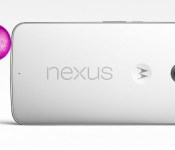
How and where to buy: Nexus 6

The Nexus 6 is one of the most anticipated phones of the year. As of now only the U.S. market is confirmed to have the Nexus 6 available for pre-order. AndroidGuys will keep you up to date on pricing and availability of this device as soon as we find out more.
U.S. Market
- Types: Cloud White 32GB and 64GB, Midnight Blue 32GB and 64GB
- When: Pre-Order starts Oct. 29th on Google Play (Sold Out)
Pre-Order for AT&T, Verizon, Sprint, Cellular South (Soon, not yet announced)
For sale sometime in november at participating carrier stores including Best Buy
Estimated Release date Nov. 3rd ( Based on Nexus 9 release date)
- Cost: $649.00 for 32GB. $699.00 for 64GB
AT&T $50.00 for 2-year agreement.”rumor due to leak”
All carriers may offer finance plans for 18 or 24 months.
Europe
- Types: Cloud White 32GB and 64GB, Midnight Blue 32GB and 64GB
- When: Pre-Order was expected November 3rd recent reports push it to November 18th
Estimated availability some time in December.
- Cost: Rumor price all over the place. Cost should be close to U.S. market
Nexus 6 AT&T, Nexus 6 T-Mobile, Nexus 6 Sprint, Google Play Nexus 6
The post How and where to buy: Nexus 6 appeared first on AndroidGuys.
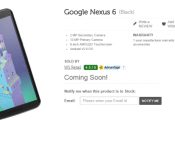
Google Nexus 6 in India soon? Flipkart puts up a preemptive listing
 The Google Nexus 6 has been available to pre-order for almost a week now, but only in the US, so the question on everyone else’s lips is when will the device become available globally. We’ve had assurances that pre-orders in the UK and Australia are going to “start in November” but that’s almost too painfully vague, and doesn’t exactly help our friends in other parts of the world. Well, it looks like at least one retailer in India is getting ready which could hail the start of availability of the Nexus 6 in India. Popular Indian online retailer, Flipkart, today posted up the above listing for the elusive Google device, but whether or not this is just a really preemptive listing or Flipkart knows something that we don’t remains to be determined.
The Nexus 6 has been getting generally good reviews with everyone who’s managed to get their hands on one. Despite its huge size, it is said to be quite good to hold and a surprising highlight appears to be its great (but not perfect) camera which makes previous Nexus cameras look a bit disappointing. At this point, most people are just wanting to pre-order the device, but it appears Motorola and Google are going through the same supply teething issues that are suffered with the availability of every Nexus smartphone. We’re not sure what pricing is going to be like in India, but judging by the price in other regions, it isn’t going to be cheap.
What do you think about availability of the Nexus 6 in India? Let us know your thoughts in the comments.
Source: FoneArena via TalkAndroid
//<![CDATA[
ord = window.ord || Math.floor(Math.random()*1E16);
document.write('‘);
//]]>
The post Google Nexus 6 in India soon? Flipkart puts up a preemptive listing appeared first on AndroidSPIN.
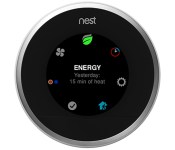
Nest’s smart thermostat now shows much more info at a glance

For all of the things Nest’s smart thermostat has learned to do, its interface hasn’t made a lot of progress; you frequently have to dig to see more than just the basics. You’ll have a much easier time of it after today, though. Nest is now rolling out a version 4.3 update that includes Quick View, a reworked interface that gives you more info at a glance. Push in the ring and you can quickly check both the outdoor temperature and humidity before you leave home — handy if you’re unsure about bringing your jacket. Spinning the ring, meanwhile, shows you a summary of everything associated with a given category. You can see the next scheduled temperature change, fan settings and other nice-to-know facts without wading into the menus.
There are some under-the-hood updates, too. A better auto-scheduler should be considerably faster at adapting to sudden changes, such as a new work shift; Nest reckons that you could save another 6 percent on your cooling and heating bills. You can also use a new System Test to spot any problems, whether you want to check a fresh thermostat installation or want to show a mechanic what’s wrong. The upgrade should hit your device within about a week, so you won’t have to wait long for a simpler (or at least, less headache-inducing) way to control your home’s climate.
Filed under: Household, Google
Source: Inside Nest

Disney Movies Anywhere service comes to Android with a link to Google Play

After years of development Disney unveiled its digital movie service on iOS earlier this year and today it’s coming to Android too. When it launched, Disney Movies Anywhere had an unprecedented deep link to iTunes, and now on Android it’s sharing a similar tie with Google Play. For users it’s apparently as seamless as can be — as long as they have a Disney account, any movies they unlock will be viewable on either family of devices (or the DMA website). The agreement covers access to around 400 Disney, Pixar and Marvel movies, and to make the sign-up worth your while, Disney is throwing in a free copy of Wreck-it Ralph for anyone that signs up and links an account.
Going cross-platform makes Disney’s KeyChest-based system much more appealing — and conveniently timed for the launch of Nexus Player / Android TV — but we’re still waiting to see if a tie-up with the likes of Amazon or Ultraviolet can fulfill the promise of unlocking a single copy in one store or with a Blu-ray / DVD purchase, and then being able to watch it anywhere, on any device. The Android app isn’t live yet, but you can check out a demo video for now (embedded after the break).
Filed under: Home Entertainment, Internet, HD, Mobile, Google
Source: Disney Movies Anywhere (YouTube), Disney Movies Anywhere
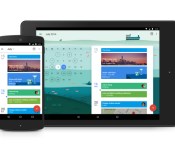
Google Calendar is next up on the Material Design update train

Google has been releasing a slew of updates for their own applications to go alongside the release of Android 5.0, Lollipop. The latest app to jump on the update train, is Google Calendar. This update brings the Material Design found across Android 5.0, and it also brings a few new features to the forefront as well. We’ve seen updates to Gmail, Inbox, as well as the apk’s for various system apps, but the next one up is Google Calendar.
Before we touch on those updates, it must be stated that Google is really knocking the Material Design concept out of the park. After testing out the Developer Preview for Android L, I really began to notice that Google was about to release the largest update to Android that I had ever seen. Now with apps being updated, and new apps being created, everything that Google wanted to do with Material Design and Android Lollipop, is coming full circle.
Back to our regularly scheduled programming.
As I stated above, the latest update for Google Calendar doesn’t just provide us with updated aesthetics. Google finally added some additional functionality to the app, and I really can’t wait to get my hands on it and dive into it.
The first big feature that Google has added, is integration with email. Now, every time that you get hotel reservations, or get an invitation to an event, Google Calendar will recognize that you got that email, and automatically create events. Sure this could get a little hairy if you get a lunch invitation with that one person who you REALLY don’t want to go with, but this will really come in handy for any other events that you actually WANT to go to.
 Assists is next on the list, and this is where Google really gets to flex its’ muscles a bit. As you are creating an event within Calendar, Assist will automatically suggest titles, addresses, or even contacts to invite to the event. As with most things nowadays, Assist will learn from your habits, and eventually, you will be able to schedule an event by just writing one word.
While not having the opportunity to get a hands-on with the Calendar update yet, from the looks of it, the feature I’m most excited for is Schedule View. This is where Google decided to really show off the Material Design within Calendar. Instead of just looking at your monthly, weekly, or daily views, Schedule View does all sorts of things to your various events. For example, if you’re planning on heading out with the guys to grab some drinks, Calendar may add a fun image to the background of the event. If you’re planning a vacation to NYC, Calendar will pull up one of the many iconic images of the New York City skyline. While it’s nothing crazy, Google wanted to add a little something extra to the Calendar app.
As for availability, the Calendar update is available today on any devices running Android 5.0 Lollipop. If you’re one of those folks that doesn’t know when or if your device will be getting Lollipop, don’t worry. Calendar will also work on any devices running Android 4.1 and above. The update will come eventually through the Play Store in the coming weeks. Oh, and Google decided to throw a little teaser in there for iPhone users, stating that they are working on an update for the iPhone app as well.
The post Google Calendar is next up on the Material Design update train appeared first on AndroidGuys.

Google adds Android 5.0 Lollipop to the AOSP

The Android Open Source Project (AOSP) is on its way to to run the latest version of Android. Google is updating the AOSP with Android 5.0 Lollipop. The repositories for the Nexus 6, Nexus 9, and Nexus Player are available alongside previous Nexus devices like the Nexus 7 (2013). If a Nexus device is missing, it is either because Google has yet to successfully upload the repositories for it or it is not going to get Lollipop.
This will give developers a chance to start working with the operating system for custom ROMs.
Source: Google
Come comment on this article: Google adds Android 5.0 Lollipop to the AOSP
Bringing an app to Android TV is pretty simple, Google shows how
There is a lot riding on Android TV considering how Google TV flopped and drifted away. To ensure its success, Google wants to make it as simple as possible for developers to take their apps and games and bring them over to Android TV. Its Nexus Player is on the market, so consumers are going to expect content for consumption.
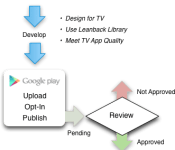
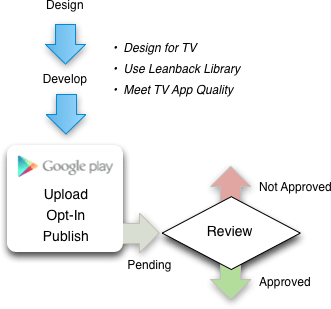
These are the steps necessary to distribute your app or game with Android TV:
- Understand guidelines and requirements
- Develop a great app for TV
- Test for TV App Quality
- Opt-in to Android TV and publish
- Track your review and approval
As always, Google wants developers to follow the recommended guidelines because everything should be familiar for an Android TV user. Tailoring an app or game for a television is vital because that is the platform’s go-to display. Scaling has to be just right. Then, the developer must aligns what it is publishing with Google’s TV App Quality test. From there, the developer has to submit the app or game and wait to see if Google approves upon review.
Source: Android Developers
Come comment on this article: Bringing an app to Android TV is pretty simple, Google shows how

Engadget Daily: Nexus 9 and Parrot Zik 2.0 reviews, a tour of Android Lollipop and more!

Google’s Nexus 9? Check. What about Android Lollipop and Parrot’s super-fly Zik 2.0 headphones? We have you covered. Read on for the rest of our news highlights from the last 24 hours, including Taylor Swift’s breakup with Spotify and our review of Google’s set-top box, the Nexus Player.
Filed under: Internet

