



Google grabs its first carrier partner for Project Loon tests in Australia

Google’s internet-transmitting Project Loon balloons are set to float above Australia and beam data down to residents below. The company announced plans to use balloons to bring the internet to disconnected areas last year, and after semi-successful trials in New Zealand, Brazil and the States, it’s teaming up with a local carrier (Australia’s Telstra) for the first time to launch Loon’s biggest test flight to date.
Project Loon works by creating a network in the stratosphere. First, a base station sends signals up to a nearby balloon, which floats some 12 miles above the ground. The balloon then relays those signals to its neighbors, passing them down the chain to units outside of the base station’s range. Each balloon can transmit this data down in the form of phone-friendly LTE, covering an area larger than 600 square miles per balloon.
The long-term plan is for a network of balloons to circle the globe on stable and predictable stratospheric winds, providing data service to the two-thirds of the earth who don’t have access to a stable wired connection. The Australia trial starts in December and will involve just 20 balloons, but these smaller tests are vital if Google is to achieve its dreams of connecting the world to the internet — and its services.
Filed under: Internet, Mobile, Google
Via: The Verge
Source: The Guardian

Noom Coach Integrates with Google Fit

Since 2012, Noom Coach has been the #1 grossing health and fitness app available on Google Play. This app allows users to track their workouts and diet all in one place. Recently the developers at Noom, Inc. have updated their app with Google Fit integration. This is a huge gain for Noom Coach users that want to track their weight loss along with more aggressive training being tracked in other Google Fit apps like RunKeeper.
On its own, Google Fit has not wowed user’s since its debut. Issues like poor performance and inconsistent stats have kept this from being one of the Mountain View search giant’s better releases. It is, however, insanely powerful. Opening Google Fit to third party developers will allow access to data from apps, like Noom Coach, to be aggregated into one place. Allowing Noom users a single pane of glass to view all their data should be huge for the app’s future success.

The post Noom Coach Integrates with Google Fit appeared first on AndroidGuys.

Motorola’s march toward mobility

We owe a lot to Motorola and its team of inventors and engineers. The company made breakthroughs in portable radio and brought us one of the first-ever cellphones. It launched the flip phone, the clamshell and the wildly popular RAZR V3. There have been some ups and downs along the way, and the company’s endured more than its share of corporate hand-changing, but with its Moto series and Nexus 6, it’s now back amongst the smartphone elite. In this week’s Rewind, we take a look at some of the milestones in Motorola’s quest for portable communicators.
Filed under: Cellphones, Handhelds, Wireless, Google

Could Scout be the solution to “Generation Tardy”?

Telenav, developers of the app Scout that aims to streamline event creation by making it easier to manage and keep in contact with your invitees, have recently unveiled the results of a recent consumer survey targeted towards revealing the “common pain points of get-togethers” that the recently updated Scout app will aim to alleviate.
Perhaps unsurprisingly given the short-attention span of the young adult generation (thanks to new information/games, and therefore potential distractions, being available at any and all times (I too unfortunately fall into this category, hard)), it is the “millenials” who struggle most of all to arrive on time to events. According to the survey, 1/3 of this age group said that as many as half of their friends tend to arrive late to events and meet-ups. As much as 30% of the general population, and nearly 50% of what Telenav dub “Generation Tardy” admit to telling their friends they’re mere minutes from the destination when they are in fact much further out.
The survey also backs up what many will likely hear from their parents on a frequently recurring basis, that they sleep too much, with 70% of the young adults having been late to a social gathering due to over sleeping (I once was meant to meet friends at a station an hour away at 2pm, and woke up at 3pm) compared to only 40% of the general population. The second most common cause of tardiness is eating, something 40% of the millenials have given as their reason, while only 22% of the general population admit to being late for this reason. The survey also proves that sex has become a higher priority for this generation of young adults than ever before, as 30% of respondents admitted to being late to a social event for this reason, twice as many as the general population.
Telenav, knowing that this generation spends most of their time glued to their smartphone (if you’re reading this on one I think I’ve proved my point), developed the app “Scout” to help prevent these problems from happening by allowing the creation of an event page that contains all the relevant information (much like Facebook’s Events page) as well as producing a group message thread to help keep everyone in contact. The app also features turn-by-turn directions and, what will appeal most of all to nervous hosts, uses location services to display each attendees’ ETA so your friends can never lie to you about how far away they truly are ever again.
Unfortunately one of the coolest features, from a party-goer’s standpoint, is only available on iOS at the current time. This features predictive traffic reports which will inform them of potential travel problems and offer an alternate route. However if you use Google Now, never fear! Simply input the event date and location in Google’s Calendar application, and the handy assistant will notify you when you need to leave, and inform you of the fastest way to get there using latest traffic reports.
If you want to give Scout a shot, and can convince all your friends to do the same, click the widget below to find it on the Play Store
The post Could Scout be the solution to “Generation Tardy”? appeared first on AndroidGuys.
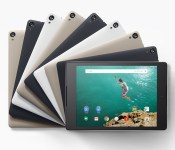
Amazon offering ‘lightning’ deal selling the Nexus 9 for $50 off!

The Nexus 9, Google’s high-end tablet of 2014 is now available on Amazon to purchase for just $349.99 ($50 off the normal price of $399.99). The offer is only available to customers in the United States and on the 16 GB indigo black.
The link to the sale page can be viewed here.
Via: GSM Arena
The post Amazon offering ‘lightning’ deal selling the Nexus 9 for $50 off! appeared first on AndroidGuys.
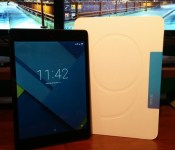
Google Nexus 9 Review

Google has taken both their tablets, the Nexus 7 and Nexus 10, and combined them into a single powerhouse. The Nexus 9, which Google debuted on October 15th alongside the Nexus 6 and Android 5.0 Lollipop, is a top of the line device due to its killer hardware and build quality. The Nexus 9 doesn’t have all the extra features, but it does come with Android 5.0 Lollipop out of the box, the 64-bit NVIDIA Tegra K1 processor, and 2 GB of RAM to power it all. Let’s jump right into the Google Nexus 9 review.
Design
The Nexus 9 has three color options available: indigo black, lunar white,and sand. It also has two storage options: 16 or 32 GB. There is an LTE version available, but it is only available in indigo black with 32 GB of storage. The device I have is the 16 GB indigo black version.
This Google tablet is constructed by HTC, who is well-known for their premium design quality on their One series. With a first glance at this device, you can tell that it is made by HTC, but it still has the familiarity of a Nexus device. The Nexus 9 comes with an 8.9 inch display in a 4:3 ratio, that I think makes the tablet easier and more enjoyable to hold.

The Nexus 9 is a very solidly built device, and that is due to the surrounding chassis that is constructed of metal. It is squared off, yet slightly angled towards the display away from the back of the device. Coming in at 7.8 mm thick, it gives enough real-estate to rest your fingers on comfortably without touching the bezels and accidentally touching the display.

On the right side of the frame are both the power button and volume rockers. HTC did a great job of hiding the buttons, and it makes the edge look seamless. This is both good and bad. While it makes the device look as sleek as ever, it also is a chore to find which button to press. Since the buttons are near flush with the chassis of the device, it tough to know if you are on the volume rockers or power button until you press them.
The back of the device has the classic Nexus soft-touch feel that can be seen on previous Google devices. While it is a fingerprint magnet, it is definitely worth it. The soft-touch back makes the device very easy to hold without the fear of dropping it.

Display
Google has stepped up their display quality in 2014. The Nexus 9 packs an 8.9 inch IPS display with a resolution of 2048 x 1536. The ppi for this device comes in at 281, which is higher than Apple’s iPad Air 2 at 264 ppi

The display which is a 4:3 ratio, looks its best when it is showing dark content, especially while watching movies. Since the device doesn’t have a 16:9 ratio, videos will naturally have black bars on the top and bottom of the video to compensate for the extra space. Darker games and movies look amazing on the Nexus 9, but once content has brighter and flashier graphics, the display doesn’t pop as well.
Aside from content, Android 5.0 Lollipop takes full advantage of the display and everything Google branded looks great and very crisp. You can tell that the Google-based apps are optimized for the 4:3 ratio.
While the Nexus 9 excels at displaying darker content and its own operating system, it also is very good at displaying text. The IPS display isn’t very bright or saturated, so it makes it easier on the eyes while reading.
Sound
This category is just for this device, since the Nexus 9 is HTC made. The Nexus 9 features HTC’s own BoomSound speakers on the front panel of the device, one on the bottom and one on the top to create a stereo effect. Front-facing speakers have been one of the more popular features to come on devices since HTC made it popular, and for good reason.

Front-facing speakers is a feature I think all devices, especially tablets need to have. I am glad Google included this, and they are loud. The sound is very crisp, even at loud volumes. Mids and highs come through very well, and low-end/bass is better than average. When bass gets too low, it drones out, but that is expected from such small speakers.
My only complaint about the speakers on the Nexus 9 is that they are sunk down into the front of the device. As you can see in the picture, it leads to dust being caught in the speaker grill.
Performance
This tablet sports top-notch specifications that render the device ‘future proof’. Google went with the 64-bit NVIDIA Tegra K1 dual-core processor that is clocked at 2.3 GHz. It’s supported by 2 GB of RAM and the all-new Android 5.0 Lollipop.
This is a stock-Android device, so there is no bloatware, just pre-installed Google apps. There is nothing this device can’t handle. On all my previous Android devices, I always tend to modify the animations speed in the developer options and set it at .5x, but this is the only device I decided against it.With the updated Android OS, navigation is as smooth as ever and transitions are always at a high frame rate.
I found myself using the multitasking button more than ever due to how smooth Android 5.0 Lollipop is on the Nexus 9. It is quick and painless switching between apps, and like I stated earlier, the animations and transitions make it everything more enjoyable.
The device does take a little longer to open and close heavier apps/games such as games like Leo’s Fortune. When more screen-intensive apps are open, expect the processor to get warm. It isn’t anything too outrageous.
Battery
The Nexus 9 sports a modest 6700 mAh battery that can travel the distance, but it also can be underwhelming. The battery life will definitely be determined on how you use this device, which can be said for all devices.
One thing the device has going for it in the battery department is the excellent standby time. While I consistently use my tablet, it is left to idle the majority of the time during my busy schedule (working, sleeping, and going to school). I will lose around 1-2% over a 8-10 hour period, which is very good.
While the standby time is great, I expected more optimization due to the new ART run-time and the latest 5.0 update. I will give Google a beak on the Nexus 9, due to the fact that Lollipop just got released, and more updates will ensue. Not only did battery life not live up to my expectations, the charging time is the worst part. It regularly takes hours to charge the device, especially if you are down on the 10-15% range.
I can expect around 4-6 hours of screen on time with normal to heavier usage on one charge. Once I start pushing the Tegra K1, there is a steep drop in battery life. Below are some battery statistics screenshots from my device.


Conclusion
Overall, this tablet is one of the best Android tablets I’ve seen, and is the only one to offer a pure Android experience. If you are an Android-enthusiast there is no question; this is the device you want. Between the awesome Tegra K1 processor and prompt updates, you can’t go wrong.
There is not an area that the device falls behind the competition, and the majority of things that are wrong with it are very fixable via software updates. Android 5.0 Lollipop brings the ultimate Android experience with some bugs, but it is still fairly new. I expect the performance of the Nexus 9 only to improve. Google has brought me back into the tablet world with how well this device performs and I would definitely recommend the Nexus 9 to anyone.
If you are in the market for a tablet, this one won’t come at the cheapest price. The 16 GB version is $399.99, the 32 GB version is $479.99, and the LTE version is $599.99.
The post Google Nexus 9 Review appeared first on AndroidGuys.

Shhhh – Google removes silent mode from phones with Lollipop

When Google first announced Android L last summer with a developer’s preview edition and then in October made the official announcement sans a final version being available, it was clear Google had all hands on deck to try to wrap up all the details that go into a major operating system overhaul. So it should be no surprise that some things may have been overlooked. At least, we hope this one is an oversight and not something intentional on the part of Google. Android Lollipop users have discovered that silent mode has been removed when running on a smartphone and other volume and notification management choices are just not well thought out.
As it stands now, users have a choice of volume that goes all the way down to “1″ and then to vibrate. Normally users could then hit the volume down key one more time and put their smartphone into silent mode where it won’t even vibrate. That last option is no longer available. Users have determined that on a tablet device, like the Nexus 9, users can go down to vibrate and if they tap the volume key back up they can get to “0″ volume. The only way to replicate this on a smartphone is for a user to go down to vibrate, then back up to “1″, then reboot their smartphone . The device will come back on at volume “0″.
There are other oddities that exist with the notification system as it relates to volume. Google tried to bake in a “sleep mode” type function in Lollipop where users could set notifications to be silent except for “Priority” sources. Unlike the function that appears in some manufacturers’ overlays, Google does not let you set a time of day for this to recur, relying instead on the user to manually set it for a specific length of time. That may be useful for on the fly needs for silence, like when attending a meeting or a movie. If a user sets the notification screening function to “None”, they will discover another problem. The “None” setting on smartphones will also silence alarms, rendering them useless.
Finally, Google makes the menu for changing notifications from “All” to “Priority” to “None” available from the lock screen, bypassing normal security like PIN codes. If you need your competition to miss a meeting because their alarm didn’t go off, all you need to do is get to their smartphone, set notifications to “None” and hope they don’t check it.
For more on how this works, you can check out a video Motorola put together showing these functions.
source: Android Police
Come comment on this article: Shhhh – Google removes silent mode from phones with Lollipop

Google Messenger 1.0 officially reaches the Play Store [APK Download]
A certain Google Messenger app was leaked earlier this year when Android Lollipop was first dropped, a strange sight seeing as Google went to all the effort of including SMS support in the Google Hangouts app. All the same, whatever Google has in mind in the long term, it has officially released Google Messenger 1.0 onto the Play Store for all to use.

 As you might expect, the Google Messenger app is for SMS messages only, but it’s actually a pretty neat app. Material Design, of course, it colours the conversations with each of your contacts in the colour of their contact card, which is a nice touch, and makes it a snap to add photos and media into your messages. Unusually, the Messenger app doesn’t quite follow the conventions of the other Google core apps (not that the conventions are particularly consistent anyway), with the app employing a 3-dot settings drop down rather than the slide out menu. Still, it’s a sweet app, and if you’re looking for something a little less green (i.e. Hangouts) to handle your SMS’s in, then you can hit the download link below, or hit the Google Play Store to download.
Make sure to bookmark GappsEarly for the latest Google app releases:
Google Messenger 1.0 APK download
Source: Google Play
//<![CDATA[
ord = window.ord || Math.floor(Math.random()*1E16);
document.write('‘);
//]]>
The post Google Messenger 1.0 officially reaches the Play Store [APK Download] appeared first on AndroidSPIN.
Google Keep 3.0 hits the Play Store with Material Design in tow [APK Download]
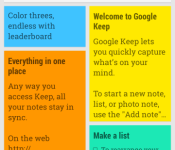
Google has continued its charge to update all its Google apps according to the Material Design guidelines and the latest app to get this makeover is Google Keep. Google Keep 3.0 (specifically 3.0.01) brings in quite a few features which puts it on par with the other updated Google apps as well as adding in some nice new features that should make everybody’s life easier.

 As you can see, the app is looking very snazzy with the new slide out menu and a new search function which lets you sort through your notes via type (e.g. note, voice, etc.) or by colour. Another neat feature is that there is now a new pop-up notification bar at the bottom of the app which will let you know various things like whether syncing is enabled or if you just removed a note and want to undo that action. The update Keep should be rolling out to your device soon (it’s not showing up in the Play Store yet), but if you want to try out the new feature, we have the APK available for download below.
Let us know if you spot something new.
//<![CDATA[
ord = window.ord || Math.floor(Math.random()*1E16);
document.write('‘);
//]]>
The post Google Keep 3.0 hits the Play Store with Material Design in tow [APK Download] appeared first on AndroidSPIN.

Google and conservationists are tracking boats to stop illegal fishing

Overfishing has been a problem for ages, but oceans are big and it’s not as if the water police authorities can track where every boat drops its nets. At least, until now, since thanks to Google, SkyTruth and Oceana, we’re now close to being able to pinpoint where every boat is in every ocean. Culling data from AIS – the automatic identification system that boats are required to broadcast so that they don’t get lost – the trio can overlay that imagery with satellite maps to show if any boat is operating in a prohibited zone. Currently, GlobalFishingWatch can only show you data from 2012-2013 for boats that are either registered as fishing vessels or displaying “fishing like” activity, but the plan is to build out the system so that it works in near-to real time. Of course, there are still holes in the system, since any vessel can disable their AIS — although that’s almost enough of a reason to haul ‘em in to be interrogated by the cops. Maybe this will be the inspiration for a whole new series called Law and Order: Environmental Crimes Unit.
Filed under: Internet
Source: Global Fishing Watch


