2014 was the year that the word “selfie” finally — and maybe unfortunately — found its way into honest-to-goodness dictionaries. Is it really any surprise, then, that smartphone makers are finally starting to upgrade their front-facing cameras? With the Desire Eye, HTC took a step back and wondered why a phone’s rear camera always had to be better than the one up front. Don’t our lovely mugs deserve the same sort of technical attention and affection as, say, our lunches? HTC (along with others like Oppo) has decided that yes, yes they do. When you look at things that way, the Desire Eye and its twin 13-megapixel cameras seems to be just the perfect compromise for wannabe mobile photographers and the truly vain. But is it really?
Hardware

I’ve got a tendency to be a little long-winded when it comes to device design, so here’s the TL;DR if you’ve got more pressing things to do: The Desire Eye’s got personality. It looks like an ice cream sandwich. I love it. Mostly.
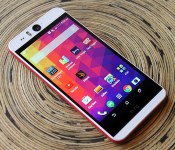
Still with me? Right. That ice cream sandwich aesthetic is the first thing you’ll notice about the Desire Eye; our review unit is a two-toned affair, with a thick red stripe bisecting the rest of the phone’s snow-white body along its edges. Persnickety style mavens might disagree, but I adore the look (in your reviewer’s humble opinion, the alternate blue-and-teal version just doesn’t stick the landing). The second thing you’ll notice is that you’ve got two identical 13-megapixel camera pods sticking out of the phone’s face and rear, each flanked by a two-tone LED flash.
The next thing you’ll pick up on: how cumbersome the thing can be. My hands aren’t gigantic, but they’re not exactly small either, and the Desire Eye seemed thick — just wide enough to feel awkward whenever I picked it up. In fact, it’s not even about how chunky the thing is; with an 8.5mm waistline, it’s technically not even as plump as the 2014 Moto X at its widest point. Really, it all boils down to a design issue: Plenty of other well-received phones have similar thicknesses, but their sides and backs curve dramatically to nestle neatly into your hands and imbue the package with an overall sleeker feel. The end result is a phone that feels substantial in spite of its apparent slightness. The Desire Eye is not that phone.

What it is, though, is solid. HTC’s crafted a body out of polycarbonate, and the shell that forms the backplate sweeps up over the sides to give it a sturdy — if relatively light — feel. On the plus side, the material is sleek enough that you can easily slide the phone out of your tightest jeans pockets, though you might occasionally lose your grip on it like I did. We might not forgive these sins on a flagship, but HTC’s Desire line has always been aimed at a more modest market and those flaws seem just a little more forgivable with that in mind. The whole shebang is IPX7-certified too, so it’ll withstand dips in up to a meter of water for a half-hour before things really start to get dire. Curiously, though, the micro-SIM and memory card aren’t tucked under a battery you pry open with a thumbnail. This is one of those little cost concessions that actually works really well; you’ll never have to pry off a flimsy battery cover or scramble for a paper clip to access those all-important bits of plastic. Sorry, lefties: The placement of these slots means the volume rocker, the power button and the dedicated two-stage shutter button all sit on the Eye’s right side. We sympathize with your struggle.
Display and sound

Let’s not mince words: The Desire Eye is definitely meant to be a mid-range phone, and plenty of nerds will stop reading after they see someone invoke the “m” word. With all that said, the 5.2-inch 1080p IPS display we’ve got here (which, remember, is a touch larger than the HTC One M8’s) is surprisingly easy on the eyes. It’s big and spacious. Color reproduction seems vivid without being outright inaccurate and the viewing angles are accommodating even to people sitting at nearly oblique angles. And the kicker? The screen can be terribly bright if you want it to be (eat that, sunlight). With levels cranked up to the maximum, the Desire Eye easily outshines the more premium One M8 and its fancier Super LCD 3 panel. If I had to pick nits, there’s the very faint light that bleeds into the picture from the edges of the display, but it’s only really apparent if you’re looking at dark images in dim spaces. Don’t worry about it too much.
As usual, the speakers don’t quite live up to the high bar set by the Eye’s display. At first glance, there’s a decent shot you’d miss the speakers altogether since they’re dark and nestled right up against the edges of the screen. They’re subtle and well-hidden, but they’ll get the job done (and then some) when it comes time to binge on YouTube videos. That’s not to say they’re nearly as good as the speakers you’ll hear on other devices, though: They lack the oomph and depth you’ll get out of a One M8, and the sound issuing forth from the stereo pair isn’t as downright loud as the iPhone 6’s single speaker. Still, the fact that we’re getting some separation between channels means most things you’ll listen to will still probably draw you in deeper, even if the overall experience isn’t as loud or bass-heavy. Plug in some headphones, though, and we’re off to the races — HTC’s BoomSound audio tech does a commendable job livening up most things you’ll listen to on a regular basis.
Software

HTC fans — and even people who just casually read this site — could probably spot the company’s Sense interface from a mile away. It’s distinctive in its subtlety, a tough act to nail when it comes to laying extra bits on top of beautiful, beautiful stock Android. Anyway, the Desire Eye ships with a Sense-ified version of Android 4.4.4 KitKat, a flavor combination we’ve run into a few times already. (HTC has said that all of its current phones would get Android 5.0 Lollipop within 90 days as part of its Advantage program, so hopefully the wait won’t be too much longer.)
The laundry list of Sense’s software niceties include a Do Not Disturb mode that lets you define certain times you want to disable notifications and an Extreme Power Saving Mode that automatically shuts off all but the phone’s most vital functions when the battery dips below a certain level. BlinkFeed is still here, and it’s still really good at what it does. The elevator pitch, if you haven’t already heard it: BlinkFeed lets you customize your own personal news feed, culling content from websites and news sources and pulling pertinent data like calendar entries into a single spot. It’s still the most visually different element of HTC’s Sense experience, not to mention one of the most useful — a quick swipe right from the home screen takes you straight into your customized news feed, perfect for when you’re standing around with a few moments to kill.

The rest of the interface is as familiar and as unobtrusive as it’s always been… for the most part, anyway. AT&T being AT&T, of course, your eyes will get blasted by a full suite of preloaded carrier apps and shortcuts that can easily be deleted or disabled during a quick trip into the device’s settings. Don’t feel like traipsing into the depths of your device? You won’t have to, technically — HTC’s app launcher lets you completely hide certain apps from view, though for the sake of the relatively paltry 16GB of storage, you’re better off axing them completely.
Camera

There aren’t any UltraPixels here, folks. When it came time to cobble together the Desire Eye, HTC didn’t go nuts trying to reinvent the sensor — instead, it picked a pair of almost identical 13-megapixel cameras and plopped ‘em right in there (more on that later). You’d think that a phone so clearly keen on photography would pack a barnburner of a sensor (or in this case, two barnburners). Alas, while the cameras here definitely aren’t bad, anyone looking for truly excellent performance is going to walk away a little disappointed.
Let’s start with that rear shooter, shall we? Resolution aside, it’s got an f/2.0 aperture to suck in as many photons as possible, and a 28mm lens perched in front of the sensor. Just like every other smartphone camera out there, the photos I captured using the Desire Eye’s rear-facer were mostly well-saturated when the sun or a room’s lighting were playing nice, but the situation quickly gets hairy as things get dim. Typical, no? It doesn’t help that most of the pictures I took outdoors seemed a little dimmer and less vivid than reality by default — it took a few trips into the HTC Camera app’s settings to fire up HDR mode or tweak the exposure and ISO to my liking. It never felt like the Desire Eye took too long to adjust focus as I bounded from subject to subject; on average it took just under two seconds to figure out what it was looking at. That’ll seem downright glacial if you’re used to the sub-second focus times of the One M8 and the LG G3, but in practice it’s less of an issue than you might think. If this camera has committed any great sin, it’s that it doesn’t excite; it’s not great, but it’s not bad either. Most of the time I wouldn’t even get worked up about it, but when a company tries to play up a camera when it tries to sell a phone, I can’t help but expect more than just the status quo.
Front-facing cameras are always crap compared to the bigger, beefier sensor sitting on the other side of the phone, but not here. Well, mostly. It’s important to note that this shooter is configured just a bit differently to better suit the selfie experience: The slightly narrower f/2.2 aperture is offset by a wider-angle lens to help squeeze more of your friends into every shot. Other than that, the cameras should behave the same… but they don’t. I noticed a bit of extra fuzziness, a lack of clarity in photos taken with the front camera, even after I disabled the mildly hilarious Live Makeup feature. (Got blemishes? Not anymore!). Those shots also seemed a little warmer than the ones taken with the rear camera, a move that seems tailor-made to liven up your face even when you haven’t seen the sun in a while. I can live with that. Thankfully, the dual-tone LED flash does a respectable job brightening up your mug, and doing so without making you downright ghastly in the process.
That’s all great, but what of the software? HTC has gone to town with the shooting modes baked into the Eye, and some of them are funny or absurd enough to keep you from getting too upset at your soft photos. The best of them has you transplanting faces from one person to another, and the results are surprisingly natural — equal parts hilarity and absurdity with hardly any work involved at all. If your overriding concern is less about impeccable picture quality and more about owning a phone that’s fun to take pictures with, the Desire Eye shouldn’t leave you hanging.
Performance and battery life

So the Desire Eye’s eyes leave quite a bit to be desired, but what about the rest of the package? The brain of the operation in this case is one of Qualcomm’s quad-core Snapdragon 801 chips clocked at 2.3GHz — the very same one that you’ll find in its big brother the One M8 and Samsung’s Galaxy S5. Pair that processing power with 2GB of RAM and you’ve got an admittedly mid-range phone that sure doesn’t run like one. HTC might’ve played it too safe with those lackluster cameras, but at least the Desire Eye has more than enough horsepower to keep it relevant. During my time using it as my daily driver, the combination of the silicon thrumming away inside the Eye and HTC’s relatively light touch with the software made for a mostly smooth experience while poking around the phone. Swiping through long webpages? Switching between apps like a crazy person? All just peachy. It occasionally took a more pronounced swipe on the screen to switch between home screens, but now I’m just being nitpicky.
But let’s be real here: The first thing I did when I got my hands on the thing was to take it for few laps through Asphalt 8. Shooting a Dodge Dart down beautifully rendered winding roads was as smooth and polished as ever, and only rarely did any sort of minor visual hiccup catch my eye. Things didn’t change much once I jumped out of the car and switched into a couple rounds of automatically killing zombies in Dead Trigger 2. I’m probably in the minority who doesn’t find the game too meaty or fulfilling, but hey, it provided plenty of on-screen action and cutscenes for the Desire Eye to handle with ease.
|
HTC Desire Eye |
Samsung Galaxy S5
|
HTC One M8 |
Samsung Note 4 |
| Quadrant 2.0 |
23,800 |
24,714 |
25,548 |
24,425 |
| Vellamo 3.0 |
3,119 |
2,715 |
2,878 |
1,808 |
| SunSpider 1.0.2* (ms) |
903 |
820 |
782 |
793 |
| 3DMark IS Unlimited |
17,260 |
17,954 |
20,612 |
20,692 |
| GFXBench 3.0 Manhattan Offscreen (fps) |
10.3 |
11.5 |
11.2 |
18.8 |
| CF-Bench |
35,626 |
33,351 |
40,223 |
43,234 |
|
*SunSpider: Lower scores are better.
|
Now that we’ve established all that, here’s how the Eye stacked up to the competition. As you’d expect out of a very well-traveled chipset, there’s very little variance between what you can squeeze out of the Desire Eye and some relatively recent flagships. It still gets pretty thoroughly trounced by the Galaxy Note 4 (obviously), but the subjective truth of the matter is that most times you’ll probably struggle to tell the difference. I still wish it came with more internal storage out of the gate since about 5GB of the preinstalled 16 is consumed by Android itself, but the easily accessible memory card slot makes that reality much less troubling.
The Desire Eye draws its juice from a 2,400mAh cell that you can’t ever access, putting it right alongside devices like the 2014 Moto X in terms of battery size. In our standard battery-rundown test (for the umpteenth time: Screen brightness is set to 50 percent while the phone loops a 720p video and sucks down all the social notifications it can), the Desire Eye managed just under 10 hours before it finally succumbed to exhaustion. The One M8 can usually last for over an hour longer thanks to its slightly bigger battery, but at least the Eye can stick it out for a full workday and then some. With even more sparing use (say, over a quiet holiday weekend) you can expect the Eye to hang in there for about three days before it needs another stop at a wall outlet, and that’s without the Extreme Power Saver mode kicking in.
The competition

The Desire Eye’s biggest selling point — the twin cameras forever peering in two directions — means there isn’t really a direct competitor to this thing. Sure, you could shell out for a rather lovely Oppo N3 ($649) with its single, swiveling sensor, but that assumes you’re strictly looking for an unlocked device you’ve got to buy online. With its bigger 5.5-inch screen, 16-megapixel sensor and the included O-Click remote, though, it’s arguably even better-suited to mobile photography than the Eye is. Meanwhile, if you dig the Desire aesthetic and you’re operating on a budget, there’s always the Desire 610 to consider. It’s smaller and only packs an FWVGA (854 x 480) screen and a quad-core 1.2GHz Snapdragon 400 processor, but at $170 without a contract, it’s still worth paying attention to. On the other end of AT&T’s device spectrum are heavyweights like the LG G3, with its gorgeous Quad HD screen. Spec-wise, it’s right up there with the Desire Eye and the rest of the world’s current spate of flagship phones, but the combination of a great display and a more robust rear camera make it worth your time (especially since it’s just a hair pricier than the Eye).
And then there’s the obvious alternative: The upmarket HTC One M8. While it’s not a game changer in the way that its predecessor was, it’s still a lovely device thanks to that comfortable, curvaceous metal body and its reassuring heft. Yes, you’re giving up the ability to liven up your selfies with a front-facing flash, but, really, not everyone needs their selfies to look pristine. In fact, I’d go as far as saying you’re almost always much better off picking up an HTC One M8 instead, considering the usually teensy price difference between the two.
Wrap-up

In many ways, the Desire Eye is a wolf in sheep’s clothing — that is, it packs much of the same power as full-on flagship smartphones all in a package designed to keep prices down. More importantly, it’s very much a niche device, an offshoot of HTC’s evolutionary line that caters to folks who can’t bear the thought of a day without selfies. If anything, that’s why the cameras are so disappointing in their mediocrity. While it’s still sort of out there, the very concept of the Desire Eye could’ve absolutely shined if HTC fitted the thing with some more robust, capable shooters. As it stands, though, it’s a mostly great phone that stands up well to the rest of the pack, even if it doesn’t live up to its potential.
Filed under: Mobile
Comments