



Watch Google’s Android Chorus bring 300 devices together in tinny harmony
 In the hope of drawing attention to its Androidify app (and the fact that you’ve been able to make your own for almost four years now), Google programmed 300 devices (and their Android character) to ‘sing’ (and flail the limbs around, roughly in time, in the middle of a classy shopping center in upscale Omotesando, Tokyo, Japan. Like a bonafide real chorus, the devices were separated out into parts, though we could also pick out a smattering of beatboxing droids too. If you have entirely not enough pride, you could even take a turn as a conductor, with a gesture sensor conveying your hand movements to your Google singing group. For such overtly public shaming, you were rewarded with a free Android t-shirt. The performances will continue through this Valentine Day weekend, and it will all sound a little something like this:
#fivemin-widget-blogsmith-image-351755display:none; .cke_show_borders #fivemin-widget-blogsmith-image-351755, #postcontentcontainer #fivemin-widget-blogsmith-image-351755width:570px;display:block;
 trydocument.getElementById(“fivemin-widget-blogsmith-image-351755″).style.display=”none”;catch(e)
Filed under: Cellphones, Tablets, Software, Mobile, Google
Source: Google Japan (Japanese)

Download and install latest Google Play Store 5.2.13 APK (Material Design)
The Google Play Store has just received a version bump, bringing it to version 5.2.13, only days after receiving the previous update to 5.2.12.
Our guess is that they found some bugs in the previous release and have pushed out a small update to address them.
If like me you like to be on the cutting edge of developments, you can go ahead and grab the latest Google Play Store 5.2.13 APK from here.
Notice anything else different in the newest version of the Google Play Store? Drop us a comment below.
FEATURED POSTS


(function() var script = document.createElement(‘script’);script.src = ‘https://stacksocial.com/widget.js?publisher=androidguys&type=editorial_post_widget_preferences’;script.async = true;var entry = document.getElementsByTagName(‘script’)[0];entry.parentNode.insertBefore(script, entry);)();
http://www.androidguys.com/pubgalaxy/728×90.html
The post Download and install latest Google Play Store 5.2.13 APK (Material Design) appeared first on AndroidGuys.

Google’s latest commercial is all about the handshake

When I meet someone, I generally shake their hand, but I never realized how many different ways there are to do the “handshake.” In case you’re wondering as well, Google shows you in their new 60 second commercial that continues to promote the “Be Together, Not the Same” campaign.
“No matter how you shake it, you can’t do it alone. ”
Check out the video after the break.
Click here to view the embedded video.
Come comment on this article: Google’s latest commercial is all about the handshake

Report: Android Lollipop experiences less app crashes than iOS 8

Android 5.0 Lollipop may not feel like the most stable operating system Google has ever put out, though a new report seems to claim otherwise. According to data from mobile application performance management solution Crittercism, application crash rates are .2% lower on devices running Lollipop than devices running iOS 8.
According to the report, Android Lollipop’s app crash rate is at a mere 2%, while the app crash rate on iOS 8 is 2.2%. The data also shows that iOS 8 has a higher app crash rate than iOS 7, with only a 1.9% rate. When talking specifically of Android, Lollipop’s crash rate is significantly less than previous versions of Android. Apps on KitKat and Ice Cream Sandwich both crash the same amount at 2.6%. Unfortunately, there was no information regarding the crash rates of devices running Jelly Bean.
This data seems to be proven true for previous iterations of each OS in the past. Back in 2012, we saw the same case. When comparing Android versus iOS apps crashing, Android versions 1.6 to 4.0.1 crashed significantly less than iOS versions 3.1.3 to 5.1.
No matter what side you’re on, a 2.2% or lower app crash rate is pretty good. Of course, a 0% rate would be best, but you likely won’t experience many crashes with either of these operating systems. Just remember, you might experience different results when comparing Lollipop and iOS 8 since all of this depends on which specific apps you’re using. Applications can crash for a number of different reasons: OS issues, device specific issues and many more.
Have you experienced any app crashes on your Lollipop or iOS 8 device? Let us know what you think in the comments.

Miami cops enter false data into Waze as revenge for revealing locations

Waze is a pretty handy tool for drivers, allowing users to share information about traffic accidents, road closures, and even cops lurking behind billboards with speed cameras. It is the latter which caused a bit of a stir a few weeks ago, when Sheriff Mike Brown of Bedford County, speaking at the National Sheriffs’ Association meeting, called for the police reporting feature to be removed.
After polite requests for Google to remove the feature, it seems that Miami police officers have chosen to take the law into their own hands. Hundreds of offices have signed up to the service and flooded it with false data to enact some small vengeance on Waze, according to a report from NBC 6 in Miami. The aim seems to be to pollute accurately reported data with misinformation about police locations and other reports.
Some officials have been concerned that making police locations publicly available puts law enforcers and the public at additional risk, be it from targeted attacks or by criminals more easily circumventing efforts to clamp down on crime. However, this view isn’t shared by all law enforcers. Broward County Sheriff Scott Israel suggests that that serious criminals don’t rely on Waze.
“If someone is suffering mental illness and they want to commit a heinous crime or hunt a deputy or a police officer; they don’t need Waze to do that,” – Broward County Sheriff Scott Israel
Waze does not appear too concerned about the possible risks, instead the company believes that the service helps act as a deterrent by highlighting any local police presence.
“Police partners support Waze and its features, including reports of police presence, because most users tend to drive more carefully when they believe law enforcement is nearby.”-Waze
Whether or not you view Waze’s feature as useful or irresponsible, surely there are better ways to resolve this contentious issue than by wasting time entering false data? Where do you stand on Waze vs the police?
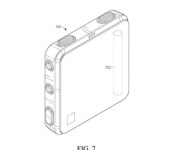
Google gets patent for a new body odor removing device

Google has reportedly received a new patent for a device which wards off body odor. This is almost like a wearable which can be attached either to your neck or the waistline, and then do its magic.
To fight off body odor, the device will sense the physical activity of the user wearing the device and emit fragrance which will counter the odor. It also has tiny fans which can help decrease body odor. Google originally applied for the patent back in 2012, but it took the USPTO until now (Feb 10) to grant them the patent.
The device can also alert you when your friends are within proximity, so that you can avoid bumping into them. The device will give you alternative directions to your destination so as to avoid meeting someone you know.

Since this is only a patent application at the moment, there’s no word on whether this device will ever come to fruition. It seems too early for a product like this to make the shelves, so it’s possible that Google will wait a couple of years before bringing this to the market.
Source: USPTO
Via: NY Daily News
Come comment on this article: Google gets patent for a new body odor removing device
Google Play Services updated to version 6.7 [APK Download]
Following the Google Play Store being updated, Google has now issued an update to Google Play Services, bringing it to version 6.7.
The update contains features that will allow scheduling for Android One firmware updates, as well as an experimental Smart Unlock feature.
In addition, the Google Settings app is now broken up into two categories and alphabetised the list.
Of course, there could always be additional hidden features just disabled, so drop us a comment below if you notice anything different.
Google Play Services should update itself automatically over the next coming days, but you can also sideload the APK using the download link here.
(function() var script = document.createElement(‘script’);script.src = ‘https://stacksocial.com/widget.js?publisher=androidguys&type=editorial_post_widget_preferences’;script.async = true;var entry = document.getElementsByTagName(‘script’)[0];entry.parentNode.insertBefore(script, entry);)();
http://www.androidguys.com/pubgalaxy/728×90.html
The post Google Play Services updated to version 6.7 [APK Download] appeared first on AndroidGuys.

Google is working on a new Bluetooth-based payment service

If Google has its way, you will one day be able to pay for your pizza at Papa John’s by simply saying your initials to the cashier.
That’s the gist of a report from The Information about a new mobile payment service that Google is working on, called Plaso (pronounced play-so.) Details are lacking for now, but here’s how the system presumably works – to pay for a good or service, the customer only needs to run Plaso on their Bluetooth-activated device and tell the cashier their initials. Based on the initials, the cashier picks up the right customer from the list of Plaso users within range and operates the transaction, potentially through Google Wallet. It’s not clear how the system works when there are more than one user with the same initials within range, nor what infrastructure this service requires.
Plaso could make it possible to pay for transactions without even needing to touch your device
In theory, Plaso could make it possible to pay for transactions without even needing to touch your device. Just walk into a café, pick up your latte, and tell the barista your initials. Payment utopia, right there. If you’ve been following mobile payment systems, Plaso may sound familiar – it’s because Square launched a very similar system three years ago, called Wallet. The difference is that, with Square Wallet, you had to check in the location, and the cashier looked at your app profile photo to recognize you. Square discontinued Wallet last year, citing lack of adoption as the main reason. And that’s the biggest issue that every payment system has to overcome in order to become mainstream.
Despite being around for yours, Google’s current payments app, Wallet, has failed to make a meaningful dent in the market. Plagued by limited compatibility (at least in the beginning), the opposition of carriers and payment processors, and insufficient promotion, Wallet remains a product that its few users love, but is largely unknown to the public. Now Apple has entered the market, and despite Google’s head start, Apple Pay is already ahead, at least when it comes to consumer recognition.
With Google rumored to be interested in buying Softcard (formerly Isis, the payment system developed by US carriers) and this new Plaso service, it looks like the Mountain View company is still eager to solve the riddle of mobile payments. It remains to be seen if that will ever happen.

Google rigged 300 devices to sing the ultimate Android chorus
“Be Together. Not the Same.” Android’s new motto is pretty much perfect. It describes the dual nature of Android and it’s a great reminder that, at the end of the day, we’re all just tech fans no matter the brands or models we prefer.
Google’s last Android ad had cute animals, lots of them. But for this newest project, Google’s getting back to the funky Androidified characters first introduced in the days before Lollipop’s arrival.
Google’s Japanese team set up a mesmerizing rig comprising 300 Android phones and tablets, each with its own animated character, each singing their part in the ultimate Android chorus. The result is an exuberant interpretation of Ode to Joy, sang in a distinctly… Googley fashion.
If you happen to be in Tokyo, you can see the Android chorus for yourself at Omotesando Hills until this Sunday.
Now, how can I make this my ringtone?
Google wants to give you 2GB of Drive storage and keep you safer
On February 10th, Google made a post on its Drive blog about online safety in relation to Safer Internet Day. It hopes that users of the service will take a couple of minutes to complete their Security Checkup. If you do this before February 17th, you’ll receive 2GB of additional data in your Google Drive plan.
Clearly, the company is confident in Drive’s encryption since they’re willing to entice users to keep using the service or to use it for the first time.
The three steps you need to take are to: make sure your account recovery information is current, review your recent sign-in activity, and confirm apps and devices that access some account information. After that, you should see three green checkboxes, like in the image above, that confirm your eligibility. The additional storage will then come around February 28 and a confirmation will be sent via email.
Google notes that users of Google Apps for Work and Google Apps for Education are not eligible for the upgrade, but they should still take the checkup.
(function() var script = document.createElement(‘script’);script.src = ‘https://stacksocial.com/widget.js?publisher=androidguys&type=editorial_post_widget_preferences’;script.async = true;var entry = document.getElementsByTagName(‘script’)[0];entry.parentNode.insertBefore(script, entry);)();
http://www.androidguys.com/pubgalaxy/728×90.html
The post Google wants to give you 2GB of Drive storage and keep you safer appeared first on AndroidGuys.

