


Disconnect.Me files antitrust case against Google for banned app

Google is already facing a legal battle in Europe to determine if it has been abusing its dominant market position, and now Disconnect Inc. is piling on the pressure with its own a case against the technology giant, claiming that the company abused its position when it banned its app.
The Disconnect Android app aimed to block ads and third party tracking software, along with any potential injections of malware. It was banned from the Google Play Store for breaching Google’s terms and conditions.
“Disconnect charges Google with abusing its dominant market position by banning Disconnect’s app, a revolutionary technology that protects users from invisible tracking and malvertising, malware served through advertisements,” – Disconnect.Me
Specifically, Google points to clause 4.4 of its Google Play policy, which prohibits apps on the store from interfering with other apps, either by altering their functionality or by removing their way of making money. By removing ads, Disconnect could be used to deprive developers of revenue. Given that the freemium app segment continues to grow at a strong pace, Google and app developers are clearly interested in preserving their revenue streams.
“Our Google Play policies (specifically clause 4.4) have long prohibited apps that interfere with other apps. We apply this policy uniformly — and Android developers strongly support it. All apps must comply with these policies and there’s over 200 privacy apps available in Google Play that do.” – Google
The case becomes a little more complicated though, as Disconnect claims that it’s not trying to disable all ads, but is offering users the option to protect themselves from invisible tracking and malware, stating that advertising doesn’t have to violate user privacy and security to be successful. The company has referenced several article on the subject of privacy and ads in the past, but clearly hasn’t persuaded Google of the case.
Google had previously blocked the app two times in the past year, leaving the developers to offer the app as a side-loadable apk. The company has filed the lawsuit with Google in pursuit of “equal treatment” so that all Android users can access its app. It is also not clear exactly what compensation the company is after as well, if anyway.
The choice to file a complaint in Europe, rather than say in the US, is most likely to capitalize on the growing legal hostility towards the tech giant in Europe. Disconnect’s case could also be merged with other anti-trust complains on the continent.
Where do you stand on the issue of privacy and ads?
MediaTek based Chromebooks to arrive near the end of 2015

Having released a selection of new SoCs for smartphones and tablets, MediaTek is now setting its sights on the laptop market. The company has confirmed that it is developing a new mobile chip for use in low-cost Chromebooks.
Mediatek will be aiming to sell its Chromebook processor to multiple existing manufacturers and will apparently be powering various next generation products. However, the company was also keen to point out that its market share would start out small. Worldwide Chromebook sales are expected to reach 7.3 million units in 2015, a 27 percent increase from 2014, according to Garnet Inc. Acer is currently the largest player in the market, so we’ll be eagerly watching to see if MediaTek can pick Acer up as a client.
The new, currently unnamed, chip is expected to arrive on the market by the end of 2015 or in early 2016, according to MediaTek President C.J. Hsieh. This move will put MediaTek in direct competition with Intel, which provides the processors for a number of existing Chomebook products.
MediaTek appears keen to go above and its current mobile products next year. The company is also developing a SoC for use in a 4K TV running Google’s Android TV service, a chip designed specifically for the wearables market, as well as a processor for home audio streaming.
Google boosts employee diversity but is still mostly white guys

As of the start of this year, 53,600 people work for Google full-time. Too many of those workers, according to the company’s detractors and its own assessment a year ago, are male, and white or Asian. In order to counter this gap, Google has looked for ways to boost female and minority hiring. Per its just updated diversity report, 21 percent of the company’s technical hires last year were female. However that translates into just a 1 percent increase in the total number of women hired to technical positions. Women in general constitute just 30 percent of Google’s employees. Additionally, the onboarding rates for both Black and Hispanic hires increased faster than the company’s overall growth for the year but still only constitute 2 and 3 percent of the company’s entire workforce, respectively.
Those numbers don’t sound like much progress because, well, they aren’t. Google called the results “early” and points to the efforts it’s undertaking, like spending millions to increase the number of technologists, change the corporate culture and recruit from a more diverse pool of sources. The company says it will keep working to “build a workforce more reflective of the diversity of people we serve”, even if the results haven’t shown up on the stat sheets just yet.

[Image Credit: Getty Images]
Source: Google Diversity Report
New “My Account” page goes live for Google users to easily manage everything they need for their accounts
<ins class="adsbygoogle"
style=”display:block”
data-ad-client=”ca-pub-8150504804865896″
data-ad-slot=”8461248232″
data-ad-format=”auto”>
(adsbygoogle = window.adsbygoogle || []).push();
Google has announced the launch of a new “My Account” page for users to simply and easily manage their Google life. The Google G+ page, along with other social outlets, made the announcement this morning simply stating, “Take control of your data, protect your privacy, and customize how Google works for you — all in one place.” It was accompanied by a very materialistic MP4 video, seen below, of the various things you can keep tabs on.
When you head over to the My Account page, which can easily be accessed from myaccount.google.com, you can see the various links that one might find useful such ass quick access to your device activity & notifications, Connected apps & sites, Your personal info and so much more. If you keep your locations services on you can see the history of your travels by day along with an hourly history of where you have been. You can see my home and work are have the highest amount of location points followed by school and the store. I don’t get around much.
 Head over to your My Account and poke about at your convenience. Again, you can go to myaccount.google.com, or you can navigate to your photo on a Google page that you have logged into and simply hit the “My account” button.
Via Google G+
The post New “My Account” page goes live for Google users to easily manage everything they need for their accounts appeared first on AndroidSPIN.
Google unveils new privacy and security management tools

Google unveiled major changes to its privacy and security management tools today. Users can now take an active approach to managing the data Google holds on them, in one centralized hub.
On the new “My Account” page, users can control their personal data settings. You can now manage experience-enhancing data used by apps like search, Maps and Youtube. Ads Settings lets you control ads so that only ads you’re interested in show up. You can also control which apps and sites you’ve given permission to connect with your Google account.
Go to myaccount.google.com to take a peek at the changes and start adjusting your settings.
If you’d like to check out your My Account page, head on over to myaccount.google.com. For more information about the changes and Google’s privacy policy in general, go to privacy.google.com.
Source: Google Blog
Come comment on this article: Google unveils new privacy and security management tools
Project ARA director Paul Eremenko leaving ATAP team after two years

Google’s ATAP (Advanced Technology and Projects) is known today for the Project ARA modular phone among many other endeavors — but today the division isn’t making news for a particular product update, but because of staff changes.
Paul Eremenko, former director of Project ARA, is moving on to join Airbus Group in Silicon Valley, one of the world’s leading aerospace and defense companies. As is common practice with some positions within Google, the ATAP project director position has a limited contract of two years in order to ensure quality and risk taking. Thus, Eremenko will leave the team.
For a full list of people who will now take over at ATAP and Ara, hit the source link.
Source: ATAP+
Come comment on this article: Project ARA director Paul Eremenko leaving ATAP team after two years
Google launches My Account for security and privacy controls
While Google’s ATAP team is working on Project Abacus, which aims to bring more security with less hassle, Google has introduced a new feature to their privacy and security settings. My Account will give you access to both the settings and tools for your Privacy and Security settings for any of your Google accounts.
From the My Account page, you can easily access your Security settings, Personal Info & Privacy settings, and your overall Account Preferences. When you log into the My Account page for the first time, you are prompted to perform a Privacy checkup and a Security checkup.

The Privacy checkup within the My Account page, basically just asks you a few panels of questions, which allow to fine tune how much information you actually want to be seen by the world. For example, you can select which profile tabs are visible to visitors on Google+, or you can choose to show your subscriptions and such via YouTube.

The Security checkup also found in the My Account page, gives you all different types of information about the devices and apps that have been connected to your account. You will be able to edit and change your recovery information, such as your recovery phone number, recovery email, and your Security question for password resets. You will also be able to view all of the recent devices that have been connected to your Google account, along with the location where the device was connected from.
The Account Permissions section, shows you all the different applications that you have linked to your Google account. Literally to the T. If some of them look suspicious, or are from a service/app that you no longer use, you can simply tap the “Remove” button and that application will no longer have access to use your Google credentials.
Finally, you can check your App Passwords, and your 2-step verification settings. This is extremely helpful to be able to go through your Google account with a fine tooth comb, and make sure that everything looks up to snuff. You can learn a lot about your account from this checklist, just by seeing all the different types of apps and services that you may or may not have linked up.
Going forward, the My Account page will be definitely useful to keep an eye on the comings and goings of my Google Account, to ensure that nothing suspicious is going on. Be sure to take some time, check this out, and make sure that all your information is what you think or expect it to be. If something looks odd, definitely get rid of it or contact Google for support.
The post Google launches My Account for security and privacy controls appeared first on AndroidGuys.
Google introduces new controls to help keep your sensitive information safe and private

Being able to control your privacy and security is becoming increasingly important, especially with all of the sensitive information constantly being traded around the web. That’s why today Google is rolling out two big improvements to its privacy and security tools that will help users better manage the information most important to them.
Google’s new My Account tool acts as a central hub for controlling your personal data and information, giving you access to settings that will help you safeguard your data, keep your privacy protected, and give you more control over what info is used to make Google services work better for you. Here are a few more important features My Account provides:
- Manage the information that can be used from Search, Maps, YouTube and other products to enhance your experience on Google. For example, you can turn on and off settings such as Web and App Activity, which gets you more relevant, faster search results, or Location History, which enables Google Maps and Now to give you tips for a faster commute back home.
- Use the Ads Settings tool to control ads based on your interests and the searches you’ve done.
- Control which apps and sites are connected to your account.
If you’d like to check out your My Account page, head on over to myaccount.google.com.
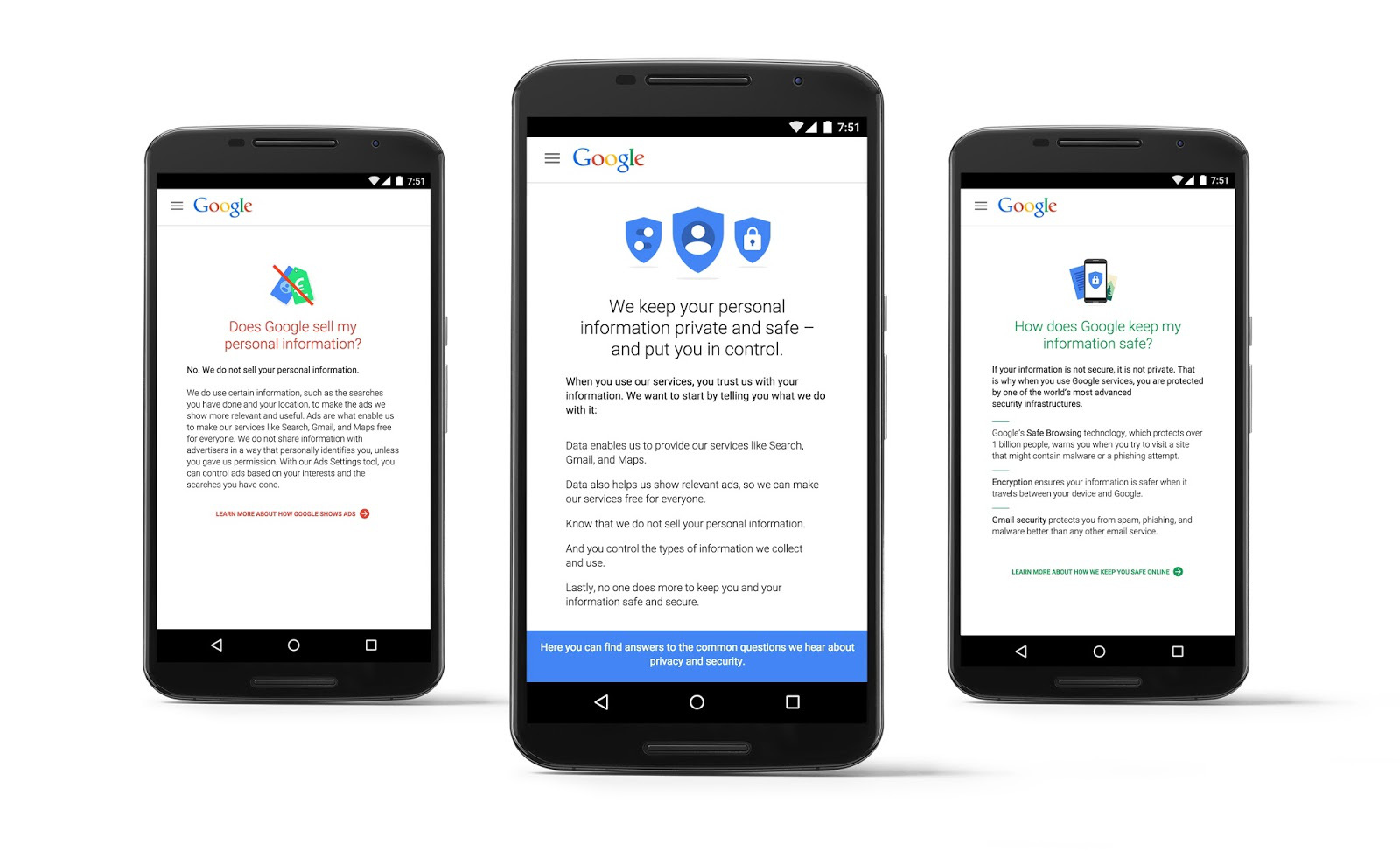
Additionally, Google is rolling out an informative website that will help answer common security questions that many users have been asking. By heading to privacy.google.com, users will hopefully get a better idea as to how their data affects their experience on Google, what types of data Google collects, and much more.
It seems like Google has been particularly focused on user security as of late, especially following the recent announcement that granular app permissions control is coming to Android M.
Google I/O 2015: What you may have missed
Unless you were residing under a rock last week, you are surely now aware of last week’s yearly developer conference, Google I/O. Well, in case you happened to not be available, or need a place to catch up on everything that was announced or talked about, AndroidGuys is here to save the day. From Android M to new Developer Tools and the new Photos service, there was surely a lot that was covered during the Google-fest, known as Google I/O 2015.
Android M
While this didn’t come as a surprise to many, Google decided to show off their latest iteration of Android, to the world. Android Lollipop, announced and released last year, obviously brought the Material Design UI design change to the forefront. Android M, because Google did NOT announce the name of the latest version, seems to bring a slew of additional features to the forefront. It may seem like an incremental update at first, but rest assured, there are more than a few changes that can be found with Android M.
Granular Permissions
The first big change announced was the addition of Granular Permissions with apps across the whole OS. What this means is that you will be able to approve or deny any permissions that a specific app may need to use in order to function correctly, or want the ability to use. Currently, users agree to all the permissions necessary for an app to be installed, upon installation from the Google Play Store. Whoever reads all those, every time you download an app, is a brave soul. I literally equate it to reading the terms and conditions of downloading any type of software update from Apple. TLDR.
Something to note in regards to these permissions changes, is that Google is paving the way for developers to build their apps that still work, even if a user denies any specific permissions request within the app. That’s a nice little touch to ensure that your apps will all still work even if you deny permissions.
Doze Mode
Everybody complains about battery life, regardless of what device you are using. iOS or Android. Well with Android M, Google is bringing a new feature known as Doze Mode, which is essentially puts your phone into a deeper sleep mode than what is currently available. No worries, Google still thought about the fact that you are expecting to receive notifications and such throughout the day, so those will still come through as normal. Google is claiming that Doze Mode could increase the battery life of a device, two-fold. Doubled the battery life, without having a bigger battery, is an interesting concept, so it will be interesting to see how it works in RL.
USB Type-C
This seems to be the year of USB Type C, with Apple introducing the MacBook, which has only the USB Type C port on it. The latest rendition of the ChromeBook Pixel also has two USB Type C ports on it, so why not introduce this technology on our mobile devices. Well Google did just that today. While they didn’t mention any devices that will include the USB Type C charging port, Google still explained what this will mean when an Android device is released with this new charging port.
Imagine this. You need to charge your phone up, but all you have is your tablet. (Of course this is a hypothetical situation, just stick with me here.) You remember that you got both of these awesome devices from Google and they both have USB Type C. So you plug the USB to USB from your tablet into your phone, and boom. Your phone is now charging. Well that’s what the introduction of USB Type C brings to the table now. On top of the fact that our Android devices will FINALLY have a reversible cable, reducing the frustration in trying to stick it in the right way.
Android Pay
Just about everyone has, or has had Google Wallet. Just about everyone has also heard about how Apple Pay works in unison with the iPhone 6 and iPhone 6+ along with the fingerprint scanner. Well Android M is bringing Android Pay with built-in fingerprint support for those devices that have a fingerprint scanner already, and of course with any new devices.
Similar to Apple Pay, Android Pay will be built right in to the OS, so that you can get up and running right away, out of the box. Google was also to gain support from Verizon, AT&T, and T-Mobile to allow Android Pay to be installed, without restrictions, right out of the box.
As for stores that are on board, Google announced that there are over 700,000 retailers that Android Pay will be accepted, across the US. Essentially, Android Pay will be supported wherever you can find an NFC payment station at your retailer of choice.
Google is also building into Android M, the ability to “Buy with Android Pay”, which will allow users to pay just by tapping the icon, and your items will be instantly paid for through the credit/debit card that is attached to your Android Pay account.
App State Backup
Any apps that will be installed on devices running Android M, will automatically back up to Google’s cloud. This was introduced so that you can have your apps backed up and ready to go whenever you switch to a new device, or perform a full-wipe on your device. I can find this extremely useful for us geeks that switch phones like we change socks, but also for those clumsy one’s who need go through phones like diapers.
The Android M Developer Preview was made available a few hours after the keynote had ended. It is compatible with the Nexus 5, 6, 9 and Nexus Player. We can expect to see Android M fully released in Q3 of this year, while there is a road-map to give users an idea of when to expect the next versions of the Developer Preview.
Android M Developer Preview Downloads
Google Photos
Before getting into the smaller announcements from yesterday’s event, let’s get into the other big announcement from the Google I/O 2015 keynote. Google Photos. It’s finally here, and you can expect to see a slew of articles claiming that this is the beginning of the end for Google+, but we know differently. Of course, the redesigned Google Photos isn’t anything that we didn’t already know about, but now we can finally play around with the features. The big feature, for me at least, was the cross-syncing between Android, the Web, and iOS.
Bundled with unlimited storage, Google is touting Google Photos as a backup service, more than anything else. However, there is a catch for that. Your photos will have a 16 Megapixel cap, and videos will have to be uploaded at 1080p or lower. There is an option, upon start up, to use your Google Drive storage capacity, which is nice if you have boat loads of extra storage sitting around, but the “unlimited storage” option will be just fine for most.
Depending upon how granular you get with your photo organization, things can be pretty rough sometimes. Google Photos is hoping to help out with some of that, by being able recognize and categorize your photos automatically for you. Photos will be able to identify people, places, landscapes, food, and will categorize those photos for you automatically. While Photos seems to walk the walk, it’s only a matter of time before we know if it can talk the talk.
Users can access their photos across the web, iOS, and Android, so that you have a copy of your favorite pictures, no matter where you’re at. If you want to share one of those photos, you will be able to pull up the sharing menu, and be able to get a link specific to the picture that you are attempting to share.
Another feature announced with Google Photos is your new Assistant. Nope, not a Google Now replacement, or anything like that. Instead, think of it as a modified version of Auto-Awesome for Google+. Your Assistant will help you create albums, custom stories, or movies, and what makes this even better, is that you don’t have to wait for Auto-Awesome to do its thing. You can make these adjustments to your photos, yourself.
Obviously these are just some of the many changes and announcements that Google brought to the Android world at Google I/O 2015. What are some of your favorite announcements? Was it the separation of Google Photos from Google+? Or was it the announcement of Android M and the release of the first batch of Developer Previews? Let us know what you think about everything in the comments below.
Google I/O 2015
The post Google I/O 2015: What you may have missed appeared first on AndroidGuys.
Google simplifies security and privacy with new account hub

Many of us are dependent on Google apps like Gmail and now Photos, but Google has a rep for being less than transparent on security and privacy, especially in Europe. Now, the search giant has just put all those things into one big hub in an attempt to make things clearer to users. Its new “Accounts” page lets you see at a glance where to change sign-in, device, ad and personal settings, and also has a pair of new wizards to help you review security and privacy settings. In addition, even if you don’t have a Google account, you can now personalize search, ads, apps like YouTube and other settings.
For those with an account, there are three setting groups (above) used to control your accounts. The “sign-in & security” card lets you manage how you sign in and control devices and apps that use Google accounts. Running through the security setup wizard will let you see and modify your passwords and two-step security controls, then verify all your phones, computers and tablets. You can also tweak apps that use Google security, many of which (if you’re like me) you may have forgotten about.
The second set of settings is for privacy control. Did you know that Google can go ahead and feature your publicly shared Google+ images as a background for its products & services? Well, now you do, and Mountain View lets you tick a box if you want them to cut that out. You can also control whether it shows your app reviews on Google Play, how you share YouTube videos and how it serves you ads, to name a few other tweaks. The final “account preferences” card lets you change your language and input tools, adjust Google Drive storage and delete accounts or devices.
Google also revealed a new privacy policy that details what data it collects from you, how it uses it, how it targets you with ads and what you can do to control all that. So why all the changes? Google’s under pressure from governments to change how it handles privacy, and has also been criticized for its overly complicated security settings. It said that “today’s launches are just the latest in our ongoing efforts to protect you and your information on Google,” and added that “there’s much more to come.” Whether or not the tweaks assuage its critics remains to be seen, but anything companies like Google can do to simplify security and privacy is fine by us.
Source: Google (1), (2)

