


Google Play continues to dominate in downloads as video streaming apps surge

As we move into the second half of 2015, App Annie has released their report on the performance of the Google Play and Apple App Store for the 2nd quarter of 2015. No surprises emerged regarding the competition between the two as Google continues to dominate in terms of downloads while the App Store maintains a lead in revenues.
Google actually expanded their lead in downloads pushing to an 85% advantage compared to 70% for the first quarter of 2015. This growth is attributed to Google’s success in emerging markets on the back of inexpensive Android devices. Even with growth in these markets, penetration is still only 30%, so there is still a lot of potential.
For revenue, much of Apple’s growth can be attributed to China which has eclipsed the U.S. in terms of iOS downloads. This helped Apple maintain a 70% edge over Google.
App Annie also noted a couple other changes of interest that occurred during the second quarter. First, they highlight how Taiwan has surged past Germany in terms of Google Play revenue and it is also one of the markets where Google Play revenues exceed the App Store. Much of this explosive growth in Taiwan is due to the Games category.
The other change is impacting both Google Play and the App Store as the Entertainment category continues to surge on the strength of video streaming platforms. Both China and the U.S. are seeing apps like Hulu, HBO Now, Youku and iQIYI Video grow in popularity and capture the interest of smartphone and tablet users. App Annie hints that this may be an early indication that the cord cutting movement is finally gaining some decent traction with viewers.


source: App Annie
via: Android Authority
Come comment on this article: Google Play continues to dominate in downloads as video streaming apps surge
Best ways to speed up mobile browsing [2015]

After using a mobile browser for some time, you may notice a slight drop in speed and performance, particularly due due to cache, cookies, and history. It can get even worse if you don’t have the luxury of HSPA+ or even LTE speeds, as 3G and 4G networks can be subject to a lot of hang ups and sometimes even disconnects.
No one wants to deal with slow Internet speeds, though. When trying to access information quickly, it can get severely frustrating, especially when you’re trying to share a video with a friend, only to be met with the annoying loading indicator. Fortunately, there are a couple of handy ways to speed up your mobile browsing, regardless of what type of network you’re on.
JavaScript
The number one thing that is going to tremendously speed up your mobile browsing is disabling JavaScript. Many of the websites you visit will feel lifeless by doing this, but if all you care about is the information on those pages regardless of functionality, turning off JavaScript is your best bet.
Here’s a quick rundown on what JavaScript does:
Click here to view the embedded video.
It doesn’t have to be a permanent solution either. If you decide you don’t like the lack of functionality from disabling JavaScript, you can always go back and reactivate it to get the functional and interactive web pages you’re used.
To disable JavaScript, open up your browser, tap the three-dot menu icon in the top right corner, select Settings, and then Advanced. Under Advanced, there should be a ‘Enable JavaScript’ option. Disable it, and then restart your browser.
JavaScript should now be disabled.
This process only works for your native browser and a select few other browsers on the Play Store. Chrome doesn’t seem to support it.
Cache and Site Data
Your cache is your friend: it’s actually out to help you speed up your web browsing by remembering certain elements and pieces of pages you’ve visited in the past. Cache really does not need to remember these websites but eventually you’ll see a hit to your performance.
That said, it’s always good to clear your cache once in a great while, especially if you find yourself having issues with your mobile browser. To clear the cache in your browser, hit the three-bar menu in the top right corner, and select Settings > Privacy > Clear Cache.
Your cache is now cleared, and you should notice a drop in performance while you’re hitting all of your regular websites, but eventually it’ll smooth out. Additionally, in that same Privacy menu, you can clear your cookies, site data, and browsing history all at the same time, which should increase overall performance.
The process works similarly for various browsers.
Cookies
Clearing your cookies doesn’t stop your web browser from collecting them. Cookies are useful, but they aren’t totally necessary to browsing the web. You can disable them by opening up Chrome, selecting the three-bar menu in the top right corner, going to Settings, and under “Advanced” select Content Settings. From there, you can turn cookies off by simply tapping it.
If you’re interesting, you can read a little more about cookies here.
Pop-ups
Pop-ups are one of the biggest contributors to slowing down your web browsing. They’re annoying, get in the way, and take up unnecessary data, RAM, processing speed, and most of the time they don’t offer anything even remotely helpful.
To disable pop-ups in your Chrome browser, hit the three-bar menu button on the top right corner, and go to Settings > Advanced > Content Settings. Select Pop-ups, and turn them off. Again, this process should work similarly with most browsers.
Browsers

A major way to speed up your browsing experience is to make sure you’re using a quality web browser. The browser that comes with your smartphone or tablet isn’t always the best solution when there are better options like Google Chrome, Firefox, and even Opera in recent years.
Another way third-party browsers speed up your web experience is by managing tabs better, allowing you to quickly switch to or save the information you need.
Closing
In our fast-paced world, slow browsing speeds can get infuriating due to being used to getting information instantaneously. While that’s not necessarily a bad thing (after all, it’s 2015, what gives?), performing these steps combined with a little patience should speed up your browsing astronomically.
What are some things you do to speed up your browsing or access to information?
Come comment on this article: Best ways to speed up mobile browsing [2015]
Play Music updated with fix for disappearing cached tracks issue

Since the latest update, Google Play Music no longer deletes cached music from devices, an issue that has been affecting some users for the past couple of weeks.
Users reported that tracks downloaded for offline use and stored on the microSD card disappeared without notice whenever the device rebooted or the card was removed. Given that offline music storage is one of the most common usages for microSD cards, the issue has left quite a few users miffed, to say the least.
Fortunately, Google has given the issue the priority treatment it required, and the version now available in the Play Store is free of this bug. According to the changelog, version 6.0.1950S also fixes an issue that prevented some songs and albums from showing up in the My Library section. Judging from the comments on this Reddit thread, the update also fixed a problem with the way album art was displayed in the notification dropdown.
It appears that the update is causing the app to re-download any music you have marked for offline playback, presumably to account for the possibility that some songs were removed by the bug in the previous version.
Have you noticed this issue? What other bugs in Play Music would you love to see fixed?
Bing makes it easier to scope out your future neighborhood

Google, Yahoo and Microsoft are constantly working to make the best possible search engine, and that’s great news for you. The more they challenge each other with new features, the better your experience on the web will be. Today is Bing’s turn to make an announcement, revealing a set of features that will be helpful for people who are moving to a new place. So not only can you search for a house or an apartment, but also learn about their neighborhood and the services located around them — such as schools and hospitals. Once you find an area you’re interested in, Bing will show you ratings, rankings and other detailed information regarding each place; the company says this is pulled from a variety of trusted sources, like Zillow.com and GeatSchools.org. Right now, it’s is limited to users in the US, but chances are it’ll be expanding to more countries later on.

[Image credit: Tom Ipri/Flickr]
Filed under: Internet, Software, Mobile, Microsoft
Source: Bing
Google hires team behind cleaning startup to help find you a plumber

This morning, Homejoy, an on-demand cleaning service startup in San Francisco, announced that it would be shutting down on July 31st. CEO Adora Cheung told Re/Code that the decision came about in large part due to four ongoing lawsuits brought against the company by workers who wanted to be reclassified as employees. This, in combination with the recent uptick in scrutiny over the on-demand “gig economy,” has made it a lot harder to raise enough funding to keep business afloat, according to Cheung. But before Homejoy can even start licking its wounds, Re/Code reports that Google has already swooped in to hire some of Homejoy’s engineers for its own upcoming home-services program.
For the uninformed, Homejoy was a service that matched users with professional cleaners. Though it hasn’t been confirmed, it appears that Google seeks to do very much the same thing — not just with cleaners, but plumbers, electricians, handymen and all manner of home-service providers. The idea, according to Buzzfeed sources, is that you’ll just search for “plumber” in Google, and it’ll connect you directly to the people you want instead of redirecting you to a variety of third-party sites like it does now. In essence, it appears that Google is seeking to create a competitor similar to Angie’s List or Amazon Home Services.
While some of Homejoy’s employees have a second chance thanks to the crew over at Mountain View, its fall from grace does raise some concerns over whether other “gig economy” startups will have the same fate. Not only has presidential candidate Hillary Clinton brought the worker classification issue to light, even the Department of Labor has jumped in the fray and published a brief explainer outlining the differences between an employee and an independent contractor. It’s unclear if Uber and its ilk will face similar challenges, but hey, maybe Google has a ridesharing alternative in the works to save the day.
Update: We’ve heard confirmation from Google that a portion of the Homejoy team is indeed joining its ranks. It has nothing to share beyond that.
Filed under: Misc, Internet, Google
Source: Re/Code (1), (2)
Chromecast Ethernet adapter back in stock in the Google Store

Google’s Ethernet Adapter for the Chromecast is back in stock in the Google Store. Google released the adapter last week, however, it was met with a good amount of popularity and quickly ran out of stock.
Wireless networks have made leaps and bounds in technology, but they’re not always the most reliable of solutions. They can easily get hung up or even disconnect, and many factors contribute to that–your ISP, how much data is being pulled down or uploaded, and etc.
Fortunately, the Ethernet Adapter for the Chromecast is a guaranteed solution to keep your Chromecast connected to your network. It eliminates all of the issues of wireless connections, giving you a stable connection to your home network. However, keep in mind that it isn’t a fail-safe against ISP issues.
If you’re interested in picking up an Ethernet Adapter for the Chromecast, hit the source link below.
source: Google Store
via: Android Police
Come comment on this article: Chromecast Ethernet adapter back in stock in the Google Store
Google Fiber joins initiative to offer free Internet access to public housing communities

Google Fiber has announced they are partnering with the U.S. Department of Housing and Urban Development in a new program launched by the White House, ConnectHome, that hopes to bring Internet connections to public and affordable housing communities. HUD has selected 28 locations throughout the country for the initial deployment of ConnectHome, which will provide free Internet connections to public and affordable housing residents in those locations. In communities where Google Fiber exists or is being deployed, like Atlanta, Durham, Nashville and Kansas City, as well as future Google Fiber markets that may overlap, Google will provide the Internet access portion.
As part of the ConnectHome initiative, Google will also partner with local community groups to provide basic computer skills training and they will help with the development of computer labs in the communities. According to Google, 26% of households who earn less than $30,000 annually do not have Internet access versus only 3% lacking access who earn $75,000 or more. This “digital divide” can have a huge impact on the opportunities available to school-age children in a world that is increasingly connected.
Google says they pursued the partnership after their experience with the Housing Authority of the City of Austin (HACA). In Austin, Google worked with HACA, EveryoneOn.org, Austin Free-Net and Austin Community College to create digital literacy training classes, provide computer access, and rollout free Internet service. Google hopes to replicate the success they had in Austin in other locations where they roll out Google Fiber services.
After the White House announcement earlier this week, HUD Secretary Julián Castro has been visiting the communities selected for ConnectHome to launch the initiative where he has been joined by Google executives. In locations without Google Fiber, other Internet providers are being tapped to assist with access.
source: Google Fiber
Come comment on this article: Google Fiber joins initiative to offer free Internet access to public housing communities
Google posts strong second quarter growth, mobile leads the way for earnings

On Thursday, Google posted its latest financial figures for the second quarter of 2015, reporting nearly $18 billion in revenues. This is an 11% percent since last year. Most of Google’s revenues unsurprisingly came from mobile search growth. And from that revenue came $3.93 billion.

You can check out the source link below for the full report.
Source: Google
Come comment on this article: Google posts strong second quarter growth, mobile leads the way for earnings
How Google’s robotic cars deal with human stupidity

Like the Terminator T-800, Google’s self-driving cars don’t feel pity, remorse or fear. But they also never lose their patience or get distracted by smartphones, and Google has revealed data collected by its vehicles showing just how bad we human drivers can get. It said the goal with the Medium article was to improve road safety by reminding us that “driver error causes 94 percent of crashes.” Program director Chris Urmson said that “our safety drivers routinely see people weaving in and out of their lanes; we’ve spotted people reading books, and even one playing a trumpet.”
Google released a video recreation of an intersection accident — one of 11 its cars have experienced — when its vehicle was rear-ended (bottom). Google’s car slowed to a stop at an intersection behind another vehicle, even though the light was green. However, the driver behind them only saw the green light and not the stopped cars, and plowed into Google’s sensor-equipped rig. Urmson said that such drivers are often “checking their devices instead of watching the road.” On the other hand, its self-driving cars have “360 degree visibility and 100 percent attention out in all directions at all times.”

Other dangerous situations involve freeway exits, turns and lane changes, and Google pointed out that cyclists and pedestrians are particularly at risk. It cited the case of a cyclist who got a late start across an intersection and was nearly hit by a left turning car. “Our car predicted the cyclist’s behavior (in the red path, above) and did not start moving until the cyclist was safely across the intersection.” He added that the cars are programmed to pause briefly when a light turns green, as “that’s often when someone will barrel impatiently or distractedly through the intersection.” None of this is new information to drivers, of course, but it’s interesting to see it from the viewpoint of an all-seeing robotic car that never feels road rage.
[Image credit: Associated Press]
Filed under: Transportation, Google
Inbox by Gmail receives new Snooze feature

Google’s Inbox by Gmail may now be available to all but that hasn’t stopped the updates coming. Inbox has just received a tweak to its Snooze options, which makes the system more flexible and convenient.
You are now able to quickly snooze emails and their notifications that contain dates or times until a more appropriate time. The smart thing is that Inbox now offers a quick suggestion, rather than having to set the time yourself. For example, you can snooze emails about products shipping until the day they are due to arrive, or offset emails about a reservation until an hour before you set-off. The little GIF below gives an example of how this feature works.
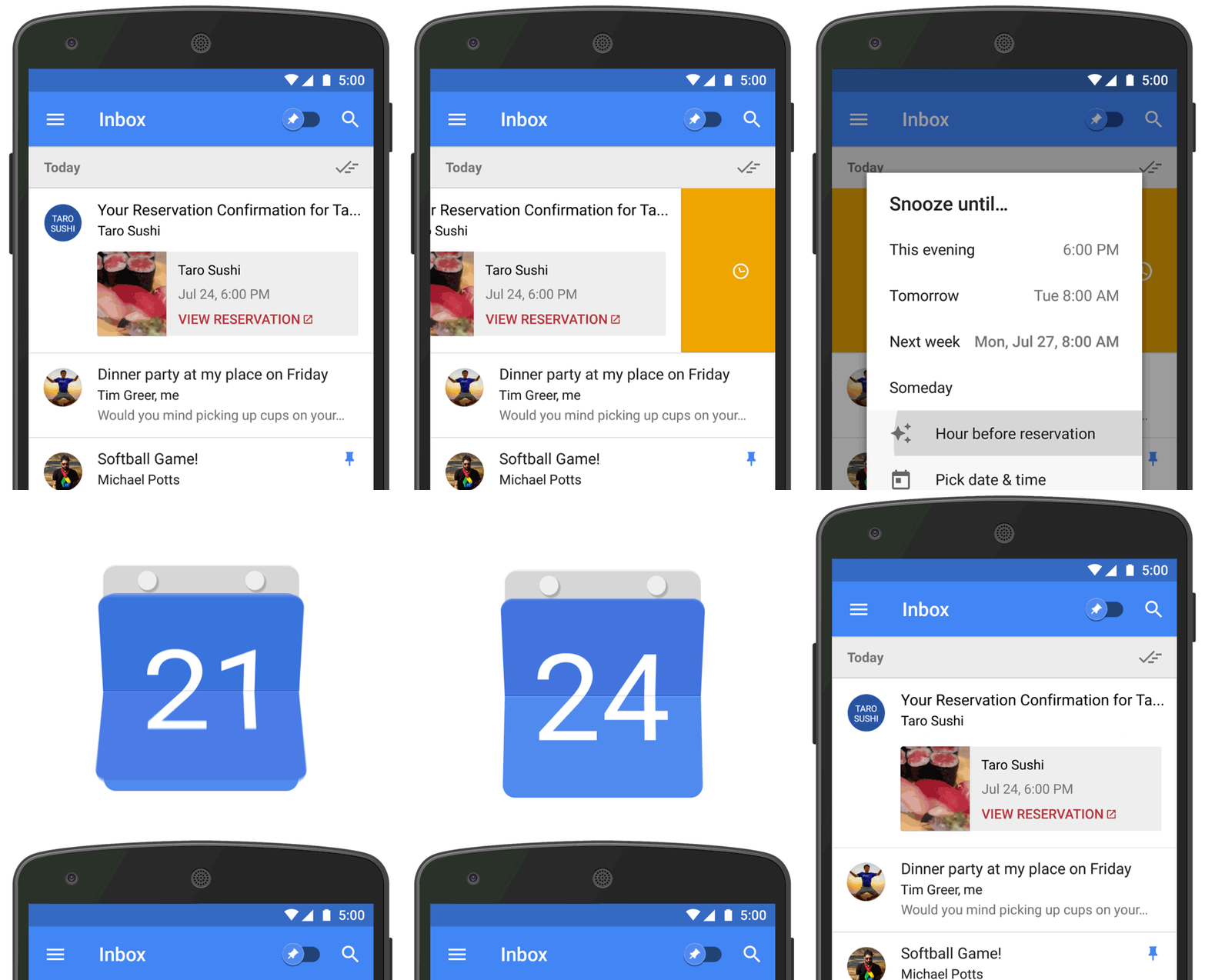
The simplified Snooze feature is accomplished via a simple one-tap option that automatically offers suggestions for when to snooze until, which is based on the email’s content. The feature should work for the majority of messages regarding package tracking, restaurant and event reservations, calendar invites, flight and hotel reservations, and car rentals.
If you haven’t tried out Inbox already, you can download the app for free from the Play Store with the button below.

