Nexus 5X review: Google’s triumphant return to smaller, cheaper phones

While the Nexus 6 received plenty of praise when it debuted last year, it also got its fair share of flack. Why? Because it was just too big. For many, the Nexus 6 was the size of a tiny giant, with its 5.96-inch display and 10.1mm-thick profile that dwarfed smaller hands. Additionally, it started at $649, whereas the previous-gen Nexus 5 cost just $349. Not wanting to disappoint its customers, Google decided to release two handsets instead of one this year: the pricier 5.7-inch Nexus 6P (made by Huawei and starting at $499 for 32GB) for those who do indeed want a larger phone, and the cheaper 5.2-inch 5X (made by LG and starting at $379 for 16GB) for those who wanted a sequel to the original 5. While it may certainly be the smaller and lower-end device of the pair, I found the 5X to be far better than I anticipated, delivering plenty of value for the money.Slideshow-330888
Hardware

The Nexus 5X is by no means a premium smartphone. Its polycarbonate, lightweight shell and vanilla design make it feel more sporty than posh; more family sedan than luxury sports car. Compared to the larger, all-metal 6P, the 5X and its plastic hardware seem downright homely. Still, taken on its own, the 5X isn’t exactly lacking in the looks department. On the contrary, it’s rather adorable, with gently rounded corners, a slender profile and smooth, curved edges that lead to an incredibly comfortable feel in the hand. I like the look of the creamy white backplate — which also comes in a beautiful robin’s egg blue and the standard black — especially in contrast with the black front frame. Sure, it won’t win any design awards, but for an affordable phone, the 5X’s simple style is more than acceptable.
Part of the 5X’s appeal is its smaller size. While there’s certainly a growing trend toward larger phones like the Nexus 6P, there’s still a segment of the population that is much more comfortable with something more pocket-friendly. Measuring 147 x 72.6 x 7.9mm, the 5X is definitely tinier than both the Nexus 6 and the 6P, and would likely please anyone who was a fan of the original Nexus 5. As someone with relatively small hands, I have to say I appreciate the form factor. I could easily tap through apps while holding the phone one-handed and it fits into my back pocket with only a tiny bit sticking out. And although it might be small, the 5X still manages to squeeze in a roomy 5.2-inch display, thanks to some relatively slim bezels.
Much of the phone’s hardware doesn’t seem too different from other Android phones — there’s the volume rocker and power button on the right side and a SIM card tray on the left. Sitting above the aforementioned screen is a 5-megapixel, front-facing camera plus an ambient light sensor. Underneath the display is the front-facing speaker grille, which hides an RGB LED indicator behind it. At the bottom is a headset jack plus a USB Type-C port, which is newly supported by Android 6.0 Marshmallow. For the uninitiated, USB Type-C is a reversible connector that will fit in the port no matter how you put it in, and it promises to transmit data at faster speeds too. This is great, but Google has only included a USB-C-to-USB-C cable in the box. That means you’ll need to get an additional USB-C-to-USB-A cable in order to charge the phone with most computers. Of course, you can just use the included USB Type-C power adapter to charge the phone, but it’s less convenient.
Flip the phone around and you’ll find the 12-megapixel camera along with a broad-spectrum CRI-90 dual flash and an infrared laser-assisted autofocus sensor (You’ll find more thoughts on the camera below). Underneath that is something brand-new to the Nexus line of phones, and that is the Nexus Imprint fingerprint reader. To start using it, rest your fingertip inside the metal ring. The phone will then immediately launch the fingerprint setup wizard, which requests that you touch the sensor a few times in different positions so that it can read your fingerprint accurately. And voila — from then on, you can just rest your finger on the reader to unlock your phone. The entire process is easy and straightforward. The reader itself works really fast — it takes less than a second for it to trigger. And, similar to Touch ID on the iPhone, the sensor can also be used to authenticate payments via Android Pay.
As far as internals go, both the Nexus 5X and 6P have something called the Android Sensor Hub, a low-power, always-on co-processor dedicated to data from sensors like the accelerometer and the gyroscope. The idea here is that it’ll automatically gather data for fitness stats like steps and distance without you having to wake the phone and without involving the device’s main processor, potentially saving you quite a bit of battery life. Additionally, it’ll know when you’ve picked it up and will automatically display the time and any missed notifications without you having to press anything.
Aside from that, the Nexus 5X has pretty solid specs for a sub-$400 handset. It has a Qualcomm Snapdragon 808 1.8GHz hexa-core 64-bit processor, an Adreno 418 GPU and 2GB of LPDDR3 RAM. Unfortunately for media hoarders, you won’t find a microSD card slot here — you’ll have to make do with either 16GB or 32GB of internal storage.
The Nexus 5X is compatible with all major US carriers as well as most networks around the globe thanks to its wide-range band support. Of note here is that just like the Nexus 6 and the Nexus 6P, the 5X is one of a few phones to support Google’s new Fi carrier service. As a reminder, the service relies mostly on WiFi for calls and data, and it piggybacks on top of both Sprint’s and T-Mobile’s networks, alternating between the two when necessary. The genius behind Fi is that it’s very affordable — you only need to pay $20 a month for the basic plan. So if you buy both the budget-friendly 5X and sign up for Fi, you could get away with a very good deal.
Display and sound

Considering the 5X is a more mid-range phone, I was pleasantly surprised by the quality of its display. Sure it’s not a WQHD AMOLED like the 6P, but the 5X’s 5.2-inch LCD is still lovely in its own right. It boasts full HD resolution (1,920 x 1,080), resulting in a pixel-dense 423-ppi display that’s brilliant, sharp and pops with rich colors. Darks are deep and whites are practically blinding if you max out the brightness. The screen is perfectly usable in direct sunlight and the viewing angles are wide. Topping it off is a sheet of Corning Gorilla Glass 3, which has been treated with an oleophobic coating that supposedly wards off fingerprints and smudges. Although it doesn’t prevent streaks 100 percent of the time, I will admit it does a good job of keeping the panel blemish-free.
As for sound, well, all you’ll get with the 5X is a single front-facing speaker, so don’t expect to replicate a stereo system here. Even at max volume, the audio is terribly tinny, metallic and shallow, with almost no bass or depth to speak of. Still, at least it’s pretty loud, which should be useful for the occasional conference call.
Android 6.0 Marshmallow

As with every new Nexus, the 5X ships with the very latest in Android versions, which in this case is Android 6.0 Marshmallow. It brings several innovations to the party, which we’ll soon detail in a more extensive review. For our purposes today, however, I’ll run through some of the key highlights of the most recent in Google’s candy-named OSes to give you a brief overview of the new software.
First, there’s a new UI. It was actually introduced to the Google Now launcher in September, so it might not be so new to some of you. The app launcher features an alphabetical list that you scroll through vertically instead of side to side. At the very top of the launcher is a row of four shortcut icons leading to your most oft-used apps — this list changes dynamically depending on what you happen to be using at any given time. In my experience, the phone is pretty smart at guessing what apps I’m obsessed with (which is mostly Gmail, Facebook and Instagram). A dynamic quick-launch bar also sometimes appears when you’re typing in a keyword in the Google search field, automatically listing any app that begins with the corresponding letters.

But one of the most standout features of Android Marshmallow, by far, is Now On Tap, which lets you dive deeper into anything you’re reading or watching by bringing up additional information. So, for example, if you’re watching The X-Files on Google’s Play Movies app, you can hold down the home button to bring up the show’s IMDb page as well as links to Google search results, YouTube videos, Facebook pages and other assorted images and links associated with the show. On a restaurant page on Yelp, Now On Tap would bring up navigation instructions, the establishment’s phone number, the menu, Street View and any other related links or images. It’s essentially a smarter and faster way to find the information you’re looking for, without having to do a search.
App permissions are also now a lot more flexible and customizable. You can selectively choose what permissions to allow, and whether or not you’d rather have those permissions on all the time or just for certain periods. A verified security boot feature shows whether or not the firmware has been modified and there’s a new Direct Share function that lets you easily send and receive files with your favorite contacts. I’m also a fan of Auto Backup for Apps, which (as the name suggests) automatically backs up everything in your phone, even certain system settings. This makes it so much easier to switch out Android devices. Indeed, I transitioned to the 5X from an older Nexus 6 that had Android Marshmallow on board, and with just a few taps, I had all my apps installed.
A few of Android Marshmallow’s features are tied to hardware. It allows for the Nexus Imprint fingerprint sensor as well as the support for USB Type-C. It also boasts better power management; there’s a Doze mode that puts the phone in a sleep state when it’s not in use, and apps that don’t get much use will be put in App Standby so that they don’t take up too much power.
Camera

Slideshow-330889
Even though the 5X is the lesser of the two new Nexus devices, it has one feature that is identical to that of the Nexus 6P: the rear camera. It’s a 12.3-megapixel shooter with a nice, wide aperture of f/2.0 and, most notably, 1.55-micron pixels, which promises to do wonders for capturing more light in dim situations. After a few days of putting the camera through its paces, I have to say I was pleasantly surprised by the quality of the images, which is a refreshing change from previous Nexus devices.
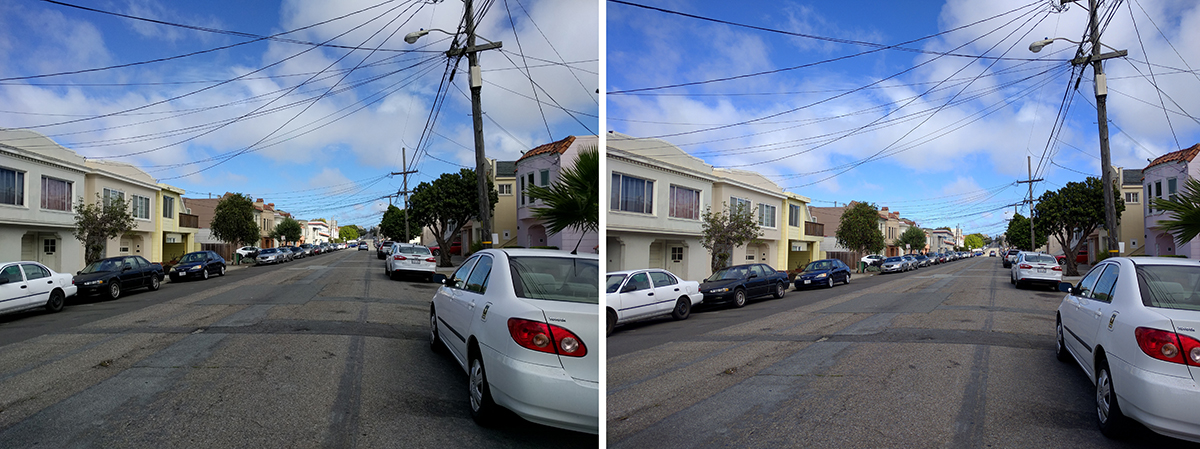
That’s not to say it doesn’t have its downsides. The colors don’t pop as much as I’d like, and indoor shots look a touch duller than desired. Photos taken on overcast days — an almost daily occurrence in San Francisco — have a gray tint, making it seem even cloudier than it actually was. Overall, though, image quality isn’t bad at all. Photos are generally crisp and detailed, and daylight shots under bright sunlight are especially nice. Taking images with HDR+ mode also added a bit more pop and better white balance, but the difference was subtle. Also, HDR photos generally take a second or two longer to snap and process, so be wary of that if you like to capture a whole bunch of shots in one go.

Shots from the Nexus 5X: No HDR on the left; HDR enabled on the right (Click to enlarge)
I was also taken aback by how good the camera was under low-light conditions — highlights weren’t too bright and shadows weren’t too dark. Of course, photos taken in extremely dim scenarios still had a hefty amount of noise and the shutter does slow down quite a bit as well, sometimes resulting in blurry shots of moving objects. If you insist on taking photos with the dual-LED flash, that could certainly solve those issues, but just know that images might be rather blown out as a result.
The camera app itself is fairly straightforward and should be familiar to most anyone who’s used an Android phone. You can toggle through self-timer options, HDR mode and flash, and flip on over to video recording if you like — the camera on the 5X boasts 4K video-recording capabilities. For folks who want a bit more fun, you can also take shots in a 360-degree Photo Sphere, auto-stitch them together in a panorama or use a feature called Lens Blur that lets you selectively choose an object to focus on, and thus blur everything else around it.

To counter some of the duller shots I mentioned earlier, you’ll likely make heavy use of the built-in image editor. There’s an auto-enhance button to make photos seem brighter or you can refine the images even further by adjusting light, color, “pop” and vignette settings. You can also add a variety of filters to the images for even greater customization.
Oh, and that front-facing 5-megapixel camera actually takes pretty decent selfies, too. Photos suffer from the same issues of not being quite colorful enough, but the camera still produces sharp, bright images that are good enough to go on Instagram.
Performance and battery life

As mentioned up top, the Nexus 5X ships with a Qualcomm Snapdragon 808 1.8GHz hexa-core 64-bit processor, which isn’t bad at all for a budget handset. It’s the same chipset in the LG G4 and the Moto X Pure, so that makes the 5X pretty competitive when pitted against the other mid-range phones on the market. In regular day-to-day use, I didn’t experience too many hiccups when switching between applications or scrolling through navigation menus. I did occasionally encounter a slight lag when launching apps or videos for the first time, but it wasn’t egregious. On the whole, performance was pretty smooth.
| Nexus 5X | LG G4 | Moto X Pure | OnePlus 2 | |
|---|---|---|---|---|
| AndEBench Pro | 6,519 | 8,352 | 9,686 | 9,945 |
| Vellamo 3.0 | 3,662 | 4,065 | 4,401 | 3,025 |
| 3DMark IS Unlimited | 14,610 | 18,572 | 18,747 | 23,598 |
| SunSpider 1.0.2 (ms) | 687.6 | 725 | n/a | 1,516 |
| GFXBench 3.0 1080p Manhattan Offscreen (fps) | 15 | 15 | 15 | 25 |
| CF-Bench | 32,376 | 71,260 | 74,237 | 79,168 |
| SunSpider 1.0.2: Lower scores are better. | ||||
Which is why the 5X’s poor benchmark scores are a little befuddling. As you can see in the chart here, the 5X falls far behind its rivals in almost every one of our usual benchmark metrics. The starkest contrast is in CF-Bench, where the score is down by almost 40,000. I’ll be honest: I have a hard time reconciling these poor benchmark scores with what I thought was an otherwise solid-performing phone, so take these results with a grain of salt.
The 5X packs a 2,700mAh battery, which is a tad skimpy compared to the G4 and the Moto X Pure. And, as you might expect, it doesn’t last quite as long as those two, either. In our standard video-rundown test, which involves looping an HD clip at 50 percent brightness, it lasted eight hours and 45 minutes before giving up the ghost. On a full day of use — which consisted of taking and uploading plenty of pictures, checking email and receiving constant notifications from Twitter and Facebook — the 5X lasted about 14 hours before battery life fell to around 10 percent, begging to be charged. Speaking of charging, the 5X charges relatively quickly with the USB Type-C cable. From a completely drained battery, it can reach the 25 percent mark in just 10 minutes. That should be enough juice for you to call an Uber or a cab home after a night out.
The competition

At $379 for 16GB and $429 for 32GB, the 5X is much more in line with the Nexus 5 than last year’s Nexus 6. That is, it’s a budget-friendly handset that’s light on price, but not on features. As such, its toughest competitor is likely the OnePlus 2, which has a similar pedigree. For $329 (16GB) or $389 (64GB), the OnePlus 2 also boasts a 1080p display, a faster Qualcomm Snapdragon 810 (a 1.8GHz octa-core 64-bit processor) and an even beefier 13-megapixel camera with an f/2.0 aperture and 1.3-micron pixels. It also boasts a bigger and longer-lasting 3,300mAh battery (nine hours compared to the 5X’s eight hours 45 minutes in our standard test). The OnePlus 2 even has a fingerprint reader, but it’s not quite as fast as the 5X’s. Another downside for the OnePlus 2: It doesn’t have NFC. And with Android Pay rapidly catching on, that might tip the scale in favor of the 5X if you’re looking forward to the future of mobile payments.
The Moto X Pure is also a worthy rival. It has that same Qualcomm Snapdragon 808 chipset, but boasts a crisper Quad HD display, a whopping 21-megapixel rear camera, a slightly bigger 3,000mAh battery, a microSD card slot (which the 5X lacks) and NFC support. Also, it’s only $400 off-contract for 32GB, which is a better deal than the 5X. The G4 has the same processor as well, and has a 5.5-inch IPS Quantum (Quad HD) display, great cameras, long battery life and a removable microSD card slot. But the G4 costs around $500 off-contract, although you can get it for around $150 if you sign up through a carrier plan. As good as both those phones are, however, they lack the 5X’s fingerprint sensor and the clean, cruft-free Android experience that some consumers want.
Wrap-up

For those who yearned for the days of budget- and pocket-friendly Nexus handsets, the 5X is for you. No, it’s not quite as premium as its rivals and it doesn’t have the higher-end specs of its bigger 6P brother, but it more than makes up for that with its affordable price. And you do get quite a lot of phone for the money: The display is sharp; the fingerprint sensor works as promised; the performance is smooth; and you get a decent camera too. Even though the OnePlus 2 and the Moto X Pure offer a better deal and slightly better specs, they lack that speedy fingerprint sensor and don’t deliver a pure Android experience, which is important to those who want timelier upgrades. With its sub-$400 price and healthy feature set, the 5X is a more-than-worthy successor to the Nexus 5.
Android Authority this week – October 18, 2015

Android fans, this week we learned more details about the upcoming Nexus 6P and 5X; the BlackBerry Priv starred in several hands-on ahead of its official unveiling; OnePlus X specs and images leaked out; details surfaced about the HTC One A9 and Motorola’s Droid Maxx 2; and OEMs revealed more about their Marshmallow plans.
Inside AA HQ
Hungry for Marshmallow? We’ve put together a Marshmallow updates roundup, a one stop shop for all information regarding Android 6 releases, OEM update plans, and custom ROMs based on Marshmallow. We will be updating it frequently, so you know where to come to keep up with the Marshmallow rollout.
The camera will always be a key aspect of the smartphone experience. We all agree on that, but when it comes to which phone has the best camera, the Android community is divided. We’re trying to bring a little objectivity into the mix with our blind camera shootout between the Xperia Z5, LG G4, Galaxy Note 5, and iPhone 6S. Vote here and come back for the results tomorrow.
Last week, it was a Nexus 5X. This week, we’re giving away a Nexus 6P. Get your sweepstakes ticket here and good luck!

The stuff you shouldn’t miss
- Comparison: Which smartphone offers the best LTE connectivity? Nirave has some answers
- Review: Does the second-gen Moto 360 keep the magic alive? Find out from our review
- Camera shootout: Xperia Z5, LG G4, Note 5 or iPhone 6S – which one has the best camera?
- Comparison: Moto X Style (Pure) or the iPhone 6S? We bring you the lowdown
- Open thread: What kind of phone buyer are you?
Top news of the week
Behold, the Priv

- BlackBerry Priv shows up in detailed hands-on: here’s what we didn’t know
- Pre-registration goes live for the BlackBerry Priv
- Here’s another BlackBerry Priv hands-on, full hardware specs too
OnePlus: X and more

- (Update: new images!) New OnePlus X / Mini rumors hint at SideTouch screen tech, dual front-facing speakers and more
- OnePlus to start building phones in India, open sale tomorrow
- OnePlus teases “beauty in the making”
- OnePlus is asking you to donate your Galaxy S6 or Note 5 for a OnePlus 2
- OnePlus 2 reservation list to close as invites ramp up
HTC One A9: more leaks

- HTC teases “the next evolution of the One” ahead of its NYC event
- HTC One A9 shows up at Orange France ahead of launch
Nexus countdown

- Nexus 6P, Nexus 5X launched in India; here’s the details
- Nexus 6P and 5X will require a new SIM card to use with Project Fi
- Nexus 6P reportedly delayed in Canada until November 2
- Google confirms Nexus 5X and 6P ‘double-twist’ camera gesture canned
Marshmallow updates

- Custom Marshmallow ROMs in development for Nexus 7 (2012) and Galaxy Nexus
- LG to begin rolling out Android 6.0 Marshmallow next week, LG G4 first in line
- Huawei Android 6.0 Marshmallow plans revealed: Mate S, Mate 7, P8, and more
- Some Sony devices will skip Android 5.1.1 and upgrade directly to Marshmallow
Droid Maxx 2

- Motorola Droid Turbo 2 and Maxx 2 features and promotions confirmed in leak
- Motorola Droid Turbo 2 renders appear on case manufacturer’s site
Join our newsletters
Get the Android Weekly delivered to your inbox each and every Sunday, sign up for our newsletter below.
Android Authority Newsletters
- Android Weekly
- Apps Weekly
- Dev Weekly
- Breaking News Alerts
- Top Stories of the day
- Review Alerts
- Deal Alerts
Report: YouTube to show off originals for its subscription service

YouTube’s gearing up to reveal some of the programming it’s funding on October 21st during an event in Los Angeles, according to Recode. These new programs will reportedly feature a handful of its biggest stars, and Recode’s sources said that at least some of the content will only be accessible to future subscription customers. A new report published by The Wall Street Journal indicates that the service has just welcomed much bigger players, though. If it’s true, then YouTube has been able to convince Time Warner Inc.’s Turner cable unit, 21st Century Fox’s Fox Sports, A+E Networks Inc. and Comcast Corp.’s NBCUniversal to add some of their shows to the $10-per-month service. It’s also currently negotiating with Walt Disney Co.
Some of the companies apparently weren’t thrilled to sign the deal, as they believe they should get a bigger cut than ordinary YouTubers due to being bigger brands. (The WSJ noted that the creators that signed up to be part of the subscription offering will collectively get 55 percent of the revenue it generates.) However, YouTube allegedly threatened to cut them off entirely, even from the free version of the website, if they don’t participate. A previous Recode report claimed the 2-in-1 subscription option could be launched as soon as late October. That lines up with the upcoming event in LA, though YouTube hasn’t confirmed anything yet.
[Image credit: Rego – d4u.hu/Flickr]
Source: The Wall Street Journal, Recode
Google buys a panorama startup to bolster Street View

Think that Google Street View could use a fresh coat of paint? Google does, too. The search firm has just snapped up Digisfera, a Portugese startup whose specialty is making the most out of panoramic photos. The newly-acquired company isn’t saying exactly what it’ll do within the Street View team, but its work on some more ambitious projects may be a clue. It produced a giant tagged panorama at the 2014 World Cup, for example, and captured a sweeping view of President Obama’s inauguration.
As with many buyouts, some of Digisfera’s work is going away. Its tagging system (PanoTag) is shutting down on October 31st, and its panorama viewer (Marizpano) is going open source to preserve the underlying technology. However, you might not miss them too much if this deal leads to far more interactive Street View shots.
Via: VentureBeat
Source: Digisfera
Google Calendar gains new illustrations and support for more languages

Illustrations have long been a staple of Google products dating back to the the first Google Doodle in 1998. Now, with last year’s introduction of Material Design in Android 5.0 Lollipop, illustrations are used everywhere by the company. It’s no surprise that Calendar really takes thrives from illustrations as people like to see a graphics represent what they’re doing. And now over twelve new illustrations are being added to Calendar.
Stella Schieffer, a product manager at Google, explains the use of illustrations in Calendar:
“Your calendar is more than just a list of dates and times — it’s your life! That’s why Calendar adds illustrations to many of your favorite events automatically.”
In addition to having illustrations for new events like weddings and Halloween parties, Google announced that illustrations now appear in thirty languages. Dutch, Finnish, Catalan, and Korean are among the languages supporting illustrations.

Click GIF to enlarge/play
Google is also encouraging people to send them suggestions for new illustrations. To do so, take a picture and tweet the photo with the hashtag #makethemost attached. Who knows, Google might choose it when the next set of Calendar illustrations is released.
Source: Google
Come comment on this article: Google Calendar gains new illustrations and support for more languages
Google takes down all VR apps with ‘Cardboard’ in their name
 According to Variety, Google has taken down all VR apps that have the word ‘Cardboard’ in their name.
Google wants developers to be more specific about what their apps do and how they use the cardboard reader. Google’s cardboard VR reader is well over a year old since its original launch. Google’s aim for Cardboard is to bring it to schools and places all around the world at an affordable price point so everyone can join in on the action. That’s why the company made Cardboard open source, so anyone can make their own version. However, Google wants to make sure that VR apps are perfectly optimized for each reader. Apps such as Cardboard VNC, Cardboard Theater and Cardboard Catapult were removed because of the liberal use of the Cardboard trademark. Perhaps Google is more serious about its Cardboard trademark than we initially thought.
Source: Variety
Come comment on this article: Google takes down all VR apps with ‘Cardboard’ in their name
Google’s new book-scanning project receives the go-ahead ruling from the U.S. appeals court
 Google has been working on a new book-scanning project and just received the go ahead from the U.S. appeals court.
Google’s idea of scanning millions of books for accessing online has been approved by the U.S. court of appeals. The court ruling stated Google Books contains a public service of posting text online and does not infringe on any laws. Many rivals still despise the project and will continue to fight over its approval.
Circuit Judge Pierre Leval made the following statement:
“Google’s division of the page into tiny snippets is designed to show the searcher just enough context surrounding the searched term to help her evaluate whether the book falls within the scope of her interest (without revealing so much as to threaten the author’s copyright interests).”
This probably won’t be the last time we hear about the case, but the ruling will stand. According to Reuters, this case will be put in the books as Authors Guild v. Google Inc, 2nd U.S. Circuit Court of Appeals, No. 13-4829.
Source: Reuters
Come comment on this article: Google’s new book-scanning project receives the go-ahead ruling from the U.S. appeals court
Google wants your suggestions for new illustrations in its Calendar

As a part of an overall Material Design facelift, last year Google added helpful illustrations to its Calendar app that automatically highlight what you’ll be doing, and now it’s expanding the feature. According to a post on the Gmail blog, there’s now a dozen more illustrations for common events like weddings and Halloween parties (timely), and they can appear in up to 30 additional languages. It’s not stopping there however, and is crowdsourcing suggestions for its next round of illustrations. You can suggest some photo inspiration by tweeting (but not Google+-ing) a picture with the hashtag #makethemost attached — we’re sure you will handle this power wisely.

Source: Gmail Blog
Huawei announces when some of their smartphones will get Android 6.0
 Just today Huawei made it official when some of their smartphone models will receive the update to Android 6.0.
Here’s a list of the company’s smartphones receiving the Android 6.0 update.
- Huawei P8
- Mate 7
- Mate S
- P8 Youth Edition
- P8 Max
- Maimang 4
- G7 and G7 Plus
Additionally, many smartphones from Huawei’s Honor series will receive the update.
- Honor 7
- Honor 7i
- Honor 6 and 6 Plus,
- Honor X2
- Honor 4X
- Honor Play 4C
Huawei is said to begin working on the updates in November. However, an exact time frame hasn’t been provided. One could expect the update to begin hitting the newest devices later this year with others arriving in early 2016. If your device’s name is not on this list, you still have hope. Huawei will likely release a full list containing additional international variants and their update roll-out status in the near future.
Via: GizmoChina
Come comment on this article: Huawei announces when some of their smartphones will get Android 6.0
Google releases Marshmallow Quick Start Guide

Google has just released their Quick Start Guide to Android 6.0 Marshmallow on the Google Play Store. If you’re eager to get a view of what’s in store with this highly anticipated update, you’ve got 60+ pages to pore over, and it won’t even cost you a dime.
Those looking for world-changing interface innovations might come away a bit disappointed. Most Android users will already be familiar with most of the things outlined in this document (it is a Quick Start Guide for beginners, after all), but it does outline one of Marshmallow’s most interesting features: Now On Tap.
 See also: How to enable Google Now on Tap and use it!
Now On Tap is a pretty natural extension of the Google Now app. The main idea behind Google Now is to provide users with content before they actively search for it. Google Now tracks patterns of use and anticipates your needs for, say, navigation back home, the location of your parked car, and whether or not you should bring an umbrella before leaving the house.
Now On Tap takes this concept slightly further by providing context-specific content while you’re in the middle of using an app. The example given in the quick start guide depicts a user receiving an email suggesting a meeting at the zoo at 11:00 AM the following day. A Now On Tap suggestion asks the user if they would like to make a calendar event for that time and place. Pretty cool.
.rvs_wrapper
width: 350px;
.rvs_wrapper.align_left
float: left;
.rvs_wrapper.align_right
float: right;
.rvs_wrapper.align_center,
.rvs_wrapper.align_none
width: 100%;
.rvs_wrapper.align_center
text-align: center;
.rvs_wrapper.align_center.cbc-latest-videos ul li
float: none;
display: inline-block;
vertical-align: top;
.rvs_wrapper.cbc-latest-videos:not(.align_none) ul li:nth-child(2n+1)
clear: both;
.rvs_title
font-weight: 600 !important;
margin: 0 !important;
font-size: 24px !important;
.rvs_wrapper.align_right .rvs_title
padding-left: 20px;
.rvs_title a
font-family: ‘Roboto Condensed’;
color: #3a3a3a;
.rvs_wrapper.cbc-latest-videos ul
padding-top: 10px;
.rvs_wrapper.align_left.cbc-latest-videos ul li,
.rvs_wrapper.align_none.cbc-latest-videos ul li
padding: 0 15px 0 0;
.rvs_wrapper.align_right.cbc-latest-videos ul li
padding: 0 0 0 15px;
float: right;
.rvs_wrapper.align_center.cbc-latest-videos ul li
padding: 0 7px;
.rvs_wrapper.cbc-latest-videos ul li > a
font-weight: 400;
.rvs_wrapper.cbc-latest-videos ul li > a .yt-thumbnail
margin-bottom: 0;
@media only screen and (min-width : 480px)
body #page .rvs_wrapper.cbc-latest-videos ul
width: 100% !important;
@media only screen and (max-width : 480px)
body #page .rvs_wrapper.cbc-latest-videos
width: 100%;
float: none !important;
overflow-x: auto;
overflow-y: hidden;
body #page .rvs_wrapper.cbc-latest-videos ul
overflow: auto;
max-height: none;
body .rvs_wrapper.cbc-latest-videos ul li
float: left !important;
clear: none !important;

Aside from that, the Quick Start guide gives new users an overview of basic features like logging in with their Google account and modifying settings. It also talks up some of the other boons Marshmallow promises to bring including more efficient memory use and longer battery life.
If you’re curious, hop on over to the Google Play store, grab your copy of the Quick Start guide, and settle into a musky leather armchair with a pipe in front of a crackling fire.
 AIVAnet