


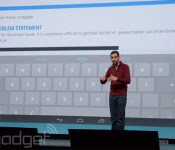
Google Drive for Business now offers unlimited storage for $10 per month, per user

You didn’t think we’d go through the whole keynote without a little Google Drive love do you? To celebrate an impressive 190-million Drive users (that’s active within the last 30 days), Google has just added a more compelling “Drive for work” proposition — unlimited storage for just $10 per month, per user. It’s not just the price that’s better, there’s a few key updates that got some stage time too. One is that users can now encrypt data within Drive. As for creating documents of your own, that’s getting more seamless too. In the past, when you worked on a word document, it would be converted to a doc file, now it’s all handled natively within Google Drive (of which Docs is now part, of course), and a native Word file is only created as and when you need to send it on to users over email etc. Sundar Pichai made a big noise on stage at I/O about the number of corporates and Universities that were going “all Google,” could this be enough for you to go all green in the office too?
Living with Google: Google Drive

As many of you likely know, Google Drive is your cloud storage for all your documents on you Android, PC, or Mac. Google has created a very easy setup for this application simple download and sign in. When you are in drive you can load documents and store them in the cloud allowing you to access them whenever and wherever you want. Most document are supported and it even stores pictures and videos. With Drive you can allow access to other users to view the document great for business and social use.
Drive gives you 15 GB of storage space for free and offers more for a monthly charge from 100GB for $1.99/month to 30TB for $299.99/month. In the ever expanding world of larger pictures and documents 15 GB is great for average uses the larger is more for enterprise users. With drive you can view documents on any mobile device or on the webpage itself. Drive allows you to pin your selected documents on the device you are using. Another feature is through drive you can access Google Docs to edit you documents.
I personally use drive on a weekly basis to access my documents from computer at home to computer at work. It is very useful and more efficient for me to store my documents on drive that a standard email. Many companies are starting to use Drive for sharing documents such as agreements and company news. As with many Google services this app is connected with your Google account and shares documents with corresponding apps such as Docs.
LIVING WITH GOOGLE is an ongoing series of articles dedicated to highlighting the many ways in which Google can help better our lives. With innumerable apps and services to choose from, our aim is to educate readers on the ways in which we use them.
See Also:
The post Living with Google: Google Drive appeared first on AndroidGuys.

Get features from the OnePlus One and CyanogenMod 11S on your device

It may be hard to come across an invite to buy the OnePlus One featuring the special edition CyanogenMod ROM, CM11S, but that doesn’t mean you can’t get some of the best features now.
The source code for the device has been released and a system dump has showed up online, so you can try out many of the apps, in addition to downloading the boot animation.
Over at XDA Developers forum, member iH8ra!n uploaded a system dump from CyanogenMod 11S build KVT49L_XNPH22Q, “a complete firmware dump of the OnePlus One” as well as some Nexus 4 compatible CM11S applications. iH8ra!n tested all of the apps on a Nexus 4, running the latest CM 11 nightly and said that all are working. It was also noted that you should be running a CM 11 build compiled on or after May 8, 2014.
Some of the apps include CameraNext, GalleryNext, Screencast, the Hexo theme (there are two APKs, one for the icons, the other for everything else such as the wallpaper, font, etc.) and the theme store, Theme Showcase. The app APKs are uploaded to Google Drive and can be downloaded here.
Not all of the apps worked on my Nexus 4 running the latest nightly, but the new CM camera is one that worked that’s pretty great and I’ve used the Hexo theme and GalleryNext.
If you would like to install the new Cyanogen boot animation, there are flashable .zip files at the source link below, as well as flashable zips for the apps if you would like to install them that way. Make sure when flashing the boot animation you download the right one for your device, according to your device’s screen resolution.
Although I wasn’t able to test them on another device, some may be able to be used on other devices, but that’s all up to you guys to try.
VIA: XDA


The post Get features from the OnePlus One and CyanogenMod 11S on your device appeared first on AndroidGuys.
20 Android apps for dads and grads

As many of you know we are right in the middle of graduation season, and Father’s Day is just around the corner. Instead of the annual tie or cliche’ socks from aunt Margaret, why not treat your beloved dads and grads to something they can really use. An app! Or a game!
Introduce them to this handpicked collection of 20 noteworthy apps that are guaranteed to make life after school, college, or a dad’s fatherly duties easier than ever.
NOTE THAT THIS POST IS SPLIT INTO TWO PAGES
Weber Grills

From the guys behind the familiar backyard cooking tool themselves comes the official app for Weber Grills. Features include nearly 100 recipes, dozens of guides, techniques, and grilling tips; pictures and videos make it a breeze. Headed to the store to prep for a big barbecue?
This app also includes grocery lists that pull together all of your recipes into one handy buying list. Pull off a killer meal? Share it via email and let the world know how awesome that rack of ribs tastes.
MLB.com Home Run Derby

Scratch that baseball itch with MLB.com Home Run Derby, the only official Home Run Derby game from Major League Baseball. Play with 8 Allstars from 2010 to 2013 and try to win it all.
The game has great graphics and 2 modes. Arcade Mode puts you in a race to beat the clock as you have to hit as many home runs as you can before time runs out. In Derby Mode, you can battle your Facebook friends or the world in an authentic derby. Play and see if you can beat your friends and become a champion.
Cars.com

The Cars.com app is designed to make it easy to find new and used cars in your area or around the nation. With the app, you can conduct car comparisons, research car models, and get dealership info so that you are better equipped during your auto hunt.
Leery about purchasing a particular vehicle, the app also has consumer and experts reviews on automobiles. The app even has dealership reviews by customers so you know the car dealers to avoid. Use this app to buy the perfect college car for you grad or to buy the vintage roadster of your dad’s dreams.
SofaScore

You like sports? Well, then you want to keep up with the latest scores, statistics, rankings, etc. You can do all that with SofaScore. Football, Basketball, Tennis, Hockey, Volleyball, Handball and even Water polo and Darts for example, you can track all that via SofaScore. There’s a huge array of sports within the app itself so just set it to keep you up to date with whatever you want and enjoy.
Just Helping My Dad

From Oceanhouse Media comes another solid read-along book for fathers of younger children. Have your wee one (ages 2-5) follow along as the book reads the Little Critter story or let them take things at their own pace.
Words light up as they are read, pictures pan and zoom, and images associate with words; background audio brings pages to life.
Monster Job Search

Put that diploma to work and get yourself started on a new career! Monster is one of the more trusted names in the job searching space and the Android app can help make the hunt less tedious. Details include the ability to create and edit cover letters, save searches, create job alerts, and push notifications. Thanks to GPS integration you can find jobs available near you.
Venmo

Gathering up money for rent, utilities, pizza, and beer has never been easier. This app lets users securely transfer money to their bank account, collect money from others, and pay with your debit card without pesky fees. Perfect for those of you moving in with a handful of roomies this fall; you’ll have no problem getting everyone to chip in on that keg. Just tell mom you’re using the money for books and stuff.
BenchPrep

You might have wanted this one during the school year as it helps prepare you for some of those big, stress-inducing tests like the MCAT, LSAT, SAT, and ACT. Nevertheless, we suggest you add this one to your Android phones and tablets as it could prove invaluable down the road.
With more than 200 courses to choose from, you’ll have access to videos, books, and other resources to help increase your scores. Award-winning stuff praised by multiple news outlets, it reportedly raises scores by an average of 15%.
Life360

An app for dads that I find useful is called Life360. Its essentially a location sharing app but its a bit different than the rest and its great for keeping track of my kids when they’re out and about which is the main reason I use it.
Life360 is a kind of a closed user group family location sharing app which you can keep personal to your family members only and share info between a trusted circle. It has some great features for keeping in touch with your children, like auto checking-in so your kids don’t have to send that ” I got here OK” text message, group messaging to all the or one of your family members in the circle so that your child can always get a message to one of the parents or older siblings.
Another really nice function that we particularly like is the built-in Panic Feature. This feature will automatically send a phone call, email, text message, and your GPS tracking coordinates to everyone in your trusted family circle, this is real handy knowing that your kids can call for help at the touch of a button.
Mint

Get a handle on your finances before things spiral out of control. Mint ties in nicely with its website and services and lets users keep a close eye on where money comes from. More importantly, it can help you understand where it’s going.
Colorful and easy on the eyes, charts and graphs really put things into perspective. The sooner you do this one, the better.
NOTE THAT THIS POST IS SPLIT INTO TWO PAGES

The post 20 Android apps for dads and grads appeared first on AndroidGuys.
[Download] Google Drive gets updated to version 1.3.144.17, adds Docs and Sheets Integration
 Earlier this week, you may have heard that Google launched two standalone apps specifically for Google Docs and Google Sheets. At the time, we were wondering whether this would cause any changes in Google Drive and today our questions have been answered. Today, Google Drive gets updated to version 1.3.144.17, and most crucially, requires that you download the Docs and Sheets apps to make changes to relevant documents.
 This is probably a logical move to create separate apps from Google Drive to handle documents as Google Drive is increasingly being touted as Google‘s answer to cloud storage. In addition to this change, Google has also rearranged the slide-out menu to make it a bit more streamlined and accessible. For the full list of changes:
- Rearranged slide-out navigation panel with settings link (no longer in overflow menu)
- Prompts to install Docs and Sheets for editing capability
- Automatically uses Docs and Sheets apps in Drive
- New file button now in overflow menu
- New refresh item in overflow menu
The update is rolling out now, however if you haven’t got the update yet and need to have the latest and greatest, we have the APK file available for download below:
Google Drive version 1.3.144.17 APK download
Let us know what you think about these standalone apps and what you think about Google Drive now in the comments.
Source: Android Police
//<![CDATA[
ord = window.ord || Math.floor(Math.random()*1E16);
document.write('’);
//]]>
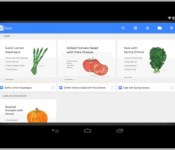
Google adds standalone Docs and Sheets apps for your Convenience
 The Google Drive app has never been the most streamlined app out there; I know my personal Drive homepage is completely cluttered with documents. Well, it looks like Google may be trying to help us with our messes as they have released standalone apps for Google Docs and Google Sheets which gives your documents and spreadsheets a much simpler, bespoke home.
These apps also have offline support right out of the box which means you can use them like any other document apps and create documents on the go which sync when you finally do have connection. Google also says that a Slides app is also on the way which will add a home for errant presentations. Now all we need is Chromecast support for these apps. Pretty please?
You can pick up the Docs and Sheets apps from the Google Play Store now for free (links are below) but note that the Google Drive app will still be hanging around if you’re perfectly happy with it. Let us know what you think about these standalone apps in the comments.
Application: Google Docs
Price: Free
Application: Google Sheets
Price: Free
//<![CDATA[
ord = window.ord || Math.floor(Math.random()*1E16);
document.write('’);
//]]>
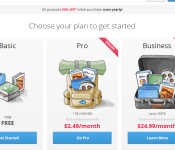
MediaFire Takes Aim at Google Drive with 1TB of Storage for $2.50 a Month (Promo)
The headlines lately have been pretty intense regarding cloud storage and the amount of space for a the price. Google recently dropped their monthly Drive prices to offer insane amounts of cloud storage. Seriously, $10 a month for a terabyte (1000GBs) of storage is pretty amazing. Dropbox on the other hand only hands over 100GBs for the same $9.99 and Box does 100 GB’s per month for $5. Google clearly has the underhand right now. However, MediaFire is taking aim at the giant with some pretty stellar promotions and new features.
 MediaFire is now offering 1TB of cloud storage for $5 a month. That cuts Drives price in half. To add to the promotion, new customers can pick up 1TB of space for $2.49 a month or pay out $24.99 for a whole year. In addition to the promo, a number of improvements and updates have also just been released.
New MediaFire Features
- Follow Files: share, collaborate, and track new files shared by users, automatically
- No File Upload Restrictions: Both free and paid accounts can upload any size file, up to 20 gigs in size
- Up to 50 gigs of cloud storage for free: Start with 10 GB and earn up to 50 GB in bonus space by installing MediaFire apps or inviting friends.
- 1 TB Pro Storage Plans: For a limited time, new users can sign up for just 2.50 a month, or 24.99 a year
“With the launch of our new storage plans, we are looking to provide everyday users with a secure and affordable way to share and store all of their music, photos, videos, and files with the people that matter most,“ said Derek Labian, CEO and Founder of MediaFire, “Over the next few months, we will be launching several new and exciting products, including new and updated applications for iPad and Android. Stay Tuned!”
You will get the most out of your MediaFire account if you install the the desktop client and the Android app. The deal is pretty hard to pass up on. If you don’t have a mediaFire account yet, feel free to head over to MediaFire.com and sign-up. you get 10GB for free regardless, but I think you might find that you like their layout, app and service enough to spend a little cash for the promotion, just because.
//<![CDATA[
ord = window.ord || Math.floor(Math.random()*1E16);
document.write('’);
//]]>
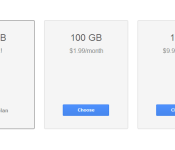
Price Drop hits Google Drive Storage, 100GB for $1.99 and 1TB For $10
Google just took a good thing and made it even better. Taking the prices for their online Google Drive storage and slashing them considerably. By default you already get 15Gb of free store from Google. That is a combined total across Drive, Gmail and Google+ Photos. If that wasn’t enough space, you had to pony up some cash for more storage. Now those prices just dropped to some extremely affordable options.
 before today 100 GB of additional storage would cost you $4.99 a month. That was a pretty acceptable price tag and one many opted for right off the bat who take a lot of photos on their devices. Now you can get the same 100 GB upgrade for just $1.99 a month. That isn’t the big one though. The big drop comes for the much larger 1TB (terrabyte) of storage. It previously set you back $49.99 a month and is now only $9.99 a month. That is a whole lot of storage for $10 a month.
If you already had one of the plans set up and scheduled for auto pay, don’t worry, Google will flop your price tag over automatically. For those of you that couldn’t justify the purchase pricing before today can head to your Google Storage Settings here, and sign up today.
You can still go larger than 1TB, as they have 10TB’s for $99.99, 20TB’s for $199.99 and 30TB’s for $299.99. Basically $10 per TB.
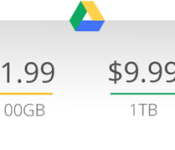
Google Drive’s reduced rates make cloud storage even more affordable

Google Drive has been the cloud repository of choice for many people since it launched back in 2012, and now the company is dropping prices to make it even more attractive. While users will still get 15GB for free, the 100GB package now costs $1.99 a month, down from $4.99. What’s more, the 1TB option has received more than a 50 percent price cut: it now costs $9.99 per month, a big drop from its previous rate of $49.99. Need even more room? 10TB+ plans start at $100 a month. Best of all, if you’re already paying for Drive storage, you’ll automatically be converted to a better plan at no additional cost and the storage still spans Drive, Gmail and Google+ Photos.
All told, compared to Dropbox, at least, Google’s new rates are quite tempting: Dropbox offers just 2GB for free, and charges $10 a month for 100GB. Business plans, meanwhile, start at $15 per user per month. The first two tiers do allow for added space for free based on referrals, one gigabyte at a time.
Filed under: Storage, Internet, Google
Source: Google Drive Blog

HTC announces HTC Advantage: screen replacements, timely updates, and more!
A few days ago, HTC held an AMA (Ask Me Anything) on Reddit, possibly gearing people up for the launch of a new product. During the session, they spilled the beans on their new goal to update flagships for the next two years. Soon after the AMA, they teased a repair service of some sort on Twitter.
If only broken hearts were this easy to fix. Details 2/18. pic.twitter.com/tmzAY74qew
Well, 2/18 is finally here, and HTC America announced their new Advantage program. If you buy a One series phone beginning today, you are automatically eligible. Here are the basics of the program:
- When a new phone launches, HTC will make sure the operating system is up to date for two years after launch.
- If you crack your screen within the first six months of owning your phone, they will now replace your screen for free (this is only a one time deal).
- You’ll also receive 25-50 GB of free Google Drive storage space, depending on the type of device you purchase.
A few things to note – for those of you who have cracked HTC One screens already, you’re out of luck. HTC Advantage begins today, and only pertains to devices bought today on out. Also, for those of you who can’t wait a few days to get your repaired device, you can opt for a $29 next -day phone replacement.

To give you the correct expectations, they most likely won’t push out every little update that exists in Android, but they are committed to updating the phones from Jelly Bean to Kit Kat, etc. Also, this is only taking place in the USA. There’s no word yet as to whether or not it will open up to anything more than the US.
This is definitely exciting news for a company that is struggling where others are succeeding. And it’s definitely a step in the right direction with the OEM/consumer relationship.
What are your thoughts on HTC Advantage? Pretty cool, right?
Source: HTC
The post HTC announces HTC Advantage: screen replacements, timely updates, and more! appeared first on AndroidGuys.
 AIVAnet