


5 Android apps you shouldn’t miss this week! – Android Apps Weekly
Welcome back to Android Apps Weekly! Here are your headlines for this week:
- NVIDIA is launching GRID game streaming in May. This will allow you to play PC games on your NVIDIA Shield and Shield Tablet and be like the Netflix for games.
- Tinder Plus is now available for those who want to pay for the dating service. Paid customers extra features but beware, the price will be higher if you’re over 30!
- Waze has been inducted into the Google Mobile Services package which means it is now an official Google app and will likely eventually be pre-installed on devices.
- Mortal Kombat X has been announced for Android and it will be here sometime in April.
- Google Play is celebrating its third birthday with a huge sale of apps, games, music, and movies. Happy birthday Google Play!
If you want to see more headlines, app updates, and app releases, don’t forget to subscribe to our newsletter! I curate it myself every week and include all of the best Android apps news, updates, and releases. Click the button below if you’re interested.
Subscribe to our Android Apps Weekly newsletter!
 BBM
BBM
[Price: Free with in app purchases]
Blackberry Messenger got a huge update this last week. With it came myriad improvements to channels, photo sending, picture previews, in-chat playback of voice notes, and the ability to customize your PIN if you subscribe. Along with all of that comes Android Wear support which is surprisingly forward thinking for an app that almost became totally irrelevant years ago. The update is out now if you want it.


 Zombie Highway 2
[Price: Free with in app purchases]
Zombie Highway was a huge success when it first came out a couple of years ago and we expect Zombie Highway 2 to continue that proud tradition. It uses many of the same mechanics as the first game, but includes improved graphics and sound effects, nitro, new cars, new weapons, new zombies, and more. The in app purchases are also surprisingly reasonable. The only downside are the release day bugs so you may need to wait a week or so for everything to get ironed out.
 Alphadia Genesis 2
[Price: $9.99 ($4.99 on sale now) with in app purchases]
Alphadia Genesis 2 is the latest game out of Kemco Games who are known as one of the best jRPG studios on Android. This is a jRPG with a decently long story line, better than average graphics, and some unique battle mechanics. It uses a job system for character customization and the company promises that in app purchases are not required to finish the game. There are some release day bugs so do beware of that.
 AutoWear
[Price: Free with in app purchases]
AutoWear is a new Android Wear application that allows you to create tasks in Tasker and then use them on your Android Wear devices. Using this app, you can a bunch of fun things with your watch and control it in ways you previously couldn’t. Some of the things you can do is create customized notifications, create interactive screens, utilize improved voice commands, and more. There is a free trial so you can try it before you buy it.
 King of Thieves
[Price: Free with in app purchases]
Last up this week is King of Thieves. This is a game out of Zeptolabs, known for their hit Cut the Rope franchise. In this platformer style game, you must dodge defenses and steal gold coins from other players, then build your own level to defend your gold against them. You can also join guilds, engage with leaderboards, and some extra stuff like costumes. It’s a different kind of platformer and worth a shot.
Wrap up
If we missed any great Android apps or games news, let us know in the comments!
Google Drive update brings long press drag and drop functionality [APK Download]
Google Drive’s G+ page put some details about a Drive update that will soon grace your beloved Android devices. They state the update will bring an improved PDF viewer, key performance improvements and design improvements. While those are good things, it won’t be what will catch your attention. The biggest change to Drive on Android […]
The post Google Drive update brings long press drag and drop functionality [APK Download] appeared first on AndroidSPIN.
Google Drive version 2.2 update brings drag and drop functionality and more

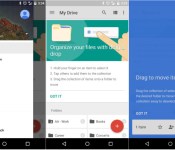
Google is pushing out yet another update to an app, and this time it’s Google Drive’s turn. The update to version 2.2 brings some basic drag and drop functionality to the app, along with a slight change to the navigation menu.
Up until now, moving files around in Google Drive was sort of a hassle. In previous versions, you’d need to select a drop down menu and choose the location to where you wanted to move your file. But in the update to version 2.2, you can now drag and drop files wherever you’d like. After you receive the update, Google will show a brief tutorial card towards the top of the app, explaining how to do so. To move files, simply hold down on an item, then drag it to your desired location. Before you move the file, Drive will let you know how many files you have selected towards the bottom of the screen, which will prevent you from moving more files than you’d like.
Next, the new update brings a full-height navigation drawer. In the version prior to this one, the navigation drawer would slide out under the action bar up top. Now the drawer reaches the top of the screen, much like we’ve seen in a few other Google apps.
Those are the only changes we’re seeing so far, so if you find any others, feel free to comment below. The update is rolling out in the Google Play Store right now, but if you don’t want to wait for it, you can sideload the apk file by following this link.

5 Android apps you shouldn’t miss this week! – Android Apps Weekly
<!–
By use of this code snippet, I agree to the Brightcove Publisher T and C
found at https://accounts.brightcove.com/en/terms-and-conditions/.
–>
<!–
This script tag will cause the Brightcove Players defined above it to be created as soon
as the line is read by the browser. If you wish to have the player instantiated only after
the rest of the HTML is processed and the page load is complete, remove the line.
–>
brightcove.createExperiences();
 Sponsor: Tiddalick
[Price: Free]
Our sponsor this week is Tiddalick. This game has you feeding a hungry frog using quick reflexes. It’s fast paced and addicting and the premise is great for both adults and kids. It’s also free with no in app purchases so there’s literally no harm in trying it out plus there is Google Play Games support! We’d like to thank developers Good Game Group for their support of Android Apps Weekly!

Welcome back to Android Apps Weekly! Here are your headlines this week:
- Microsoft has officially bought Sunrise Calendar for $100 million.
- Today Calendar developer Jack Underwood has implemented some hilarious anti-piracy measures in his app.
- Google Drive is giving away 2GB of free storage. Microsoft is giving away 100GB of free storage (for 2 years).
- Joe Danger is coming out on Google Play and Amazon Appstore sometime in 2015.
- Xposed Framework is coming to Lollipop “soon”, according to the developer.
Don’t forget to check out this week’s newsletter for a complete list of headlines, updates, and new Android apps and games releases! Why not subscribe while you’re there? And now here are five Android apps you shouldn’t miss this week!
 Skype
Skype
[Price: Free]
Skype received a big update this last week that allows you to send photos to offline contacts that will receive upon getting online again. Along with the photo sharing, there were also some bug fixes and performance improvements but otherwise it’s same old free video and chat platform we all know.

 HERE Maps
[Price: Free]
The popular Nokia alternative to Google Maps received an update this last week for both Android and Windows Phone. The update includes significant improvements to a whole bunch of places around the world including support for new countries, better graphics for rivers and lakes, and updates to other countries.
 SlingTV
[Price: Free app / $20/month subscription]
DISH turned heads this last week with the release of SlingTV. This gives you 20 television stations for $20 a month including ESPN, TBS, TNT, Cartoon Network, and others. You can also get some additional sports and kids channels in $5/month packages. Sadly, no major hockey channels but the service looks good.
 businesswire
 Limbo
Limbo
[Price: $4.99]
Limbo is a new 2D horror game where you must solve puzzles, dodge obstacles, and search for your lost sister. The graphics are minimal black and white and the design plays a huge part in the atmosphere of the game. It’s $4.99 but currently rocks an astounding 4.9 rating in the Google Play Store.
 ScreenPop Lockscreen Messenger
[Price: Free]
ScreenPop Lockscreen Messenger is an app that does exactly what the name says it does. It’s a photo-based messaging service where messages are delivered directly to your lock screen. It’s an interesting concept that looks really fun but do keep in mind that there’s almost no security. However, messages disappear as soon as you unlock the device or reply.
Wrap up
If we missed any great Android apps or games news, let us know in the comments! Also, don’t forget to subscribe to the Android Apps Weekly newsletter for news straight to your inbox!
Google wants to give you 2GB of Drive storage and keep you safer
On February 10th, Google made a post on its Drive blog about online safety in relation to Safer Internet Day. It hopes that users of the service will take a couple of minutes to complete their Security Checkup. If you do this before February 17th, you’ll receive 2GB of additional data in your Google Drive plan.
Clearly, the company is confident in Drive’s encryption since they’re willing to entice users to keep using the service or to use it for the first time.
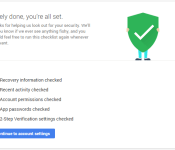
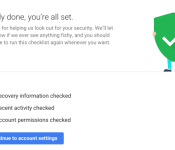
The three steps you need to take are to: make sure your account recovery information is current, review your recent sign-in activity, and confirm apps and devices that access some account information. After that, you should see three green checkboxes, like in the image above, that confirm your eligibility. The additional storage will then come around February 28 and a confirmation will be sent via email.
Google notes that users of Google Apps for Work and Google Apps for Education are not eligible for the upgrade, but they should still take the checkup.
(function() var script = document.createElement(‘script’);script.src = ‘https://stacksocial.com/widget.js?publisher=androidguys&type=editorial_post_widget_preferences’;script.async = true;var entry = document.getElementsByTagName(‘script’)[0];entry.parentNode.insertBefore(script, entry);)();
http://www.androidguys.com/pubgalaxy/728×90.html
The post Google wants to give you 2GB of Drive storage and keep you safer appeared first on AndroidGuys.
Google integrating G+ Photos into Google Drive
 One of the most overdue features for Google’s cloud storage service, Drive, has been the ability to look at your Google+ photos. Google owns both services, so you’d think they would be interconnected, right? Unfortunately, that hasn’t been the case up until now, but it looks like Google is working on rectifying that.
One user on Reddit has noticed an option in Drive’s settings to automatically integrate G+ Photos into Drive, creating a separate Google Photos folder where all of the backed up pictures from the social network are presumably stored. The option isn’t showing up for anyone else, but the Redditor has uploaded a couple of screenshots showing the new feature. There’s no telling if this is an incredibly elaborate hoax or if Google is testing out the feature in a very limited user base, but this move makes sense for Google.
We’ll keep you updated if the feature makes it way to other users over the next few weeks.
source: Phandroid
Come comment on this article: Google integrating G+ Photos into Google Drive
Snag 2GB of Google Drive storage fee from Google for a simple security checkup
Can one have too much cloud storage these days? It is an argument that could go on for decades and not one I am here to participate in. However, if you are finding yourself short on storage from your Google Drive account as it is loaded with documents, music and photos, now is your chance […]
The post Snag 2GB of Google Drive storage fee from Google for a simple security checkup appeared first on AndroidSPIN.
No brainer: Google’s giving you 2GB of free storage to secure your account

Today is Safer Internet Day, so Google is giving everyone 2 GB of extra Drive storage to do something that everyone should be doing anyway: secure their Google accounts.
As Target, Sony Pictures, and a bunch of Hollywood A-listers can attest, online security is not something you want to take lightly. Last year, we’ve seen hacking incidents on an epic scale, and 2015 will probably be no different. And, while it’s corporate hacks that usually make the headlines, regular users need to be just as careful about how they secure their digital lives.
Google has a bevy of security measures in place, including two-factor authentication, app authorization, and various ways to regain access to your account. But not all users know about these features or care enough to set them up. So Google is bribing users with 2 GB of free storage space for Drive.
All you need to do to get the free storage is go through this simple Security Checkup to see if the following security features are properly set up:
- Recovery information
- Recent activity
- Account permissions
- App passwords
- 2-step verification
Once you go through everything and you see the green checkmarks, you automatically qualify for the 2GB of free storage. Google will allocate the extra space around February 28 and let you know through an email.
Again, there’s no reason not to set up these simple security measures. Two-step verification in particular will shield you from any unwanted access to your Google account. Go through the Security Checkup here.
[Deal] Spend 2 minutes completing Google’s Security Checkup and receive 2 GB of Google Drive storage

Did you know that today is Safer Internet Day? To celebrate, Google is giving you a chance to grab 2 GB of extra Google Drive storage, and it will only cost you 2 minutes of your time. More importantly, you will secure your account in the process
All you have to do is complete Google’s Security Checkup, which basically confirms your recovery information, apps and devices that have access to your account information, and lets you check your most recent sign-in activity.
What could be easier than that? After completing the Checkup, don’t expect the extra storage to show automatically. Google will add the 2 GB of extra storage to everyone around February 28, and you will get an email when completed. Unfortunately this deal won’t work for Google Apps customers, but they recommend going through the Safety Check anyway.
Hit the source link to get started.
source: Google / Google Security Checkup
Come comment on this article: [Deal] Spend 2 minutes completing Google’s Security Checkup and receive 2 GB of Google Drive storage

Samsung Knox customers will get a complementary free 3 months of Google Drive for Work
 Right on the heels of adding in new features to Knox, Samsung has announced an offer for customers that use the security service. Any customers that sign up for Knox will get a free 3 month trial of Google Drive for Work, which is obviously Google’s own cloud storage service that’s centered around business security.
The offer nets customers a full 1 TB of storage, and if more than 5 users take part, that gets bumped up to unlimited storage. The encryption on the service is top notch, which goes hand-in-hand with Samsung’s take on Knox, so this might be a worthwhile offer for many people.
As a side note, the offer is only available in the US, but it seems like that’s where Google and Samsung are aiming this partnership, anyway.
source: Samsung
Come comment on this article: Samsung Knox customers will get a complementary free 3 months of Google Drive for Work
 AIVAnet
